ListKit Pricing 2026: Plans, Credit Math, and Cheaper Options
ListKit's $97 starter plan looks simple until you count credits. Here is what each tier actually costs per verified contact, where the burn hides, and when a leaner tool makes more sense.
TL;DR
- ListKit pricing starts with a free plan (100 credits). Paid tiers are Professional at $97/mo, Scale at $297/mo, and Ultimate at $597/mo. Annual billing takes about 15% off, and Enterprise is custom.
- Credits are the thing to watch. A triple-verified email costs 2 credits, and a US mobile number costs 3 credits each time one is found. That means 2,000 credits buy about 1,000 verified emails, not 2,000.
- Credits expire every 30 days and don't roll over. If your outbound volume swings from month to month, the unused balance is lost.
- ListKit is good value when you pull large, repeatable lists every month and want unlimited seats. It costs more than you need if you just want to find and verify emails for accounts you already picked.
- For account-based work where you already know your targets, a dedicated email finder with verification included is usually cheaper per contact.
What is ListKit, and what are you actually paying for?#
ListKit is a B2B lead-list platform aimed at cold email agencies and outbound teams. You filter a contact database by industry, headcount, title, location, and intent signals. Then you export contacts that have been verified before they reach your sequencer. Its main selling point is "triple-verified" email data, meaning each address is checked by more than one verification layer to keep bounce rates low.
The plans don't limit features. According to ListKit's own site, every plan, including the free one, gets unlimited users, AI company search, triple verification, intent data, enrichment, and CRM integrations. The only thing that changes between tiers is how many credits you get.
So choosing a ListKit plan comes down to one question: how many credits will you actually use in 30 days?
How much does ListKit cost in 2026?#
These are the published ListKit prices as of this writing. Check the vendor page before you buy, because data tools change their pricing often.
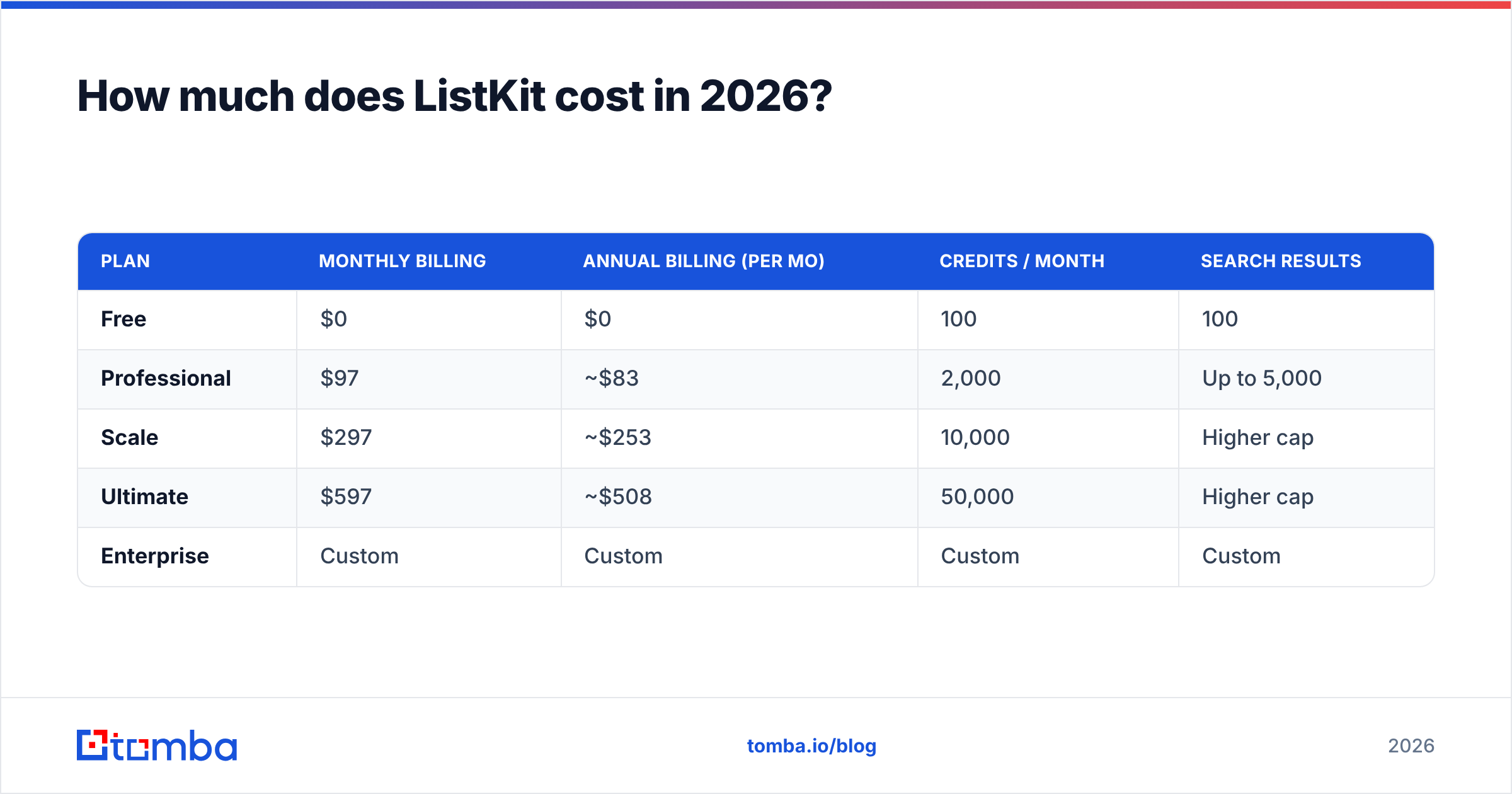
| Plan | Monthly billing | Annual billing (per mo) | Credits / month | Search results |
|---|---|---|---|---|
| Free | $0 | $0 | 100 | 100 |
| Professional | $97 | ~$83 | 2,000 | Up to 5,000 |
| Scale | $297 | ~$253 | 10,000 | Higher cap |
| Ultimate | $597 | ~$508 | 50,000 | Higher cap |
| Enterprise | Custom | Custom | Custom | Custom |
Top-ups are sold as "Universal Credits" at roughly $10 per 1,000 credits. That's a useful safety valve if you run out mid-month, but it also shows the real unit cost of the platform.
How do ListKit credits actually get consumed?#
Buyers get tripped up here. A credit is not a contact. ListKit's help center explains the model in its guide to how credits work. In practice it breaks down like this:
- Business email export: 1 credit. This is the base cost to reveal a work email.
- Triple verification: +1 credit. Verification is billed separately, so a verified email costs 2 credits in total. Most people buy ListKit for this feature, so plan on paying it every time.
- US mobile number: 3 credits. You're only charged when a number is actually found, not for every row you try. It's still the most expensive action on the platform.
- Monthly expiry. Credits last 30 days from when they're issued. They don't accumulate, and you can't save a quiet month's balance for a busy one.
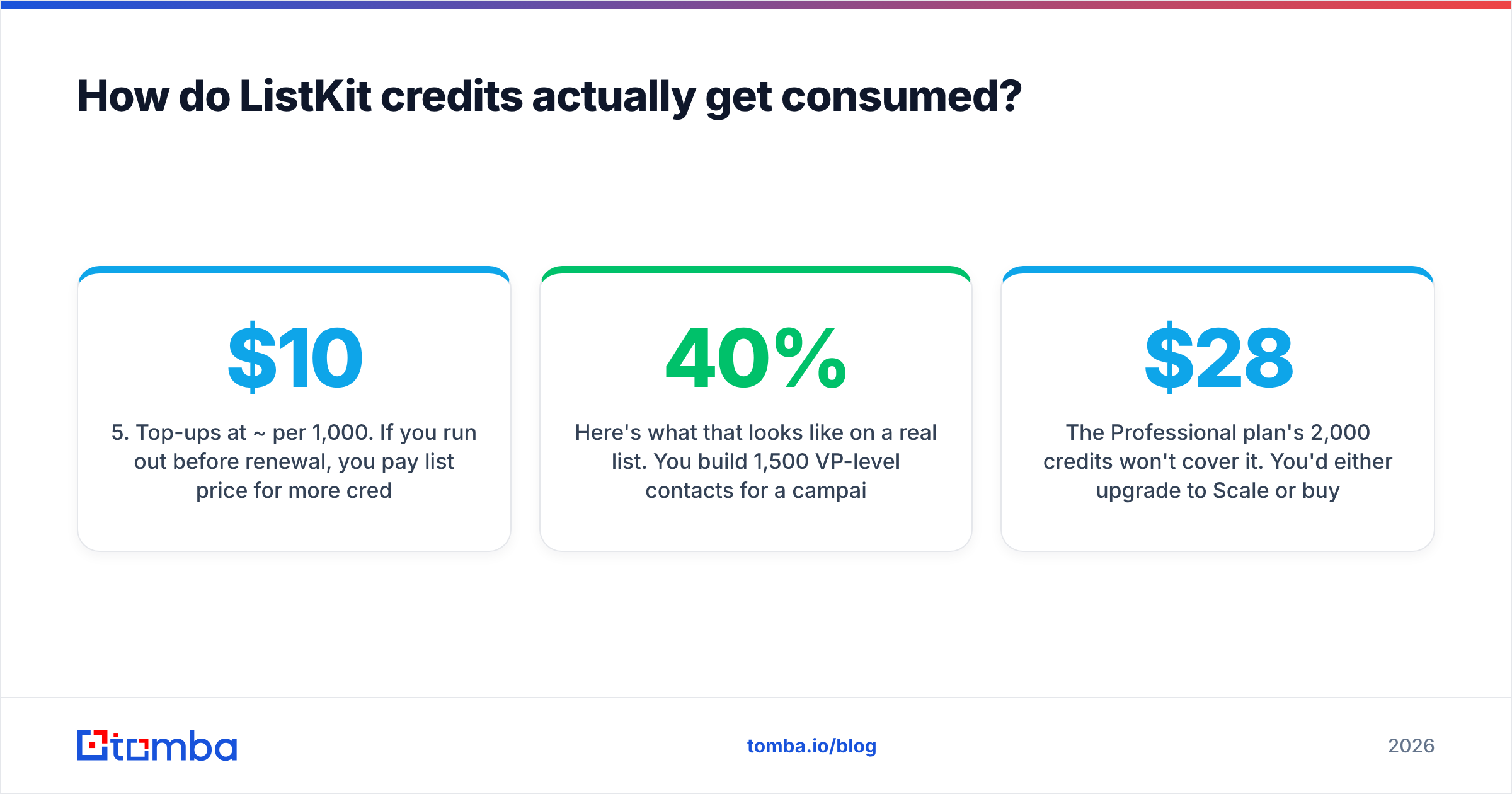
- Top-ups at ~$10 per 1,000. If you run out before renewal, you pay list price for more credits. You don't get a discount for committing to more.
Here's what that looks like on a real list. You build 1,500 VP-level contacts for a campaign and want a verified email plus a mobile number for each. Say the database finds mobiles for 40% of them:
- Emails: 1,500 × 2 credits = 3,000 credits
- Mobiles: 600 found × 3 credits = 1,800 credits
- Total: 4,800 credits
The Professional plan's 2,000 credits won't cover it. You'd either upgrade to Scale or buy 2,800 extra credits for about $28. The top-up is cheap on its own, but it shows that the plan name tells you very little about how many contacts you'll get.
What does a verified contact really cost on each plan?#
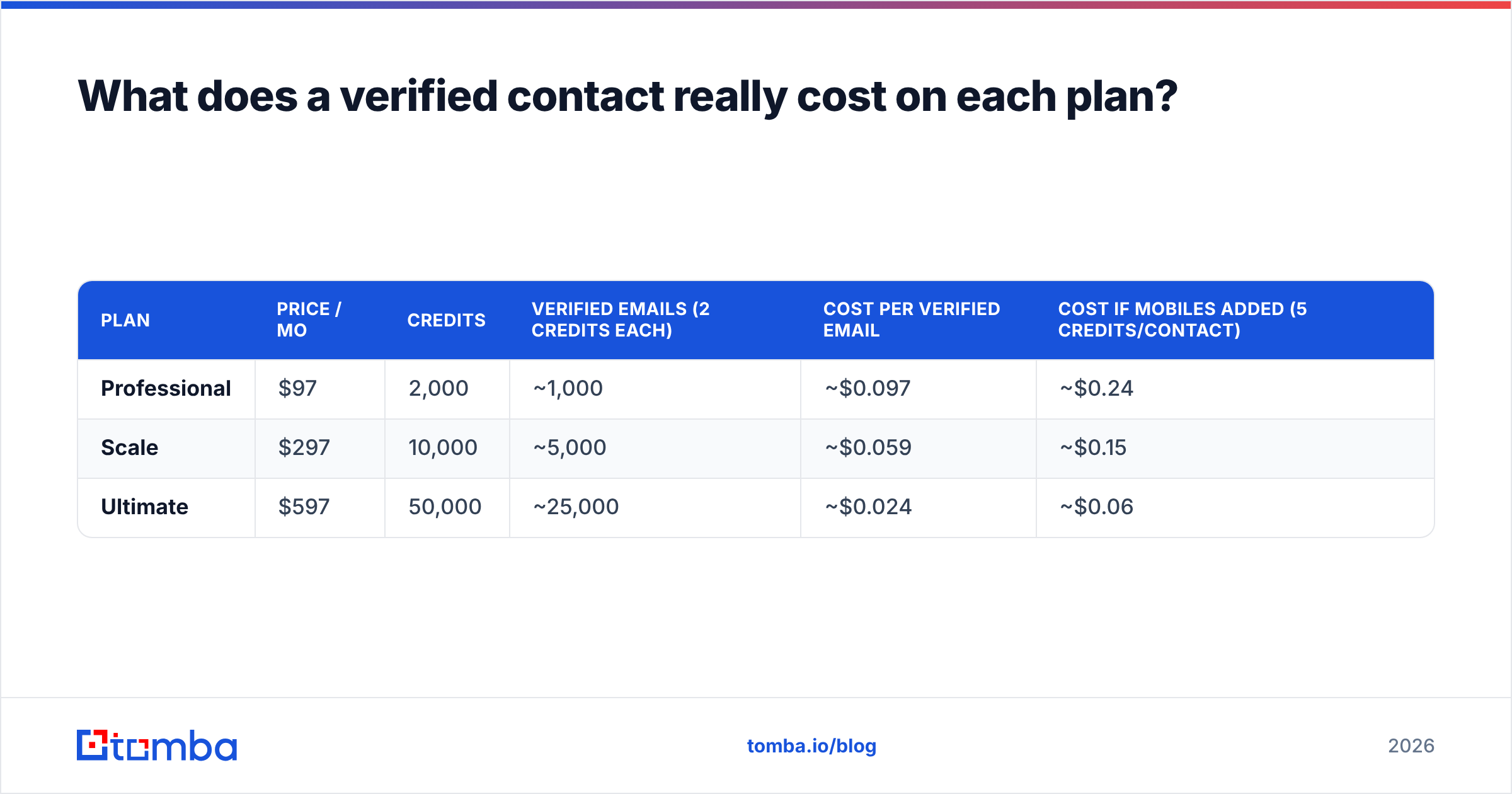
To compare ListKit against other options, convert credits into verified emails and divide the plan price by that number. This table assumes the typical use case of verified email only, with no phone numbers, on monthly billing.
| Plan | Price / mo | Credits | Verified emails (2 credits each) | Cost per verified email | Cost if mobiles added (5 credits/contact) |
|---|---|---|---|---|---|
| Professional | $97 | 2,000 | ~1,000 | ~$0.097 | ~$0.24 |
| Scale | $297 | 10,000 | ~5,000 | ~$0.059 | ~$0.15 |
| Ultimate | $597 | 50,000 | ~25,000 | ~$0.024 | ~$0.06 |
Two things follow from this:
- ListKit gets much cheaper at volume. Per verified email, Ultimate costs about a quarter of Professional. If your agency really exports 20,000+ verified contacts a month, the unit price is competitive with almost anything else.
- Those rates only hold if you use all your credits. Because credits expire, a team on Ultimate that uses only 20,000 of its 50,000 credits is paying about $0.06 per email, the same as the Scale tier. Your real cost per contact depends on your worst month, not your best.
Is ListKit worth the money?#
It depends on how you prospect. ListKit is strong in some situations and a poor fit in others.
ListKit is worth it if:
- You run a cold email agency or high-volume outbound team that builds new lists from filters every week.
- Your monthly usage is steady, so you rarely leave credits unused.
- You want unlimited seats. Many competitors charge per user, and at five or more users that becomes a big part of the bill.
- You care about bounce rate above everything else and want verification built into every export instead of run as a separate step.
ListKit is harder to justify if:
- You already know your target accounts (ABM, named-account selling, partner outreach) and just need the right person's email at each domain.
- Your volume jumps around, for example a 4,000-contact campaign one month and 300 the next.
- You mostly need phone numbers. At 3 credits per mobile, phone-heavy workflows burn through credits quickly.
- You're a founder or solo seller who needs a few hundred verified contacts a month. The free tier is too small and $97 is more than you need.
Independent reviewers generally rate ListKit well on data quality and ease of use. The complaints tend to be about credit mechanics rather than the product. That fits with the math above: the software works well, and the pricing model is what decides whether you get good value from it.
Which hidden costs should you watch for?#
Most of the added cost doesn't show up as a fee. It comes from how credits and usage interact. Before you commit, check these:
- Verification is billed separately. Budget 2 credits per email, not 1. People who compare "2,000 credits" to another vendor's "2,000 emails" end up overpaying by half.
- Expiry penalizes uneven volume. Seasonal campaigns, holiday slowdowns, and paused clients all turn into unused credits that disappear.
- Annual lock-in. The 15% annual discount is real, but you commit for 12 months to a credit level you may not need by the second quarter.
- Phone enrichment adds up. At 3 credits per found mobile, adding phones to a list can more than double its cost.
- Re-verifying aging data. Contacts go stale quickly. Industry estimates put B2B data decay at roughly 2–3% a month. If you store lists and send to them later, you'll probably want to re-verify, which means paying again, either in ListKit or in a separate email verifier.
How does ListKit pricing compare with alternatives?#
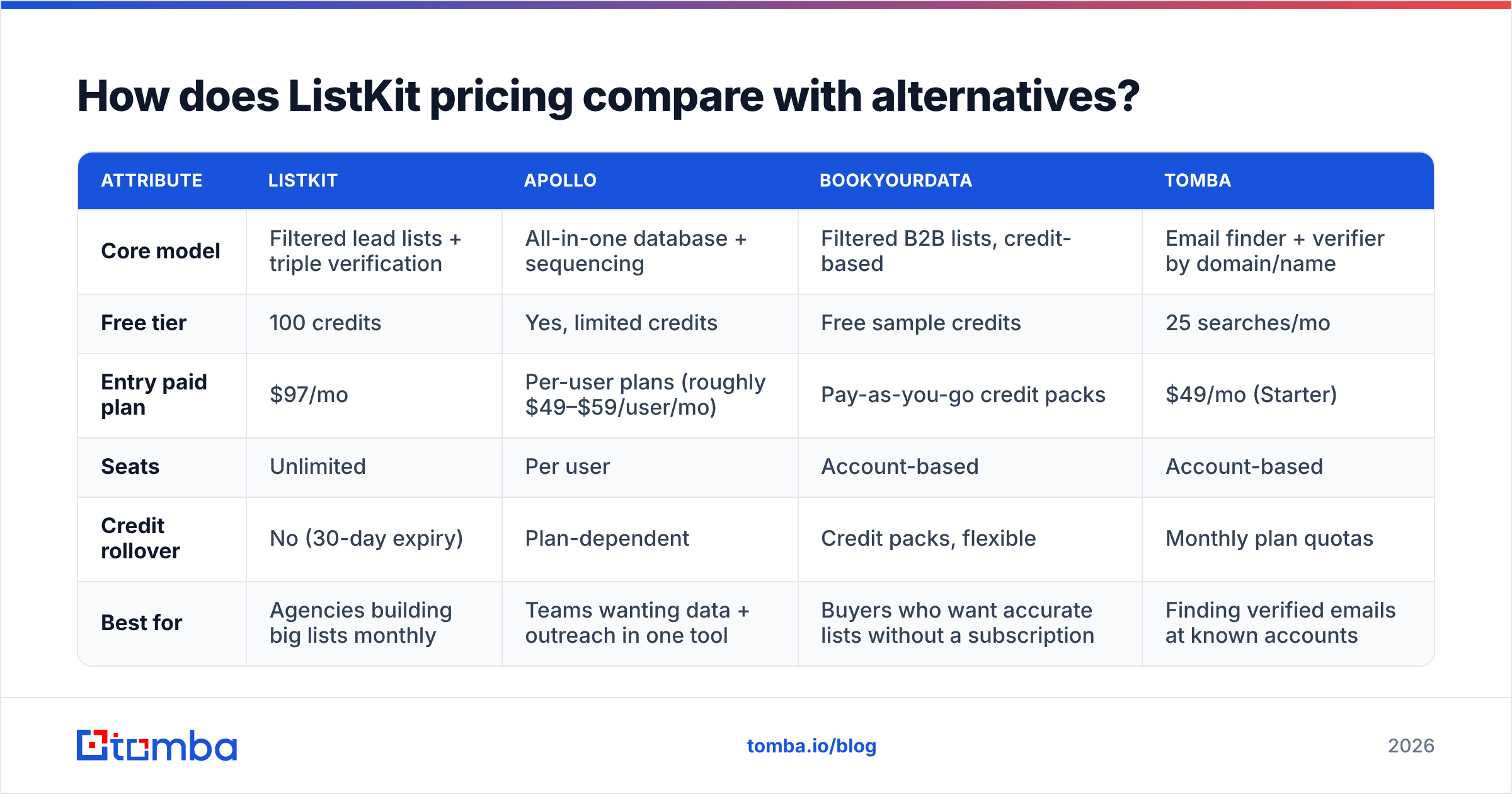
ListKit's closest competitors fall into two groups. List-building databases (Apollo, BookYourData, and similar) let you filter and export contacts at scale. Email finders (Tomba and similar) start from a domain or a name and return the verified address. Which group you need depends on whether you already know who you're targeting.
| Attribute | ListKit | Apollo | BookYourData | Tomba |
|---|---|---|---|---|
| Core model | Filtered lead lists + triple verification | All-in-one database + sequencing | Filtered B2B lists, credit-based | Email finder + verifier by domain/name |
| Free tier | 100 credits | Yes, limited credits | Free sample credits | 25 searches/mo |
| Entry paid plan | $97/mo | Per-user plans (roughly $49–$59/user/mo) | Pay-as-you-go credit packs | $49/mo (Starter) |
| Seats | Unlimited | Per user | Account-based | Account-based |
| Credit rollover | No (30-day expiry) | Plan-dependent | Credit packs, flexible | Monthly plan quotas |
| Best for | Agencies building big lists monthly | Teams wanting data + outreach in one tool | Buyers who want accurate lists without a subscription | Finding verified emails at known accounts |
A few fair points about these tools:
- Apollo has a much larger all-in-one feature set, including sequencing and a dialer. If you want database and outreach in one place, it's a reasonable choice. Seat-based pricing does add up for larger teams, which is where ListKit's unlimited users help. If you're weighing that trade-off, our Apollo alternative breakdown goes into more detail.
- BookYourData is a well-regarded list provider with an accuracy-focused reputation. Its flexible credit purchasing suits teams whose volume varies, which is exactly where ListKit's monthly expiry is weakest.
- Tomba does a different job. It doesn't build lists from scratch by industry filter. You give it a company domain or a person's name, and it returns the professional email with verification included. For ABM and named-account prospecting, that avoids paying for list-building features you won't use. For larger jobs, the bulk email finder handles CSV uploads, and the full tier breakdown is on the Tomba pricing page.
Which ListKit plan should you pick?#
Base the decision on your lowest realistic monthly volume, not the highest.
- Under ~500 verified contacts/month: Skip the paid ListKit tiers. Use the free plan to test data quality, and pair it with a lower-cost email finder for known accounts.
- 500–1,000 verified emails/month, email only: Professional ($97) fits. Keep phone enrichment to a minimum, or you'll need top-ups.
- 2,000–5,000 verified contacts/month: Scale ($297) is the most sensible tier. It's the best balance between unit cost and the risk of wasted credits.
- 15,000+ verified contacts/month, consistently: Ultimate ($597) makes sense only if you use most of your credits every month. Look at three months of export history before you commit.
- Agencies with several clients: Unlimited seats are a real advantage. Calculate the combined credit burn across all clients, and consider annual billing only after two stable quarters.
Run a pilot before choosing any tier. Export 200 contacts on the free plan, send to them, and measure your actual bounce rate and reply rate. A cheap contact isn't worth much if the replies don't come.
The bottom line on ListKit pricing#
ListKit's pricing is simple on the surface: four tiers, and every feature on every plan. The cost that matters is set by three details. Verification costs 2 credits per email, mobiles cost 3 credits, and credits expire every 30 days. High-volume agencies with steady usage get a competitive unit price and unlimited seats. Smaller teams, or teams that target specific accounts, often pay for list-building capacity they never use.
If your prospecting starts with a list of companies rather than a database filter, you probably don't need a list builder. Tomba Email Finder returns verified professional emails from a domain, a name, or a company, starting with a free tier of 25 searches a month and paid plans from $49/mo. Try it on your next target-account list and compare the cost per verified contact with what ListKit would charge.
Related guides#
// get started
Find, verify and enrich your first contacts today
Start on the free plan with 25 searches a month, then scale when your team is ready.
Free plan · No credit card required · GDPR & CCPA
// about the author