ListKit Pros and Cons: An Honest 2026 Review for B2B Teams
ListKit sells triple-verified B2B lead lists with a simple UI and hands-on onboarding. The catches: credits that expire, a big price jump for intent data, and the need for tight filters. Here is who it actually fits.
TL;DR
- ListKit's main strengths: you get triple-verified B2B contacts, a clean filter UI, a free onboarding call, and a permanent free plan with about 100 credits a month.
- ListKit's main weaknesses: credits expire every 30 days, intent data only unlocks at the Scale tier (around $297/mo), and loose filters burn credits on off-target leads.
- It fits agencies and outbound teams that build large, fresh lists every month and want them ready to load into a sequencer.
- It fits less well if you prospect in small batches, enrich existing CRM records, or need per-lookup email finding through an API. A pay-per-search email finder usually costs less for that.
- Before you pay, run the same 200-contact sample through ListKit's free plan and one alternative, then compare bounce rates. Don't trust any vendor's accuracy claim until you've tested it.
What is ListKit, and what problem does it solve?#
ListKit is a B2B lead-list platform. You set filters for industry, job title, headcount, location, technology and (on higher plans) buying intent. ListKit returns contacts whose emails have already been checked three times, and you export the list as a CSV or push it into a sequencer like Instantly, Smartlead or Lemlist. Cold email agencies are its core audience, and the product shows it: bulk list building is the default way of working, and single-contact lookups are secondary.
The pitch is simple. Most list tools make you export contacts and then pay a separate verifier to clean them. ListKit folds verification into the credit price, so what you download should be ready to send. Whether that promise holds for your market is the question this review tries to answer.
A useful analogy: a traditional B2B database is a wholesale warehouse where you check every item yourself. ListKit is closer to a meal-kit service. Someone else has already sorted and portioned the ingredients, and you pay a subscription whether or not you cook that week.
What are the biggest ListKit pros?#
These five strengths come up most often in user reviews and in hands-on testing:
- Triple-verified emails. Each contact goes through validity checks, catch-all detection and risky-address flagging before it reaches your export. G2 reviewers often say they no longer need a separate verifier, which saves both money and a step in the workflow.
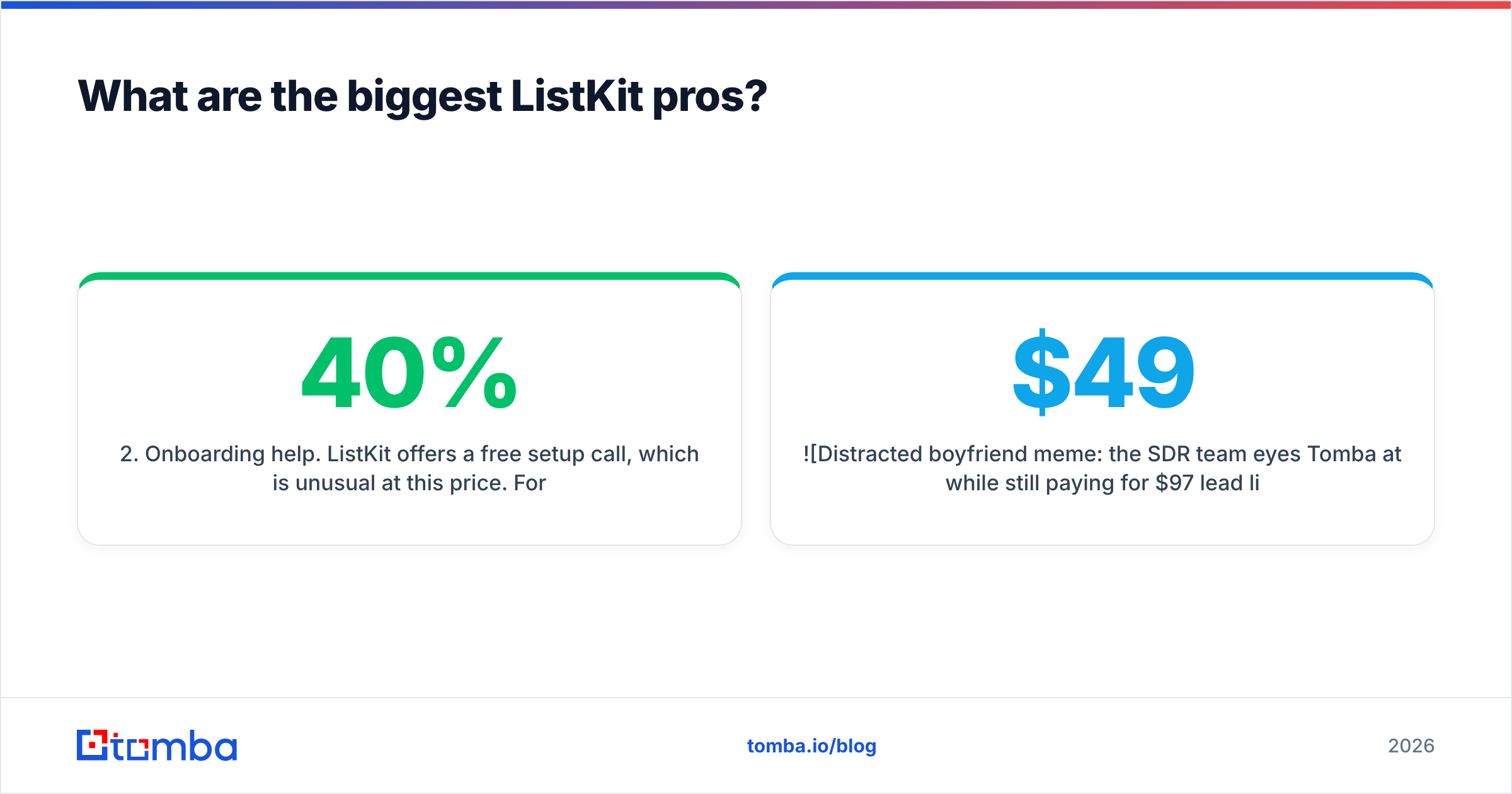
- Onboarding help. ListKit offers a free setup call, which is unusual at this price. For a new SDR or a small agency, a session on filter strategy can prevent the most common mistake: building a 10,000-row list that is 40% irrelevant.
- A permanent free plan. About 100 credits a month with access to the core features is enough for a real pilot, not just a look at the UI.
- Built for sequencers. Exports and integrations assume you are loading contacts straight into a cold email tool. Zapier covers most of the gaps.
- A short learning curve. Reviewers consistently rate the interface as easy to pick up. A new rep can build a usable list in the first session.

What are the biggest ListKit cons?#
The weaknesses matter more than the marketing suggests, mainly for teams that don't prospect at agency volume.
- Credits expire. According to ListKit's billing documentation, credits reset at the end of each 30-day term. If you run outbound in bursts, such as a campaign push one month and a quiet month after, you lose what you don't spend.
- Intent data costs more. Intent signals only unlock at the Scale tier, around $297/mo. That is roughly three times the entry plan, just to see which accounts are actively researching your category.
- Filter quality decides lead quality. Several reviewers say part of their exports were off-target. That is usually caused by filters that are too broad, but you still pay for every one of those rows.
- Bounces still happen. Triple verification lowers bounce rates. It doesn't remove them. Users report results that beat unverified lists but fall short of the roughly 98% deliverability figure that appears in marketing copy. Catch-all domains are still the weak spot for every provider.
- List-first, not lookup-first. If your daily job is "find the email for this one VP I found on LinkedIn," a bulk list tool is the wrong shape. You'll want an email finder built for single lookups.
How much does ListKit cost in 2026?#
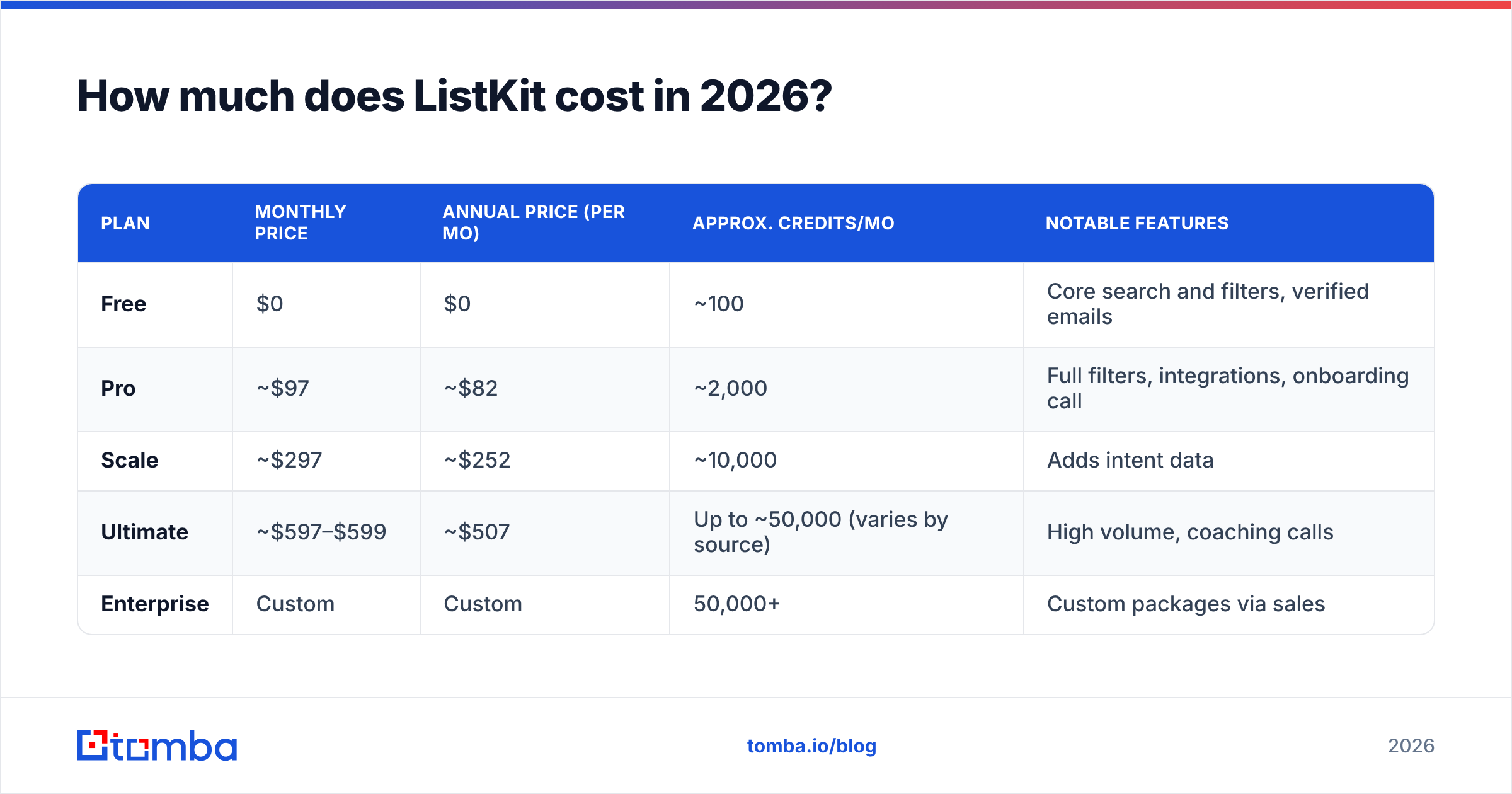
ListKit's pricing has changed several times, including a widely reported cut in per-credit cost in 2026. Treat the figures below as a snapshot, and confirm them on the official ListKit pricing page before you buy.
| Plan | Monthly price | Annual price (per mo) | Approx. credits/mo | Notable features |
|---|---|---|---|---|
| Free | $0 | $0 | ~100 | Core search and filters, verified emails |
| Pro | ~$97 | ~$82 | ~2,000 | Full filters, integrations, onboarding call |
| Scale | ~$297 | ~$252 | ~10,000 | Adds intent data |
| Ultimate | ~$597–$599 | ~$507 | Up to ~50,000 (varies by source) | High volume, coaching calls |
| Enterprise | Custom | Custom | 50,000+ | Custom packages via sales |
Two cost traps to plan for:
- Break-even volume. At about $97 for about 2,000 credits, the Pro plan only beats pay-as-you-go alternatives if you really use most of those credits every month.
- The intent jump. If intent data is the reason you're looking at ListKit, budget for Scale from day one. Don't assume the Pro plan will cover it.
How does ListKit compare to alternatives?#
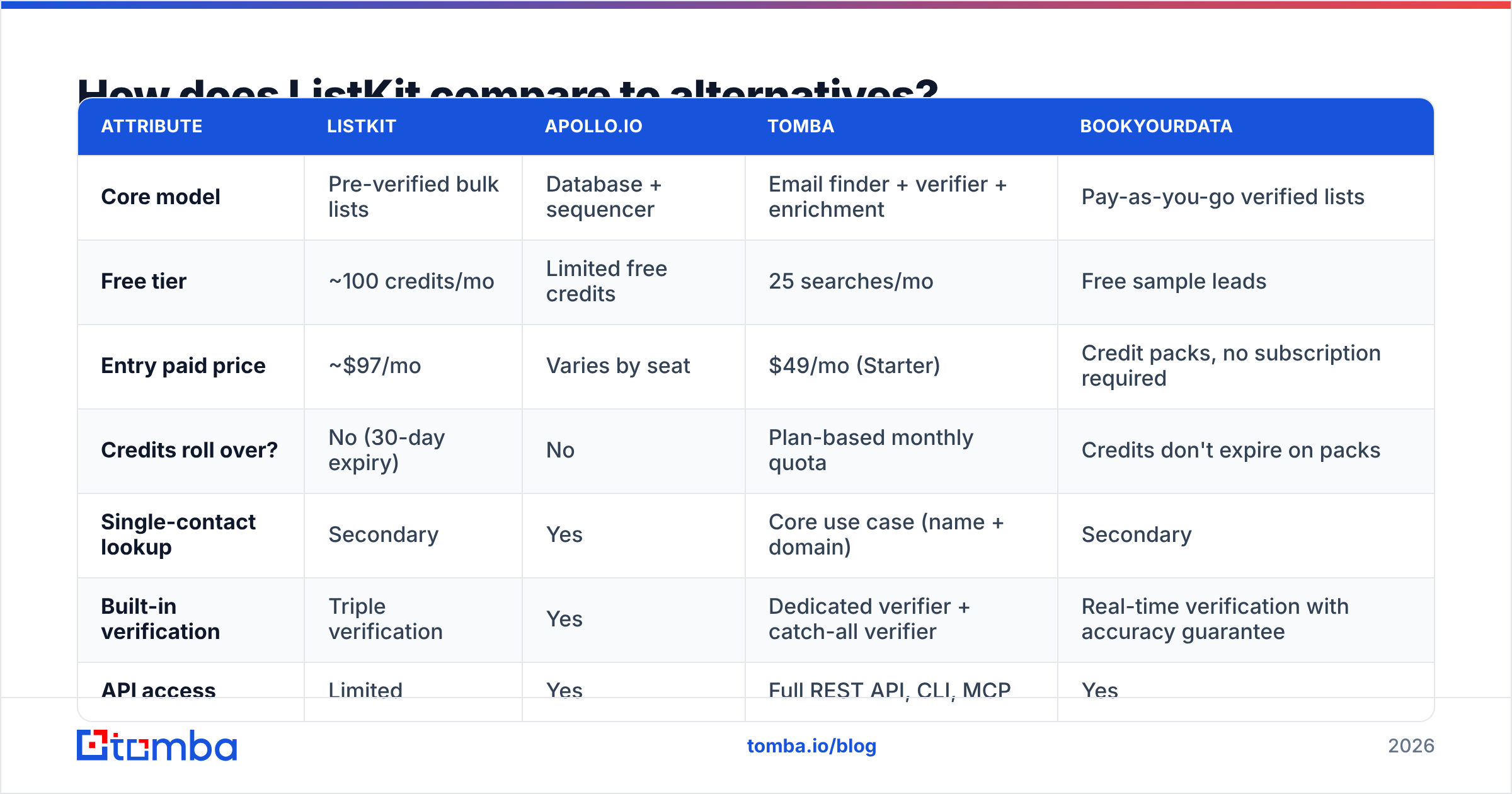
ListKit competes with two kinds of tools. The first is all-in-one databases like Apollo. The second is email finders and verifiers that you pair with your own list sources. The table below compares the models, not just the logos.
| Attribute | ListKit | Apollo.io | Tomba | BookYourData |
|---|---|---|---|---|
| Core model | Pre-verified bulk lists | Database + sequencer | Email finder + verifier + enrichment | Pay-as-you-go verified lists |
| Free tier | ~100 credits/mo | Limited free credits | 25 searches/mo | Free sample leads |
| Entry paid price | ~$97/mo | Varies by seat | $49/mo (Starter) | Credit packs, no subscription required |
| Credits roll over? | No (30-day expiry) | No | Plan-based monthly quota | Credits don't expire on packs |
| Single-contact lookup | Secondary | Yes | Core use case (name + domain) | Secondary |
| Built-in verification | Triple verification | Yes | Dedicated verifier + catch-all verifier | Real-time verification with accuracy guarantee |
| API access | Limited | Yes | Full REST API, CLI, MCP | Yes |
| Best for | Agencies building big monthly lists | Teams wanting one platform | Enrichment, lookups, developers | Buyers who want accuracy without subscriptions |
BookYourData deserves a closer look if expiring credits are your main objection. Its pay-as-you-go model and accuracy guarantee fit irregular buyers well. If you're weighing ListKit against a full platform, our Apollo alternative breakdown covers the trade-offs of the all-in-one approach.
Is ListKit accurate enough to skip a separate verifier?#
For most campaigns, mostly yes, with one caveat. Verification is a snapshot in time. An address that passed checks on the day you exported it can bounce six weeks later, after the person changes jobs. B2B contact data decays by roughly 2–3% a month, so a list you export in January and send in March is already stale.
Here is a practical protocol:
- Send within two weeks of export. That's where triple verification gives you the most value.
- Re-verify anything older than 30 days. Run aged lists through a standalone email verifier before sending, especially on primary sending domains.
- Separate catch-all addresses. Put catch-alls in their own low-volume segment or on a secondary domain. Every provider, ListKit included, is least reliable on catch-all domains.
- Measure your own bounce rate. Keep hard bounces under 2% per campaign. If a ListKit export goes above that, tighten the filters or re-verify before you blame the data.
Who should buy ListKit, and who shouldn't?#
ListKit fits you if:
- You run a cold email agency or an outbound team sending thousands of new contacts a month.
- You want lists ready for a sequencer, with no separate verification step.
- You value onboarding help and a simple UI more than API depth.
- You can reliably use 2,000+ credits a month, every month.
Look elsewhere if:
- Your prospecting is account-based and low-volume, around 50–300 highly targeted contacts a month.
- You mainly need to enrich or fix emails already in your CRM.
- You're a developer or RevOps engineer who wants lookups inside your own workflows through an API, spreadsheet add-on or AI agent.
- You prospect in bursts and hate losing unused credits.
For that second group, a lookup-first tool works better. You find the person on LinkedIn or a company site, then resolve the email by name and domain, or pull every public address for a company with domain search. You pay for what you look up, not for rows you might never contact.

What do real users say about ListKit?#
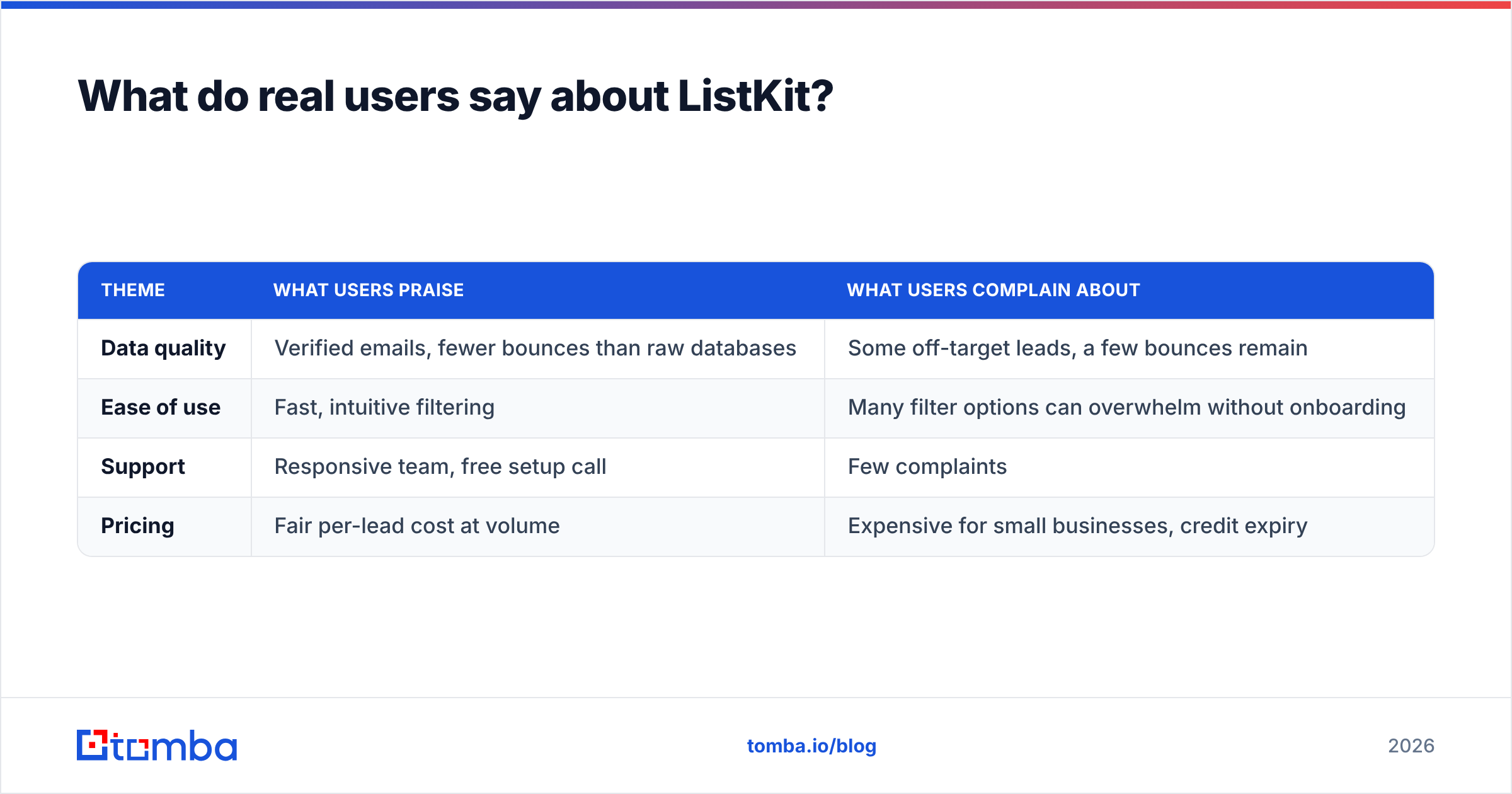
Across review platforms, the sentiment is fairly consistent. Here are the patterns without the hype:
| Theme | What users praise | What users complain about |
|---|---|---|
| Data quality | Verified emails, fewer bounces than raw databases | Some off-target leads, a few bounces remain |
| Ease of use | Fast, intuitive filtering | Many filter options can overwhelm without onboarding |
| Support | Responsive team, free setup call | Few complaints |
| Pricing | Fair per-lead cost at volume | Expensive for small businesses, credit expiry |
The takeaway: people who get strong results with ListKit tend to have high volume and a clear ICP. People who are unhappy with it usually bought a volume tool for a low-volume problem.
How should you test ListKit before committing?#
A 30-minute pilot shows you more than any review, this one included.
- Define one tight ICP. For example: "VP Sales, US SaaS, 50–200 employees, using HubSpot."
- Pull 100 contacts on ListKit's free plan with those filters.
- Pull the same 100 profiles through an alternative. Ideally use a name-plus-domain email finder for a like-for-like comparison.
- Run both sets through the same independent verifier so neither vendor grades its own work.
- Compare three numbers: the relevance rate (how many actually match your ICP), the valid rate, and the catch-all share.
- Estimate your cost per usable contact at your real monthly volume, and include the cost of credits that would expire unused.
If ListKit wins on cost per usable contact at your volume, buy it. If it doesn't, you've spent an afternoon, not an annual contract.
What's the final verdict on ListKit?#
ListKit's pros and cons both come from the same design choice: it's built for high-volume list building. Triple verification, sequencer-ready exports and hands-on onboarding make it a good pick for agencies and outbound teams that consume thousands of fresh contacts a month. The same design causes its weak points: 30-day credit expiry, a steep jump to get intent data, and a heavy bulk-export workflow for anyone who just needs the right email for the right person.
Choose based on how you actually prospect. For volume lists, ListKit is a solid choice. For precise lookups, CRM enrichment or API-driven workflows, a lookup-first tool usually costs less and wastes less.
If you're in that second group, try Tomba Email Finder. Enter a name and a company domain, and you get a verified professional email you can check again with Tomba's built-in verifier and catch-all tools. The free plan includes 25 searches a month so you can run the pilot above yourself, and paid plans start at $49/mo. See Tomba pricing to match a plan to your real lookup volume.
Related guides#
// get started
Find, verify and enrich your first contacts today
Start on the free plan with 25 searches a month, then scale when your team is ready.
Free plan · No credit card required · GDPR & CCPA
// about the author