ListKit Reviews 2026: Pricing, Data Quality, Pros and Cons
ListKit sells triple-verified B2B lead lists with a done-for-you feel. We went through what users praise, where they complain, what the credits really cost, and who should pick something else.
TL;DR
- ListKit is a B2B lead-list builder aimed at cold emailers and agencies. Every email it returns has been checked three times, and exports push straight into sequencers like Smartlead and Salesforge.
- Reviews are strongly positive, averaging about 4.7/5 on G2 across several hundred reviews. Users mostly praise the onboarding call, the clean interface and how few emails bounce.
- The usual complaints are the entry price (about $97/mo billed monthly), credits that are hard to plan for, some leads that miss your target when filters are loose, and bounces that still happen despite the "triple-verified" label.
- ListKit fits teams that want ready-to-send lists at volume. If you mostly need to find or verify specific people's emails, a dedicated email finder is usually cheaper per contact.
- Prices and credit rules have changed several times in 2025–2026. Check the live pricing page before you commit.
What is ListKit, and who is it built for?#
ListKit is a B2B contact database with a list-building interface on top. You pick filters such as job title, industry, headcount, location, technologies and funding stage. ListKit returns matching contacts with work emails (and phone numbers on some plans), verified before you export them.
It's built for cold email operators: agencies running campaigns for clients, founders doing their own outbound, and small SDR teams whose sequencer already works but whose lists are the bottleneck. ListKit doesn't try to be a full sales engagement platform. It doesn't send your email for you. It covers the step just before sending: getting a clean list.
You can see this in the integrations. ListKit syncs directly with cold email tools like Smartlead, Salesforge and Instantly, plus the major CRMs, so you don't have to export and re-import a CSV every time.
How does ListKit actually work?#
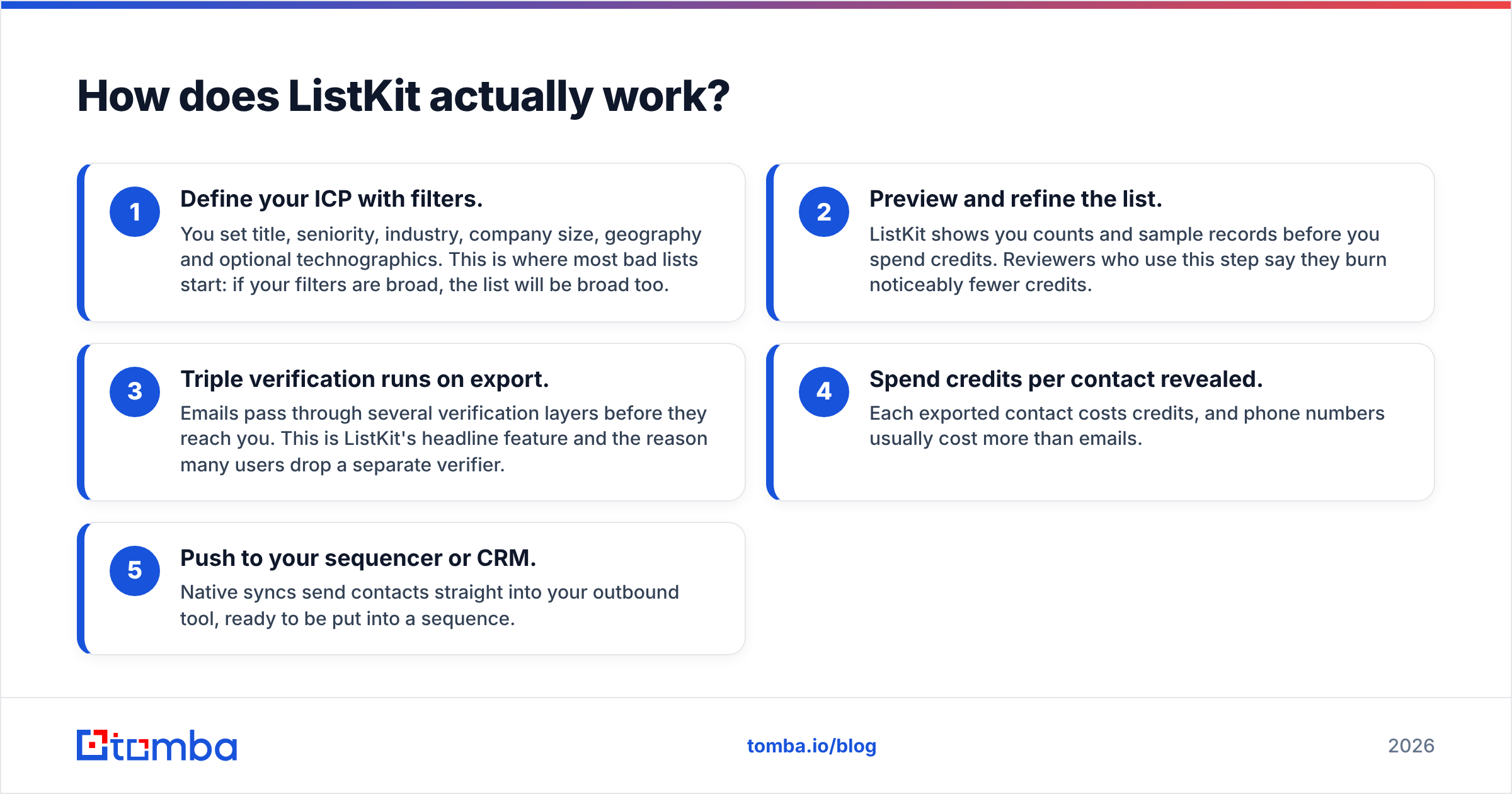
A typical ListKit workflow has five stages. Most of the complaints in reviews trace back to one of them:
- Define your ICP with filters. You set title, seniority, industry, company size, geography and optional technographics. This is where most bad lists start: if your filters are broad, the list will be broad too.
- Preview and refine the list. ListKit shows you counts and sample records before you spend credits. Reviewers who use this step say they burn noticeably fewer credits.
- Triple verification runs on export. Emails pass through several verification layers before they reach you. This is ListKit's headline feature and the reason many users drop a separate verifier.
- Spend credits per contact revealed. Each exported contact costs credits, and phone numbers usually cost more than emails.
- Push to your sequencer or CRM. Native syncs send contacts straight into your outbound tool, ready to be put into a sequence.
Note what's missing: there's no single-contact "find this one person's email" workflow at the center of the product. ListKit is built around lists. If you usually start from a name and a company domain, you want a different kind of tool. We cover that below.
What do ListKit reviews say users like?#
Reading through the ListKit reviews on G2, a few themes come up again and again.
Onboarding that actually helps. New accounts get a free setup call, and reviewers say it made a real difference. The team helps you build your first ICP filters and warns you away from mistakes that waste credits. For a data tool, that level of hands-on help is unusual at this price.
Verification you don't pay for separately. Many cold emailers already pay for a standalone verifier on top of their data source. ListKit's built-in triple check replaces that cost for a lot of users, and reviewers often mention it as a reason they switched.
Low friction to the sequencer. Direct syncs mean no CSV cleanup, no column mapping and no Zapier chain that fails silently at 2 a.m. Agencies running dozens of client campaigns value this more than almost anything else.
Simple interface. Compared with enterprise databases that have 40 filter panels, reviewers describe ListKit as quick to learn for the basic case.

What do ListKit reviews complain about?#
The negative reviews are just as consistent, and more useful if you're deciding whether to buy.
"Triple-verified" still bounces. Several reviewers point out that verified doesn't mean bounce-free. That's true of every data vendor. Verification checks whether a mailbox accepted a probe at a given moment. It can't guarantee the mailbox still exists next month, and it has trouble with catch-all domains that accept everything. Expect bounce rates that are lower than raw scraped data, but not zero. If you're new to how bounces happen, the bounce message entry on Wikipedia is a quick technical primer.
Off-target leads. A common complaint is that part of the list doesn't fit the ICP. Most of the time the cause is filters that are too loose. "VP Sales" can match "VP Sales Operations" and "VP Sales Engineering". Still, a user shouldn't need a support call to get a usable list, and some reviewers hold that against the product.
Pricing feels high at the bottom. A solo founder sending 500 emails a month will find the entry tier expensive relative to their volume. ListKit's pricing is designed for people exporting thousands of contacts a month.
Credit planning is confusing. Different sources report different rollover and expiry rules, and ListKit has changed credit pricing more than once, including a widely reported credit price cut in 2026. If you don't use most of your credits every cycle, find out exactly what happens to unused ones before you pay annually.
Learning curve on advanced filters. The simple case is simple. Complex ICPs with technographics, funding and department size take practice, and credits get burned while you learn.
How much does ListKit cost in 2026?#
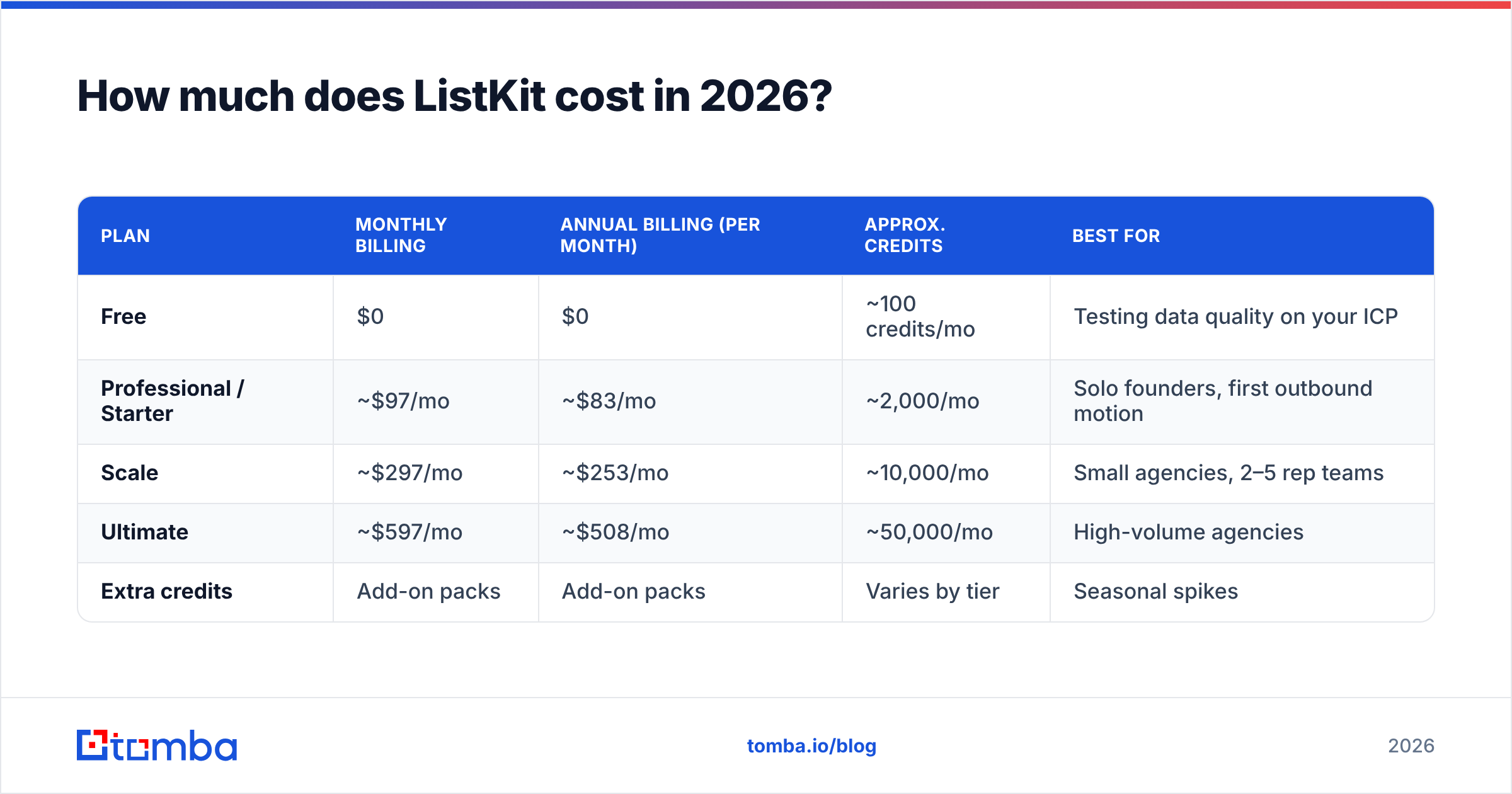
ListKit's pricing has changed several times, so treat the figures below as a snapshot. Confirm on the official ListKit pricing page before buying.
| Plan | Monthly billing | Annual billing (per month) | Approx. credits | Best for |
|---|---|---|---|---|
| Free | $0 | $0 | ~100 credits/mo | Testing data quality on your ICP |
| Professional / Starter | ~$97/mo | ~$83/mo | ~2,000/mo | Solo founders, first outbound motion |
| Scale | ~$297/mo | ~$253/mo | ~10,000/mo | Small agencies, 2–5 rep teams |
| Ultimate | ~$597/mo | ~$508/mo | ~50,000/mo | High-volume agencies |
| Extra credits | Add-on packs | Add-on packs | Varies by tier | Seasonal spikes |
Two practical notes:
- Work out cost per usable contact, not per credit. If 15% of an export misses your ICP and another 3% bounce, your real cost per contact you can use is about 20% higher than the headline figure.
- Use the free tier as a data audit. Pull 100 contacts on your exact ICP, verify a sample yourself, and check titles by hand on LinkedIn. That tells you more than any review, including this one.
Is ListKit better than other B2B data tools?#
It depends on how you usually work. ListKit is list-first: you start with an ICP and it gives you many contacts. Email finders are person-first: you start with a name and a domain and get one accurate address. Big platforms like Apollo try to do both, and add sequencing on top.
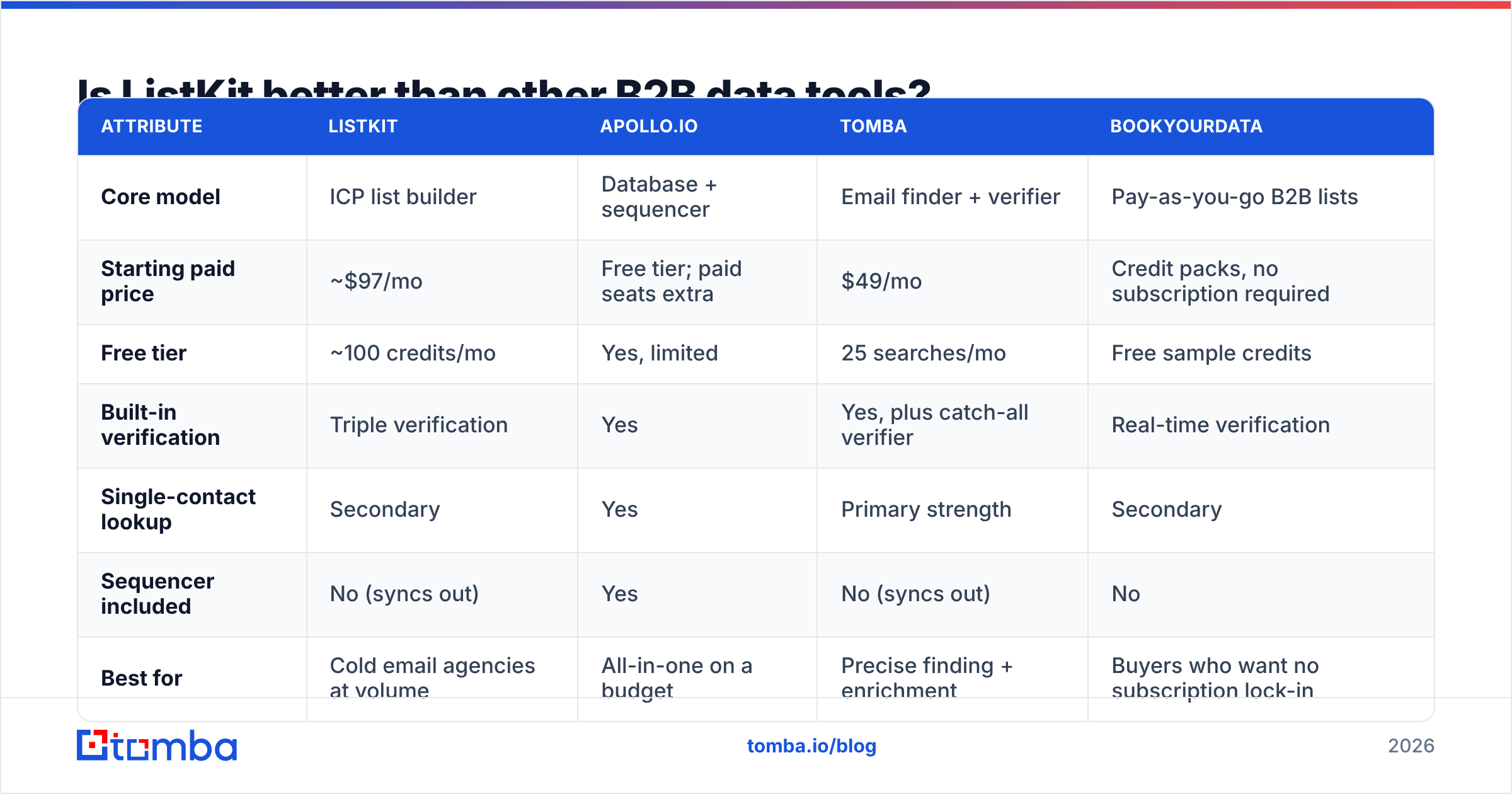
| Attribute | ListKit | Apollo.io | Tomba | BookYourData |
|---|---|---|---|---|
| Core model | ICP list builder | Database + sequencer | Email finder + verifier | Pay-as-you-go B2B lists |
| Starting paid price | ~$97/mo | Free tier; paid seats extra | $49/mo | Credit packs, no subscription required |
| Free tier | ~100 credits/mo | Yes, limited | 25 searches/mo | Free sample credits |
| Built-in verification | Triple verification | Yes | Yes, plus catch-all verifier | Real-time verification |
| Single-contact lookup | Secondary | Yes | Primary strength | Secondary |
| Sequencer included | No (syncs out) | Yes | No (syncs out) | No |
| Best for | Cold email agencies at volume | All-in-one on a budget | Precise finding + enrichment | Buyers who want no subscription lock-in |
A few honest takes:
- ListKit vs Apollo. Apollo's free tier is hard to beat on paper, and it includes a sequencer. Reviewers who move from Apollo to ListKit usually do it for lower bounce rates and the onboarding help, not for coverage. If you're considering the move in either direction, our Apollo alternative breakdown covers the tradeoffs.
- ListKit vs BookYourData. Both focus on verified lists. BookYourData's pay-as-you-go model suits teams with uneven volume that don't want a monthly commitment. ListKit suits teams exporting large volumes every month. Both are solid choices, and the right one depends on your volume pattern.
- ListKit vs an email finder like Tomba. Different jobs. If your outbound starts from account lists, such as target domains from a CRM, an event attendee list or a partner list, you don't need a database search. You need to find emails by domain or by name, and pay only for those contacts.

Who should use ListKit, and who should skip it?#
ListKit is a strong fit if you:
- Run cold email at volume, meaning several thousand new contacts a month or more.
- Use Smartlead, Salesforge, Instantly or a similar sequencer and want native syncs.
- Want someone to help you set up your ICP filters on day one.
- Would rather pay one bill than stack a data tool plus a separate verifier.
You should probably skip it if you:
- Send low volume (under ~1,000 new contacts a month), where the entry tier's cost per contact is high.
- Mostly start from known accounts or named people rather than broad ICP searches.
- Need enrichment on records already in your CRM rather than net-new lists.
- Need guaranteed credit rollover. Confirm the current policy in writing first.
How should you test ListKit before paying?#
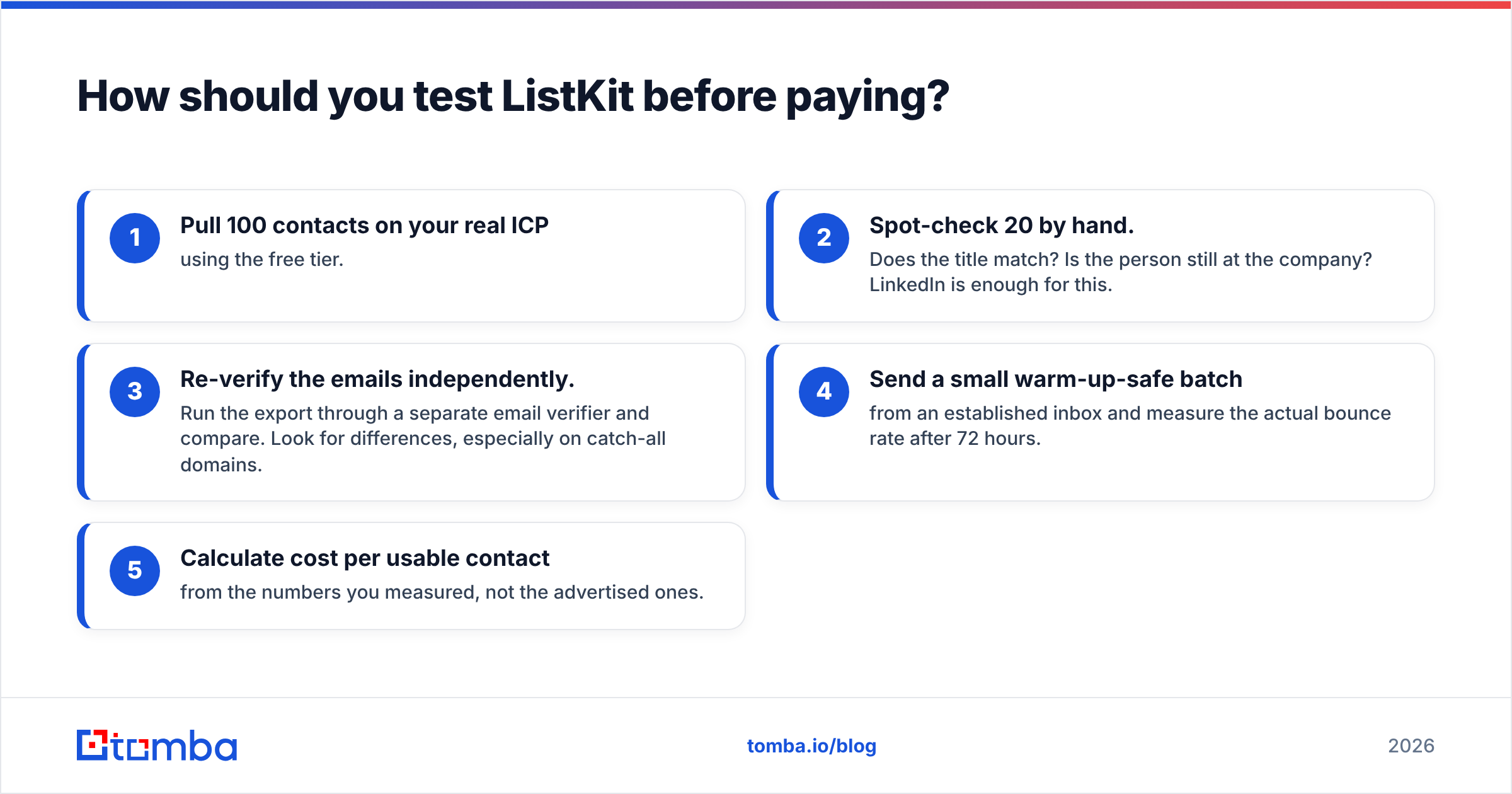
Don't choose a data vendor based on reviews alone, even good ones. Run this 30-minute test instead:
- Pull 100 contacts on your real ICP using the free tier.
- Spot-check 20 by hand. Does the title match? Is the person still at the company? LinkedIn is enough for this.
- Re-verify the emails independently. Run the export through a separate email verifier and compare. Look for differences, especially on catch-all domains.
- Send a small warm-up-safe batch from an established inbox and measure the actual bounce rate after 72 hours.
- Calculate cost per usable contact from the numbers you measured, not the advertised ones.
If ListKit passes, great: you've confirmed its data works for your market, which no review can tell you. If it doesn't, you've lost 30 minutes instead of an annual contract.
What's the verdict on ListKit reviews?#
The reviews hold up. ListKit is a well-liked, cold-email-focused list builder. Its onboarding is genuinely good, its built-in verification cuts real costs, and its sequencer syncs remove a lot of busywork. The complaints are real but predictable. The entry price is high for low-volume senders, credit rules deserve careful reading, and "triple-verified" lowers bounces without eliminating them.
Buy it if you build large ICP lists every month and want them ready to send. Look elsewhere if your outbound starts from specific accounts and people, or if your volume is too low to justify the monthly minimum.
If that second group describes you, try Tomba Email Finder. You search by name plus domain, or pull every public email at a company, verify results in the same workflow, and pay for what you look up. The free tier includes 25 searches a month, and paid plans start at $49/mo (see Tomba pricing). It's a cheap way to test your next account list before committing to a volume database.
Related guides#
// get started
Find, verify and enrich your first contacts today
Start on the free plan with 25 searches a month, then scale when your team is ready.
Free plan · No credit card required · GDPR & CCPA
// about the author