Lusha Reviews 2026: What Users Love, Hate, and Actually Pay
Lusha reviews praise its fast Chrome extension and direct dials, then complain about credits and seats. Here is what holds up in 2026, what it really costs, and who should buy it.
TL;DR
- Lusha reviews are mostly positive. Reviewers like the Chrome extension, how fast you can reveal a contact on LinkedIn, and how good its direct dials and mobile numbers are for North American contacts.
- The common complaints are about cost, not data. A phone reveal costs 10 credits and an email costs 1, so a phone-heavy team burns through its allowance fast.
- Accuracy depends on region and seniority. Reviewers report strong results for US mid-market and enterprise contacts and patchier coverage in EMEA, APAC, and among small companies.
- Lusha suits SDR teams that make a lot of calls and prospect on LinkedIn. If your outreach is mostly email, you can usually get the same contacts for less with a dedicated email finder.
- Before you sign anything annual, check prices on Lusha's own pricing page. Plans, credit costs, and seat rules have changed several times in the last two years.
What is Lusha, and why do people review it so much?#
Lusha is a B2B contact-data platform. Its main use is revealing a prospect's business email, direct dial, or mobile number while you look at their LinkedIn profile, a company website, or a CRM record. The company started as a lightweight browser extension and has grown into a broader prospecting suite with a searchable database, intent signals, enrichment, CRM integrations, and an API.
It gets reviewed constantly because it's one of the first tools new SDRs try. The free plan lets you install the extension and reveal a few contacts in about five minutes. A product that's easy to adopt collects a lot of opinions, and that's why Lusha has well over a thousand reviews on G2, with an aggregate score that has stayed in the low-to-mid 4s out of 5 for several years.
The useful part isn't the star rating. It's the patterns in what people praise and what they complain about, so that's what this review covers.
What do Lusha reviews consistently praise?#
Read a few hundred Lusha reviews on G2 and similar sites and the same strengths come up again and again.
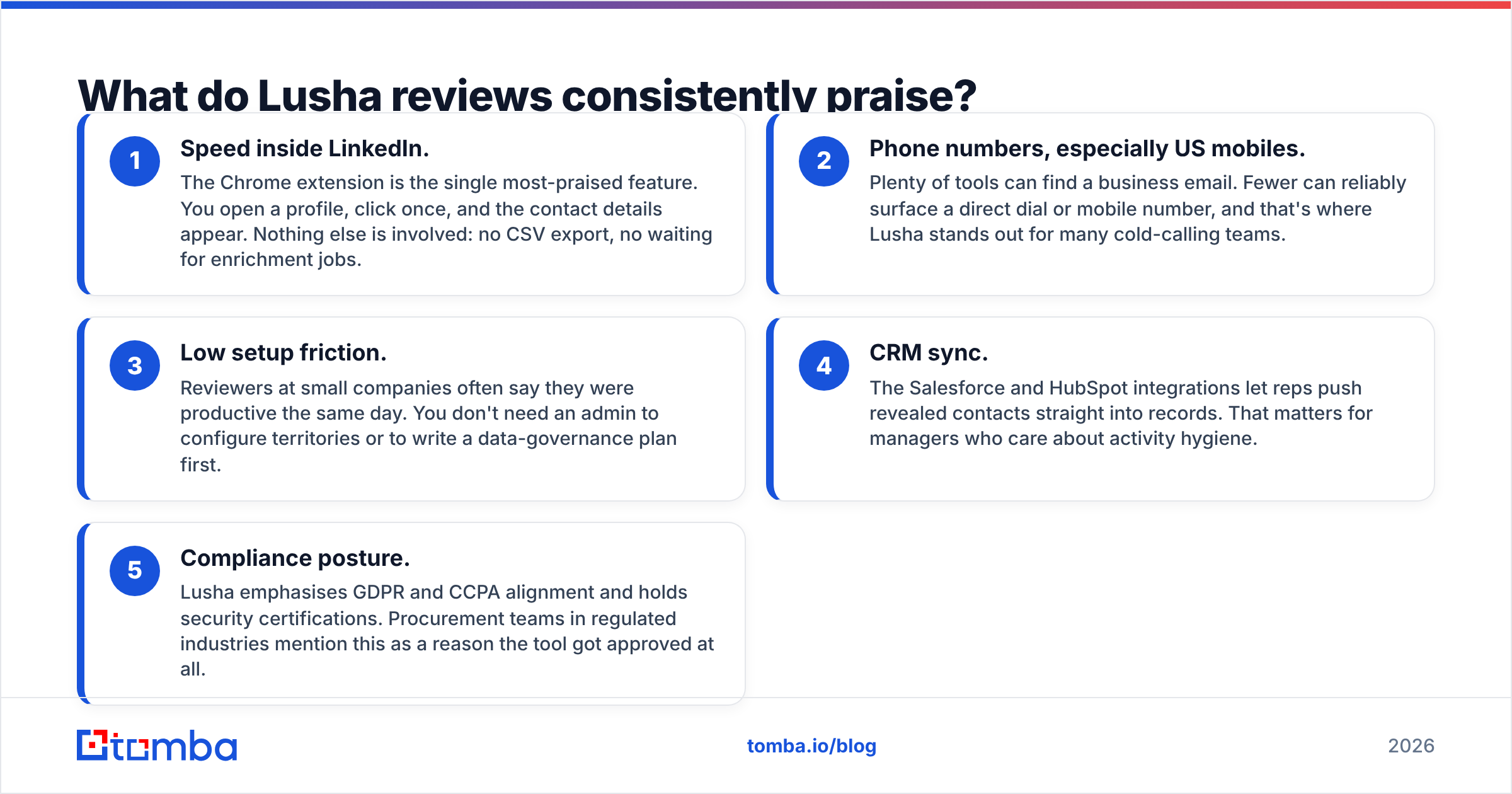
- Speed inside LinkedIn. The Chrome extension is the single most-praised feature. You open a profile, click once, and the contact details appear. Nothing else is involved: no CSV export, no waiting for enrichment jobs.
- Phone numbers, especially US mobiles. Plenty of tools can find a business email. Fewer can reliably surface a direct dial or mobile number, and that's where Lusha stands out for many cold-calling teams.
- Low setup friction. Reviewers at small companies often say they were productive the same day. You don't need an admin to configure territories or to write a data-governance plan first.
- CRM sync. The Salesforce and HubSpot integrations let reps push revealed contacts straight into records. That matters for managers who care about activity hygiene.
- Compliance posture. Lusha emphasises GDPR and CCPA alignment and holds security certifications. Procurement teams in regulated industries mention this as a reason the tool got approved at all.
None of this is surprising. Lusha was built around the single-contact, in-browser reveal, and it still does that better than most.

What do Lusha reviews consistently complain about?#
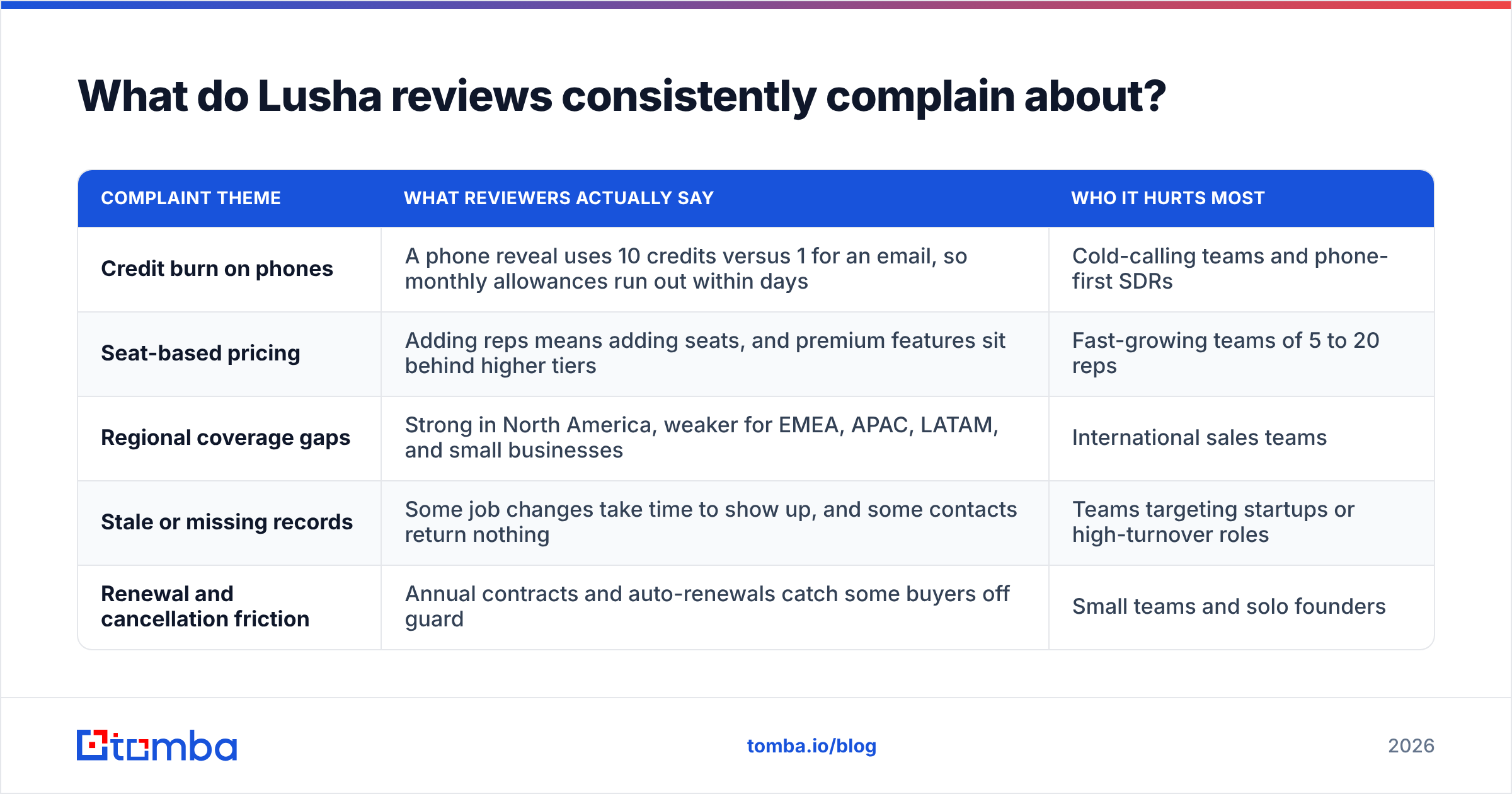
The negative reviews cluster around three themes. Almost none of them say "the product is broken." Most say "the product is expensive for how we use it."
| Complaint theme | What reviewers actually say | Who it hurts most |
|---|---|---|
| Credit burn on phones | A phone reveal uses 10 credits versus 1 for an email, so monthly allowances run out within days | Cold-calling teams and phone-first SDRs |
| Seat-based pricing | Adding reps means adding seats, and premium features sit behind higher tiers | Fast-growing teams of 5 to 20 reps |
| Regional coverage gaps | Strong in North America, weaker for EMEA, APAC, LATAM, and small businesses | International sales teams |
| Stale or missing records | Some job changes take time to show up, and some contacts return nothing | Teams targeting startups or high-turnover roles |
| Renewal and cancellation friction | Annual contracts and auto-renewals catch some buyers off guard | Small teams and solo founders |
The first two rows explain most of the one- and two-star reviews. Teams buy Lusha for phone numbers, discover that phones are the most expensive thing to reveal, and then find that scaling to more reps multiplies the bill.
The coverage complaint deserves nuance. Every B2B data vendor is strongest where it has the most contributors and sources, and for most of them, Lusha included, that's the US. If your ICP is DACH manufacturing or Southeast Asian SaaS, run a test list before you commit.
How much does Lusha cost in 2026?#
Lusha has reworked its pricing more than once, so treat these figures as a snapshot and check the official Lusha pricing page before you buy. At the time of writing, the structure looks like this:
- Free: around 40 credits a month, one seat, and access to the extension.
- Starter / Pro: self-serve paid tiers. Paid plans start at roughly $50 a month on monthly billing, and Pro adds more credits, extra seats, and credit rollover.
- Premium: a larger credit pool, more seats, and more of the team-management and enrichment features.
- Scale: custom, annual-only pricing that includes API access, intent signals, SSO, and advanced CRM workflows.
Annual billing knocks off about a quarter compared with paying monthly.
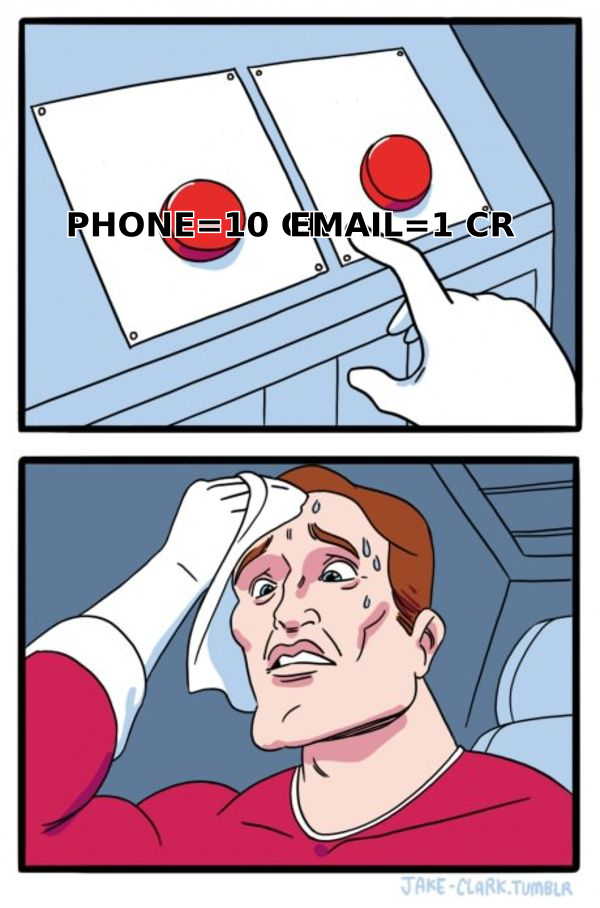
The number that matters more than the sticker price is the credit cost per data type. An email reveal costs 1 credit and a phone reveal costs 10. Work out your real cost per contact from your actual phone-to-email mix, not from the headline credit count.
Here's a worked example. Say a rep reveals 30 contacts a week, and half of them need a phone number. That's 15 emails (15 credits) plus 15 phones (150 credits), or about 165 credits a week and roughly 700 a month. A plan with a few hundred credits won't last that rep three weeks.
Is Lusha's data accurate?#
Mostly yes, with caveats. Reviewers generally rate Lusha's emails as reliable and its phone data as one of its strongest assets. The caveats follow a predictable pattern:
- Seniority matters. Directors and VPs at established companies tend to come back complete. Individual contributors at 20-person startups are hit-or-miss.
- Geography matters. US and Canadian records get the best reviews. Coverage elsewhere varies, and some European reviewers say phone hit rates drop noticeably.
- Freshness matters. Contact data decays as people change jobs. Some reviewers describe revealing emails for people who left months earlier.
The practical fix is the same whatever vendor you use: verify before you send. Running revealed emails through an email verifier before they go into a sequence protects your sender reputation and stops one bad batch from tanking deliverability for the whole domain. It costs very little compared with burning a warmed-up inbox.
Lusha also positions itself as privacy-conscious and references the GDPR framework in its compliance materials. If you sell into the EU, confirm with your legal team how you'll handle lawful basis and opt-outs for any contact you reveal, whichever tool it comes from.
How does Lusha compare with alternatives?#
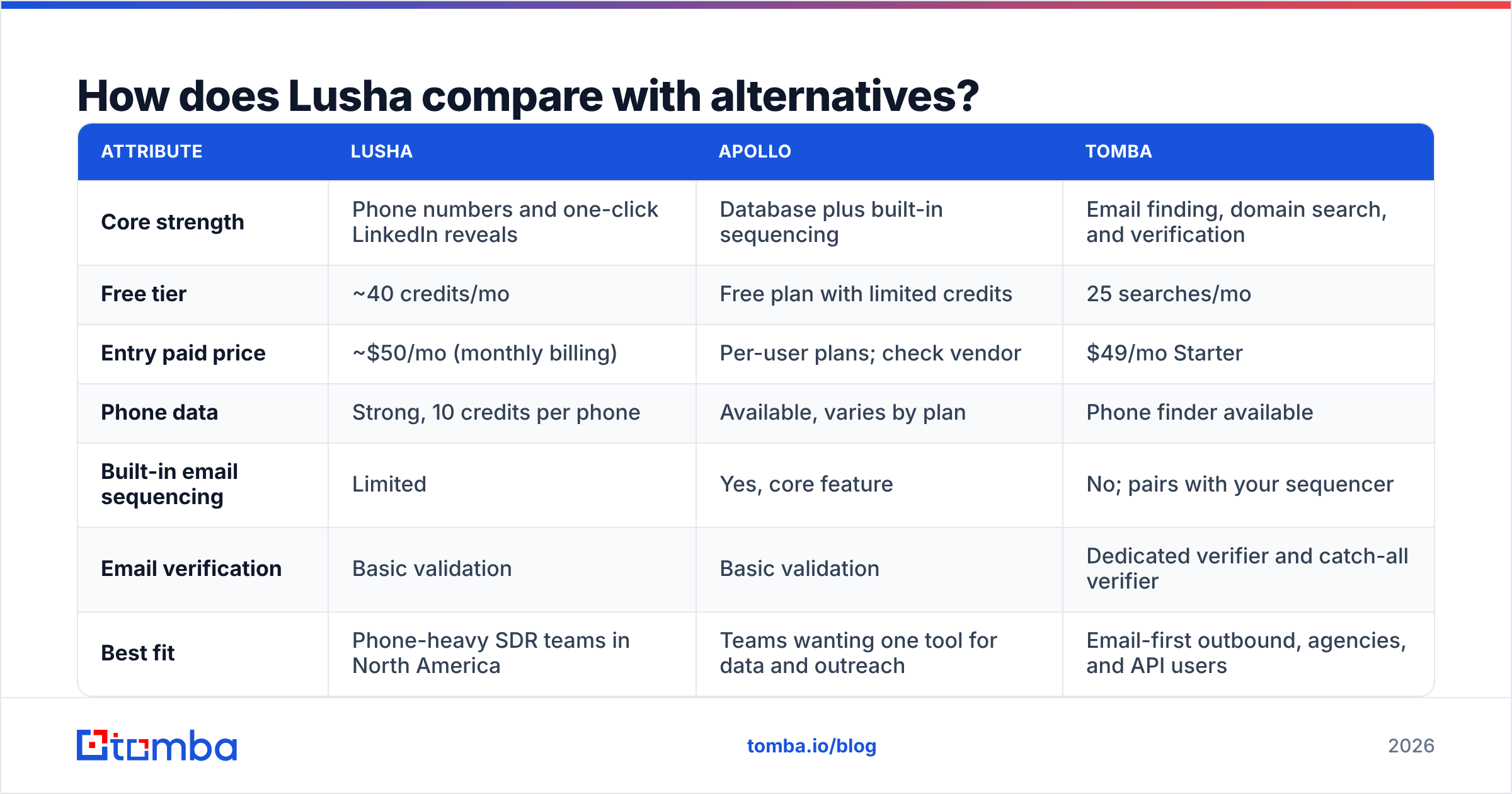
Lusha rarely gets evaluated on its own. Here's how it compares with two tools that come up in the same buying conversations: Apollo, an all-in-one prospecting and sequencing platform, and Tomba, an email-first finder and verifier.
| Attribute | Lusha | Apollo | Tomba |
|---|---|---|---|
| Core strength | Phone numbers and one-click LinkedIn reveals | Database plus built-in sequencing | Email finding, domain search, and verification |
| Free tier | ~40 credits/mo | Free plan with limited credits | 25 searches/mo |
| Entry paid price | ~$50/mo (monthly billing) | Per-user plans; check vendor | $49/mo Starter |
| Phone data | Strong, 10 credits per phone | Available, varies by plan | Phone finder available |
| Built-in email sequencing | Limited | Yes, core feature | No; pairs with your sequencer |
| Email verification | Basic validation | Basic validation | Dedicated verifier and catch-all verifier |
| Best fit | Phone-heavy SDR teams in North America | Teams wanting one tool for data and outreach | Email-first outbound, agencies, and API users |
A few takeaways from the table:
Pick Lusha if your reps live on the phone and in LinkedIn, sell mostly into North America, and the budget can absorb 10-credit phone reveals. That's the use case it was built for, and reviewers in it are mostly happy.
Pick Apollo if you want data and sequencing in one place and can accept a heavier interface. If Apollo isn't the right fit either, this roundup of Apollo.io alternatives covers other options.
Pick an email-first tool if most of your pipeline comes from cold email. When you rarely need mobile numbers, you're paying for Lusha's phone-data strength without using it. A dedicated email finder with domain search and built-in verification usually gets you more usable contacts per dollar.
Who should (and shouldn't) buy Lusha?#
After all the reviews, the decision mostly comes down to which channel you prospect on.
Lusha is a good fit if you:
- Run a team with high call volume where a mobile number is worth far more than an email
- Prospect mostly one contact at a time from LinkedIn or company websites
- Sell into US and Canadian mid-market and enterprise accounts
- Need Salesforce or HubSpot sync without building it yourself
- Have procurement requirements around compliance certifications
Lusha is probably not the right fit if you:
- Run cold email campaigns of thousands of contacts a month
- Mainly target European or APAC companies, or small businesses
- Are a solo founder or small agency watching every dollar
- Need bulk enrichment over an API without negotiating an enterprise contract
- Want sequencing and data in the same product
Lusha isn't bad for the second group. You'd just be paying for capabilities you won't use much.
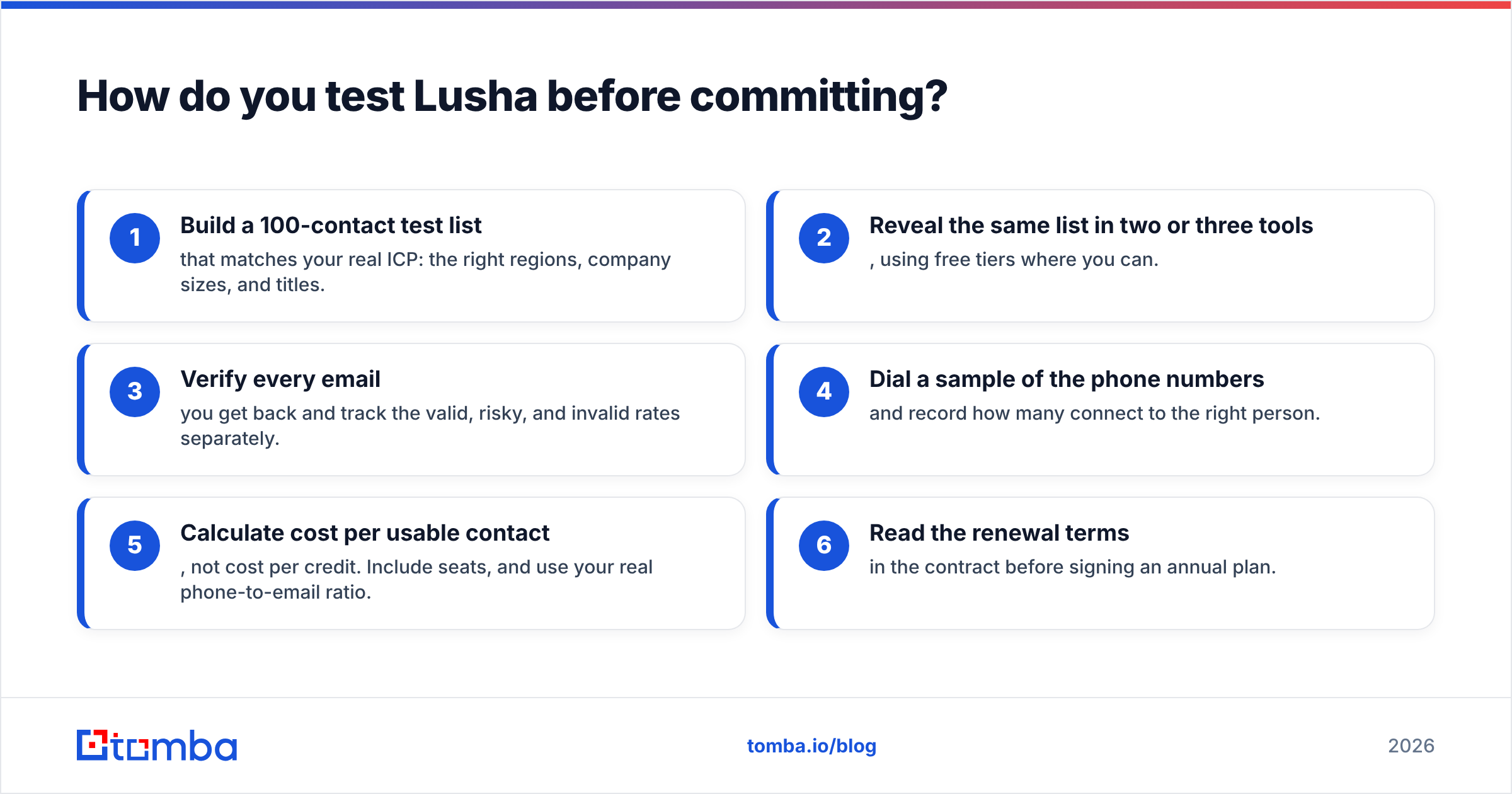
How do you test Lusha before committing?#
Run a structured trial instead of a casual one. Most of the disappointed reviewers skipped this step.
- Build a 100-contact test list that matches your real ICP: the right regions, company sizes, and titles.
- Reveal the same list in two or three tools, using free tiers where you can.
- Verify every email you get back and track the valid, risky, and invalid rates separately.
- Dial a sample of the phone numbers and record how many connect to the right person.
- Calculate cost per usable contact, not cost per credit. Include seats, and use your real phone-to-email ratio.
- Read the renewal terms in the contract before signing an annual plan.
This takes a few hours and will tell you more than any star rating. If your vendors' data comes from different sources (see how Tomba sources and validates its data for one example), you'll see it in the results straight away.
Frequently asked questions about Lusha#
Is Lusha legit? Yes. Lusha is an established B2B data company with a large customer base, a long review history on G2, and published compliance materials. The complaints are about cost and coverage, not legitimacy.
Is Lusha free? There's a free plan with a small monthly credit allowance, at the time of writing about 40 credits. It's fine for testing but too small for daily prospecting.
Why do Lusha credits run out so fast? Phone numbers cost 10 credits each, compared with 1 credit for an email. Teams that reveal mostly phone numbers use up their allowance roughly ten times faster than they expect.
Is Lusha better than Apollo? For phone numbers and quick LinkedIn reveals, many reviewers prefer Lusha. For an all-in-one database and sequencer, Apollo usually comes out ahead. Your outreach channel should decide it.
What is a cheaper alternative to Lusha for emails? If you mostly need verified business emails, an email-first finder such as Tomba costs less per usable contact. Its Starter plan is $49/mo, and the Tomba pricing page covers higher-volume tiers.
The verdict on Lusha in 2026#
Lusha holds up well. It does what it was built for (fast, in-browser contact reveals with strong phone data) and reviewers in that use case are satisfied. The negative reviews are a predictable result of credit-based, seat-based pricing applied to teams whose workflow doesn't match Lusha's strengths.
So the question isn't whether Lusha is good. It's whether you'll actually use what you're paying for. If you're mostly dialling, probably yes. If you mostly email, probably not.
If your pipeline runs on cold email, try Tomba Email Finder first. Search by name, domain, or company, verify each address before it reaches your sequencer, and start on the free tier with 25 searches a month before upgrading to Starter at $49/mo. Run it against the same 100-contact test list you'd give Lusha, then compare cost per usable contact.
Related guides#
// get started
Find, verify and enrich your first contacts today
Start on the free plan with 25 searches a month, then scale when your team is ready.
Free plan · No credit card required · GDPR & CCPA
// about the author