Lusha vs Winmo: Contact Data vs Ad-Spend Intelligence in 2026
Lusha and Winmo both sell B2B contact data, but they solve different problems. One is a self-serve contact finder that starts free. The other is ad-industry intelligence that typically costs five figures a year. Here's how to pick.
TL;DR
- Lusha is a general-purpose B2B contact data tool. It has a Chrome extension, self-serve plans from a free tier up to about $400/mo list price, and email and phone reveals paid for with credits.
- Winmo is a vertical sales intelligence platform for people who sell to advertisers and agencies. It covers ad spend, agency relationships, and timing signals, and contracts reportedly start around $10K–$14K per year.
- If you sell media, sponsorships, adtech, or agency services, Winmo's data is hard to replace. For almost anything else, Lusha (or a cheaper email finder) gives you more for your money.
- Many teams don't need either platform at full price. They need verified emails for a defined account list, and a dedicated email finder can handle that from $49/mo.
What is the real difference between Lusha and Winmo?#
Comparing Lusha and Winmo is less like comparing two CRMs and more like comparing a phone book with a trade journal. Both tell you who to contact, but they answer different questions.
Lusha answers: "What is this person's email and direct dial?" It's horizontal. It works across industries, roles, and company sizes, and most people use it through a browser extension on LinkedIn or company websites. You find a person, spend a credit, and get the contact.
Winmo answers: "Which brands are about to spend money on advertising, which agency controls that budget, and who decides?" It's vertical. It tracks advertisers, agencies, and the relationships between them, along with estimated media spend by channel and signals such as agency reviews, leadership changes, and budget-planning windows. Contact data is part of the product, but the main value is the context around it.
That's why the comparison is lopsided on paper. Winmo costs many times more than Lusha, but for a media seller trying to reach a CPG brand's CMO before planning season, a correct email with no context is the cheap part. Knowing when to reach out and which agency to go through is what wins the deal.
How do Lusha and Winmo compare feature by feature?#
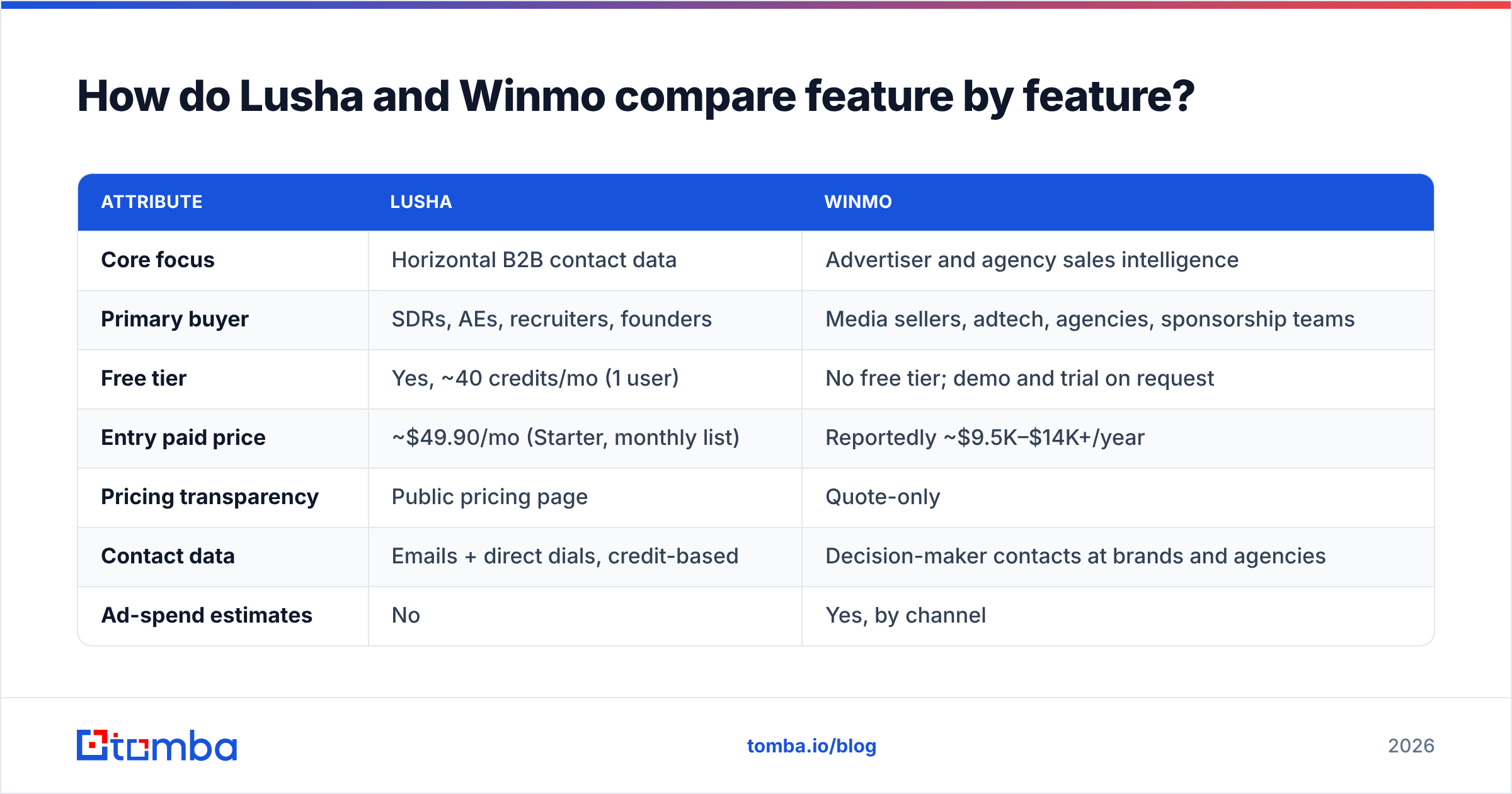
The table below uses list pricing and features reported for 2026. Lusha publishes its prices. Winmo doesn't, so its figures come from third-party reports and customer disclosures, and you should treat them as estimates.
| Attribute | Lusha | Winmo |
|---|---|---|
| Core focus | Horizontal B2B contact data | Advertiser and agency sales intelligence |
| Primary buyer | SDRs, AEs, recruiters, founders | Media sellers, adtech, agencies, sponsorship teams |
| Free tier | Yes, ~40 credits/mo (1 user) | No free tier; demo and trial on request |
| Entry paid price | ~$49.90/mo (Starter, monthly list) | Reportedly ~$9.5K–$14K+/year |
| Pricing transparency | Public pricing page | Quote-only |
| Contact data | Emails + direct dials, credit-based | Decision-maker contacts at brands and agencies |
| Ad-spend estimates | No | Yes, by channel |
| Agency-of-record mapping | No | Yes, a core feature |
| Buying/timing signals | Job changes, funding, hiring intent | Agency reviews, planning calendars, spend shifts |
| Chrome extension | Yes, a core workflow | Available, secondary |
| CRM integrations | Salesforce, HubSpot, Pipedrive, more | Salesforce, HubSpot |
| Best fit | Any B2B outbound motion | Selling into marketing budgets |
The main gap is in the middle rows. Lusha has nothing like ad-spend estimates or agency-of-record mapping, and it isn't trying to. Winmo isn't trying to be a cheap, self-serve tool that SDRs use to find any contact at any company.
How much do Lusha and Winmo actually cost?#
Lusha pricing in 2026 is tiered and credit-based. Third-party reviews generally report these tiers:
- Free: ~40 credits/month, 1 user
- Starter: ~$49.90/mo monthly list, roughly 400 credits
- Pro: ~$69.90/mo list with a credit slider
- Premium: ~$399.90/mo list, ~5 seats, higher credit pools
- Scale: custom
Annual billing usually cuts about 25% off these prices. Watch the credit math: an email reveal costs 1 credit, but phone reveals cost more (reports range from 5 to 10 credits, depending on when the pricing page was captured). If your team depends on direct dials, your effective cost per contact can be several times higher than the headline price suggests. Check Lusha's official site for current numbers before you budget.
Winmo doesn't publish pricing. Third-party roundups and customer reports put entry packages at roughly $9,500 to $14,000+ per year, with team and enterprise contracts going much higher. Most buyers sign annual contracts after a demo. Winmo's Capterra listing shows a 4.5/5 average from 130+ reviewers, which is a useful sanity check that customers feel they get their money's worth.
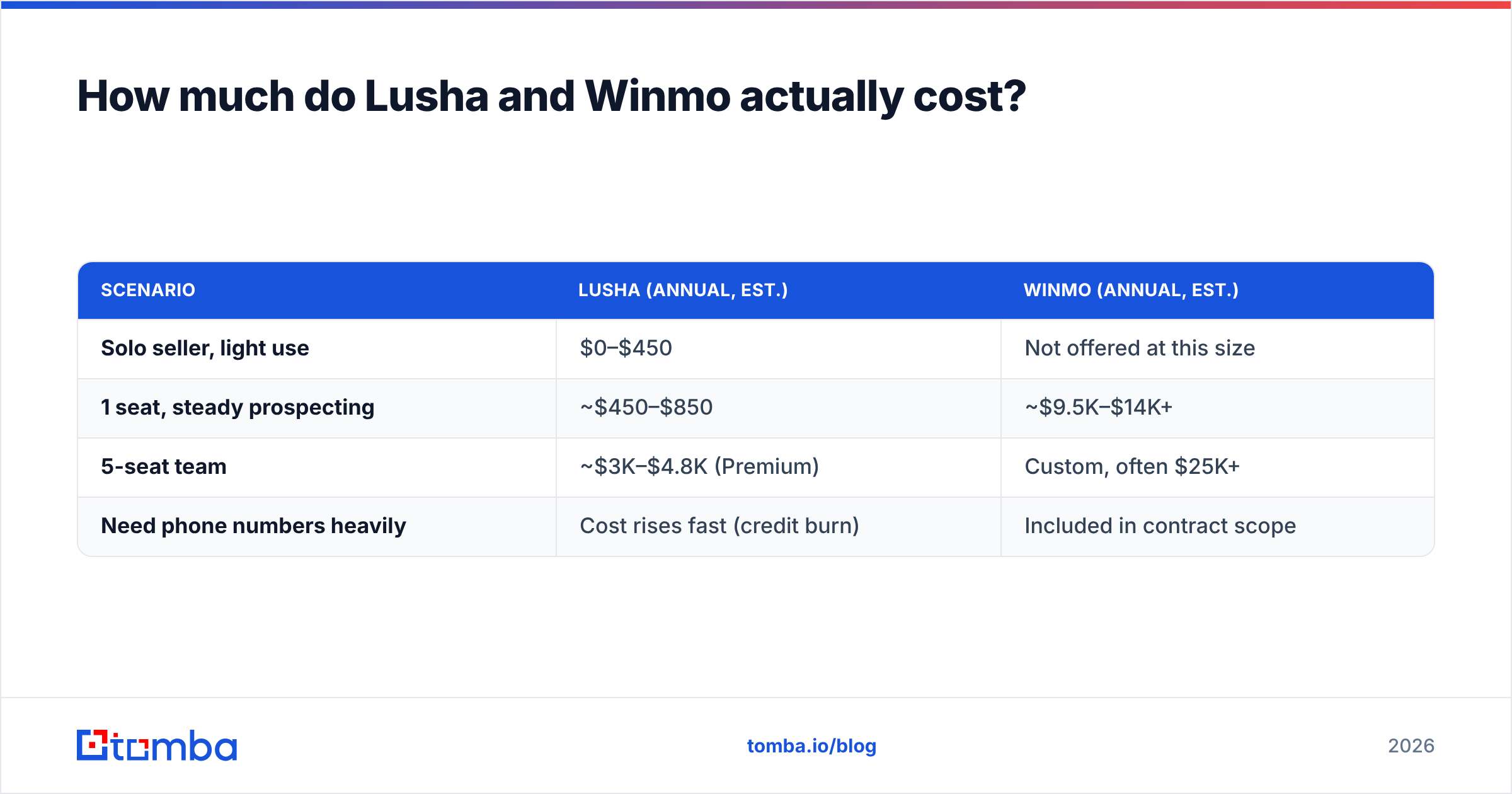
Here's a rough per-seat comparison:
| Scenario | Lusha (annual, est.) | Winmo (annual, est.) |
|---|---|---|
| Solo seller, light use | $0–$450 | Not offered at this size |
| 1 seat, steady prospecting | ~$450–$850 | ~$9.5K–$14K+ |
| 5-seat team | ~$3K–$4.8K (Premium) | Custom, often $25K+ |
| Need phone numbers heavily | Cost rises fast (credit burn) | Included in contract scope |

Who should choose Winmo over Lusha?#
Winmo is worth the cost when your revenue depends on marketing budgets at named brands. These buyers usually get value from it quickly:
- Media sales teams. Publishers, broadcasters, CTV, podcast networks, and out-of-home sellers who need to know which brands are spending on which channels and who controls the plan.
- Adtech and martech vendors. If your buyer is a brand marketer or an agency trading desk, Winmo's agency-of-record data tells you whether to pitch the brand directly or go through its agency.
- Agencies doing new business. Agency-review alerts and "who is the incumbent?" data shorten the time between a brand opening a pitch and you getting invited.
- Sponsorship and events sellers. Sports, festivals, and conferences selling to brand partnership teams benefit from spend and category data.
- Teams selling on planning calendars. If a brand sets its annual budget in Q3, reaching them in Q1 is wasted effort. Winmo's timing signals are designed for this.
If none of those describe you, you'll pay for intelligence you won't use. A SaaS SDR selling HR software to mid-market operations leaders has no use for a brand's estimated CTV spend.
Who should choose Lusha over Winmo?#
Lusha suits teams that need volume and speed across many industries:
- SDR teams that mostly work LinkedIn and want one-click reveals inside the browser.
- Founders and small teams who need a free tier or a sub-$100/mo plan to start.
- Recruiters looking for personal and work contacts for candidates.
- RevOps teams that want enrichment flowing into Salesforce or HubSpot without an annual five-figure contract.
Lusha also gives some signals, such as job changes, hiring, and funding. These are generic B2B signals, not ad-industry ones. For most outbound motions, generic signals plus a good contact is enough.
The common complaints about Lusha are also worth knowing: data coverage gets thinner outside North America and Western Europe, phone credits burn fast, and accuracy varies by region and seniority. G2 and Capterra reviews mention these issues regularly, so test it on a sample of your own target list before you commit to an annual plan.
Is Lusha's data more accurate than Winmo's?#
Neither vendor wins outright, because they cover different populations.
Winmo's dataset is narrow and curated. It covers a defined universe of advertisers, agencies, and their marketing and media decision-makers. Because the universe is smaller, it can be researched more thoroughly, and agency-relationship data in particular is hard to get anywhere else.
Lusha's dataset is broad and mostly crowd-sourced and aggregated across millions of companies. Its breadth is the advantage. The trade-off is that record quality varies more, especially for junior roles and less-covered regions.
In practice, a large share of teams verify every email before sending, whichever source it came from. A bounced email costs the same whether the contact came from a $14K platform or a free extension, because it damages your sender reputation. Running exports through an email verifier before they reach your sequencer is cheap insurance on either platform.
Can you combine Lusha or Winmo with a cheaper email finder?#
Yes, and that's often the most cost-efficient setup. Teams typically use one of these three:
- Winmo for targeting, an email finder for coverage. Use Winmo to decide which brands and agencies to pursue and when. Then fill in the wider buying committee (procurement, brand managers, analysts) with a cheaper email finder rather than paying for extra seats.
- Lusha for phones, an email finder for emails. Since Lusha's phone reveals cost several times more than email reveals, some teams keep Lusha only for direct dials and source emails elsewhere at lower cost per contact.
- An email finder only. If you already know your target accounts (from your CRM, an event list, or a partner list), you may not need a sales intelligence platform at all. Domain-level search and verified pattern matching cover most of the work.
For the third option, a tool like the Tomba Email Finder finds professional emails by name plus domain, or lists every public address at a company. Plans start at $49/mo, with a free tier of 25 searches per month (see Tomba pricing). It won't tell you a brand's CTV budget, but it does provide email coverage for the accounts you've already picked.

What are the pros and cons of each tool?#
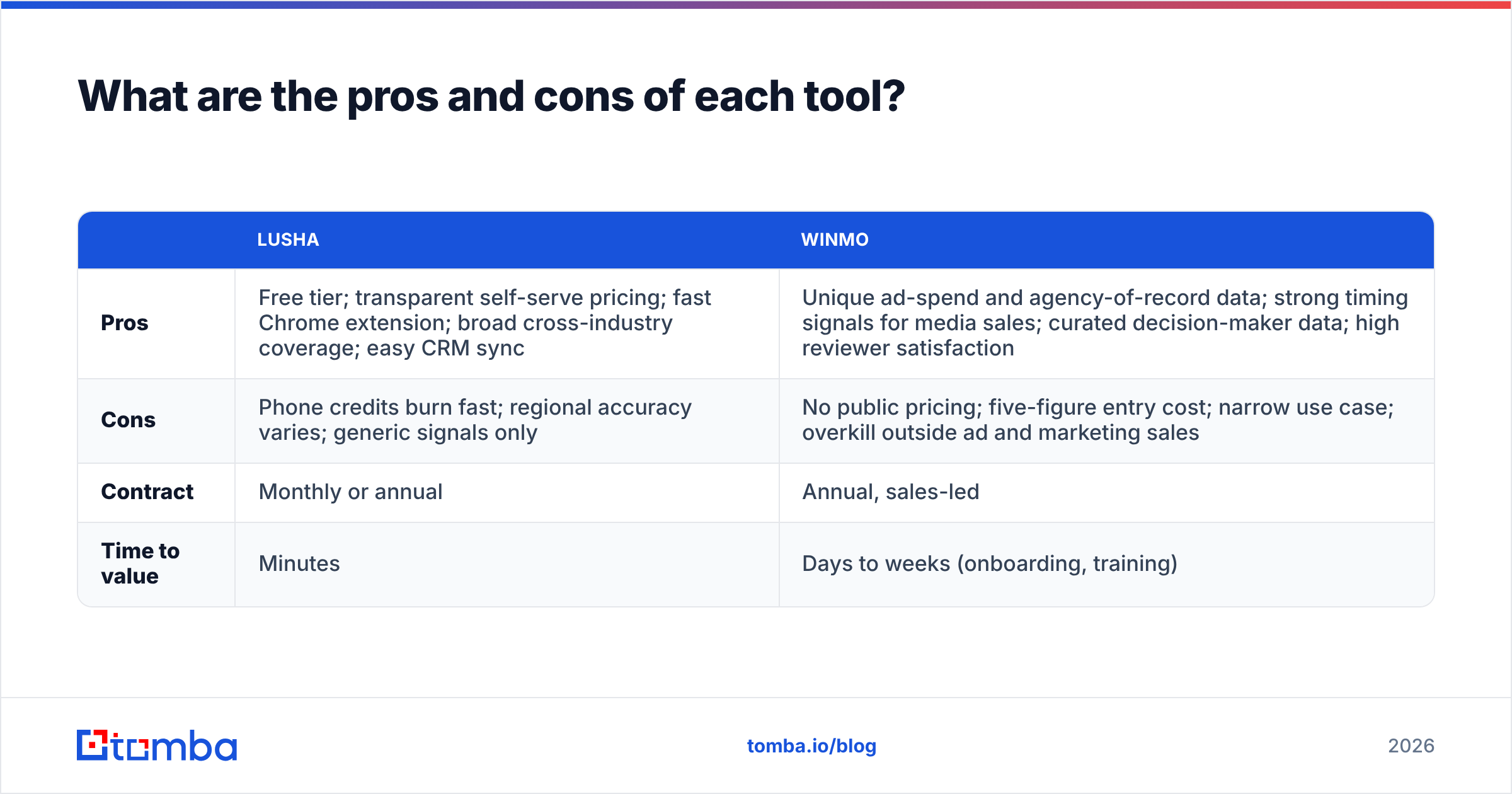
| Lusha | Winmo | |
|---|---|---|
| Pros | Free tier; transparent self-serve pricing; fast Chrome extension; broad cross-industry coverage; easy CRM sync | Unique ad-spend and agency-of-record data; strong timing signals for media sales; curated decision-maker data; high reviewer satisfaction |
| Cons | Phone credits burn fast; regional accuracy varies; generic signals only | No public pricing; five-figure entry cost; narrow use case; overkill outside ad and marketing sales |
| Contract | Monthly or annual | Annual, sales-led |
| Time to value | Minutes | Days to weeks (onboarding, training) |
How do you decide between Lusha and Winmo?#
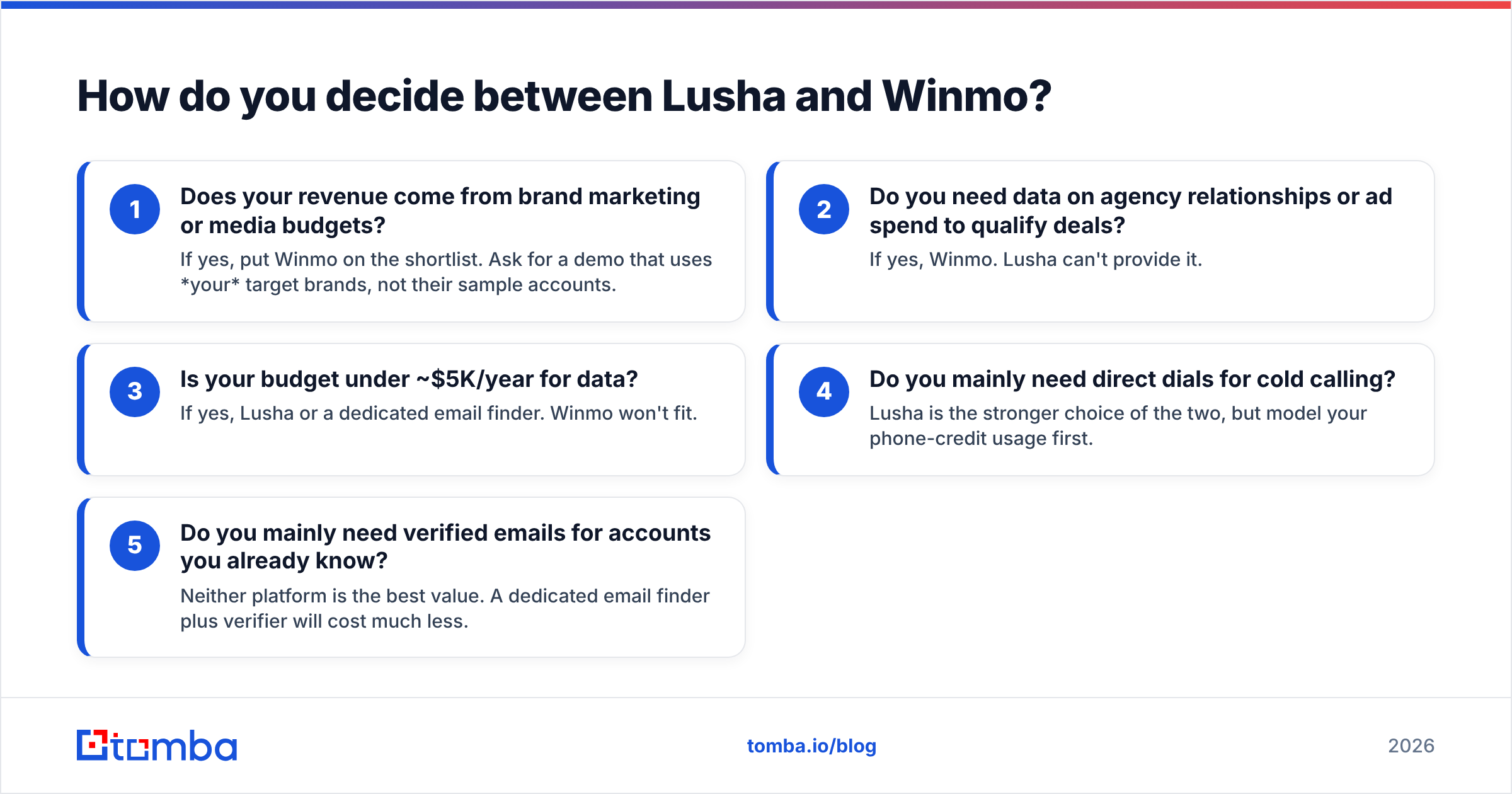
Answer these questions in order. The first "yes" settles it.
- Does your revenue come from brand marketing or media budgets? If yes, put Winmo on the shortlist. Ask for a demo that uses your target brands, not their sample accounts.
- Do you need data on agency relationships or ad spend to qualify deals? If yes, Winmo. Lusha can't provide it.
- Is your budget under ~$5K/year for data? If yes, Lusha or a dedicated email finder. Winmo won't fit.
- Do you mainly need direct dials for cold calling? Lusha is the stronger choice of the two, but model your phone-credit usage first.
- Do you mainly need verified emails for accounts you already know? Neither platform is the best value. A dedicated email finder plus verifier will cost much less.
Before signing either contract, take 100 contacts from your real ICP, run them through both trials (or through Lusha and an alternative), verify the results, and compare bounce-safe yield per dollar. That one exercise gives you a clearer answer than any feature grid. If you're also comparing other data providers, our Apollo alternative breakdown covers how the broader contact-data market prices coverage.
Which one wins: Lusha or Winmo?#
For selling to advertisers and agencies, Winmo wins. No general-purpose contact database replicates its ad-spend estimates, agency-of-record mapping, or planning-cycle timing. If one closed media deal covers the subscription, the price is justified.
For everyone else, Lusha wins on value. It's self-serve, starts free, and covers any industry. Just budget carefully for phone credits and verify data before you send.
There's also a third option the matchup leaves out. If what you need is "the right email at the right company," you may not need either platform's premium features.
If that describes you, start with the Tomba Email Finder. You can look up professional emails by name, domain, or company, check them with built-in verification, and push them into your CRM. It starts with 25 free searches a month and paid plans begin at $49/mo. Test it on your own target accounts first, then decide whether you also need sales intelligence on top.
Related guides#
// start free
See who Tomba finds at any company
Type a company's domain to see its people, their roles and verified work emails, each with the pages it was found on. Free account, no card.
Free plan · No credit card required · GDPR & CCPA
// about the author