Mail Campaign Guide: How to Plan, Send, and Measure in 2026
Most mail campaigns fail before anyone reads them, because of bad lists, missing authentication, or one generic blast. Here is the full playbook for 2026, from list to last follow-up.
TL;DR
- A mail campaign is a planned series of emails sent to a defined audience toward one measurable goal. One email is a send. A campaign is a sequence with a goal.
- Most campaigns fail at the infrastructure layer before copy matters at all. Bad addresses, missing SPF/DKIM/DMARC, and sending too much from a new domain will sink good writing.
- Since 2024, Gmail, Yahoo, and later Outlook require bulk senders to authenticate, offer one-click unsubscribe, and keep spam complaints under 0.3%. Treat these as the minimum.
- Pick the campaign type (cold outbound, nurture, announcement, re-engagement) first. It decides your list source, cadence, and success metric.
- Track replies, positive-reply rate, and meetings booked. Open rates have been unreliable since Apple Mail Privacy Protection.
What is a mail campaign?#
A mail campaign is a coordinated set of email messages sent to a specific audience over a set period, built to produce one outcome: replies, demo bookings, renewals, event sign-ups, or reactivated accounts.
The word "mail" causes some confusion. In B2B sales and marketing, "mail campaign" nearly always means an email campaign. Direct (postal) mail campaigns still exist, and some account-based marketing teams send physical packages to top-tier accounts. This guide covers email, which is where most B2B teams spend their outbound budget and where the most can go wrong.
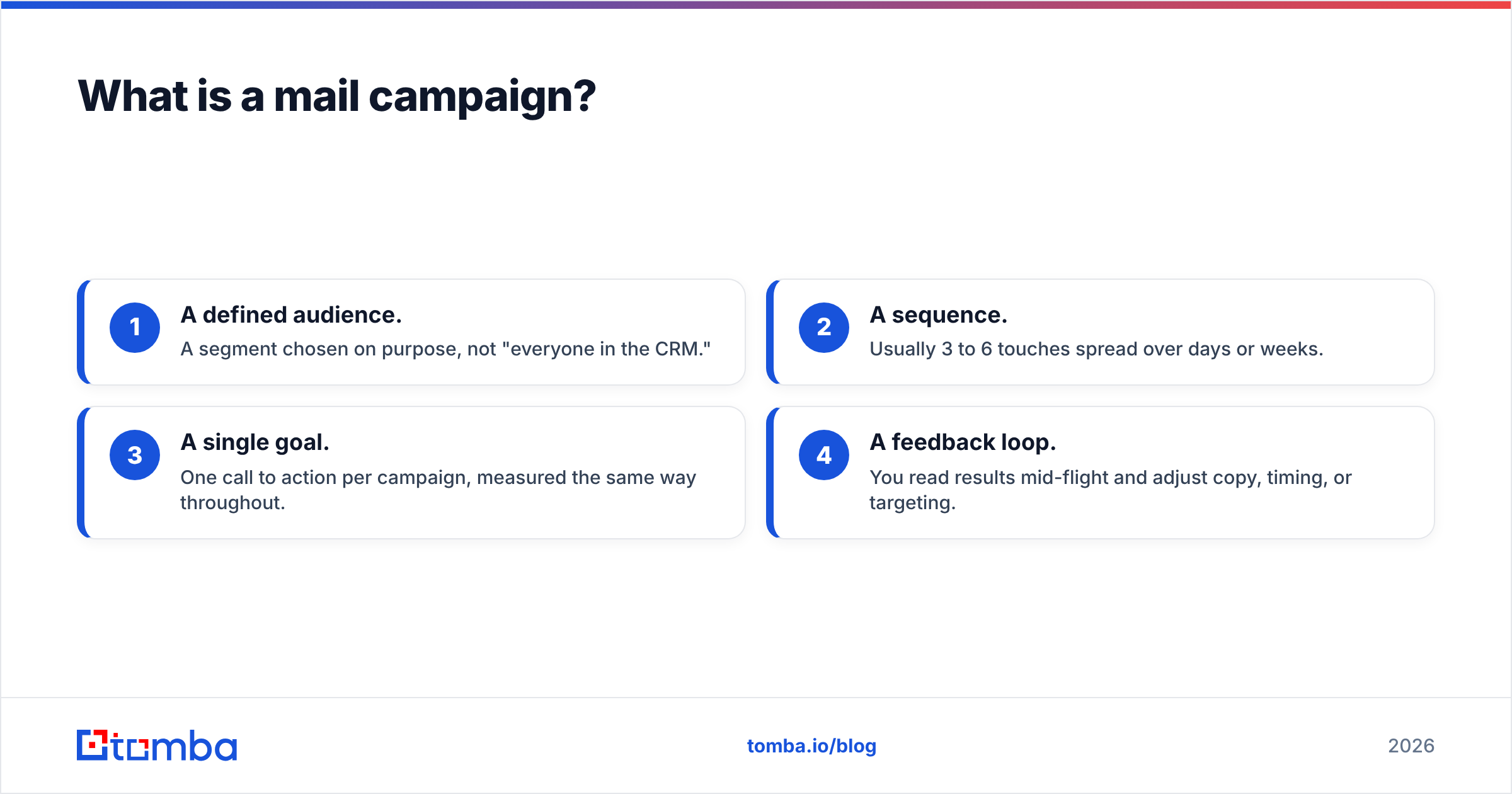
A campaign has four parts that a one-off email doesn't:
- A defined audience. A segment chosen on purpose, not "everyone in the CRM."
- A sequence. Usually 3 to 6 touches spread over days or weeks.
- A single goal. One call to action per campaign, measured the same way throughout.
- A feedback loop. You read results mid-flight and adjust copy, timing, or targeting.
If one of these is missing, you are sending emails, not running a campaign.
Which type of mail campaign should you run?#
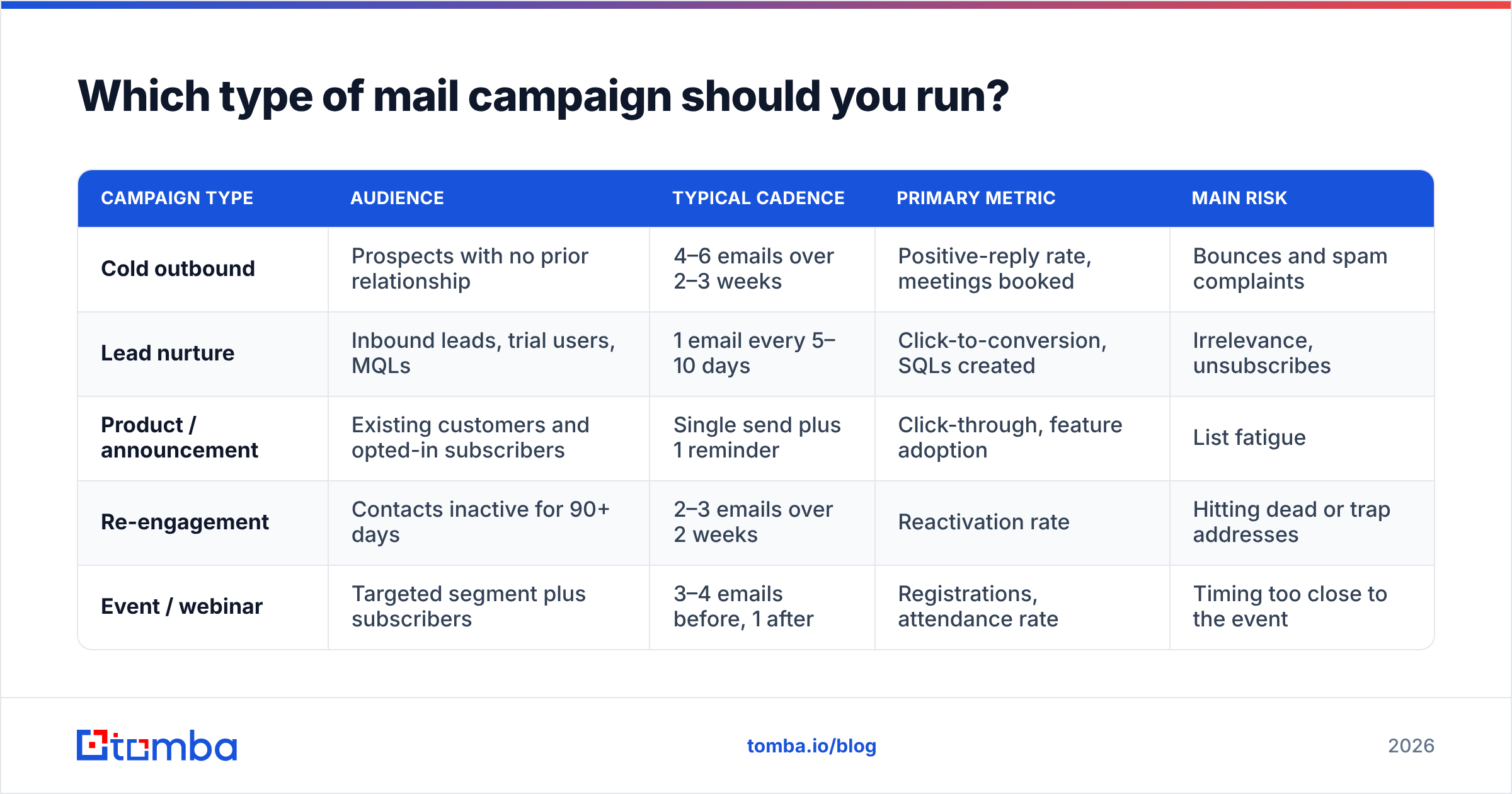
Choose the type before you write anything. Each type uses different data, carries different legal and deliverability risk, and gets judged by a different number.
| Campaign type | Audience | Typical cadence | Primary metric | Main risk |
|---|---|---|---|---|
| Cold outbound | Prospects with no prior relationship | 4–6 emails over 2–3 weeks | Positive-reply rate, meetings booked | Bounces and spam complaints |
| Lead nurture | Inbound leads, trial users, MQLs | 1 email every 5–10 days | Click-to-conversion, SQLs created | Irrelevance, unsubscribes |
| Product / announcement | Existing customers and opted-in subscribers | Single send plus 1 reminder | Click-through, feature adoption | List fatigue |
| Re-engagement | Contacts inactive for 90+ days | 2–3 emails over 2 weeks | Reactivation rate | Hitting dead or trap addresses |
| Event / webinar | Targeted segment plus subscribers | 3–4 emails before, 1 after | Registrations, attendance rate | Timing too close to the event |
Two practical points come out of this table.
First, cold outbound and newsletters should never share a sending domain. Cold outreach naturally draws more complaints, and you don't want that reputation landing on the domain your customers use for invoices and password resets. Most teams send cold email from a secondary domain (for example getacme.com next to acme.com).
Second, the success metric decides how you write. A nurture email built for clicks needs a link and a reason to click. A cold email built for replies works better with no links at all and a question that is easy to answer.
How do you build a list that won't wreck your sender reputation?#
The list sets the ceiling on campaign performance. A great sequence sent to the wrong people, or to addresses that don't exist, will fail, and it will also damage your domain for the next campaign.
For cold outbound, build from your ideal customer profile, not from what a database happens to make easy to export. A workable flow:
- Define firmographic filters such as industry, headcount band, region, and tech stack.
- Pull a target account list of companies that match.
- Identify 1 to 3 relevant roles per account (the decision-maker, a champion, and sometimes a technical evaluator).
- Find each person's work address with an email finder that works from name plus domain.
- Run every address through an email verifier before it goes into a sequence.
Step 5 is non-negotiable. Bounce rates above roughly 2% are a common warning sign for mailbox providers, and a single unverified CSV can go well past that. Catch-all domains, which accept mail for any address, need separate handling. Send to them in smaller batches or leave them out of the first wave.
Never buy a static list. Purchased lists are usually stale, often contain spam traps, and in many jurisdictions put you on the wrong side of consent rules. Where third-party data is involved, use a reputable provider that sources and refreshes it transparently, and verify the result anyway.
For nurture and announcement campaigns, the list already exists in your CRM or marketing platform. The job here is hygiene. Suppress hard bounces, remove contacts who haven't engaged in 6 to 12 months (or move them to a re-engagement campaign first), and respect every unsubscribe immediately.
What technical setup does a mail campaign need in 2026?#
This is where most campaigns quietly fail. In February 2024, Google and Yahoo began enforcing requirements for bulk senders, meaning anyone sending around 5,000+ messages a day to their users. Microsoft followed with similar enforcement for Outlook consumer mailboxes in 2025. Even if you send far less, these rules describe what mailbox providers now expect from everyone.
The baseline, drawn from Google's email sender guidelines and Yahoo's sender best practices:
- SPF record listing every service allowed to send for your domain.
- DKIM signing on every message, aligned with your From domain.
- DMARC policy published. Starting at
p=nonewith reporting is fine, but it must exist. - One-click unsubscribe (RFC 8058 list-unsubscribe header) for marketing and promotional mail, honored within two days.
- Spam complaint rate kept below 0.1% and never reaching 0.3%, as reported in Google Postmaster Tools.
- Valid forward and reverse DNS for sending IPs, and TLS for transmission.
Warm up new domains and mailboxes. A domain registered last week that sends 500 emails on day one looks exactly like a spammer. Ramp gradually: start with a small daily volume per mailbox, raise it over 3 to 4 weeks, and keep cold sending per mailbox modest even when fully warm. Many teams spread volume across several mailboxes instead of pushing one hard. If you want a concrete ramp schedule, the email warmup calculator will produce one from your target volume.
Check before you send. Run your template through a spam checker to catch obvious triggers such as image-only bodies, link shorteners, too many links, or aggressive formatting. It won't guarantee inbox placement, but it catches the avoidable mistakes.
For a deeper look at how these factors combine, see the glossary entry on email deliverability.
How should you write the emails in a campaign?#
Once the list is clean and the domain is trusted, copy decides the result. The principles below apply most strongly to cold and nurture campaigns, but they hold for announcements too.
Write to one segment, not the whole list. A VP of Finance at a 200-person logistics company and a RevOps manager at a Series B SaaS company don't share the same problem. Split them into separate campaigns, or at least separate first emails. Segment-level relevance usually does more than heavy per-person personalization, and it scales.
Structure the first email in four lines:
- Trigger or observation. Why you're writing to them now (a hire, a funding round, a tool they use, a page on their site).
- Problem. The specific pain that trigger usually creates.
- Proof. One short outcome from a similar company, with a number if you have an honest one.
- Ask. A low-friction question, such as "Worth a look?" or "Is this on your radar for Q1?", not "Book 30 minutes on my calendar."
Keep it short. Cold first emails of roughly 50 to 125 words tend to do well because they can be read in a preview pane. Nurture emails can run longer if the content earns it.
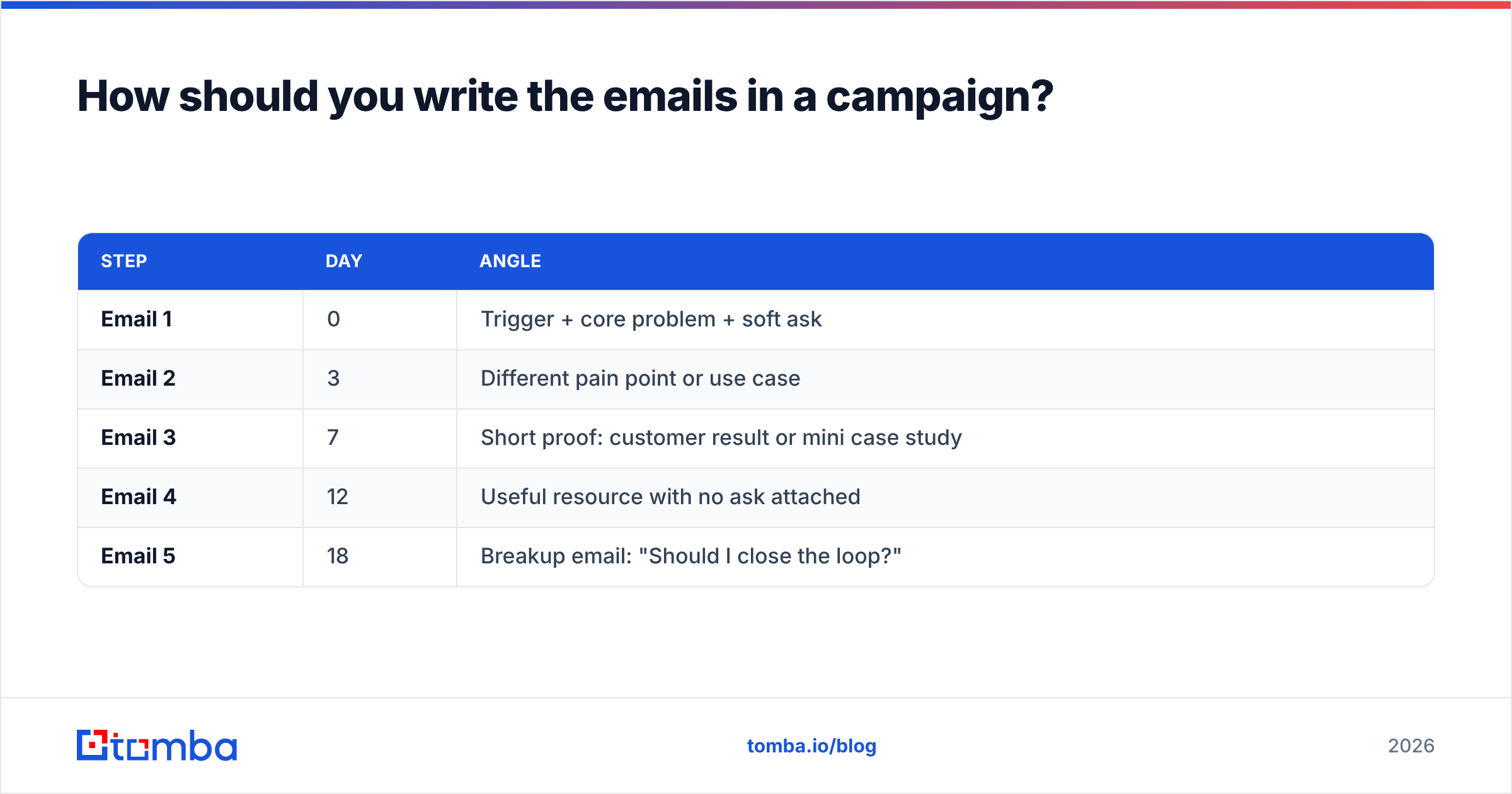
Make each follow-up add something. "Just bumping this up" gives the reader nothing new. Each follow-up should bring a new angle, such as a different pain point, a case study, a relevant resource, or a sharper question. A typical cold sequence:
| Step | Day | Angle |
|---|---|---|
| Email 1 | 0 | Trigger + core problem + soft ask |
| Email 2 | 3 | Different pain point or use case |
| Email 3 | 7 | Short proof: customer result or mini case study |
| Email 4 | 12 | Useful resource with no ask attached |
| Email 5 | 18 | Breakup email: "Should I close the loop?" |
Subject lines should look internal. Two to five lowercase words that could plausibly come from a colleague ("question about onboarding", "logistics hiring") usually beat clever or salesy lines. Avoid misleading subjects, which also violate the FTC's CAN-SPAM rules in the US.
Stay compliant across regions. CAN-SPAM requires a physical address and a working opt-out. GDPR in the EU and UK and CASL in Canada add consent and legitimate-interest requirements that vary by country. If you prospect into Europe, document your lawful basis for each segment and make opting out effortless.
When should you send, and how much?#
Timing matters less than relevance, but it still matters.
- Weekdays beat weekends for B2B. Tuesday through Thursday mornings in the recipient's time zone are a sensible default. Treat that as a starting hypothesis to test, not a law.
- Send in the recipient's local time. A campaign that reaches London at 3 a.m. because you scheduled it from San Francisco starts at a disadvantage.
- Throttle volume. Spread sends across the day instead of firing 1,000 at once. Sudden spikes look suspicious to mailbox providers.
- Stop on reply. Any reply, including "not interested," should remove that contact from the sequence automatically. Following up after someone said no is the fastest route to a spam complaint.
- Cap total touches. If 5 or 6 thoughtful emails haven't got a response, more emails won't either. Move the contact to a long-term nurture track or another channel.
Which metrics actually tell you if a mail campaign worked?#
Open rate used to be the headline number. It isn't reliable anymore. Apple Mail Privacy Protection preloads tracking pixels, which inflates opens, and many security filters "open" mail automatically. Some cold emailers turn open tracking off entirely, because the tracking pixel itself can hurt deliverability.
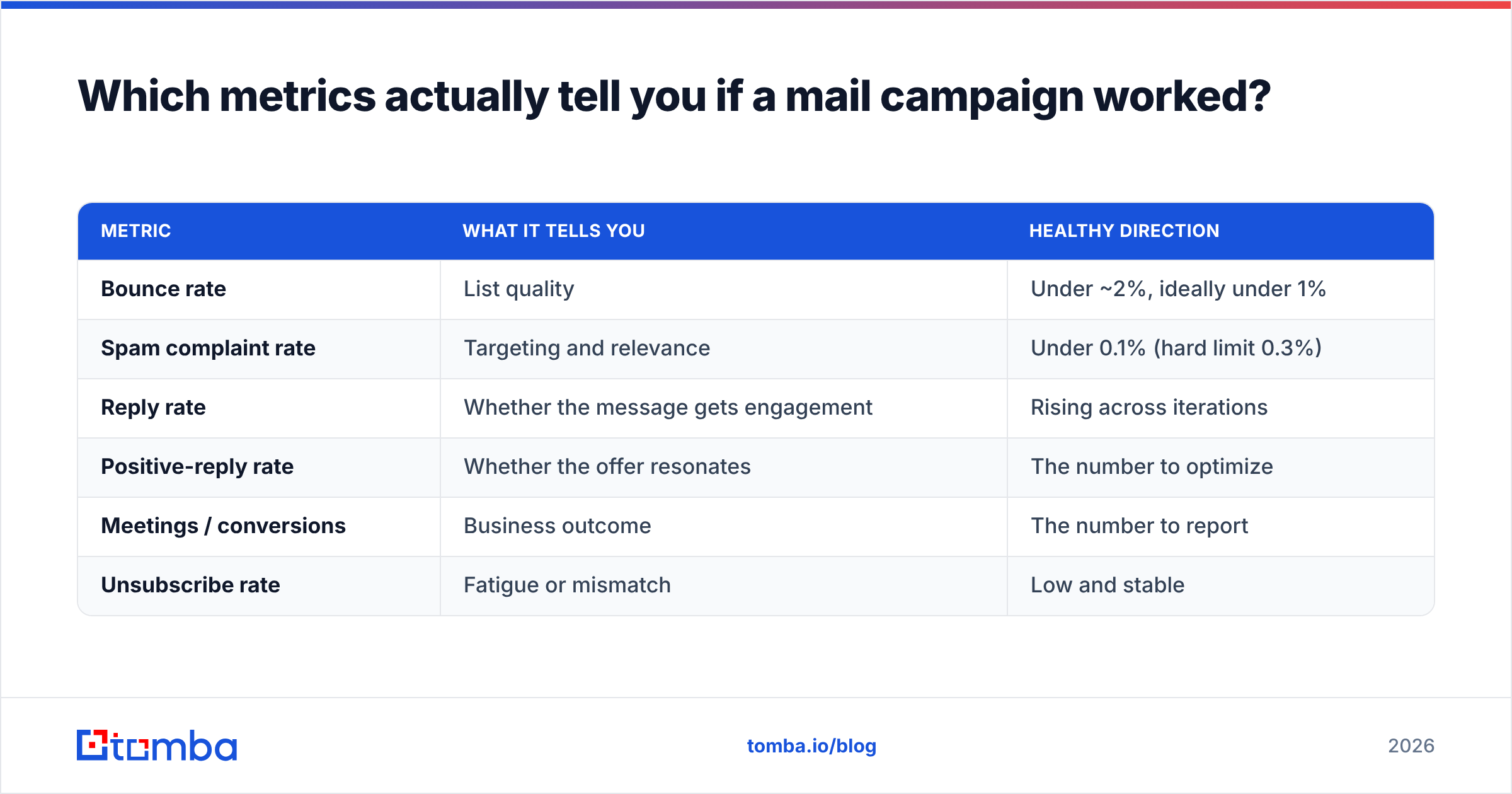
Track these instead, roughly in order of importance:
| Metric | What it tells you | Healthy direction |
|---|---|---|
| Bounce rate | List quality | Under ~2%, ideally under 1% |
| Spam complaint rate | Targeting and relevance | Under 0.1% (hard limit 0.3%) |
| Reply rate | Whether the message gets engagement | Rising across iterations |
| Positive-reply rate | Whether the offer resonates | The number to optimize |
| Meetings / conversions | Business outcome | The number to report |
| Unsubscribe rate | Fatigue or mismatch | Low and stable |
Read them as a diagnostic chain, in this order:
- High bounces? The list is the problem. Re-verify before changing anything else.
- Low bounces, but low replies and complaints creeping up? Targeting is off. You're reaching real people who aren't the right people.
- Decent reply rate, mostly negative? The offer or positioning needs work.
- Good positive replies, few meetings? The hand-off is breaking. Look at response speed, scheduling friction, and qualification.
Change one variable at a time between iterations. If you rewrite the subject line, the first email, and the target segment all at once, you won't know what moved the result.
For more context on benchmarks and how to calculate them, the HubSpot email marketing resources are a solid reference for nurture and newsletter-style campaigns.
What are the most common mail campaign mistakes?#
These are the patterns behind most failed campaigns:
- Sending from the primary domain for cold outreach. One bad campaign can push your invoices and support replies into spam.
- Skipping verification. Bounces are the most avoidable deliverability problem, and they show up first.
- One message for everyone. Mixing segments in a single campaign weakens every message.
- Too many links and images in cold email. Plain text with at most one link looks like a person wrote it, because a person did.
- No unsubscribe path. It's now required for bulk marketing mail at major providers. In cold email, a simple "reply 'no' and I won't follow up" line also lowers complaints.
- Judging success by opens. You end up optimizing a number that no longer reflects human behavior.
- No suppression across tools. Someone who unsubscribes in your marketing platform shouldn't keep getting cold sequences from your sales engagement tool. Sync suppression lists.
How do you run your first mail campaign this week?#
A compact checklist you can work through in order:
- Pick one goal and one segment. For example: "Book 10 meetings with heads of operations at 50–500 person logistics companies in the US."
- Confirm authentication. SPF, DKIM, and DMARC are live on the sending domain, and the mailbox has been warming for at least 2 to 3 weeks.
- Build 200 to 400 contacts. Find work emails, verify them, and set catch-alls aside.
- Write a 4 to 5 step sequence. A new angle in every step, plain text, one low-friction ask.
- Launch at modest volume. Watch bounces and complaints daily for the first week.
- Review after 2 weeks. Use the diagnostic chain above, change one variable, and run the next batch.
Running small, clean batches and improving each round beats one large blast almost every time. You protect your domain, you get readable data, and each campaign starts from a better baseline than the last.
Where does Tomba fit in a mail campaign?#
Every step above depends on reaching real people at real addresses. If the list is wrong, authentication, copy, and cadence can't make up for it. Tomba Email Finder finds professional email addresses from a name and company domain, or returns everyone publicly associated with a domain, and connects with verification so you can clean the list before the first send. You can start on the free tier (25 searches a month) to build and test your first segment, then move to the Starter plan at $49/mo when you're ready to run campaigns at a steady weekly volume.
Related guides#
// start free
See who Tomba finds at any company
Type a company's domain to see its people, their roles and verified work emails, each with the pages it was found on. Free account, no card.
Free plan · No credit card required · GDPR & CCPA
// about the author