Mailarrow Pricing Reviews Pros and Cons: 2026 Honest Breakdown
Mailarrow undercuts most cold email platforms on price, with unlimited mailboxes from $39/mo. Here is what the plans include, what the few public reviews say, and where the hidden costs are.
This Mailarrow pricing reviews pros and cons breakdown covers the three paid plans, what the few public reviews say, and the costs the plan price leaves out.
TL;DR
Mailarrow has three paid plans: Basic at $39/mo, Professional at $59/mo, and Growth at $99/mo on monthly billing. Some third-party listings show lower annual rates (about $32, $49, and $70 per month).
Every plan includes unlimited mailboxes and unlimited email warmup. That is the main reason to choose it over seat-priced or inbox-priced tools.
There are very few public reviews: two on G2, with an average of 4.3/5. Reviewers like how simple it is. They complain about emails still landing in spam and about the built-in email finder returning inaccurate addresses.
The real cost goes beyond the plan price. You also pay for sending domains, mailboxes, and a reliable data and verification layer.
Verdict: Mailarrow is good value for small teams that want to send at scale on a budget. Teams that need a large review base, deep integrations, or accurate built-in prospect data should look elsewhere or pair it with a dedicated data tool.
What is Mailarrow and who is it built for?#
Mailarrow is a cold email outreach platform. It handles sequences, inbox rotation, warmup, AI personalization, and campaign analytics. It competes with Instantly, Smartlead, and Woodpecker. These tools let you connect many mailboxes and spread volume across them. That way, no single inbox gets flagged.
Its pitch is simple. You get unlimited mailboxes and unlimited warmup at a low monthly price, and the plan limits are set by active prospects and monthly emails, not by seats or inboxes. That suits agencies and lean outbound teams. They run many domains and don't want to pay each time they add a mailbox.
It is not an enterprise sales engagement suite. You won't find the multi-channel cadences, call dialers, or deep CRM governance of Outreach or Salesloft. Judge it as what it is: a budget-friendly sending engine.
How much does Mailarrow cost in 2026?#
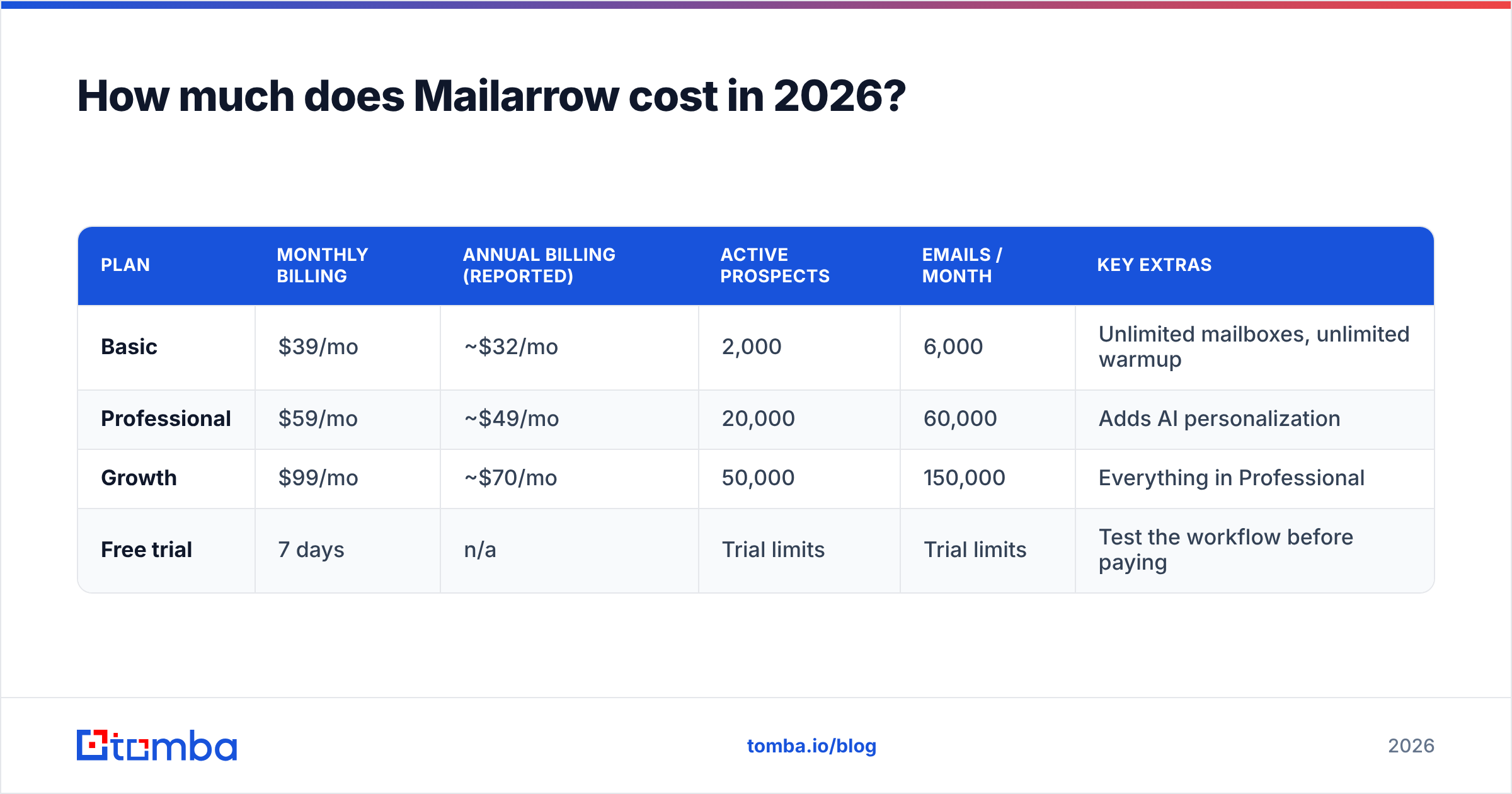
Below are Mailarrow's published tiers as they appear on its listings and on third-party sites such as G2's Mailarrow pricing page. Prices change, so confirm on the official Mailarrow site before you buy.
| Plan | Monthly billing | Annual billing (reported) | Active prospects | Emails / month | Key extras |
|---|---|---|---|---|---|
| Basic | $39/mo | ~$32/mo | 2,000 | 6,000 | Unlimited mailboxes, unlimited warmup |
| Professional | $59/mo | ~$49/mo | 20,000 | 60,000 | Adds AI personalization |
| Growth | $99/mo | ~$70/mo | 50,000 | 150,000 | Everything in Professional |
| Free trial | 7 days | n/a | Trial limits | Trial limits | Test the workflow before paying |
A few things stand out:
- The jump from Basic to Professional is the best deal on the page. For $20 more per month you get 10x the active prospects and 10x the email volume, plus AI personalization. Basic is mostly a trial-sized plan.
- Growth is priced for agencies. 150,000 emails a month spread across dozens of mailboxes is real agency volume, and $99/mo for that is aggressive compared with similar tools.
- There's no permanent free tier. You get a 7-day trial, then you pay.
What do Mailarrow reviews actually say?#
The honest answer is that there isn't much to go on. As of this writing, Mailarrow's G2 profile shows two reviews averaging 4.3/5, and G2 notes that the vendor hasn't managed the profile in over a year. We found no meaningful set of Capterra reviews. Two reviews are anecdotes, not evidence, so treat any confident verdict on Mailarrow (including this one) with that in mind.
That said, the feedback that exists is consistent:
What reviewers liked
- Easy onboarding and simple day-to-day use
- Unlimited mailboxes and smart inbox rotation
- AI personalization that one reviewer credited with better reply rates
- Built-in warmup and analytics that were useful for spotting problems
What reviewers disliked
- Emails still landing in spam despite using warmup and automation features
- The built-in email finder sometimes pulling random or inaccurate addresses
- Occasional slowness in the app
The spam complaint isn't specific to Mailarrow. No sending tool can fix bad lists, weak authentication, or aggressive volume. The data-accuracy complaint matters more, though, because it points to where Mailarrow's all-in-one promise is weakest.

Mailarrow pricing reviews pros and cons at a glance#
Here are the trade-offs in one place.
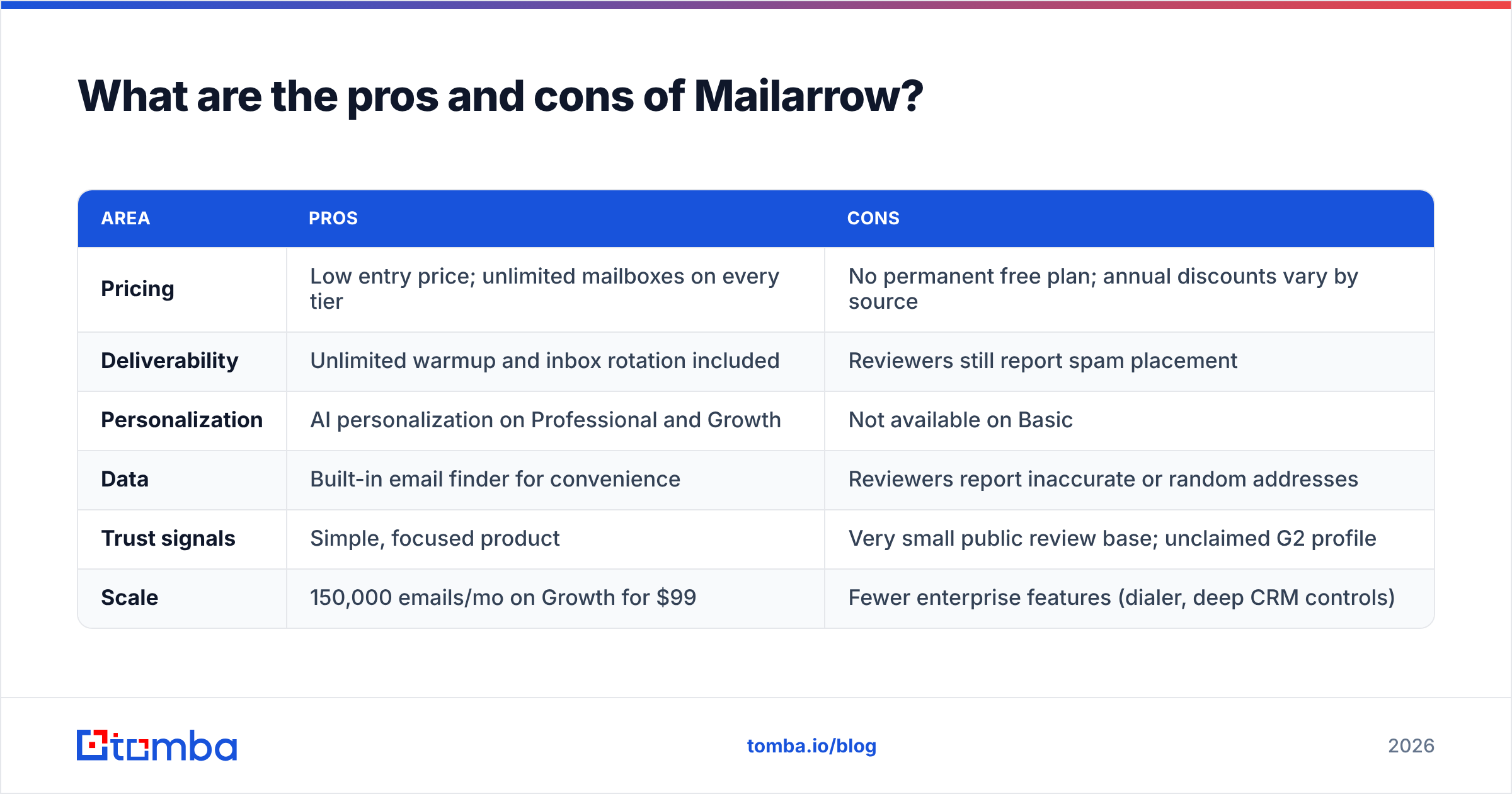
| Area | Pros | Cons |
|---|---|---|
| Pricing | Low entry price; unlimited mailboxes on every tier | No permanent free plan; annual discounts vary by source |
| Deliverability | Unlimited warmup and inbox rotation included | Reviewers still report spam placement |
| Personalization | AI personalization on Professional and Growth | Not available on Basic |
| Data | Built-in email finder for convenience | Reviewers report inaccurate or random addresses |
| Trust signals | Simple, focused product | Very small public review base; unclaimed G2 profile |
| Scale | 150,000 emails/mo on Growth for $99 | Fewer enterprise features (dialer, deep CRM controls) |
Is Mailarrow cheaper than Instantly, Smartlead, or Woodpecker?#
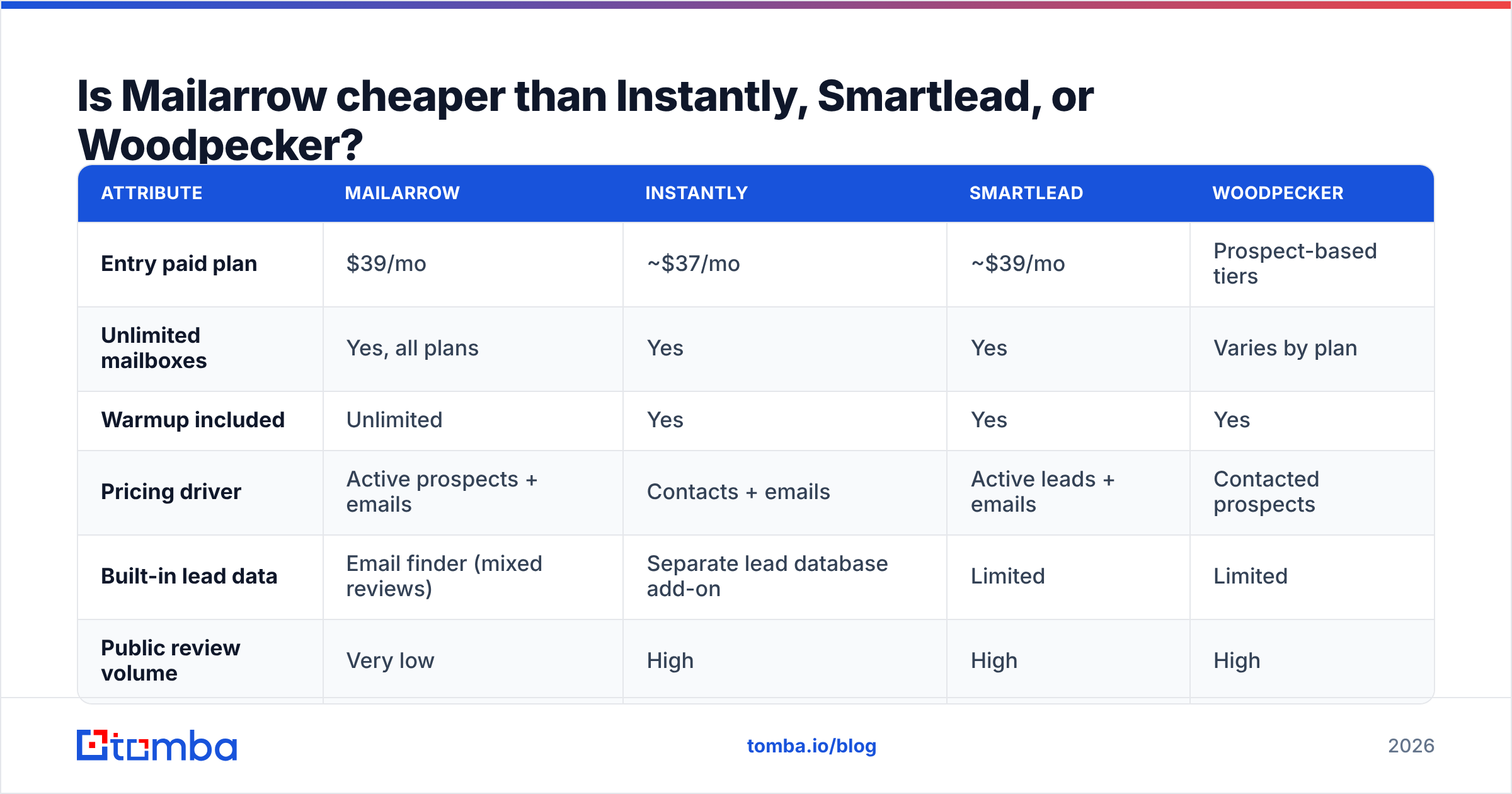
On headline price, Mailarrow sits at or below most direct competitors, especially once you add mailboxes. The structure matters as much as the number. Some tools charge by contacted prospects, some by inbox, and some bundle lead databases at extra cost.
| Attribute | Mailarrow | Instantly | Smartlead | Woodpecker |
|---|---|---|---|---|
| Entry paid plan | $39/mo | ~$37/mo | ~$39/mo | Prospect-based tiers |
| Unlimited mailboxes | Yes, all plans | Yes | Yes | Varies by plan |
| Warmup included | Unlimited | Yes | Yes | Yes |
| Pricing driver | Active prospects + emails | Contacts + emails | Active leads + emails | Contacted prospects |
| Built-in lead data | Email finder (mixed reviews) | Separate lead database add-on | Limited | Limited |
| Public review volume | Very low | High | High | High |
Competitor prices are approximate and change often. Check each vendor's pricing page before deciding. If you're looking at the market leader, our Instantly alternative breakdown covers that comparison in more depth.
The takeaway: Mailarrow wins on price per mailbox and per email at the Professional and Growth tiers. Instantly and Smartlead win on maturity, community, integrations, and the confidence that thousands of reviews give you. If you're spending company money and have to justify the choice, that review gap is a real factor.
What are the hidden costs of running Mailarrow?#
The plan price is only one line in your outbound budget. Before you compare tools on sticker price, account for the full stack:
Sending domains. Serious cold email uses secondary domains to protect your main domain. Plan on roughly $10–15 per domain per year, and most teams run several.
Mailboxes. "Unlimited mailboxes" means Mailarrow doesn't charge for them, but Google Workspace or Microsoft 365 still does, usually several dollars per inbox per month. Ten inboxes add a noticeable monthly cost on top of your plan.
Warmup time. New inboxes need weeks of warmup before they can send at volume. That is lost pipeline time, not cash, but it's real. Use a warmup calculator to plan ramp-up before you commit to a sending schedule.
Prospect data. Mailarrow's own email finder has mixed reviews, so many teams will buy data from a dedicated provider. Budget for it.
Verification. Every invalid address you send to increases your bounce rate and hurts sender reputation. Google's email sender guidelines are strict about bulk senders, and a high bounce rate is one of the quickest ways to end up in spam.
That last point ties directly to the main complaint in Mailarrow's reviews. When users say "my emails still go to spam," the cause is often upstream: unverified lists, catch-all domains, and guessed addresses. Warmup can't make up for sending to bad data.
Why does data quality matter more than the sending tool?#
Think of a sending platform as a delivery truck. A better truck gets packages there more reliably, but if half the addresses on the labels are wrong, no truck fixes that. In cold email, your bounce rate, spam complaints, and reply rate depend on the list long before they depend on the sequencer.
That's why reviewers' comments about Mailarrow's email finder pulling "random" addresses matter. If you rely on an all-in-one tool's data and it guesses wrong, you burn the domains you spent weeks warming up.
The practical fix is to separate the jobs:
- Use a dedicated email finder to source addresses with confidence scores and source data.
- Run every list through an email verifier before importing it into Mailarrow or any other sequencer.
- Treat catch-all addresses separately. Send to them in smaller batches or verify them with a catch-all check.
- Keep your bounce rate under roughly 2%. Pause campaigns that go over it and clean the list.
With that setup, Mailarrow can do what it's good at, which is cheap, high-volume, rotated sending. Data accuracy becomes a separate, accountable layer.
Who should choose Mailarrow, and who should skip it?#
Here's a straightforward fit check.
Mailarrow is a good fit if you:
- Run an agency or lean outbound team that needs many mailboxes without per-inbox fees
- Want a low-cost sending engine and already have (or plan to buy) a reliable data source
- Are comfortable with a smaller vendor and can test it on the 7-day trial
- Will actually use Professional or Growth, where the value per dollar is strongest
Skip Mailarrow, or pair it carefully, if you:
- Need a large body of third-party reviews to justify the purchase internally
- Expect the built-in email finder to be your main data source
- Need enterprise features like a dialer, advanced permissions, or deep CRM syncing
- Are sending from a single fresh domain and expect warmup alone to solve deliverability
How should you evaluate Mailarrow during the free trial?#
Seven days goes by quickly. Use it for a structured test instead of clicking around:
- Day 1: Connect 2–3 secondary-domain inboxes and start warmup. Check that SPF, DKIM, and DMARC pass.
- Day 2: Import a small, verified list of 100–200 prospects. Verify it with a separate tool first so you're testing the sender, not your data.
- Day 3: Build a 3-step sequence with AI personalization (on a Professional trial) and compare the output with your own copy.
- Days 4–6: Send at low volume and watch bounce rate, open tracking, and replies. Seed a few test inboxes at Gmail and Outlook to check placement.
- Day 7: Test the built-in email finder on 20 contacts you already know are correct. Count the misses. That tells you whether you need an external data layer.
If the test goes well and your verified list stays out of spam, Mailarrow's pricing is hard to beat for the volume you get.
FAQ#
Does Mailarrow have a free plan? No. Mailarrow offers a 7-day free trial, and the paid plans start at $39/mo on monthly billing.
Which Mailarrow plan is the best value? Professional at $59/mo. It gives 10x Basic's prospect and email limits for $20 more and adds AI personalization.
Is Mailarrow good for deliverability? It includes unlimited warmup and inbox rotation, which help. Reviewers still report spam placement, which usually means list quality and authentication need work.
Is Mailarrow's email finder accurate? Public reviews say it sometimes returns inaccurate addresses. Most teams should verify data before sending or use a dedicated email finder.
How many reviews does Mailarrow have? Very few. Two on G2 as of this writing, averaging 4.3/5. That isn't enough for a confident consensus.
Final verdict: is Mailarrow worth the price?#
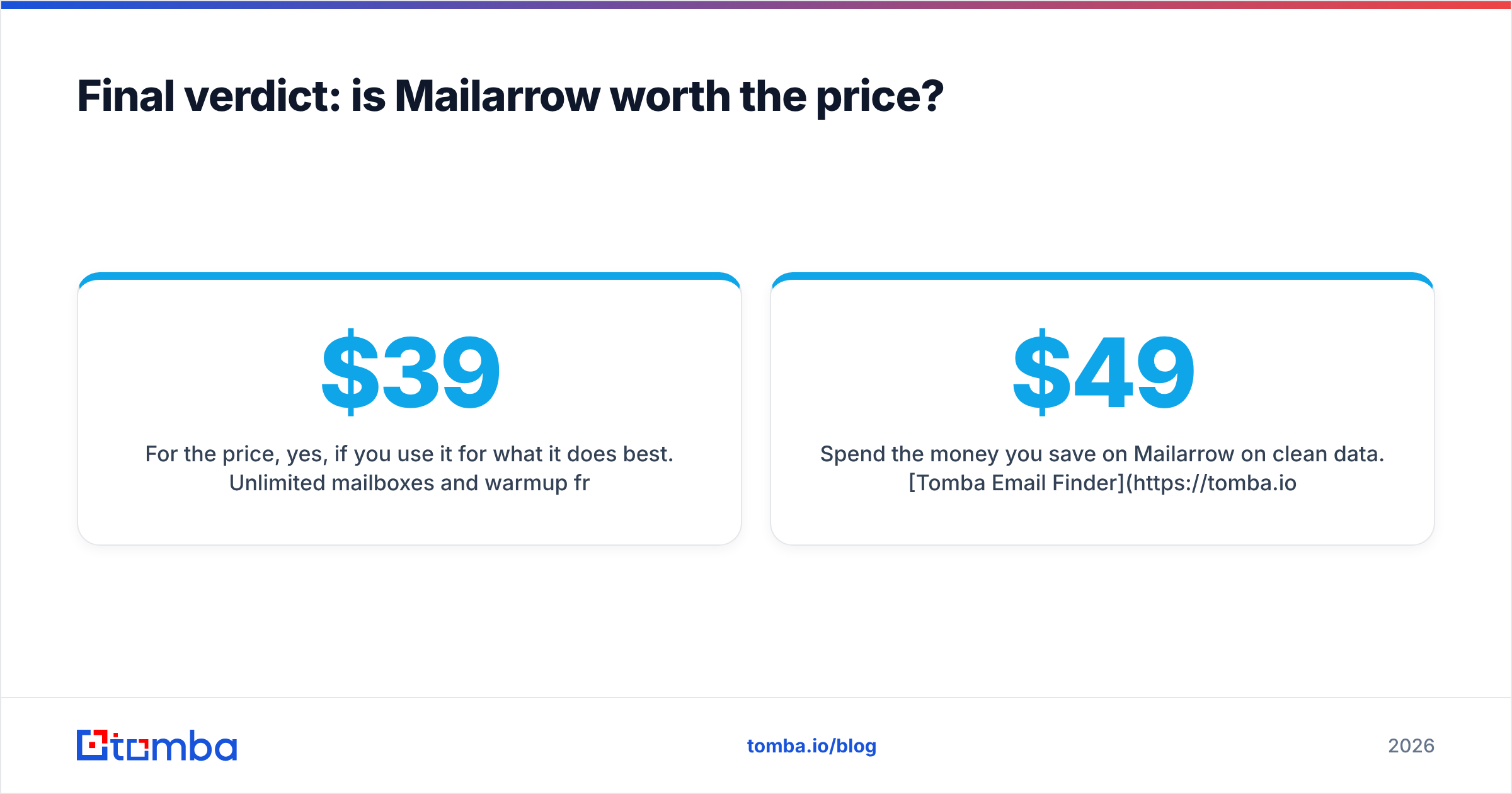
For the price, yes, if you use it for what it does best. Unlimited mailboxes and warmup from $39/mo, and 150,000 emails a month for $99, are some of the strongest per-dollar numbers in cold email. The weak spots are the small review base and a built-in email finder that reviewers don't trust. Both can be managed. Run the trial carefully, and don't let Mailarrow be your only source of prospect data. That is the short version of our Mailarrow pricing reviews pros and cons analysis.
Spend the money you save on Mailarrow on clean data. Tomba Email Finder finds work email addresses by domain, name, or company. Each result comes with a confidence score and public sources. That way, the lists you load into Mailarrow or any other sequencer start out accurate. There's a free tier with 25 searches a month to test it, and paid plans start at $49/mo. See the full Tomba pricing to match a plan to your sending volume.
Related guides#
// start free
See who Tomba finds at any company
Type a company's domain to see its people, their roles and verified work emails, each with the pages it was found on. Free account, no card.
Free plan · No credit card required · GDPR & CCPA
// about the author