Mailchimp Deliverability Issues: Causes, Diagnosis and 9 Fixes
Your Mailchimp campaigns are going to spam or the Promotions tab, and the dashboard doesn't tell you why. Here is how to find the real cause and the 9 fixes that get you back into the inbox.
TL;DR
- Most Mailchimp deliverability issues come from your setup, not from Mailchimp: no domain authentication, a list that has gone stale, and audiences that never actively opted in.
- Since Gmail and Yahoo started enforcing their bulk-sender rules in 2024, unauthenticated campaigns and spam complaint rates above 0.3% get filtered hard. Aim to stay under 0.1%.
- Mailchimp sends most accounts over shared IPs, so your reputation is partly pooled. Your domain reputation is the lever you actually control.
- Verify and prune your list before every major send. Hard bounces and spam traps do the most damage.
- Mailchimp is built for opt-in marketing, not cold outreach. If you import cold prospects, you risk a suspended account on top of poor inbox placement.
What are Mailchimp deliverability issues, exactly?#
A Mailchimp deliverability issue is any case where a campaign Mailchimp reports as "sent" never reaches the primary inbox. That covers three different failures, and it helps to keep them apart:
- Bounces. The receiving server rejects the message outright. Mailchimp shows these as hard or soft bounces in the campaign report.
- Spam-folder placement. The message is accepted but filed as junk. Mailchimp can't see this, so the report looks normal while open rates drop.
- Tab or folder demotion. Gmail puts the email in Promotions, or Outlook sends it to "Other." It technically arrived, but nobody reads it.
The trouble is that Mailchimp's dashboard only measures the first one directly. "Delivered" means "a server accepted it," not "a human saw it." If your open rate fell from 28% to 11% while your bounce rate stayed flat, you are almost certainly looking at the second or third failure.
Mailchimp also runs its own abuse-prevention system, Omnivore, which scores your list and campaign before sending. If Omnivore flags you, your campaign can be paused or your account suspended. That is a fourth kind of issue: you never get to send at all.
Why do Mailchimp emails go to spam?#
Mailbox providers like Gmail, Outlook, and Yahoo score each message on sender identity, sender reputation, and how recipients react. Almost every Mailchimp deliverability problem fits one of these five causes:
- Unauthenticated sending domain. If you haven't added Mailchimp's DKIM CNAME records to your DNS, your mail is signed with Mailchimp's domain instead of yours. Under DMARC, that looks like someone else sending on your behalf. Since February 2024, Gmail and Yahoo require SPF or DKIM plus a DMARC record for anyone sending 5,000+ messages a day, and they increasingly penalize smaller senders that skip it too.
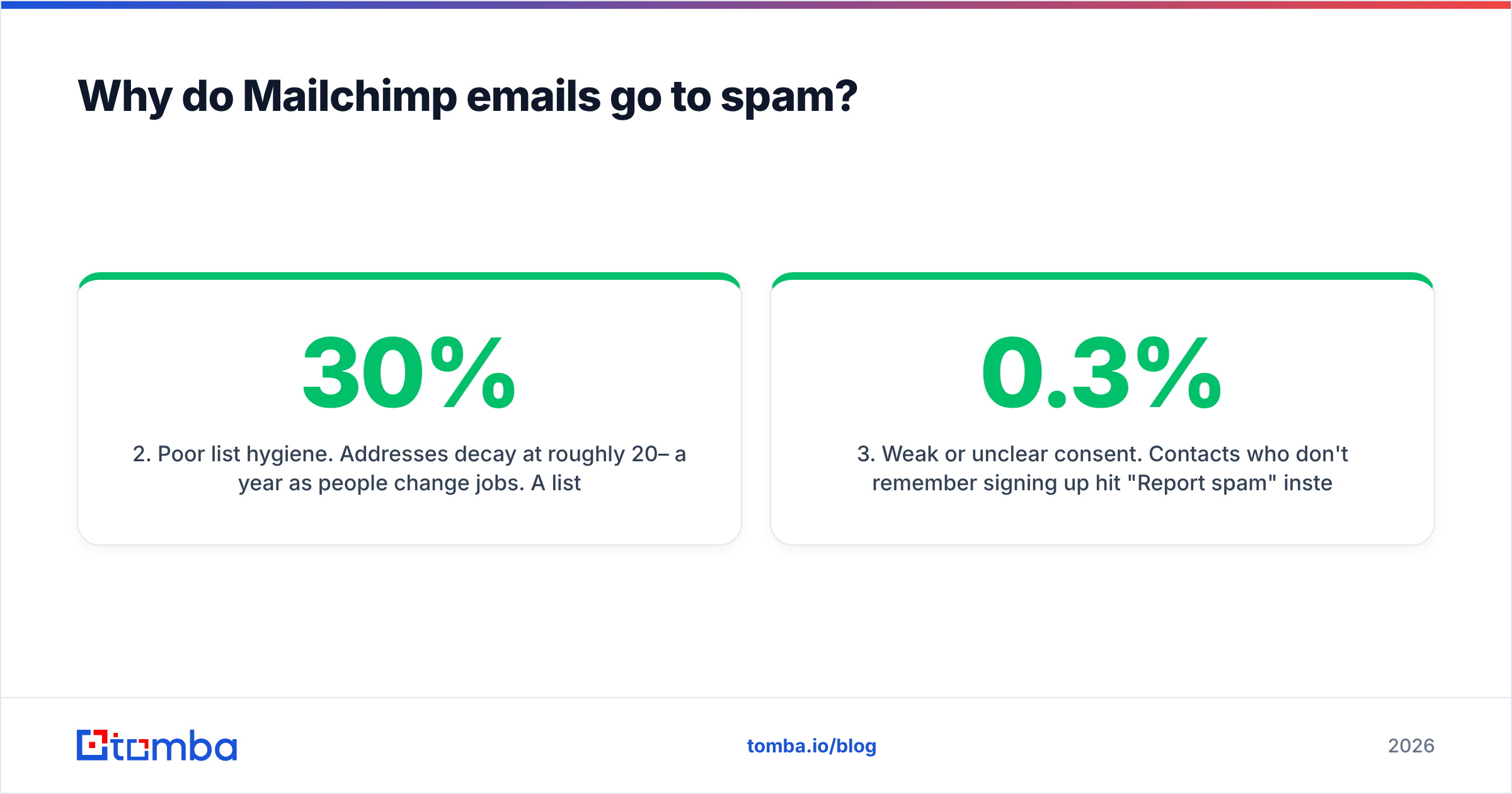
- Poor list hygiene. Addresses decay at roughly 20–30% a year as people change jobs. A list you haven't emailed in six months will produce hard bounces, and some of those dead addresses get recycled as spam traps.
- Weak or unclear consent. Contacts who don't remember signing up hit "Report spam" instead of "Unsubscribe." A complaint rate above 0.3% is Gmail's published red line. Above 0.1% you are already losing placement.
- Low engagement. Gmail weighs opens, replies, and deletes-without-reading heavily. Sending every campaign to every contact, including people who haven't opened anything in a year, drags down your domain reputation.
- Content and formatting signals. Image-only emails, link shorteners, mismatched link domains, and heavy promotional wording won't sink a good sender alone, but they tip borderline senders into spam.
Shared IPs make all of this more noticeable. Mailchimp pools most senders on IP ranges it manages carefully, so a single bad actor rarely ruins your sending. It does mean you can't fix poor placement just by "warming up an IP." Your domain reputation is what moves the needle. Our glossary entry on sender reputation explains how providers track domain and IP reputation separately.
How do you diagnose a Mailchimp deliverability problem?#
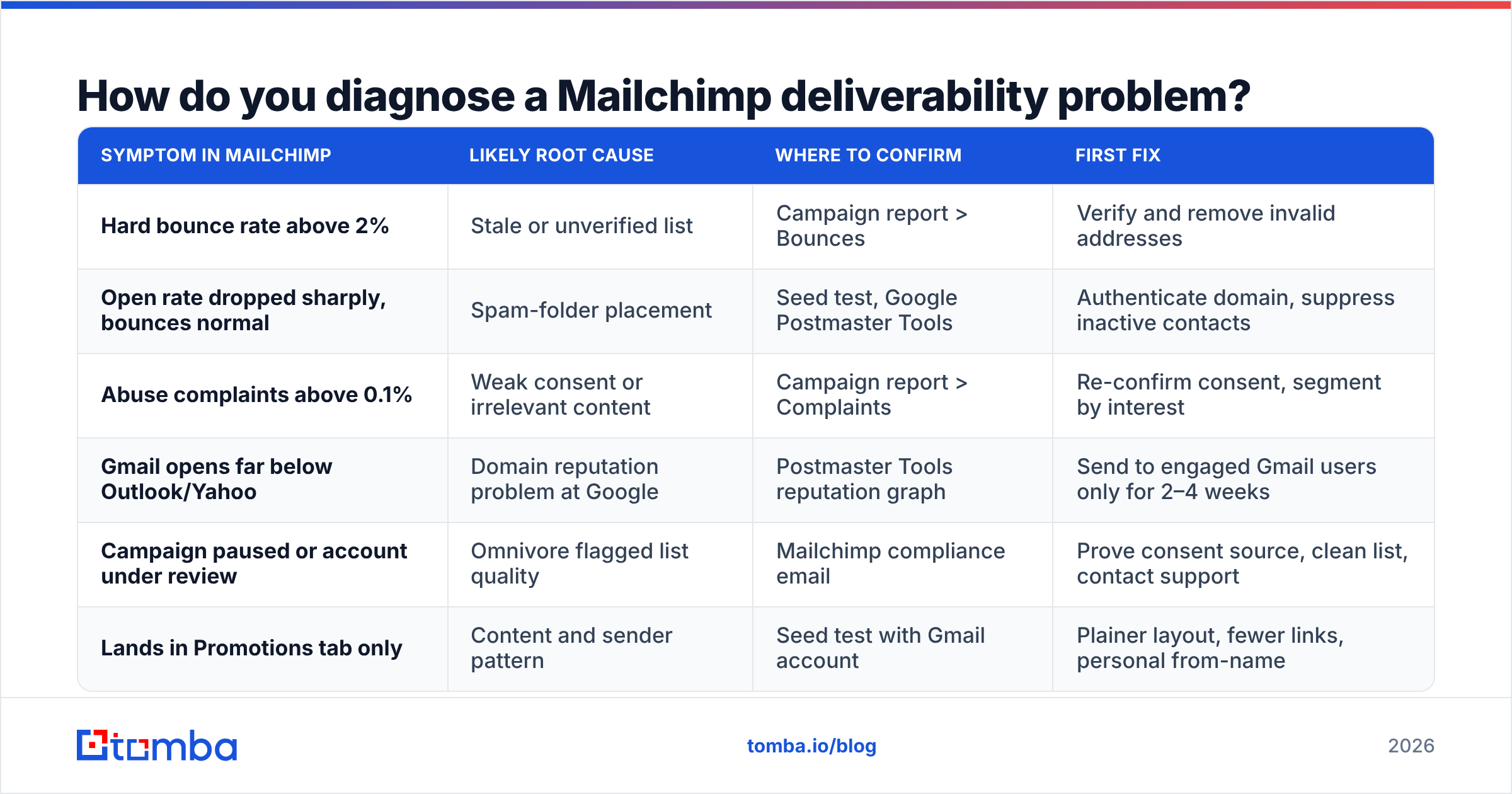
Don't change five things at once. Work through the symptoms in order, because each one points to a different cause.
| Symptom in Mailchimp | Likely root cause | Where to confirm | First fix |
|---|---|---|---|
| Hard bounce rate above 2% | Stale or unverified list | Campaign report > Bounces | Verify and remove invalid addresses |
| Open rate dropped sharply, bounces normal | Spam-folder placement | Seed test, Google Postmaster Tools | Authenticate domain, suppress inactive contacts |
| Abuse complaints above 0.1% | Weak consent or irrelevant content | Campaign report > Complaints | Re-confirm consent, segment by interest |
| Gmail opens far below Outlook/Yahoo | Domain reputation problem at Google | Postmaster Tools reputation graph | Send to engaged Gmail users only for 2–4 weeks |
| Campaign paused or account under review | Omnivore flagged list quality | Mailchimp compliance email | Prove consent source, clean list, contact support |
| Lands in Promotions tab only | Content and sender pattern | Seed test with Gmail account | Plainer layout, fewer links, personal from-name |
Three tools make this diagnosis concrete:
- Mailchimp's Domains page (Account > Domains) shows whether your sending domain is verified and authenticated. If authentication says "Not authenticated," stop and fix that first.
- Google Postmaster Tools shows your domain's reputation and spam rate as Gmail sees it. You need to verify your domain there, and it only shows data once you send meaningful volume to Gmail users. Google documents the requirements in its email sender guidelines.
- A seed test. Send the campaign to a handful of your own accounts on Gmail, Outlook, and Yahoo. Crude, but it tells you inbox vs Promotions vs spam in five minutes.
If you want to check your DNS before you touch Mailchimp, run your domain through an SPF checker to see whether an existing SPF record is malformed or over the 10-lookup limit. That's a common hidden failure when several tools send on behalf of the same domain.
What are the 9 fixes for Mailchimp deliverability issues?#
Work through these in order. The first four fix 80% of cases.
1. Authenticate your domain with DKIM#
In Mailchimp, go to Account > Domains, verify your sending domain, then add the two CNAME records Mailchimp gives you (they point Mailchimp's DKIM keys at your domain). Once authenticated, Mailchimp signs mail as your domain, and DKIM alignment passes for DMARC.
2. Publish a DMARC record#
DKIM alone isn't enough for Gmail and Yahoo's bulk-sender rules. Add a TXT record at _dmarc.yourdomain.com. Start with monitoring only:
v=DMARC1; p=none; rua=mailto:dmarc@yourdomain.com
Move to p=quarantine once reports confirm all your legitimate senders (Mailchimp, Google Workspace, your CRM, your helpdesk) pass. The DMARC specification overview on Wikipedia explains alignment if the reports confuse you.
3. Never send from a free-mail address#
A from-address like yourbrand@gmail.com can't pass DMARC through Mailchimp, because Gmail's own DMARC policy rejects mail claiming to be from gmail.com but sent by someone else. Use an address on a domain you own.
4. Verify your list before you send#
This is the fix people skip, and it causes the most damage. Run your audience through an email verifier before importing it, and again before any campaign to contacts you haven't emailed in 90+ days. Remove invalid, disposable, and role-based addresses (info@, admin@) that you didn't collect directly. Treat catch-all addresses as risky and send to them in small batches.
If your contacts live in a CRM and sync into Mailchimp, cleaning at the source beats cleaning in Mailchimp. Otherwise the bad addresses come back on the next sync. Tomba's Mailchimp integration can push verified contacts into an audience directly.
5. Suppress inactive subscribers#
Build a segment of contacts who haven't opened or clicked in 6 months (adjust for your send frequency). Send them one re-engagement email. Anyone who still doesn't engage gets archived. Your list gets smaller, but your inbox placement goes up. Note that Apple Mail Privacy Protection inflates opens, so use clicks as the stronger engagement signal where you can.
6. Use double opt-in for new signups#
Mailchimp's signup forms support double opt-in. It cuts signups by a few percent and nearly eliminates typo addresses, bots, and malicious signups that seed your list with spam traps.
7. Make unsubscribing effortless#
Gmail and Yahoo require one-click unsubscribe (RFC 8058 list-unsubscribe headers) for bulk senders. Mailchimp adds these headers automatically, but don't hide the footer link or make people log in to leave. Every frustrated "Report spam" click costs you more than an unsubscribe.
8. Segment instead of blasting#
Sending every campaign to your whole audience is the fastest way to build complaints. Segment by interest, purchase history, or signup source, and send each group only what matches. Mailchimp's groups and tags make this simple. The data shows up as lower complaint rates within two or three campaigns.
9. Clean up content signals#
- Keep a reasonable text-to-image ratio. No single-image emails.
- Use your own domain for links. Avoid public URL shorteners.
- Stick to a consistent from-name and from-address.
- Limit links to what the reader actually needs. Ten tracked links in a newsletter look different from three.
- Write a subject line that matches the body.
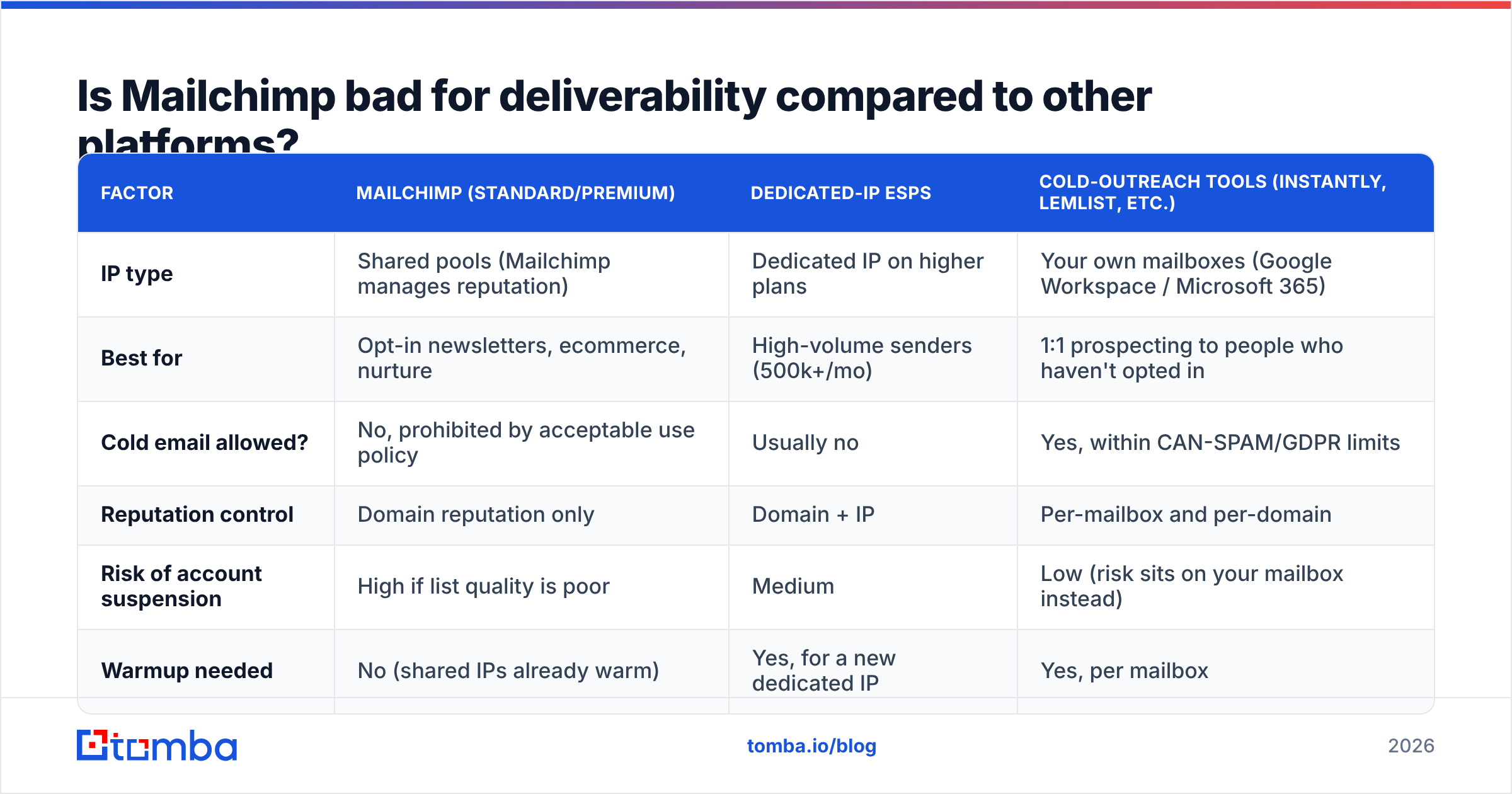
Is Mailchimp bad for deliverability compared to other platforms?#
No. Mailchimp's infrastructure is solid, and its strict compliance policies keep the shared IP pools fairly clean. Most of the "Mailchimp has bad deliverability" complaints you see in forums come from senders who'd have the same problems on any platform.
There are real trade-offs though, and they matter depending on what you send:
| Factor | Mailchimp (Standard/Premium) | Dedicated-IP ESPs | Cold-outreach tools (Instantly, Lemlist, etc.) |
|---|---|---|---|
| IP type | Shared pools (Mailchimp manages reputation) | Dedicated IP on higher plans | Your own mailboxes (Google Workspace / Microsoft 365) |
| Best for | Opt-in newsletters, ecommerce, nurture | High-volume senders (500k+/mo) | 1:1 prospecting to people who haven't opted in |
| Cold email allowed? | No, prohibited by acceptable use policy | Usually no | Yes, within CAN-SPAM/GDPR limits |
| Reputation control | Domain reputation only | Domain + IP | Per-mailbox and per-domain |
| Risk of account suspension | High if list quality is poor | Medium | Low (risk sits on your mailbox instead) |
| Warmup needed | No (shared IPs already warm) | Yes, for a new dedicated IP | Yes, per mailbox |
The row most teams get wrong is cold email. Mailchimp's acceptable use policy prohibits sending to purchased, rented, or scraped lists and to anyone who hasn't consented. Importing a list of cold B2B prospects is the most common way Omnivore suspends an account, and even when it gets through, the complaint rate wrecks your domain reputation for your legitimate newsletter too.
If you do outbound prospecting, keep it out of Mailchimp entirely. Use a separate sending domain (for example trybrand.com alongside brand.com), dedicated mailboxes, and a tool built for 1:1 outreach. Mailchimp stays for people who asked to hear from you.
How long does it take to recover Mailchimp deliverability?#
It depends on how much damage your domain took:
- Authentication fixes only: Placement often improves on the next campaign once DKIM and DMARC pass. Gmail starts trusting a newly aligned domain within days.
- Moderate reputation damage (Postmaster shows "Low"): plan for 2–6 weeks. Send only to your most engaged segment (opened or clicked in the last 30–60 days), keep volume steady, then gradually add older segments back.
- Severe damage (Postmaster shows "Bad," or you hit spam traps): 1–3 months. Pause sends to everyone except recent engagers, verify the full list, and consider whether a separate subdomain for marketing (for example
news.brand.com) makes sense going forward so a future problem doesn't touch your main corporate mail. - Account suspension: Recovery runs through Mailchimp's compliance team. You'll typically need to show where the contacts came from and how they consented. Suspensions involving purchased lists are rarely reversed.
The one thing that never speeds recovery is volume. Sending more campaigns to "push through" a reputation problem just generates more negative signals.
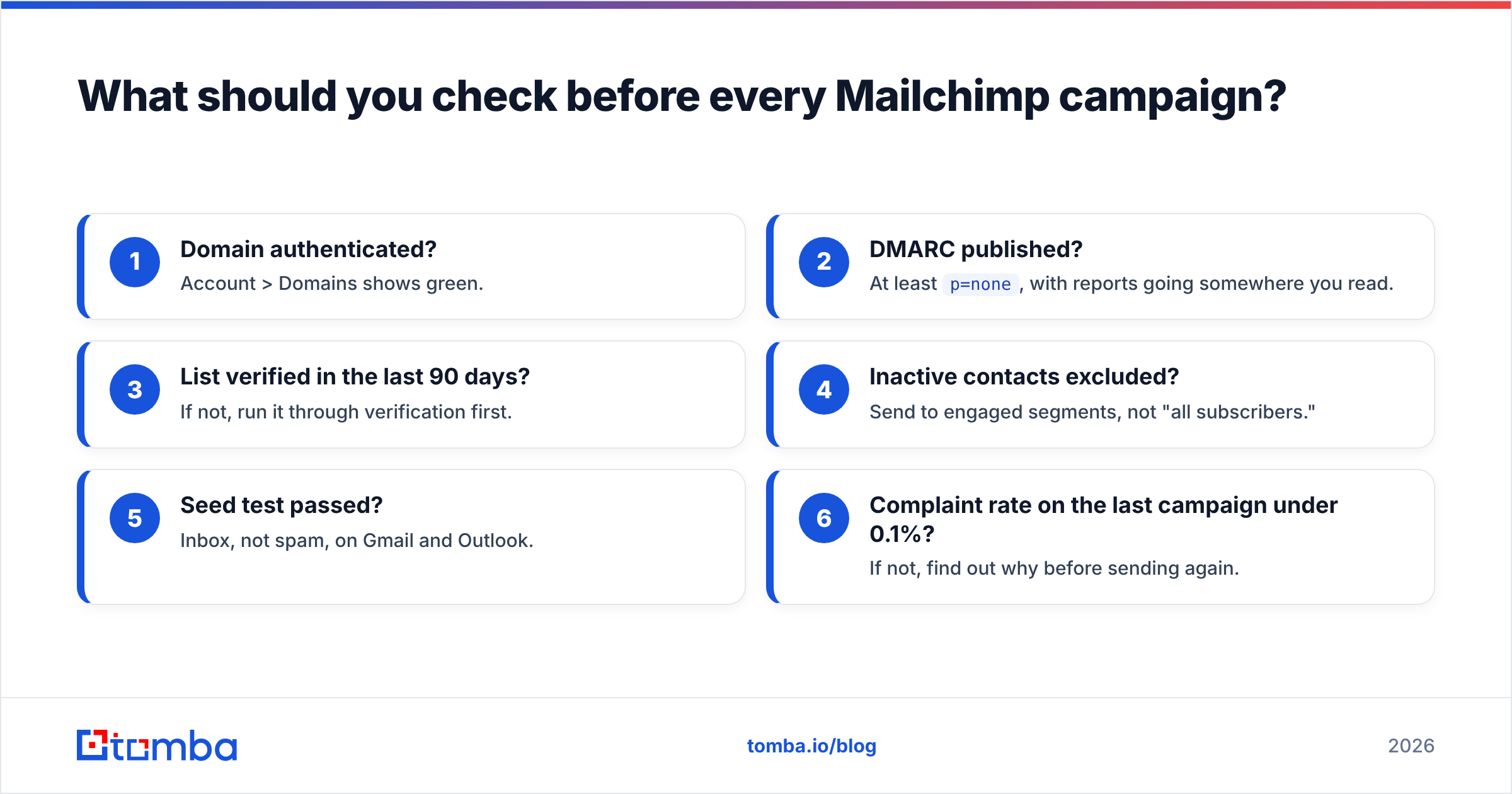
What should you check before every Mailchimp campaign?#
Save this checklist and run through it before any send to more than a few thousand people:
- Domain authenticated? Account > Domains shows green.
- DMARC published? At least
p=none, with reports going somewhere you read. - List verified in the last 90 days? If not, run it through verification first.
- Inactive contacts excluded? Send to engaged segments, not "all subscribers."
- Seed test passed? Inbox, not spam, on Gmail and Outlook.
- Complaint rate on the last campaign under 0.1%? If not, find out why before sending again.
If all six are green and you still see problems, check Postmaster Tools for a domain-level issue and look at whether another tool sending from the same domain (a CRM, a helpdesk, a cold outreach platform) is damaging your shared domain reputation. That cross-contamination is the most overlooked cause of deliverability problems that look like they're Mailchimp's fault.
Fix the list before you fix the campaign#
Most Mailchimp deliverability issues start before you ever click "Send": an address that doesn't exist, a contact who never opted in, a domain nobody authenticated. Authentication takes an afternoon. List quality is ongoing work, and it starts with knowing every address you add is real.
If you build B2B audiences from webinar signups, event lists, or inbound leads, Tomba Email Finder helps you find the correct professional address for a contact by name and company, with verification built in, so typos and dead addresses don't reach your Mailchimp audience in the first place. You can start on the free tier (25 searches a month) and check Tomba pricing when you need volume. Plans start at $49/month.
Related guides#
// start free
See who Tomba finds at any company
Type a company's domain to see its people, their roles and verified work emails, each with the pages it was found on. Free account, no card.
Free plan · No credit card required · GDPR & CCPA
// about the author