8 Maildoso Alternatives for Cold Email Infrastructure (2026)
Maildoso is cheap, fast cold email infrastructure, but it isn't the right fit for every sending setup. Here are 8 Maildoso alternatives compared on pricing model, mailbox type, IP control, and who each one actually suits.

TL;DR
- Maildoso sells cheap, bulk cold email mailboxes (SMTP and Google Workspace "combo" plans) with domains bundled. It's built for volume, and the price per inbox is very low.
- People usually switch for one of three reasons: they want Microsoft or Google mailboxes instead of shared SMTP, they want dedicated IPs, or they want warmup and sending in the same tool.
- The strongest Maildoso alternatives in 2026 are Mailforge, Infraforge, Zapmail, Inframail, InboxKit, Instantly DFY, Smartlead SmartSenders, and Mailreef. Each one fits a different setup.
- Third-party sources disagree on Maildoso's 2026 billing (quarterly vs. monthly), so check live pricing pages before you budget.
- Infrastructure only protects your sender reputation if the list is clean. Bounces from unverified contacts will burn new domains no matter whose mailboxes you use.
What is Maildoso, and why do teams look for alternatives?#
Maildoso is a cold email infrastructure provider. You pay for a batch of mailboxes, it buys the domains, configures SPF, DKIM, and DMARC, and gives you inboxes you can connect to a sequencer like Instantly, Smartlead, or Woodpecker. It sells two main products: SMTP mailboxes on its own servers, and "combo" plans that mix SMTP with Google Workspace inboxes.
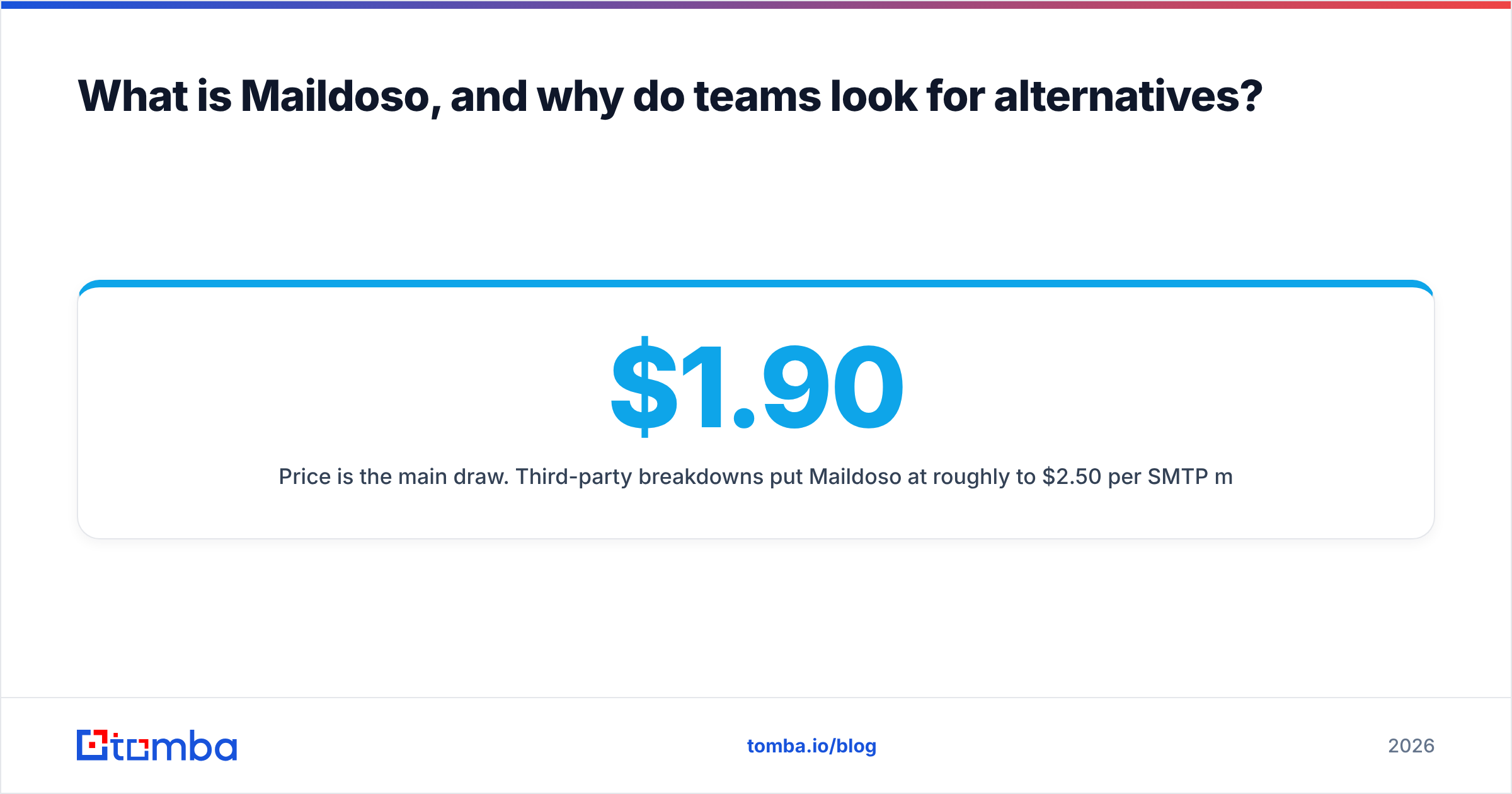
Price is the main draw. Third-party breakdowns put Maildoso at roughly $1.90 to $2.50 per SMTP mailbox per month, and around $2 to $3 per combo mailbox, with very-high-volume tiers going lower. Several reviewers also say Maildoso moved to quarterly billing in 2026, with bundles such as 32 mailboxes for about $299 a quarter. Those numbers come from secondary sources and they don't fully agree, so treat them as ranges.
Teams start shopping for Maildoso alternatives once they hit one of these problems:
- Mailbox type mismatch. SMTP mailboxes land differently from real Google Workspace or Microsoft 365 inboxes. If your prospects mostly use Outlook, a Microsoft-heavy setup may place better.
- No dedicated IPs. On shared infrastructure, other senders' behavior affects your sender reputation. Agencies with client SLAs often want IPs nobody else touches.
- Tools are scattered. Maildoso's SMTP plans don't include built-in warmup, inbox placement testing, or list verification, so you end up stitching together three or four vendors.
- Billing commitment. A quarterly plan doesn't suit a team that is still testing whether outbound works at all.
None of these means Maildoso is a bad product. They mean it fits a particular buyer: a high-volume sender who is comfortable on shared SMTP and runs everything else elsewhere.

How should you evaluate a Maildoso alternative?#
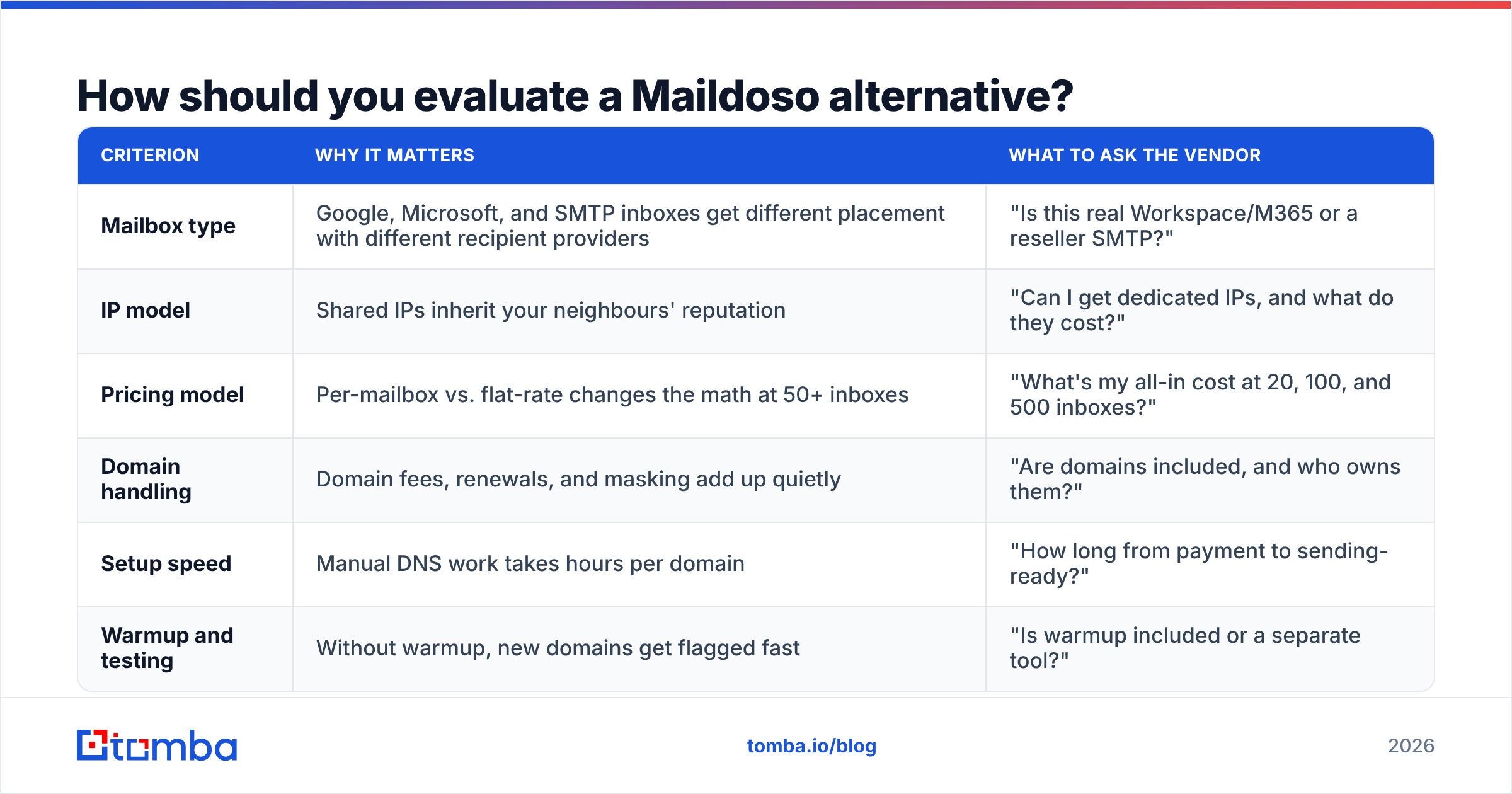
Before comparing vendors, pin down what you're actually buying. Cold email infrastructure looks like a commodity at first glance, but the differences decide whether your emails reach the inbox or the spam folder.
| Criterion | Why it matters | What to ask the vendor |
|---|---|---|
| Mailbox type | Google, Microsoft, and SMTP inboxes get different placement with different recipient providers | "Is this real Workspace/M365 or a reseller SMTP?" |
| IP model | Shared IPs inherit your neighbours' reputation | "Can I get dedicated IPs, and what do they cost?" |
| Pricing model | Per-mailbox vs. flat-rate changes the math at 50+ inboxes | "What's my all-in cost at 20, 100, and 500 inboxes?" |
| Domain handling | Domain fees, renewals, and masking add up quietly | "Are domains included, and who owns them?" |
| Setup speed | Manual DNS work takes hours per domain | "How long from payment to sending-ready?" |
| Warmup and testing | Without warmup, new domains get flagged fast | "Is warmup included or a separate tool?" |
Use this table as a scorecard. The right answer depends on your volume, your ICP's email provider mix, and how much infrastructure work you want to do yourself.
What are the best Maildoso alternatives in 2026?#
Below are eight options. The pricing comes from public pages and third-party reviews current at the time of writing. Vendors in this space change their plans often, so confirm before you buy.
1. Mailforge: best for cheap shared-IP volume#
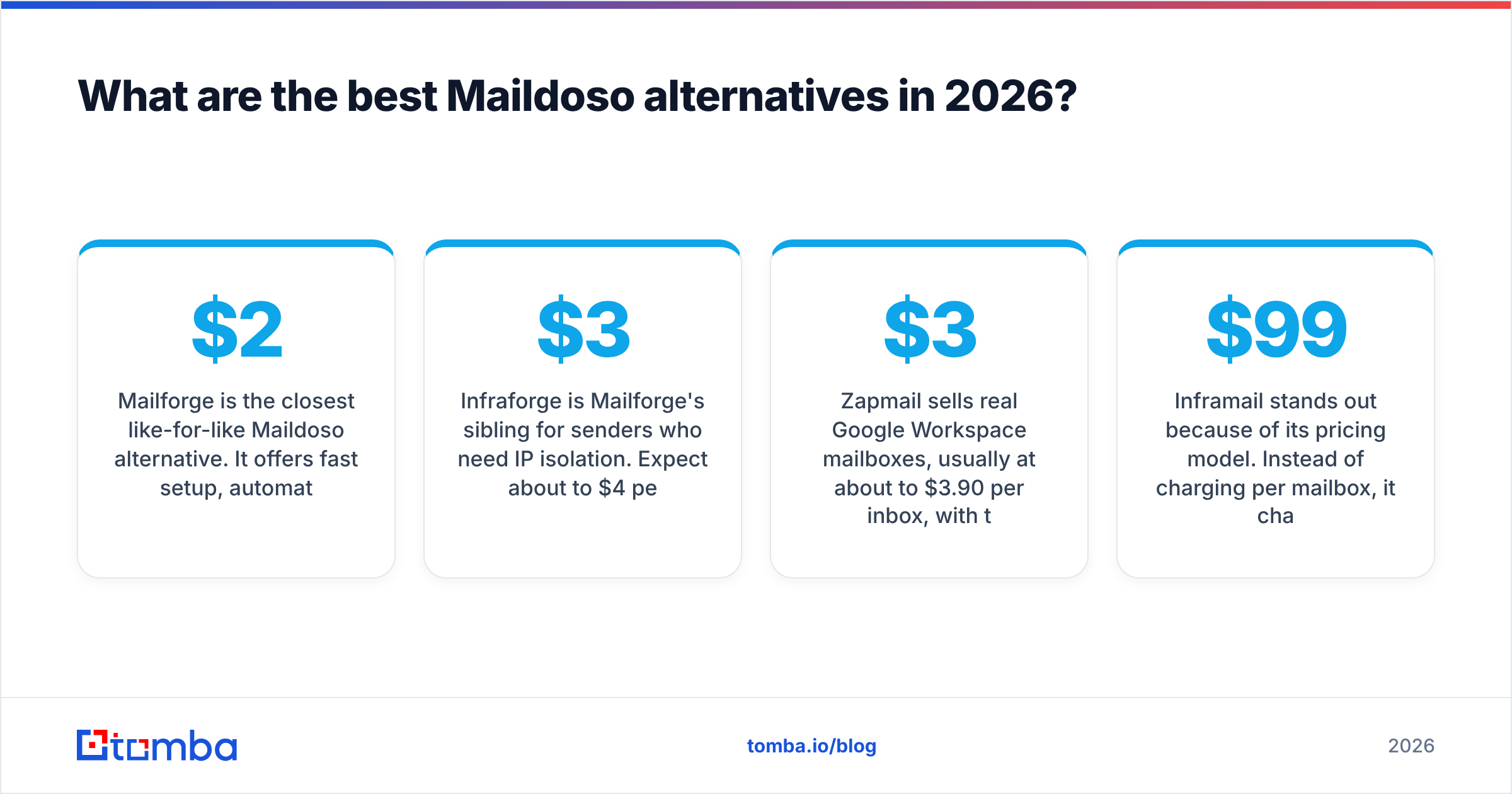
Mailforge is the closest like-for-like Maildoso alternative. It offers fast setup, automated DNS, and low per-mailbox pricing (around $2 to $3 per mailbox per month, with a 10-mailbox minimum). Domains are billed separately, and reviewers report different domain fees, so check Mailforge's site directly.
Pros: Cheap, fast, and part of the Forge ecosystem (Warmy for warmup, Infraforge for dedicated IPs), so you can upgrade without migrating. Cons: Shared infrastructure, so you carry the same neighbour risk as Maildoso. Best for: Startups and lean SDR teams that want Maildoso-level economics with a cleaner upgrade path.
2. Infraforge: best for dedicated IPs#

Infraforge is Mailforge's sibling for senders who need IP isolation. Expect about $3 to $4 per SMTP mailbox, plus a monthly fee for dedicated IPs (often quoted around $99/month) and add-ons for SSL and domain masking.
Pros: You own your reputation. If a client gets flagged, other clients aren't affected. Cons: It costs noticeably more, and dedicated IPs need their own warmup period. Best for: Agencies running multiple clients, and teams with compliance or SLA requirements.
3. Zapmail: best for pre-warmed Google Workspace inboxes#
Zapmail sells real Google Workspace mailboxes, usually at about $3 to $3.90 per inbox, with tiered base plans. It automates domain purchase, DNS, and Workspace provisioning, and it's often chosen when Gmail-to-Gmail placement is the priority.
Pros: Genuine Google inboxes, quick provisioning, and a good fit for prospects on Google Workspace. Cons: It costs more per inbox than SMTP, and Google's own sending limits and policies still apply. Best for: Teams selling into startups and tech companies, where Google Workspace dominates.
4. Inframail: best flat-rate pricing at scale#
Inframail stands out because of its pricing model. Instead of charging per mailbox, it charges a flat monthly fee (commonly cited at $99/month) for unlimited Microsoft 365 inboxes, with automated domain and inbox setup.
Pros: Per-inbox cost falls quickly as you add inboxes, and Microsoft inboxes can place well with Outlook-heavy enterprise prospects. Cons: Some users report higher account suspension rates on Microsoft. Plan for redundancy. Best for: High-volume senders targeting mid-market and enterprise buyers on Microsoft 365.
5. InboxKit: best for mixed Google + Microsoft setups#
InboxKit provisions both Google and Microsoft mailboxes from one dashboard, with automated DNS and bulk domain handling. It's a sensible choice when you want to spread sending across providers instead of betting on one.
Pros: Provider diversity in one place, with bulk setup. Cons: Smaller ecosystem and less third-party review coverage than Mailforge or Instantly. Best for: Teams that want to A/B test placement across Google and Microsoft.
6. Instantly DFY accounts: best if you already sequence in Instantly#
Instantly offers done-for-you email accounts that it buys, configures, and connects to your Instantly workspace automatically. Warmup runs in the same tool you sequence from.
Pros: One vendor for inboxes, warmup, sending, and analytics. Fewer things break between tools. Cons: It usually costs more per inbox than Maildoso, and it locks you deeper into Instantly. If you're already weighing other sequencers, see our Instantly alternative breakdown. Best for: Instantly users who want fewer moving parts.
7. Smartlead SmartSenders: best for Smartlead-native agencies#
Smartlead's SmartSenders feature lets you buy domains and mailboxes inside Smartlead and connect them to its unlimited-mailbox sending model. Pricing is per mailbox and per domain, and changes often, so check the in-app quote.
Pros: Built for agencies with many client workspaces, and works well with Smartlead's rotation and warmup. Cons: Best value only if you already pay for Smartlead. Best for: Agencies standardised on Smartlead.
8. Mailreef: best for very high SMTP volume#
Mailreef targets senders pushing tens of thousands of emails a day, with SMTP infrastructure and options for private IP pools.
Pros: Built for volume, with options for IP isolation. Cons: Overkill for a team sending a few hundred emails a day. Best for: Lead-gen agencies and outbound shops operating at serious scale.
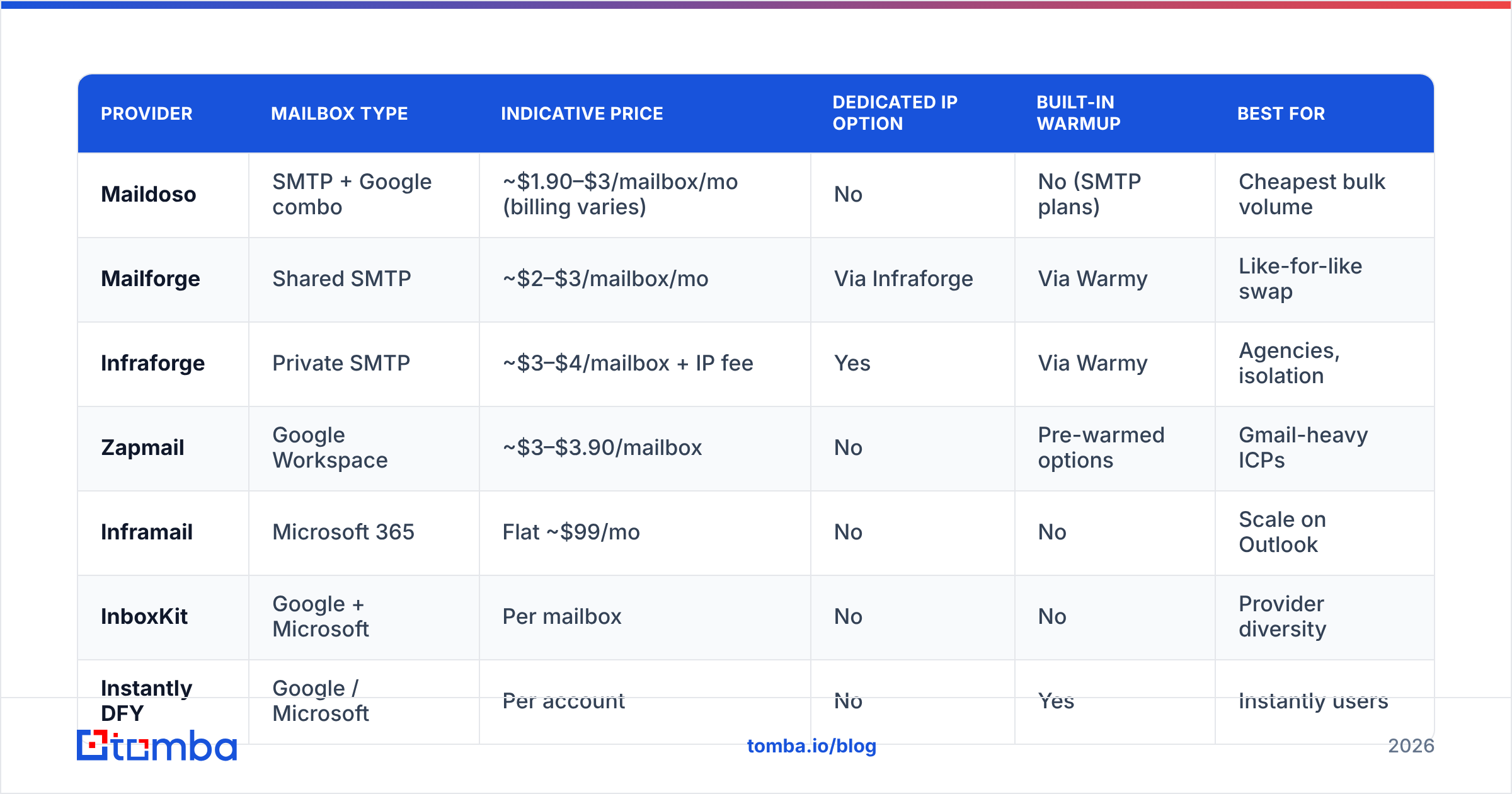
How do the Maildoso alternatives compare side by side?#
| Provider | Mailbox type | Indicative price | Dedicated IP option | Built-in warmup | Best for |
|---|---|---|---|---|---|
| Maildoso | SMTP + Google combo | ~$1.90–$3/mailbox/mo (billing varies) | No | No (SMTP plans) | Cheapest bulk volume |
| Mailforge | Shared SMTP | ~$2–$3/mailbox/mo | Via Infraforge | Via Warmy | Like-for-like swap |
| Infraforge | Private SMTP | ~$3–$4/mailbox + IP fee | Yes | Via Warmy | Agencies, isolation |
| Zapmail | Google Workspace | ~$3–$3.90/mailbox | No | Pre-warmed options | Gmail-heavy ICPs |
| Inframail | Microsoft 365 | Flat ~$99/mo | No | No | Scale on Outlook |
| InboxKit | Google + Microsoft | Per mailbox | No | No | Provider diversity |
| Instantly DFY | Google / Microsoft | Per account | No | Yes | Instantly users |
| Smartlead SmartSenders | Google / Microsoft | Per mailbox + domain | No | Yes | Smartlead agencies |
Prices are indicative ranges from public sources at the time of writing. Verify on each vendor's pricing page before you commit.
Is cheaper infrastructure actually cheaper?#
Not always. Per-mailbox price is the easiest number to compare and the least useful on its own. Your real cost per booked meeting is decided by inbox placement, and placement is decided mostly by three things you control:
- Bounce rate. Google's sender guidelines are clear that bulk senders must keep spam complaints low and keep their lists clean. A list with 8% invalid addresses will hurt a $2 mailbox and a $4 mailbox equally.
- Volume per inbox. Most practitioners stay around 30 to 50 cold emails per inbox per day. Our warmup calculator helps you work out how many inboxes and domains you need for your target daily volume.
- Content and targeting. Relevant, personalised emails earn replies, and replies are a strong positive signal for inbox providers.
Here's a quick model. Say you send 1,000 emails a day. At 40 per inbox, you need 25 inboxes. On Maildoso that might cost around $50 to $65 a month, and on Zapmail closer to $75 to $100. That's a $30 to $50 difference. One burned domain, with lost sending days, replacement domains, and a fresh warmup cycle, costs more than that gap. So a cheaper setup that bounces more is the expensive setup.
Why does list quality matter more than which provider you pick?#
Every provider on this list does the same basic job: it gives you authenticated inboxes. None of them can fix a bad list. Infrastructure is the delivery truck. If half the addresses on the manifest don't exist, the truck still comes back full of returned packages, and the depot (the inbox provider) starts treating your trucks with suspicion.
Hard bounces are the fastest way to damage a new domain. They happen when you send to:
- Guessed addresses. Someone pattern-matched
firstname@company.comwithout checking it. - Stale contacts. People who left the company 18 months ago.
- Catch-all domains you assumed were safe. The server accepts everything at first, then bounces later or silently drops mail.
That's why the habit that matters most, whichever Maildoso alternative you choose, is to verify every address before it goes into a sequence. Run lists through an email verifier, handle catch-all results separately, and source contacts from a provider that shows where each email was found and when.

Which Maildoso alternative should you choose?#
Map your situation to the closest match:
- "I just want Maildoso, but with an upgrade path." Mailforge.
- "I run an agency and can't have clients affecting each other." Infraforge or Mailreef.
- "My buyers are on Google Workspace." Zapmail.
- "My buyers are enterprise and use Outlook." Inframail, with backup inboxes elsewhere.
- "I want to test both providers." InboxKit.
- "I already pay for a sequencer and want fewer vendors." Instantly DFY or Smartlead SmartSenders.
- "I'm happy with shared SMTP and price is everything." Stay on Maildoso and invest the savings in list quality.
Whatever you pick, roll it out in stages. Move 20% of your sending to the new provider, warm it for two to three weeks, compare reply and bounce rates against your existing setup, then migrate the rest. Industry reviews on G2 are useful for spotting recurring complaints such as suspensions, support delays, and billing surprises before you commit.
What else should you check before migrating off Maildoso?#
A few practical points that are easy to miss:
- Domain ownership. Confirm whether the domains you're leaving are registered in your name and can be transferred. Some providers bundle domains in ways that make leaving awkward.
- Warmup history. Inboxes you abandon lose their warmup. Plan the overlap so you aren't sending cold from brand-new inboxes.
- Sequencer reconnection. Moving 100+ inboxes into Instantly or Smartlead takes time. Check whether the new provider supports bulk OAuth or CSV import.
- Billing period. If you're on a quarterly Maildoso plan, time the migration to the end of the billing cycle.
- Reputation monitoring. Set up Google Postmaster Tools for your sending domains before you switch, so you have a baseline to compare against.
Ready to protect whichever infrastructure you choose?#
The provider is only half the deliverability equation. The other half is sending to people who actually exist. The Tomba Email Finder finds professional email addresses by name, domain, or company, shows the public sources behind each result, and pairs with Tomba's verifier so you can clean lists before they reach a fresh inbox. You can start on the free tier with 25 searches a month, and paid plans begin at $49/month. See the full Tomba pricing to match a plan to your sending volume. Good infrastructure delivers mail reliably, and a verified list makes sure that mail goes to real people.
Related guides#
// start free
See who Tomba finds at any company
Type a company's domain to see its people, their roles and verified work emails, each with the pages it was found on. Free account, no card.
Free plan · No credit card required · GDPR & CCPA
// about the author