Mailforge Pricing Reviews Pros and Cons: 2026 Buyer's Guide
Mailforge advertises cold email mailboxes from about $3 each. Here is what you actually pay once you add domains and add-ons, what G2 reviewers say, and when a shared-IP setup is the wrong call.
This guide puts Mailforge pricing reviews pros and cons in one place. Here is the short version before you buy.
- Headline price: Mailforge mailboxes cost about $3 per mailbox per month on annual billing for small accounts. The rate drops toward $2 only at high volume. Domains are extra, at roughly $14 per year for a .com.
- Real cost is higher than the sticker: add domains, the 10-slot minimum, and optional SSL or domain masking. A 30-mailbox setup then costs about $1,200+ per year.
- What reviewers like: fast bulk setup, automatic SPF, DKIM and DMARC records, and responsive support. Mailforge holds roughly a 4.7/5 rating on G2.
- The main con: mailboxes send over shared infrastructure. Other customers' sending habits can affect your reputation. Dedicated IPs sit in a separate product (Infraforge).
- Verdict: Mailforge is worth it for agencies and outbound teams that need dozens of mailboxes quickly. It's a weak fit for low-volume senders and for anyone whose bounce rate is already a problem.
What is Mailforge?#
Mailforge is a cold email infrastructure provider. It's part of the Forge product family, alongside Salesforge (the sequencer), Warmforge (warmup), and Infraforge (dedicated infrastructure). Its job is narrow. You buy a batch of secondary domains and mailboxes. Mailforge sets up the DNS records for you. Then you plug those mailboxes into whatever sending tool you use.
Think of it like renting a fleet of delivery vans instead of buying one truck. You don't want your main company domain doing cold outreach. A spike in spam complaints there could hurt invoices, password resets, and customer replies. So you spread outbound volume across many lookalike domains (for example getacme.com or tryacme.com). Each domain gets two or three mailboxes that send modest daily volumes.
Mailforge runs mailboxes on its own mail servers. It doesn't resell Google Workspace or Microsoft 365 seats. That keeps it cheap. It is also the source of its biggest trade-off, which we cover below.
You can see the current plans on the official Mailforge site. Prices in this article come from third-party reviews and published figures at the time of writing. Check the live pricing page before you budget.
How much does Mailforge cost in 2026?#
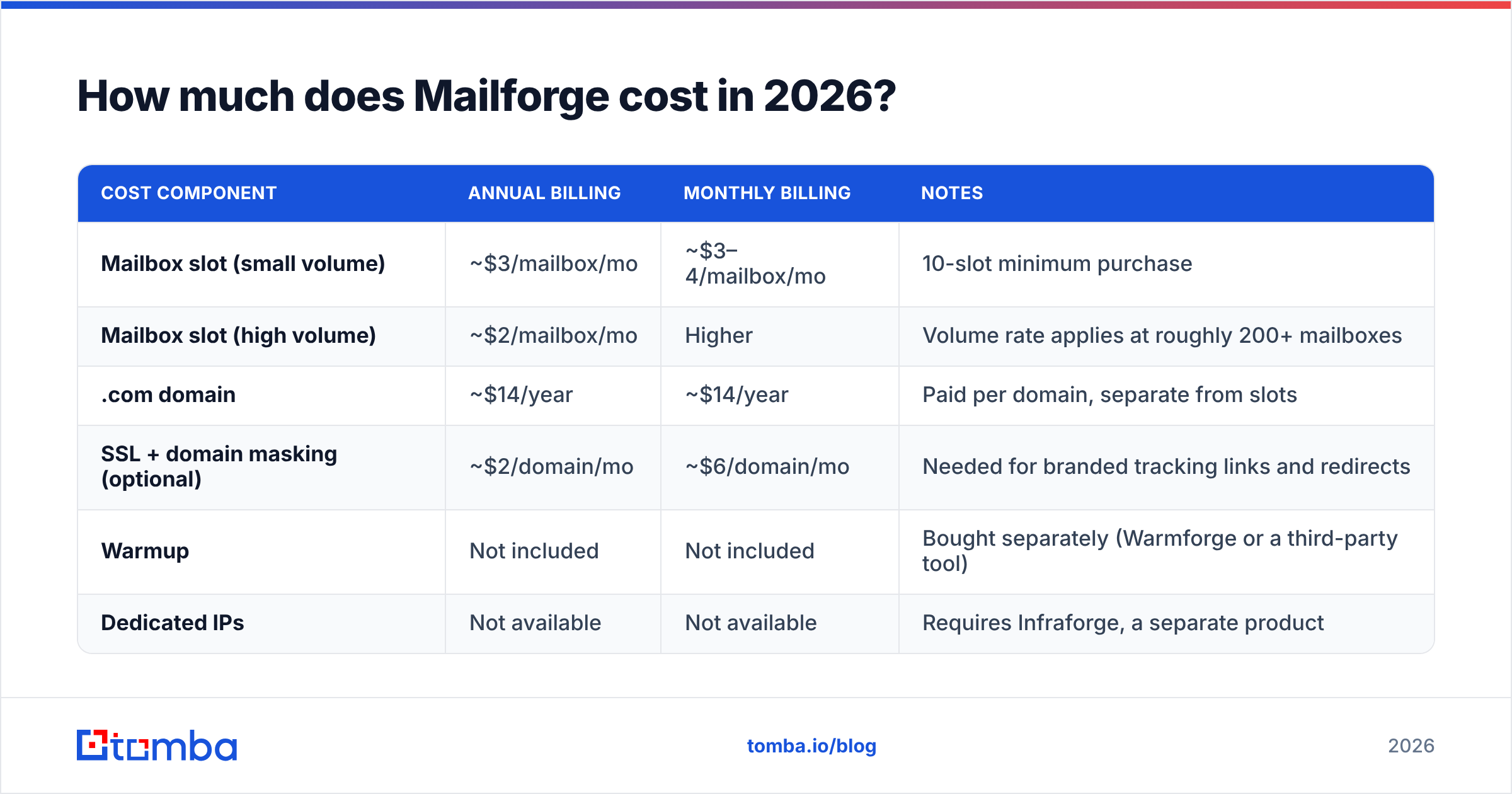
Mailforge charges per mailbox slot, with domains billed separately. The headline numbers most reviewers report:
| Cost component | Annual billing | Monthly billing | Notes |
|---|---|---|---|
| Mailbox slot (small volume) | ~$3/mailbox/mo | ~$3–4/mailbox/mo | 10-slot minimum purchase |
| Mailbox slot (high volume) | ~$2/mailbox/mo | Higher | Volume rate applies at roughly 200+ mailboxes |
| .com domain | ~$14/year | ~$14/year | Paid per domain, separate from slots |
| SSL + domain masking (optional) | ~$2/domain/mo | ~$6/domain/mo | Needed for branded tracking links and redirects |
| Warmup | Not included | Not included | Bought separately (Warmforge or a third-party tool) |
| Dedicated IPs | Not available | Not available | Requires Infraforge, a separate product |
Some comparison sites show a much higher rate for the smallest accounts. They put it at roughly $6 per mailbox when you buy only 10 slots on a yearly plan. Treat the $2 figure as a volume price for agencies, not what a solo founder pays.
What does a realistic setup cost?#
Say you're a small outbound team that wants to send about 1,500 cold emails per day without burning anything:
- Domains: 10 secondary domains x $14 = $140/year
- Mailboxes: 3 mailboxes per domain = 30 slots x
$3 x 12 = **$1,080/year** - Optional SSL/masking: 10 domains x $2 x 12 = ~$240/year
- Warmup tool: add your own, typically $10–$30+/month depending on vendor
- Sequencer: Salesforge, Instantly, Smartlead or similar, usually $30–$100+/month
That puts infrastructure alone around $1,220–$1,460 per year, before warmup and the sending platform. That works out to roughly $3.40–$4 per mailbox per month once everything is included. It's still cheap compared with buying 30 Google Workspace seats, but it's not "$2 a mailbox." Use a warmup calculator to see how many mailboxes your target volume needs. Then you won't buy slots you never use.
What do Mailforge reviews say?#
On G2, Mailforge holds roughly a 4.7-star average across about 80 reviews. Reviews cluster around a few themes.
What reviewers praise:
- Setup speed. The most common compliment: you buy dozens of domains and mailboxes, and DNS is ready in minutes. Setting up SPF, DKIM, and DMARC by hand for 20 domains is tedious and easy to get wrong.
- Bulk DNS management. You can change records across many domains at once. That helps when you rotate tracking domains or fix a mistake.
- Support. Several reviewers mention fast, helpful support responses.
- Ecosystem fit. Teams already using Salesforge or Warmforge say the connection between tools is seamless.
What reviewers criticize:
- Shallow analytics. Mailforge is infrastructure, not a deliverability dashboard. Reputation and placement data are thinner than some users expect.
- Plan-change UX. Some users found scaling down mailbox counts or changing plans confusing.
- Mobile experience. It's described as clunky. That matters less for an infrastructure tool, but it comes up.
Independent reviewers raise a deeper concern that G2 star ratings don't capture well. A detailed write-up from Bitscale is one example. The concern is how shared IPs are policed.

Is Mailforge's shared infrastructure a dealbreaker?#
It depends on your volume, your list quality, and how much risk you can tolerate.
On shared infrastructure, your mailboxes send from IP addresses that other Mailforge customers also use. Picture an apartment building. If one tenant throws loud parties every night, the whole building can end up on the landlord's watch list, including the quiet tenants. Email works the same way. Say another sender on your IP pool blasts a scraped list and gets lots of spam complaints. Mailbox providers may then treat all traffic from those IPs more harshly. Your sender reputation is partly tied to people you've never met.
To be fair, modern inbox providers weigh domain reputation heavily, not just IP reputation. Shared pools are also normal across the industry. Most low-cost cold email infrastructure works this way. The real question is how strictly the provider polices abusive senders. Mailforge publishes relatively little about how it does that. If you need full control, Infraforge offers dedicated IPs at a higher price.
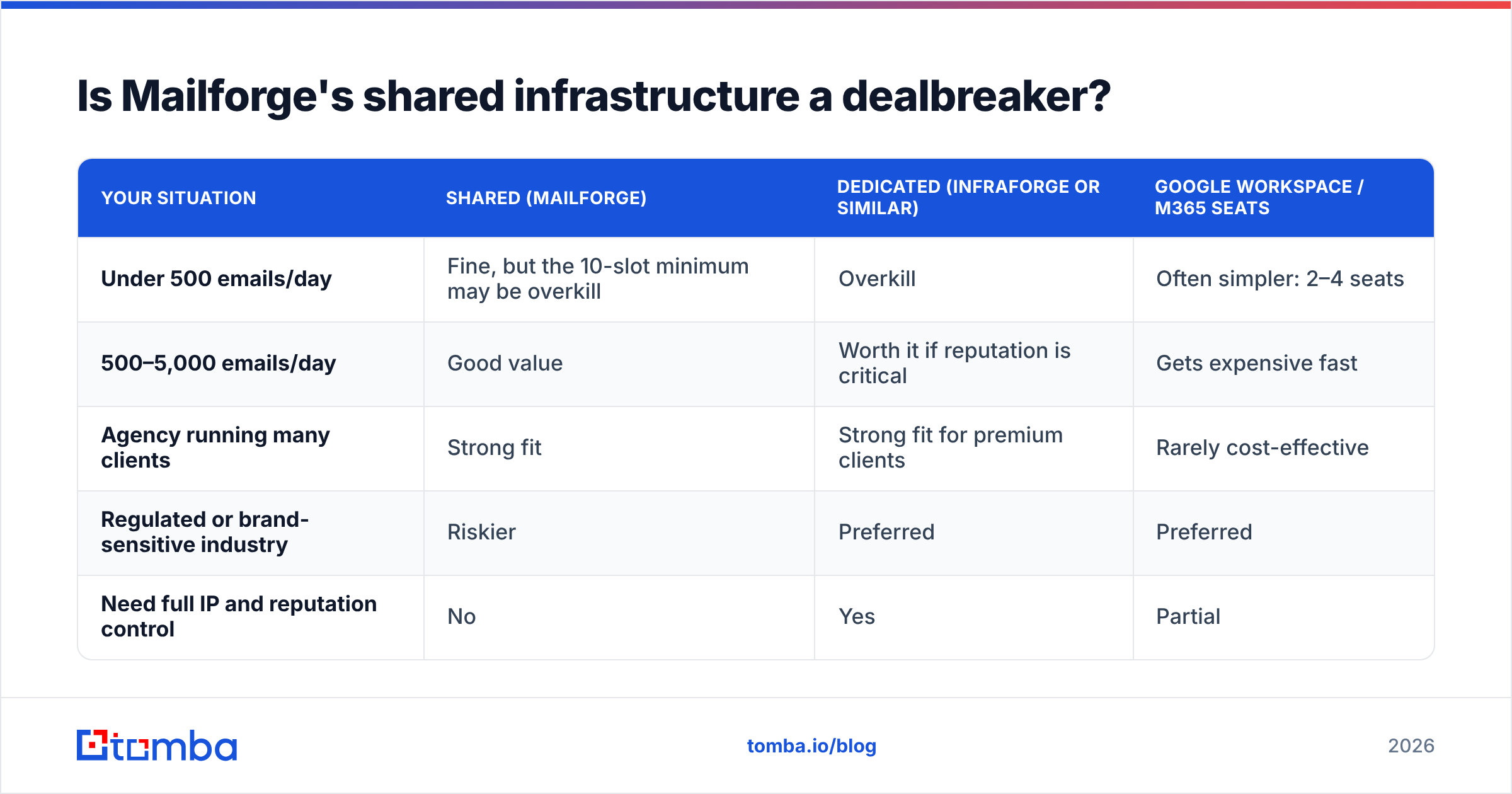
Here's a practical way to decide:
| Your situation | Shared (Mailforge) | Dedicated (Infraforge or similar) | Google Workspace / M365 seats |
|---|---|---|---|
| Under 500 emails/day | Fine, but the 10-slot minimum may be overkill | Overkill | Often simpler: 2–4 seats |
| 500–5,000 emails/day | Good value | Worth it if reputation is critical | Gets expensive fast |
| Agency running many clients | Strong fit | Strong fit for premium clients | Rarely cost-effective |
| Regulated or brand-sensitive industry | Riskier | Preferred | Preferred |
| Need full IP and reputation control | No | Yes | Partial |
Mailforge pricing reviews pros and cons at a glance#
Here's the condensed view, based on published pricing, G2 feedback, and independent reviews:
| Pros | Cons |
|---|---|
| Low per-mailbox cost, especially at volume | Real cost is higher once you add domains, masking, and the 10-slot minimum |
| Automatic SPF, DKIM, and DMARC setup | Shared IPs: your reputation partly depends on other customers |
| Bulk domain and mailbox purchasing in minutes | Limited deliverability analytics |
| Bulk DNS edits across all domains | Warmup not included |
| Domain masking and SSL for tracking links | Dedicated IPs require a separate product |
| Integrates cleanly with Salesforge and works with most sequencers | Plan downgrades and changes reported as confusing |
| Responsive support (per reviewers) | Annual billing needed for the best rates |
How does Mailforge compare with alternatives?#
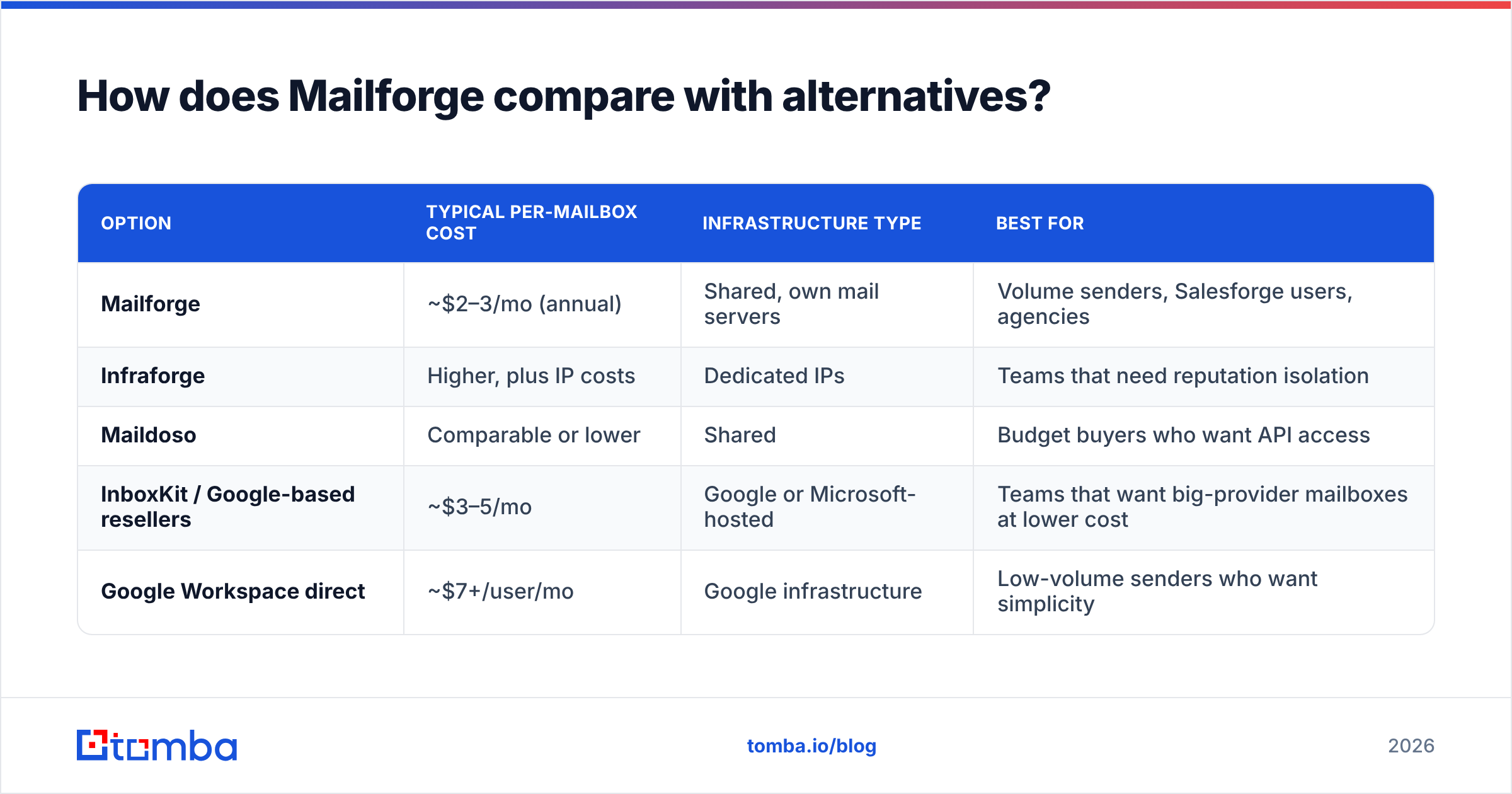
Mailforge competes with other shared-infrastructure providers like Maildoso and InboxKit. It also competes with simply buying Google Workspace seats. Prices change often in this category, so treat these figures as rough guides:
| Option | Typical per-mailbox cost | Infrastructure type | Best for |
|---|---|---|---|
| Mailforge | ~$2–3/mo (annual) | Shared, own mail servers | Volume senders, Salesforge users, agencies |
| Infraforge | Higher, plus IP costs | Dedicated IPs | Teams that need reputation isolation |
| Maildoso | Comparable or lower | Shared | Budget buyers who want API access |
| InboxKit / Google-based resellers | ~$3–5/mo | Google or Microsoft-hosted | Teams that want big-provider mailboxes at lower cost |
| Google Workspace direct | ~$7+/user/mo | Google infrastructure | Low-volume senders who want simplicity |
Be skeptical of comparison posts written by vendors. That includes posts from Mailforge's rivals and from Mailforge itself. Every vendor in this space ranks itself first.
What does Mailforge not fix?#
This is where many teams waste money. Infrastructure decides where your email is sent from. It does nothing about who you send to.
If 8% of your list bounces, no domain setup will save you. Hard bounces are one of the clearest signals inbox providers use to spot low-quality senders. Google's email sender guidelines are explicit that bulk senders need clean authentication, low spam complaint rates, and good list hygiene. A fresh Mailforge domain sending to a dirty list will burn just as fast as a Google Workspace seat. You'll end up buying replacement domains every quarter.
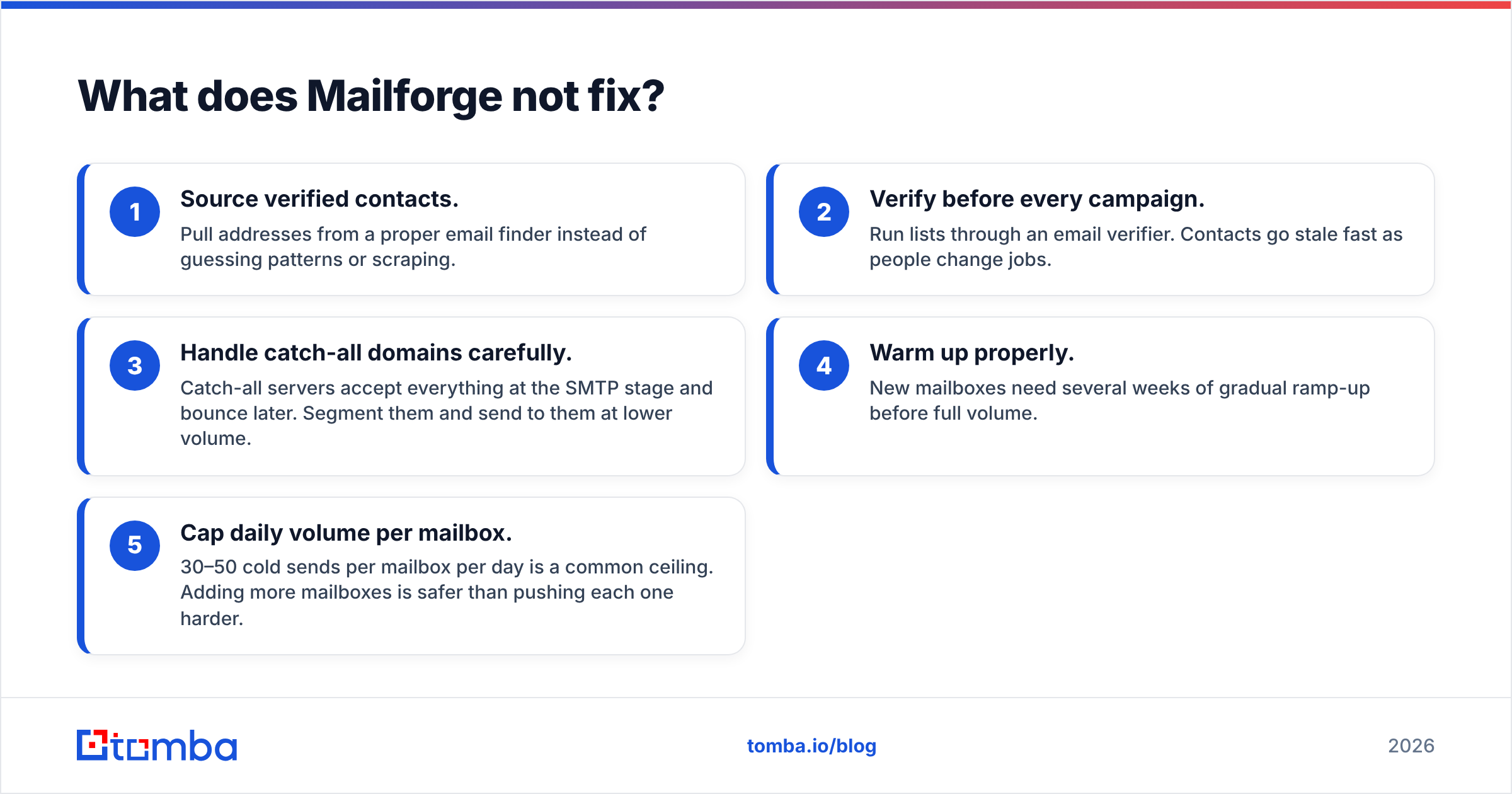
Before buying 30 mailboxes, check the basics in order:
- Source verified contacts. Pull addresses from a proper email finder instead of guessing patterns or scraping.
- Verify before every campaign. Run lists through an email verifier. Contacts go stale fast as people change jobs.
- Handle catch-all domains carefully. Catch-all servers accept everything at first and bounce later. Segment them and send to them at lower volume.
- Warm up properly. New mailboxes need several weeks of gradual ramp-up before full volume.
- Cap daily volume per mailbox. 30–50 cold sends per mailbox per day is a common ceiling. Adding more mailboxes is safer than pushing each one harder.

Is Mailforge worth it in 2026?#
For the right buyer, yes. Mailforge is a good deal if you:
- Send several thousand cold emails per day across many domains
- Run an agency managing multiple client sending setups
- Already use Salesforge or Warmforge and want tightly connected tools
- Value fast setup over tight control of your IP reputation
It's probably not worth it if you:
- Send under a few hundred emails per day, where 2–4 Google Workspace seats are simpler and the 10-slot minimum is wasted
- Work in a regulated or brand-sensitive space where shared-IP risk isn't acceptable
- Haven't fixed list quality yet. Infrastructure spend is wasted on a list that bounces
The fair summary of Mailforge pricing reviews pros and cons: pricing is competitive, setup is fast, and reviewers are mostly happy. It all comes down to one trade. You get cheap, fast scale and give up control over who shares your sending neighborhood. Go in knowing that. Budget for the full cost (domains, masking, warmup, sequencer). Send only to verified contacts. Do that, and Mailforge can be a solid base for an outbound program.
Frequently asked questions#
Does Mailforge offer a free trial?#
Mailforge has no permanent free tier. Trial terms change over time, so check the live pricing page. Plan for a paid commitment, and note that annual billing gives the best rates.
Is warmup included in Mailforge pricing?#
No. Warmup is sold separately through Warmforge or a third-party warmup tool. Budget for it from day one.
Can I use Mailforge mailboxes with Instantly or Smartlead?#
Yes. Mailforge mailboxes connect over standard protocols, so you can plug them into most cold email sequencers, not just Salesforge.
What's the difference between Mailforge and Infraforge?#
Mailforge uses shared sending infrastructure and is the cheaper, faster option. Infraforge offers dedicated IPs for reputation isolation and costs more.
Fill your new mailboxes with contacts that won't bounce#
Cheap infrastructure only pays off when every mailbox sends to real, deliverable people. Tomba Email Finder finds professional email addresses by domain, name, or company. Verification is built in. That way, hard bounces won't burn the domains you just bought in the first week. Start on the free tier (25 searches per month) to test data quality on your own target accounts. Move to Starter at $49/mo when your Mailforge mailboxes are warmed and ready to send.
Related guides#
// start free
See who Tomba finds at any company
Type a company's domain to see its people, their roles and verified work emails, each with the pages it was found on. Free account, no card.
Free plan · No credit card required · GDPR & CCPA
// about the author