MailGenius Pricing Reviews Pros and Cons: 2026 Verdict
MailGenius looks like it costs $23 a month, but that's the annual rate. Here's what each plan actually costs, what reviewers praise and complain about, and when a free spam test is all you need.
Searching for MailGenius pricing reviews pros and cons? Here's what each plan really costs, what users say, and when a free test is enough.
TL;DR
- MailGenius is a pre-send spam tester. You send one email to a seed address. It grades your SPF, DKIM, and DMARC, checks blacklists, and tells you what to fix.
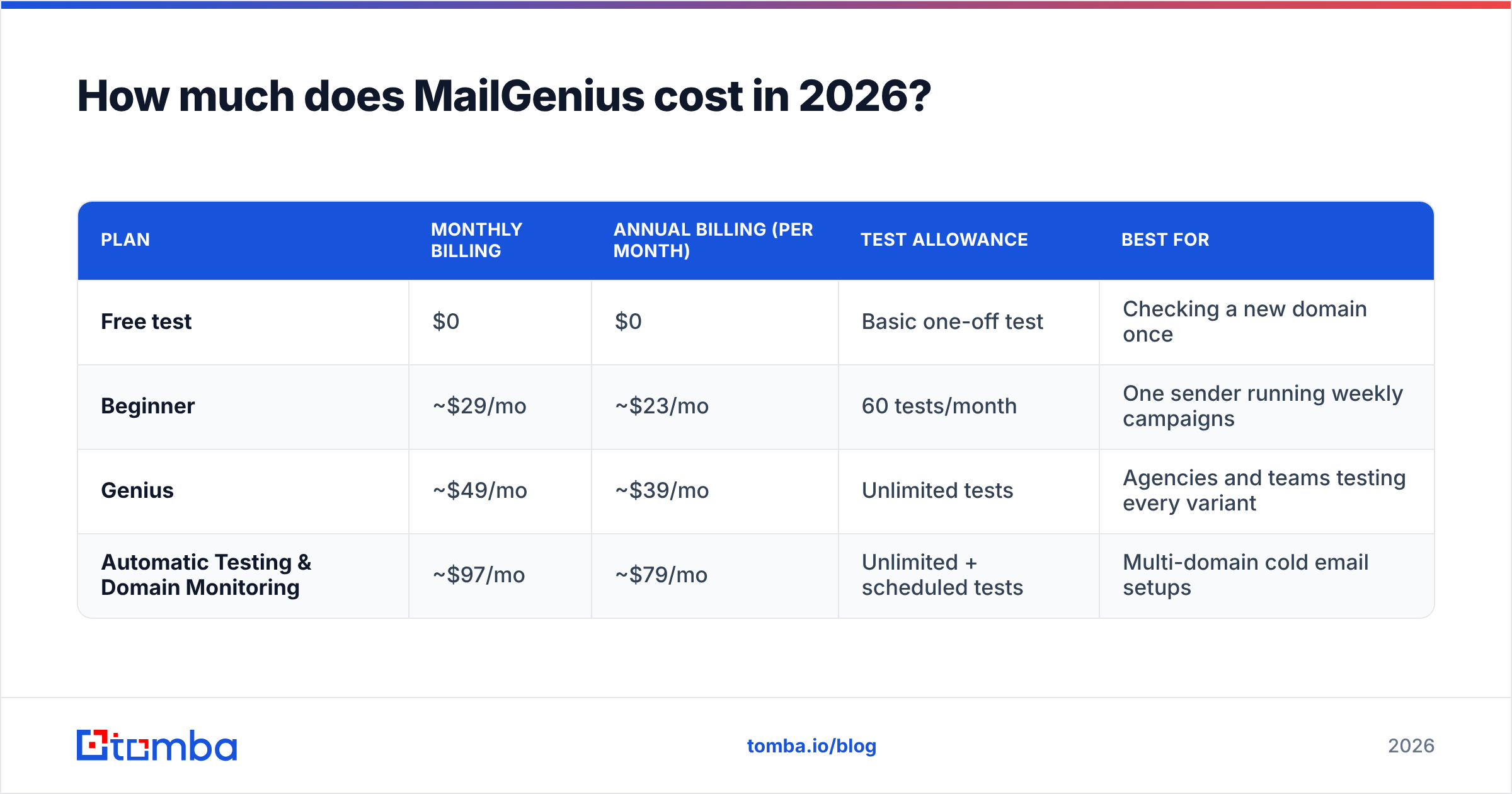
- In 2026 the paid tiers are about $29/mo Beginner (60 tests), $49/mo Genius (unlimited tests), and $97/mo for automatic testing plus domain monitoring. The $23, $39, and $79 prices you often see are yearly rates.
- Reviewers like the clear reports and fast support. They dislike the price, sales emails after a free test, and the 60-test cap on the entry plan.
- It's worth paying for if you send cold email from several domains. With one domain, the free test plus a few free checkers usually covers it.
- A perfect spam score won't save a bad list. Bounces hurt your reputation more than most content problems, so fix your data first.
What is MailGenius?#
MailGenius is an email deliverability testing tool aimed mostly at cold emailers and small marketing teams. It works like a pre-flight check. Before you launch a campaign, you send one copy to a unique MailGenius address. Within seconds you get a report covering:
- Authentication: whether SPF, DKIM, and DMARC are present, aligned, and passing
- Blacklists: whether your sending IP or domain appears on the major DNS blocklists
- Content signals: spam-trigger phrasing, link and image ratios, and broken or heavy HTML
- Technical hygiene: reverse DNS, unsubscribe headers, and similar plumbing
The output is a single score with ranked fixes and plain-English explanations. That plain English is the main reason people pick it. You don't need to know how to read raw email headers to act on it.
One thing it doesn't do is measure real inbox placement across Gmail, Outlook, and Yahoo seed accounts. Full seed-list tools do that. MailGenius tells you whether your setup looks healthy, not where a given email actually landed. Keep that in mind when you compare it to tools that cost twice as much.
How much does MailGenius cost in 2026?#
You've probably seen several sets of numbers. Older review sites still list plans starting at $8/month, which MailGenius no longer sells. The current MailGenius pricing page shows yearly prices by default. So the first figure you see is lower than what you'd pay month to month.
Here's the 2026 lineup based on the official page and recent third-party checks. Confirm on the live page before you buy. The monthly/yearly toggle is where most confusion comes from.
| Plan | Monthly billing | Annual billing (per month) | Test allowance | Best for |
|---|---|---|---|---|
| Free test | $0 | $0 | Basic one-off test | Checking a new domain once |
| Beginner | ~$29/mo | ~$23/mo | 60 tests/month | One sender running weekly campaigns |
| Genius | ~$49/mo | ~$39/mo | Unlimited tests | Agencies and teams testing every variant |
| Automatic Testing & Domain Monitoring | ~$97/mo | ~$79/mo | Unlimited + scheduled tests | Multi-domain cold email setups |
Some details are easy to miss:
- The annual discount is about 20%. You pay for the year upfront, so you're locked in if your sending volume drops.
- 60 tests runs out faster than you'd think. If you test every sequence step, every A/B variant, and every inbox you send from, five campaigns can use up a month of credits.
- Monitoring is only on the top tier. Scheduled tests and blacklist alerts across domains are the real reason to pay for it, and you only get them at roughly $79–$97/mo.
- The free test is basic. It's fine for a one-time check, but you'll get upgrade prompts and follow-up emails afterward.

What do MailGenius reviews actually say?#
There aren't many reviews, and they disagree. Read them with that in mind. The MailGenius G2 profile has only a handful of reviews. They're mostly positive and centered on the reports and support. Capterra has even fewer, and its average is lower. Much of the long-form "review" content on Google comes from competitors that sell warmup or deliverability tools. Expect some bias.
Across the sources, the same points keep coming up:
What reviewers praise
- Reports a non-technical founder can act on in about ten minutes
- Fast, helpful support that walks you through DNS fixes
- A quick turnaround: the result is ready before you've switched tabs
- Clear guidance on SPF and DKIM, the most common real problems
What reviewers criticize
- The subscription feels expensive for what is mostly a checklist
- Aggressive follow-up emails after running the free test
- Confusion caused by showing annual prices by default
- Occasional blacklist flags that users believe were false positives
- An AI assistant layer that some users find more distracting than useful
The pattern is consistent. People who need help understanding deliverability like it. People who already understand it feel they're paying for explanations they don't need.
What are the pros and cons of MailGenius?#
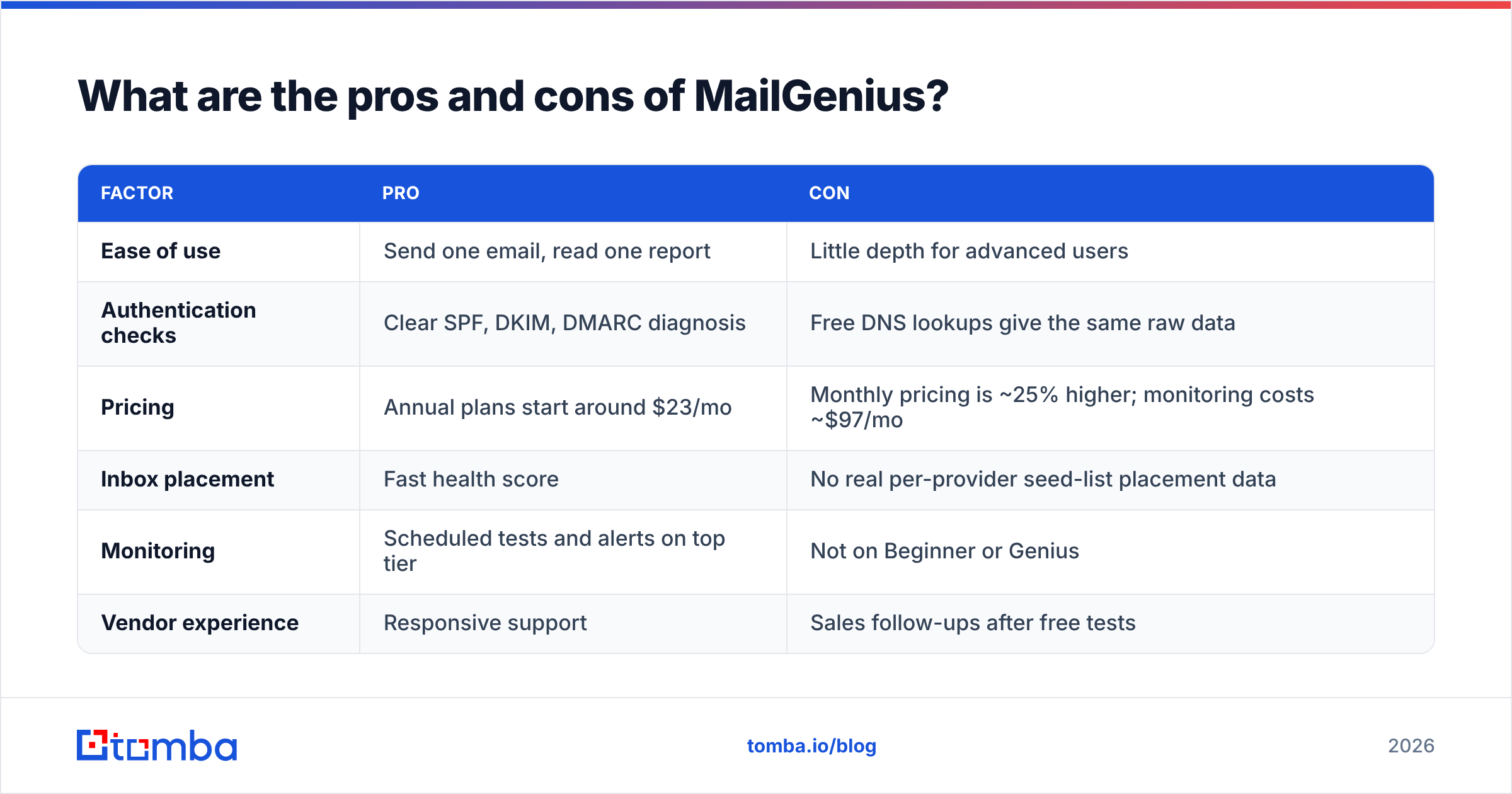
Here's the MailGenius pricing reviews pros and cons summary as a decision grid:
| Factor | Pro | Con |
|---|---|---|
| Ease of use | Send one email, read one report | Little depth for advanced users |
| Authentication checks | Clear SPF, DKIM, DMARC diagnosis | Free DNS lookups give the same raw data |
| Pricing | Annual plans start around $23/mo | Monthly pricing is ~25% higher; monitoring costs ~$97/mo |
| Inbox placement | Fast health score | No real per-provider seed-list placement data |
| Monitoring | Scheduled tests and alerts on top tier | Not on Beginner or Genius |
| Vendor experience | Responsive support | Sales follow-ups after free tests |
MailGenius sells convenience. You're not buying data you can't get elsewhere. You're buying time: it gathers the data and explains it in one place. Whether that's worth $29–$97 a month depends on how often you test and how many domains you run.
How does MailGenius compare to other deliverability testers?#
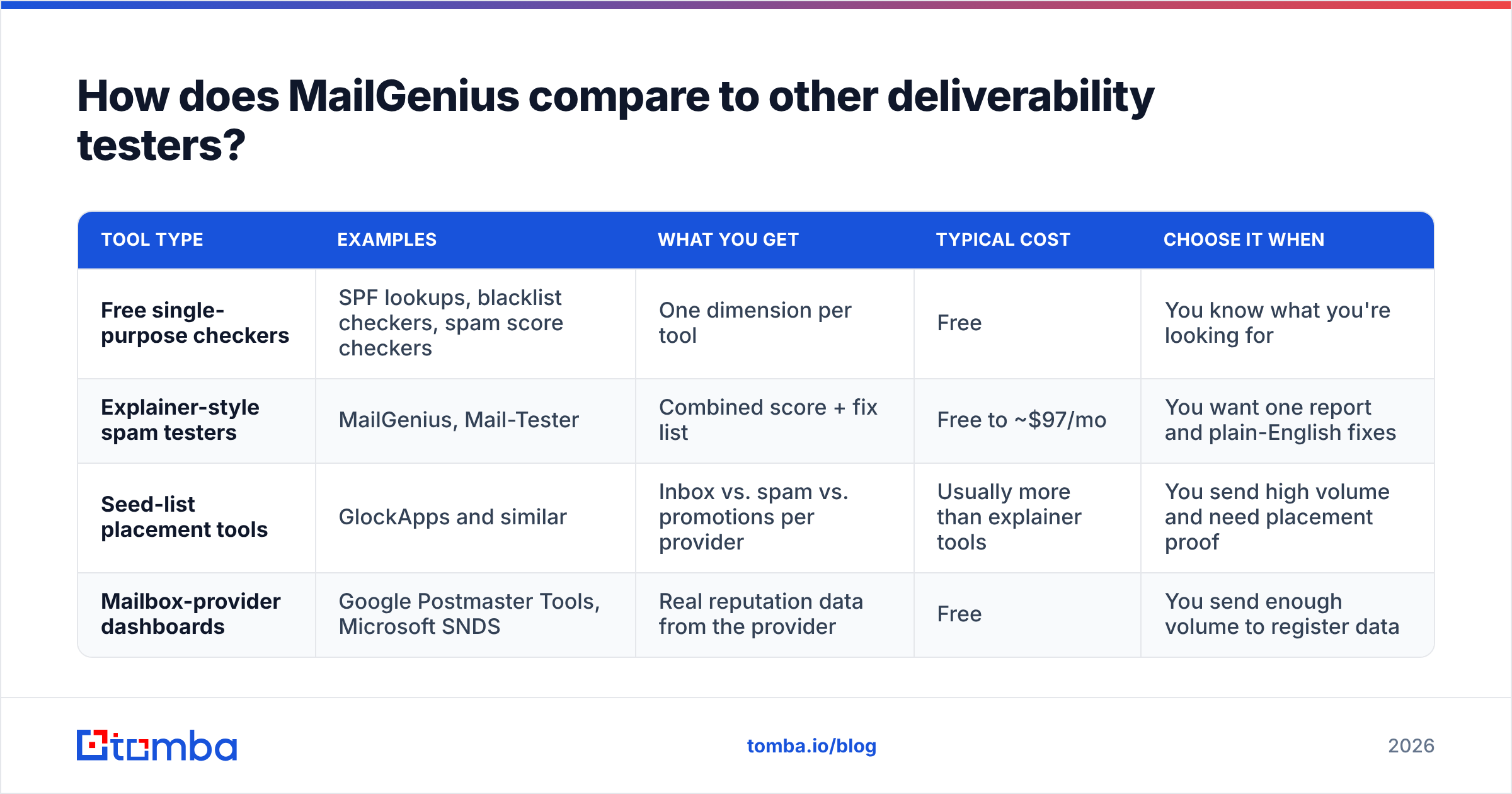
The deliverability-testing market splits into three groups: free single-purpose checkers, explainer-style testers like MailGenius, and seed-list placement tools. The table below compares them by capability, not exact price, because competitor tiers change often.
| Tool type | Examples | What you get | Typical cost | Choose it when |
|---|---|---|---|---|
| Free single-purpose checkers | SPF lookups, blacklist checkers, spam score checkers | One dimension per tool | Free | You know what you're looking for |
| Explainer-style spam testers | MailGenius, Mail-Tester | Combined score + fix list | Free to ~$97/mo | You want one report and plain-English fixes |
| Seed-list placement tools | GlockApps and similar | Inbox vs. spam vs. promotions per provider | Usually more than explainer tools | You send high volume and need placement proof |
| Mailbox-provider dashboards | Google Postmaster Tools, Microsoft SNDS | Real reputation data from the provider | Free | You send enough volume to register data |
Many teams use a mix. Use free checkers for daily spot checks and provider dashboards for real reputation trends. Pay for a tester only when something breaks and you need a fast diagnosis.
If you'd rather build that free layer yourself, a spam checker covers content scoring and a blacklist checker covers blocklists. Add Google Postmaster Tools, and you have most of what a Beginner plan gives you.
Is MailGenius worth it for cold email?#
It depends on how complicated your setup is. Use these four questions to decide:
- How many sending domains do you run? With one or two, set up DNS once with free tools and re-check monthly. With five or more, Genius or the monitoring tier starts paying for itself. It catches problems you'd otherwise miss.
- Who on your team fixes DNS? If it's a founder or SDR who doesn't know what DMARC alignment means, the explanations alone are worth the money. If it's someone technical, you're paying for a dashboard.
- How often do you change copy or infrastructure? Weekly sequence changes and new domains mean more tests. Sixty a month fits a steady setup, not a team adding inboxes every week.
- Do you need to prove inbox placement? Agencies reporting to clients often do. MailGenius gives you a health score, not placement rates per provider, so you may need a seed-list tool anyway.
If you answered "few domains, technical owner, stable setup," skip the subscription. If you answered "many domains, non-technical owner, constant change," the Genius plan at roughly $39–$49/mo is a reasonable buy.
Why can't a spam tester fix a bad list?#
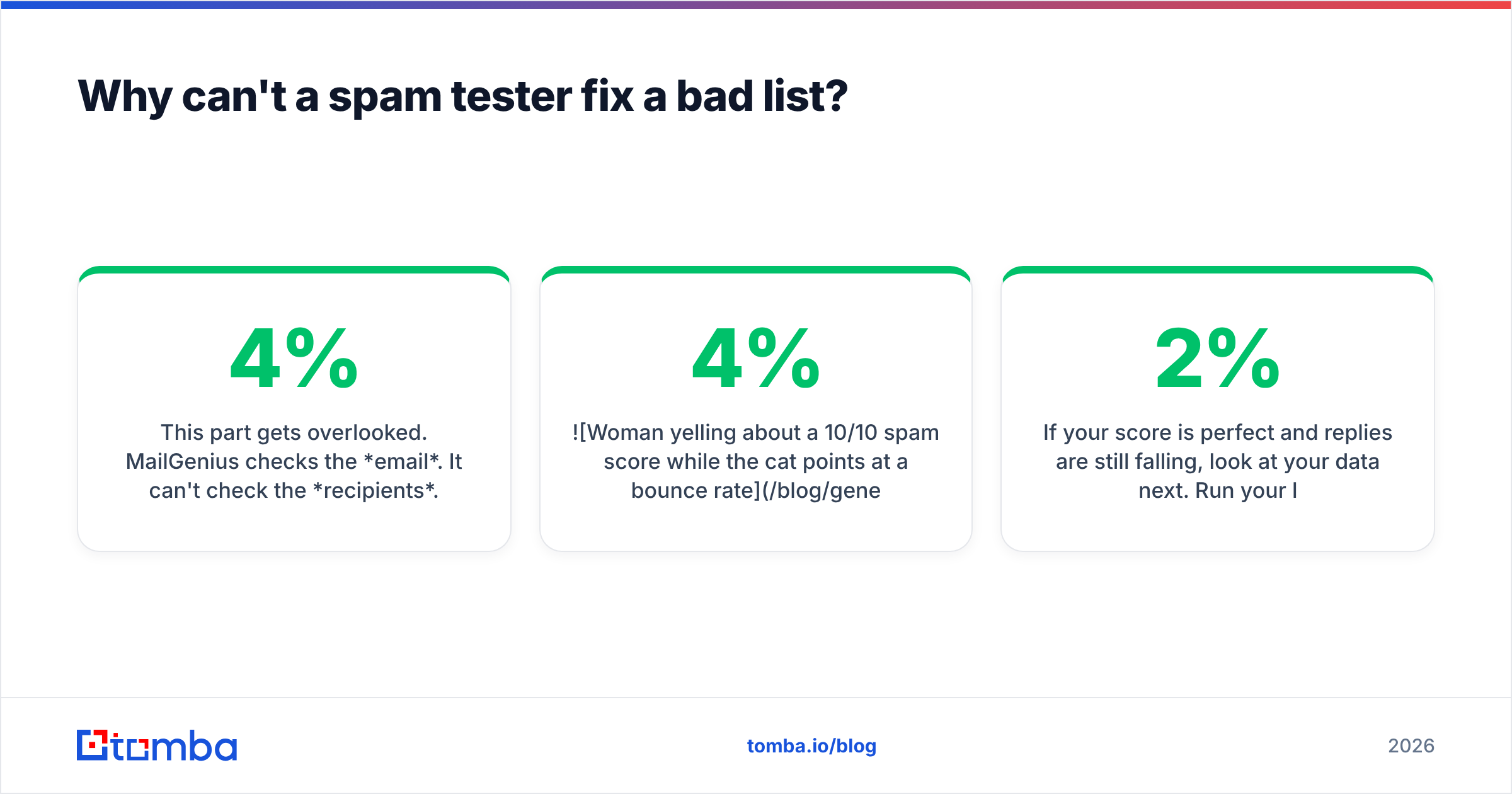
This part gets overlooked. MailGenius checks the email. It can't check the recipients. Gmail and other providers weigh bounce rates, spam complaints, and engagement heavily when they decide where your mail goes. That reputation builds over many sends, not in a single test. You can have perfect SPF, DKIM, and DMARC, clean HTML, and a 10/10 score. You can still land in spam within two weeks because 4% of your list bounced.

Google's own email sender guidelines say this directly. Authentication is the minimum. Senders with high spam rates or invalid addresses get filtered anyway. A deliverability tester helps with the first part. Your list quality decides the second.
In practice, a healthy cold email setup covers four layers:
- Infrastructure: authenticated domains and warmed inboxes. MailGenius and DNS checkers live here.
- Content: clean copy without spam-trigger phrasing. Spam testers help here too.
- Data quality: verified addresses with known catch-all status. This is where most bounces come from, and a spam tester can't see it.
- Volume discipline: sensible daily caps per inbox and gradual ramp-ups.
If your score is perfect and replies are still falling, look at your data next. Run your list through an email verifier before every campaign. Bounce rates under 2% protect your sender reputation better than any content tweak.
What's the cheapest effective deliverability stack in 2026?#
Say you're a solo founder or a small SDR team sending a few hundred cold emails a day. This setup covers most of what MailGenius checks for $0 in testing costs:
- Authenticate once. Publish SPF, DKIM, and a DMARC policy, and confirm them with an SPF checker and your provider's admin console.
- Use the MailGenius free test as a one-off audit on each new domain. It's a good second opinion and costs nothing.
- Register with Google Postmaster Tools so you see real reputation data once your volume is high enough.
- Verify every list before sending and suppress invalid and risky catch-all addresses.
- Spot-check content with a free spam checker whenever you write new sequence copy.
- Upgrade to a paid tester only when needed: when you pass about five domains, onboard clients, or see an unexplained drop in opens.
At that point, MailGenius Genius or the monitoring tier becomes worth buying rather than a monthly cost you could cut.
MailGenius pricing reviews pros and cons: the final verdict#
MailGenius is a well-built, easy-to-read deliverability tester with good support. It's priced for convenience, not for unique data. Read the pricing carefully. The default view shows yearly rates, the 60-test cap on Beginner is tight, and monitoring only comes with the top tier.
Buy it if you run several cold email domains, your deliverability owner isn't technical, or you need scheduled monitoring without building it yourself. Skip it if you send from one or two domains and someone on the team can read DNS records. Free checkers and Google's own tools cover most of the same ground.
Whatever you decide, remember the limit of any spam tester. It confirms your email is built correctly. It can't confirm the person on the other end exists. A perfect score sent to a decaying list still damages your domain.
Start with clean data. Tomba Email Finder finds professional email addresses by domain, name, or company, and checks each address before it reaches your sequencer. You can start on the free plan's 25 monthly searches, and paid plans start at $49/mo when you're ready to scale. See the Tomba pricing page for details. Pair it with any deliverability tester, MailGenius included, and your next spam score will match what actually reaches the inbox.
Related guides#
// start free
See who Tomba finds at any company
Type a company's domain to see its people, their roles and verified work emails, each with the pages it was found on. Free account, no card.
Free plan · No credit card required · GDPR & CCPA
// about the author