Mailgun Warmup: How to Warm a Dedicated IP Without Getting Burned
Mailgun's automatic IP warmup handles the volume ramp. It does nothing for a dirty list, a weak domain, or emails people ignore. Here's what it covers, what it skips, and a schedule you can actually follow.
TL;DR
- Mailgun warmup means slowly raising how much mail a new dedicated IP sends, so Gmail, Outlook and Yahoo learn to trust it before you send at full volume.
- Mailgun's Automatic IP Warmup caps daily volume in set stages. Anything over the cap rolls over to shared IPs or your other dedicated IPs, so you don't have to throttle by hand.
- The automatic ramp only handles volume. Your list quality, domain authentication and engagement decide whether the warmup works, and Mailgun can't fix those for you.
- Shared IPs don't need a warmup. If you send under roughly 100k emails a month, a dedicated IP plus a warmup is often more trouble than it's worth.
- Mailgun is not a cold-email inbox warmer. If you send outbound from Google Workspace or Microsoft 365 mailboxes, you need a different tool and a different playbook.
What is Mailgun warmup, exactly?#
When people say "Mailgun warmup," they nearly always mean IP warmup: building a sending reputation for a dedicated IP address you've added to your Mailgun account.
Think of a new tenant moving into a building with a security desk. On day one the guard doesn't know them, so they get checked closely. After a few weeks of normal behaviour, they get waved through. Mailbox providers treat a new IP the same way. It has no history, so any sudden spike in volume looks like a spammer who just rented a fresh server.
Technically, ISPs score each sending IP on volume consistency, bounce rate, spam complaints and recipient engagement. A brand-new dedicated IP starts with no score at all. Send 200,000 messages from it on day one and you'll see deferrals (4xx "try again later" responses), throttling, or straight-to-spam placement.
Mailgun handles this in two ways:
- Automatic IP Warmup. A built-in feature that raises your daily sending limit on a new dedicated IP in fixed stages.
- Manual warmup. You turn off the automatic feature and control volume yourself, in your sending code or your ESP-side scheduling.
Mailgun documents the automatic feature in its help center under Automatic IP Warmup. There's also a longer explainer on the Mailgun blog.
How does Mailgun's Automatic IP Warmup work?#
When you assign a new dedicated IP to a domain and turn on automatic warmup, Mailgun puts that IP on a staged schedule. Each stage has a daily send limit. When you hit the limit for the day, Mailgun doesn't reject the extra messages. It rolls them over to shared IPs or to other dedicated IPs already linked to your domain.
That rollover is the main operational advantage. Your app keeps sending at its normal rate and Mailgun handles the routing behind the scenes.
Two places in the Control Panel show you where things stand:
- IP inventory, Warmup column. Shows the current active stage and volume for every IP that's warming up.
- IP details card. Shows the stage number (for example "Stage 7/30") and how much you've sent against that stage's cap (for example 9,059 of 14,000).
A few things the automatic warmup does not do:
- It doesn't pick which recipients go to the warming IP. If your worst, least-engaged segment lands on the new IP during week one, you've taught ISPs the wrong lesson.
- It doesn't pause when bounce or complaint rates jump. Reputation monitoring is still your job.
- It doesn't warm your sending domain. Since Gmail and Yahoo tightened their bulk-sender rules, domain reputation counts as much as IP reputation, and in many cases more.

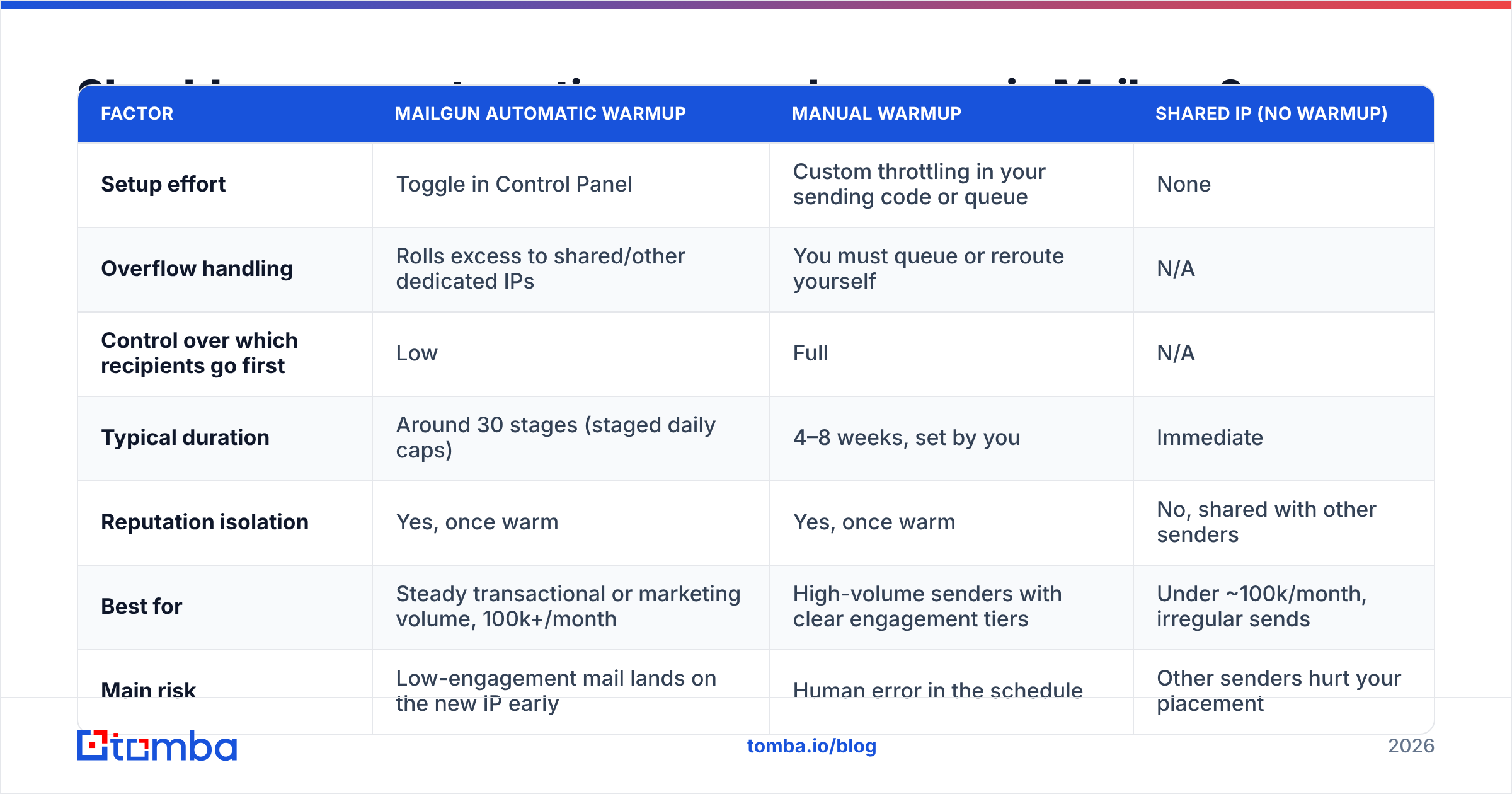
Should you use automatic or manual warmup in Mailgun?#
Most teams should leave the automatic warmup on. Manual control is worth it only if you have a specific reason, like an existing engaged segment you want to route through the new IP first.
| Factor | Mailgun Automatic Warmup | Manual Warmup | Shared IP (no warmup) |
|---|---|---|---|
| Setup effort | Toggle in Control Panel | Custom throttling in your sending code or queue | None |
| Overflow handling | Rolls excess to shared/other dedicated IPs | You must queue or reroute yourself | N/A |
| Control over which recipients go first | Low | Full | N/A |
| Typical duration | Around 30 stages (staged daily caps) | 4–8 weeks, set by you | Immediate |
| Reputation isolation | Yes, once warm | Yes, once warm | No, shared with other senders |
| Best for | Steady transactional or marketing volume, 100k+/month | High-volume senders with clear engagement tiers | Under ~100k/month, irregular sends |
| Main risk | Low-engagement mail lands on the new IP early | Human error in the schedule | Other senders hurt your placement |
If you're unsure, use this rule of thumb: if you can't name your most engaged 10% of recipients, you don't have enough data to beat the automatic schedule. Leave it on.
What does a sensible warmup schedule look like?#
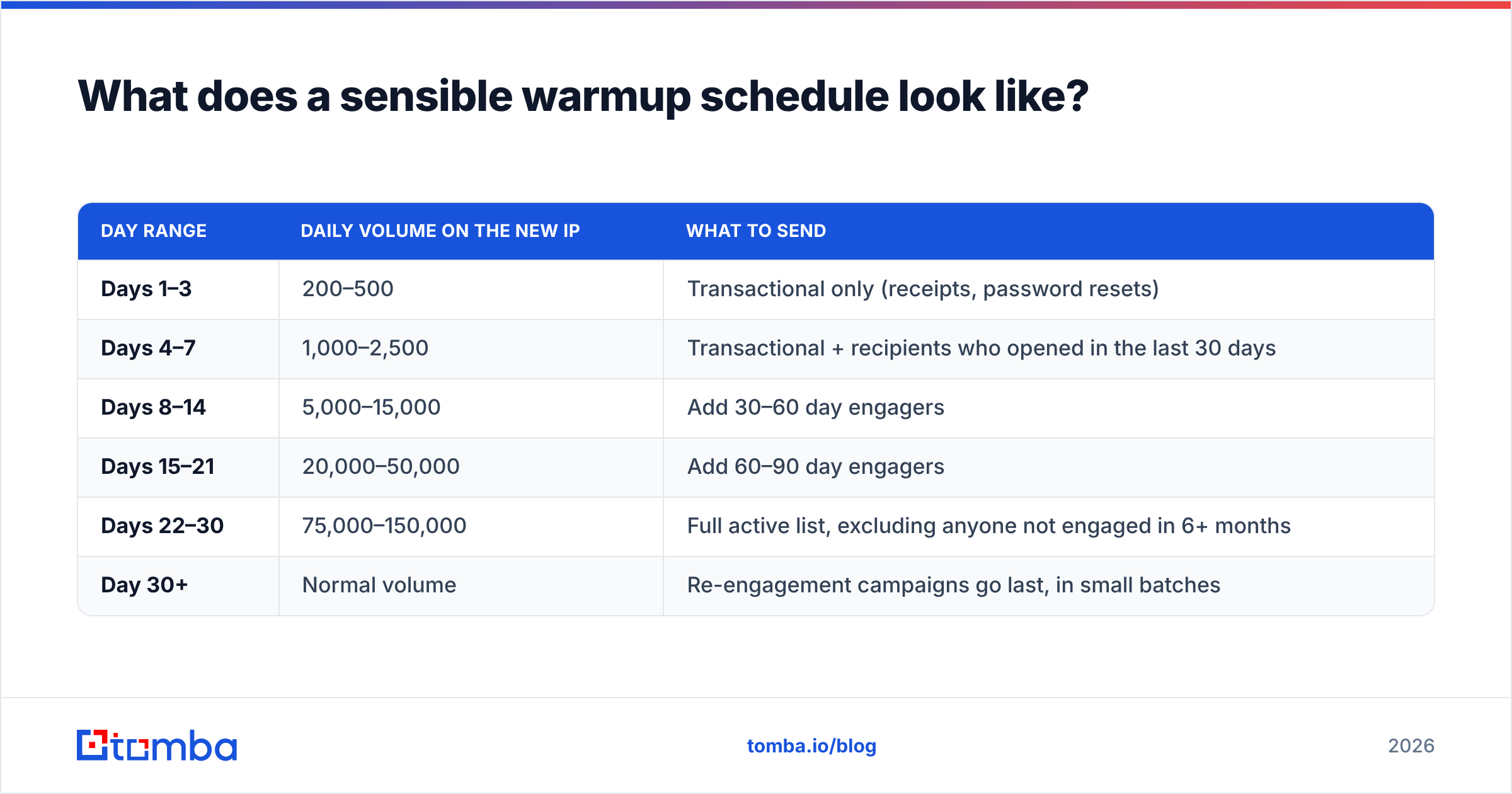
Mailgun shows the exact stage limits in your Control Panel, and they can change over time, so check them there rather than copying numbers from a blog post. If you're warming manually, or you just want a sanity check, the ramp below is a common conservative pattern across ESPs. It's illustrative, not Mailgun's official table.
| Day range | Daily volume on the new IP | What to send |
|---|---|---|
| Days 1–3 | 200–500 | Transactional only (receipts, password resets) |
| Days 4–7 | 1,000–2,500 | Transactional + recipients who opened in the last 30 days |
| Days 8–14 | 5,000–15,000 | Add 30–60 day engagers |
| Days 15–21 | 20,000–50,000 | Add 60–90 day engagers |
| Days 22–30 | 75,000–150,000 | Full active list, excluding anyone not engaged in 6+ months |
| Day 30+ | Normal volume | Re-engagement campaigns go last, in small batches |
Two things matter more than the exact numbers:
- Consistency. Sending 5,000 on Monday, 0 on Tuesday and 40,000 on Wednesday looks worse to an ISP than a flat 10,000 a day. Big swings reset trust.
- Per-provider pacing. Gmail, Microsoft and Yahoo each judge you separately. If 70% of your list is on Gmail, your "5,000 a day" is really 3,500 a day to Gmail. Keep an eye on that number.
To model the ramp against your own list size, plug your target volume into a warmup calculator and compare its output with the stage caps in Mailgun.
What do you need to set up before the warmup starts?#
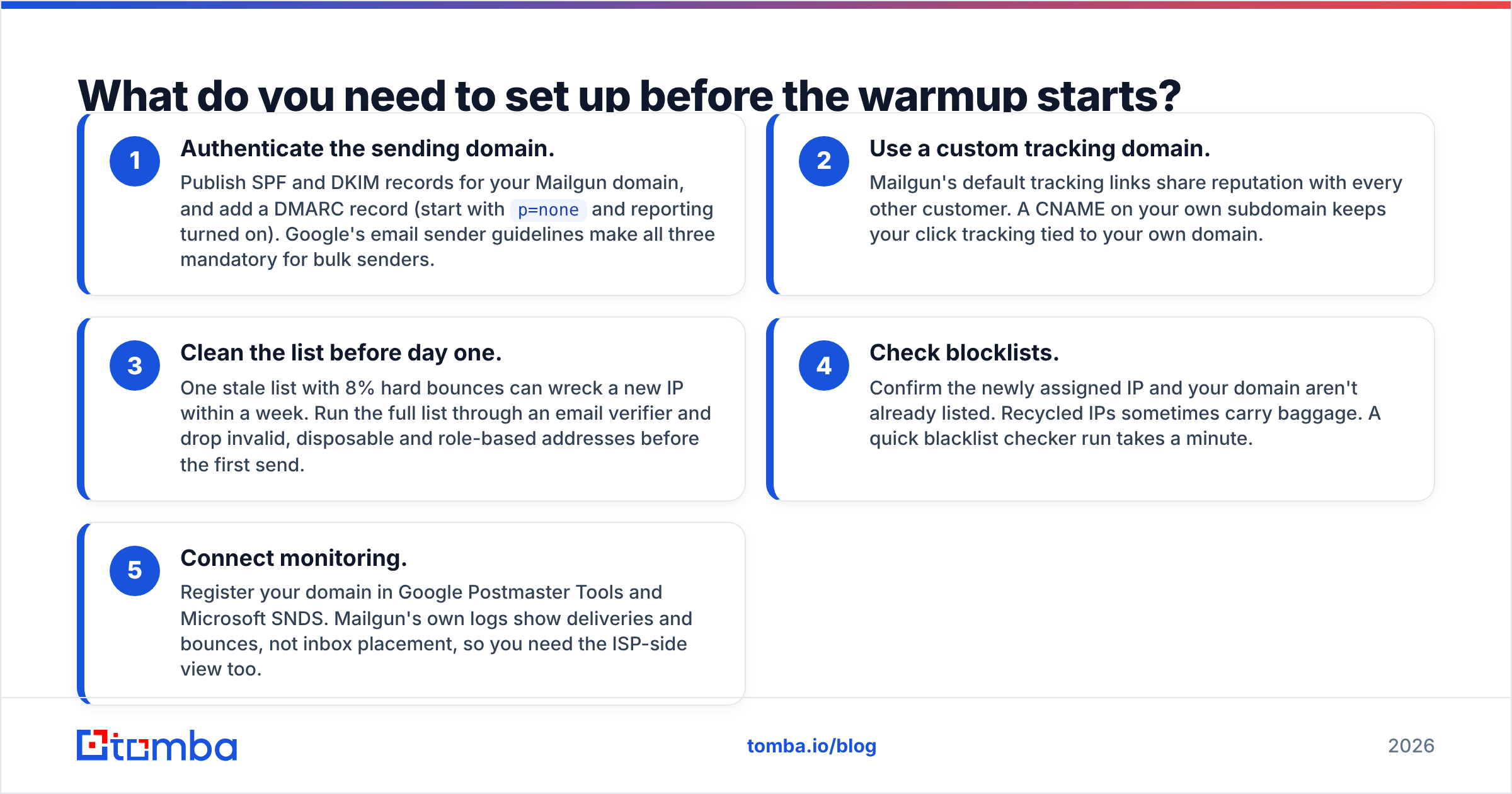
A warmup run on a bad foundation just builds bad reputation slowly. Fix these first.
- Authenticate the sending domain. Publish SPF and DKIM records for your Mailgun domain, and add a DMARC record (start with
p=noneand reporting turned on). Google's email sender guidelines make all three mandatory for bulk senders. - Use a custom tracking domain. Mailgun's default tracking links share reputation with every other customer. A CNAME on your own subdomain keeps your click tracking tied to your own domain.
- Clean the list before day one. One stale list with 8% hard bounces can wreck a new IP within a week. Run the full list through an email verifier and drop invalid, disposable and role-based addresses before the first send.
- Check blocklists. Confirm the newly assigned IP and your domain aren't already listed. Recycled IPs sometimes carry baggage. A quick blacklist checker run takes a minute.
- Connect monitoring. Register your domain in Google Postmaster Tools and Microsoft SNDS. Mailgun's own logs show deliveries and bounces, not inbox placement, so you need the ISP-side view too.
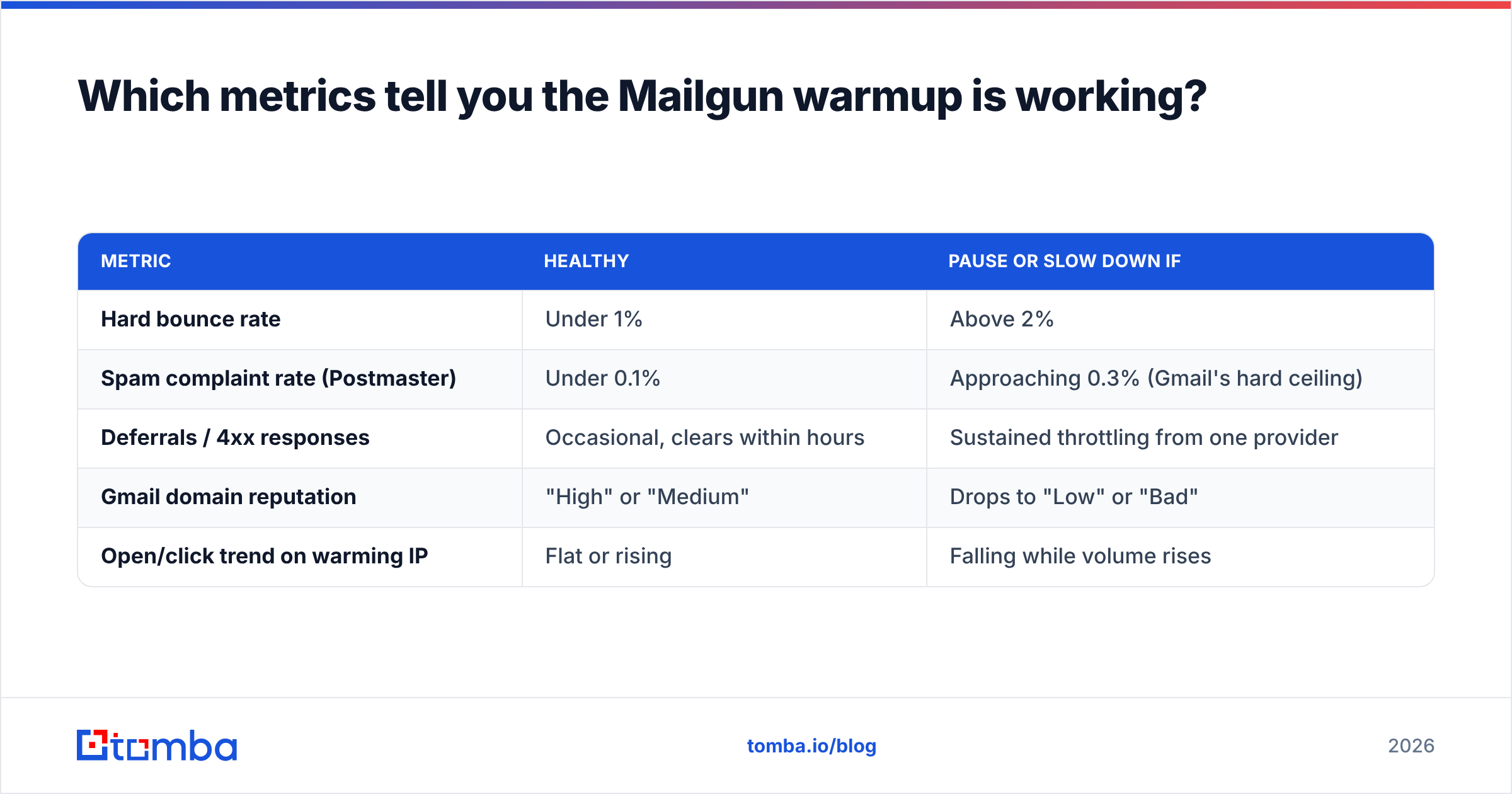
Which metrics tell you the Mailgun warmup is working?#
Watch these every day for the first two weeks, then a few times a week:
| Metric | Healthy | Pause or slow down if |
|---|---|---|
| Hard bounce rate | Under 1% | Above 2% |
| Spam complaint rate (Postmaster) | Under 0.1% | Approaching 0.3% (Gmail's hard ceiling) |
| Deferrals / 4xx responses | Occasional, clears within hours | Sustained throttling from one provider |
| Gmail domain reputation | "High" or "Medium" | Drops to "Low" or "Bad" |
| Open/click trend on warming IP | Flat or rising | Falling while volume rises |
If something goes wrong partway through, don't keep climbing. Hold the current volume, or drop back a stage, and narrow the audience to your most engaged recipients until the numbers recover. With automatic warmup on, you can also limit which traffic you send to that domain while the IP catches up.
Is Mailgun warmup the same as cold email warmup?#
No, and mixing them up is the most expensive mistake people make here.
Mailgun is an email API and SMTP relay built for transactional and opted-in marketing mail. Its IP warmup builds trust for an IP that sends mail people asked for: receipts, alerts, newsletters, product updates.
Cold email warmup tools (Instantly, Lemwarm, Smartlead's built-in warmup and others) do something different. They warm individual mailboxes on Google Workspace or Microsoft 365 by trading automated messages with a network of other inboxes, then marking those messages as "not spam" and replying.
Three practical consequences:
- Mailgun's acceptable use policy restricts unsolicited bulk mail. Pushing cold outbound through Mailgun, especially to purchased or scraped lists, risks account suspension no matter how carefully you warmed the IP.
- Inbox warmers don't help Mailgun IPs. They work at the mailbox level, not the IP level.
- Separate your streams. Run transactional and newsletter mail through Mailgun on one subdomain (for example
mail.yourco.com). Run cold outbound from separate mailboxes on a separate domain. A complaint spike from outbound then can't drag down your password-reset emails.
When is a dedicated IP (and its warmup) not worth it?#
A dedicated IP rewards you only when you send enough consistent volume to keep its reputation alive. Low, bursty volume looks just as suspicious on a warmed IP as on a cold one, and the reputation fades if the IP sits idle.
Skip the dedicated IP and stay on Mailgun's shared pool if:
- You send under roughly 100,000 emails a month. Mailgun's own guidance points to about this threshold.
- Your sending is bursty: one big monthly newsletter and very little in between.
- You don't have someone who will actually watch Postmaster and bounce data during the ramp.
Pricing changes often, so check the live Mailgun pricing page. As of 2026, third-party trackers list dedicated IPs either bundled into the higher-volume plans (Scale, around $90/month) or as an add-on of roughly $60/month on lower tiers. Add one only when your volume justifies it.

What are the most common Mailgun warmup mistakes?#
These show up again and again in deliverability post-mortems:
- Moving the whole list over on day one. Even with automatic warmup on, people sometimes turn it off "because rollover is slowing things down." That's exactly when it's protecting you.
- Warming with your worst segment. Re-engagement campaigns to people who haven't opened in a year belong at the end of the warmup, not the start.
- Skipping list hygiene because "it's our own list." Customer lists decay about 20–30% a year as people change jobs. B2B lists decay fastest.
- Changing several things at once. New IP, new domain, new template and a new audience in the same week means you can't tell what caused a reputation drop.
- Stopping monitoring at day 30. Warmup builds reputation. Keeping that reputation is ongoing work.
How do you keep the IP warm after the ramp ends?#
After you finish the schedule, reputation depends on what you send every day, not on what you did during warmup.
- Keep volume steady. If you have a seasonal spike (Black Friday, product launch), increase volume gradually over the week before it instead of jumping overnight.
- Sunset unengaged recipients. Suppress anyone with no opens or clicks in 6 months, or move them to a separate low-frequency re-permission flow.
- Verify new addresses at capture. Run real-time verification at signup or at CRM import so bad addresses never reach the send queue. This is the cheapest deliverability fix there is.
- Check authentication after every DNS change. One broken SPF include after a DNS migration can quietly fail DMARC for days.
Frequently asked questions#
How long does Mailgun warmup take? Mailgun's automatic warmup moves a new dedicated IP through a series of daily-capped stages (the Control Panel shows them as, for example, "Stage 7/30"). In practice, expect about four to six weeks before an IP handles full volume reliably, longer if your engagement is weak.
Do I need to warm up a Mailgun shared IP? No. Shared IPs already have established reputation. The trade-off is that other senders on the pool can affect your placement.
What happens to emails over the daily warmup limit? With automatic warmup on, Mailgun sends the excess through shared IPs or your other dedicated IPs instead of rejecting it.
Can I use Mailgun for cold email if I warm up the IP? Warming up doesn't change Mailgun's acceptable use policy. Cold outbound is better sent from dedicated mailboxes on a separate domain using cold-email tooling.
How Tomba fits into a clean Mailgun warmup#
A warmup is only as good as the addresses you send to. If your list was built from scraped or guessed emails, no ramp will save it. The best warmups start with contacts you know exist. Tomba Email Finder finds professional addresses by name, domain or company, and runs verification on every result, so the contacts you load into Mailgun start out clean. The Free tier gives you 25 searches a month to test it against your own list, and paid plans start at $49/month when you need more volume.
Related guides#
// get started
Find, verify and enrich your first contacts today
Start on the free plan with 25 searches a month, then scale when your team is ready.
Free plan · No credit card required · GDPR & CCPA
// about the author