Cold Email Bounce Rate: How to Get Below 2% in 2026
A high cold email bounce rate quietly kills your domain reputation and hides your best campaigns from inboxes. Here is how to measure it, benchmark it, and drive it under 2%.
Your cold email bounce rate is the fastest way to torch a sending domain you spent months warming up. One bad list, one skipped verification step, and mailbox providers start treating you like a spammer before a single prospect reads your pitch.
This guide breaks down what counts as a bounce, what a healthy benchmark actually is in 2026, why your rate climbs, and the concrete workflow that keeps it under 2% campaign after campaign.
TL;DR#
- A cold email bounce rate under 2% is the safe zone. Above 4% and mailbox providers start throttling or blocking your domain.
- Most bounces are self-inflicted — unverified lists, stale data, and catch-all domains you never checked.
- Hard bounces hurt reputation permanently; soft bounces are usually temporary but still need monitoring.
- Verification before send is non-negotiable. Cleaning a list with an email verifier is the single biggest lever you have.
- Warmup, authentication (SPF/DKIM/DMARC), and list hygiene together keep you out of the spam folder long-term.
What is a cold email bounce rate?#
Your bounce rate is the percentage of emails that were rejected by the receiving mail server instead of being delivered. The formula is simple:
Bounce rate = (bounced emails ÷ total emails sent) × 100
Think of it like mailing physical letters to addresses you scraped off the internet. Some houses were demolished, some addresses never existed, and some mailboxes are temporarily stuffed full. Every letter that comes back "return to sender" is a bounce — and the post office starts wondering why so much of your mail is undeliverable.
Mailbox providers like Gmail and Outlook watch that ratio obsessively. A clean sender delivers to real people. A spammer blasts stale lists and racks up bounces. Your bounce rate is one of the loudest signals telling them which one you are.
There are two kinds you need to separate:
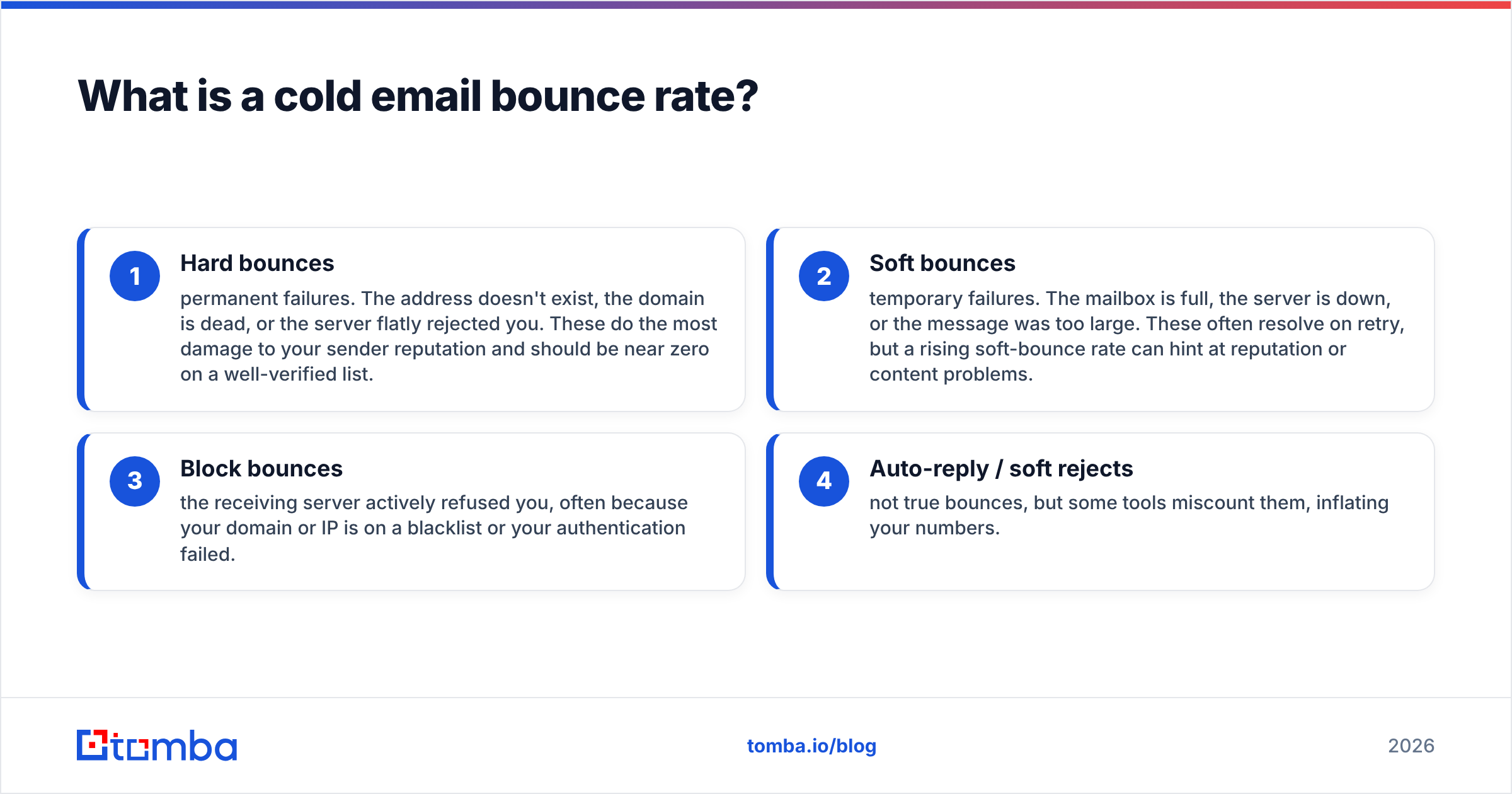
- Hard bounces — permanent failures. The address doesn't exist, the domain is dead, or the server flatly rejected you. These do the most damage to your sender reputation and should be near zero on a well-verified list.
- Soft bounces — temporary failures. The mailbox is full, the server is down, or the message was too large. These often resolve on retry, but a rising soft-bounce rate can hint at reputation or content problems.
- Block bounces — the receiving server actively refused you, often because your domain or IP is on a blacklist or your authentication failed.
- Auto-reply / soft rejects — not true bounces, but some tools miscount them, inflating your numbers.

What is a good cold email bounce rate in 2026?#
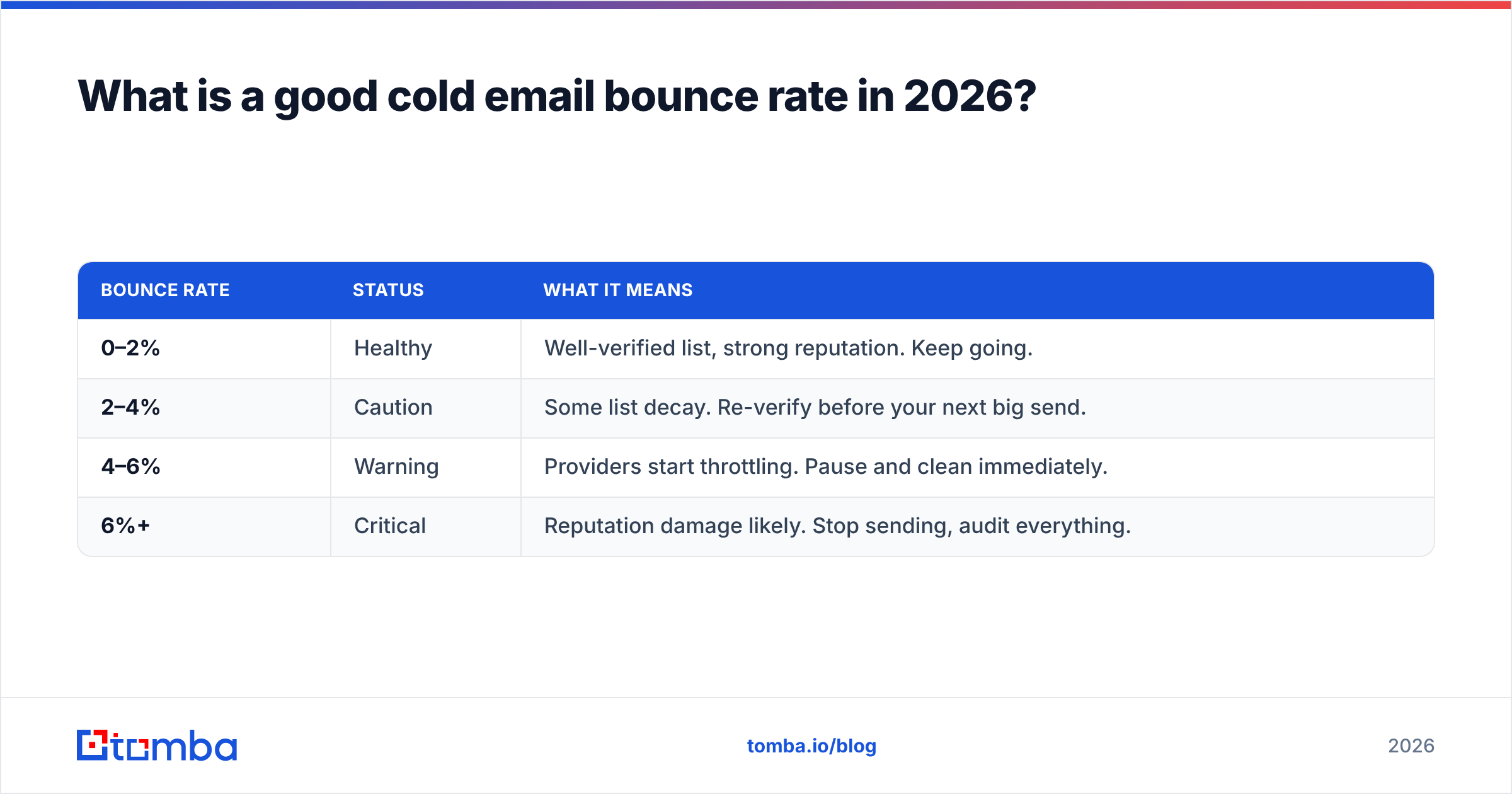
The short answer: keep it under 2%. That is the threshold most deliverability teams and email service providers treat as "healthy." Cross 4–5% and you are in dangerous territory where automatic throttling and domain reputation damage kick in.
Here is how the ranges break down:
| Bounce rate | Status | What it means |
|---|---|---|
| 0–2% | Healthy | Well-verified list, strong reputation. Keep going. |
| 2–4% | Caution | Some list decay. Re-verify before your next big send. |
| 4–6% | Warning | Providers start throttling. Pause and clean immediately. |
| 6%+ | Critical | Reputation damage likely. Stop sending, audit everything. |
For context, general marketing email benchmarks from providers like HubSpot hover around a 2% acceptable bounce rate for opt-in lists. Cold email is harder because your recipients never handed you their address — which is exactly why verification matters more, not less.
Reputable G2 reviews of email tools consistently show that teams who verify before sending report bounce rates in the sub-1% range, while teams relying on scraped or purchased lists routinely see 8–15%. The difference isn't luck. It's process.
Why is my cold email bounce rate so high?#
If your rate is climbing, one of these is almost always the culprit:
- You skipped verification. Sending to a raw, unverified list guarantees bounces. Roughly 20–30% of B2B contact data decays every year as people change jobs.
- You bought or scraped a list. Purchased lists are full of spam traps, dead addresses, and role accounts. They're the number-one cause of catastrophic bounce rates.
- You ignored catch-all domains. Catch-all servers accept every address, so a standard verifier can't confirm the mailbox is real. Send blindly and you gamble on every one.
- Your data is stale. A list you built six months ago has already lost a chunk of its accuracy. People leave, companies rebrand, domains lapse.
- You have authentication gaps. Missing SPF, DKIM, or DMARC records cause block bounces even when the address is valid.
- Your domain is too new or cold. Blasting from an unwarmed domain triggers defensive rejections.
The uncomfortable truth is that most high bounce rates are self-inflicted. The good news: that means they're fixable with the right workflow.
How do you lower your cold email bounce rate?#
Lowering your bounce rate comes down to one principle — only send to addresses you've confirmed are real. Here's the workflow that gets you there.
1. Verify every address before you send#
This is the highest-leverage step, full stop. A quality email verification pass checks syntax, domain records, MX servers, and mailbox existence via SMTP, then flags risky and catch-all addresses so you can decide how to handle them.
Run your entire list through verification and remove or quarantine anything marked invalid. For large lists, a bulk verify run does this in one pass instead of one address at a time.
2. Find emails from a source that's already accurate#
Garbage in, garbage out. If you build lists with a tool that returns verified, sourced data, you start from a much cleaner baseline. A quality email finder returns a confidence score and the sources behind each address, so you're not guessing. See how Tomba sources its data for what "accurate at the point of collection" actually looks like.
3. Handle catch-all domains deliberately#
Catch-all domains are the silent bounce-rate killer because a normal verifier returns "unknown." Use a dedicated catch-all verifier to score them, and either segment them into a lower-priority send or skip them entirely on high-stakes campaigns.

4. Authenticate your sending domain#
Set up SPF, DKIM, and DMARC records before you send a single cold email. Missing records cause outright rejections. You can confirm your setup with a free SPF checker and read the fundamentals in this SPF record primer. Proper authentication also protects you from spoofing and improves overall email deliverability.
5. Warm up new domains and inboxes#
A brand-new domain has no reputation, so providers treat it with suspicion. Ramp your volume gradually over 3–4 weeks before running full campaigns. Estimate your ramp with a warmup calculator so you don't spike volume too fast.
6. Re-verify on a schedule#
List hygiene isn't a one-time event. Re-verify any list older than 30–60 days before reusing it, because B2B data decays continuously. Set a recurring cadence and treat it like changing the oil in a car — routine maintenance that prevents an expensive breakdown.
Verification tools compared: what actually moves the needle#
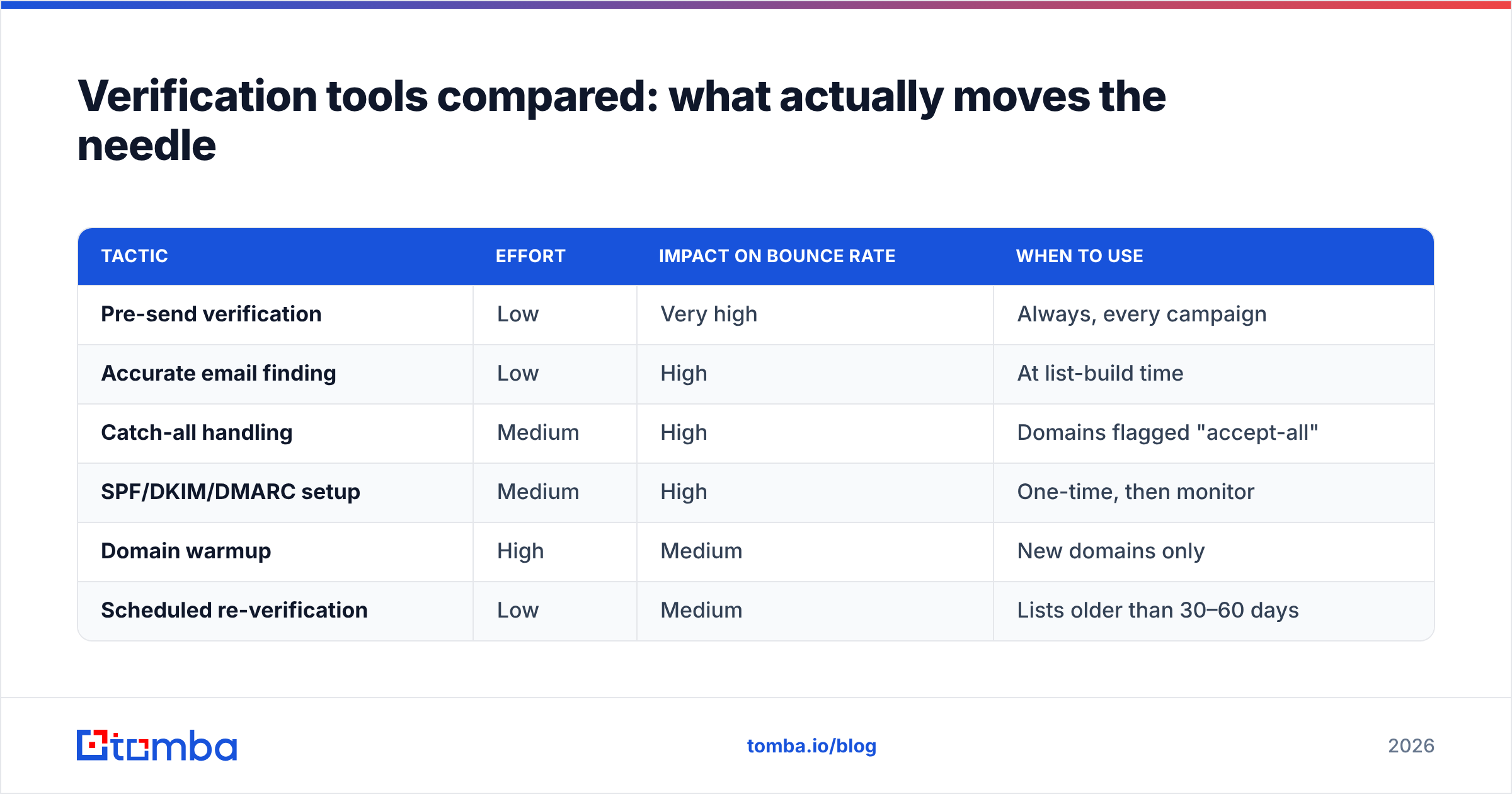
Not every step has the same impact. Here's how the core tactics stack up on effort versus payoff.
| Tactic | Effort | Impact on bounce rate | When to use |
|---|---|---|---|
| Pre-send verification | Low | Very high | Always, every campaign |
| Accurate email finding | Low | High | At list-build time |
| Catch-all handling | Medium | High | Domains flagged "accept-all" |
| SPF/DKIM/DMARC setup | Medium | High | One-time, then monitor |
| Domain warmup | High | Medium | New domains only |
| Scheduled re-verification | Low | Medium | Lists older than 30–60 days |
The pattern is clear: verification is low-effort and high-impact, which is why skipping it is the most expensive mistake in cold email. Everything else supports it.
How is bounce rate different from deliverability and spam rate?#
These three metrics get tangled together, but they measure different things:
- Bounce rate measures messages the receiving server rejected outright. It's a delivery-attempt failure.
- Deliverability (or inbox placement) measures where accepted messages land — inbox versus spam folder. An email can be delivered but still buried in spam.
- Spam complaint rate measures how many recipients marked you as spam. Keep this under 0.1% or providers punish you hard.
They're connected. A high bounce rate drags down your sender reputation, which pushes more accepted mail into spam folders, which raises complaints. Fixing bounces at the source protects all three. If you want to go deeper on placement specifically, the concepts in email deliverability and sender reputation build directly on top of clean list hygiene.
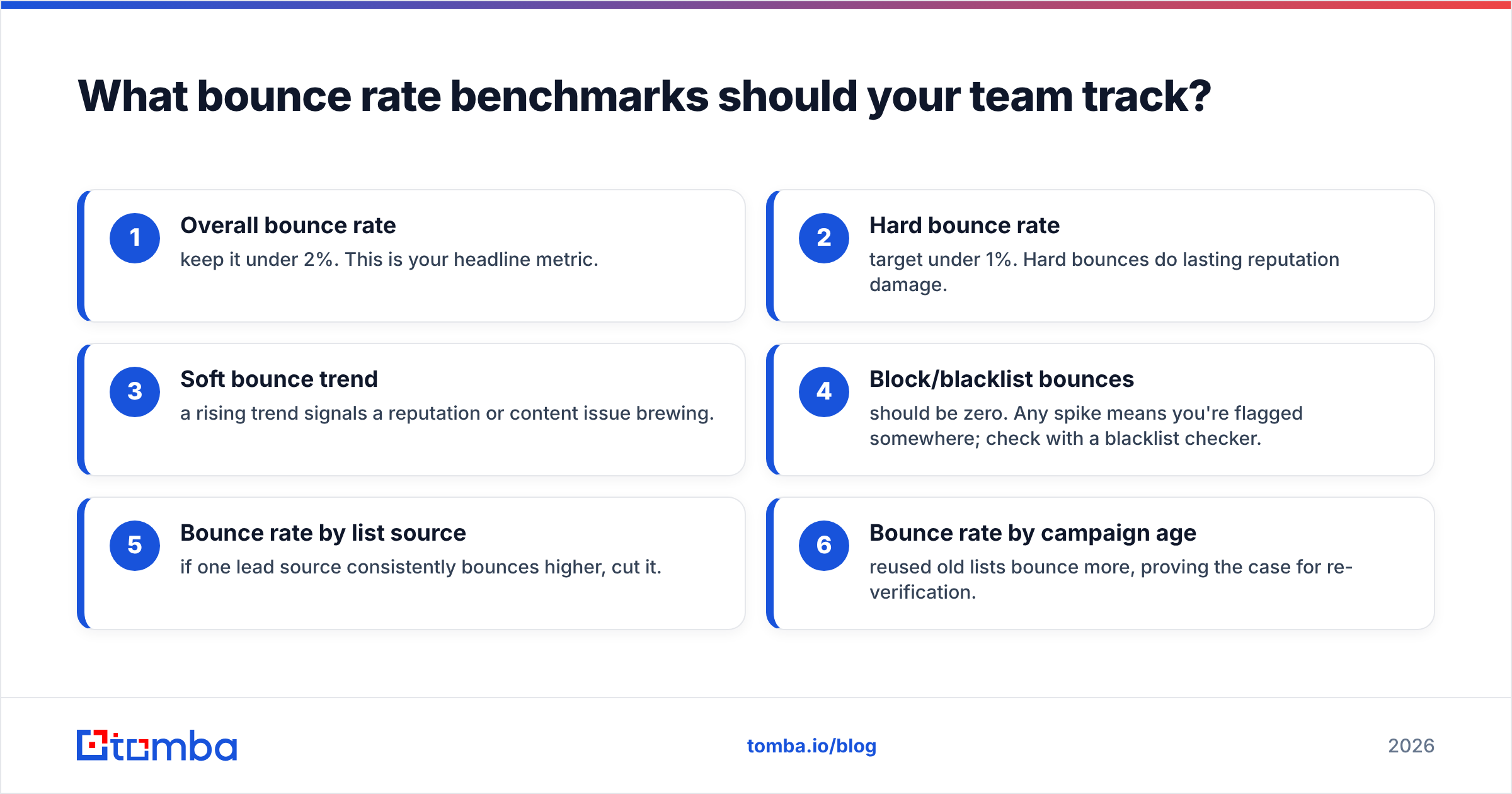
What bounce rate benchmarks should your team track?#
Don't just watch one number. Build a small dashboard around these:
- Overall bounce rate — keep it under 2%. This is your headline metric.
- Hard bounce rate — target under 1%. Hard bounces do lasting reputation damage.
- Soft bounce trend — a rising trend signals a reputation or content issue brewing.
- Block/blacklist bounces — should be zero. Any spike means you're flagged somewhere; check with a blacklist checker.
- Bounce rate by list source — if one lead source consistently bounces higher, cut it.
- Bounce rate by campaign age — reused old lists bounce more, proving the case for re-verification.
Tracking bounce rate by source is the most underrated habit here. It tells you which data providers and list-building methods are worth your money and which are quietly poisoning your domain.
Common mistakes that keep bounce rates high#
Even experienced teams trip on these:
- "We'll clean the list later." Later never comes, and the damage is already done after the first send.
- Trusting a single verification pass forever. Data decays; yesterday's clean list isn't today's.
- Treating catch-all as valid. Catch-alls need their own handling, not a blind send.
- Sending from one domain at high volume. Spread volume across warmed domains and inboxes.
- Ignoring role-based addresses. info@, sales@, and support@ addresses bounce and complain more; segment or drop them.
- No feedback loop. If you're not logging bounces back into your CRM to suppress bad addresses, you'll re-send to them next quarter.
A quick way to sanity-check a single address before adding it to a campaign is a free email checker — useful for spot checks even when your main workflow runs in bulk.
Bringing it together: a repeatable low-bounce workflow#
Put the pieces in order and the whole thing runs on autopilot:
- Build your list with an accurate email finder that returns confidence scores.
- Verify the full list before every send.
- Segment catch-alls and role accounts into lower-risk buckets.
- Authenticate your domain with SPF, DKIM, and DMARC.
- Warm up new domains before scaling volume.
- Monitor bounce rate by source and campaign age.
- Re-verify anything older than 30–60 days.
Follow that loop and a sub-2% bounce rate stops being a goal you chase and becomes the default state of your outbound program.
Start with clean data#
The cheapest bounce is the one that never happens because you never sent to a dead address. That starts at the source — finding and verifying real, current professional emails before they ever enter a campaign.
The Tomba Email Finder returns sourced, confidence-scored addresses by domain, name, or company, and pairs with built-in verification so your list is clean before the first send. On the free tier you get 25 searches a month to test it; paid Tomba plans start at $49/mo when you're ready to scale. Build clean, verify everything, and let your bounce rate take care of itself.
Related guides#
// get started
Find, verify and enrich your first contacts today
Start on the free plan with 25 searches a month, then scale when your team is ready.
Free plan · No credit card required · GDPR & CCPA
// about the author