Cold Email Campaign Software in 2026: The Complete Buyer's Guide
Cold email campaign software decides whether your outreach lands in the inbox or the spam folder. Here's how the 2026 platforms actually compare — and what to buy.
Cold email campaign software is the engine that turns a list of contacts into a predictable pipeline of replies — or into a fast track to the spam folder if you pick the wrong tool. In 2026, the gap between the best and worst platforms is no longer about who has the prettiest sequence builder. It's about who keeps you out of Google and Microsoft's spam filters.
This guide breaks down what actually matters, compares the leading platforms on concrete attributes, and shows you where each one fits.
TL;DR#
- Cold email campaign software automates sending, sequencing, warmup, and reply tracking for outbound email at scale — the good tools are built around deliverability, not just volume.
- The 2026 buying decision hinges on three things: inbox placement, sending infrastructure (dedicated IPs, inbox rotation), and how clean your data is before it hits the tool.
- Instantly and Smartlead dominate on deliverability features; Apollo and Saleshandy bundle data plus sending; Reply.io and Lemlist lean into multichannel.
- No campaign tool fixes a bad list. Verified, accurately sourced contacts from a dedicated email finder and email verifier do more for reply rates than any feature.
- Budget realistically: expect $30–$100/month for sending software, plus a separate data/verification budget.
What is cold email campaign software?#
Cold email campaign software is a platform that sends personalized outbound email sequences to prospects who haven't opted in, then tracks opens, replies, and bounces so you can iterate. Think of it as the difference between mailing 500 letters by hand and running a print shop with an automated mailroom: the mailroom handles addressing, postage, timing, and follow-ups so you focus on the message.
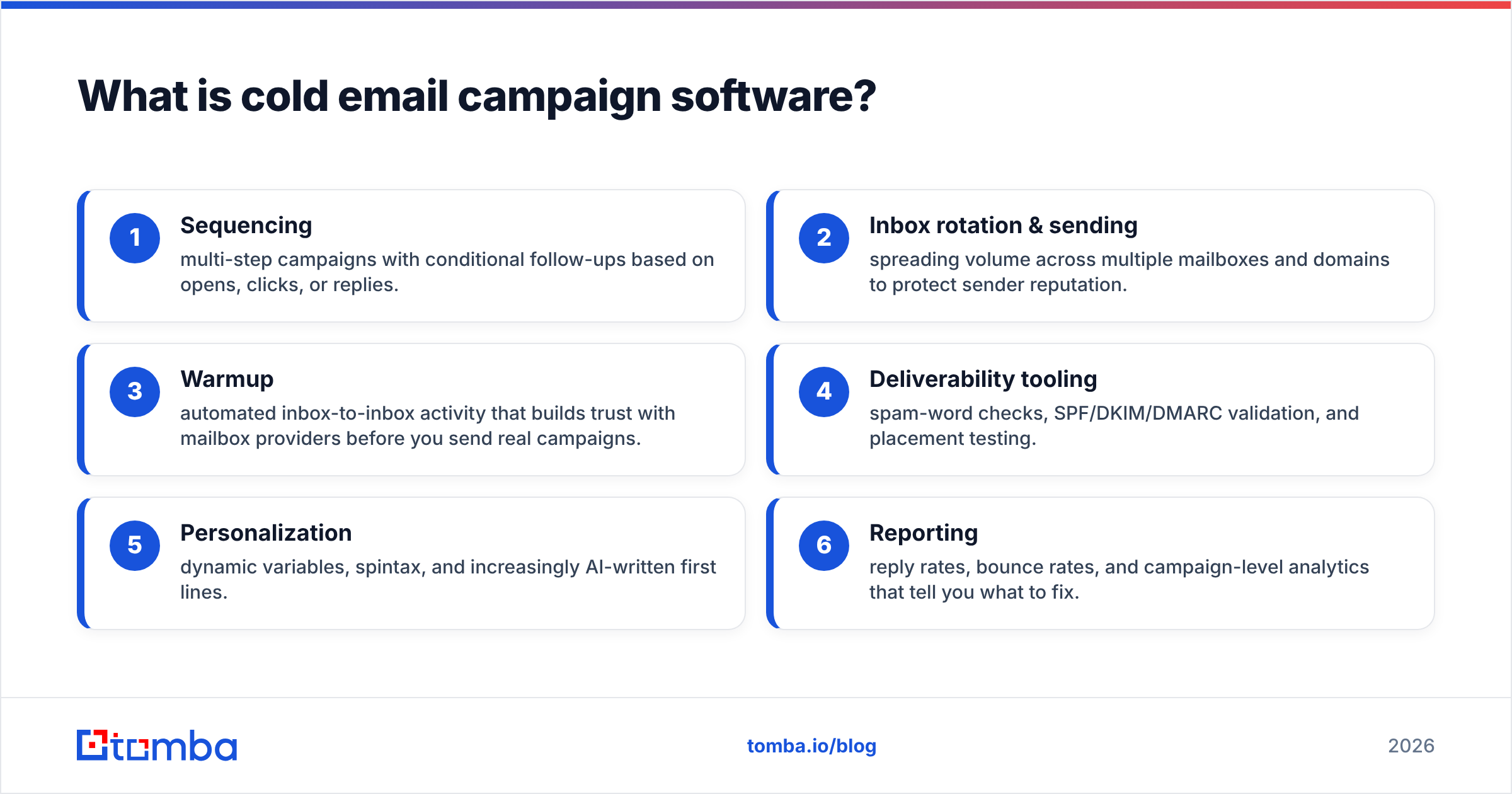
The category has consolidated around a handful of core jobs. A modern platform typically does all of the following:
- Sequencing — multi-step campaigns with conditional follow-ups based on opens, clicks, or replies.
- Inbox rotation & sending — spreading volume across multiple mailboxes and domains to protect sender reputation.
- Warmup — automated inbox-to-inbox activity that builds trust with mailbox providers before you send real campaigns.
- Deliverability tooling — spam-word checks, SPF/DKIM/DMARC validation, and placement testing.
- Personalization — dynamic variables, spintax, and increasingly AI-written first lines.
- Reporting — reply rates, bounce rates, and campaign-level analytics that tell you what to fix.
If a tool only does the first item well, it's a sequencer, not campaign software. The 2026 winners are the ones that treat deliverability as a first-class product surface.
Why does deliverability matter more than features in 2026?#
Because Google and Yahoo's 2024 bulk-sender rules changed the game, and the enforcement only tightened through 2026. If your authentication is broken or your spam-complaint rate creeps above 0.3%, no amount of sequence branching saves you. Your mail simply doesn't reach the inbox.
That reordered the entire buying priority. Five years ago, teams shopped for the richest feature set. Today the smart question is: how does this platform protect my inbox placement? The features that answer that question are:
- Dedicated and rotating IPs so one bad campaign doesn't torch a shared pool.
- Automatic inbox rotation across many mailboxes to keep per-inbox volume low.
- Built-in warmup that runs continuously, not just at onboarding.
- Pre-send verification to strip invalid addresses before they bounce.
That last point is where most teams quietly fail. A campaign tool sends whatever you upload. If 15% of your list is invalid, you'll rack up bounces, trip spam filters, and poison the domain you spent weeks warming. This is why serious senders run every list through an email verification pass and confirm risky domains with a catch-all verifier before importing a single contact. The campaign software is the last mile — your data quality is the road.
How do the top cold email campaign software platforms compare?#
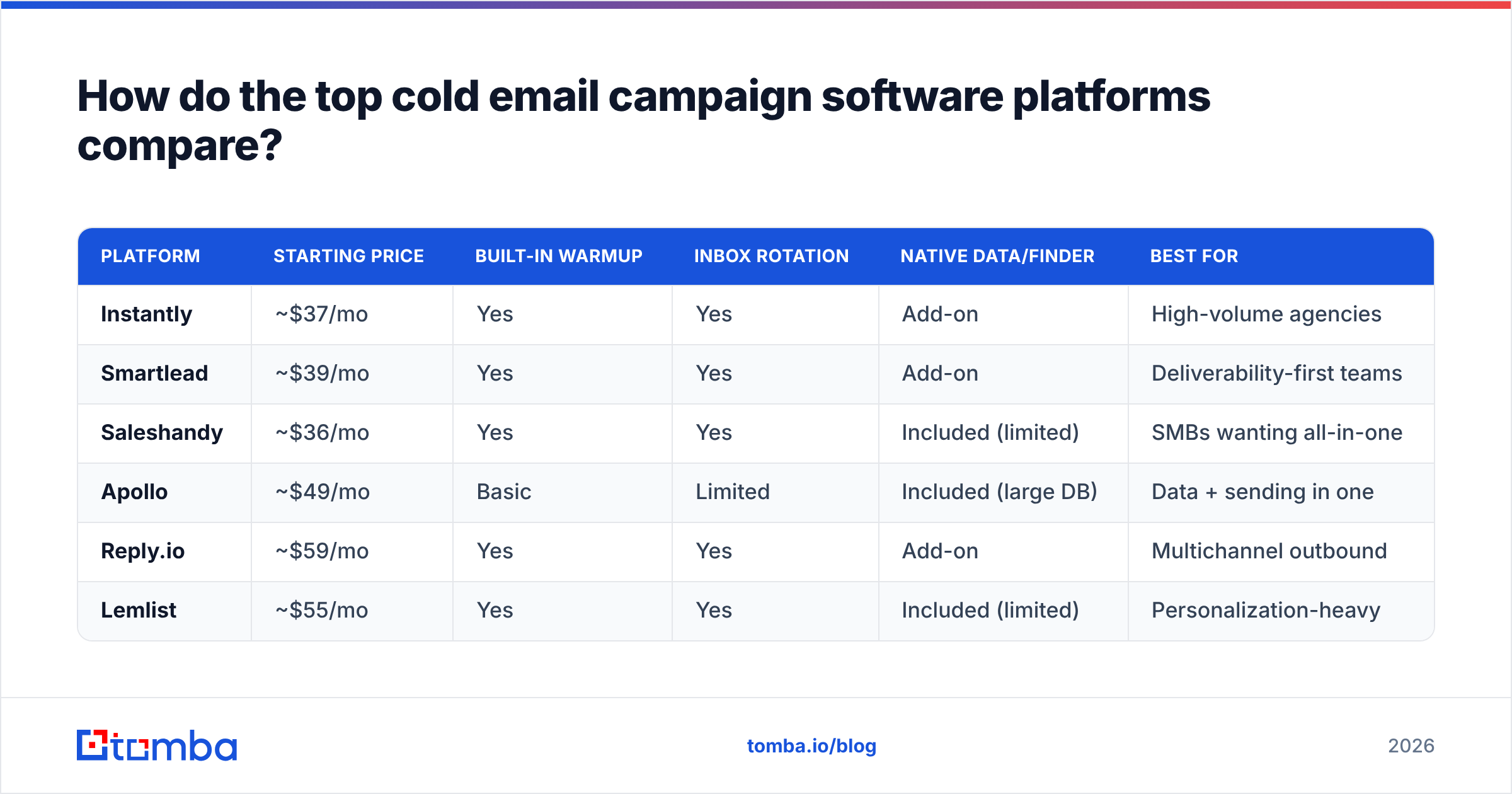
Here's how the leading 2026 platforms stack up on the attributes that actually change outcomes. Pricing reflects entry-level paid plans and is rounded; always check current vendor pricing before committing.
| Platform | Starting price | Built-in warmup | Inbox rotation | Native data/finder | Best for |
|---|---|---|---|---|---|
| Instantly | ~$37/mo | Yes | Yes | Add-on | High-volume agencies |
| Smartlead | ~$39/mo | Yes | Yes | Add-on | Deliverability-first teams |
| Saleshandy | ~$36/mo | Yes | Yes | Included (limited) | SMBs wanting all-in-one |
| Apollo | ~$49/mo | Basic | Limited | Included (large DB) | Data + sending in one |
| Reply.io | ~$59/mo | Yes | Yes | Add-on | Multichannel outbound |
| Lemlist | ~$55/mo | Yes | Yes | Included (limited) | Personalization-heavy |
A few honest caveats on this table. Apollo bundles a huge contact database, which is convenient but often less accurate than a dedicated finder — you trade precision for one-stop shopping. Instantly and Smartlead are the deliverability purists: lean sending machines that assume you bring your own verified data. Saleshandy and Lemlist include contact data, but the databases are smaller and you'll frequently need to supplement them.
The pattern is clear: the tools with the best sending infrastructure tend to have the weakest native data, and vice versa. That's not a flaw — it's an argument for keeping data sourcing and sending as separate, best-of-breed layers.
Should you use an all-in-one platform or a best-of-breed stack?#
Use best-of-breed unless you're a solo founder who values simplicity over performance. Here's the reasoning.
An all-in-one platform like Apollo is genuinely appealing: one login, one bill, data and sending together. For a first campaign or a tiny team, that convenience is worth real money. But bundled databases optimize for coverage (how many contacts they claim) over accuracy (how many are correct and current). When you scale, those inaccuracies compound into bounces and deliverability damage.
A best-of-breed stack separates the concerns:
- Data layer — a dedicated email finder and domain search to source accurate, current contacts, plus enrichment to fill gaps.
- Verification layer — an email verifier to scrub the list before it ever touches your sending domain.
- Sending layer — Instantly, Smartlead, or similar, focused purely on deliverability and sequencing.
This is the setup most high-performing outbound teams run. It costs a little more in tooling and takes one extra step in the workflow, but the payoff is a list that doesn't bounce and a domain reputation that survives past month two.
What does cold email campaign software actually cost?#
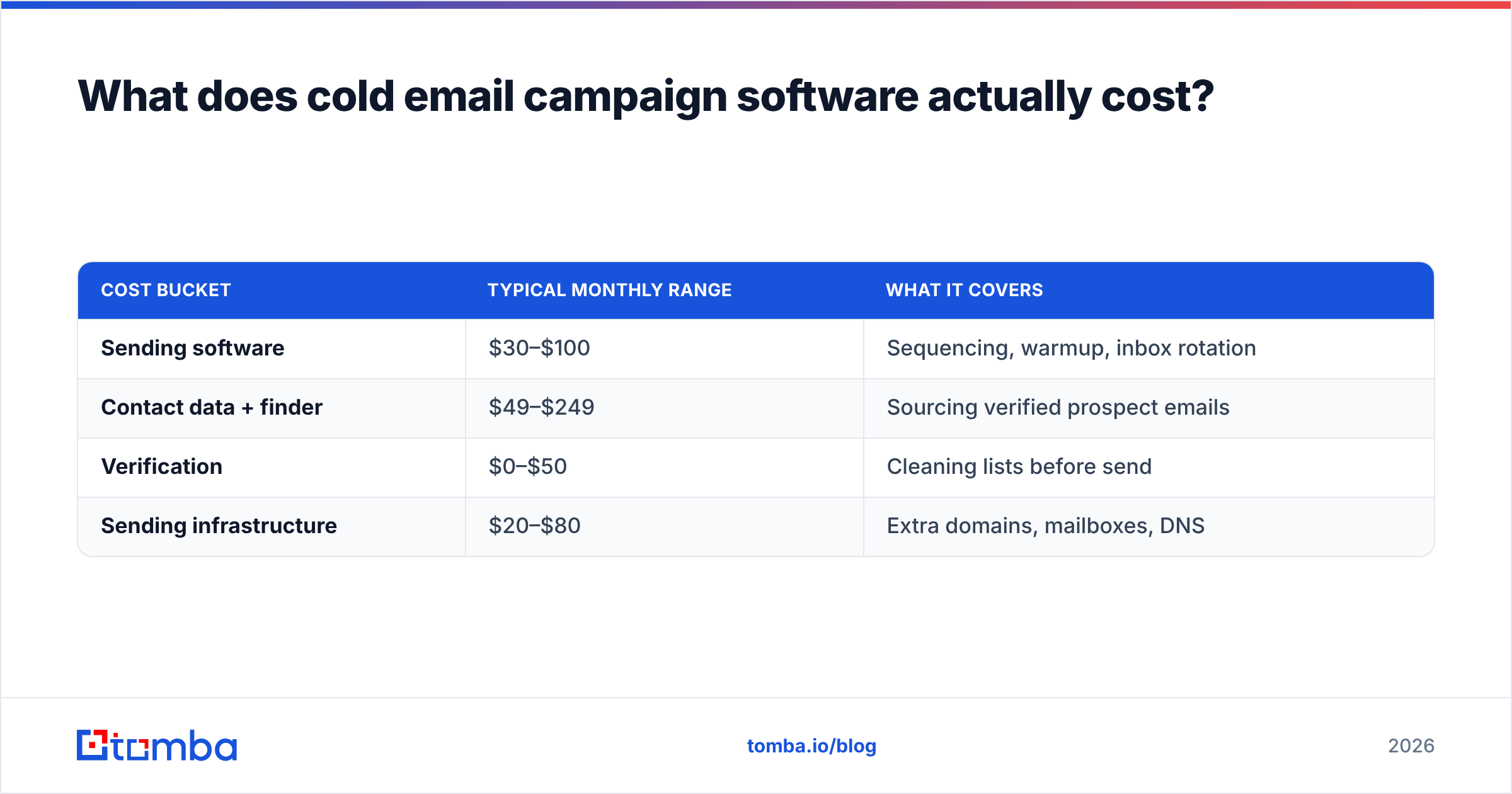
Budget in three buckets, not one. The sticker price on the sending tool is the least of your real costs.
| Cost bucket | Typical monthly range | What it covers |
|---|---|---|
| Sending software | $30–$100 | Sequencing, warmup, inbox rotation |
| Contact data + finder | $49–$249 | Sourcing verified prospect emails |
| Verification | $0–$50 | Cleaning lists before send |
| Sending infrastructure | $20–$80 | Extra domains, mailboxes, DNS |
For a mid-market team sending a few thousand emails a month, a realistic all-in figure is $150–$400/month once you account for data and domains. The teams that under-budget almost always do it by ignoring data and verification — then wonder why their reply rates crater.
On the data side, Tomba's plans start with a free tier of 25 searches/month, then Starter at $49/mo, Growth at $99/mo, and Pro at $249/mo. You can see the full breakdown on the Tomba pricing page. Pairing a focused data tool with a lean sending platform usually beats paying a premium for a bundled suite that does neither job exceptionally.
How do you set up a cold email campaign that actually lands?#
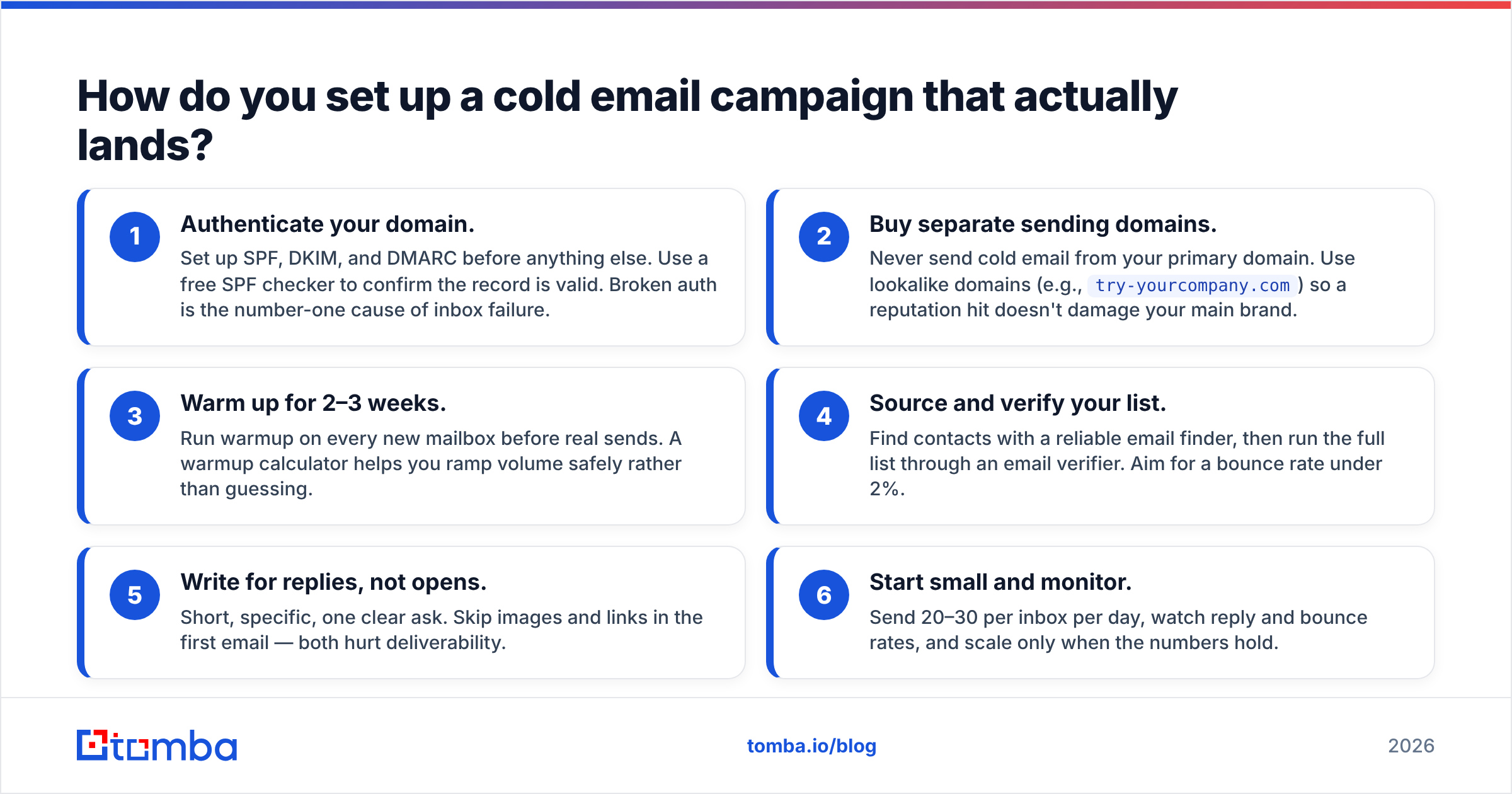
Follow this sequence. The order matters more than the tools.
- Authenticate your domain. Set up SPF, DKIM, and DMARC before anything else. Use a free SPF checker to confirm the record is valid. Broken auth is the number-one cause of inbox failure.
- Buy separate sending domains. Never send cold email from your primary domain. Use lookalike domains (e.g.,
try-yourcompany.com) so a reputation hit doesn't damage your main brand. - Warm up for 2–3 weeks. Run warmup on every new mailbox before real sends. A warmup calculator helps you ramp volume safely rather than guessing.
- Source and verify your list. Find contacts with a reliable email finder, then run the full list through an email verifier. Aim for a bounce rate under 2%.
- Write for replies, not opens. Short, specific, one clear ask. Skip images and links in the first email — both hurt deliverability.
- Start small and monitor. Send 20–30 per inbox per day, watch reply and bounce rates, and scale only when the numbers hold.
Skipping steps 1 through 4 to get to sending faster is the classic mistake. Deliverability is earned before the campaign starts, not recovered after it fails.
What's the biggest hidden cost of cold email software?#
Domain and reputation damage from bad data — and it's rarely on the pricing page. A single campaign to an unverified list can generate enough hard bounces to blacklist a sending domain, forcing you to buy new domains, re-warm them for weeks, and eat the lost pipeline in the meantime.
That's why the data question sits upstream of the software question. You can run the best sending platform on the market and still fail if the list is dirty. Conversely, a modest sending tool with a clean, well-sourced list will outperform an expensive suite fed garbage. When you evaluate where your budget goes, weight it toward the inputs — verified contacts and enrichment — because they determine whether the software can do its job at all. Tools like a reverse email lookup and data enrichment round out a list so your personalization has something real to work with.
Which platform should you choose?#
Match the tool to your situation:
- Solo founder or first campaign: Saleshandy or an all-in-one — simplicity wins while you learn the mechanics.
- Agency running many client campaigns: Instantly or Smartlead — inbox rotation and deliverability tooling are non-negotiable at volume.
- Team that wants data and sending together: Apollo — accept the accuracy tradeoff for the convenience.
- Multichannel (email + LinkedIn + calls): Reply.io or Lemlist — sequencing across channels is their strength.
Whatever you pick on the sending side, treat data as a separate, deliberate decision. For a deeper look at how Instantly compares as an alternative, or how a data-first stack fits together, the fundamentals stay the same: verified contacts in, protected reputation throughout.
The bottom line#
The best cold email campaign software in 2026 is the one that protects your inbox placement and lets you feed it clean data. Features like AI first lines and conditional branching are nice, but they're tiebreakers — deliverability and data quality are the deciding factors.
Before you optimize your sequences, optimize your list. Start with the Tomba Email Finder to source accurate, verified professional emails, then push them into whatever sending platform fits your workflow. Clean data in means real replies out — and that's the only metric your campaign software is ultimately judged on. Try Tomba's free tier and see how much your bounce rate drops before your next send.
Related guides#
Ready to find emails that actually work?
Join 150,000+ professionals who stopped guessing and started sending. Free credits on signup — no credit card required.
Get the Tomba newsletter
Practical outbound tactics and product updates — once every two weeks.
About the author