Cold Email Domain Setup: The Complete Guide for 2026
Your main domain is too valuable to burn on cold outreach. Here's how to set up dedicated cold email domains that protect your reputation and actually land in the inbox.
Sending cold email from your main company domain is one of the fastest ways to torch your reputation. One angry spam-flag wave, and the domain your invoices, contracts, and customer support run through starts landing in junk. A cold email domain is the fix: a separate, purpose-built domain that absorbs the risk of outbound so your primary domain stays clean.
This guide walks through exactly how to buy, configure, authenticate, and warm up cold email domains in 2026 — with the DNS records, the sending limits, and the mistakes that get whole domains blacklisted.
TL;DR#
- Never send cold email from your primary domain. Buy dedicated lookalike domains (e.g.
get-acme.com,try-acme.com) and point them at your brand. - Authenticate everything: SPF, DKIM, and a DMARC record are non-negotiable in 2026 — Google and Yahoo will reject unauthenticated bulk mail outright.
- Warm up for 2–4 weeks before real outreach. Ramp from ~10 sends/day to a steady ceiling; keep each mailbox under ~30–50 cold sends/day.
- Verify your list before you send. A clean list is the single biggest lever on deliverability — bounces above 2–3% wreck domain reputation fast.
- Use 1–3 mailboxes per domain, and spread volume across several domains rather than pushing one hard.
What is a cold email domain?#
A cold email domain is a secondary domain you register and configure only for outbound prospecting, kept completely separate from the domain that carries your real business mail. Think of it like a food truck parked outside your restaurant: if the truck gets a health complaint, your Michelin-starred dining room isn't shut down with it. The cold domain takes the reputational hits so your primary domain — the one your paying customers, vendors, and internal team rely on — never gets dragged into a blocklist.
The mechanics matter because mailbox providers score reputation at the domain and IP level. When recipients mark your messages as spam, when you hit spam traps, or when you bounce into dead addresses, that signal attaches to the sending domain. Once your root domain's sender reputation tanks, every email from it suffers — including the password resets and renewal notices that keep the business running.

Why can't you just use your main domain?#
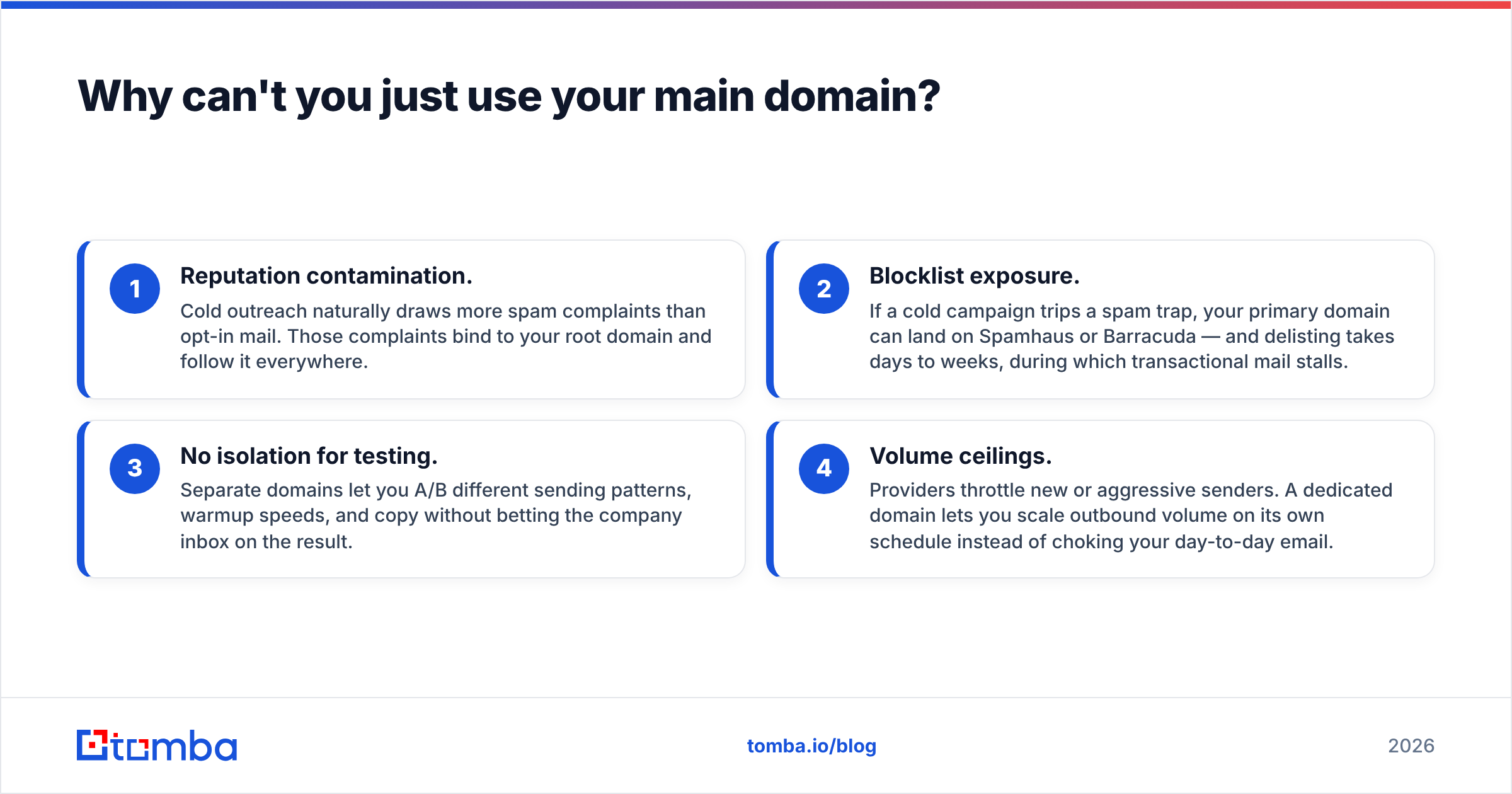
Because the downside is permanent and the upside is zero. Here's what's actually at stake when you blur the two:
- Reputation contamination. Cold outreach naturally draws more spam complaints than opt-in mail. Those complaints bind to your root domain and follow it everywhere.
- Blocklist exposure. If a cold campaign trips a spam trap, your primary domain can land on Spamhaus or Barracuda — and delisting takes days to weeks, during which transactional mail stalls.
- No isolation for testing. Separate domains let you A/B different sending patterns, warmup speeds, and copy without betting the company inbox on the result.
- Volume ceilings. Providers throttle new or aggressive senders. A dedicated domain lets you scale outbound volume on its own schedule instead of choking your day-to-day email.
The rule is simple, and it's worth repeating until it sticks: outbound goes on a domain you can afford to lose.
How do you set up a cold email domain, step by step?#
The setup is mechanical once you know the sequence. Do it in this order.
1. Buy lookalike domains. Keep your brand recognizable. If your company is acme.com, register acme-hq.com, getacme.com, try-acme.com, or acme-sales.com. Register through a mainstream registrar (Namecheap, Google Domains successor providers, Cloudflare) and prefer .com — obscure TLDs like .info or .biz carry spam baggage.
2. Set up a redirect. Point each cold domain's website to your primary site with a 301 redirect. A cold domain that resolves to nothing looks disposable to filters and to prospects who check.
3. Create mailboxes. Use Google Workspace or Microsoft 365 rather than obscure hosts — their sending infrastructure has trust that fresh, unknown IPs don't. Create 1–3 mailboxes per domain (john@, j.doe@, sales@).
4. Authenticate. Add SPF, DKIM, and DMARC DNS records (details in the next section). This is where most beginners quietly fail.
5. Warm up. Enroll each mailbox in a warmup service and let it run 2–4 weeks before a single real prospect gets a message.
6. Verify your list. Run every address through an email verifier so bounces stay near zero from day one.
7. Ramp slowly. Start at ~10 cold sends per mailbox per day and climb weekly toward a ceiling of roughly 30–50.
What DNS records does a cold email domain need?#
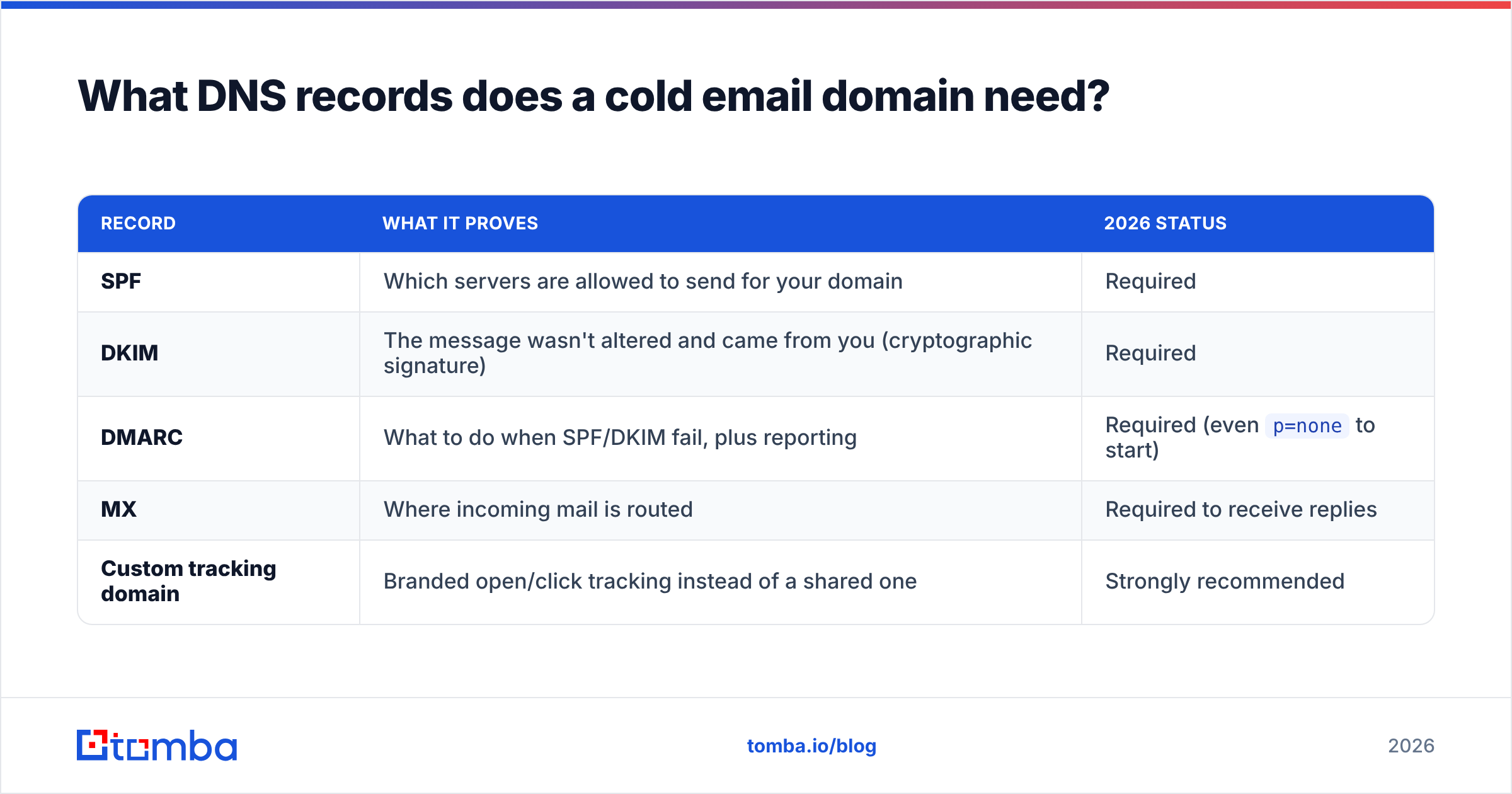
Three records do the heavy lifting. Miss any one and Google/Yahoo bulk-sender rules will bounce or junk your mail.
| Record | What it proves | 2026 status |
|---|---|---|
| SPF | Which servers are allowed to send for your domain | Required |
| DKIM | The message wasn't altered and came from you (cryptographic signature) | Required |
| DMARC | What to do when SPF/DKIM fail, plus reporting | Required (even p=none to start) |
| MX | Where incoming mail is routed | Required to receive replies |
| Custom tracking domain | Branded open/click tracking instead of a shared one | Strongly recommended |
Set DMARC to p=none while you monitor reports, then tighten to quarantine and eventually reject once you confirm legitimate mail passes. You can sanity-check your setup with a free SPF checker before you send anything. The DMARC specification and record syntax are documented at dmarc.org, and Google's requirements for bulk senders are laid out in Google Postmaster Tools — read both once so you're configuring to the actual standard, not folklore.
A working SPF record looks like v=spf1 include:_spf.google.com ~all. DKIM is generated inside your mail provider's admin console and pasted in as a TXT record. DMARC starts as v=DMARC1; p=none; rua=mailto:dmarc@yourdomain.com.
How many domains and mailboxes do you actually need?#
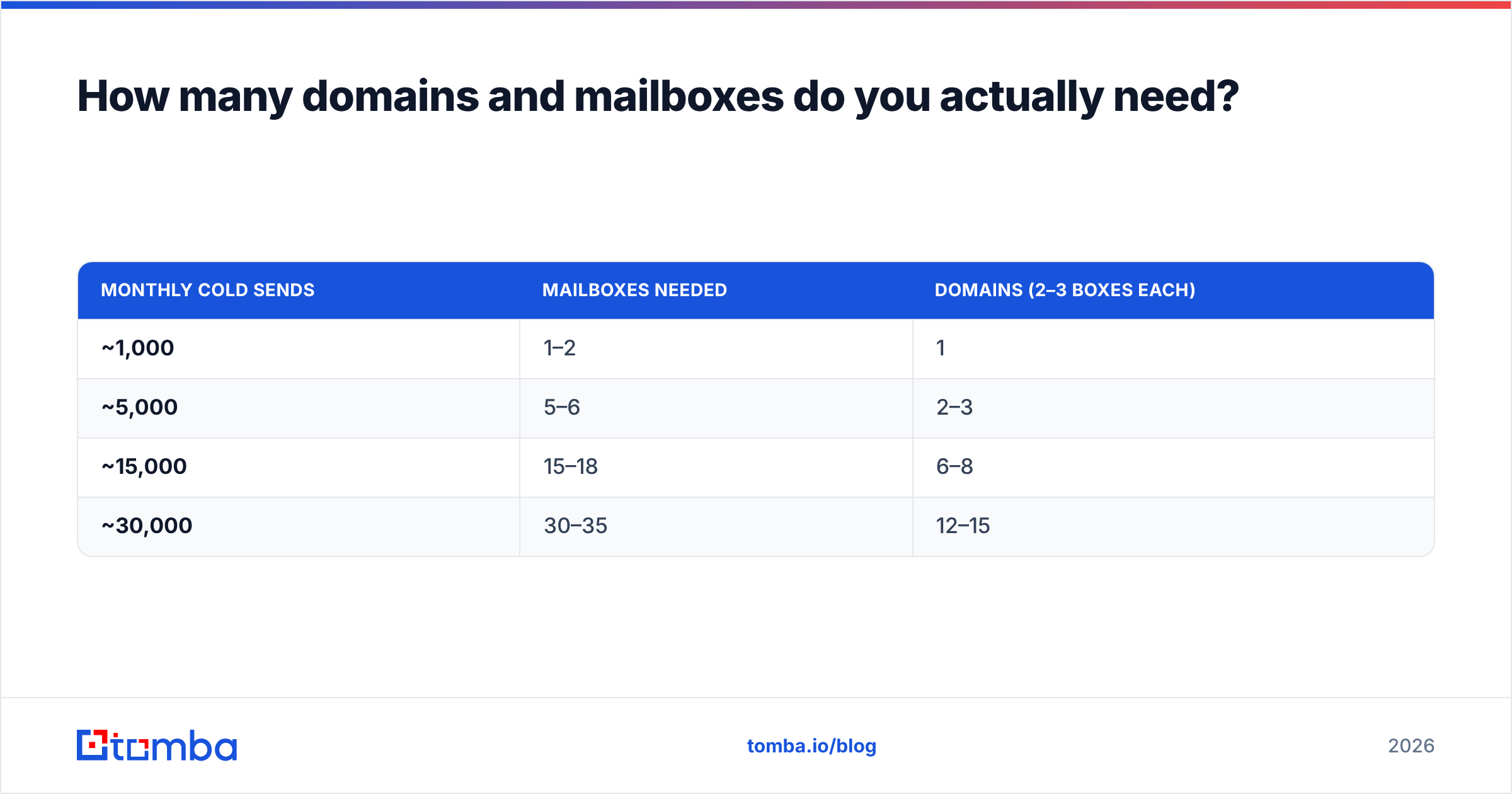
Match capacity to your target send volume, then divide so no single mailbox is overworked. The math is straightforward: decide your monthly cold-email target, cap each mailbox at ~30–50 sends/day (~1,000/month at the safe end), and back into domain count.
| Monthly cold sends | Mailboxes needed | Domains (2–3 boxes each) |
|---|---|---|
| ~1,000 | 1–2 | 1 |
| ~5,000 | 5–6 | 2–3 |
| ~15,000 | 15–18 | 6–8 |
| ~30,000 | 30–35 | 12–15 |
Notice the pattern: scale is a domain-and-mailbox problem, not a "send harder from one inbox" problem. Pushing volume through too few mailboxes is the classic way to burn a domain in a week.
How long should you warm up a cold email domain?#
Two to four weeks, minimum, before real outreach — and warmup never fully stops. A brand-new domain with zero sending history looks identical to a spam operation's throwaway domain. Warmup builds the positive engagement signals (opens, replies, "not spam" moves) that tell filters you're legitimate.
A healthy ramp looks like this:
- Week 1: ~10 warmup emails/day per mailbox, high reply rate, no real prospects.
- Week 2: ~20/day, begin mixing in a handful of hyper-targeted real sends.
- Week 3: ~30/day, scale real outreach as replies stay healthy.
- Week 4+: Hold at your ceiling; keep a warmup baseline running underneath live campaigns.
You can model the exact ramp curve and daily targets with a free email warmup calculator instead of guessing. The temptation to skip warmup and "just start sending" is exactly the impulse that gets domains blocklisted on day two.
What kills a cold email domain's reputation fastest?#
These are the reputation-enders, ranked by how quickly they'll sink you:
- Dirty lists. Sending to invalid or spam-trap addresses spikes your bounce rate. Keep hard bounces under 2–3%. This is why list email deliverability hygiene comes before volume, always.
- No authentication. Missing SPF/DKIM/DMARC in 2026 is an automatic junk-or-reject from major providers.
- Volume spikes. Going from 10 to 500 sends overnight is a textbook spam signal.
- Spammy content. Link-heavy HTML, spam-trigger phrases, and image-only emails all raise your spam score. Plain-text-style messages perform best.
- Low engagement. If nobody opens or replies, filters conclude your mail is unwanted and route it to spam preemptively.
- Identical mass sends. Byte-for-byte identical emails to thousands of recipients look automated. Personalize with real variables.
The through-line: cold email is a reputation game, and reputation is earned slowly and lost instantly.
How does list quality connect to domain health?#
They're the same problem wearing two hats. Your domain reputation is downstream of who you send to. A pristine domain with perfect DNS still dies if you blast it at a list full of dead addresses, because bounces and spam-trap hits get scored against the domain, not the list.
That's why serious outbound teams build clean lists before they build the sending infrastructure. Finding accurate, current business emails — and verifying them before they ever hit a mailbox — is the foundation the whole domain strategy sits on. Sourcing addresses from a reputable B2B database and running them through verification means your carefully warmed domains never waste their reputation on undeliverable sends. Cross-referencing sources like G2 for tooling and HubSpot's deliverability guidance for benchmarks helps you sanity-check your bounce and reply targets against the industry.
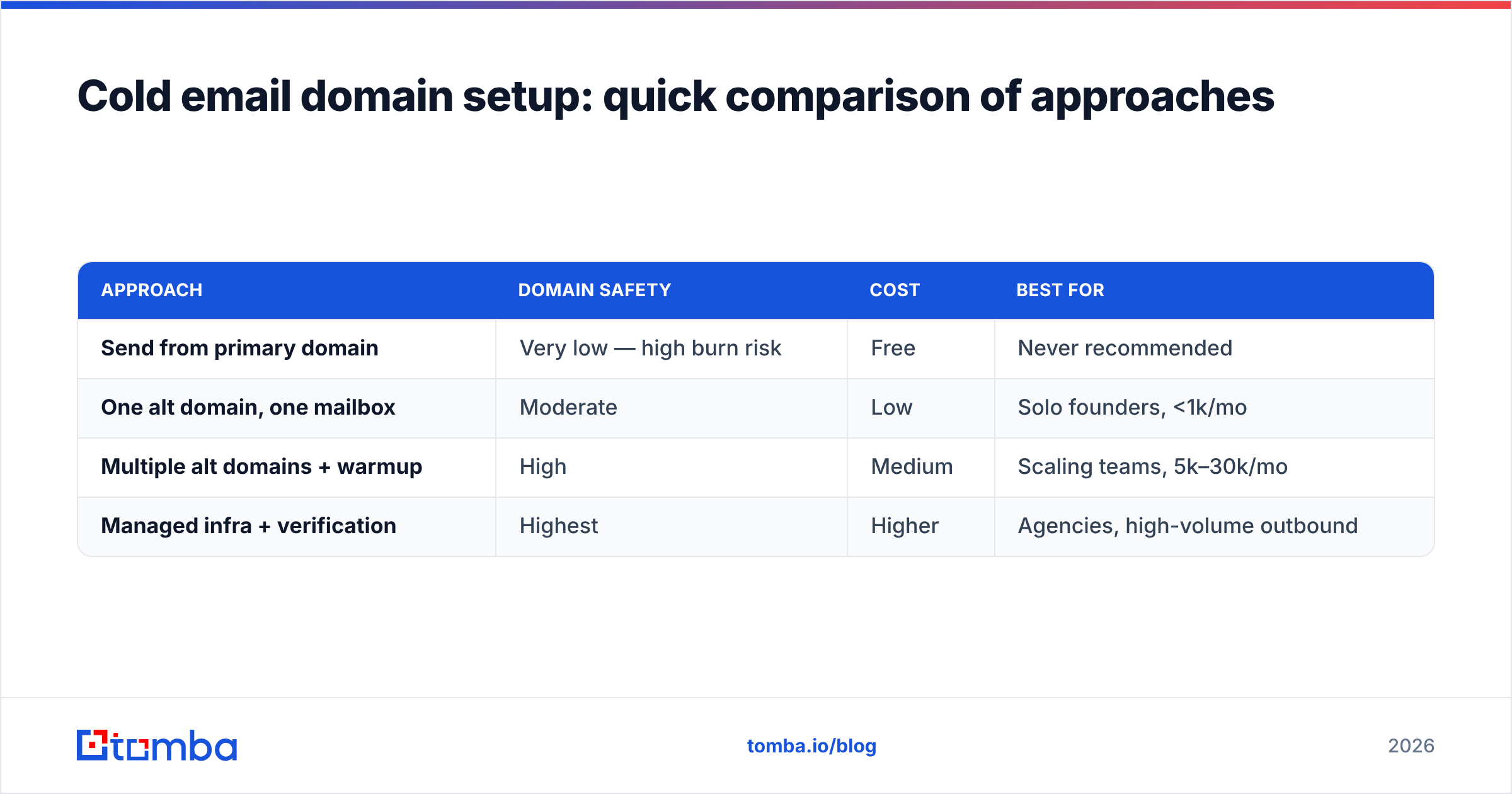
Cold email domain setup: quick comparison of approaches#
| Approach | Domain safety | Cost | Best for |
|---|---|---|---|
| Send from primary domain | Very low — high burn risk | Free | Never recommended |
| One alt domain, one mailbox | Moderate | Low | Solo founders, <1k/mo |
| Multiple alt domains + warmup | High | Medium | Scaling teams, 5k–30k/mo |
| Managed infra + verification | Highest | Higher | Agencies, high-volume outbound |
For most B2B teams, the third row is the sweet spot: several dedicated domains, disciplined warmup, and a verified list feeding them. It costs more than winging it from your main domain, and it's the only approach that survives contact with 2026's sender rules.
Common questions#
Can I reuse a burned domain? Rarely worth it. Reputation recovery is slow and uncertain; a fresh domain is cheaper than the recovery time. Retire burned domains and rotate in new ones.
Do subdomains work instead of separate domains? A subdomain (mail.acme.com) shares some reputation with the root, so a bad campaign can still bleed onto your main domain. True separate domains isolate risk better for cold outreach specifically.
How many mailboxes per domain is safe? Two to three. More than that on a single fresh domain looks like a spam farm.
The bottom line#
A cold email domain isn't optional infrastructure in 2026 — it's the difference between outbound that scales and a company inbox that ends up on a blocklist. Buy lookalike domains, authenticate them fully with SPF, DKIM, and DMARC, warm them for weeks not days, and — above everything — feed them a clean, verified list.
That last part is where campaigns are won or lost. Before you send a single message, build your prospect list on accurate data: use the Tomba Email Finder to source verified professional emails by name, company, or domain, so your carefully protected domains spend their reputation only on addresses that actually land. Clean data in, inbox placement out. Start free with 25 searches a month, and check the full Tomba pricing when you're ready to scale outbound the right way.
Related guides#
Ready to find emails that actually work?
Join 150,000+ professionals who stopped guessing and started sending. Free credits on signup — no credit card required.
Get the Tomba newsletter
Practical outbound tactics and product updates — once every two weeks.
About the author