Cold Email Gmail: How to Send Without Getting Blocked
Can you actually run cold email from Gmail in 2026? Here are the real sending limits, the setup that keeps you out of spam, and when to graduate to a dedicated domain.
Running a cold email Gmail campaign feels like the obvious move. You already have the account, the interface is familiar, and it costs nothing to start. The problem is simple: Gmail was built for personal and team email, not for firing 200 first-touch messages at strangers every morning. Do it wrong and you will burn your domain, land in spam, and maybe get your account suspended.
This guide breaks down what Gmail can and cannot do for cold outreach in 2026. You will learn the technical setup that keeps you in the inbox, the daily limits you must respect, and the point where a free Gmail workflow stops making sense.
TL;DR#
- Yes, you can send cold email from Gmail, but consumer Gmail caps you at ~500 recipients/day and Google Workspace at ~2,000 — and hitting those numbers cold will wreck your reputation fast.
- Authentication is non-negotiable. SPF, DKIM, and DMARC are now required by Google for bulk senders. No records, no inbox.
- Verify every address before you send. Bounces above ~3% are the single fastest way to get filtered. Clean your list first.
- Warm up the mailbox for 2–4 weeks before real volume, and keep daily sends low with human-like gaps.
- Gmail is a starting point, not a scaling engine. Past ~20–30 leads a day per inbox, move to dedicated sending domains and a purpose-built tool.
Can you actually send cold email through Gmail?#
Short answer: yes, within strict limits, and only if you set it up correctly.
Gmail is a mailbox provider, not a cold email platform. It will happily send your messages, but it has no native scheduling for sequences, no automatic bounce handling for outreach, and no reputation dashboard tuned for prospecting. You are borrowing a personal tool for a commercial job, which is fine at small scale and dangerous at large scale.
Think of it like using your personal car for deliveries. For a handful of packages a week, it works great. Try to run a logistics company out of a hatchback and the wheels come off — literally and reputationally.
There are two flavors of Gmail, and they behave very differently:
- Free consumer Gmail (
@gmail.com) — hard cap around 500 recipients per rolling 24 hours. No custom domain. Weakest reputation footing for cold outreach. - Google Workspace (
you@yourcompany.com) — up to ~2,000 recipients per day, custom domain, admin controls, and the ability to configure authentication properly.
For anything resembling real B2B outreach, Workspace is the only sane choice because it lets you send from a professional domain and control your DNS records.
What are Gmail's cold email sending limits in 2026?#
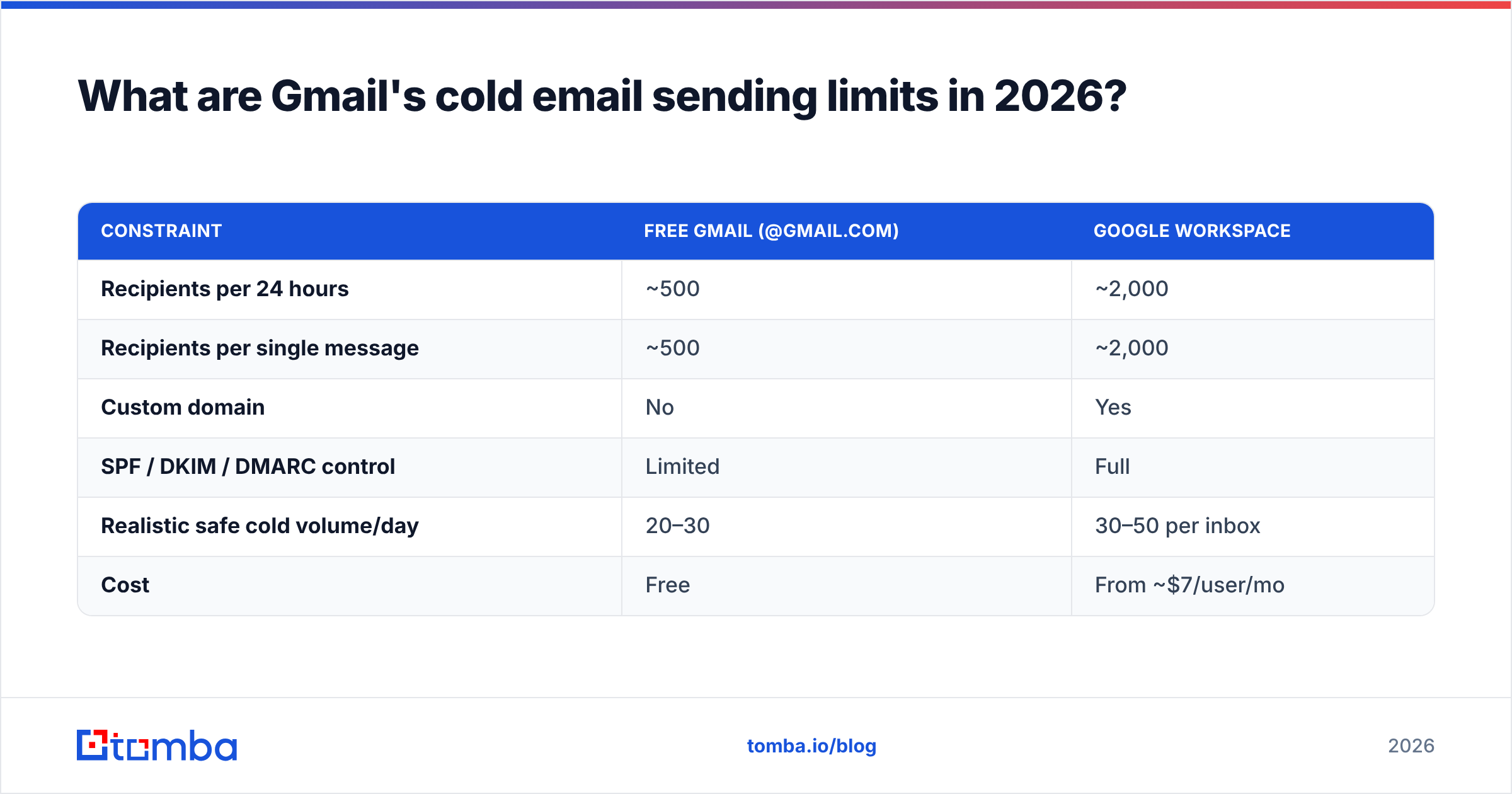
Limits are the first wall you hit, and Google enforces them harder than most people expect. Exceed them and you get a temporary lockout — sometimes 24 hours, sometimes longer.
| Constraint | Free Gmail (@gmail.com) | Google Workspace |
|---|---|---|
| Recipients per 24 hours | ~500 | ~2,000 |
| Recipients per single message | ~500 | ~2,000 |
| Custom domain | No | Yes |
| SPF / DKIM / DMARC control | Limited | Full |
| Realistic safe cold volume/day | 20–30 | 30–50 per inbox |
| Cost | Free | From ~$7/user/mo |
Notice the gap between the technical limit and the safe limit. Google may let a Workspace inbox send 2,000 messages, but sending 2,000 cold emails from one mailbox is a guaranteed spam-folder trip. Reputation, not the hard cap, is your real ceiling. New domains and new inboxes should start in the low double digits and ramp slowly.
Google's own Gmail sending limits documentation spells out the recipient caps and the throttling behavior in detail — read it before you plan volume.
How do you set up cold email Gmail so it lands in the inbox?#
Deliverability comes down to trust signals. Google decides whether you are a real sender or a spammer based on authentication, list quality, and engagement. Get these three right and Gmail becomes a viable low-volume channel.
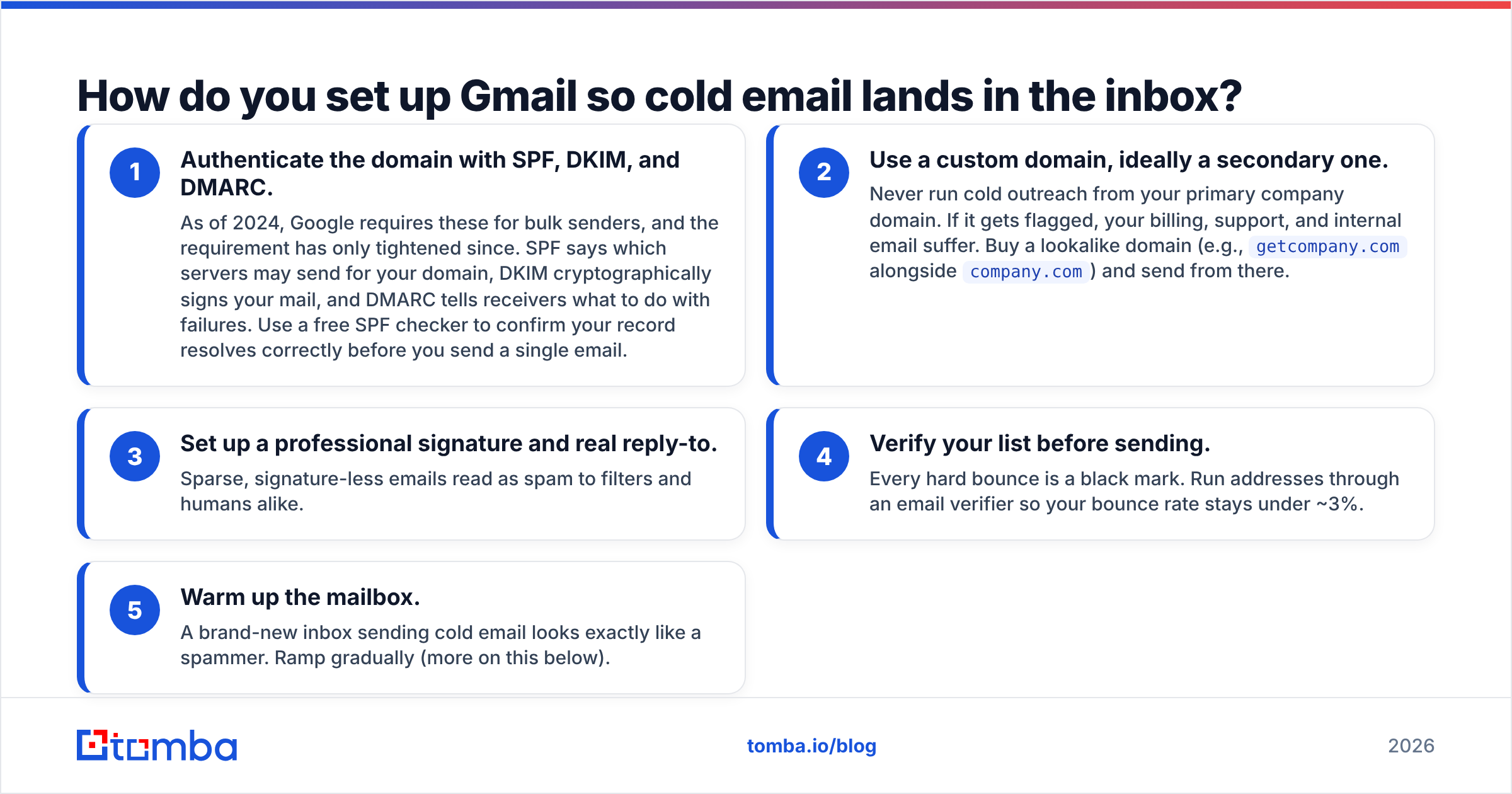
Here is the setup checklist, in priority order:
- Authenticate the domain with SPF, DKIM, and DMARC. As of 2024, Google requires these for bulk senders, and the requirement has only tightened since. SPF says which servers may send for your domain, DKIM cryptographically signs your mail, and DMARC tells receivers what to do with failures. Use a free SPF checker to confirm your record resolves correctly before you send a single email.
- Use a custom domain, ideally a secondary one. Never run cold outreach from your primary company domain. If it gets flagged, your billing, support, and internal email suffer. Buy a lookalike domain (e.g.,
getcompany.comalongsidecompany.com) and send from there. - Set up a professional signature and real reply-to. Sparse, signature-less emails read as spam to filters and humans alike.
- Verify your list before sending. Every hard bounce is a black mark. Run addresses through an email verifier so your bounce rate stays under ~3%.
- Warm up the mailbox. A brand-new inbox sending cold email looks exactly like a spammer. Ramp gradually (more on this below).
Skipping any one of these five is enough to tank your results. Authentication and verification are the two that people neglect most — and they are the two that matter most.
If you want to understand the mechanics behind the inbox-versus-spam decision, the concept of email deliverability is worth a read; it ties together authentication, reputation, and engagement into one score that mailbox providers act on.
Why does list quality matter more than volume?#
Because Gmail watches your bounce rate and spam-complaint rate like a hawk, and both are functions of who you email, not how many.
A list of 100 verified, well-targeted contacts will beat a list of 1,000 scraped guesses every time. Scraped lists are full of dead addresses, role accounts, and spam traps. Send to those and you rack up bounces, complaints, and — worst case — a spam-trap hit that lands your domain on a blacklist.
This is where your prospecting workflow feeds directly into deliverability. If you are guessing email formats or pulling addresses from stale exports, you are seeding your own failure. Sourcing verified, current addresses with a proper email finder and confirming them before send turns your list from a liability into an asset.
The rule of thumb: you cannot out-send a bad list. No amount of warmup or clever copy rescues a database full of invalid contacts.
How should you warm up a Gmail account for cold email?#
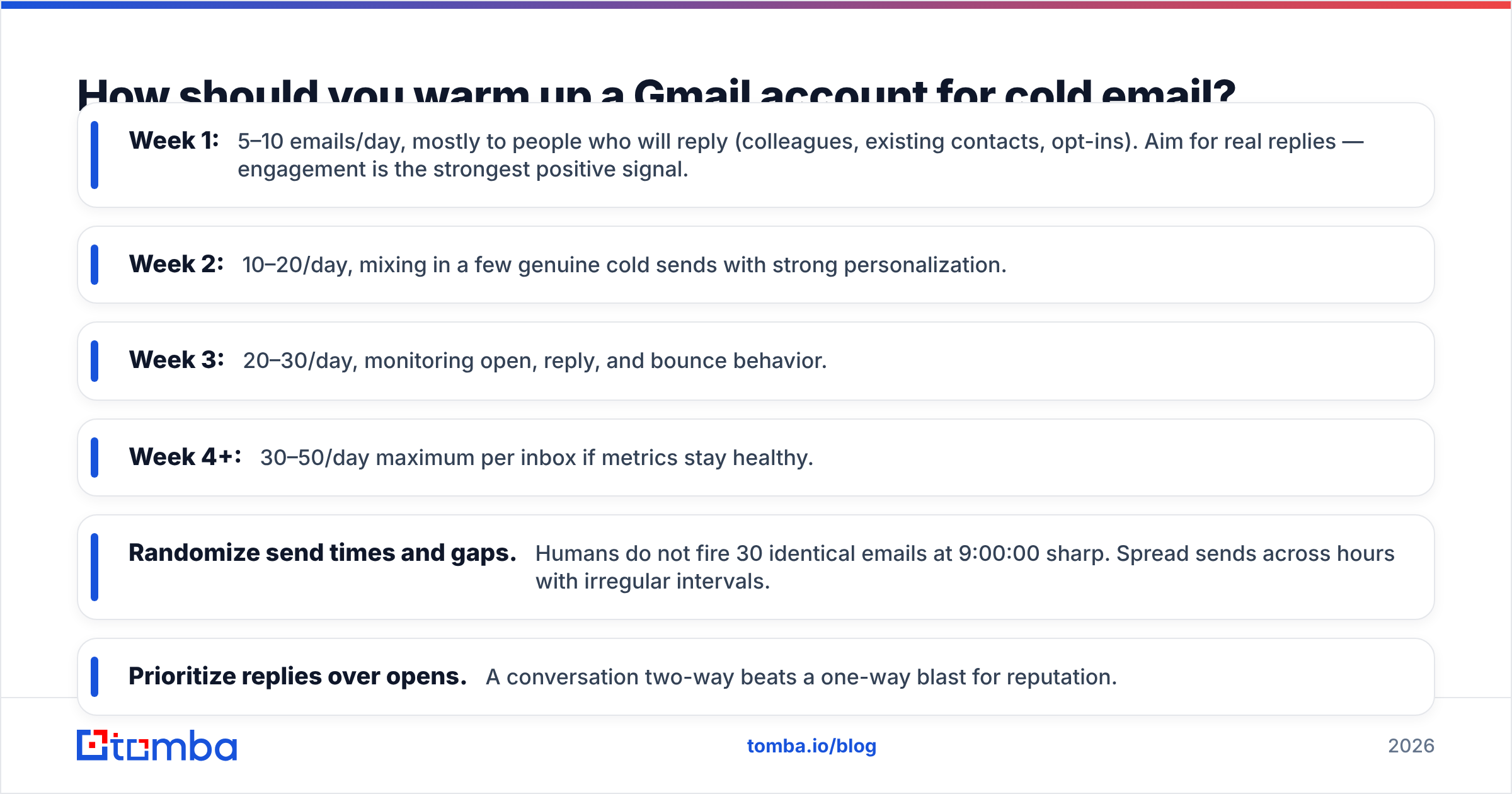
Warming up means gradually building sender reputation so Google trusts your mailbox before you scale. A cold inbox that suddenly blasts 50 strangers looks fraudulent; an inbox that ramps over weeks looks human.
A practical warmup schedule for a fresh Workspace inbox:
- Week 1: 5–10 emails/day, mostly to people who will reply (colleagues, existing contacts, opt-ins). Aim for real replies — engagement is the strongest positive signal.
- Week 2: 10–20/day, mixing in a few genuine cold sends with strong personalization.
- Week 3: 20–30/day, monitoring open, reply, and bounce behavior.
- Week 4+: 30–50/day maximum per inbox if metrics stay healthy.
Throughout warmup, keep these habits:
- Randomize send times and gaps. Humans do not fire 30 identical emails at 9:00:00 sharp. Spread sends across hours with irregular intervals.
- Prioritize replies over opens. A two-way conversation beats a one-way blast for reputation.
- Watch the metrics. If bounces climb or opens crater, pause and diagnose before pushing volume.
You can model a realistic ramp with a free email warmup calculator so you are not guessing at the numbers. And if you run Workspace, Google's Postmaster Tools gives you domain reputation, spam rate, and authentication pass rates straight from the source — check it weekly.
What does good cold email copy look like in Gmail?#
Deliverability gets you into the inbox; copy gets you a reply. And copy also affects deliverability, because messages that get opened, read, and replied to build reputation, while ignored or deleted-unread messages erode it.
Keep cold emails in Gmail:
- Short. Three to five sentences. Long emails from unknown senders get archived.
- Plain. Skip heavy HTML, tracking-pixel overload, and multiple links. Filters penalize flashy formatting from cold senders. A single relevant link is safer than five.
- Personalized. Reference something specific — their role, a recent company move, a shared context. Generic "Dear Sir/Madam" openers scream template.
- Clear on the ask. One question, one call to action. Make replying effortless.
Avoid spam-trigger words in subject and body ("free," "guarantee," "act now," excessive exclamation points). If you want a second opinion on a draft, run it through a spam checker before sending at volume.
When should you stop using Gmail for cold email?#
The moment you need predictable scale, Gmail becomes the bottleneck rather than the tool.
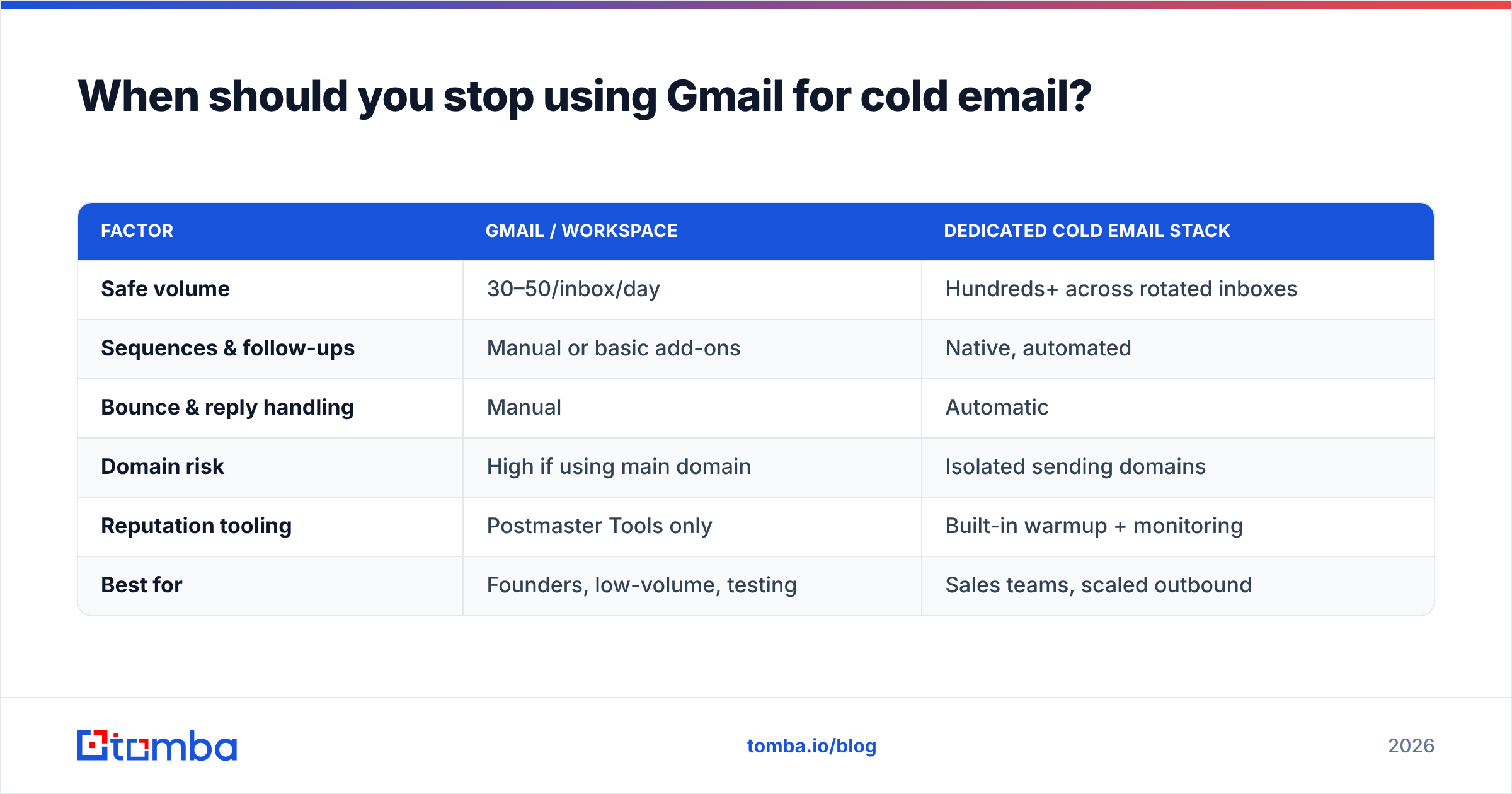
Here is how the two paths compare once you get serious:
| Factor | Gmail / Workspace | Dedicated cold email stack |
|---|---|---|
| Safe volume | 30–50/inbox/day | Hundreds+ across rotated inboxes |
| Sequences & follow-ups | Manual or basic add-ons | Native, automated |
| Bounce & reply handling | Manual | Automatic |
| Domain risk | High if using main domain | Isolated sending domains |
| Reputation tooling | Postmaster Tools only | Built-in warmup + monitoring |
| Best for | Founders, low-volume, testing | Sales teams, scaled outbound |
The honest verdict: Gmail is excellent for validating your offer and running low-volume, high-personalization outreach. A founder sending 20 researched emails a day to ideal-fit prospects will do well in Gmail. But a sales team needs more. It may want 300 sends a day, automated multi-step sequences, and inbox rotation across several domains. That team has outgrown Gmail. Force that volume through it and you end up with suspended accounts and a poisoned domain.
The smart migration path is to keep the two jobs separate: use a data platform to source and verify contacts, then feed that clean list into whichever sending engine fits your volume — Gmail today, a dedicated tool tomorrow. Your list quality is portable; your sending infrastructure is swappable.
The bottom line#
Cold email Gmail success comes down to three truths: authenticate your domain, verify your list, and ramp your volume like a human. Ignore any of them and Google's filters will bury you, no matter how good your pitch is.
Start small, measure your bounce and reply rates religiously, and only scale volume once your reputation is proven. When you outgrow the mailbox, move the sending — but keep sourcing your contacts the same disciplined way.
Whatever you send from, the campaign lives or dies on data quality. Build your list on verified, current contacts with the Tomba Email Finder — find professional addresses by domain, name, or company, confirm they are deliverable before you hit send, and start on the free tier of Tomba's plans (25 searches/month) before scaling to Starter at $49/mo. A clean list is the one cold-email advantage that transfers no matter which inbox you use.
Related guides#
Ready to find emails that actually work?
Join 150,000+ professionals who stopped guessing and started sending. Free credits on signup — no credit card required.
Get the Tomba newsletter
Practical outbound tactics and product updates — once every two weeks.
About the author