12 Cold Email Mistakes That Kill Reply Rates in 2026
Most cold email mistakes don't announce themselves. Your open rate looks fine, your reply rate quietly dies, and nobody tells you why. Here are the 12 that do the most damage in 2026, ranked by how much they cost you.
Cold email still works in 2026. What stopped working is the version of it most teams are running: a 5,000-contact list scraped last quarter, three sequence steps written in one afternoon, and a subject line that reads like a press release.
The frustrating part is that cold email fails silently. Nobody replies "your list is dirty" or "your first line is about you, not me." You just watch a reply rate hover at 0.4% and blame the market.
This is a diagnostic guide. Twelve mistakes, in the order they cost you money, with the fix for each.
TL;DR#
- List quality outranks copy. A 12% bounce rate poisons your domain reputation faster than any subject line can save it. Verify before you send, every time.
- Volume without infrastructure is self-harm. Google and Microsoft's 2024 bulk-sender rules made SPF, DKIM, and DMARC non-negotiable, and spam-complaint thresholds are enforced automatically.
- The most common copy mistake is talking about yourself in sentence one. If your opener contains "we help" or "I wanted to reach out," rewrite it.
- Follow-ups are where the replies live. Most positive responses arrive on emails 2 through 4, yet most sequences stop at two.
- Personalization is not a merge tag.
{{first_name}}is table stakes; a relevant observation about the prospect's business is the actual variable.
What actually counts as a cold email mistake?#
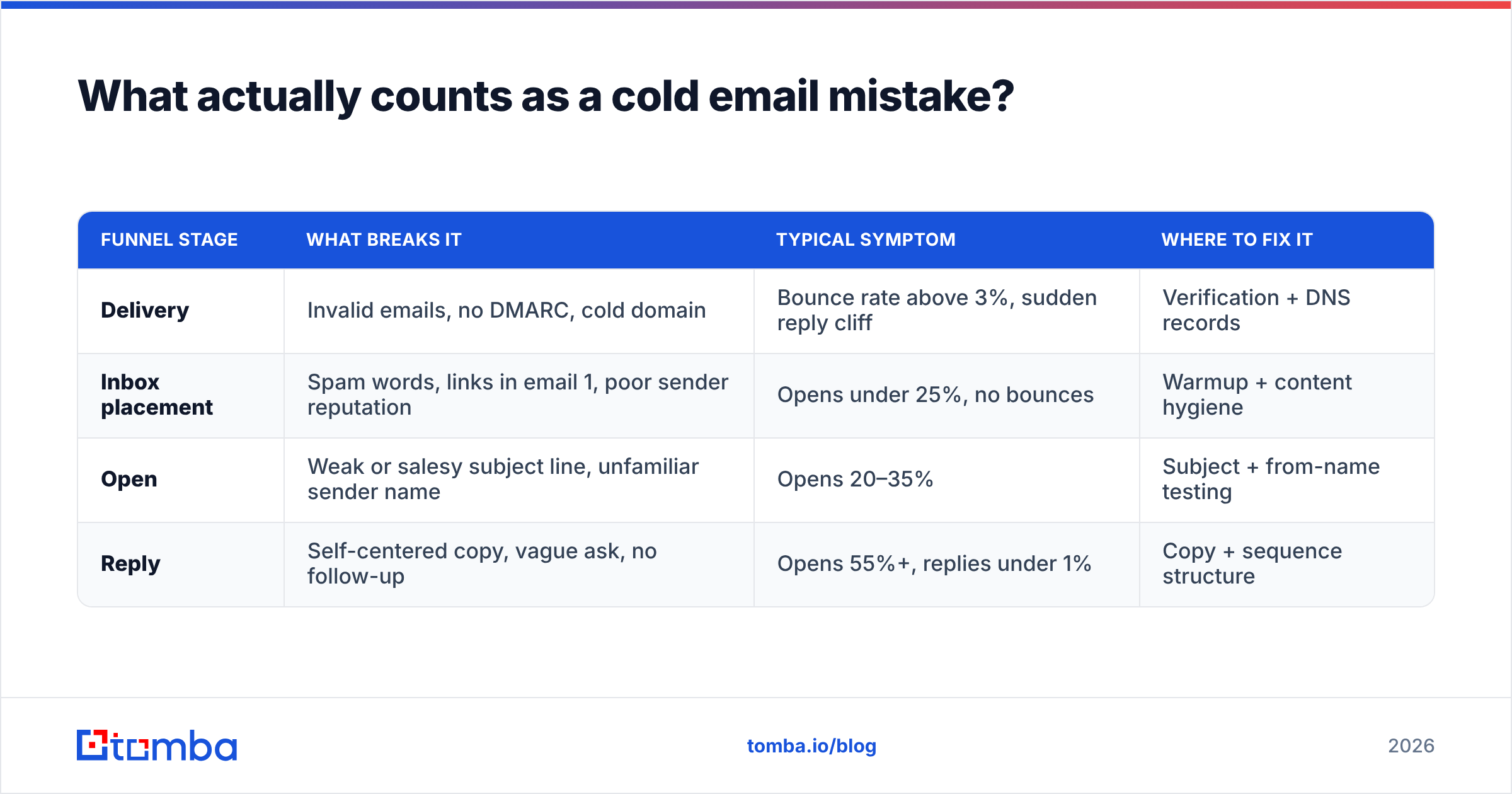
A cold email mistake is anything that reduces the probability your message is (a) delivered, (b) opened, (c) read, or (d) worth replying to. That's the whole funnel, and the four stages fail in different ways.
Most teams obsess over stage (c) — the copy — because it's the only part they can see. But if 15% of your addresses bounce, your copy never gets evaluated at all. The mailbox provider made the decision for your prospect.
Here's how the four failure stages break down:
| Funnel stage | What breaks it | Typical symptom | Where to fix it |
|---|---|---|---|
| Delivery | Invalid emails, no DMARC, cold domain | Bounce rate above 3%, sudden reply cliff | Verification + DNS records |
| Inbox placement | Spam words, links in email 1, poor sender reputation | Opens under 25%, no bounces | Warmup + content hygiene |
| Open | Weak or salesy subject line, unfamiliar sender name | Opens 20–35% | Subject + from-name testing |
| Reply | Self-centered copy, vague ask, no follow-up | Opens 55%+, replies under 1% | Copy + sequence structure |
Read that table as a triage order. If you're bouncing, don't touch your subject line. Fix the list.
Which cold email mistakes cost you the most?#
1. Sending to an unverified list#
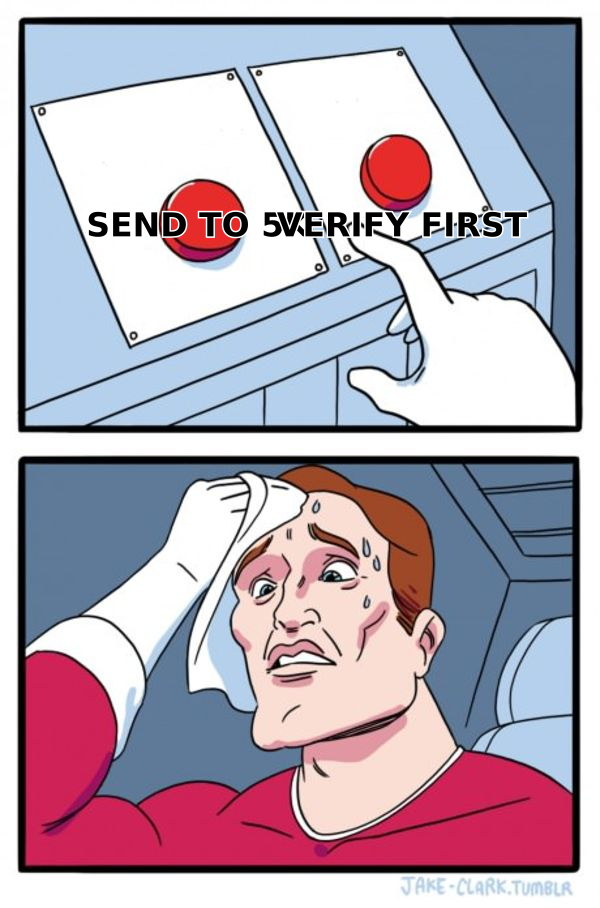
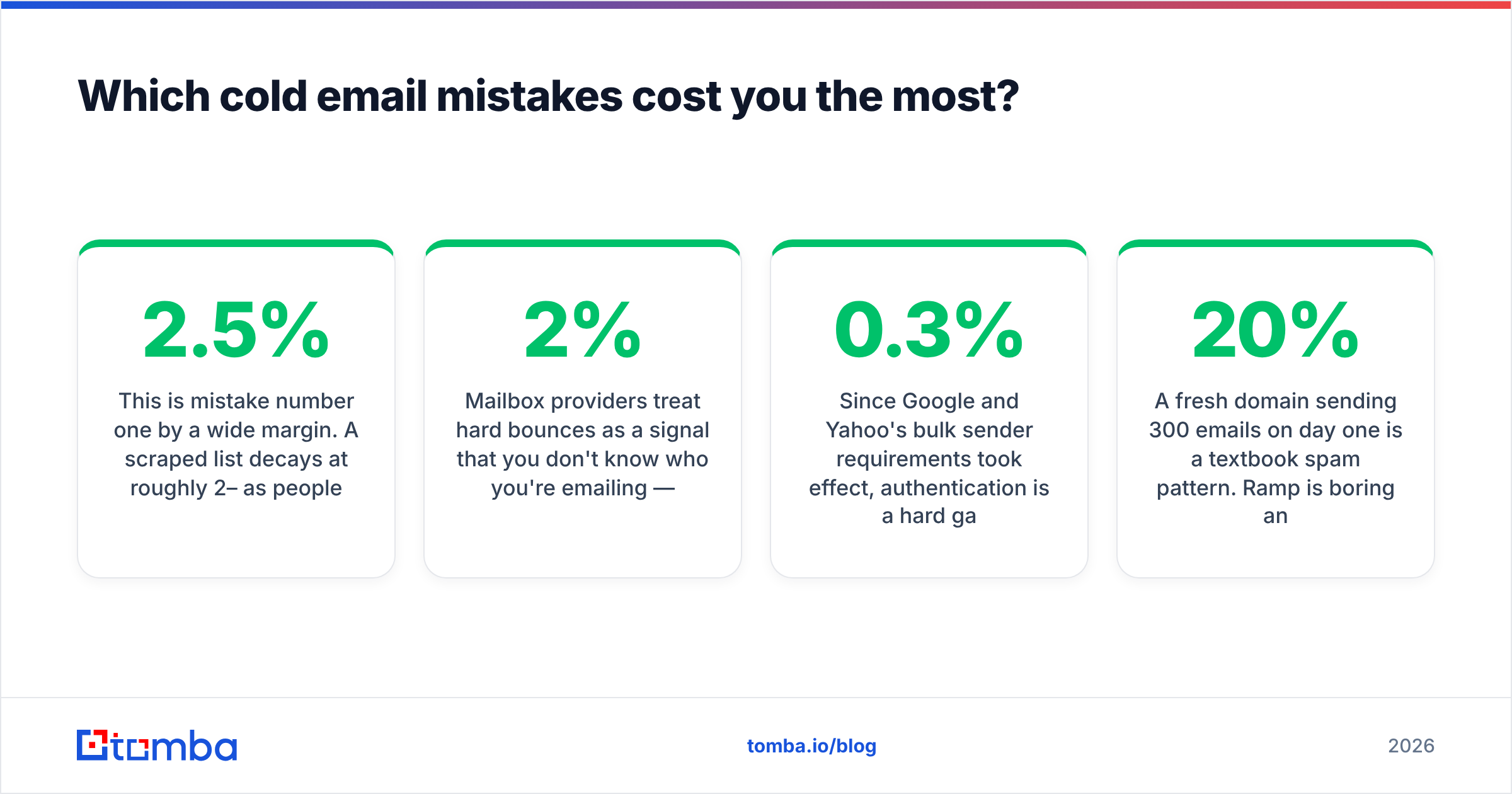
This is mistake number one by a wide margin. A scraped list decays at roughly 2–2.5% per month as people change jobs. A twelve-month-old list is functionally a bounce generator.
Mailbox providers treat hard bounces as a signal that you don't know who you're emailing — which is exactly what spammers look like. Keep your bounce rate under 2%. Under 1% if you're on a young domain.
Run every list through an email verifier before it touches your sending tool, and re-verify anything older than 60 days. For domains that accept everything, a catch-all verifier gives you a confidence score rather than a coin flip.
2. Skipping SPF, DKIM, and DMARC#
Since Google and Yahoo's bulk sender requirements took effect, authentication is a hard gate, not a best practice. Google's own sender guidelines spell out the thresholds: authenticate your domain, keep spam complaints under 0.3%, and support one-click unsubscribe.
If you can't recite your DMARC policy from memory, go check it right now with an SPF checker. This takes ten minutes and prevents a class of failure that no copywriting can undo.
3. Sending from your primary domain#
If your outbound domain is yourcompany.com, one bad campaign can take your billing emails and password resets down with it. Buy a lookalike domain (getyourcompany.com, yourcompany.co), warm it for three to four weeks, and keep outbound isolated.

4. Ramping volume too fast#
A fresh domain sending 300 emails on day one is a textbook spam pattern. Ramp is boring and mandatory: start at 10–20 per day per mailbox, add roughly 20% weekly, cap at 40–50 per mailbox per day indefinitely. Use more mailboxes, not more volume per mailbox.
If you want a schedule rather than a guess, the email warmup calculator will build the ramp for you.
5. Opening with yourself#
Read the first sentence of your last campaign. If it starts with "I," "we," or your company name, you've told the prospect that this email is about your quota.
Compare:
Bad: "Hi Sarah, I'm Alex from Acme. We help logistics companies reduce dwell time by 30%."
Better: "Hi Sarah — noticed Northline added two Midwest DCs this year. Curious how you're handling driver dwell across the new sites."
The second version costs ninety seconds of research and reads like a person. The first reads like a mail merge because it is one.
6. Personalizing the wrong variable#
{{first_name}} is not personalization. Neither is {{company}}. Every spammer on earth has those fields.
Real personalization means referencing something that could only be true of this prospect: a job posting, a product launch, a podcast appearance, a specific page on their site. If you can copy-paste your "personalized" line into a competitor's email and it still makes sense, it isn't personalized.
For scale, tier your personalization instead of abandoning it:
- Tier 1 (top 50 accounts) — one custom sentence per prospect, researched by a human. 8–15 minutes each.
- Tier 2 (next 300) — a custom line per segment of ten, based on a shared trigger (hiring, funding, tech stack).
- Tier 3 (the long tail) — dynamic variables pulled from enrichment data: headcount band, tech in use, recent job posts.
- Never — a generic compliment ("love what you're building") that applies to any company with a website.
Data enrichment is what makes tiers 2 and 3 possible. Without firmographic fields on the row, every prospect looks identical and your copy has nothing to grab.
7. Asking for a 30-minute call in email one#
You are a stranger. A stranger asking for thirty minutes of a VP's calendar is asking for something worth several hundred dollars of their time.
Lower the cost of yes. "Worth a quick look?" "Want me to send the two-line version?" "Are you the right person for this, or should I be talking to someone in ops?" These are questions a busy person can answer in four words while walking to a meeting.
8. Stopping after two follow-ups#
This is the single largest recoverable loss in most sequences. Reply distribution is not front-loaded the way people assume — a meaningful share of positive responses arrive on the third, fourth, and fifth touches, when the prospect finally has bandwidth.
Four to six touches spread over three weeks, each adding new information rather than "just bumping this," is the working shape. Never send "following up" as a standalone email. Every touch earns its place by contributing a case study, a different angle, or a shorter ask.
9. Writing subject lines like ad copy#
"Transform Your Revenue Operations in 2026" is a headline. It belongs on a landing page. In an inbox, it announces itself as marketing before the prospect finishes reading it.
The subject lines that get opened look like internal email: lowercase, two to four words, specific. "dwell time question." "northline + acme." "quick one on the DC rollout." If you're testing, a subject line tester will catch spam-trigger phrasing before your prospect does.
10. Putting links and images in the first email#
Email one has no relationship equity. Links, tracking pixels, images, and HTML signatures all raise your spam score before you've earned any trust. Send plain text. Add the link on touch two or three, after the prospect has opened once and not complained.
11. Ignoring the unsubscribe requirement#
The CAN-SPAM Act requires a functioning opt-out and a physical mailing address on commercial email. GDPR raises the bar further for EU recipients. Beyond the legal exposure, a missing unsubscribe converts would-be opt-outs into spam complaints — and complaints, not unsubscribes, are what destroy sender reputation.
A one-line "reply STOP and I'll close the loop" preserves the plain-text feel while giving people an exit.
12. Measuring opens instead of replies#
Open rate has been unreliable since Apple's Mail Privacy Protection started pre-fetching images. Inflated opens make bad campaigns look healthy.
Track reply rate, positive reply rate, and meetings booked. Those three numbers tell you whether your outbound works. Everything else is a diagnostic, not a KPI.
How do you know which mistake is yours?#
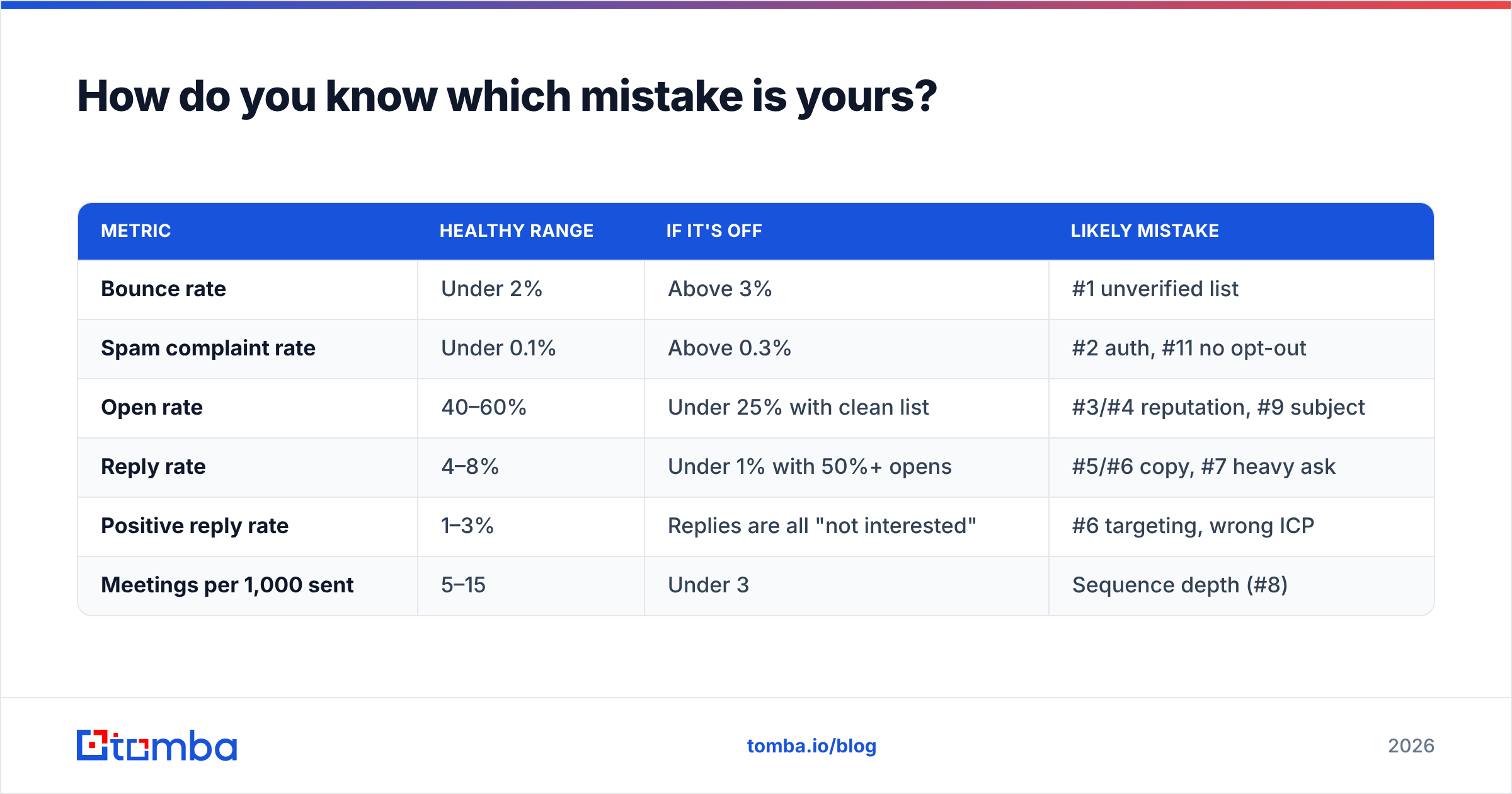
Run the numbers in this order. Each row tells you where to stop and fix.
| Metric | Healthy range | If it's off | Likely mistake |
|---|---|---|---|
| Bounce rate | Under 2% | Above 3% | #1 unverified list |
| Spam complaint rate | Under 0.1% | Above 0.3% | #2 auth, #11 no opt-out |
| Open rate | 40–60% | Under 25% with clean list | #3/#4 reputation, #9 subject |
| Reply rate | 4–8% | Under 1% with 50%+ opens | #5/#6 copy, #7 heavy ask |
| Positive reply rate | 1–3% | Replies are all "not interested" | #6 targeting, wrong ICP |
| Meetings per 1,000 sent | 5–15 | Under 3 | Sequence depth (#8) |
Two things to note. First, an open rate above 60% with a near-zero reply rate almost always means bot-driven opens from security scanners, not human interest. Second, if your bounce rate is fine but placement is poor, the problem is reputation, not data — check your domain against a blacklist checker before you rewrite a single line.
What separates good outbound from spam?#
Strip away the tooling and there are three tests. Spam fails at least one.
- Relevance test — could this email have been sent to 500 other companies unchanged? If yes, it's spam, regardless of how polite it is.
- Timing test — is there a reason to email this person this week rather than any other week? A trigger (funding, hiring, launch, leadership change) is what turns a cold email into a timely one.
- Cost-of-reply test — can the recipient dispose of your email in under ten seconds, either by replying or ignoring it, without feeling manipulated? Fake reply-threading ("Re:") and false familiarity fail this test hard.
Peer benchmarks are worth checking too. Vendor-neutral review data on G2's sales engagement category and practitioner data from HubSpot's sales blog will tell you whether your reply rate is genuinely poor or just below your own optimistic assumptions.
What should you fix first this week?#
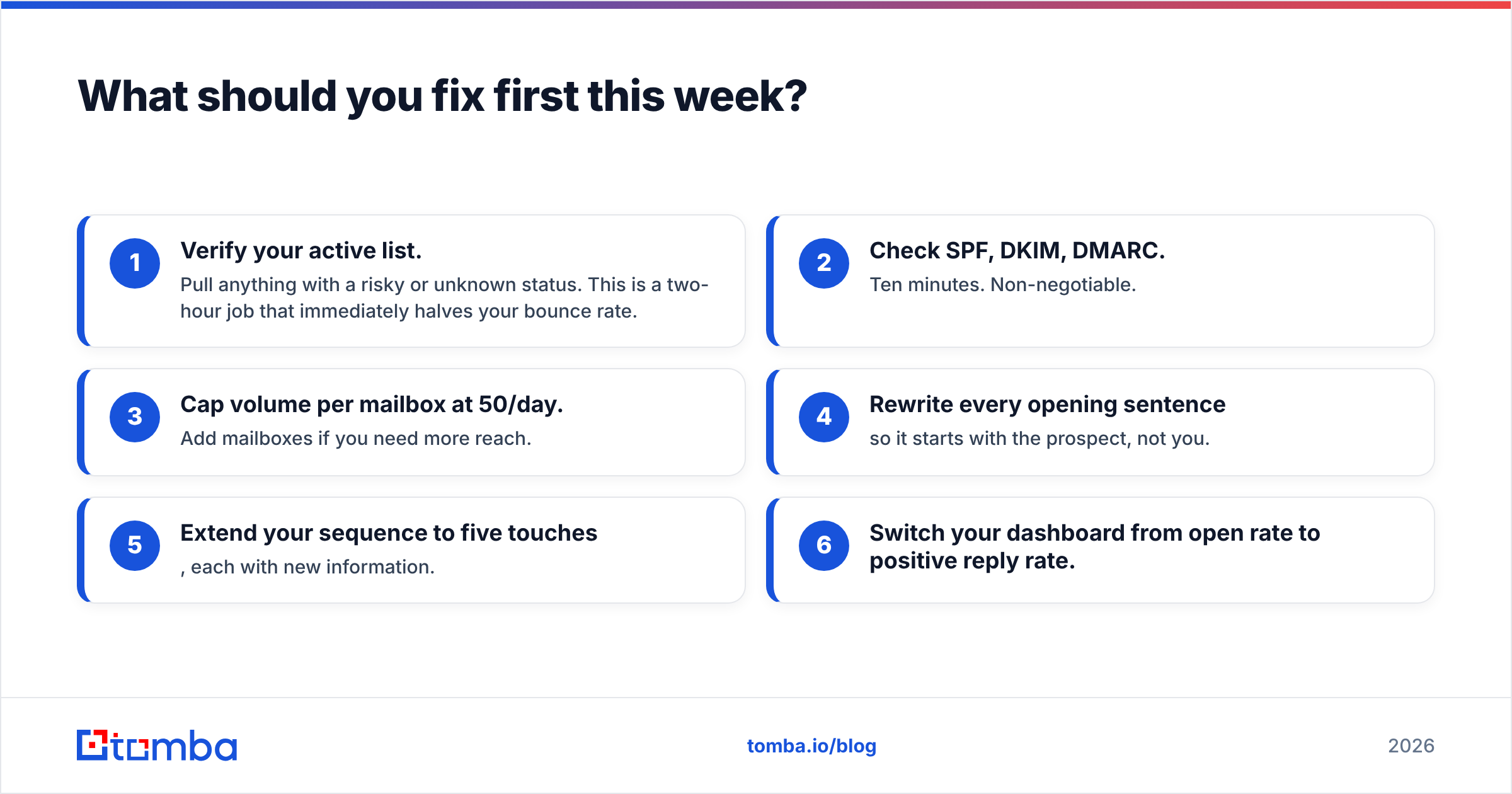
Fix in this order, because each step protects the next:
- Verify your active list. Pull anything with a risky or unknown status. This is a two-hour job that immediately halves your bounce rate.
- Check SPF, DKIM, DMARC. Ten minutes. Non-negotiable.
- Cap volume per mailbox at 50/day. Add mailboxes if you need more reach.
- Rewrite every opening sentence so it starts with the prospect, not you.
- Extend your sequence to five touches, each with new information.
- Switch your dashboard from open rate to positive reply rate.
Steps 1 through 3 are infrastructure and take an afternoon. Steps 4 through 6 are craft and take a quarter. Do them in that order anyway — brilliant copy sent from a burned domain never gets read.
The data layer is where most of this is decided#
Nine of the twelve mistakes above trace back to the same root cause: you don't actually know who you're emailing. Wrong address, stale role, no firmographics, no trigger, no idea whether the domain accepts mail.
That's a data problem, and it's fixable before you write a word of copy. Tomba's Email Finder resolves verified professional addresses by name and domain, flags catch-all domains instead of guessing at them, and returns enrichment fields you can use as personalization variables. The free tier gives you 25 searches a month to test accuracy against a list you already trust; paid plans start at $49/month on Starter and $99/month on Growth, with full pricing details published rather than gated behind a demo call.
Start there. A verified, enriched list makes mediocre copy perform. Great copy cannot rescue a bad list.
Related guides#
Ready to find emails that actually work?
Join 150,000+ professionals who stopped guessing and started sending. Free credits on signup — no credit card required.
Get the Tomba newsletter
Practical outbound tactics and product updates — once every two weeks.
About the author