Cold Email No Response? 7 Reasons and How to Fix Them
Silence isn't rejection — it's diagnostic data. Here's how to tell whether your cold email got no response because of bad data, bad timing, bad targeting, or a subject line nobody opened.
TL;DR#
- Silence is not rejection. In most sequences, 60–80% of "no response" is actually no delivery, no open, or no relevance — three different problems with three different fixes.
- Rewriting your copy first is the most common mistake. If your bounce rate is above 3%, or your emails are landing in Promotions, the words don't matter yet.
- Diagnose in this order: delivered → opened → read → relevant → easy to reply to. Fix the earliest broken link, not the last one.
- Follow-ups do more work than first touches. Across most B2B sequences, the majority of replies arrive on emails 2 through 4, not email 1.
- Verified data is the cheapest fix available. Cleaning a list with an email verifier before you send costs less than one bad send costs your domain.
Why does your cold email get no response?#
Because "no response" is a symptom, not a diagnosis. A prospect who never received your email and a prospect who read it, understood it, and decided it wasn't worth answering both show up identically in your dashboard: zero replies.
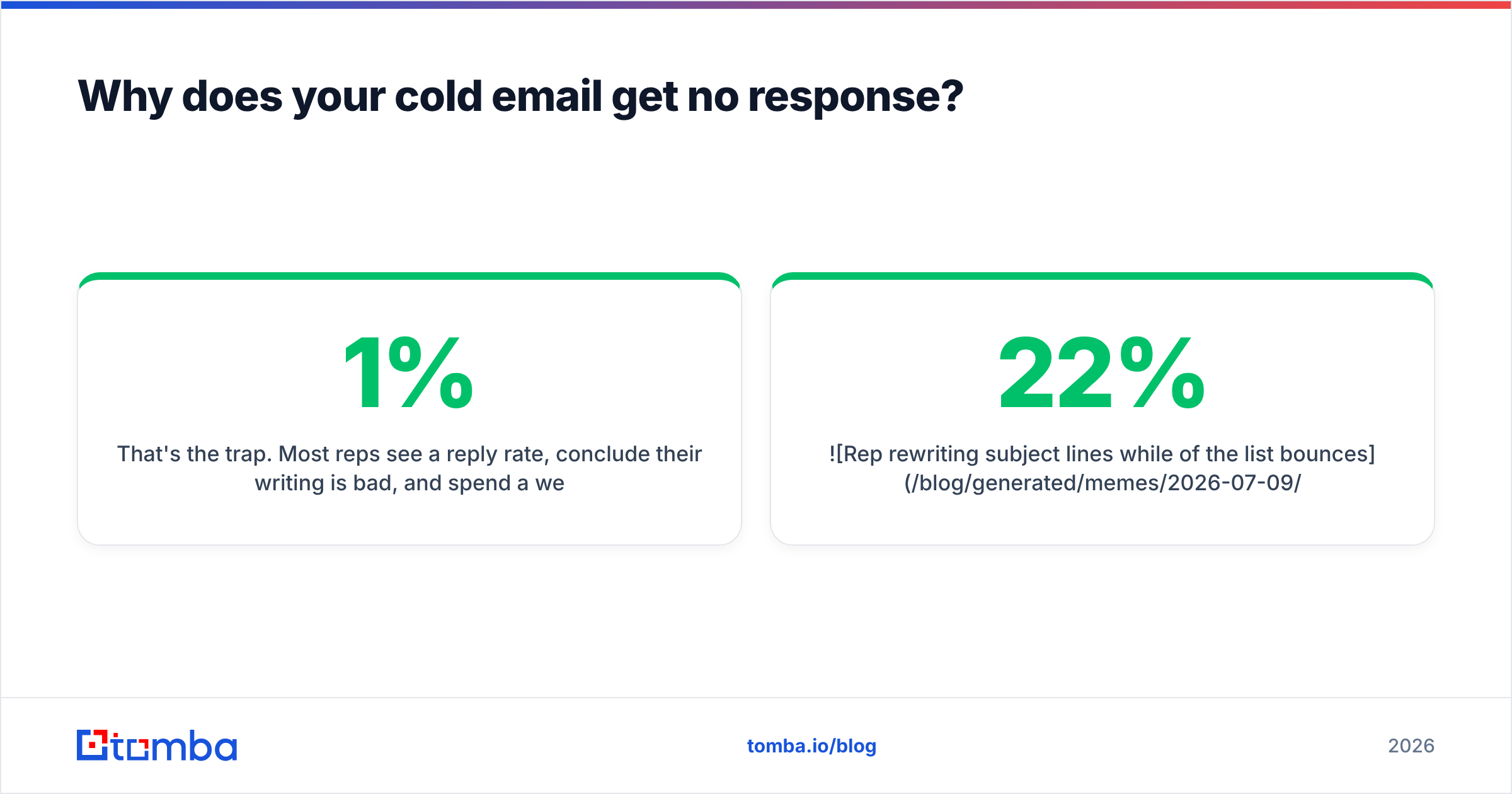
That's the trap. Most reps see a 1% reply rate, conclude their writing is bad, and spend a week rewriting subject lines — when the actual problem was that 22% of their list bounced, another 30% landed in a spam folder, and half the remaining contacts weren't decision-makers for the thing being sold.
Here's the honest hierarchy of causes, roughly in the order they cost you replies:
- The email never arrived. Invalid address, hard bounce, or a catch-all domain that silently discards mail.
- It arrived but was filtered. Spam folder, Promotions tab, or quarantined by a corporate gateway.
- It was delivered but never opened. Weak subject line, unknown sender name, sent at a dead hour.
- It was opened but not read. Wall of text, no visible ask in the first two lines, obvious template.
- It was read but irrelevant. Wrong persona, wrong company stage, wrong problem.
- It was relevant but hard to answer. Vague CTA, four questions in one paragraph, a calendar link with no context.
- You gave up too early. One touch, no follow-up, no second angle.
Fix #1 before you touch #3. Fix #3 before you touch #6. Working backwards from copy is why so many people conclude "cold email is dead" — they never got a clean read on whether their emails were being seen at all.

How do you diagnose which stage is broken?#
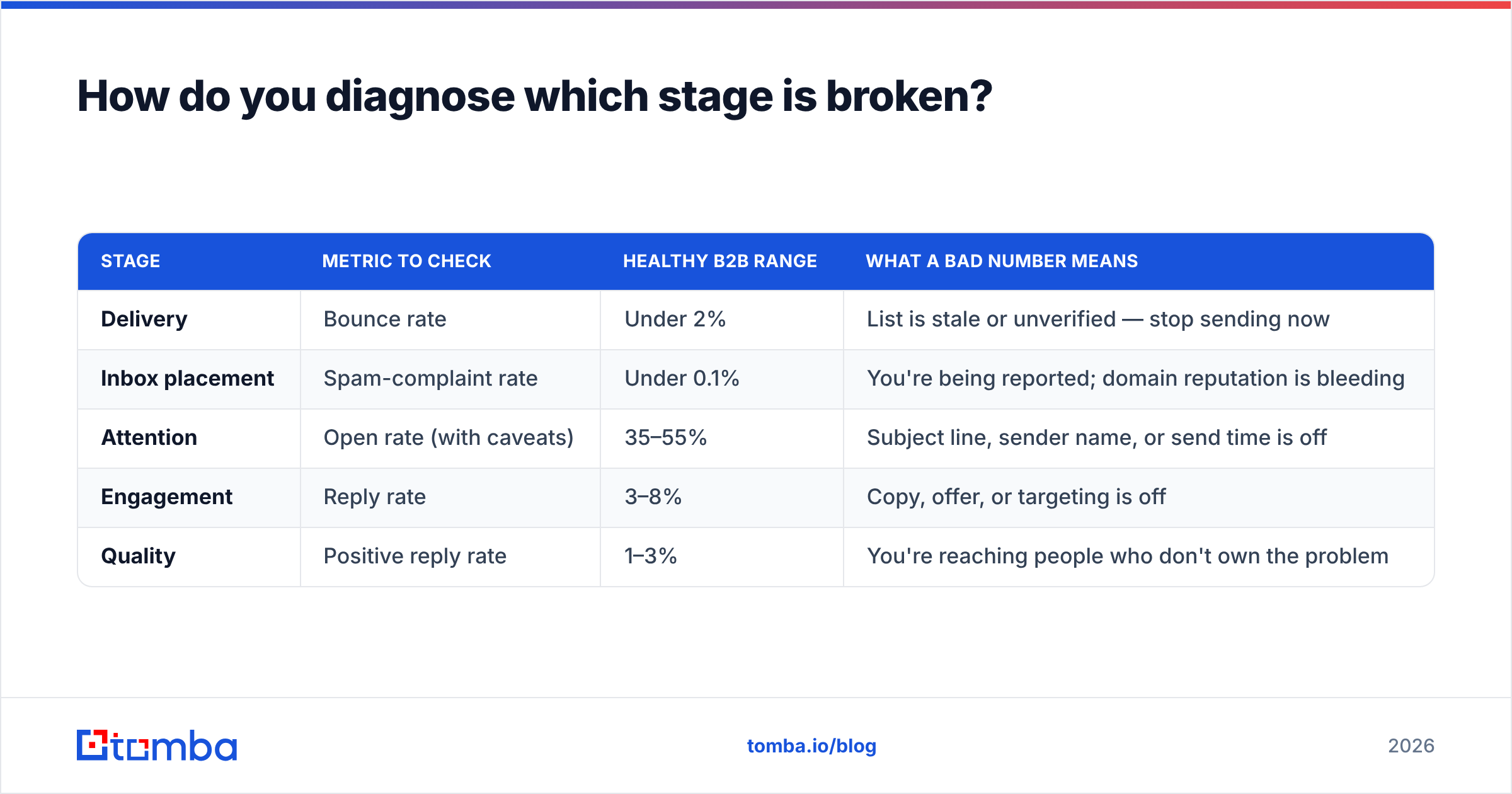
Run the funnel numbers. You need four metrics, and you need them per-campaign, not blended across your whole account.
| Stage | Metric to check | Healthy B2B range | What a bad number means |
|---|---|---|---|
| Delivery | Bounce rate | Under 2% | List is stale or unverified — stop sending now |
| Inbox placement | Spam-complaint rate | Under 0.1% | You're being reported; domain reputation is bleeding |
| Attention | Open rate (with caveats) | 35–55% | Subject line, sender name, or send time is off |
| Engagement | Reply rate | 3–8% | Copy, offer, or targeting is off |
| Quality | Positive reply rate | 1–3% | You're reaching people who don't own the problem |
A few notes on reading this table honestly.
Open rate has become a lousy metric since Apple Mail Privacy Protection started pre-fetching images — it inflates opens for Apple Mail users and tells you nothing. Treat it as directional, not exact. If your open rate cratered from 45% to 12% overnight, that's a deliverability signal worth chasing. If it drifted from 45% to 41%, ignore it.
Bounce rate is the metric that actually gates everything else. Google's bulk sender guidelines are explicit that senders must keep spam rates below 0.3% and stay under 0.1% to be safe. High bounces correlate directly with spam placement, because mailbox providers read "sending to addresses that don't exist" as a signature of scraped or purchased lists.
If your bounce rate is above 3%, stop reading the copy section. Go clean your list.
Is your data the real problem?#
Usually, yes. This is the least glamorous answer and the most frequently correct one.
Consider what happens to a 5,000-contact list built from an export you didn't verify:
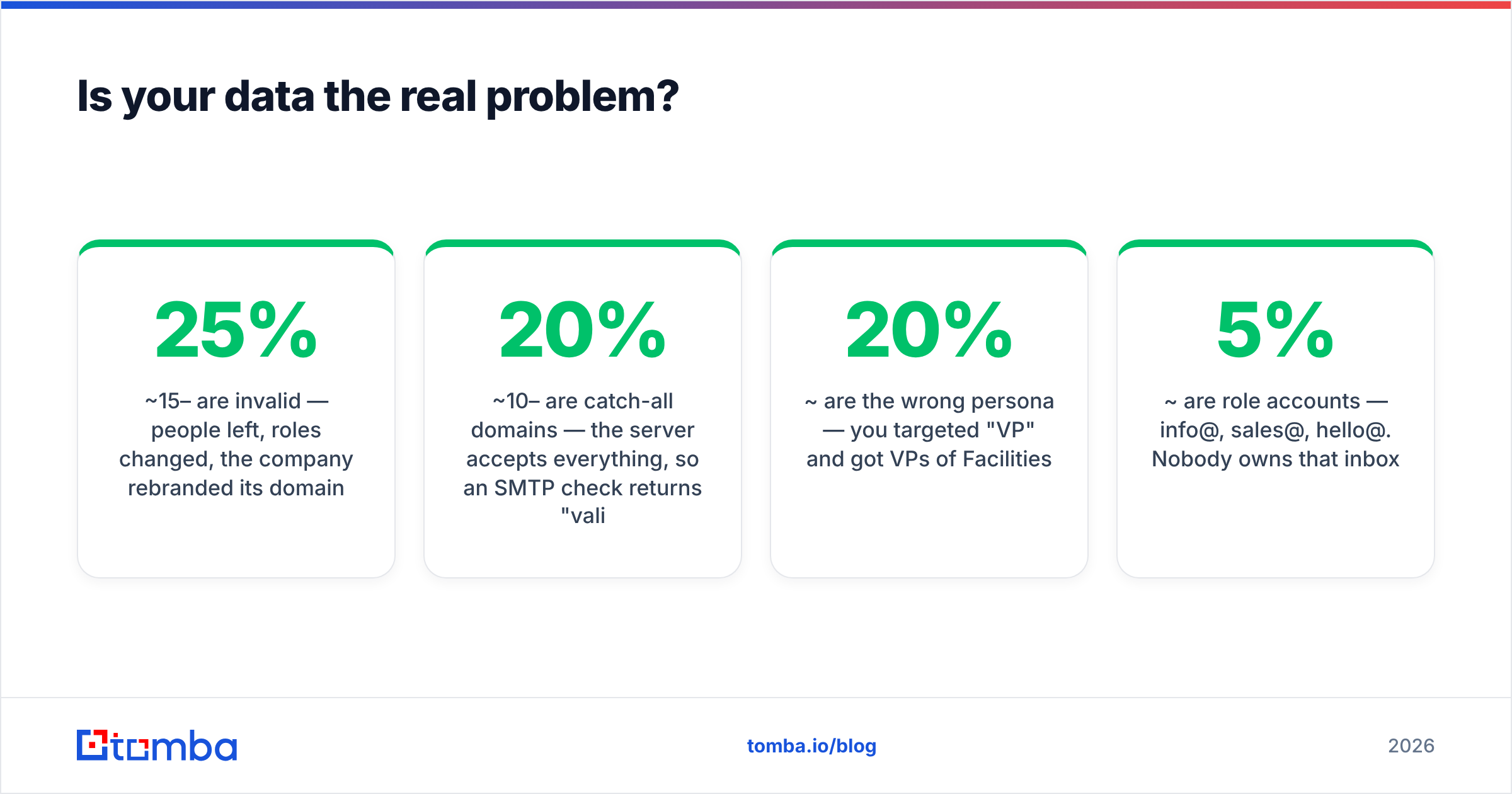
- ~15–25% are invalid — people left, roles changed, the company rebranded its domain.
- ~10–20% are catch-all domains — the server accepts everything, so an SMTP check returns "valid" and the message still lands nowhere.
- ~20% are the wrong persona — you targeted "VP" and got VPs of Facilities.
- ~5% are role accounts — info@, sales@, hello@. Nobody owns that inbox.
Do the arithmetic. Of 5,000 sends, maybe 2,500 reach a real human who could plausibly care. If 40 of them reply, your true reply rate against reachable, relevant contacts is 1.6% — but your dashboard says 0.8%, and you go rewrite the email.
The fix has three parts, and none of them are creative:
- Verify before you send. Run every address through a verifier that does SMTP-level checks, not just syntax and MX lookups. The difference between "the domain has a mail server" and "this specific mailbox accepts mail" is the whole game.
- Handle catch-alls separately. Catch-all domains need their own treatment — a catch-all verifier uses pattern confidence and secondary signals rather than a bounce test that will always come back green. Don't blindly send to them; segment them into a lower-volume, lower-risk cohort.
- Enrich for relevance, not just for the address. Knowing someone's email is table stakes. Knowing their headcount, funding stage, tech stack, and current title is what lets you write a first line that isn't generic. Contact enrichment turns a name into a reason to reach out.
Sourcing matters too. There's a real difference between tools that guess an address from a name pattern and tools that verify it against a live mailbox, and a real difference again between a static purchased list and a continuously refreshed one. Vendors approach this differently — providers like BookYourData sell curated, human-verified B2B lists with accuracy guarantees, while Tomba's email finder resolves and verifies addresses on demand from company domains. Both are legitimate answers to different problems. What is not legitimate is a five-year-old CSV nobody has touched.
What actually makes someone reply?#
Once your email is genuinely arriving in a genuinely relevant inbox, the copy question becomes real. And here the research is consistent and slightly boring: short, specific, low-friction emails win.
The four things that move reply rate, ranked:
- Relevance of the trigger. Referencing something the prospect actually did — a funding round, a job posting, a product launch, a conference talk — outperforms any clever subject line. HubSpot's sales research has consistently found personalization at the account level beats personalization at the "Hi {{first_name}}" level by a wide margin.
- Length. Under 125 words. Every additional paragraph is a chance for the reader to decide this is a project rather than a reply.
- A single, tiny ask. "Worth a look?" outperforms "Do you have 15 minutes Tuesday or Thursday for a demo of our platform?" The first costs one word to answer. The second costs a calendar check.
- Sender credibility. A real name, a real signature, a domain that isn't
getleads-outreach-3.com. Nobody replies to a stranger who looks like a bot.
The four things that don't move reply rate as much as people think:
- Emoji in the subject line
- "Quick question" (burned to the ground)
- Video thumbnails in the first touch
- Merge tags beyond first name and company
Here's the practical test: read your email out loud as if you were leaving a voicemail. If it sounds like a person, send it. If it sounds like a landing page, cut it in half and try again. Tools like a subject line tester help with the top of the message, but the body is where replies are won or lost.
How many follow-ups before you stop?#
Four to six touches over two to three weeks, then stop. This is one of the few places where the data is unambiguous and most people still get it wrong by sending exactly one email.
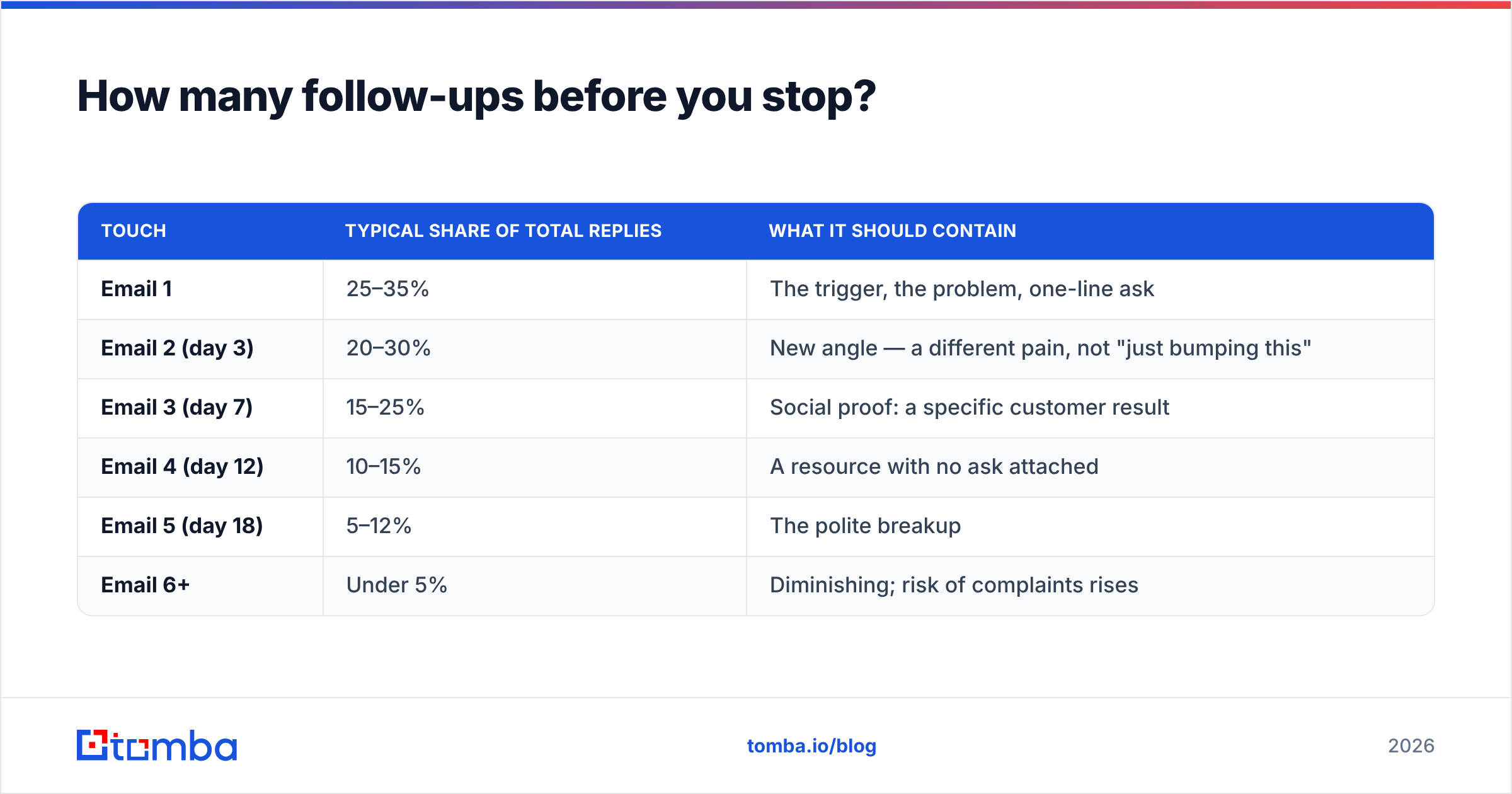
The distribution of replies across a sequence looks roughly like this:
| Touch | Typical share of total replies | What it should contain |
|---|---|---|
| Email 1 | 25–35% | The trigger, the problem, one-line ask |
| Email 2 (day 3) | 20–30% | New angle — a different pain, not "just bumping this" |
| Email 3 (day 7) | 15–25% | Social proof: a specific customer result |
| Email 4 (day 12) | 10–15% | A resource with no ask attached |
| Email 5 (day 18) | 5–12% | The polite breakup |
| Email 6+ | Under 5% | Diminishing; risk of complaints rises |
Two rules govern this table.
Rule one: every follow-up must add information. "Just following up," "bumping this to the top of your inbox," and "did you see my last email?" add nothing and signal that you have nothing. Each touch should be a new attempt to be useful — a different problem, a different proof point, a different format.
Rule two: the breakup email is not a threat. "Since I haven't heard back, I'll assume this isn't a priority — I'll close the loop here. If that changes, my door's open." That reliably produces a small burst of replies, some of them positive, precisely because it removes pressure. What does not work is the passive-aggressive version that implies the prospect owes you something.
Stop at six. Beyond that, your marginal reply rate approaches zero while your spam-complaint rate climbs — and spam complaints, unlike ignored emails, do permanent damage to your sender reputation.
Is it deliverability or is it you?#
Run this checklist before you conclude your writing is the problem. Every item takes under ten minutes.
- Check your SPF, DKIM, and DMARC records. Missing or misconfigured authentication is the single most common reason cold email lands in spam in 2026. Every major mailbox provider now requires all three for bulk senders. Use an SPF checker to confirm your record resolves and doesn't exceed the ten-lookup limit.
- Check whether your domain or IP is blacklisted. A single bad campaign — or a shared IP on a cheap sending platform — can land you on Spamhaus or SORBS. Run a blacklist checker monthly, not once.
- Check your sending volume ramp. A brand-new domain sending 500 emails on day one is a textbook spam signature. Warm up over four to six weeks, starting at 10–20 sends per day.
- Check your reply-to and unsubscribe. A working unsubscribe link reduces spam complaints, which are far more damaging than opt-outs. This is not optional under CAN-SPAM or GDPR.
- Check the content for spam triggers. Not "free" and "guarantee" — those filters retired years ago. Modern filters flag link-heavy emails, tracking pixels on cold traffic, mismatched display names, and URL shorteners. Run a draft through a spam checker before you commit.
If all five pass and you're still at a 0.5% reply rate on a verified, well-targeted list — then the copy is the problem. Now you have permission to rewrite.
What's the fastest path from silence to replies?#
Do these in order. Don't skip ahead.
Week 1 — Fix the plumbing. Verify the entire list. Segment out catch-alls. Confirm SPF/DKIM/DMARC. Check blacklists. Expect to delete 20–30% of your contacts. This will feel bad and will double your reply rate.
Week 2 — Fix the targeting. For every remaining contact, answer: does this person own the problem I solve, at a company where that problem is currently expensive? If you can't answer yes, cut them. A 400-contact list of exact-fit prospects outperforms a 5,000-contact list of "maybe" every single time — and it costs less to enrich, less to send, and far less in reputation risk.
Week 3 — Fix the sequence. Four to six touches. Each one adds new information. Each one has one ask. The breakup email is genuinely gracious.
Week 4 — Now fix the copy. Shorter. More specific. Read it out loud. Cut the second paragraph.
Most teams do this in exactly the reverse order and wonder why nothing moves. The reason is structural: copy is the only variable you can change without admitting your list is bad. Admitting your list is bad is more useful.
The honest summary#
A cold email with no response is telling you something. It's just rarely telling you what you assume. Before you conclude that your writing is weak, confirm that the message was delivered to a real mailbox belonging to a real person who genuinely owns the problem you solve — and that you asked them exactly once, in a way that costs one word to answer.
Most of that is a data problem, not a writing problem. Which is good news: data problems are solvable in an afternoon, and writing problems take years.
Start where the leverage is. Use the Tomba Email Finder to source and verify addresses at the moment you build your list, not after your bounce rate has already flagged your domain. The free tier gives you 25 searches a month to test the difference on a real segment; the Starter plan is $49/mo if the numbers hold up. See full Tomba pricing before you commit — and run your existing list through verification first, so you know exactly how much of your silence was never about the words at all.
Related guides#
Ready to find emails that actually work?
Join 150,000+ professionals who stopped guessing and started sending. Free credits on signup — no credit card required.
Get the Tomba newsletter
Practical outbound tactics and product updates — once every two weeks.
About the author