Cold Email Open Rate: What's Good and How to Fix Yours
Open rate benchmarks are quietly broken — privacy proxies inflate them and bad data deflates them. Here's what a real cold email open rate looks like in 2026, and the four levers that actually move it.
TL;DR
- A healthy cold email open rate in 2026 sits between 35% and 55% for a verified, well-targeted list. Anything above 70% usually means your tracking is counting bots, not humans.
- Apple Mail Privacy Protection and similar image proxies pre-fetch tracking pixels, which inflates reported opens for roughly a third of B2B recipients. Your dashboard is lying to you by a predictable margin.
- The four levers that actually move opens, in order of impact: list quality → sending infrastructure → sender identity → subject line. Most people obsess over the last one.
- Bounce rate is the leading indicator. If you're above 3%, no subject line rewrite will save you — inbox providers have already started throttling you.
- Fix opens by fixing inputs: verify every address, warm every domain, keep daily volume per mailbox under ~40, and stop pretending open rate is a conversion metric.
What is a cold email open rate, and why is it harder to measure than it looks?#
Your cold email open rate is the percentage of delivered emails where a recipient loaded the tracking pixel — a 1×1 transparent image your sending tool embeds in the message body. Divide pixel loads by delivered sends, and that's your number.
Think of it like a motion sensor on a shop door. It tells you something passed through. It does not tell you whether that was a customer, a delivery driver, or a plastic bag blown in by the wind. In 2026, an enormous share of your "opens" are the plastic bag.
Three things break the measurement:
- Privacy proxies. Apple Mail Privacy Protection, launched in iOS 15 and now the default for most Apple Mail users, downloads every remote image the moment mail is fetched — whether or not a human ever looks at the message. Those all register as opens.
- Security scanners. Corporate email gateways (Proofpoint, Mimecast, Microsoft Defender) click and load message assets to sandbox them. Same effect: phantom opens, sometimes phantom clicks.
- Image blocking. The opposite problem. Plain-text Outlook clients and users who've disabled remote images never load the pixel, so genuine reads go uncounted.
The net effect isn't random noise — it skews high. Email tracking as a discipline has been degrading for years, and the honest read is that your reported open rate is directionally useful and absolutely useless.
That's not an argument for ignoring it. It's an argument for treating it as a diagnostic, not a KPI. Opens tell you whether your email reached a real inbox and whether the sender name plus subject line cleared the two-second glance test. Reply rate tells you whether the email was any good.
What is a good cold email open rate in 2026?#
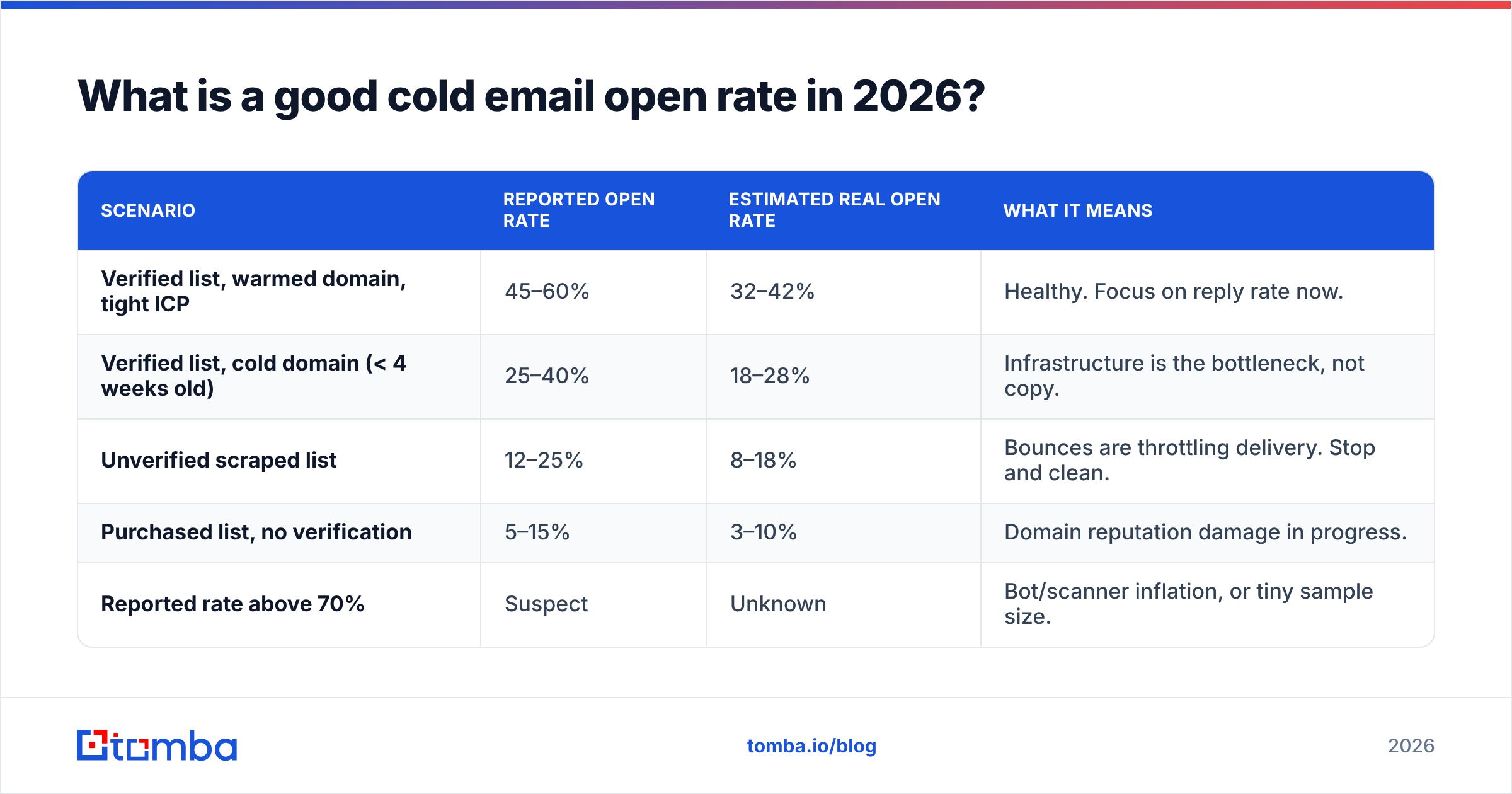
Here's the range, segmented by what's actually driving the number. These figures assume tracking pixels enabled and no filtering of proxy opens.
| Scenario | Reported open rate | Estimated real open rate | What it means |
|---|---|---|---|
| Verified list, warmed domain, tight ICP | 45–60% | 32–42% | Healthy. Focus on reply rate now. |
| Verified list, cold domain (< 4 weeks old) | 25–40% | 18–28% | Infrastructure is the bottleneck, not copy. |
| Unverified scraped list | 12–25% | 8–18% | Bounces are throttling delivery. Stop and clean. |
| Purchased list, no verification | 5–15% | 3–10% | Domain reputation damage in progress. |
| Reported rate above 70% | Suspect | Unknown | Bot/scanner inflation, or tiny sample size. |
Two things fall out of that table.
First, the gap between reported and real is roughly 25–30% relative, and it's stable. If your tool says 50%, assume 35–38% of humans actually saw the message. Some platforms now let you exclude opens that occur within seconds of delivery, or opens from known proxy IP ranges. Turn that on. A lower, honest number beats a flattering, useless one.
Second, and this is the part people resist: the top two rows differ by infrastructure, not by writing. Same list, same copy, same person — one domain warmed, one not. The delta is twenty points.
Why does list quality matter more than your subject line?#
Because inbox placement is gated before anyone reads a word.
When you send to an address that doesn't exist, the receiving server returns a hard bounce. Gmail, Outlook, and every serious provider track your hard-bounce ratio as a proxy for "is this sender a spammer or a legitimate correspondent." Google's own bulk sender guidelines are explicit that high bounce and complaint rates trigger throttling and spam-folder routing.
The thresholds, roughly:
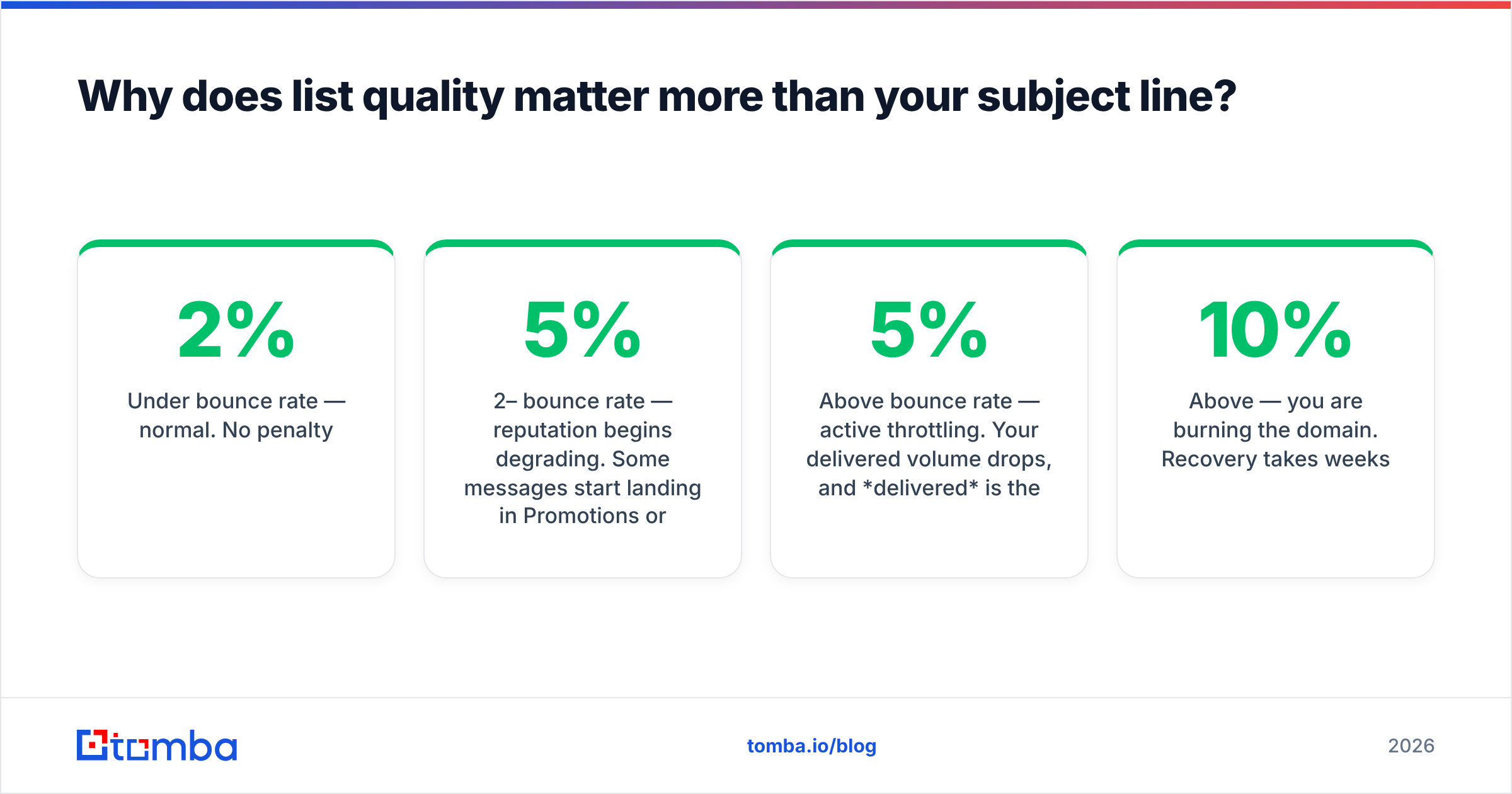
- Under 2% bounce rate — normal. No penalty.
- 2–5% bounce rate — reputation begins degrading. Some messages start landing in Promotions or Spam.
- Above 5% bounce rate — active throttling. Your delivered volume drops, and delivered is the denominator of your open rate.
- Above 10% — you are burning the domain. Recovery takes weeks.
Here's the compounding trap. Bounces suppress delivery. Suppressed delivery means fewer opens. Fewer opens means a worse engagement signal. A worse engagement signal means more spam-foldering. You can rewrite the subject line forty times inside that death spiral and the number won't move, because the number isn't about the subject line.
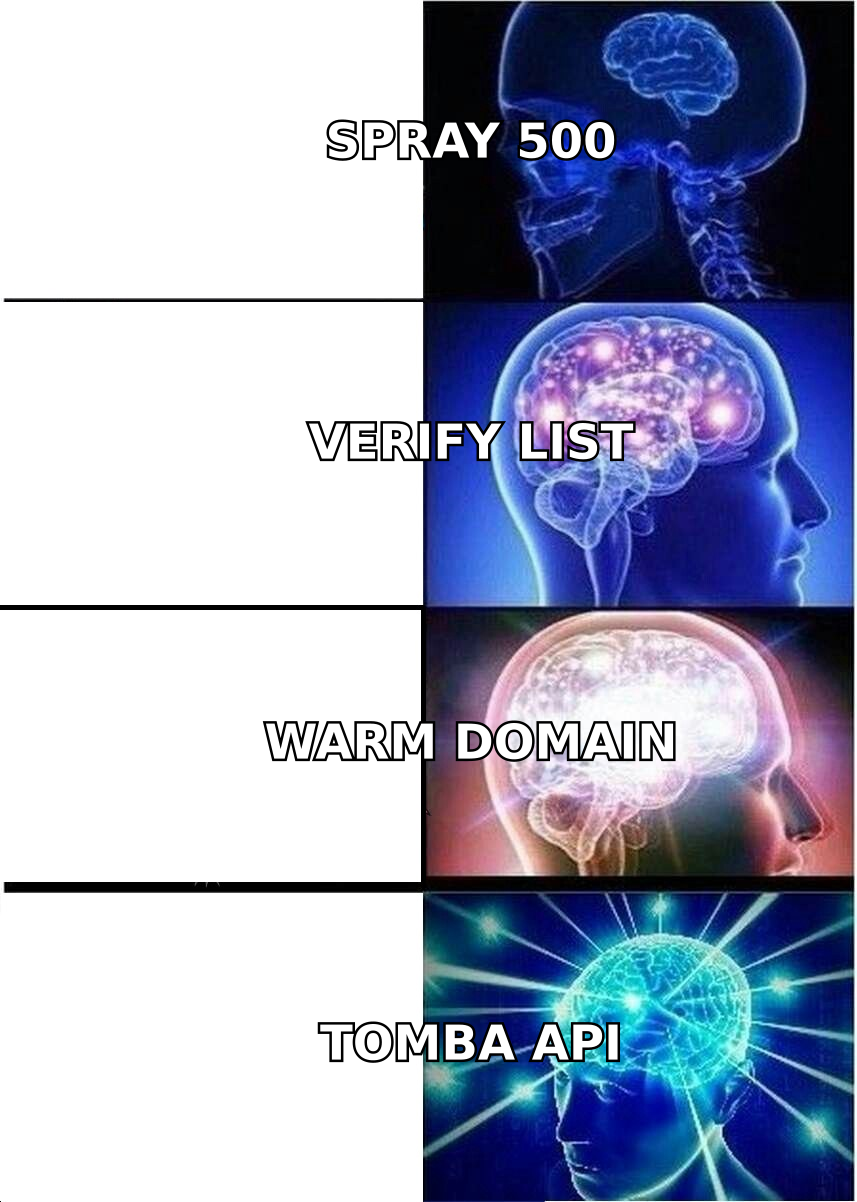
The fix is unglamorous: verify before you send. Run every address through an email verifier that does real SMTP-level checks, not just syntax and MX-record lookups. Anything flagged as invalid, disposable, or role-based (info@, sales@, support@) comes out of the send. Catch-all domains — where the server accepts everything and tells you nothing — need a separate treatment; a proper catch-all verifier uses pattern confidence and cross-source signals rather than pretending the SMTP handshake is meaningful.
If you're sourcing addresses rather than importing them, source them clean in the first place. A domain search that returns verified addresses with confidence scores saves you the verification round-trip entirely.
How much does sending infrastructure change your open rate?#
More than any single copy change you will ever make. Here's the stack, ranked by leverage.
- Domain age and warmup. A domain sending cold outreach in its first week is a red flag to every filter on the internet. Ramp from 5 sends/day to your target over 3–4 weeks. Use a warmup calculator to schedule the curve rather than guessing.
- Authentication records. SPF, DKIM, and DMARC are table stakes as of the 2024 Google/Yahoo enforcement wave. Missing DMARC alone can route you to spam regardless of content. Check your SPF record resolves cleanly and doesn't exceed the 10-lookup limit.
- Volume per mailbox. Keep it under ~40 cold sends per mailbox per day. Need more volume? Add mailboxes, not sends. Ten mailboxes at 30/day beats three at 100/day, every time.
- Separate sending domain. Never send cold outreach from your primary corporate domain. Use
getacme.comoracme-hq.com, notacme.com. If reputation burns, your invoicing and support email survive. - Engagement seeding. Providers weight reply rate and "moved to inbox" actions heavily. Early replies — even from colleagues on the warmup network — teach the filter that your mail is wanted.
- List hygiene over time. Suppress anyone who hasn't opened across three sequences. Repeatedly emailing dead addresses is exactly the behavior filters are built to catch.
Points 1 through 4 are prerequisites. If any of them is missing, subject-line optimization is rearranging deck chairs.
Does the subject line still matter?#
Yes — but as a multiplier on an already-healthy baseline, not as a rescue mechanism.
Once you're actually landing in the primary inbox, the recipient's decision happens in about two seconds and involves three pieces of information, in this order:
- Sender name. "Sarah from Tomba" outperforms "Tomba Sales Team" and both outperform "no-reply@". A recognizable human name that matches the signature is worth more than any clever subject.
- Subject line. Short wins. Four to seven words. Lowercase often outperforms Title Case because it reads as personal correspondence rather than marketing. Avoid the words that trip Bayesian filters — free, guarantee, act now, limited time.
- Preview text. The first ~90 characters of the body render next to the subject in most clients. If your first line is "Hi {{FirstName}}, I hope this email finds you well," you have spent your preview text on nothing.
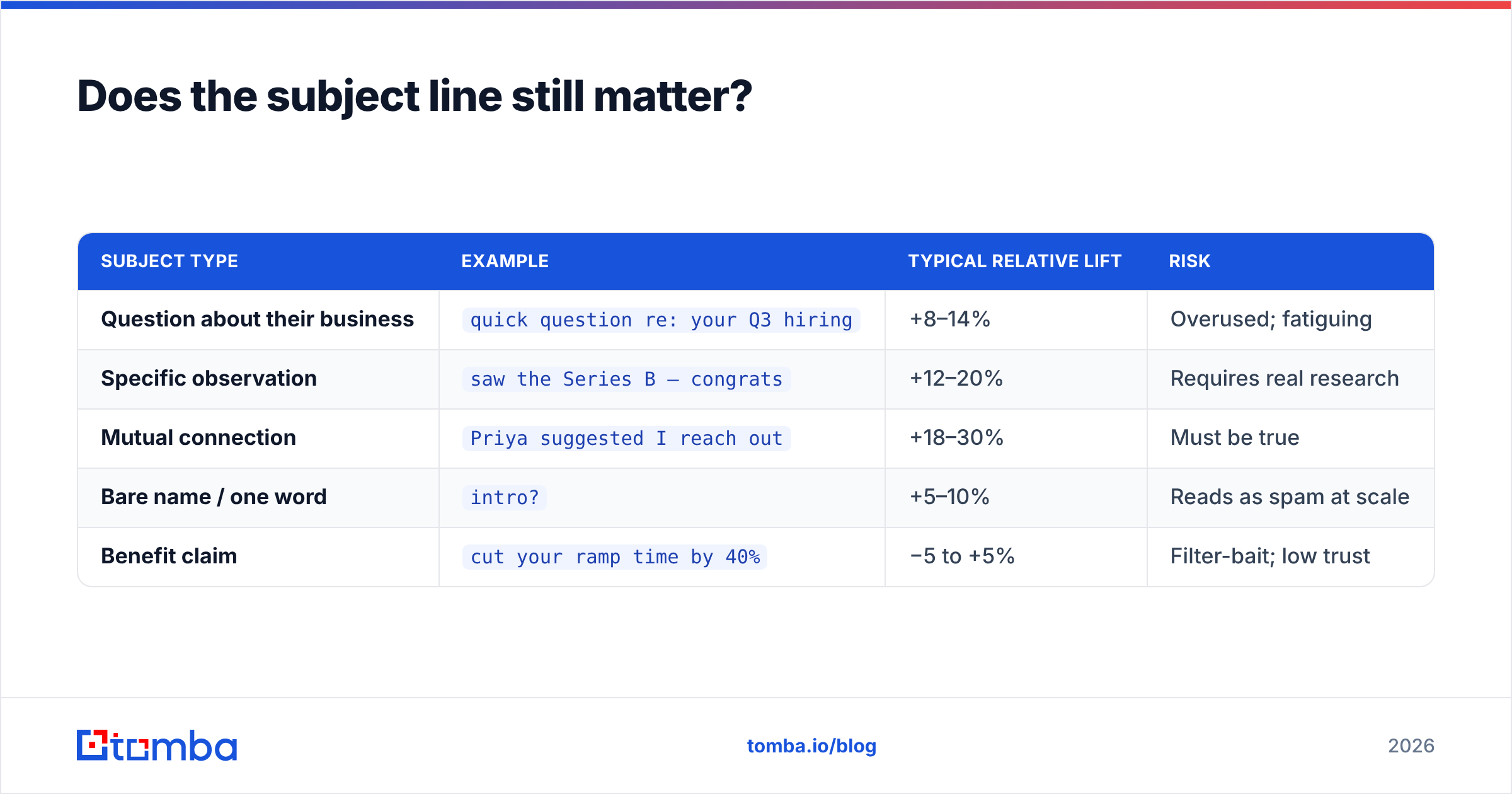
What consistently tests well in B2B cold outreach:
| Subject type | Example | Typical relative lift | Risk |
|---|---|---|---|
| Question about their business | quick question re: your Q3 hiring |
+8–14% | Overused; fatiguing |
| Specific observation | saw the Series B — congrats |
+12–20% | Requires real research |
| Mutual connection | Priya suggested I reach out |
+18–30% | Must be true |
| Bare name / one word | intro? |
+5–10% | Reads as spam at scale |
| Benefit claim | cut your ramp time by 40% |
−5 to +5% | Filter-bait; low trust |
Note the asymmetry. The best-performing subjects all require information about the recipient. That's not a copywriting problem — that's a data problem. Personalization at scale means having the firmographic and role-level context to write "saw the Series B" honestly, for a thousand prospects. That's what contact enrichment is for.
If you want to sanity-check a line before it ships, run it through a subject line tester — it won't write the email for you, but it will catch the spam-trigger words and length problems you stopped noticing three drafts ago.

What should you measure instead of open rate?#
Open rate is an input metric wearing a KPI costume. Here's a saner scoreboard, in the order a healthy cold email program should read it.
Bounce rate (target: < 2%). The single most predictive number you have. It's measurable within an hour of sending, it directly gates everything downstream, and it's entirely within your control before you press send. Treat any spike as a stop-the-line event.
Spam-complaint rate (target: < 0.1%). Google's threshold. Cross it and you're not throttled, you're gone. Complaints usually mean targeting failure — you emailed people for whom your offer is genuinely irrelevant.
Reply rate (target: 3–8% for cold; 8–15% for warm/referred). The number that correlates with pipeline. Unlike opens, replies cannot be faked by a security scanner. A campaign with a 30% open rate and a 6% reply rate is healthier than one with a 60% open rate and a 1% reply rate — the second one is being opened by robots.
Positive-reply rate (target: 30–50% of all replies). Splits "interested" from "unsubscribe me." A high total reply rate made of angry responses is a targeting problem dressed as success.
Meetings booked per 1,000 sends. The only number your CFO cares about. Everything above is a leading indicator of this.
According to HubSpot's marketing benchmark research, reply and conversion metrics have held far steadier over the past five years than open metrics — precisely because they can't be inflated by client-side prefetching. Anchor your reporting there.
How do you actually raise your cold email open rate?#
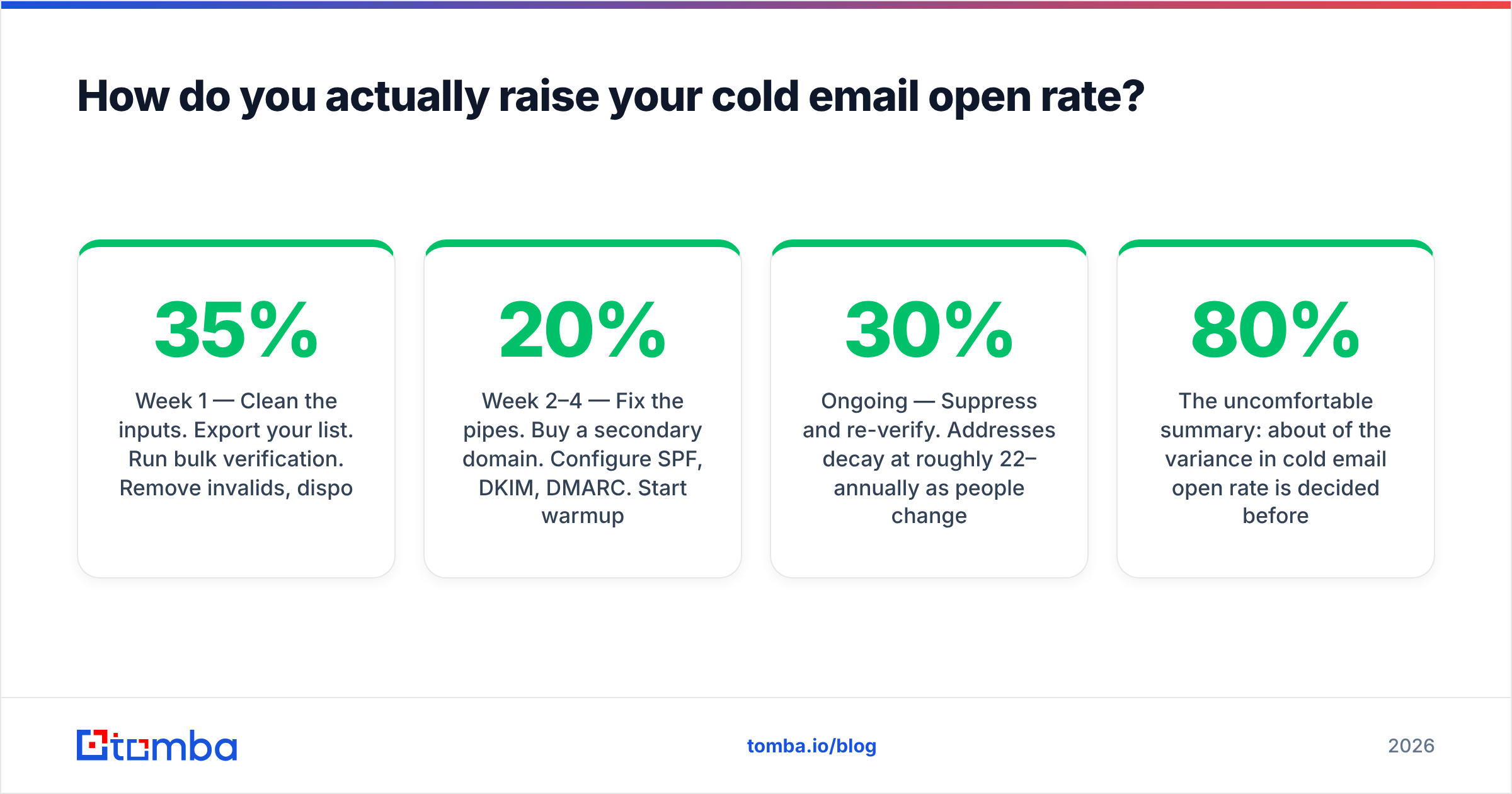
A sequence, not a checklist. Do them in order; each step is wasted if the prior one is broken.
Week 1 — Clean the inputs. Export your list. Run bulk verification. Remove invalids, disposables, role accounts, and anything you can't attribute to a named human in a named company. Expect to lose 15–35% of a scraped list. That loss is the point. If you're rebuilding rather than cleaning, source from a verified B2B database so the addresses arrive pre-scored.
Week 2–4 — Fix the pipes. Buy a secondary domain. Configure SPF, DKIM, DMARC. Start warmup at 5 sends/day per mailbox and ramp 20% weekly. Do not send a single cold email from this domain during warmup that isn't part of the warmup network.
Week 5 — Fix the identity. Real sender name. Real photo. Real signature with a physical address and a working unsubscribe. Plain text or near-plain-text HTML. Zero images, zero tracked links in the first email of a sequence — both suppress deliverability, and the tracked link is what got you a click metric you couldn't trust anyway.
Week 6 — Fix the message. Now, and only now, does subject-line work pay. Test one variable at a time across at least 400 sends per arm. Anything smaller is superstition.
Ongoing — Suppress and re-verify. Addresses decay at roughly 22–30% annually as people change jobs. Re-verify any list older than 90 days before reuse. Suppress non-openers after three touches.
The uncomfortable summary: about 80% of the variance in cold email open rate is decided before you write a word. Data quality and infrastructure. The copy matters — it's just that copy is the last 20%, and it's the part everyone starts with because it's the fun part.
Where does Tomba fit?#
If your open rate problem is really a bounce-rate problem — and for most teams reading this, it is — the fix starts upstream of your sending tool.
The Tomba Email Finder returns verified professional addresses with per-result confidence scores, so the list you load into Instantly, Smartlead, or Outreach is clean before the first send. Pair it with bulk verification to re-check aging lists, and use the API to verify at the point of import rather than as a quarterly cleanup ritual. The free tier gives you 25 searches a month to test against your own known-good contacts; paid plans start at $49/mo on Starter, with Growth at $99/mo — see Tomba pricing for the full breakdown.
Clean data won't write your subject line. It will make your subject line matter.
Related guides#
Ready to find emails that actually work?
Join 150,000+ professionals who stopped guessing and started sending. Free credits on signup — no credit card required.
Get the Tomba newsletter
Practical outbound tactics and product updates — once every two weeks.
About the author