How to Run a Cold Email Outreach Campaign That Gets Replies
Most cold email outreach campaigns fail before the first send — bad lists, cold domains, and a pitch nobody asked for. Here's the full 2026 playbook, with the numbers that actually predict replies.
TL;DR
- A cold email outreach campaign is a sequenced, permission-less email program aimed at a tightly defined list — not a blast, not a newsletter, and not a numbers game you win with volume.
- List quality decides 60–70% of your outcome. Verified contacts, correct titles, and real buying context beat clever copy every time.
- Infrastructure (separate sending domain, SPF/DKIM/DMARC, 3–4 weeks of warmup, ≤30 sends per inbox per day) is the difference between the inbox and the spam folder.
- The winning sequence in 2026 is short: 3–4 emails over 12–18 days, each one adding new information rather than repeating the ask.
- Track reply rate and positive-reply rate. Open rate is now noise — Apple Mail Privacy Protection and image proxies have made it unreliable.
What Is a Cold Email Outreach Campaign?#
A cold email outreach campaign is a structured, multi-touch email sequence sent to prospects who have not opted in, with a single measurable goal — usually a booked call, a demo, or a reply that qualifies interest.
Think of it like knocking on doors in an unfamiliar neighborhood. A spammer knocks on all 400 doors with the same script. A good campaign knocks on the 40 doors with a specific problem the pitch actually solves, mentions something visible from the porch, and leaves after the third knock. Same channel, wildly different outcome.
Three properties separate a campaign from a blast:
- A defined ICP segment. Not "SaaS companies" — "Series A–B SaaS companies with 15–60 employees who posted a Head of Demand Gen role in the last 90 days."
- A sequence, not a send. Multiple touches, spaced, each with an independent reason to exist.
- A feedback loop. Every campaign is a hypothesis about a segment, an offer, and a message. You run it, read the reply data, and change one variable.
Everything below is downstream of getting those three right.
Why Do Most Cold Email Campaigns Fail?#
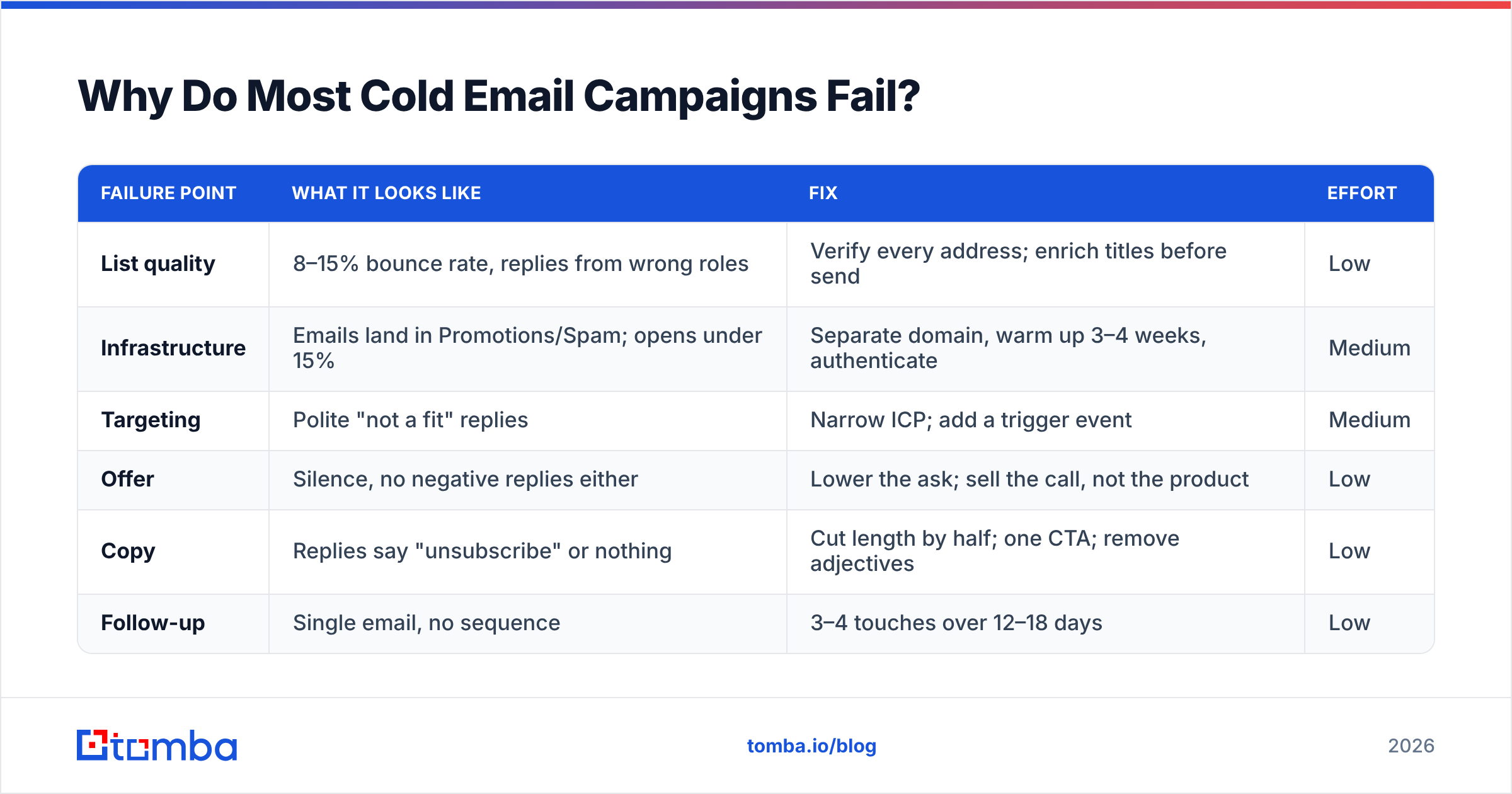
They fail in a predictable order, and almost never at the copy stage — even though copy is where most teams spend their time.
| Failure point | What it looks like | Fix | Effort |
|---|---|---|---|
| List quality | 8–15% bounce rate, replies from wrong roles | Verify every address; enrich titles before send | Low |
| Infrastructure | Emails land in Promotions/Spam; opens under 15% | Separate domain, warm up 3–4 weeks, authenticate | Medium |
| Targeting | Polite "not a fit" replies | Narrow ICP; add a trigger event | Medium |
| Offer | Silence, no negative replies either | Lower the ask; sell the call, not the product | Low |
| Copy | Replies say "unsubscribe" or nothing | Cut length by half; one CTA; remove adjectives | Low |
| Follow-up | Single email, no sequence | 3–4 touches over 12–18 days | Low |
Notice the pattern: the cheapest fixes sit at the top and the bottom. Teams that plateau are usually rewriting subject lines when their bounce rate is 11%.
A bounce rate above 3% is not a nuisance — it's a signal to mailbox providers that you bought or scraped a list. Google's bulk sender guidelines are explicit that spam complaint rates above 0.3% will get your mail throttled or rejected outright. Bounces compound the same reputational damage. Run your list through an email verifier before it ever touches a sending tool, and treat anything that comes back as risky or unknown as a "do not send."

How Do You Build a List That's Actually Worth Emailing?#
Start from the trigger, not the tool.
A trigger is a public, time-bound event that makes your offer relevant right now: a funding round, a new executive hire, a job posting for a role you'd help them fill, a technology change on their site, a conference they're attending. Triggers do two things — they narrow the list and they hand you a first line that doesn't sound like a template.
Once you have the trigger, the build is mechanical:
- Source the companies. Pull the account list from whatever surfaces the trigger — job boards, funding databases, tech-detection tools, or a curated B2B database filtered by firmographics.
- Identify the person, not the role. A named individual with a verifiable LinkedIn profile. "info@" and "sales@" addresses belong in a different campaign.
- Find the address. A domain search returns known patterns and existing contacts for a company; an email finder resolves a specific first/last/domain combination against those patterns.
- Verify before you sequence. Syntax, MX records, SMTP response, and catch-all status. Catch-all domains accept everything, which means a "valid" result there is not the same as a deliverable one — use a dedicated catch-all verifier instead of guessing.
- Enrich for personalization variables. Title, seniority, company size, and one specific fact you can reference. If you cannot personalize a row, delete the row.
- Cap the batch. 200–400 contacts per campaign variant. Bigger batches make it impossible to attribute what worked.
Prebuilt list vendors — BookYourData and similar providers — are a legitimate shortcut when you need coverage in a vertical fast, and they're often cheaper per verified contact than building from scratch. The tradeoff is that everyone else in your category can buy the same rows. Purchased lists work best as a supplement to trigger-based sourcing, not a replacement for it.
If you're sourcing from LinkedIn, a LinkedIn finder closes the gap between a profile and a mailbox without exporting a Sales Navigator CSV you'll have to clean anyway. For high volume, push the whole thing through a bulk email finder and hand your SDRs a file that's already verified.
What Sending Infrastructure Does a Cold Email Outreach Campaign Need?#
Everything here is table stakes. Skip one item and you'll spend three months blaming your copy.
Domain separation. Never send cold email from your primary domain. Buy a lookalike — getacme.com or acme-hq.com if you own acme.com. If reputation collapses, you burn the throwaway, not your billing and support mail.
Authentication. SPF, DKIM, and DMARC on every sending domain, no exceptions. Since 2024, Gmail and Yahoo have required all three for bulk senders. Check your record with an SPF checker before your first send and again after any DNS change.
Warmup. New domains and new mailboxes have no reputation, and mailbox providers treat "no reputation" as "suspicious." Ramp from 5 sends per day to your ceiling over 3–4 weeks, mixing in real replies. An email warmup calculator will map the ramp for the number of inboxes you're running.
Volume ceilings. 25–35 cold sends per inbox per day in 2026. Not 100. If you need 900 sends a day, you need roughly 30 inboxes across 6–8 domains, not one heroic mailbox.
Blacklist monitoring. Check your sending IPs and domains weekly with a blacklist checker. Getting delisted takes days; noticing late takes weeks.
Content hygiene. No tracking pixels (they hurt more than the open-rate data helps), no images, at most one link, no attachments. Run a draft through a spam checker if you're using any word that sounds like a discount.
Your sender reputation is the compounding asset in this whole system. Protect it the way you'd protect a credit score.
What Does a High-Performing Sequence Look Like?#
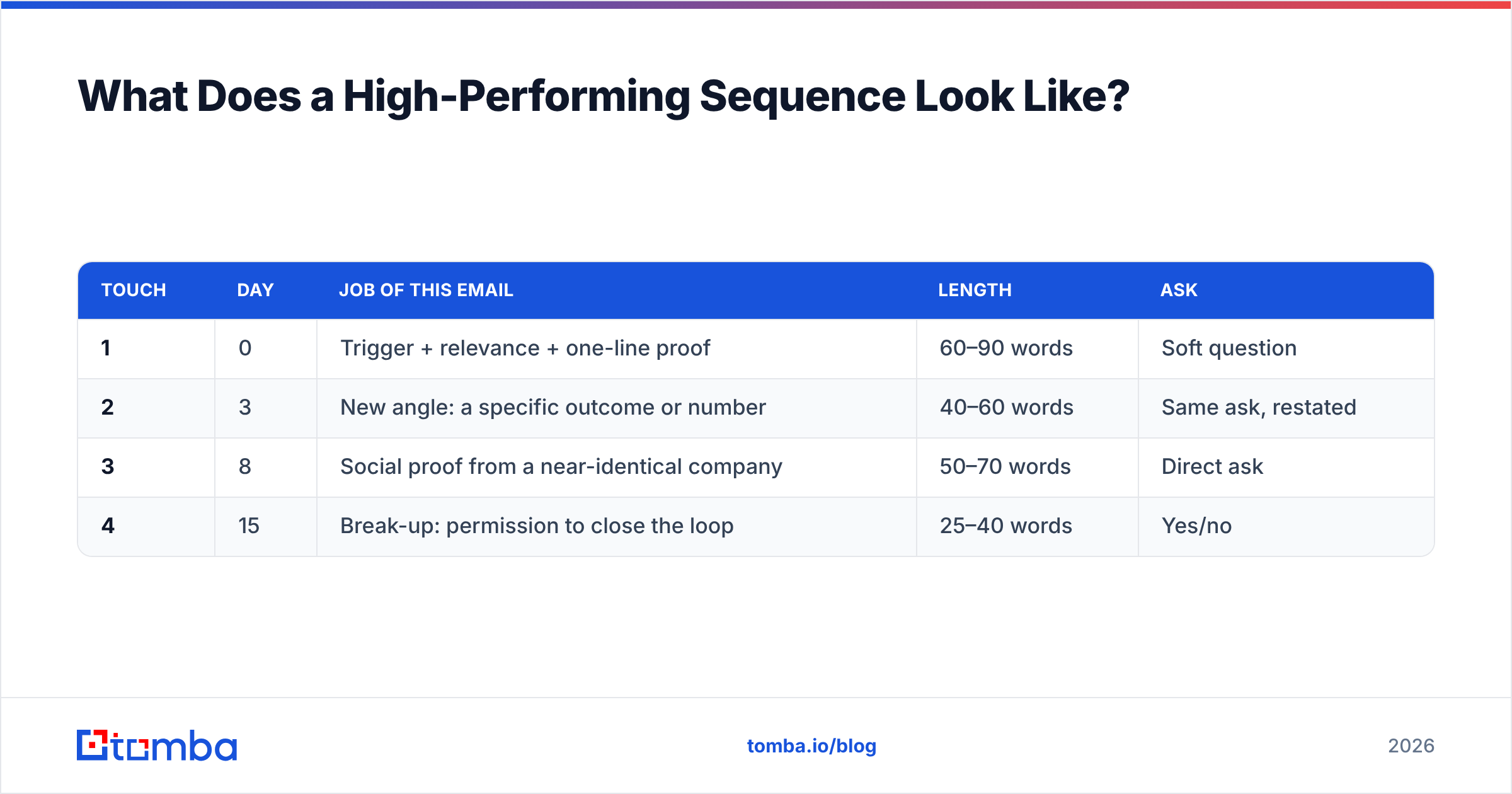
Four emails. Twelve to eighteen days. Each one earns its place by adding information.
| Touch | Day | Job of this email | Length | Ask |
|---|---|---|---|---|
| 1 | 0 | Trigger + relevance + one-line proof | 60–90 words | Soft question |
| 2 | 3 | New angle: a specific outcome or number | 40–60 words | Same ask, restated |
| 3 | 8 | Social proof from a near-identical company | 50–70 words | Direct ask |
| 4 | 15 | Break-up: permission to close the loop | 25–40 words | Yes/no |
Email 1 references the trigger in the first sentence. "Saw you're hiring two demand gen managers" beats "I hope this email finds you well" by a margin that doesn't need a study to confirm. Then one sentence connecting the trigger to a problem, one sentence of proof, one question.
Email 2 is not "just bumping this." It introduces a number: "Teams in your position usually find 40% of their outbound list bounces because the data is 18 months old." New information, same thread.
Email 3 is the only place a case study belongs. Name a company the prospect recognizes, in their segment, and one metric that moved.
Email 4 gives the prospect an exit. "Should I close this out?" produces more replies than the previous three combined in most campaigns, because it costs one word to answer.
Do not send seven emails. Do not send on weekends. Do not send more than one campaign to the same person in a quarter. Your response rate falls off a cliff after touch four, and your complaint rate does the opposite.
For copy that doesn't sound like it was assembled from a template library, start from cold email templates and then strip out every sentence that would be true of any vendor in your category. What's left is the email.

Which Metrics Should You Track in 2026?#
Open rate is dead as a primary metric. Apple Mail Privacy Protection pre-fetches images, Gmail proxies them, and a meaningful share of your "opens" are machines. Worse, the tracking pixel that generates the number also makes you look like a marketer to spam filters.
Track these instead:
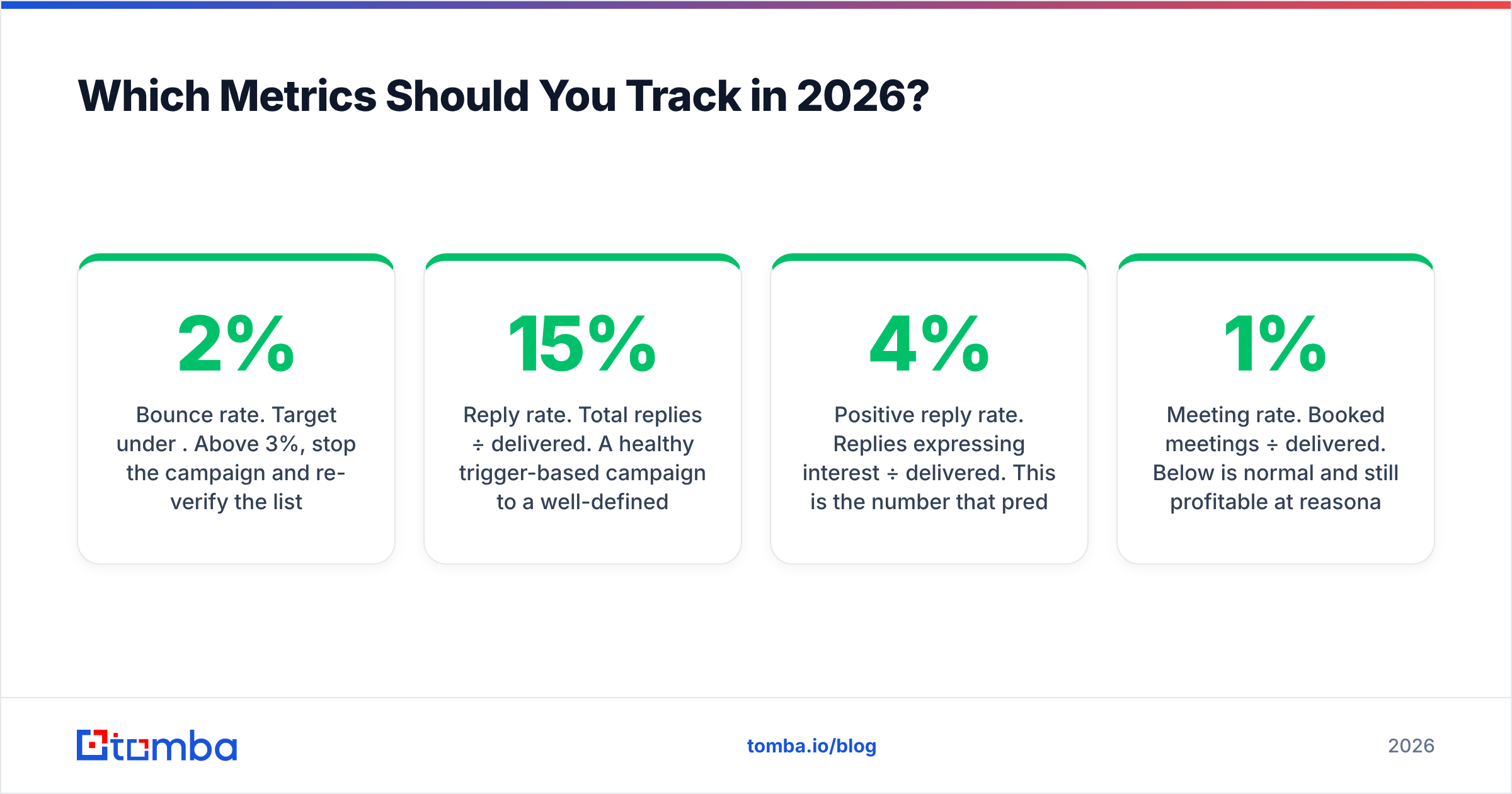
- Bounce rate. Target under 2%. Above 3%, stop the campaign and re-verify the list.
- Reply rate. Total replies ÷ delivered. A healthy trigger-based campaign to a well-defined segment runs 8–15%. Broad campaigns run 1–3%.
- Positive reply rate. Replies expressing interest ÷ delivered. This is the number that predicts pipeline. 2–4% is strong.
- Meeting rate. Booked meetings ÷ delivered. Below 1% is normal and still profitable at reasonable ACV.
- Spam complaint rate. Must stay under 0.1%. Google's hard ceiling is 0.3%.
- Domain health. Deliverability by inbox, checked monthly. When one mailbox's reply rate drops while others hold, that mailbox is in trouble — not your copy.
HubSpot's ongoing cold email research puts average cold-email reply rates in the low single digits across industries, which tells you how much room a properly targeted campaign has to outperform the mean. The gap between 1% and 10% is almost entirely list and trigger quality.
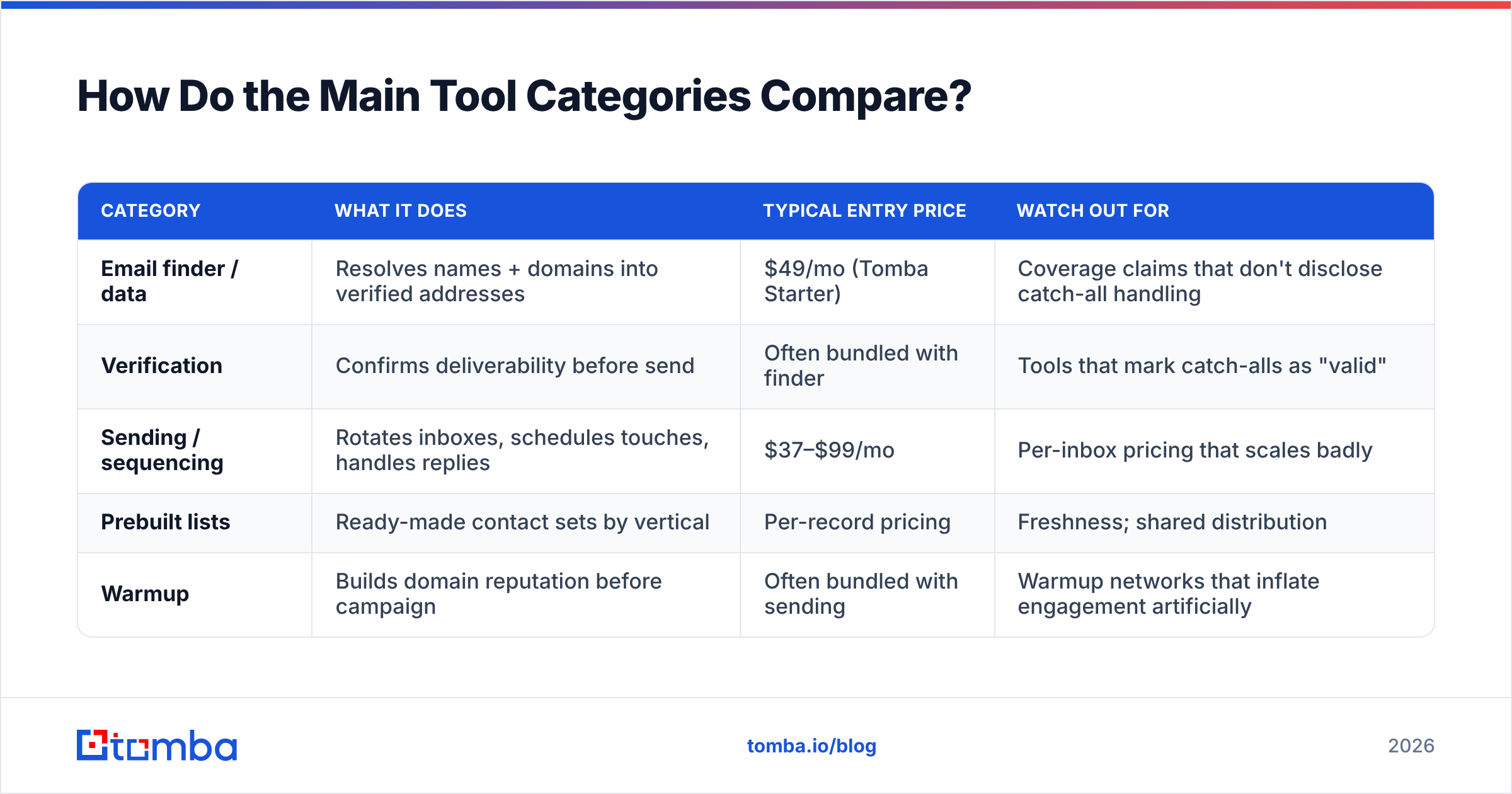
How Do the Main Tool Categories Compare?#
You need three things: data, sending, and verification. Some tools bundle them. Bundling is convenient and usually worse at each individual job.
| Category | What it does | Typical entry price | Watch out for |
|---|---|---|---|
| Email finder / data | Resolves names + domains into verified addresses | $49/mo (Tomba Starter) | Coverage claims that don't disclose catch-all handling |
| Verification | Confirms deliverability before send | Often bundled with finder | Tools that mark catch-alls as "valid" |
| Sending / sequencing | Rotates inboxes, schedules touches, handles replies | $37–$99/mo | Per-inbox pricing that scales badly |
| Prebuilt lists | Ready-made contact sets by vertical | Per-record pricing | Freshness; shared distribution |
| Warmup | Builds domain reputation before campaign | Often bundled with sending | Warmup networks that inflate engagement artificially |
On the data side, Tomba pricing starts with a free tier at 25 searches per month, then Starter at $49/mo, Growth at $99/mo, and Pro at $249/mo — with verification, domain search, and catch-all checks in the same account rather than sold separately. That matters operationally: the moment verification lives in a different vendor than sourcing, someone on your team starts skipping it.
If your workflow lives in a spreadsheet, the Google Sheets add-on and Tomba API both let you verify in place rather than exporting, cleaning, and re-importing. Fewer handoffs means fewer unverified rows sneaking into a send.
What's the Fastest Path to a First Campaign?#
Give yourself four weeks. Three of them are warmup, and you can do everything else in parallel.
- Week 1: Buy the sending domain. Configure SPF, DKIM, DMARC. Create 3 inboxes. Start warmup. Simultaneously, define one ICP segment and one trigger.
- Week 2: Source 300 accounts matching the trigger. Identify one contact per account. Find and verify every address. Delete anything unverified or catch-all-unresolved.
- Week 3: Write four emails. Have someone outside your team read email 1 and tell you what you're selling. If they can't, rewrite it. Set up the sequence, disable open tracking, cap sends at 30 per inbox per day.
- Week 4: Send to 100 contacts. Read every reply, including the rude ones. Change exactly one variable — usually the subject line or the first sentence — and send to the next 100.
Then repeat. A cold email outreach campaign is not a project you finish; it's a loop you tighten. The teams booking meetings consistently in 2026 aren't the ones with the best copy. They're the ones whose list is clean, whose domain is healthy, and whose segment is narrow enough that the email doesn't need to be clever to be relevant.
Start where the leverage is. Every point of bounce rate you remove is a point of sender reputation you keep, and every verified contact is a send you didn't waste. Tomba's Email Finder resolves names and domains into verified, deliverable addresses — with verification, domain search, and catch-all checks built into the same workflow, so nothing unverified reaches your sequencer. Start on the free tier with 25 searches, and scale when the campaign proves itself.
Related guides#
Ready to find emails that actually work?
Join 150,000+ professionals who stopped guessing and started sending. Free credits on signup — no credit card required.
Get the Tomba newsletter
Practical outbound tactics and product updates — once every two weeks.
About the author