The Cold Email Outreach Playbook: A 2026 Field Guide
Most cold email advice starts at the copy. That's the last 10% of the job. Here's the full playbook — infrastructure, list quality, sequencing, and the metrics that tell you it's working — as it actually runs in 2026.
TL;DR
- A cold email outreach playbook is not a copy template. It's four systems — sending infrastructure, list quality, sequence design, and measurement — and copy is the last one you should touch.
- Bounce rate is the single highest-leverage number in the whole stack. Above 3%, mailbox providers start treating you as a bulk sender regardless of how good your copy is.
- The 2026 median cold email reply rate sits around 3–5% for a well-targeted list. Anything above 8% usually means the list is tiny and hand-built, not that the copy is magic.
- Sequences of 3–4 touches over 12–16 days capture roughly 80% of total replies. Touch five onward is mostly noise and unsubscribes.
- Volume is a multiplier on quality, never a substitute for it. Ten thousand sends against a bad list produce ten thousand deliverability problems.
What is a cold email outreach playbook?#
Think of cold email like a restaurant, not a recipe. Everyone obsesses over the recipe — the subject line, the first sentence, the CTA. But a restaurant with a brilliant recipe and a broken walk-in freezer poisons its customers. The recipe was never the constraint.
A cold email outreach playbook is the operating manual for the whole restaurant. It specifies four layers, and each one gates the next:
- Infrastructure — the domains, mailboxes, authentication records, and warmup schedule that determine whether your message reaches an inbox at all.
- List — who you're contacting, why they qualify, and how confident you are that the address is real and belongs to that person.
- Sequence — how many touches, spaced how far apart, saying what, across which channels.
- Measurement — the numbers that tell you which of the three layers above is actually broken when results disappoint.
Skip layer one and you build a beautiful sequence that lands in spam. Skip layer two and you get a 12% bounce rate that torches your domain in a week. Most teams start at layer three because it's the only one that feels like writing, and it's the reason most cold email programs plateau at a 0.8% reply rate and get quietly defunded.
Why do most cold email campaigns fail before the first send?#
Because failure is decided upstream. By the time a message hits a spam filter, the outcome was determined by decisions made days earlier.
Here's what the failure chain actually looks like. Suppose you send 1,000 emails against a list you pulled from a scrape and never verified. A realistic 9% of those addresses are dead. Ninety hard bounces in one campaign is enough for Gmail and Outlook to flag the sending domain. Your inbox placement on the remaining 910 messages drops — not to zero, but to maybe 60%. So 546 people could theoretically see your email. Of those, maybe half open it. Of those, a normal 6% reply rate on the seen population gives you roughly 16 replies.
Now run the same campaign against a verified list. Bounce rate: 1.2%. No domain flag. Inbox placement: 92%. You reach 909 people, and the same copy gets you around 27 replies. Same words, same offer, same sender — 69% more conversations, purely from the layer everybody skips.
That's the whole argument for verification, and it's why email verification is a prerequisite, not an optimization. Google's own bulk sender guidelines are explicit that senders must keep spam complaint rates below 0.3% and maintain valid authentication — both of which a dirty list actively undermines.
What does a healthy sending infrastructure look like in 2026?#
Never send cold email from your primary company domain. That domain carries your invoices, your support replies, and your password resets. Burn it and you have a business continuity incident, not a marketing problem.
The standard setup:
- Buy 2–3 lookalike domains. If you're
acme.com, registergetacme.com,acme-hq.com,tryacme.io. Redirect them to your main site. - Create 2–3 mailboxes per domain. Real names, real signatures, real headshots. A mailbox that looks like a person gets treated like a person.
- Authenticate everything. SPF, DKIM, and DMARC on every sending domain. This is non-negotiable in 2026 — Gmail and Yahoo both enforce it for bulk senders. Run an SPF checker before your first send, not after your first complaint.
- Warm each mailbox for 3–4 weeks. Ramp from ~5 sends/day to ~30. Warmup tools that simulate replies help, but the ramp curve matters more than the tool.
- Cap at 30–40 cold sends per mailbox per day. Six mailboxes × 35 sends = 210/day = ~4,400/month. That's a real pipeline engine, and none of it depends on a single fragile asset.
If your sender reputation is already damaged, no amount of sequence tuning recovers it. You rotate domains and start the warmup clock again. Prevention costs four weeks; recovery costs a quarter.
How do you build a list that actually deserves your sequence?#
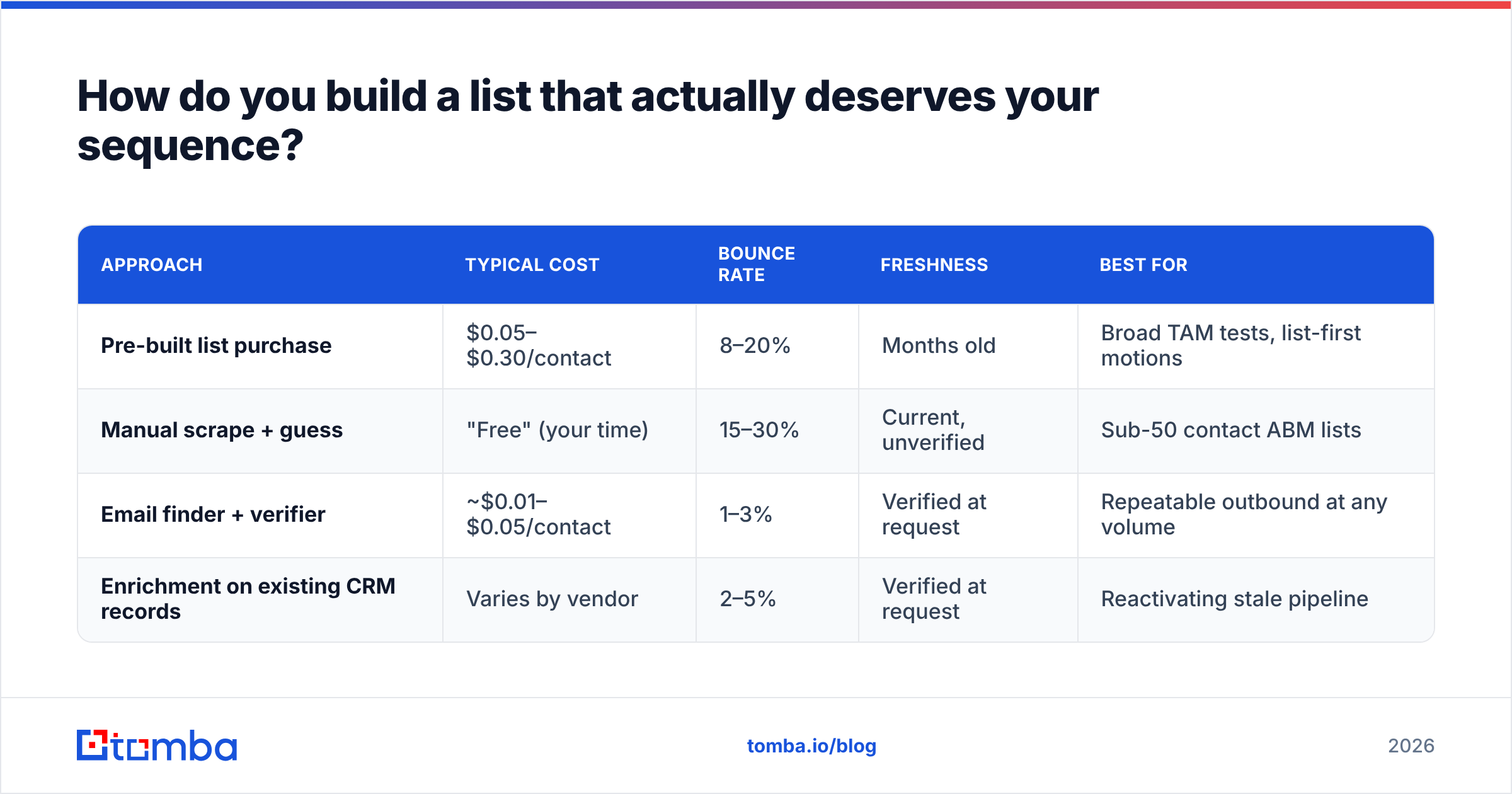
There are three ways to get contacts, and they are not interchangeable. The cost per usable contact — not per row — is what matters.
| Approach | Typical cost | Bounce rate | Freshness | Best for |
|---|---|---|---|---|
| Pre-built list purchase | $0.05–$0.30/contact | 8–20% | Months old | Broad TAM tests, list-first motions |
| Manual scrape + guess | "Free" (your time) | 15–30% | Current, unverified | Sub-50 contact ABM lists |
| Email finder + verifier | ~$0.01–$0.05/contact | 1–3% | Verified at request | Repeatable outbound at any volume |
| Enrichment on existing CRM records | Varies by vendor | 2–5% | Verified at request | Reactivating stale pipeline |
Purchased lists aren't automatically bad — vendors like BookYourData maintain genuinely well-curated, human-verified datasets and are a reasonable option when you need coverage fast. The failure mode is treating any static list as permanently accurate. Roughly 25–30% of B2B contact data decays per year as people change jobs. A list bought in January is materially wrong by August.
The repeatable pattern most outbound teams converge on:
- Define the account list first. Firmographics, tech stack, hiring signals, funding events. Accounts, not people. Fifty right accounts beat five thousand random ones.
- Identify the personas inside each account. Title patterns, not individual names. "VP Demand Gen or Head of Growth" — you'll find whoever holds it.
- Resolve names to addresses with a domain search that returns every public address pattern on the company, then match names against that pattern.
- Verify every address before it enters a sequence. Catch-all domains need a dedicated catch-all verifier because standard SMTP checks return "valid" for every mailbox on them, real or not.
- Enrich for personalization inputs. Job title, team size, recent funding, current tooling — the specific facts you'll reference in line one.
- Suppress ruthlessly. Existing customers, open opportunities, past unsubscribes, competitors. This list should be a hard filter in your sending tool, not a mental note.
Step four is where most programs quietly leak money. A bulk verify pass over a 5,000-row list costs a few dollars and routinely removes 400–700 addresses that would each have been a bounce.
What should the sequence itself look like?#
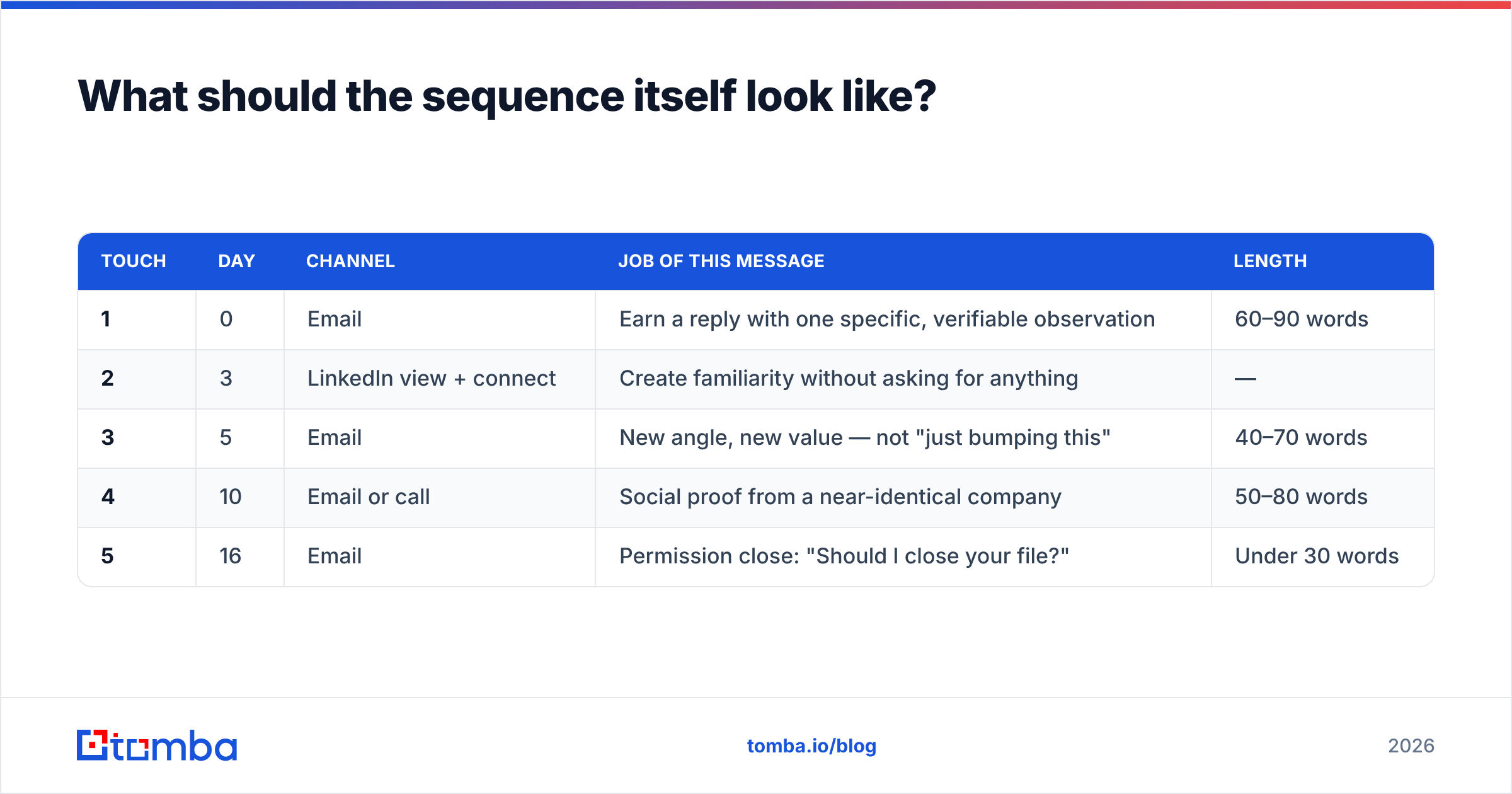
Four touches, twelve to sixteen days, and then stop. Here's a structure that holds up across most B2B categories:
| Touch | Day | Channel | Job of this message | Length |
|---|---|---|---|---|
| 1 | 0 | Earn a reply with one specific, verifiable observation | 60–90 words | |
| 2 | 3 | LinkedIn view + connect | Create familiarity without asking for anything | — |
| 3 | 5 | New angle, new value — not "just bumping this" | 40–70 words | |
| 4 | 10 | Email or call | Social proof from a near-identical company | 50–80 words |
| 5 | 16 | Permission close: "Should I close your file?" | Under 30 words |
Three rules govern the whole table.
Every touch is a new argument, not a reminder. "Following up on my last email" tells the recipient you have nothing new to say. Touch three should approach from a completely different angle than touch one — different pain, different proof, different question.
Touches get shorter, not longer. Desperation reads as length. The permission close at touch five is the highest-reply-rate message in most sequences precisely because it costs nothing to answer.
Stop at five. Analysis of large outbound datasets consistently shows that touches one through four capture roughly 80% of a sequence's total replies. Touch seven produces a rounding error of replies and a real increase in complaints — and complaints are what actually kill you.
How do you write a cold email that gets a reply?#
The copy formula is boring because the constraint is attention, not artistry. Four parts:
One: a first line that proves you looked. Not "I saw you're the VP of Sales at Acme" — that's the job title, visible to anyone. Instead: "You're hiring three AEs in EMEA but still running attribution through spreadsheets, based on your careers page and the Modern Sales podcast episode from last month." That sentence is unfakeable at scale, which is exactly why it works.
Two: a problem statement in their language. Describe the symptom they'd complain about to a peer, not the category your product sits in. "Reps spend Monday morning rebuilding the same lists" beats "inefficient prospecting workflows."
Three: proof, compressed. One customer, one number, one sentence. "Clay's SDR team cut list-build time from 6 hours to 40 minutes." Skip the logo wall.
Four: an interest CTA, not a calendar CTA. "Worth a look?" converts better than "Do you have 15 minutes Thursday at 2?" because the first asks for a yes and the second asks for a commitment. Ask for the meeting on the reply, not in the cold email.
Total: under 90 words. If your email needs a scrollbar on mobile, it needs a delete key. HubSpot's cold email research puts the same point more diplomatically, but the mechanism is the same — every additional sentence is another opportunity to lose the reader.
One anti-pattern worth naming: personalization tokens that break. Hi {{first_name}}, rendering as Hi , is worse than no personalization, because it announces automation. Run a spam checker and a merge-field dry run on every campaign before it goes live.
Which channel mix beats email-only?#
Email-only works. Email plus one adjacent channel works considerably better, mostly because it changes the interpretation of the email rather than the email itself. A cold email from a stranger is spam. A cold email from someone whose LinkedIn profile you looked at yesterday is a follow-up.
The two cheapest additions:
- LinkedIn profile view + connection request between touches one and three. Zero incremental cost, and it moves your name from "unknown" to "vaguely familiar." Pair it with light LinkedIn outreach — a comment on a post beats a pitch in a DM.
- One phone attempt at touch four for accounts above your median deal size. Not a cold call from nothing; a call from someone who has now emailed twice and viewed their profile. Pull direct dials with a phone finder rather than dialing switchboards.
What doesn't work: adding channels to compensate for a bad list. Multichannel amplifies whatever signal you have. If the signal is "we picked you at random," multichannel just makes the randomness louder.
What metrics tell you the playbook is working?#
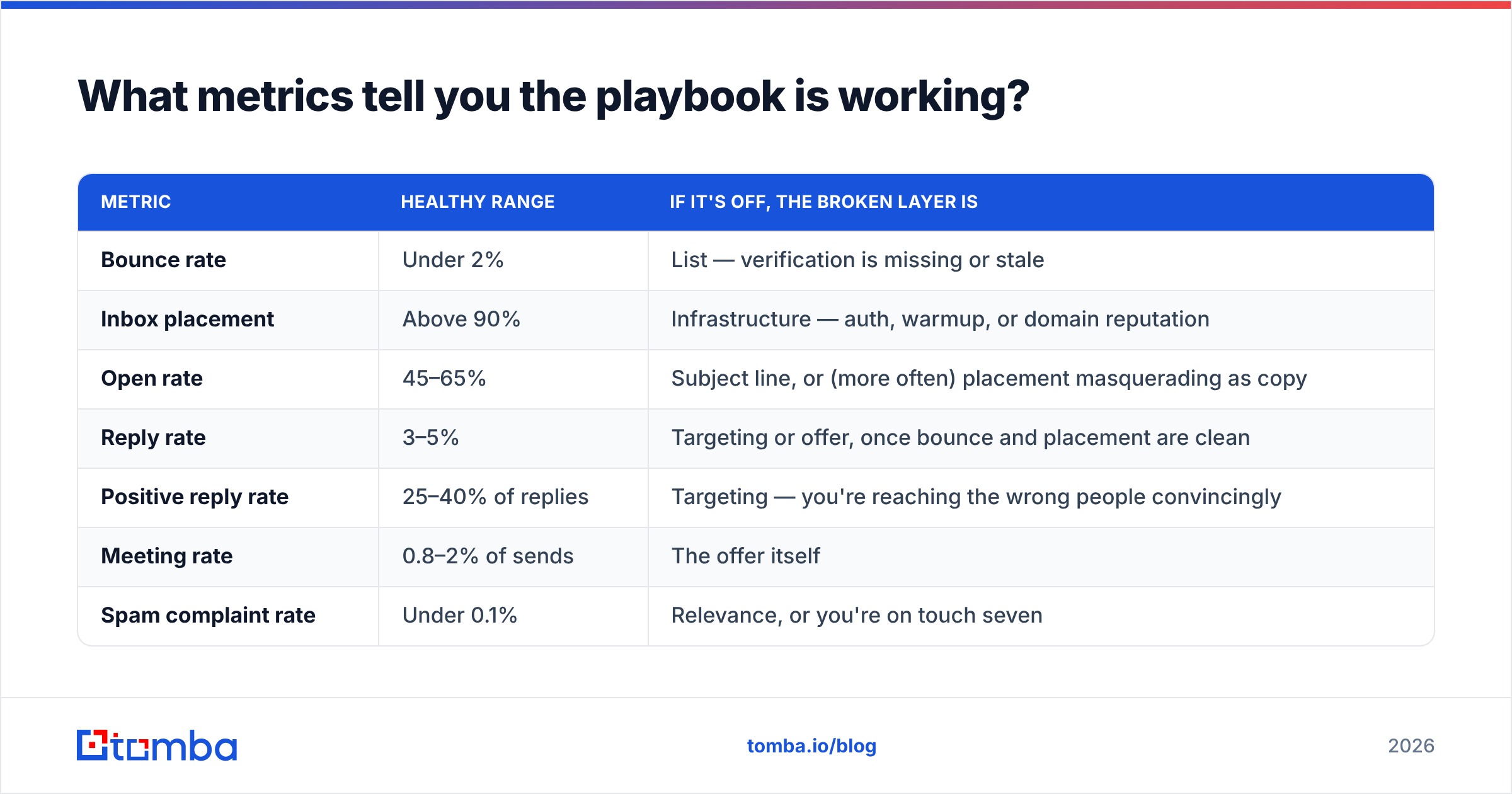
Diagnose by layer. Each metric points at exactly one broken system.
| Metric | Healthy range | If it's off, the broken layer is |
|---|---|---|
| Bounce rate | Under 2% | List — verification is missing or stale |
| Inbox placement | Above 90% | Infrastructure — auth, warmup, or domain reputation |
| Open rate | 45–65% | Subject line, or (more often) placement masquerading as copy |
| Reply rate | 3–5% | Targeting or offer, once bounce and placement are clean |
| Positive reply rate | 25–40% of replies | Targeting — you're reaching the wrong people convincingly |
| Meeting rate | 0.8–2% of sends | The offer itself |
| Spam complaint rate | Under 0.1% | Relevance, or you're on touch seven |
Read that table top-down and stop at the first row that's out of range. Fixing subject lines when your bounce rate is 9% is like adjusting the seasoning while the kitchen is on fire.
One caveat on open rate: Apple Mail Privacy Protection and similar features inflate opens by pre-fetching tracking pixels. Treat open rate as a directional signal, never as a KPI. Reply rate is the first number in the funnel that a machine can't fake on your behalf.
What are the compliance guardrails?#
Short version: cold email is legal in most jurisdictions if you get the mechanics right, and expensive if you don't.
- CAN-SPAM (US) — accurate headers, no deceptive subject lines, a physical postal address in the footer, and a working opt-out honored within 10 business days. Consent is not required.
- GDPR (EU/UK) — you need a lawful basis. Legitimate interest can cover B2B outreach to business addresses when the offer is plausibly relevant to the recipient's professional role, but you must document the balancing test and honor objections immediately.
- CASL (Canada) — the strict one. Express or implied consent is generally required. Implied consent exists for conspicuously published business addresses where the message relates to their role.
Practical takeaway: include a plain-text opt-out line ("Not the right person? Reply 'no' and I'll close your file."), keep your suppression list authoritative across every sending tool, and never email a personal Gmail address you scraped from a hobby forum. Vendor and buyer reviews on G2's email verification category are a decent sanity check on which providers take data provenance seriously — ask any vendor where their data comes from, and expect a real answer.
What does the whole playbook cost to run?#
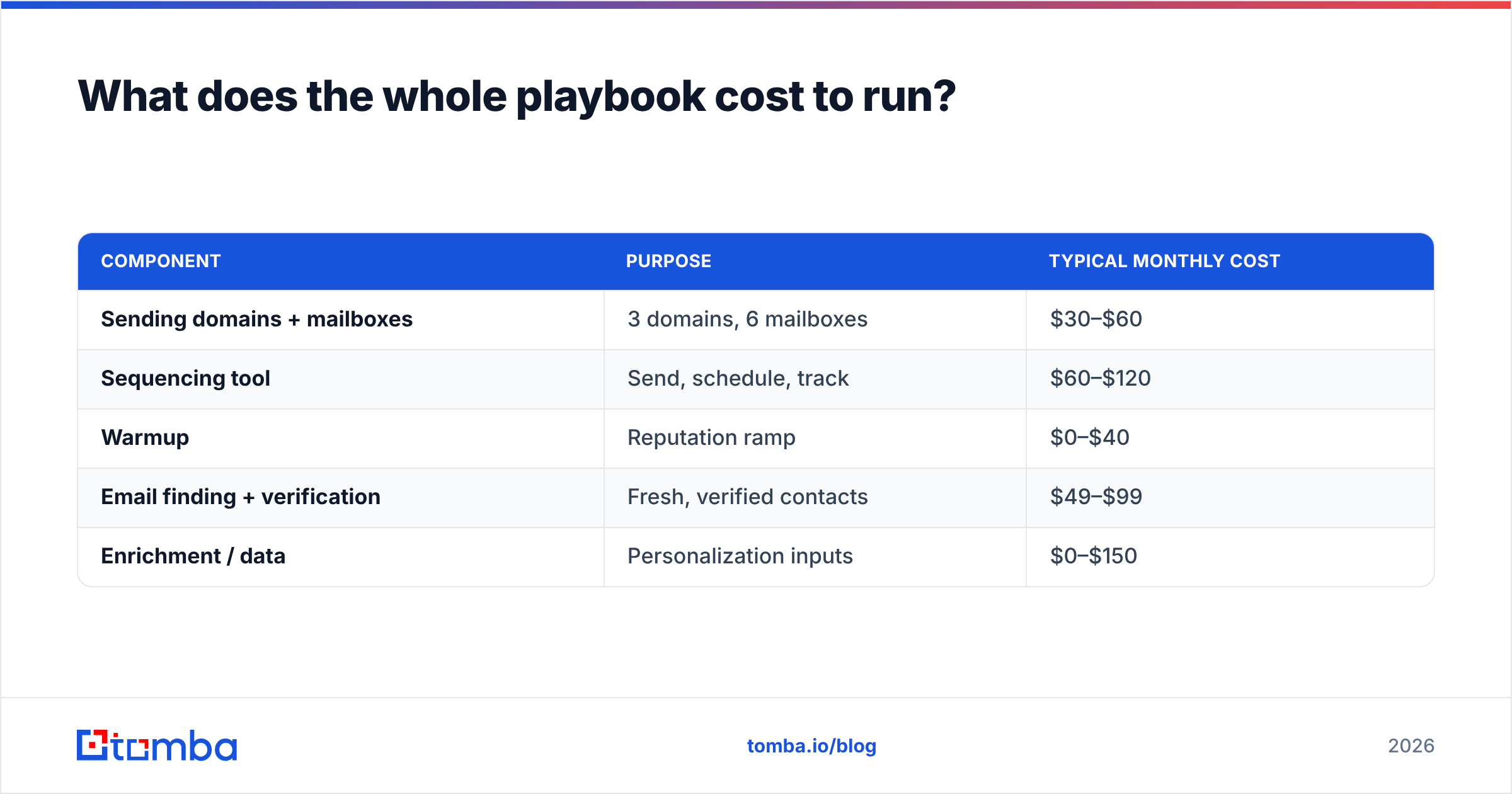
A functional outbound stack in 2026, for a two-SDR team sending roughly 4,000 emails a month:
| Component | Purpose | Typical monthly cost |
|---|---|---|
| Sending domains + mailboxes | 3 domains, 6 mailboxes | $30–$60 |
| Sequencing tool | Send, schedule, track | $60–$120 |
| Warmup | Reputation ramp | $0–$40 |
| Email finding + verification | Fresh, verified contacts | $49–$99 |
| Enrichment / data | Personalization inputs | $0–$150 |
On the data line, Tomba pricing starts with a free tier at 25 searches/month, Starter at $49/mo, and Growth at $99/mo — which covers finding, verifying, catch-all checking, and enrichment in one place rather than stitching three vendors together. For teams running this programmatically, the Tomba API lets you resolve and verify inside your own enrichment job so nothing unverified ever reaches a sequence.
Notice what's cheap and what's expensive. The layer that determines 70% of your outcome — list quality — is the smallest line item on the sheet. That asymmetry is the whole playbook in one table.
Where should you start tomorrow?#
Pick fifty accounts you'd genuinely be delighted to close. Find the right person at each one. Verify every address. Write four touches that each make a different argument. Send from a warmed domain that isn't your company's.
That's a two-day project, it costs less than a team lunch, and it will teach you more about your market than a 10,000-send blast ever could — because at fifty contacts you can read every reply, and every reply is a free consulting session about your positioning.
When the fifty works, the mechanics scale. Start with the contacts. Tomba's Email Finder resolves names and domains into verified, deliverable addresses — with bounce protection built into the same request — so the list under your sequence is the part you never have to worry about. The free tier gives you 25 searches to test the difference on your own accounts before you spend a dollar.
Related guides#
// get started
Find, verify and enrich your first contacts today
Start on the free plan with 25 searches a month, then scale when your team is ready.
Free plan · No credit card required · GDPR & CCPA
// about the author