The Cold Email Playbook: Build, Send, and Book Meetings in 2026
Most cold email advice is recycled. This playbook covers the four layers that actually move reply rates in 2026: list quality, deliverability infrastructure, message structure, and follow-up math.
TL;DR
- A cold email playbook is not a template swipe file. It is four stacked layers — list quality, sending infrastructure, message structure, follow-up math — and the top layer only works if the three beneath it are solid.
- List quality is the single biggest lever. A 3% bounce rate on a verified list and a 14% bounce rate on a scraped one produce completely different inbox placement, regardless of how good your copy is.
- Google and Microsoft both tightened bulk-sender enforcement in 2024, and the rules have not loosened. Spam complaint rate above 0.3% now means your domain gets throttled, not warned.
- Sequences of 3–4 emails capture roughly 2–3x the replies of a single send. Most of that lift is in emails 2 and 3, not email 5.
- Personalization scales badly. Personalization variables scale fine. Learn the difference before you hire an SDR to fix a structural problem.
What is a cold email playbook, actually?#
A cold email playbook is the documented, repeatable system your team uses to turn a target account list into booked meetings — covering how you source contacts, how you protect your sending domain, how you write, and how you follow up.
Think of it like a restaurant kitchen. The template is the recipe card. But the recipe card is worthless if your ingredients are rotten (bad data), your stove is broken (bad deliverability), or you serve the plate to someone who ordered something else (bad targeting). Most teams obsess over the recipe card and wonder why nobody eats.
The distinction matters because the two failure modes look identical from the dashboard. A 0.4% reply rate could mean your copy is boring, or it could mean 40% of your emails never reached an inbox. Same number, opposite fixes. A real playbook forces you to diagnose in order.
Why do most cold email programs fail before the first send?#
Because the sequence of decisions is backwards. Teams pick a sending tool, buy 50,000 contacts, write a template, and start sending on their primary company domain. By week three, deliverability is destroyed and nobody knows why.
Here is the order that works, and why each step gates the next:
- Define the trigger, not the persona. "VP of Engineering at Series B SaaS" is a filter, not a reason to email. "VP of Engineering at a company that just posted three infra roles" is a reason. Triggers cut list size by 90% and raise reply rates more than any subject line rewrite.
- Source contacts you can verify. If you cannot confirm a mailbox exists before you send to it, you are gambling with your domain reputation. Use an email verifier as a gate, not an afterthought.
- Separate your sending domain. Never run cold outbound from your primary domain. Buy a lookalike (
getacme.comforacme.com), configure SPF, DKIM, and DMARC, and warm it for 3–4 weeks before real volume. - Write for a single outcome. One ask per email. Not "check out our site, book a demo, and reply if interested."
- Sequence with intent, not attrition. Each follow-up should add information, not repeat the ask louder.
- Measure replies, not opens. Open tracking has been unreliable since Apple Mail Privacy Protection shipped. Positive reply rate is the only number that survives.
Skip step 2 and steps 3–6 cannot save you.

How much does list quality actually matter?#
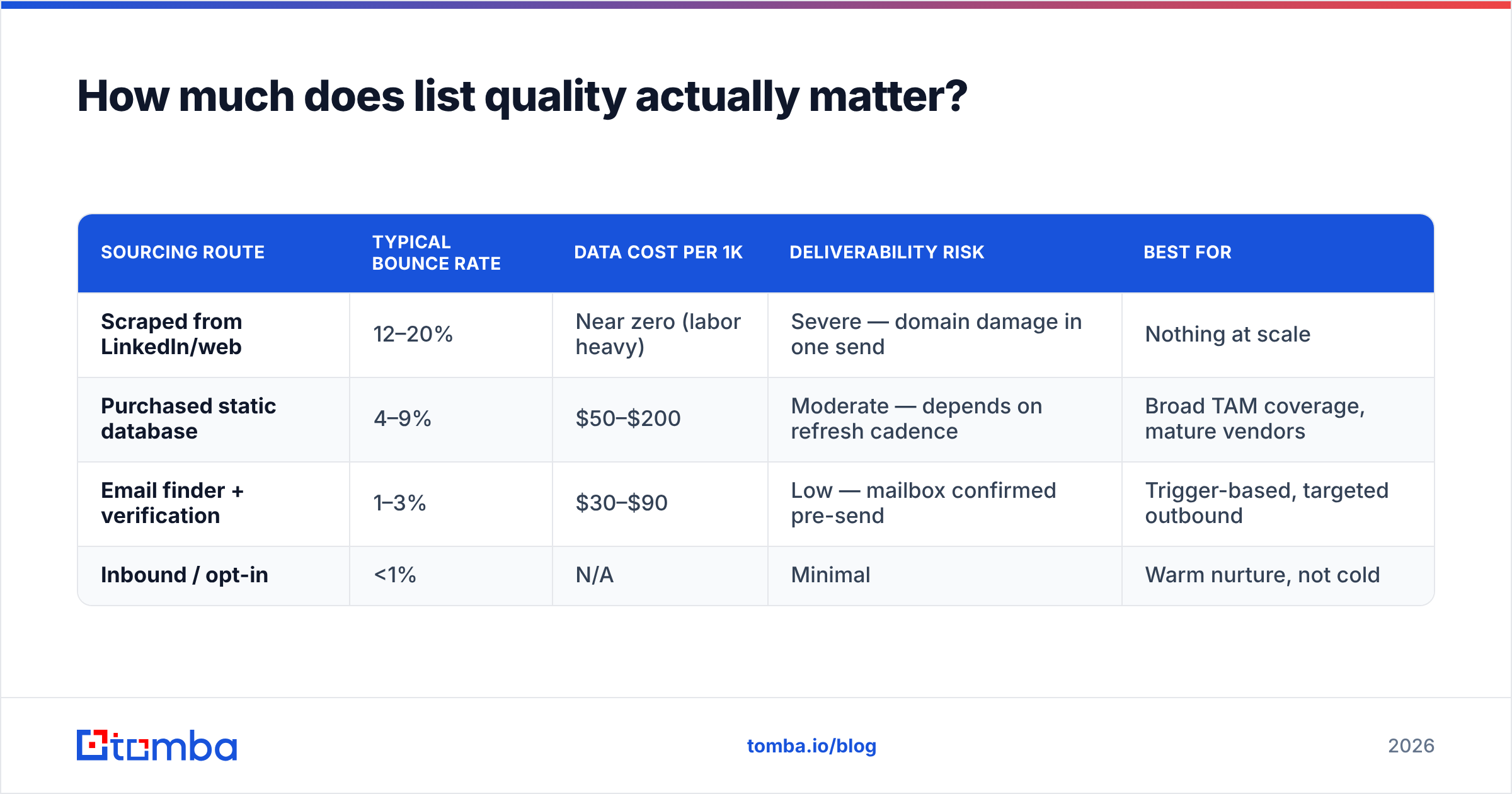
It matters more than everything else combined. Here is what the same 5,000-contact campaign looks like across three sourcing routes.
| Sourcing route | Typical bounce rate | Data cost per 1k | Deliverability risk | Best for |
|---|---|---|---|---|
| Scraped from LinkedIn/web | 12–20% | Near zero (labor heavy) | Severe — domain damage in one send | Nothing at scale |
| Purchased static database | 4–9% | $50–$200 | Moderate — depends on refresh cadence | Broad TAM coverage, mature vendors |
| Email finder + verification | 1–3% | $30–$90 | Low — mailbox confirmed pre-send | Trigger-based, targeted outbound |
| Inbound / opt-in | <1% | N/A | Minimal | Warm nurture, not cold |
Purchased databases have improved considerably. Vendors like BookYourData publish accuracy guarantees and refresh cycles, which makes them a legitimate option when you need breadth fast — the failure mode there is staleness, not fabrication, and a verification pass fixes most of it.
The finder-plus-verifier route wins for trigger-based outbound because you are looking up a specific person at a specific moment, not renting a snapshot of the market. A domain search returns the actual email pattern in use at a company; a bulk email finder runs that across a target list in one pass.
Whatever route you take, run a verification pass before the send. Non-negotiable. A 12% bounce rate is not a data problem you absorb — it is a signal to Gmail that you are a spammer, and Gmail acts on it within a single campaign.

What deliverability setup do you need before sending?#
Three DNS records, one warmed domain, and a volume ceiling. That is the whole checklist, and most teams get two of the four wrong.
SPF tells receiving servers which IPs may send on your behalf. DKIM cryptographically signs your mail so it cannot be forged. DMARC tells receivers what to do when SPF or DKIM fails. Google's bulk sender requirements made all three mandatory for anyone sending over 5,000 messages a day to Gmail addresses, and required a one-click unsubscribe header plus a spam complaint rate below 0.3%.
Run an SPF checker against your sending domain right now. If the record is missing, has more than 10 DNS lookups, or ends in ~all when you meant -all, fix it before you read further. Then confirm DMARC exists at _dmarc.yourdomain.com — even a p=none policy is better than nothing, because it turns on reporting.
Warmup is the part everyone rushes. A brand-new domain sending 200 cold emails on day one is indistinguishable from a compromised account. Ramp: 10–15 emails/day for week one, roughly doubling weekly until you hit 40–50 per mailbox per day. That ceiling is not arbitrary — it is where mailbox providers stop treating a human-shaped account as human-shaped. Need more volume? Add mailboxes, not per-mailbox volume.
Understanding email deliverability as a reputation system rather than a technical checkbox is what separates teams who scale from teams who buy new domains every quarter.
What does a cold email that gets replies actually look like?#
Short, specific, and asking for something small. Roughly 75–125 words, one paragraph of context, one question.
The structure that consistently outperforms:
- Subject line: 2–5 words, lowercase, no pitch. "quick question re: hiring" beats "Transform Your Recruiting Pipeline Today." The subject's only job is to look like it came from a person.
- Opening line: about them, verifiably. Not "I hope this finds you well." Not "I saw you're the VP of Sales" (they know). Instead: reference the trigger. "Saw you opened a second office in Austin — congrats."
- Body: one problem, one proof point. Name the problem you believe they have. Offer one piece of evidence you can solve it. Skip your funding round and your logo wall.
- CTA: an interest ask, not a calendar ask. "Worth a look?" converts better than "Do you have 30 minutes Tuesday?" because it costs the reader nothing to answer.
- Signature: plain text, no images, no tracking pixel. Images and tracked links are the two most common spam-filter triggers in otherwise clean emails.
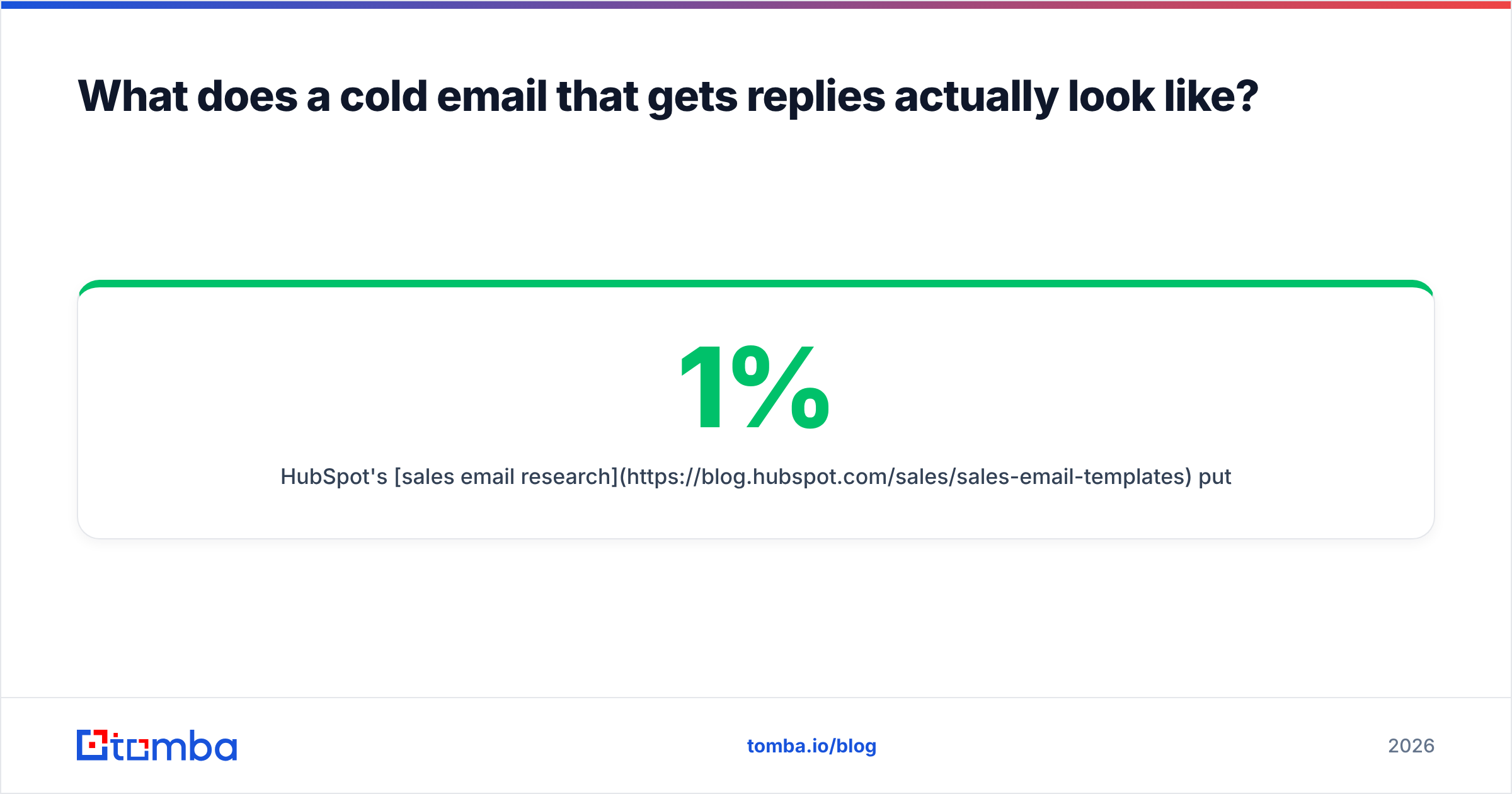
HubSpot's sales email research puts average cold email reply rates somewhere between 1% and 5% depending on industry and list quality. If you are under 1%, the problem is almost never the CTA wording. It is upstream.
One caveat on personalization: a hand-researched first line lifts replies, but it costs an SDR five to eight minutes per contact. At 300 contacts a week, that is a full day. Merge-field personalization drawn from firmographic or trigger data — company name, recent hire, tech stack detected on their site — captures most of the lift at a fraction of the cost. Use data enrichment to populate those fields automatically rather than paying humans to copy-paste from LinkedIn.
How many follow-ups should a sequence have?#
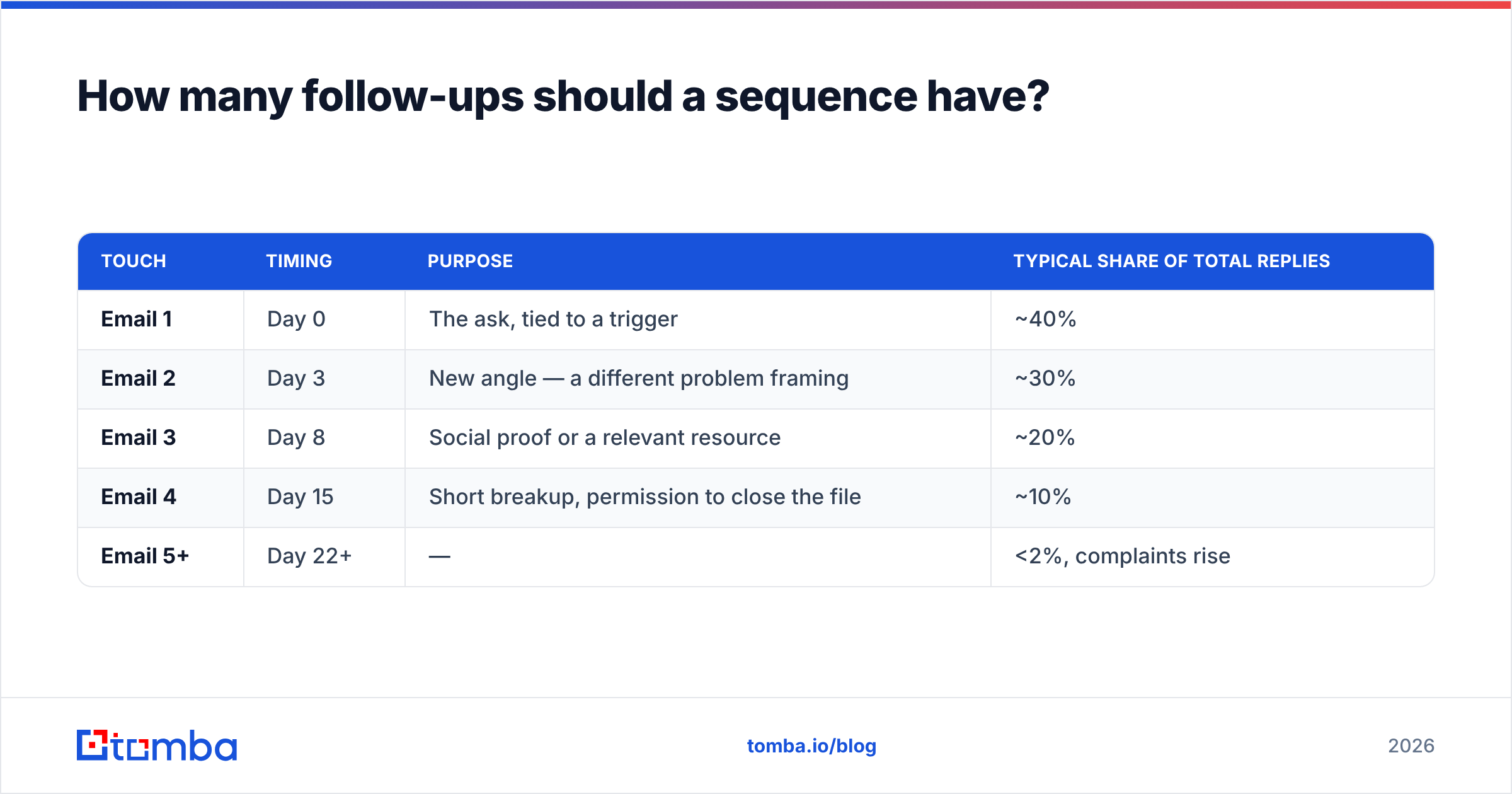
Three to four total touches, spaced 3, 5, and 7 days apart. Beyond that, marginal reply rate collapses and complaint rate climbs.
| Touch | Timing | Purpose | Typical share of total replies |
|---|---|---|---|
| Email 1 | Day 0 | The ask, tied to a trigger | ~40% |
| Email 2 | Day 3 | New angle — a different problem framing | ~30% |
| Email 3 | Day 8 | Social proof or a relevant resource | ~20% |
| Email 4 | Day 15 | Short breakup, permission to close the file | ~10% |
| Email 5+ | Day 22+ | — | <2%, complaints rise |
The pattern that fails is the "just bumping this to the top of your inbox" chain. Each follow-up should be readable as a standalone email, add something the previous one did not, and never guilt the recipient for silence. The breakup email works precisely because it removes pressure: "Sounds like this isn't a priority — I'll close the file. Happy to reconnect if that changes."
Reply-to-meeting conversion is the number that pays your salary, not reply rate. A 6% reply rate where two-thirds of replies are "unsubscribe" is worse than a 3% reply rate where half book time. Track them separately or you will optimize toward the wrong thing.
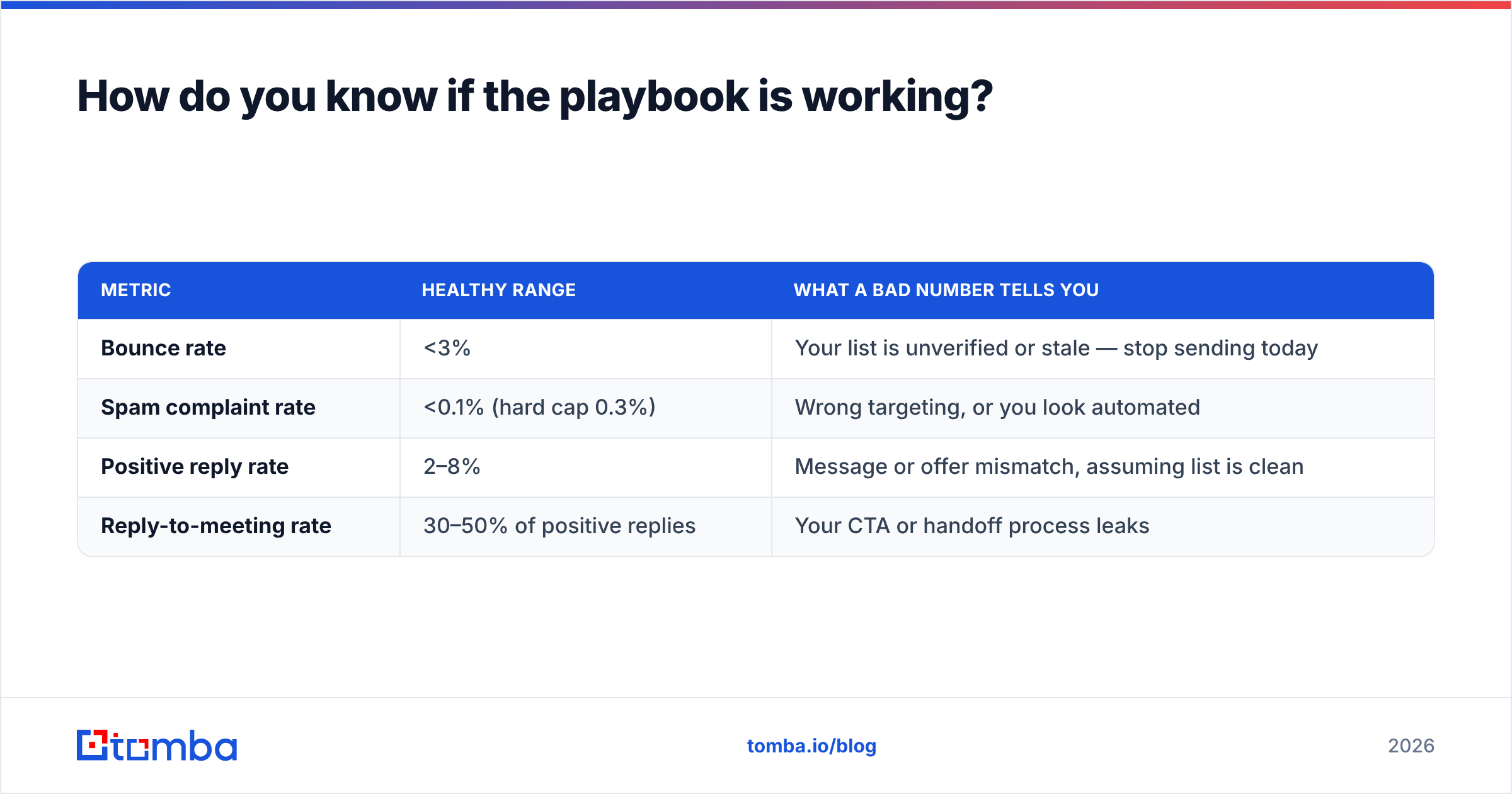
How do you know if the playbook is working?#
Instrument four metrics, in this order, and only move down the list when the one above it is healthy.
| Metric | Healthy range | What a bad number tells you |
|---|---|---|
| Bounce rate | <3% | Your list is unverified or stale — stop sending today |
| Spam complaint rate | <0.1% (hard cap 0.3%) | Wrong targeting, or you look automated |
| Positive reply rate | 2–8% | Message or offer mismatch, assuming list is clean |
| Reply-to-meeting rate | 30–50% of positive replies | Your CTA or handoff process leaks |
Bounce rate above 3% invalidates every metric below it, because you no longer know how many people saw your email. That is why verification is a gate rather than a nice-to-have. Run your list through a free email checker for a spot check, or a bulk pass before a real campaign.
For catch-all domains — the ones that accept every address and verify nothing — standard verification returns "unknown," which is not the same as "invalid." Roughly 15–20% of B2B domains are catch-all. A catch-all verifier resolves a meaningful share of those, and the rest you either send to at low volume as a controlled experiment or exclude entirely. Do not treat "unknown" as "valid" by default.
If you are evaluating tools for any of this, G2's outbound category is a reasonable starting point for reading actual practitioner reviews rather than vendor claims — filter for reviewers at your company size, since the experience of a 5-person team and a 200-rep org share almost nothing.
What are the four mistakes that kill cold email programs?#
Sending from your primary domain. One bad campaign and your invoices, your support replies, and your recruiting emails all start landing in spam. Recovery takes months. Buy a secondary domain.
Confusing volume with pipeline. Doubling send volume on a broken list doubles your complaint rate and halves your inbox placement. The math works against you. Ten thousand emails to a poorly-targeted list produces fewer meetings than one thousand to a well-triggered one, and costs you your domain besides.
Treating opens as a signal. Since Apple Mail Privacy Protection, a large share of "opens" are prefetches by mail clients, not humans. Teams still gate follow-ups on open events and wonder why the logic misfires. Delete open tracking entirely — it also removes a tracking pixel that filters dislike.
Skipping verification because it costs money. Verification runs a few dollars per thousand contacts. A burned domain costs weeks of pipeline plus the price of rebuilding reputation from zero. This is the cheapest insurance in the entire stack, and it is the first line item teams cut.
Where should you start this week?#
Pick twenty accounts with a real, observable trigger. Find the right contact at each. Verify every address. Write one email, personal in the first line and specific in the ask. Send from a warmed secondary domain. Follow up three times.
Twenty emails will not build your quarter. But it will tell you, cleanly, whether your offer resonates — without a data problem or a deliverability problem contaminating the answer. Once the signal is clear, scale the machine.
The step most teams get wrong is the second one: finding a contact address that actually exists. Tomba Email Finder resolves professional email addresses by name and domain, and returns a confidence score with the sources behind it — so you know before you send, not after you bounce. The free tier gives you 25 searches a month to test the workflow on your first twenty accounts; paid plans start at $49/mo when you're ready to run the full playbook. Check the pricing details and start with the accounts you already know you want.
Related guides#
Ready to find emails that actually work?
Join 150,000+ professionals who stopped guessing and started sending. Free credits on signup — no credit card required.
Get the Tomba newsletter
Practical outbound tactics and product updates — once every two weeks.
About the author