Cold Email Software in 2026: The No-Fluff Buyer's Guide
Most cold email software looks identical on the feature page. The differences that decide whether your mail lands are buried in sending limits, warmup mechanics, and data quality. Here's what to actually compare.
TL;DR
- Cold email software is a sending and sequencing layer. It does not find contacts, verify them, or fix a bad list — and that is where most campaigns actually die.
- Feature pages across Instantly, Smartlead, Lemlist, Saleshandy and Apollo are close to identical. The real differences are inbox rotation depth, warmup mechanics, per-seat vs per-inbox pricing, and how hard it is to leave.
- Deliverability is upstream of everything. A 12% bounce rate will sink a perfectly written sequence on the best-rated platform on the market.
- Budget roughly 60/40: 60% of spend on data quality and verification, 40% on the sending tool. Most teams invert this and wonder why reply rates stall.
- Pick your sender based on inbox volume, not feature count. Under 10 mailboxes, almost anything works. Above 50, rotation and reputation isolation are the only things that matter.
What is cold email software, actually?#
Cold email software is the machinery that sits between your contact list and a prospect's inbox. It connects your mailboxes, spaces messages out over time, personalizes each send from variables in a CSV, tracks replies, and stops the sequence when someone responds.
Think of it like a mailroom. The mailroom does not write your letters and it does not know which addresses are real. It stamps, sorts, and meters the outflow so the post office does not flag you as a bulk nuisance. That is genuinely valuable work — but if half the addresses on your envelopes do not exist, the mailroom cheerfully sends them anyway and your return-to-sender pile becomes the thing that gets you blacklisted.
This distinction matters because the category is routinely oversold. Vendors market "reply rate lift" as a property of their sequencer. It is almost never a property of the sequencer. It is a property of the list, the offer, and the domain reputation you brought with you.
Here is what a modern cold email platform actually owns:
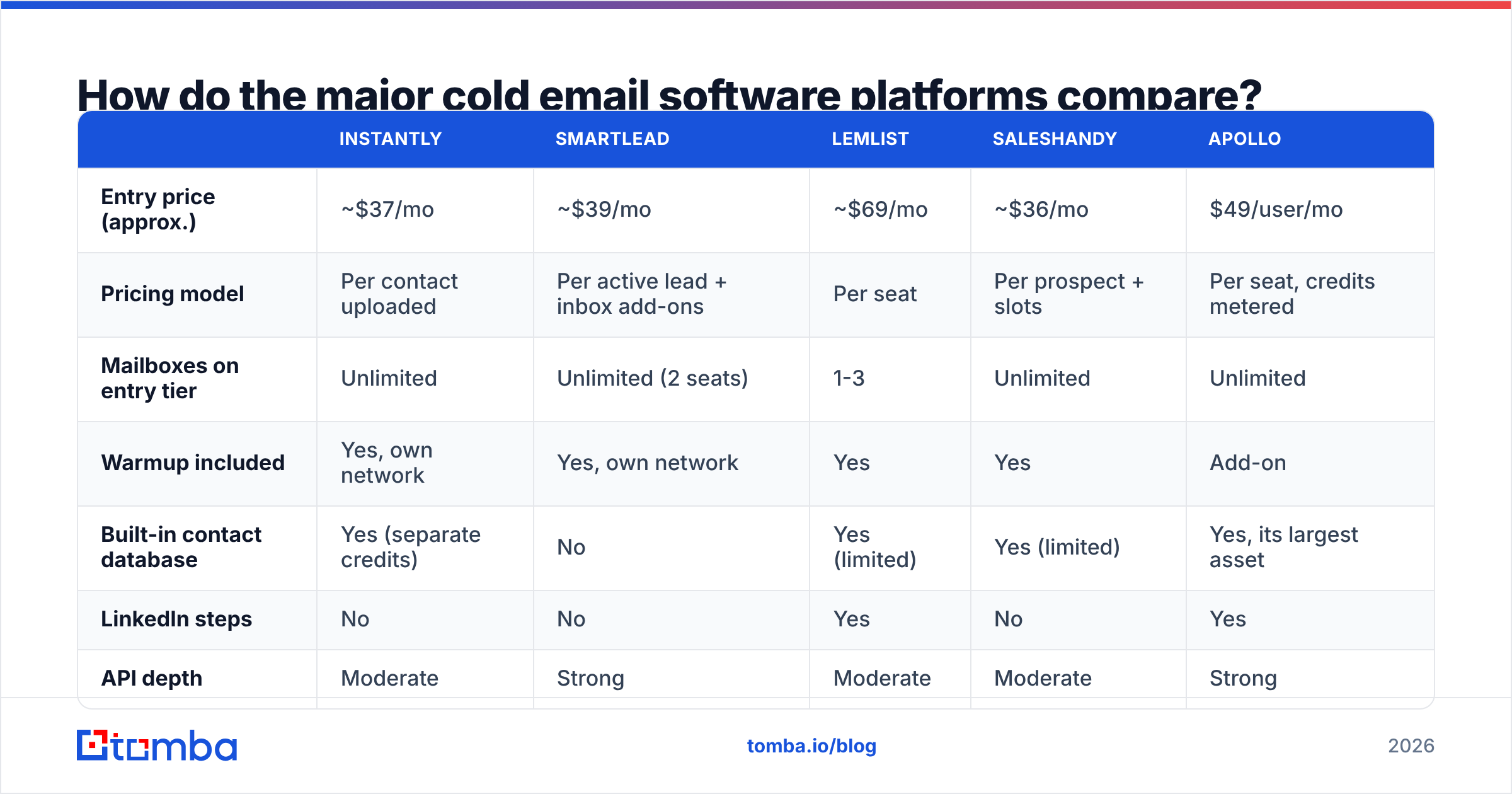
- Mailbox connection and rotation. Attaching N Google Workspace or Microsoft 365 inboxes and distributing sends across them so no single mailbox exceeds provider thresholds.
- Warmup. Automated inbox-to-inbox conversation between accounts in a shared network, designed to build a positive engagement history before real sends begin.
- Sequencing and branching. Step 1, wait three days, step 2 if no open, step 3 if no reply, stop on reply or meeting booked.
- Personalization at variable depth. Merge tags at minimum; some tools add AI-generated first lines or LinkedIn-scraped icebreakers.
- Unified inbox and reply routing. All responses from all mailboxes in one queue, with sentiment tagging so you can triage interested from unsubscribe.
- Reporting. Opens (increasingly unreliable), clicks, replies, bounces, and — on the better tools — a per-mailbox health score.
Notice what is not on that list: finding the email address, confirming it exists, or telling you whether the domain accepts everything and silently discards it later.
Why does deliverability decide the winner, not features?#
Because inbox providers grade you before they grade your copy.
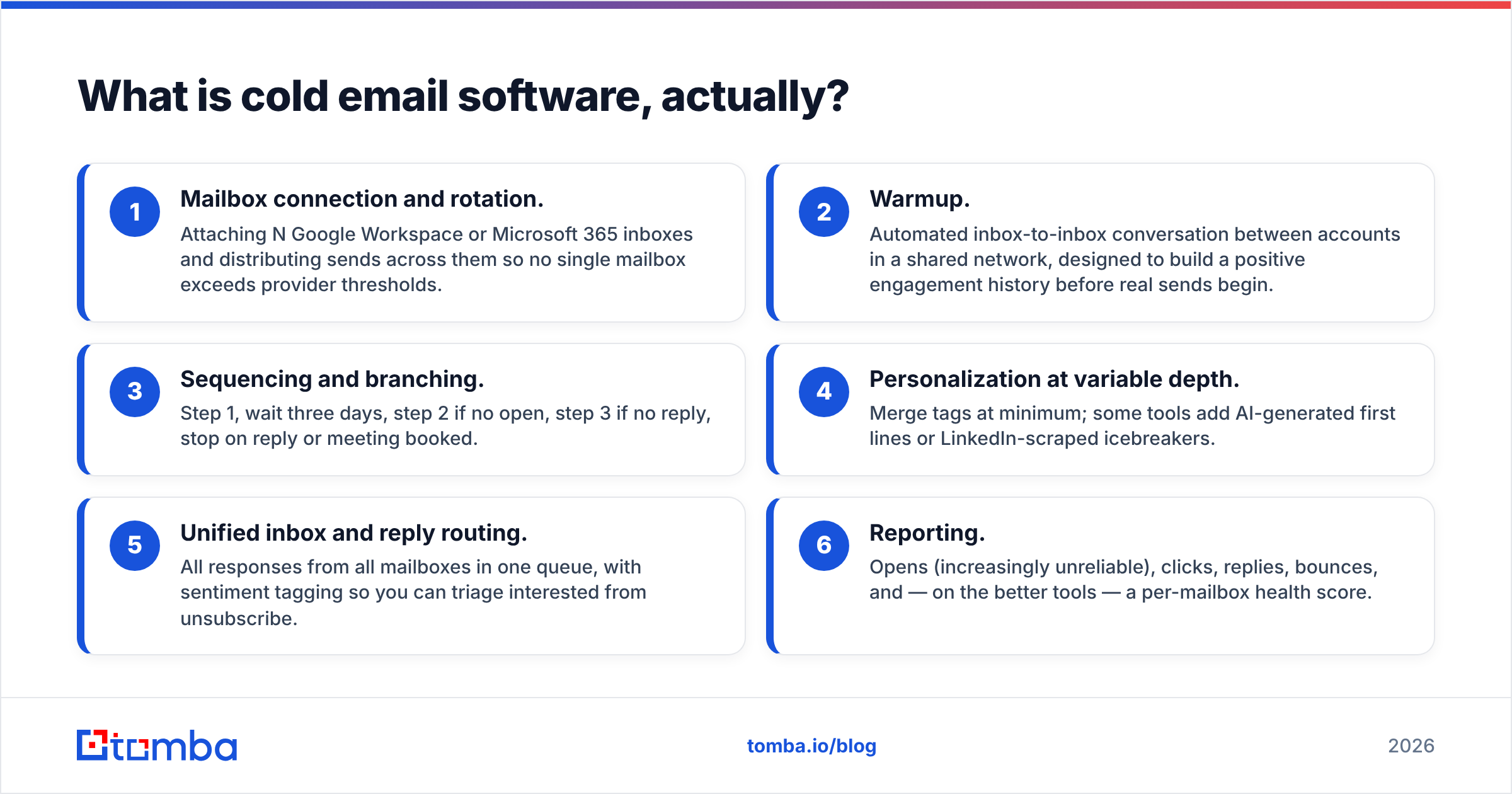
Google's bulk sender guidelines draw a hard line: authenticate with SPF, DKIM and DMARC, keep spam complaints under 0.3%, and offer one-click unsubscribe on marketing mail. Microsoft has tightened comparably. Neither cares how clever your subject line was. They look at authentication, complaint rate, bounce rate, and engagement history — and they make the routing decision before a human ever sees the message.
Bounce rate is the fastest way to fail that test. Every send to a dead mailbox is a signal that you acquired your list carelessly. Cross roughly 3-5% hard bounces on a campaign and mailbox providers start throttling. Cross 10% and you are training Gmail to treat your domain as a scraper.
So before you evaluate a single sending tool, run this sequence:
- Authenticate the domain. SPF, DKIM, DMARC. Confirm with an SPF checker that the record resolves and does not exceed the ten-lookup limit.
- Use separate sending domains. Never send cold outbound from your primary corporate domain. Buy lookalikes, warm them independently, and keep the reputation blast radius contained.
- Verify every address before it enters the sequencer. An email verifier that performs SMTP-level checks will catch dead mailboxes, role accounts, and disposable domains before your sender ever touches them.
- Handle catch-all domains explicitly. Roughly a fifth of B2B domains accept all mail at the gateway and discard invalid recipients downstream. A generic verifier marks these "unknown" and passes them through. A dedicated catch-all verifier resolves a meaningful share of them.
- Warm before you send. Two to three weeks minimum on a fresh domain. Run the math on ramp speed with a warmup calculator rather than guessing.

Skip these and it does not matter whether you bought the $37 plan or the $299 one. You will be filtered identically.
How do the major cold email software platforms compare?#
Feature lists have converged hard since 2023. Everyone has unlimited inbox rotation on some tier, everyone has AI copy assistance, everyone has a unified inbox. What still separates them is pricing model, warmup network quality, and what happens when you want to leave.
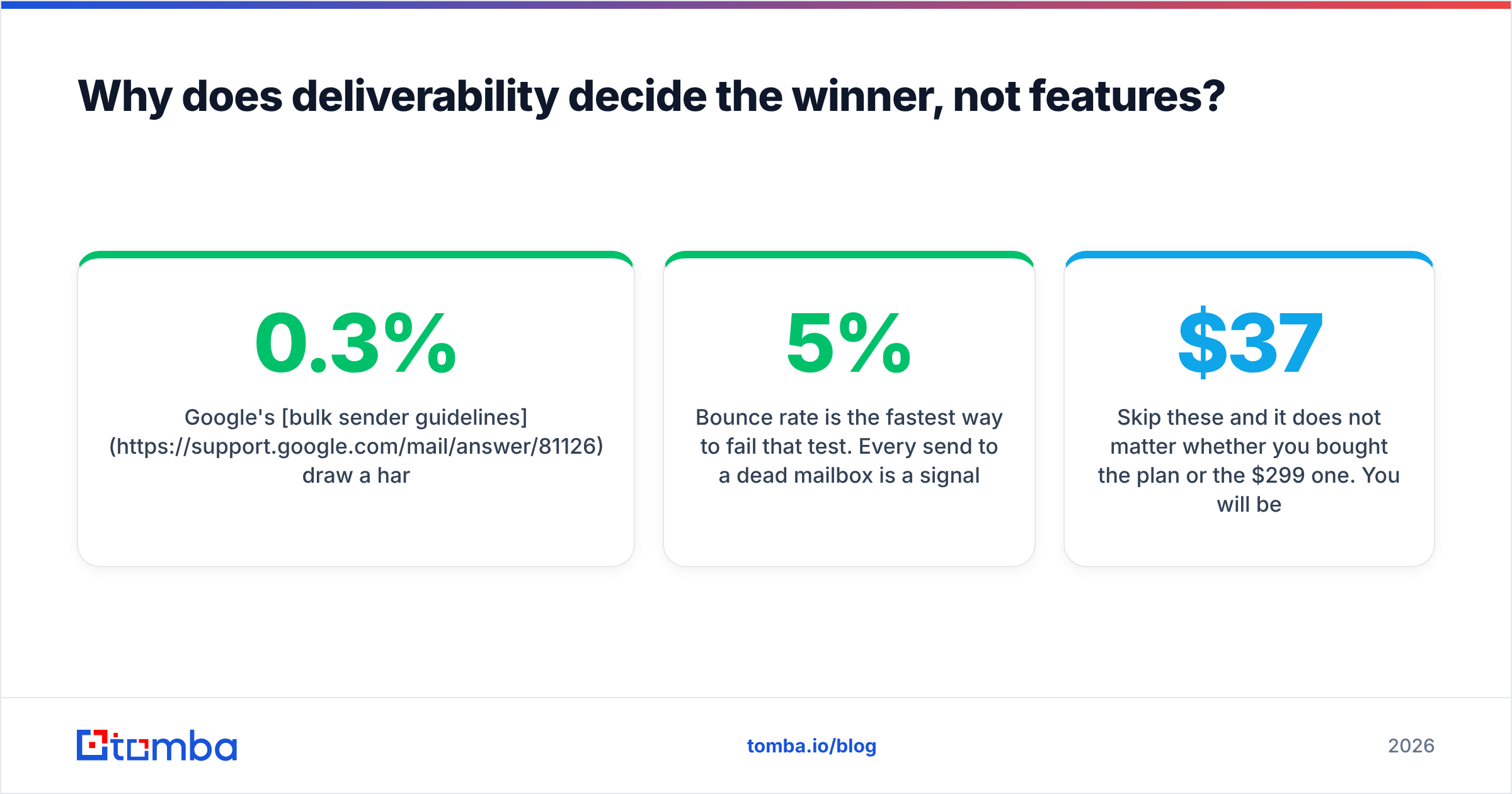
| Instantly | Smartlead | Lemlist | Saleshandy | Apollo | |
|---|---|---|---|---|---|
| Entry price (approx.) | ~$37/mo | ~$39/mo | ~$69/mo | ~$36/mo | $49/user/mo |
| Pricing model | Per contact uploaded | Per active lead + inbox add-ons | Per seat | Per prospect + slots | Per seat, credits metered |
| Mailboxes on entry tier | Unlimited | Unlimited (2 seats) | 1-3 | Unlimited | Unlimited |
| Warmup included | Yes, own network | Yes, own network | Yes | Yes | Add-on |
| Built-in contact database | Yes (separate credits) | No | Yes (limited) | Yes (limited) | Yes, its largest asset |
| LinkedIn steps | No | No | Yes | No | Yes |
| API depth | Moderate | Strong | Moderate | Moderate | Strong |
| Best for | Volume agencies | Agencies needing white-label | Multichannel SMB | Price-sensitive SMB | Teams wanting data + sending in one |
Pricing changes frequently and varies by billing term and add-ons. Confirm current numbers on each vendor's own pricing page — Instantly, Smartlead — before committing. Cross-check reviews on G2's sales engagement category for a read on support responsiveness, which no feature table captures.
Read the pricing-model row twice. It is the row that will surprise you in month three.
Per-seat tools (Lemlist, Apollo) punish teams that want many operators. Per-contact tools (Instantly) punish teams with large, frequently refreshed lists. Per-active-lead tools (Smartlead) punish long sequences where a prospect stays "active" for six weeks. There is no free option — only the question of which meter matches your motion.
What does cold email software not do for you?#
It does not build the list. This is the single most expensive misunderstanding in outbound.
The bundled databases inside sending tools exist to reduce friction, not to be accurate. Apollo's database is the strongest of the bundled options and even there, contact data decays at roughly 25-30% annually as people change roles. A contact record scraped eighteen months ago and never re-verified is a coin flip.
You have three realistic sourcing paths:
- Bundled database. Fastest. Lowest accuracy. Fine for wide-net, low-ACV motions where a 15% bounce rate is survivable — which, per the section above, it is not.
- Dedicated data vendor. Higher accuracy, higher cost per record. BookYourData and similar providers sell verified, filtered lists with clear provenance, which suits teams that want a clean handoff and no tooling to maintain.
- Find-and-verify on demand. You identify the account, then resolve the person. An email finder takes a name and domain and returns the address with a confidence score; domain search returns every discoverable mailbox at a company along with its dominant email pattern. Because you are resolving addresses at the moment you need them, decay is close to zero.
The third path is what most high-performing outbound teams have converged on, and it is why the tooling stack usually looks like finder → verifier → sender rather than sender with database attached.

For teams already running the account list in a spreadsheet, a bulk email finder closes the loop without an integration project — upload the CSV of company domains and named contacts, get back verified addresses and a confidence column you can filter on before anything reaches the sequencer.
How should you choose based on team size?#
Match the tool to your inbox count, not your headcount.
Under 10 mailboxes (founder-led, first SDR). Any of the five will work. Optimize for the shortest setup path and the cheapest exit. Saleshandy or Smartlead entry tiers are the honest picks here. Do not pay for Apollo's seat pricing if you are not using its database, and do not pay for enterprise sequencing you will never branch.
10-50 mailboxes (scaling outbound team). Rotation quality starts to matter. You need per-mailbox health visibility, automatic pausing of degraded inboxes, and sending schedules that respect recipient timezone. Smartlead and Instantly are built for this band. Test both on a real 5,000-contact campaign before you commit annually — dashboards look the same at zero volume.
50+ mailboxes (agency, high-velocity outbound). Now you are running infrastructure. What matters: reputation isolation between clients or segments, white-label reporting, API access for programmatic list injection, and a support team that answers when a domain gets flagged at 2am. Smartlead's white-label and Instantly's volume tiers dominate here. Expect to also run a separate verification pipeline, because at this volume a 2% bounce differential is the whole margin.
Any size, multichannel. If LinkedIn touches are non-negotiable, the field narrows to Lemlist or Apollo, or you accept a second tool. Layering LinkedIn on top of email is genuinely effective, but it also doubles the surface area where personalization goes wrong at scale.
What should your evaluation actually test?#
Free trials reward the wrong things. Everyone's onboarding is polished. Run these five tests instead, in this order:
- Bounce a known-bad list. Upload fifty addresses you know are dead. Does the platform warn you, or does it send? Tools that send are optimizing for your credit consumption, not your reputation.
- Kill a mailbox mid-campaign. Disconnect one inbox while a sequence is live. Does rotation absorb it gracefully, or does the campaign error out?
- Export your data. Try to pull every contact, every reply, and every campaign result out to CSV on day two. If export is throttled, buried, or enterprise-gated, you have found your switching cost.
- Read one reply thread. Send to yourself from a different domain, reply, then reply again. Does threading hold? Does sentiment tagging fire? Does the sequence actually stop?
- Check the unsubscribe path. One-click unsubscribe must be present and must be honored across campaigns, not just the one that triggered it. This is a compliance requirement, not a preference.
If a vendor fails tests one or three, walk. The first means they are misaligned with your sender reputation. The third means they know it and are betting you cannot leave.
Is cold email software worth it in 2026?#
Yes — but as the cheapest layer in a stack that only works when the layers beneath it are sound.
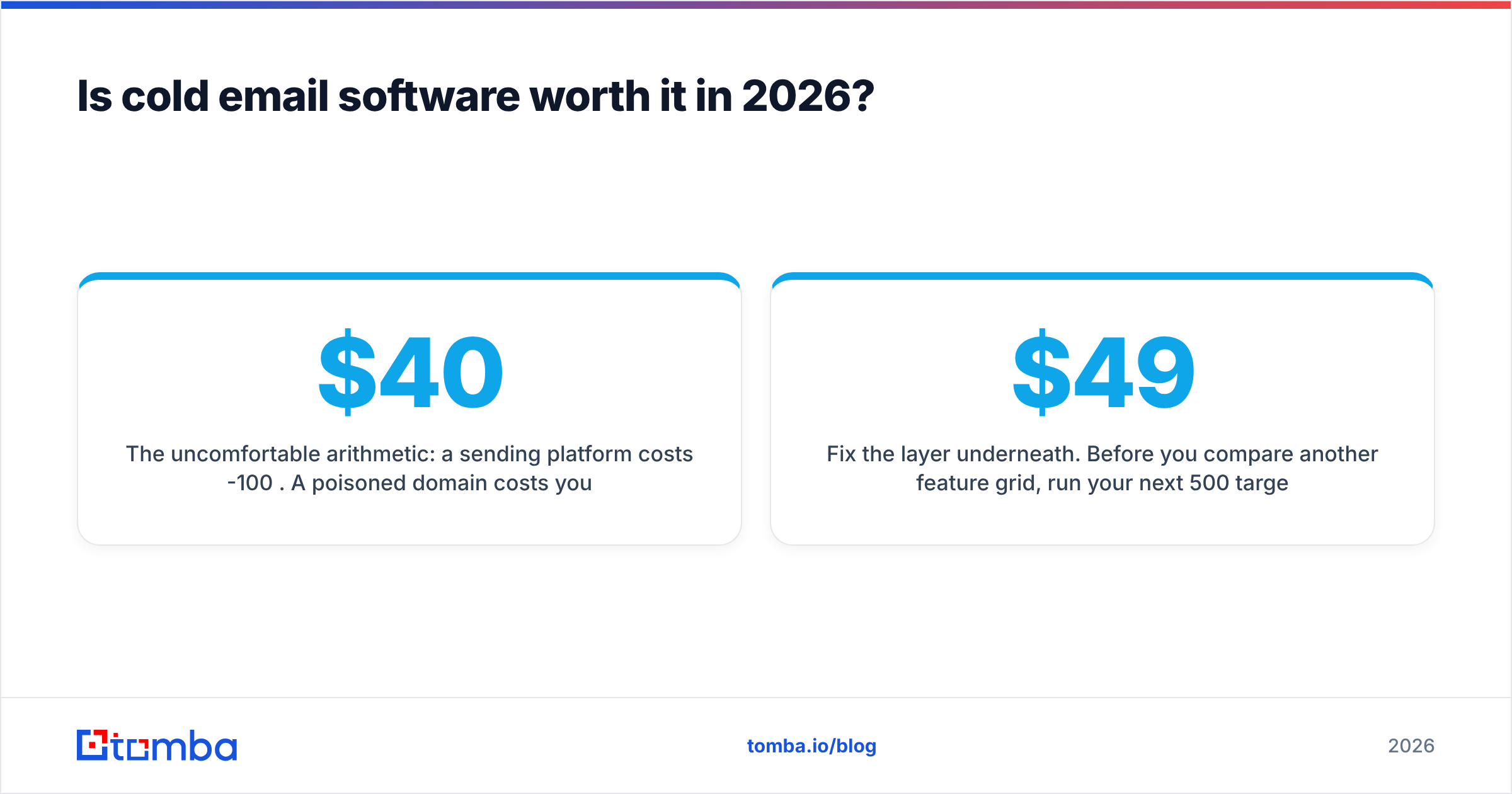
The uncomfortable arithmetic: a sending platform costs $40-100 per month. A poisoned domain costs you two to three months of pipeline while you buy new domains, warm them, and rebuild reputation from zero. The expected cost of bad data is an order of magnitude above the cost of the tool that sends it.
Teams that get outbound right in 2026 look boringly similar. They pick a mid-tier sender and stop shopping. They spend the saved evaluation hours on ICP definition and offer clarity. And they spend real money on the two things the sender cannot do — finding the right person, and confirming that person's mailbox exists before a single message leaves the building.
Choose the sender in an afternoon. Spend the rest of the quarter on the list.
Fix the layer underneath. Before you compare another feature grid, run your next 500 target contacts through Tomba Email Finder. Give it a name and a company domain and it returns the verified professional address with a confidence score, so what reaches your sequencer is a list your domain reputation can survive. Start free with 25 searches a month; paid plans open at $49/mo, with Growth at $99/mo and Pro at $249/mo — see Tomba pricing for the full breakdown. Whichever sender you pick, feed it clean data first.
Related guides#
// get started
Find, verify and enrich your first contacts today
Start on the free plan with 25 searches a month, then scale when your team is ready.
Free plan · No credit card required · GDPR & CCPA
// about the author