Cold Email Strategy in 2026: A Complete Playbook That Works
Most cold email advice is recycled from 2019, when inboxes were emptier and filters were dumber. Here is what a cold email strategy actually looks like in 2026 — targeting math, volume limits, sequence structure, and the metrics that matter.
TL;DR
- A cold email strategy is a system, not a template. The four levers are list quality, volume discipline, message relevance, and follow-up structure — in that order of impact.
- List quality decides more outcomes than copy does. A 30% bounce rate kills a domain faster than a bad subject line ever will.
- Google and Microsoft tightened bulk-sender rules in 2024 and have kept tightening. Authentication (SPF, DKIM, DMARC) is table stakes, not an optimization.
- The realistic benchmark in 2026: 40–60% open rate, 3–8% reply rate, 1–2% positive reply rate on a well-targeted list. Anything above that is either a narrow niche or a rounding error on a small sample.
- Sequences of 3–5 emails over 12–18 days outperform both one-shots and 9-step marathons. Most positive replies land on emails two and three.
What is a cold email strategy, actually?#
A cold email strategy is the set of decisions you make before you write a single word: who you contact, how many of them you contact per day, from which domain, with what claim, and how many times you follow up before you stop.
Most teams skip straight to copy. They A/B test subject lines against a list that is 22% invalid, sending from a domain with no DMARC record, at 400 emails a day from a single mailbox. Then they conclude cold email is dead.
Cold email is not dead. Cold spray is dead. The distinction matters because the tactics that worked in 2019 — buy a list, blast it, iterate on copy — now trigger the exact filters designed to catch them.
Here is the honest hierarchy of what moves outcomes:
- Targeting — Are these people plausibly in market for what you sell? No copy rescues a bad ICP.
- Deliverability — Does the email reach the inbox? Authentication, domain reputation, list hygiene, volume ramp.
- Relevance — Does the first line prove you know something specific about them?
- Follow-up — Do you show up again, at the right interval, with a new angle rather than a "just bumping this"?
- Copy craft — Subject lines, CTA phrasing, formatting. Real, but last.
Teams spend their time in reverse order. That's the whole problem.
Why does list quality beat copywriting every time?#
Because the filter runs before the human does.
Mailbox providers score your sending domain on bounce rate, spam complaints, engagement, and authentication. A list padded with guessed addresses and dead contacts generates hard bounces. Hard bounces above roughly 2–3% start damaging domain reputation. Above 5%, you're in trouble. Above 10%, you're rebuilding from a new domain in six weeks.
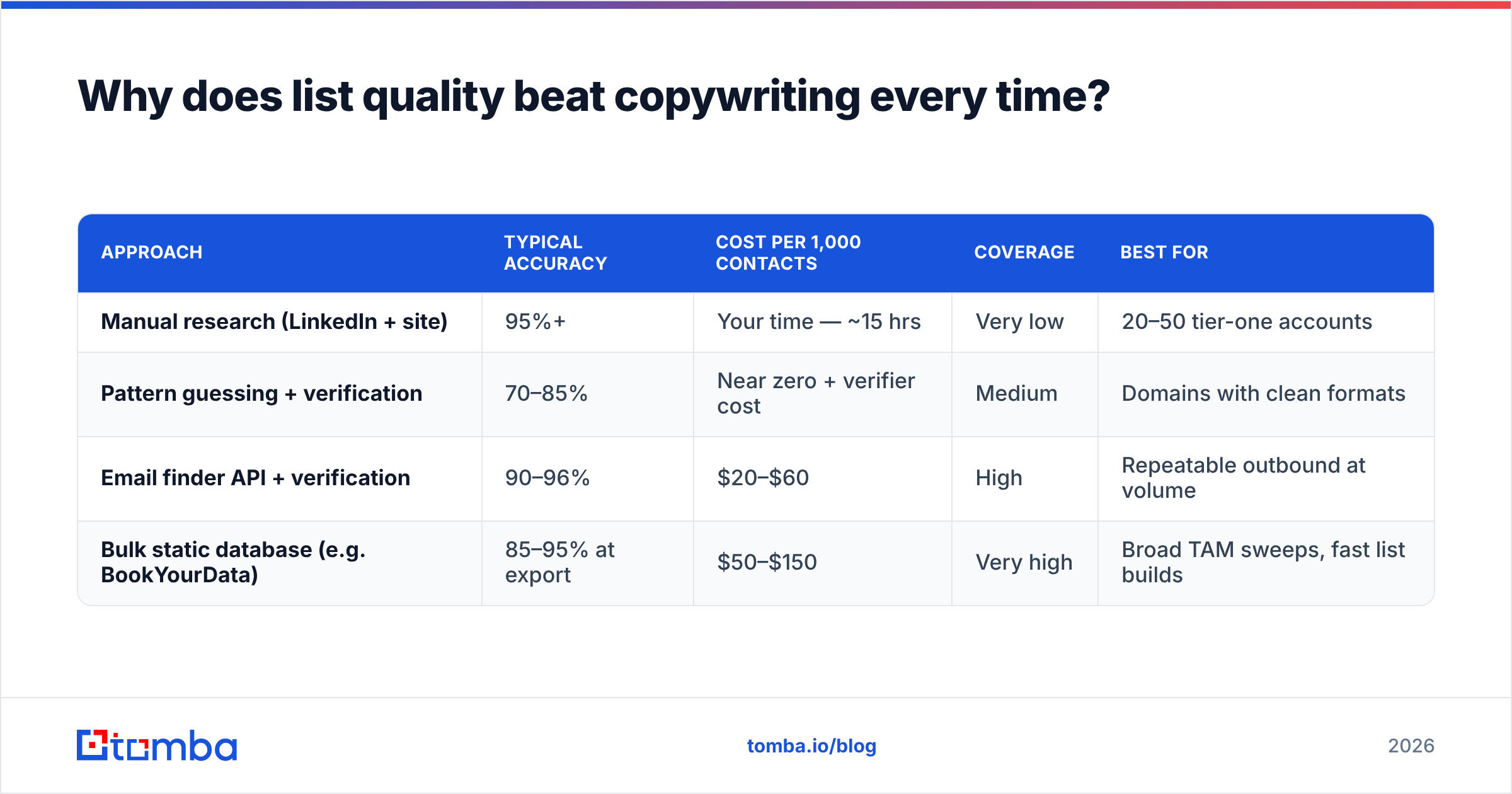
There are only three ways to get contact data, and they trade off differently:
| Approach | Typical accuracy | Cost per 1,000 contacts | Coverage | Best for |
|---|---|---|---|---|
| Manual research (LinkedIn + site) | 95%+ | Your time — ~15 hrs | Very low | 20–50 tier-one accounts |
| Pattern guessing + verification | 70–85% | Near zero + verifier cost | Medium | Domains with clean formats |
| Email finder API + verification | 90–96% | $20–$60 | High | Repeatable outbound at volume |
| Bulk static database (e.g. BookYourData) | 85–95% at export | $50–$150 | Very high | Broad TAM sweeps, fast list builds |
Static databases are genuinely useful — BookYourData and similar providers give you breadth quickly and are a reasonable starting point for a wide TAM sweep. The catch is universal to all static data, no matter the vendor: B2B contact data decays at roughly 25–30% per year as people change jobs. A record that was accurate in January is a coin flip by the following January.
That's why the practical answer is layered: pull breadth from a database, then re-verify at send time. An email verifier run 24 hours before launch catches the decay a monthly export cannot. If you're working from company domains rather than names, domain search gets you the roster and the format pattern in one call.
The rule: never send to an address you have not verified within 30 days. Catch-all domains are the hard case — they accept everything at the SMTP layer, so a standard verifier returns "unknown." Use a catch-all verifier or accept that catch-all sends carry higher risk and cap them as a percentage of each campaign.
How much volume can you actually send in 2026?#
Less than you think, and the ceiling is enforced by the receiving side, not by your tool.
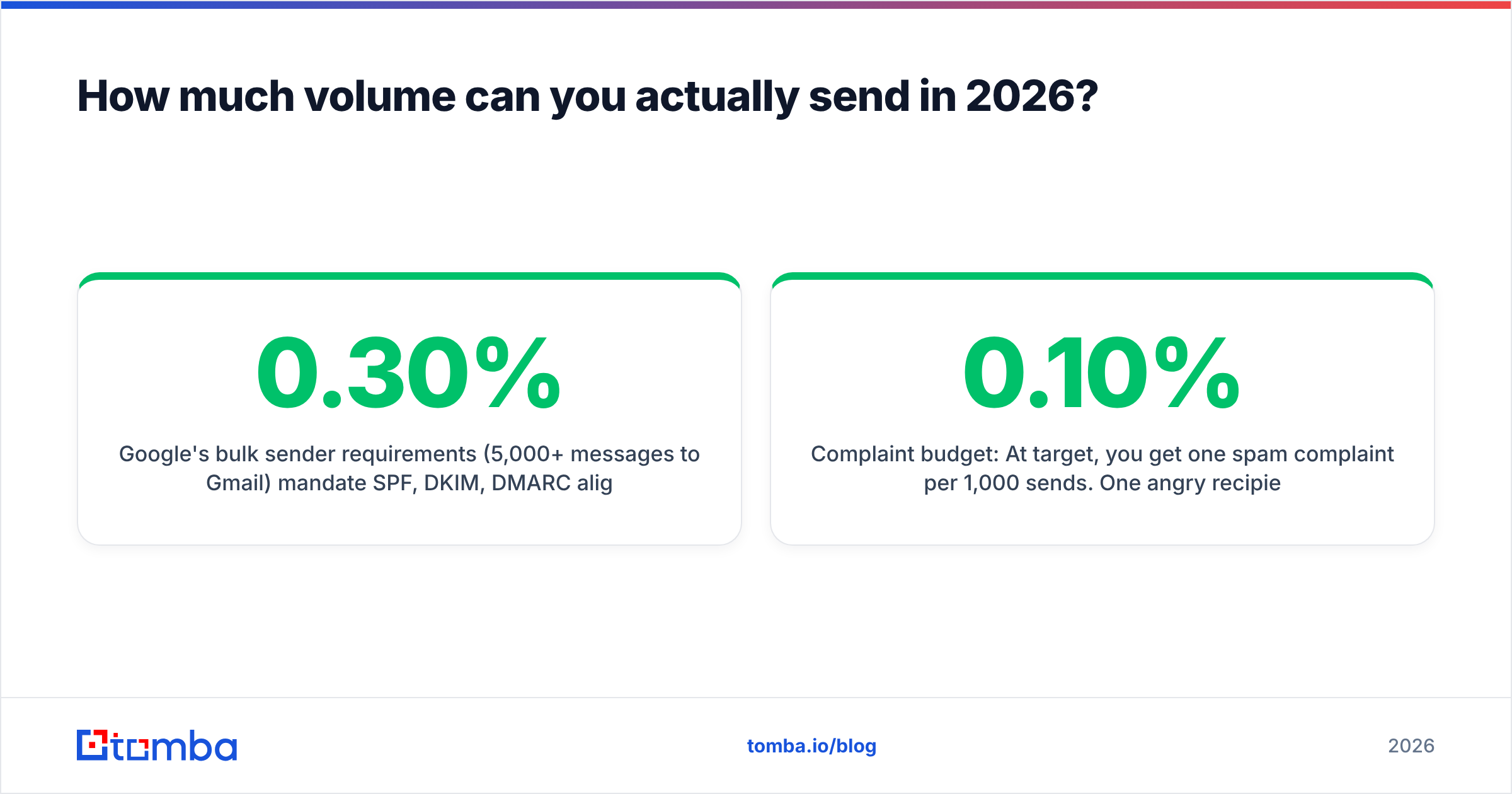
Google's bulk sender requirements (5,000+ messages/day to Gmail) mandate SPF, DKIM, DMARC alignment, one-click unsubscribe, and a spam complaint rate below 0.30% — with 0.10% as the stated target. Microsoft rolled out equivalent requirements for Outlook.com in 2025. These are documented in Google's own sender guidelines and are not negotiable.
Practical volume math for a cold outbound program:
- Per mailbox: 30–50 cold sends per day, maximum. Not 200. Not "it depends on warmup."
- Warmup ramp: Start at 5–10/day on a new mailbox, add ~5/day per week, plateau at 40.
- Domain separation: Never send cold from your primary domain. Buy lookalikes (
get-acme.com,acme-hq.com), authenticate each, and let them absorb the reputation risk. - Mailbox count: Want 500 sends/day? That's 12–15 mailboxes, not one.
- Complaint budget: At 0.10% target, you get one spam complaint per 1,000 sends. One angry recipient on a 300-send day is a real problem.
Run your domain through an SPF checker before the first send, and check your IP and domain against a blacklist checker monthly. If you want a sanity check on the ramp schedule, the email warmup calculator will tell you how many weeks you need before you can safely hit your target volume.
The uncomfortable implication: if your model requires 5,000 cold sends a day to hit quota, your model requires ~120 authenticated mailboxes. Most teams discover this after burning their main domain.
What does a high-performing cold email sequence look like?#
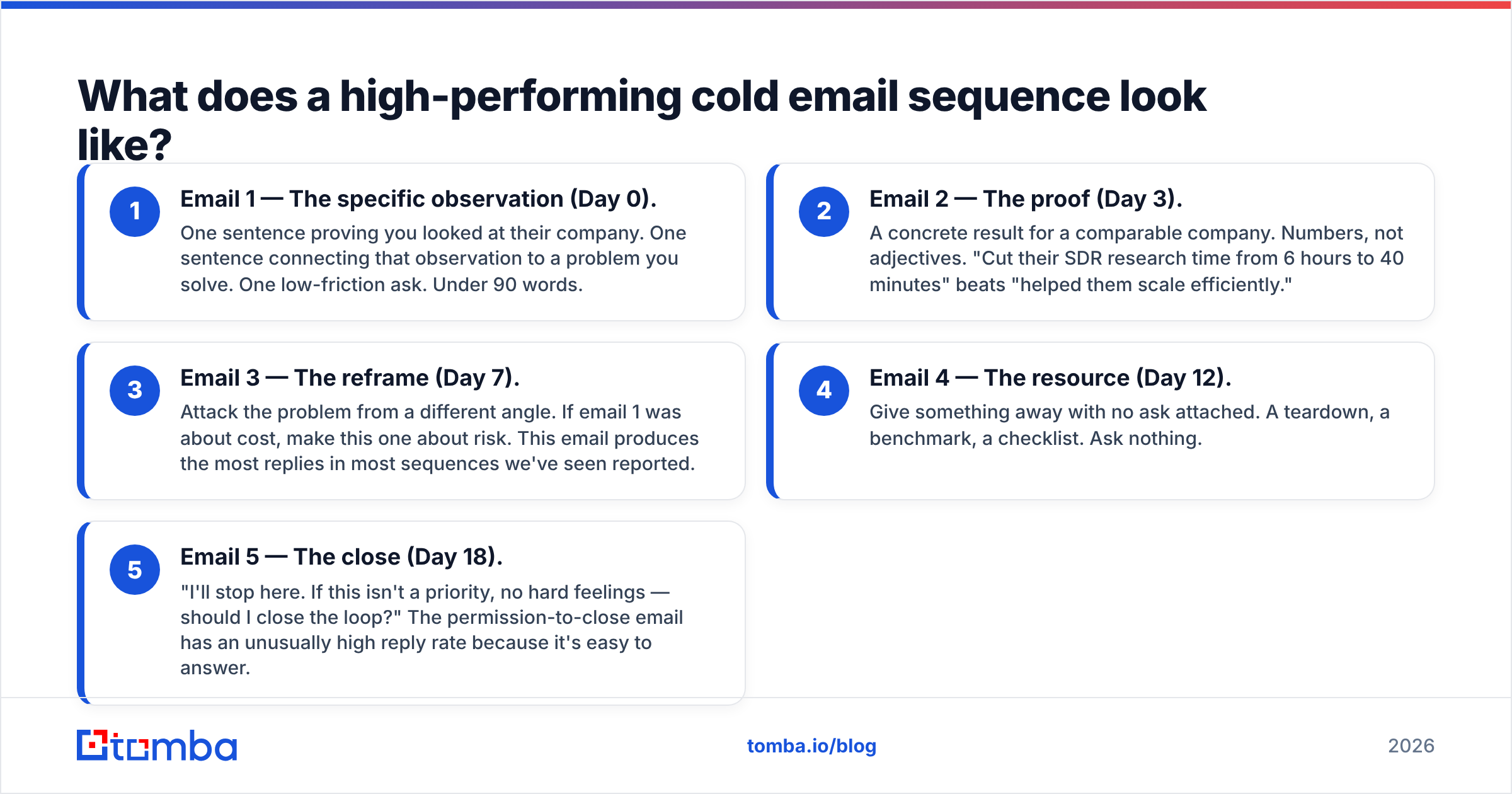
Three to five emails, spread across 12–18 days, each with a different angle. Not five variations of "following up."
Here's the structure that holds up across industries:
- Email 1 — The specific observation (Day 0). One sentence proving you looked at their company. One sentence connecting that observation to a problem you solve. One low-friction ask. Under 90 words.
- Email 2 — The proof (Day 3). A concrete result for a comparable company. Numbers, not adjectives. "Cut their SDR research time from 6 hours to 40 minutes" beats "helped them scale efficiently."
- Email 3 — The reframe (Day 7). Attack the problem from a different angle. If email 1 was about cost, make this one about risk. This email produces the most replies in most sequences we've seen reported.
- Email 4 — The resource (Day 12). Give something away with no ask attached. A teardown, a benchmark, a checklist. Ask nothing.
- Email 5 — The close (Day 18). "I'll stop here. If this isn't a priority, no hard feelings — should I close the loop?" The permission-to-close email has an unusually high reply rate because it's easy to answer.
Two structural notes. First, keep the whole sequence on one thread only if your replies are strong; new threads with fresh subject lines re-enter the primary tab more often. Second, stop at five. HubSpot's sales research and most vendor benchmark reports converge on diminishing returns past the fifth touch, and complaint rates climb.
If you're drafting from scratch, the cold email templates library is a faster starting point than a blank page — just rewrite the specificity in, because a template's first line is by definition not specific to your prospect.
Which metrics should you actually track?#
Open rate is now half-broken. Apple Mail Privacy Protection pre-fetches images, inflating opens for a meaningful share of recipients. Treat open rate as a directional deliverability signal, not a performance metric.
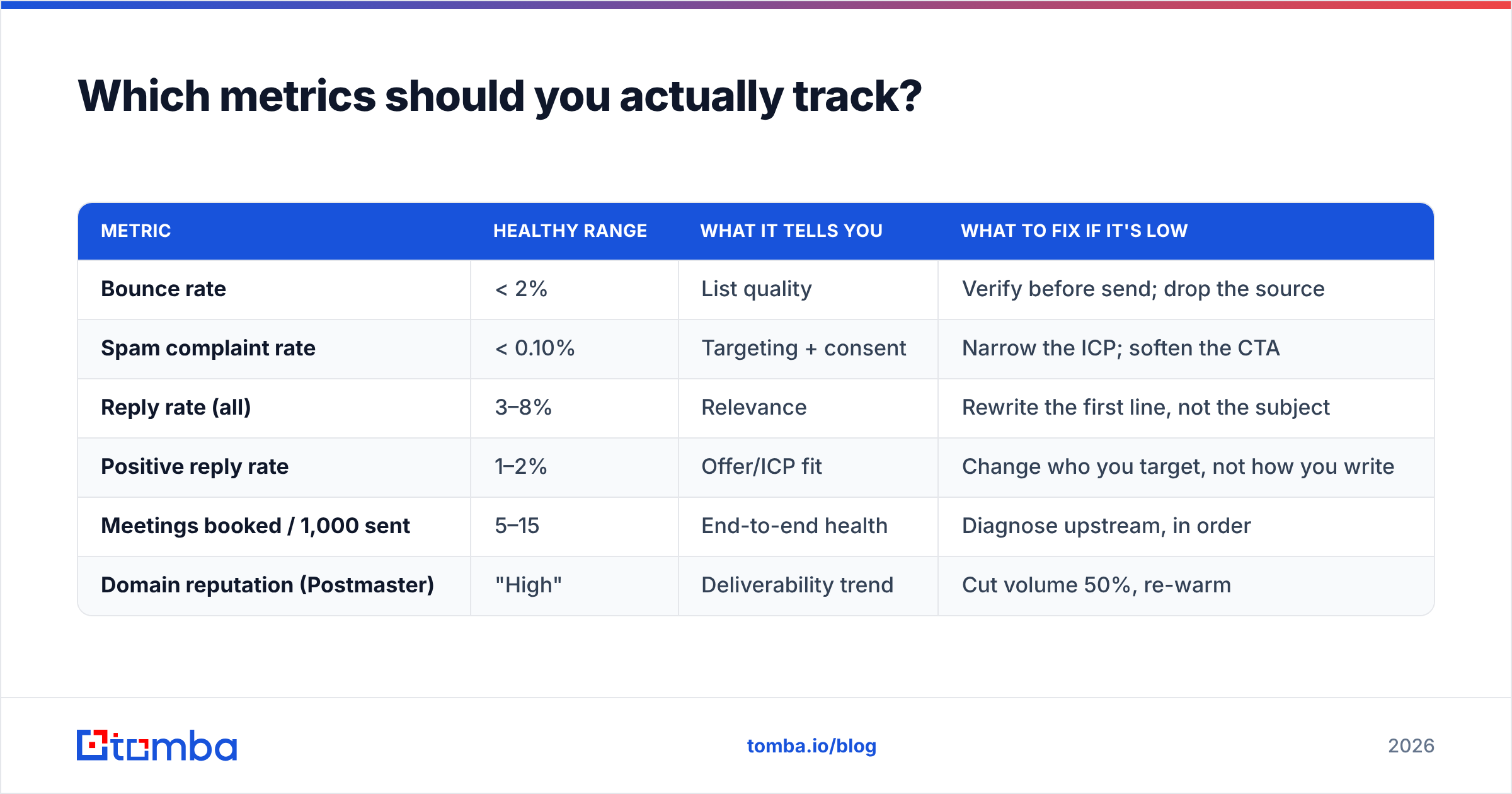
Track these instead:
| Metric | Healthy range | What it tells you | What to fix if it's low |
|---|---|---|---|
| Bounce rate | < 2% | List quality | Verify before send; drop the source |
| Spam complaint rate | < 0.10% | Targeting + consent | Narrow the ICP; soften the CTA |
| Reply rate (all) | 3–8% | Relevance | Rewrite the first line, not the subject |
| Positive reply rate | 1–2% | Offer/ICP fit | Change who you target, not how you write |
| Meetings booked / 1,000 sent | 5–15 | End-to-end health | Diagnose upstream, in order |
| Domain reputation (Postmaster) | "High" | Deliverability trend | Cut volume 50%, re-warm |
The single most useful number is positive reply rate, because it's the only one that can't be gamed by sending more. If you're at 8% total replies but 0.3% positive, you don't have a copy problem — you're annoying the right number of the wrong people.
Set up Google Postmaster Tools for every sending domain on day one. It's free, and it's the only direct read on how Gmail perceives you.
How do you build the list without wrecking your reputation?#
Work backwards from the offer.
Step 1 — Define the trigger, not the persona. "VP Sales at 50–200 person SaaS" is a persona. "VP Sales at a SaaS company that posted two SDR roles in the last 30 days" is a trigger. Triggers produce 3–5× the reply rate because timing is doing the work your copy can't.
Step 2 — Build the account list first. 200 accounts that match the trigger beats 5,000 that match the persona. You will run out of accounts before you run out of sends, and that's the correct constraint.
Step 3 — Find the contacts. For each account, identify one primary and one secondary contact. Two contacts per account, not seven — multithreading a cold account reads as spam to the company's mail admin. An email finder resolves name + domain to a verified address; for lists you've already scraped from LinkedIn, a LinkedIn finder handles the profile-to-email step directly.
Step 4 — Verify, then verify again. Once at build, once within 24 hours of send. The bulk email finder handles both passes on a CSV. Delete anything that returns risky or invalid. Do not send to "unknown" without a deliberate decision about what percentage of your list it represents.
Step 5 — Enrich for the first line. You need one true, specific fact per prospect: a funding round, a job posting, a product launch, a podcast appearance. Without it, email 1 is generic and the rest of the sequence never gets read. Data enrichment fills firmographic gaps, but the specific fact usually comes from a human spending 45 seconds on their site.
Step 6 — Cap and stagger. 40 sends per mailbox per day, staggered over business hours in the recipient's timezone. Not 400 at 9:00 AM sharp.
Is cold email still worth it in 2026?#
Yes, with a narrower definition of "it."
Cold email as a volume channel — 10,000 sends a month, spray a persona, hope — has a terrible expected value now. The complaint thresholds, the authentication requirements, and the sheer competition for attention in the primary tab have squeezed it. Gartner and Forrester have both been documenting the shift in B2B buyer behavior toward self-directed research for years; buyers do not want to be interrupted by a stranger with a calendar link, and you can read the trend lines yourself on Gartner's sales research hub.
Cold email as a precision channel — 200 accounts, a real trigger, a verified address, a first line that could only have been written for that person — still books meetings at a rate no other outbound channel matches per dollar spent. The difference between the two is entirely upstream of the send button.
The reframe that helps: stop asking "how do I get more replies?" and start asking "how do I earn the right to send this email at all?" If you can't answer why this person, this week, don't send it. Your domain reputation is a finite budget, and every irrelevant send spends a little of it.
Where should you start this week?#
If you're building from zero, in order:
- Buy and authenticate two sending domains. SPF, DKIM, DMARC. Warm them for three weeks before the first real send.
- Pick one trigger. Build 150 accounts against it manually. Do not automate this step yet.
- Find and verify one contact per account. Two if the account is worth it.
- Write a 4-email sequence. Send 40 a day. Read every reply.
- After 150 sends, look at your positive reply rate. If it's under 1%, change the trigger — not the subject line.
That's a four-week program. It will teach you more about your market than a 10,000-send blast, and you'll still have a working domain at the end of it.
Build the list your strategy deserves. The Tomba Email Finder resolves names and company domains to verified professional email addresses, with catch-all detection and confidence scoring built in — so the addresses you send to on Monday are still valid on Monday. Start free with 25 searches a month, or scale to 5,000 on the Starter plan at $49/mo. See Tomba pricing for the full breakdown, or hit the Tomba API if you'd rather wire verification directly into your sequencing tool.
Related guides#
// get started
Find, verify and enrich your first contacts today
Start on the free plan with 25 searches a month, then scale when your team is ready.
Free plan · No credit card required · GDPR & CCPA
// about the author