Cold Emailing Businesses: The Complete 2026 Playbook
Cold email still books meetings in 2026, but the margin for error is gone. Here's how deliverability, data quality, and offer design actually decide whether your campaign lands in the inbox or the void.
TL;DR
- Cold emailing businesses is still legal and still effective in 2026 — but Google and Microsoft's 2024 bulk-sender rules killed the spray-and-pray version of it permanently.
- Roughly 60–70% of cold campaign failures trace back to two things: unverified contact data and an unauthenticated sending domain. Neither is a copywriting problem.
- Expect 40–60% open rates and 3–8% reply rates on a tight, verified list. If you're below that, fix the list before you touch the subject line.
- Volume caps matter more than sequence length: 20–40 sends per mailbox per day, warmed for 3–4 weeks, beats one mailbox blasting 400.
- Personalization at scale is not "Hi {{first_name}}" — it's a research signal in the first sentence that a competitor's template can't reproduce.
What is cold emailing businesses, exactly?#
Cold emailing businesses means sending an unsolicited but relevant commercial email to a person at a company you have no prior relationship with, usually to open a sales conversation. That's it. It sits between advertising (no permission, no targeting) and opt-in marketing email (explicit permission, existing relationship).
The confusion is that people treat it like email marketing. It isn't. Email marketing goes to a list that asked for it, through a platform like Mailchimp, from a shared IP pool, at 50,000 recipients a send. Cold email goes to 30 people a day, from a real human's mailbox, on a secondary domain, and is designed to get a reply — not a click.
Think of it like knocking on a door versus putting a flyer under it. The flyer scales infinitely and gets thrown away. The knock scales badly and occasionally gets you invited in. If you try to knock on 10,000 doors in one afternoon, you're not a salesperson anymore — you're a nuisance, and the neighborhood watch (Gmail's spam filter) will treat you accordingly.
Is cold email still legal in 2026?#
Yes, in most of the world, with conditions that have not changed much in a decade.
In the United States, the CAN-SPAM Act permits unsolicited commercial email to business addresses. You must not use deceptive headers or subject lines, you must disclose that the message is a solicitation, you must include a valid physical postal address, and you must honor opt-out requests within 10 business days. Consent is not required. Fines run to five figures per violating message, so the "must" is not decorative.
In the EU and UK, GDPR and PECR are stricter but not prohibitive. Business-to-business cold email to a corporate address generally relies on legitimate interest as the lawful basis. That requires the message to be relevant to the recipient's professional role, that you can explain where you got the data, and that opting out is trivial. Emailing a personal Gmail address about your enterprise SaaS is not legitimate interest. Emailing a named Head of RevOps at a 200-person company about a RevOps tool plausibly is.
Canada's CASL is the outlier: it requires express or implied consent, with implied consent covering publicly published business addresses where the message relates to the person's role. In practice, most teams sending to Canada rely on that carve-out and keep meticulous records of where each address came from.
Practical rule: if you cannot explain in one sentence why this specific person at this specific company should hear from you, the legal question is the least of your problems.
Wait — that image is wrong. Here is the one that belongs:
Why do most cold email campaigns fail before the first send?#
Because the campaign was never the problem. Four failure layers sit underneath the copy, and they fail in a fixed order.
- Infrastructure — Your sending domain has no SPF record, no DKIM signature, and no DMARC policy. Google and Yahoo's bulk-sender requirements (rolled out in 2024 and tightened since) mean unauthenticated mail from an unknown domain gets filtered before a human sees the subject line. Check your setup with a free SPF checker before you spend a dollar on tooling.
- Data — Your list came from a scrape or an export that's 14 months old. Roughly 25–30% of B2B contact data decays annually as people change jobs. A bounce rate above 3% signals to mailbox providers that you don't know who you're emailing, and your sender reputation absorbs the damage across every future campaign.
- Targeting — The contacts are real and reachable, but they can't buy what you sell. A verified email to a marketing coordinator about a CFO-budget product is a technically successful delivery of an irrelevant message.
- Message — The first line is about you. The ask is a 30-minute call. The signature has three links and a banner image.
Teams obsess over layer 4 because it's the only one that feels like craft. Layers 1 through 3 are where the money leaks. A brilliant email to a dead address is worth exactly zero.
How do you build a cold email list that doesn't bounce?#
Start from a definition of who you want, not from a database of who exists. The sequence that works:
- Define the account. Industry, headcount band, tech stack, funding stage, geography. Five criteria maximum. If your ICP needs a paragraph, it isn't one.
- Find the accounts. Job boards, funding announcements, conference attendee lists, and competitor review pages on G2 are all higher-signal than a generic database filter, because they encode intent and timing.
- Find the people. Pull the right titles per account, then resolve emails. A domain search gives you every published address and the company's email pattern in one query, which lets you infer addresses for people who aren't listed anywhere.
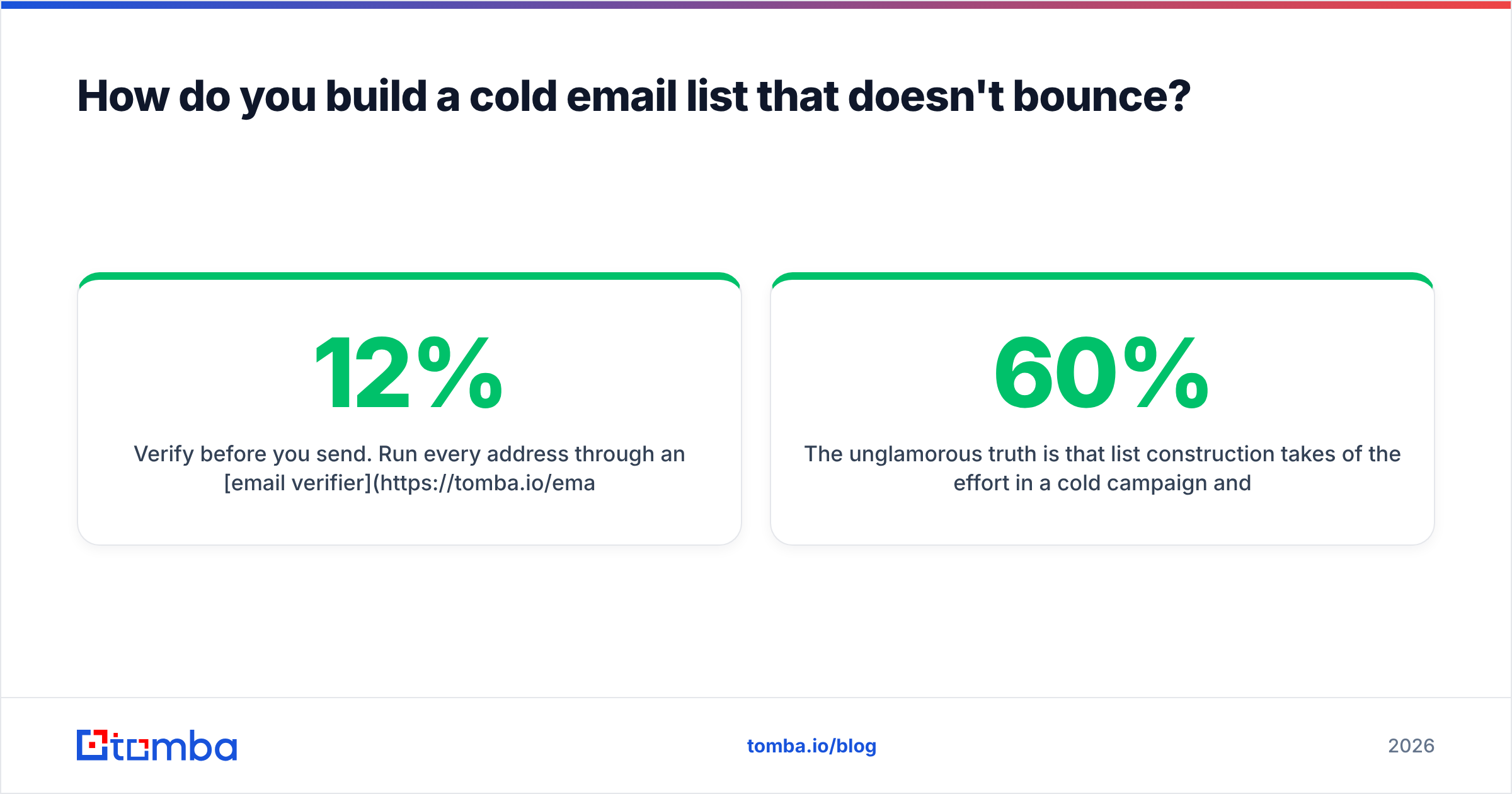
- Verify before you send. Run every address through an email verifier. Kill hard bounces, quarantine catch-alls, and only send to the confirmed set. This single step moves bounce rate from 8–12% down to under 2%.
- Enrich, then segment. Job title alone is a weak segmentation key. Company size, recent hiring signals, and tech stack tell you what to say. Contact enrichment fills those fields so the first sentence can carry a real observation.
The unglamorous truth is that list construction takes 60% of the effort in a cold campaign and produces 80% of the outcome variance. Nobody writes LinkedIn posts about it.
Which tools do you actually need?#
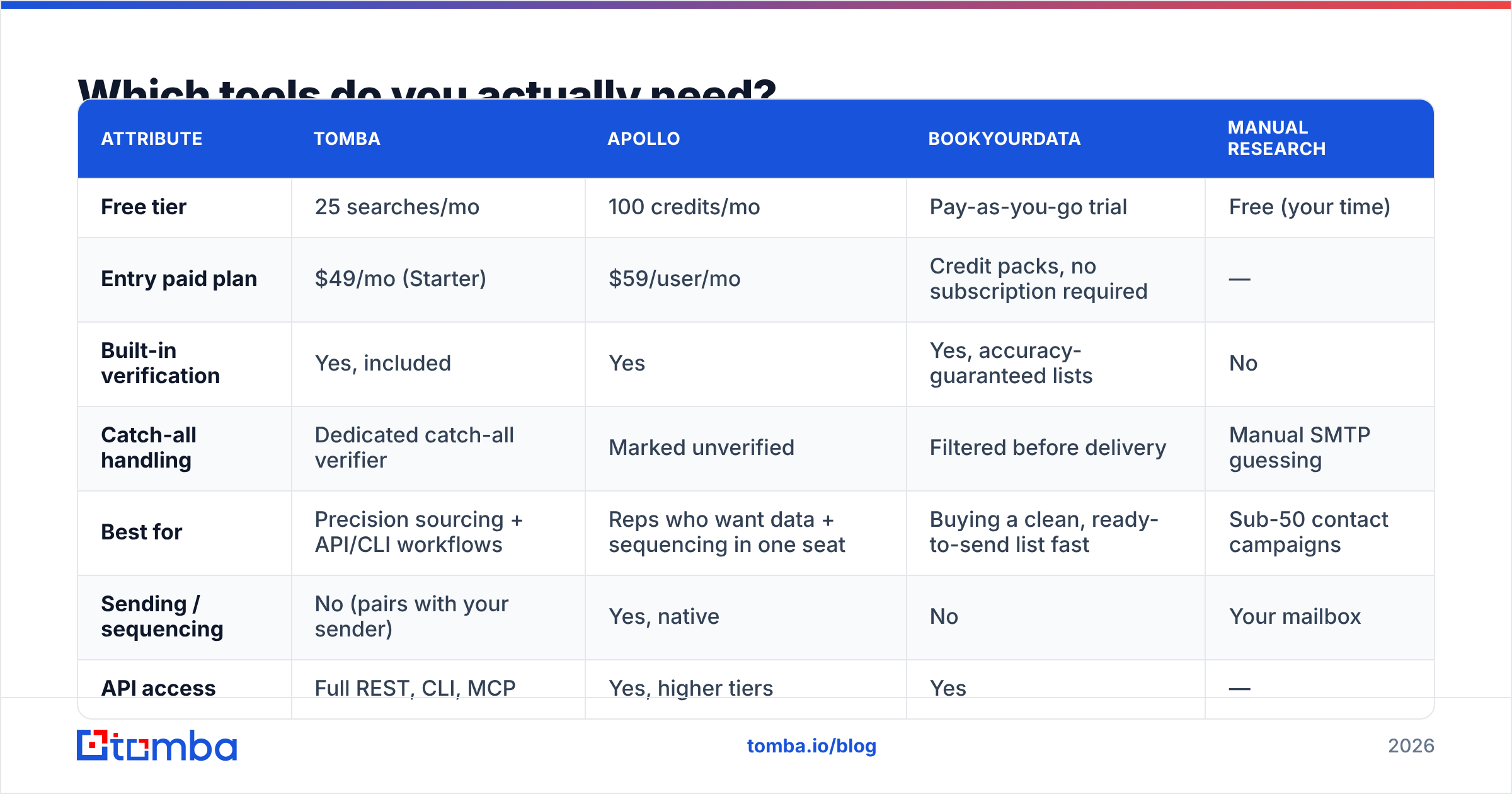
You need three categories: a data source, a verifier, and a sending platform. Most teams over-buy by purchasing an all-in-one that's mediocre at all three. Here's how the common approaches compare on the attributes that decide cost per booked meeting.
| Attribute | Tomba | Apollo | BookYourData | Manual research |
|---|---|---|---|---|
| Free tier | 25 searches/mo | 100 credits/mo | Pay-as-you-go trial | Free (your time) |
| Entry paid plan | $49/mo (Starter) | $59/user/mo | Credit packs, no subscription required | — |
| Built-in verification | Yes, included | Yes | Yes, accuracy-guaranteed lists | No |
| Catch-all handling | Dedicated catch-all verifier | Marked unverified | Filtered before delivery | Manual SMTP guessing |
| Best for | Precision sourcing + API/CLI workflows | Reps who want data + sequencing in one seat | Buying a clean, ready-to-send list fast | Sub-50 contact campaigns |
| Sending / sequencing | No (pairs with your sender) | Yes, native | No | Your mailbox |
| API access | Full REST, CLI, MCP | Yes, higher tiers | Yes | — |
Read that table as a fork, not a ranking. If you want to buy a finished, guaranteed list and start sending this afternoon, BookYourData is genuinely built for that and does it well. If you want an all-in-one seat where sourcing and sequencing live together, Apollo is the default answer and there's a reason it's the default. If your workflow is programmatic — enriching a CRM, resolving contacts inside a script, feeding a data warehouse — a focused finder with a real API is the cheaper, more accurate layer, and that's where Tomba's email finder fits. Compare Tomba pricing against per-seat models before assuming the bundled option is cheaper; it usually isn't past two users.

What does deliverability actually require?#
Deliverability is not a setting. It's a reputation score that mailbox providers compute about your domain and IP, and it responds slowly to good behavior and instantly to bad behavior.
The non-negotiables:
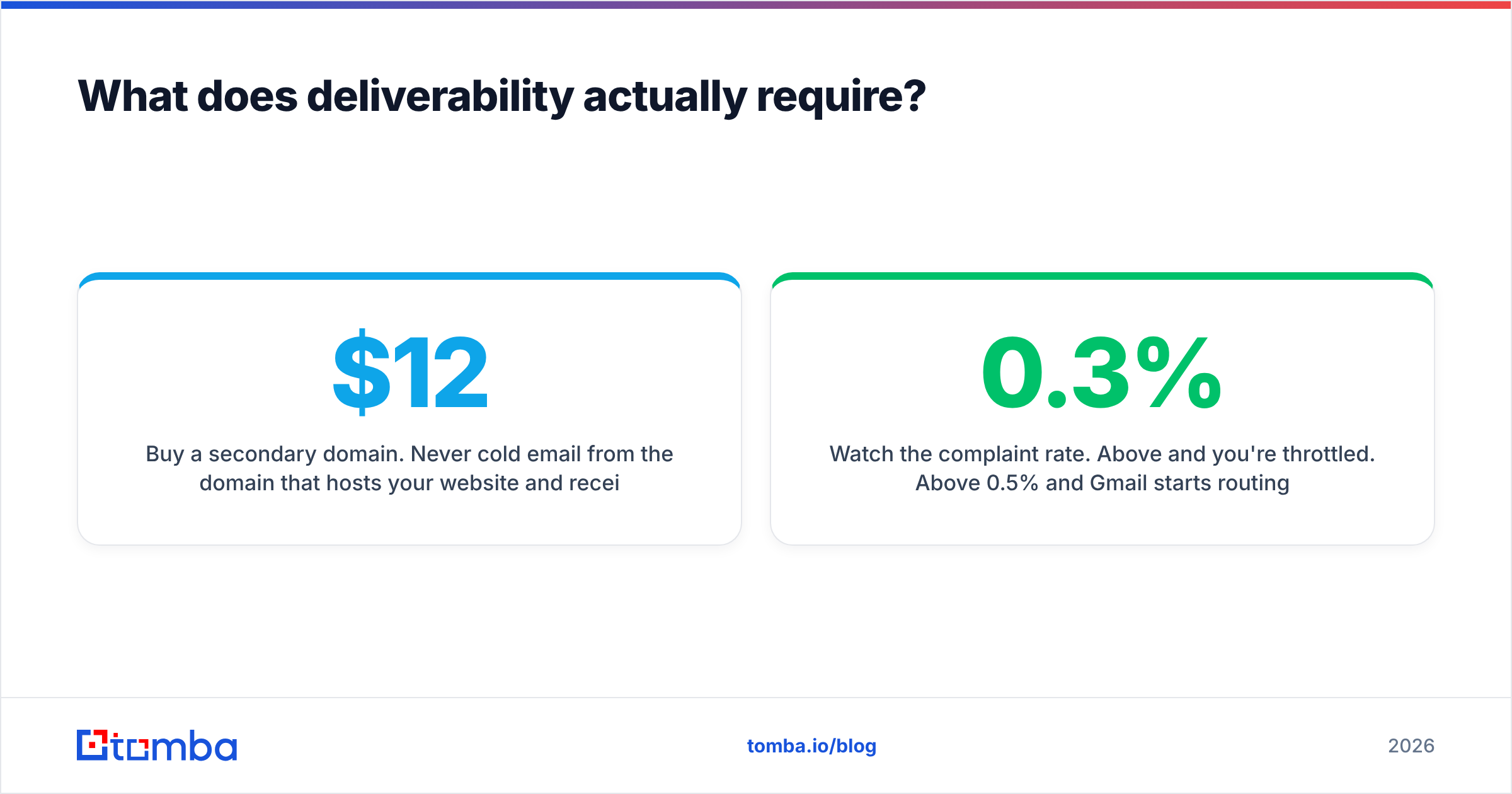
- Buy a secondary domain. Never cold email from the domain that hosts your website and receives customer mail. Use
getacme.comoracme-hq.com, notacme.com. If reputation burns, you burn a $12 asset instead of your company's ability to receive invoices. - Authenticate all three protocols. SPF authorizes your sending servers. DKIM cryptographically signs each message. DMARC tells receivers what to do when the first two fail. Google's sender guidelines require all three for bulk senders and effectively expect them from everyone else.
- Warm up for 3–4 weeks. Start at 5 sends per day per mailbox, ramp by roughly 5 per day, cap at 30–40. A warmup calculator will give you the exact ramp curve for your target volume.
- Cap volume per mailbox, scale by adding mailboxes. Ten mailboxes at 30 sends/day is 300 sends/day at healthy volumes. One mailbox at 300 sends/day is a spam trap.
- Watch the complaint rate. Above 0.3% and you're throttled. Above 0.5% and Gmail starts routing you to spam wholesale. Complaints come from irrelevance, not from cold outreach as a category.
Bounce rate is the leading indicator you can control before sending. Complaint rate is the one you can only control by targeting properly. Both compound: a domain with three months of clean sending survives a bad week; a domain with three weeks of history does not.
What does a cold email that gets replies look like?#
Six structural rules, in the order the reader encounters them.
- Subject line: 2–4 words, lowercase, no pitch. "quick question re: hiring" outperforms "Transform Your Recruiting Process in 2026" by a wide margin, because the first looks like internal mail and the second looks like a billboard.
- First sentence: about them, verifiably. Reference something you could only know by looking — a job posting, a product launch, a podcast appearance. If the sentence could be pasted into 500 emails unchanged, delete it.
- Second sentence: the problem, not the product. Name the specific operational pain your first sentence implies. You are demonstrating that you understand their world before asking for time in it.
- Third sentence: proof, compressed. One customer, one number, one comparable company. "We took Ramp's SDR ramp time from 90 days to 41" is proof. "We're a leading platform" is noise.
- The ask: absurdly small. Not a 30-minute call. "Worth a reply?" or "Want me to send the two-line version?" A yes to a small ask is the start of a conversation; a no to a big ask is the end of one.
- The signature: plain text, one line, no images. Images and tracking pixels are the two most reliable ways to move a first-touch email into Promotions.
Total length: under 90 words. Read it aloud. If it sounds like a person typed it on a phone, ship it. If it sounds like a company approved it, rewrite it. Steal structure — not sentences — from proven cold email templates, then replace every generic clause with something only you could write.
How many follow-ups, and how far apart?#
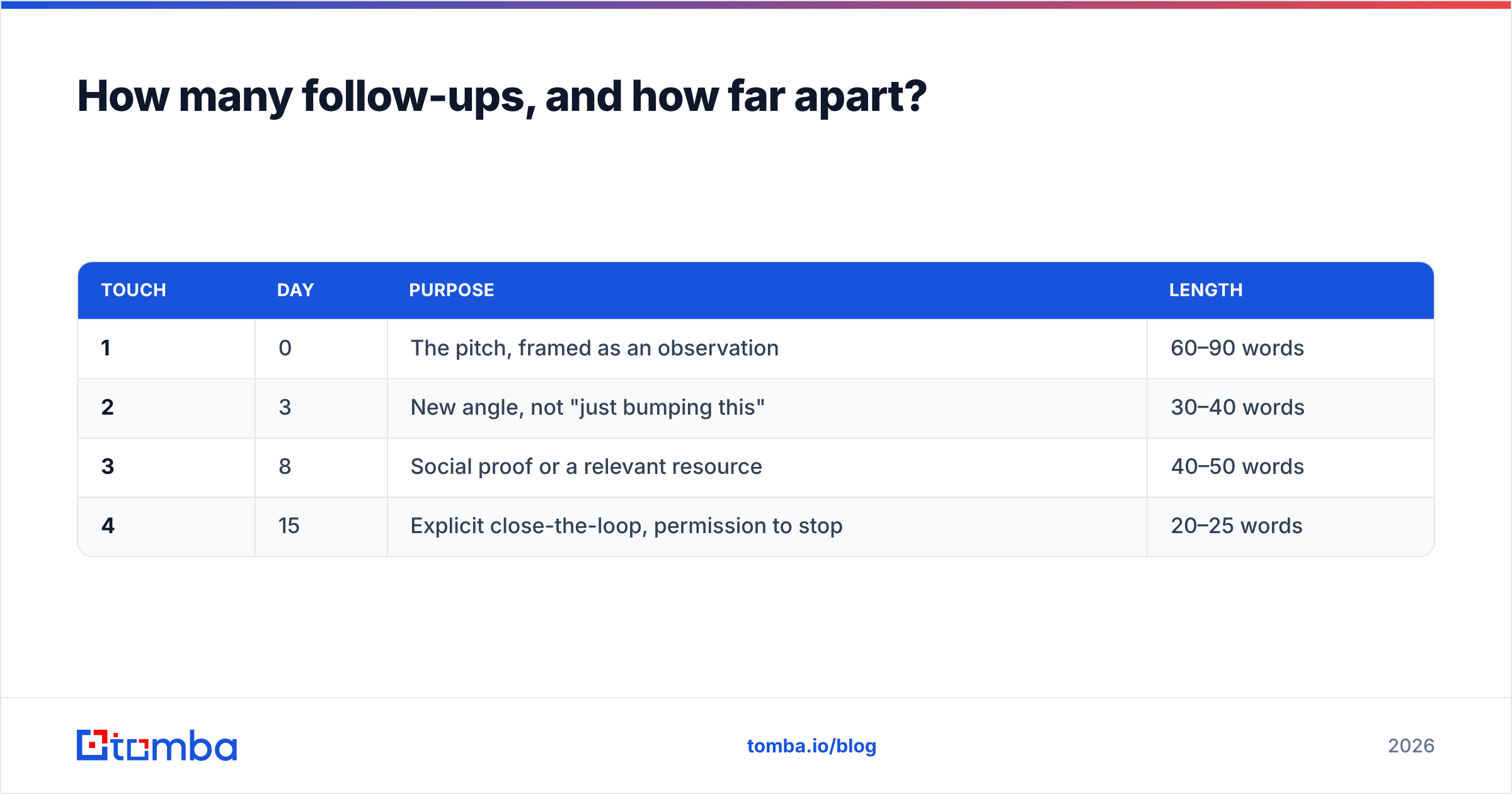
Three to four total touches, spread across 12–16 days, then stop. The data across most sequencing platforms converges on the same shape: touch one produces roughly half of all replies, touches two and three together produce the other half, and touch five produces complaints.
A workable cadence:
| Touch | Day | Purpose | Length |
|---|---|---|---|
| 1 | 0 | The pitch, framed as an observation | 60–90 words |
| 2 | 3 | New angle, not "just bumping this" | 30–40 words |
| 3 | 8 | Social proof or a relevant resource | 40–50 words |
| 4 | 15 | Explicit close-the-loop, permission to stop | 20–25 words |
Reply to your own thread for follow-ups rather than sending fresh emails — it preserves context and reads as persistence, not as automation. And write the fourth email as a genuine exit. "Sounds like this isn't a priority — I'll close your file. If that's wrong, just reply with a date." That message pulls replies out of people who were 80% of the way to ignoring you forever, and it costs nothing when it doesn't.
What benchmarks should you hold yourself to?#
On a verified list of 500 well-targeted contacts, sent from warmed mailboxes, you should see:
- Bounce rate: under 2%. Above 3% is a data problem, full stop.
- Open rate: 40–60%. Treat this as directional only — Apple Mail Privacy Protection inflates it and iOS pre-fetching corrupts it.
- Reply rate: 3–8% across the full sequence. Below 2% with a clean list means the offer or the targeting is wrong.
- Positive reply rate: 1–3%. This is the only metric that pays rent.
- Meetings booked: 5–15 from 500 contacts, at a healthy positive-reply rate.
If your bounce rate is fine and your reply rate is 0.4%, no subject-line test will save the campaign. Rebuild the ICP. If your open rate is 20%, you have a deliverability problem masquerading as a copy problem — check whether your domain is on a blacklist before you rewrite anything.
Where should you start this week?#
Pick 100 accounts, not 1,000. Resolve and verify the contacts. Write one email you'd be comfortable receiving. Send 20 a day from a warmed secondary domain. Read every reply, including the hostile ones — they tell you precisely which part of your targeting is wrong.
The teams that make cold emailing businesses work in 2026 aren't the ones with the cleverest templates. They're the ones whose lists are 98% deliverable and whose first sentence proves they did homework. Everything else is downstream of those two facts.
Start with the data layer, because it's the one you can fix today. Tomba's Email Finder resolves professional addresses by name, company, or domain, verifies them in the same call, and hands them back through a UI, a spreadsheet add-in, or an API — so the 500 contacts you email next week are 500 people who exist. The free tier gives you 25 searches a month to test it against a list you already trust. Run it, compare the bounces, and let the numbers decide.
Related guides#
// get started
Find, verify and enrich your first contacts today
Start on the free plan with 25 searches a month, then scale when your team is ready.
Free plan · No credit card required · GDPR & CCPA
// about the author