How to Build a Cold Outreach Campaign That Books Meetings in 2026
A cold outreach campaign only works when targeting, data, and sequencing line up. Here's the full 2026 playbook — steps, templates, channels, and metrics that actually book meetings.
Most cold outreach fails before the first email is ever sent. Not because the copy was weak, but because the list was wrong, the data was stale, or the sequence had no logic behind it. A cold outreach campaign is a system, and systems break at their weakest link.
This guide walks through that system end to end: how to pick targets, build a clean list, write messages people actually answer, sequence across channels, and measure whether any of it is working. No fluff, no "in today's competitive landscape" — just the moving parts and how to assemble them.
TL;DR#
- A cold outreach campaign is a repeatable system, not a batch of emails. Targeting → data → messaging → sequencing → measurement.
- Data quality is the multiplier. A 3% reply rate on a clean, verified list beats a 0.4% rate on a scraped one — and protects your sender reputation.
- Multichannel wins. Email + LinkedIn + phone, sequenced deliberately, outperforms any single channel by a wide margin.
- Personalization at the segment level scales better than one-off hand-writing. Group by trigger, then customize the opener.
- Measure replies and meetings, not opens. Apple Mail Privacy Protection made open rates close to useless.
What is a cold outreach campaign?#
A cold outreach campaign is a structured, multi-touch effort to start conversations with people who have never engaged with you before. "Cold" means no prior relationship. "Campaign" means it runs on a plan — defined audience, defined message, defined cadence, and a defined success metric.
Think of it like planting a field, not fishing with a single line. You prepare the soil (research and data), plant in rows (segments and sequences), and measure the yield (replies and booked meetings). Random casting produces random results.
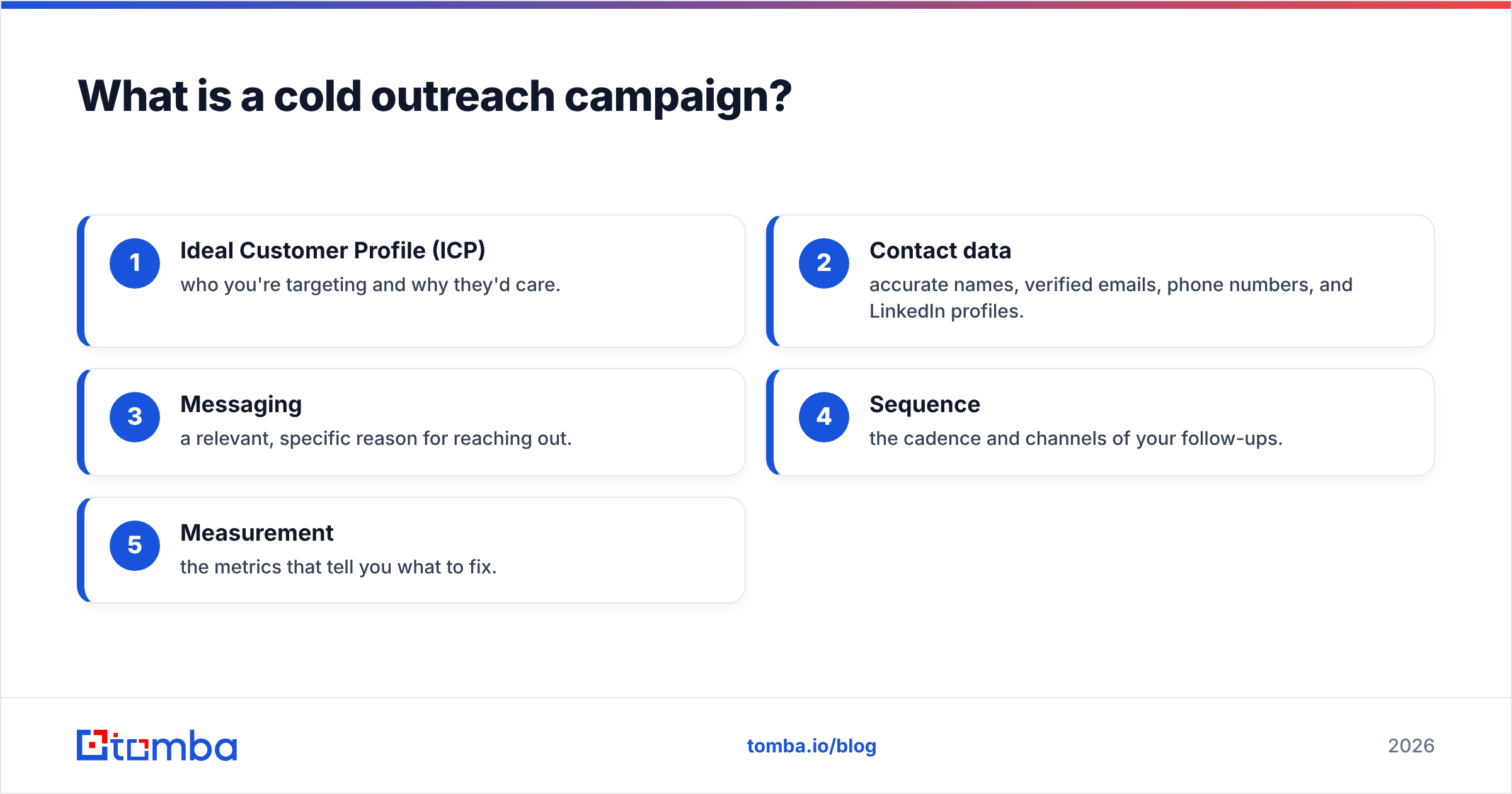
The core components never change, even as tools and channels do:
- Ideal Customer Profile (ICP) — who you're targeting and why they'd care.
- Contact data — accurate names, verified emails, phone numbers, and LinkedIn profiles.
- Messaging — a relevant, specific reason for reaching out.
- Sequence — the cadence and channels of your follow-ups.
- Measurement — the metrics that tell you what to fix.
Get these five right and the campaign works. Skip one and the rest can't compensate.
Why do most cold outreach campaigns fail?#
Because they optimize the wrong layer. Teams pour hours into subject-line A/B tests while emailing a list that's 30% invalid. The failure is almost always upstream.
Here's where campaigns actually break, in order of impact:
- Bad data. Bounced emails wreck your sender reputation and land future messages in spam. One bad list can poison a domain for weeks.
- Wrong audience. Perfect copy sent to people with no need for your product gets ignored — correctly.
- Generic messaging. "I'd love to hop on a call" tells the reader nothing about why you chose them.
- No follow-up. Most replies come from touch two through five, yet many campaigns stop after one send.
- Wrong metrics. Chasing open rates in a post-email deliverability reality means steering by a broken compass.
The fix isn't working harder on copy. It's fixing the foundation first.
How do you build the target list?#
Start with your ICP, then find the people inside it — verified. This is the step that decides everything downstream, so give it the most care.
Define the ICP precisely. Not "SaaS companies," but "Series A–B B2B SaaS companies, 50–200 employees, using HubSpot, with a VP of Sales hired in the last 6 months." Specific triggers give you specific reasons to reach out.
Find the contacts. Use a domain-first approach: identify target companies, then pull the right roles. A domain search returns the email patterns and people at a given company, so you can go from a target account to named decision-makers in seconds. When you have a first and last name, an email finder resolves the professional address directly.
Verify before you send. This is non-negotiable. Run every address through an email verifier to strip invalid and risky contacts. For domains that accept everything, a catch-all verifier tells you which addresses are actually deliverable. Clean data keeps your bounce rate under 2% — the threshold mailbox providers watch.
Enrich for personalization. Layer in job titles, company size, tech stack, and recent activity with data enrichment so your segments have something to personalize around.
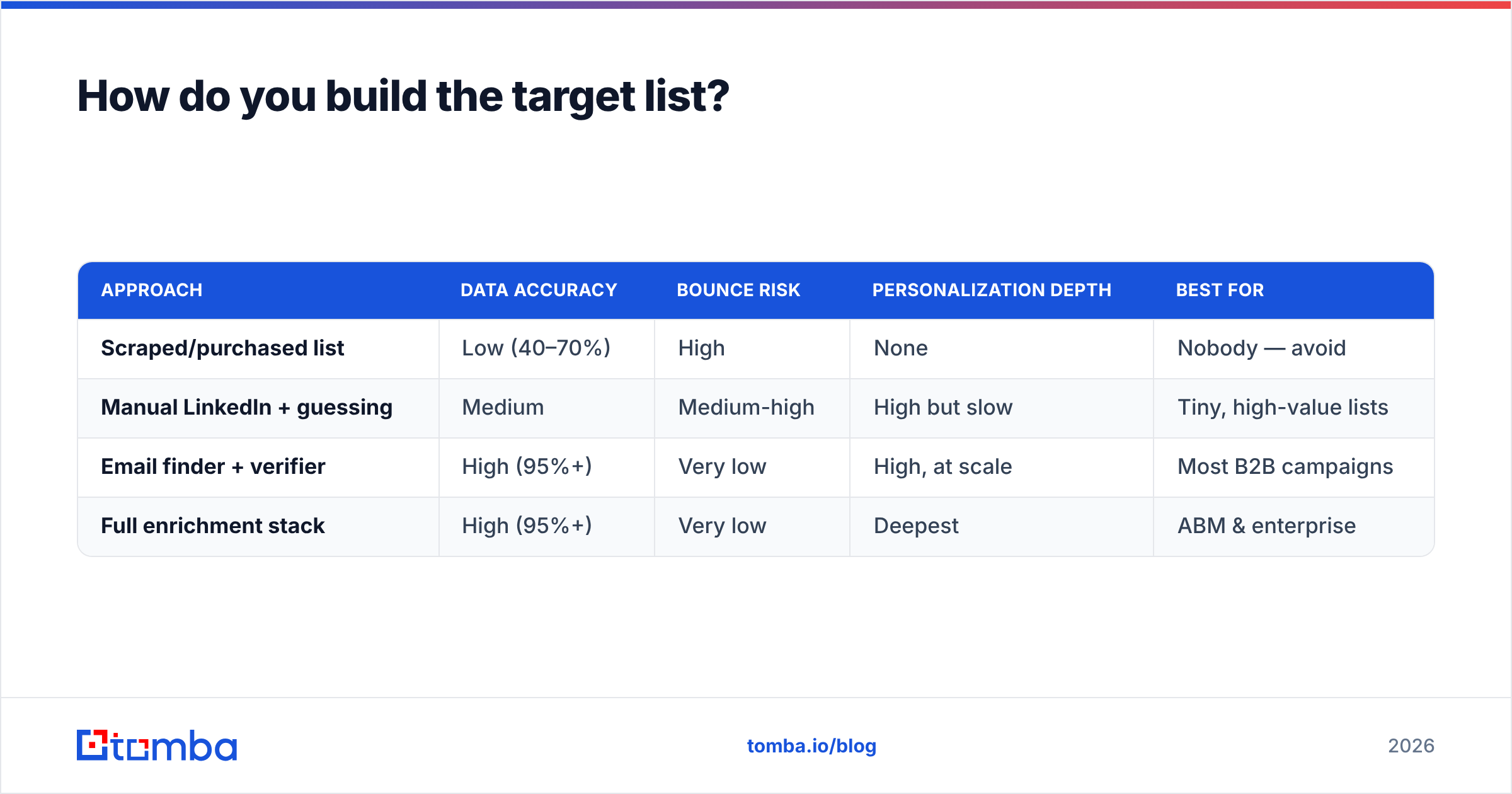
Here's how the list-building approaches compare:
| Approach | Data accuracy | Bounce risk | Personalization depth | Best for |
|---|---|---|---|---|
| Scraped/purchased list | Low (40–70%) | High | None | Nobody — avoid |
| Manual LinkedIn + guessing | Medium | Medium-high | High but slow | Tiny, high-value lists |
| Email finder + verifier | High (95%+) | Very low | High, at scale | Most B2B campaigns |
| Full enrichment stack | High (95%+) | Very low | Deepest | ABM & enterprise |
The pattern is clear: verified, finder-built lists give you the accuracy of manual work at the speed of automation. If you want to see how a provider sources and validates its records, review its data sources before committing budget.
What channels should a 2026 campaign use?#
Multichannel, always — but sequenced, not simultaneous. Blasting the same person on email, LinkedIn, and phone in the same hour reads as desperate. Spacing those touches reads as persistent.
The three core channels and their roles:
- Email — the workhorse. Scalable, measurable, and where most B2B buying conversations still start. This is your primary channel.
- LinkedIn — the warm-up and the fallback. A profile view or a thoughtful comment before your first email makes the name familiar. A connection request works when email bounces. See LinkedIn outreach for cadence ideas.
- Phone — the accelerator. A call after two ignored emails often breaks the pattern. Pull direct dials with a phone finder so you're not stuck on switchboards.
A sane multichannel sequence over two weeks:
- Day 1 — LinkedIn profile view (no request yet).
- Day 2 — Email #1: the core message.
- Day 4 — LinkedIn connection request, short note.
- Day 6 — Email #2: new angle, not a "just bumping this."
- Day 9 — Phone call + voicemail.
- Day 11 — Email #3: a relevant resource, low ask.
- Day 14 — Break-up email.
The point isn't the exact days. It's that each touch adds a new reason to respond instead of repeating the last one louder.
How do you write cold messages that get replies?#
Lead with relevance to them, not credentials about you. The reader's only question in the first two seconds is "why me, and why now?" Answer it before you do anything else.
A reply-getting cold email has four parts:
- Opener (1 sentence): a specific, personalized observation. A trigger event, a recent hire, a shared connection, something on their site.
- Relevance (1–2 sentences): why that observation connects to a problem you solve.
- Proof (1 sentence): a concrete result for a similar company. Numbers beat adjectives.
- Ask (1 sentence): one small, specific next step. "Worth a 15-minute call Thursday?" not "Let me know if you're interested."
Keep it under 120 words. Nobody reads a wall of text from a stranger. If you need a starting point, a library of cold email templates gives you proven structures to adapt — but adapt them, never send them raw.
On personalization: do it at the segment level to stay sane. Group contacts by a shared trigger ("just raised a Series A," "hiring for RevOps"), write one message per segment, then customize only the opening line per person. That gets you 80% of the lift of full personalization at 20% of the effort.
Two more rules that quietly decide outcomes:
- Subject lines stay short and human. 2–4 words, lowercase-ish, no hype. "quick question re: onboarding" outperforms "Revolutionize Your Sales Process Today."
- Every email must survive the spam filter. Warm your domain, authenticate it, and check your copy against a spam checker before launch. The best message never read is worth nothing.
How do you set up cold email for deliverability?#
Protect the domain first, or nothing else matters. Deliverability is the invisible layer that determines whether your carefully written message reaches an inbox or a junk folder.
The pre-launch checklist:
- Use a separate sending domain. Never run cold outreach from your primary domain. Buy a lookalike (get-yourbrand.com) and protect the main one.
- Authenticate. Set up SPF, DKIM, and DMARC. Confirm your SPF record is valid with an SPF checker.
- Warm up gradually. Ramp from ~20 sends/day to your target over 3–4 weeks. Cold domains that blast 500 emails on day one get flagged instantly.
- Cap daily volume. Stay under ~50 cold emails per inbox per day. Add more inboxes to scale, don't push one harder.
- Keep bounces under 2%. This loops straight back to verification — a clean list is a deliverability tool, not just a relevance tool.
Google and Microsoft both tightened bulk-sender rules, and providers like HubSpot publish their own deliverability guidance worth reading. The direction is one-way: authentication and low complaint rates are now table stakes, not optimizations.
What metrics actually matter?#
Reply rate and meetings booked. Everything else is a diagnostic, not a goal.
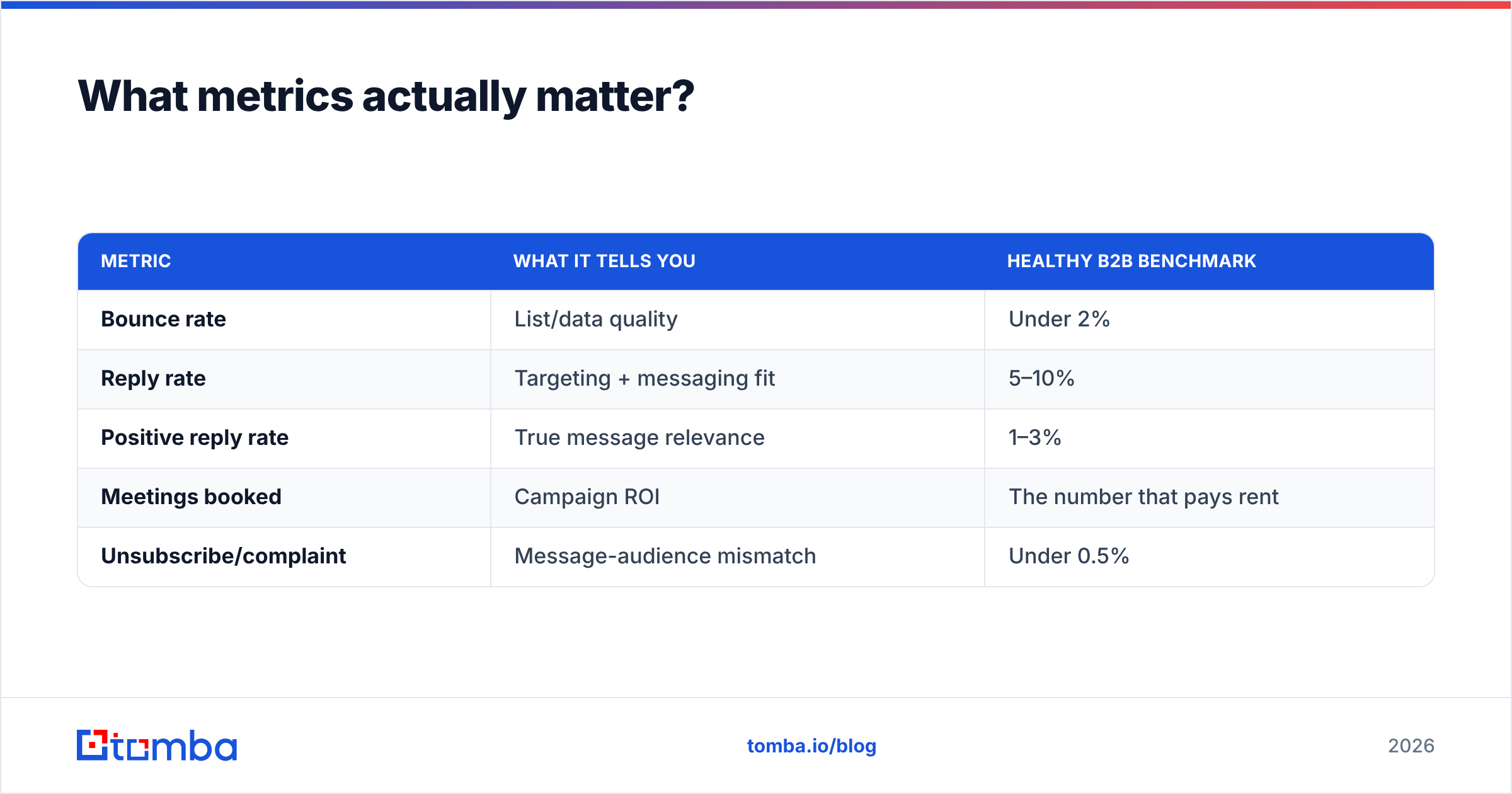
Since Apple Mail Privacy Protection auto-loads tracking pixels, open rates are inflated and unreliable — treat them as noise. Here's the metric hierarchy that reflects reality:
| Metric | What it tells you | Healthy B2B benchmark |
|---|---|---|
| Bounce rate | List/data quality | Under 2% |
| Reply rate | Targeting + messaging fit | 5–10% |
| Positive reply rate | True message relevance | 1–3% |
| Meetings booked | Campaign ROI | The number that pays rent |
| Unsubscribe/complaint | Message-audience mismatch | Under 0.5% |
Read them as a diagnostic chain. High bounce → fix your data. Good delivery but low replies → fix targeting or copy. Good replies but no meetings → fix your ask or your ICP. Each metric points at exactly one broken part, which is why chasing opens leads nowhere.
How do you scale without breaking things?#
Add volume through more segments and more inboxes, never by degrading data quality. Scale is where most campaigns quietly rot — the list gets bigger and dirtier at the same time.
Protect quality as you grow:
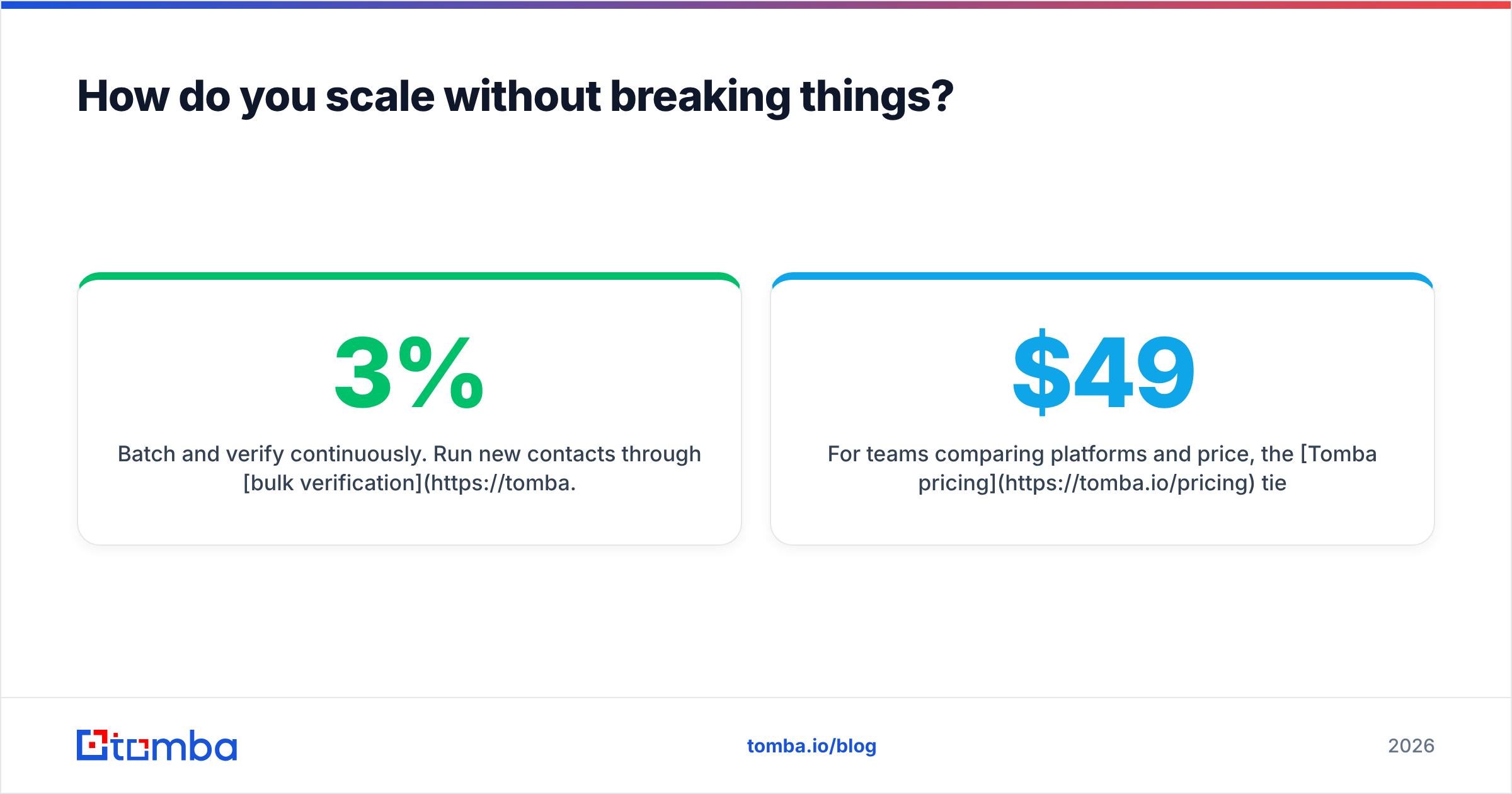
- Batch and verify continuously. Run new contacts through bulk verification before every send, not once a quarter. Data decays ~2–3% per month.
- Automate the plumbing, not the judgment. Wire your finder and verifier into your CRM through integrations or the Tomba API so list-building runs without manual exports.
- Segment more, don't personalize less. More volume should mean more narrow segments, each with a sharper message — not one generic blast to everyone.
- Rotate and monitor inboxes. Spread volume across inboxes and watch each one's reputation independently.
For teams comparing platforms and price, the Tomba pricing tiers run from a free plan (25 searches/month) to Starter at $49/mo, Growth at $99/mo, and Pro at $249/mo — so you can start small and scale credits as segments grow. Independent reviews on G2 are a useful sanity check when weighing any vendor against your own volume needs.
Cold outreach campaign checklist#
Before you hit send on any campaign, confirm every layer is in place:
- ICP defined with at least one specific trigger
- Contacts sourced by domain, then resolved to named people
- Every email verified; catch-alls validated separately
- Separate sending domain, warmed and authenticated (SPF/DKIM/DMARC)
- Message segmented by trigger, opener personalized per contact
- Multichannel sequence mapped across 10–14 days
- Copy run through a spam check
- Reply and meeting tracking wired up — not open rates
If all eight are checked, you're not sending cold emails. You're running a campaign.
Start with clean, verified data#
Every point in this guide traces back to one thing: the quality of the list you send to. Targeting, deliverability, reply rates, and scale all collapse if the underlying data is wrong. That's the foundation worth building first.
The fastest way to build that foundation is to go from a target company to verified, ready-to-contact decision-makers without leaving one workflow. The Tomba Email Finder does exactly that — search by domain or name, get professional emails, and verify them in the same step, so your campaign launches on data you can trust. Start on the free tier, prove the reply rate on a clean list, and scale from there.
Your copy can always be improved later. Your sender reputation can't be un-burned. Build on verified data, and the rest of the campaign has room to work.
Related guides#
Ready to find emails that actually work?
Join 150,000+ professionals who stopped guessing and started sending. Free credits on signup — no credit card required.
Get the Tomba newsletter
Practical outbound tactics and product updates — once every two weeks.
About the author