How to Collect Email Addresses: A Complete 2026 Playbook
Buying a list feels fast, but it wrecks deliverability and risks fines. Here's how to collect email addresses the right way in 2026 — permission-based tactics, the tools that scale it, and a workflow that keeps your list clean.
You can collect email addresses in a way that grows revenue, or in a way that quietly poisons your sending reputation. The gap between those two outcomes is almost entirely about permission and verification — not volume. This playbook walks through both the marketing side (earning opt-ins) and the outbound side (finding verified business contacts), and how to do each without landing in spam or breaking the law.
TL;DR#
- Collecting email addresses well means earning consent or sourcing verified B2B data — never scraping blind and blasting.
- Marketing lists grow through opt-in forms, lead magnets, and double opt-in; outbound lists grow through email finders and verification.
- Buying static lists is the fastest way to burn a domain — high bounce rates and spam traps tank your email deliverability.
- Always verify before you send. A clean list of 1,000 beats a dirty list of 10,000 every time.
- For compliant, verified B2B addresses at scale, an email finder plus an email verifier is the modern replacement for list buying.
What does it actually mean to collect email addresses?#
Collecting email addresses is the process of building a contact list you can legally and effectively email — either for marketing (newsletters, promotions) or outbound sales (cold outreach to business prospects). The word "collect" hides two very different motions:
- Inbound / permission-based — a person voluntarily hands you their address in exchange for something (a guide, a discount, updates). This is the backbone of email marketing.
- Outbound / research-based — you identify a business decision-maker and find their professional email through public data and pattern matching. This is the backbone of B2B prospecting.
Both are legitimate. What's not legitimate is scraping random consumer inboxes or buying a bulk list of 50,000 "leads" from a marketplace of unknown origin. That's the practice that gets domains blacklisted.

Why does permission-based collection matter so much?#
Because mailbox providers now judge you on engagement, not just content. Gmail and Yahoo's 2024 sender requirements made spam complaint rates and authentication hard gates. If you email people who never asked to hear from you, your complaint rate climbs, your sender reputation drops, and eventually your legitimate mail stops reaching inboxes at all.
Permission also keeps you on the right side of the law:
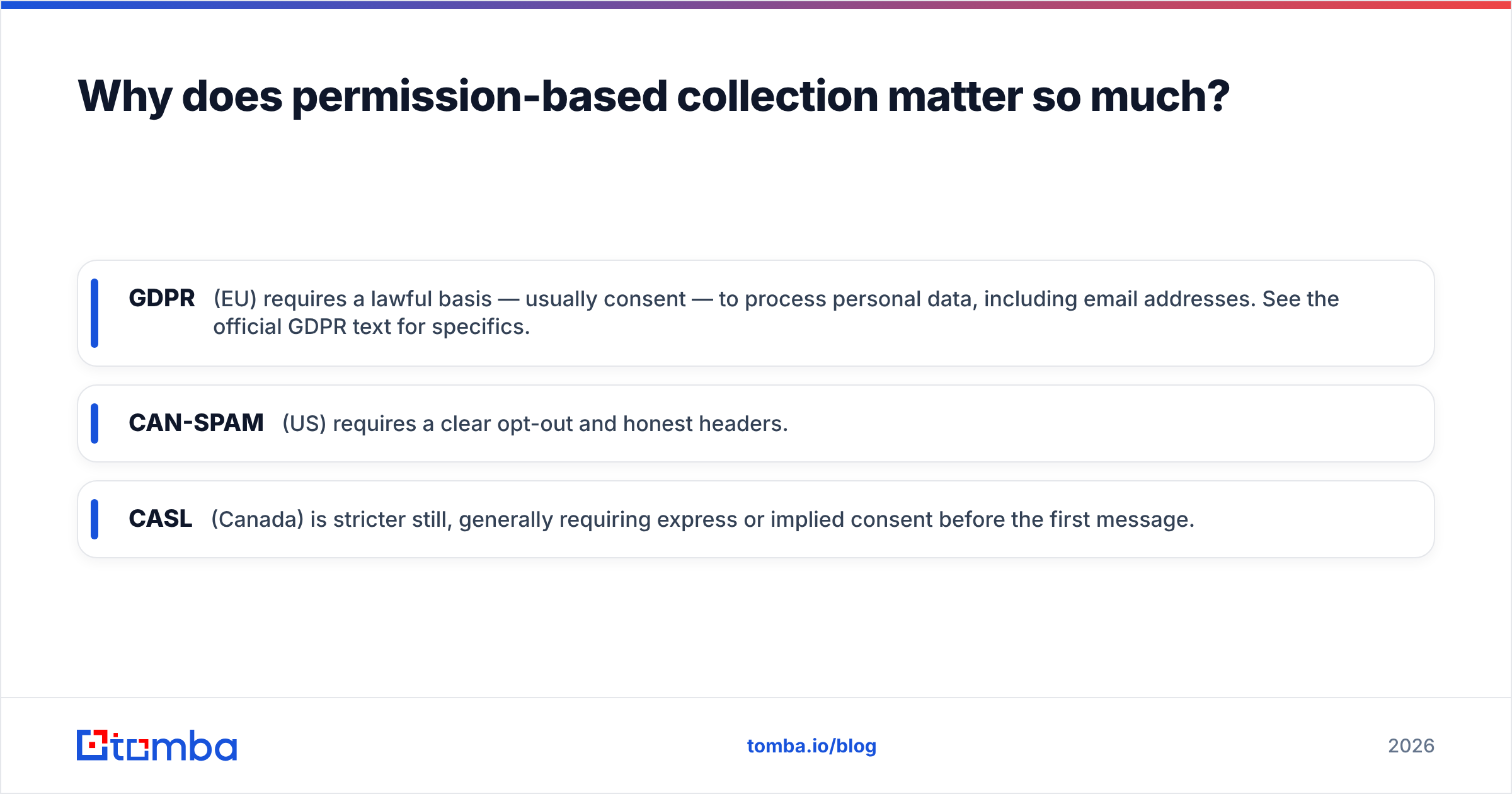
- GDPR (EU) requires a lawful basis — usually consent — to process personal data, including email addresses. See the official GDPR text for specifics.
- CAN-SPAM (US) requires a clear opt-out and honest headers.
- CASL (Canada) is stricter still, generally requiring express or implied consent before the first message.
The practical takeaway: for consumer marketing, get explicit opt-in. For B2B outbound, most jurisdictions allow contacting a business role at a business address with a relevant offer and easy opt-out — but you still need accurate data and a real reason to reach out.
What are the best ways to collect email addresses in 2026?#
Here are nine methods that still work, grouped by motion. Pick the ones that match your channel and audience.
- Opt-in signup forms — Embed a form on your highest-traffic pages. Keep it to one field (email) where possible; every extra field cuts conversion.
- Lead magnets — Trade a template, checklist, or report for an address. Specific beats generic ("2026 SaaS pricing benchmark" > "our newsletter").
- Content upgrades — Offer a downloadable version of a popular blog post inside that post. Contextual relevance lifts opt-in rates dramatically.
- Exit-intent popups — Trigger an offer when a visitor moves to leave. Annoying if overused, effective if the offer is strong.
- Webinars and events — Registration is a natural, high-intent email capture point.
- Referral loops — "Invite a colleague, both get access." Turns your list into a growth engine.
- Gated tools and calculators — A free interactive tool (like a warmup calculator) captures addresses from people with a clear use case.
- Email finders for outbound — Look up verified professional emails by name and company domain when you're doing targeted B2B outreach.
- Data enrichment — Take a partial record (name + company) and fill in the verified email, phone, and role automatically.
The first seven grow a marketing list. The last two grow an outbound list. Most serious teams run both.
Should you buy an email list instead?#
No — not a static, one-time purchase. Bought lists are the single most common cause of deliverability disasters. Here's the honest tradeoff versus building your own.
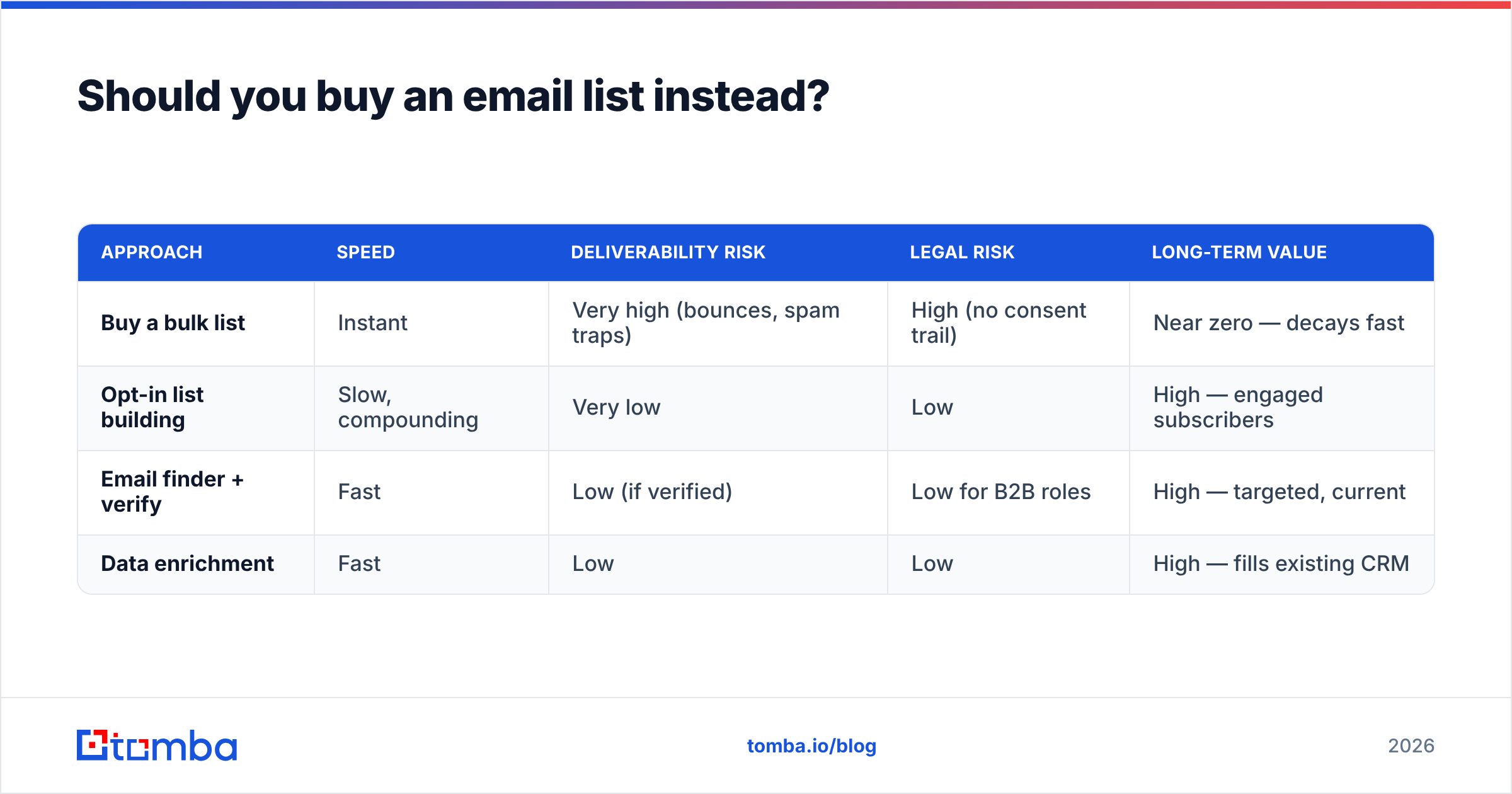
| Approach | Speed | Deliverability risk | Legal risk | Long-term value |
|---|---|---|---|---|
| Buy a bulk list | Instant | Very high (bounces, spam traps) | High (no consent trail) | Near zero — decays fast |
| Opt-in list building | Slow, compounding | Very low | Low | High — engaged subscribers |
| Email finder + verify | Fast | Low (if verified) | Low for B2B roles | High — targeted, current |
| Data enrichment | Fast | Low | Low | High — fills existing CRM |
There's a middle path worth naming: reputable B2B data providers such as BookYourData sell verified, opt-in-checked business contacts rather than scraped junk, which is a different category from anonymous list marketplaces. The rule of thumb still holds — whatever the source, verify every address before you send.
How do email finders and verification fit in?#
An email finder takes a person's name and their company domain and returns their professional email, sourced from public web signals and known company email patterns. An email verifier then pings that address (without sending mail) to confirm it exists and can receive messages. Used together, they replace the entire "buy a list" motion with something accurate and current.
Tomba packages this into a workflow built for outbound teams:
- Email Finder — find a single contact's address by name and domain.
- Domain Search — pull every discoverable email pattern for a company at once.
- Bulk finder — upload a CSV of names and companies and get verified emails back.
- Email Verifier — score deliverability and catch risky or invalid addresses before they cost you a bounce.
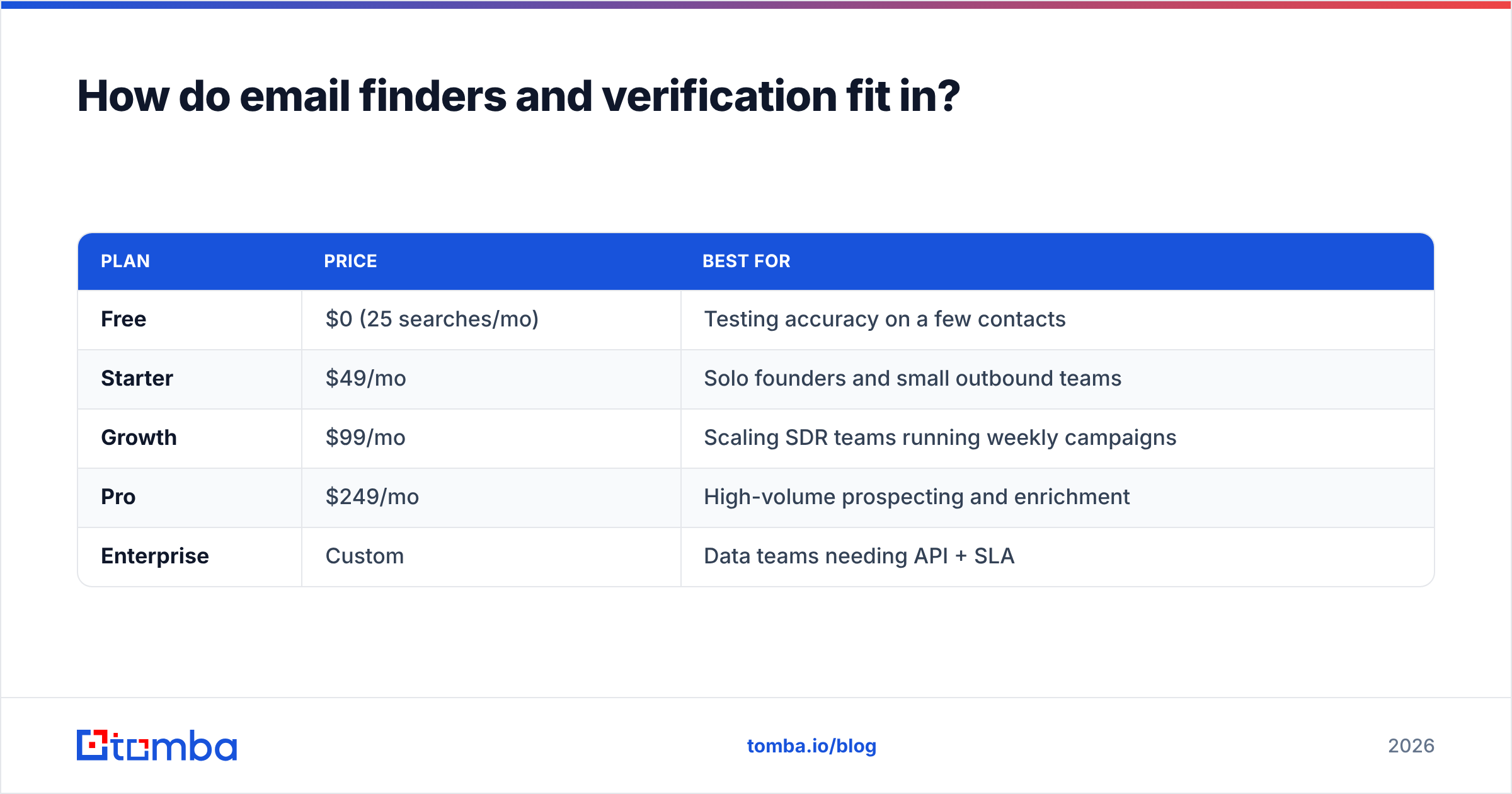
Here's how Tomba's pricing lines up if you're weighing tools:
| Plan | Price | Best for |
|---|---|---|
| Free | $0 (25 searches/mo) | Testing accuracy on a few contacts |
| Starter | $49/mo | Solo founders and small outbound teams |
| Growth | $99/mo | Scaling SDR teams running weekly campaigns |
| Pro | $249/mo | High-volume prospecting and enrichment |
| Enterprise | Custom | Data teams needing API + SLA |
You can review full Tomba pricing for credit limits per tier. (Note: the correct Starter price is $49/mo — anything advertising "$39" for a comparable feature set is usually a stripped tier.)
What's the right workflow to keep a collected list clean?#
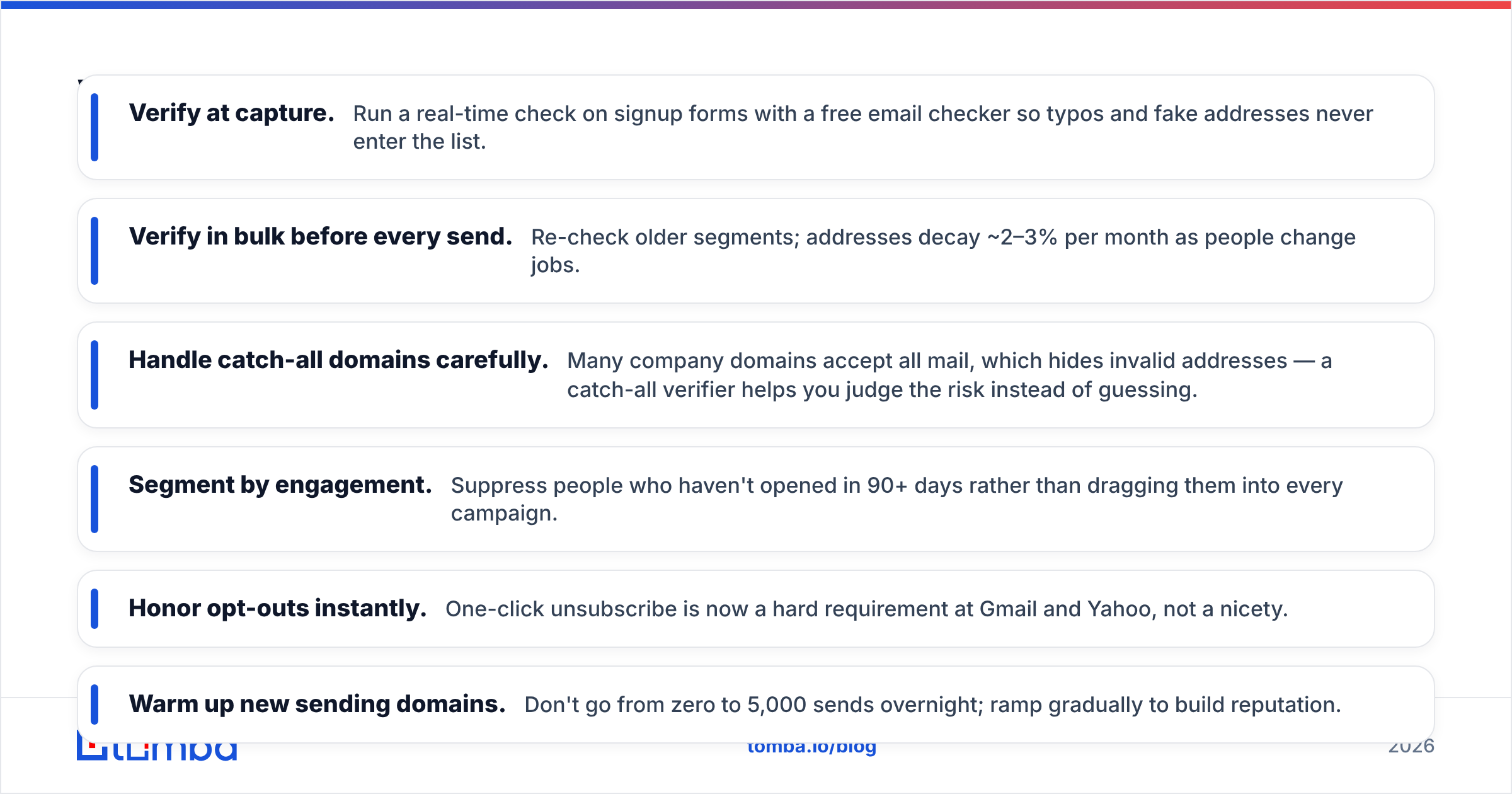
Collecting addresses is step one. Keeping the list healthy is what protects your deliverability over time. Use this loop:
- Verify at capture. Run a real-time check on signup forms with a free email checker so typos and fake addresses never enter the list.
- Verify in bulk before every send. Re-check older segments; addresses decay ~2–3% per month as people change jobs.
- Handle catch-all domains carefully. Many company domains accept all mail, which hides invalid addresses — a catch-all verifier helps you judge the risk instead of guessing.
- Segment by engagement. Suppress people who haven't opened in 90+ days rather than dragging them into every campaign.
- Honor opt-outs instantly. One-click unsubscribe is now a hard requirement at Gmail and Yahoo, not a nicety.
- Warm up new sending domains. Don't go from zero to 5,000 sends overnight; ramp gradually to build reputation.
This is the difference between a list that compounds in value and one that quietly rots. For deeper reading on why bounces and complaints matter, HubSpot's email deliverability guide and vendor reviews on G2 are solid neutral references.
What mistakes should you avoid when collecting emails?#
- Scraping consumer inboxes. High complaint risk, low relevance, often illegal.
- Skipping verification. Even good sources contain 5–15% invalid addresses; sending to them spikes bounces.
- Hiding the value exchange. If people don't know what they're signing up for, they mark you as spam.
- One giant unsegmented blast. Relevance drives engagement; engagement drives inbox placement.
- Ignoring double opt-in for marketing. It costs a few percent of signups but dramatically improves list quality and legal footing.
- Treating B2B and B2C the same. Consent rules and expectations differ — a role-based business email is a different beast from a personal Gmail.
How do you decide between inbound and outbound collection?#
Match the method to your motion:
- If you sell to businesses with defined target accounts, lead with outbound — an email finder plus verification gets you accurate contacts at named companies faster than waiting for inbound signups.
- If you sell to a broad audience or run content marketing, lead with inbound — opt-in forms and lead magnets build an engaged, owned audience.
- Most B2B teams do both: inbound captures demand you've created; outbound reaches demand you haven't. The shared requirement is the same — every address gets verified before it's emailed.
The bottom line#
Collecting email addresses in 2026 is a discipline, not a shortcut. Earn consent for marketing, source verified business data for outbound, and verify relentlessly on both sides. Do that, and your list becomes an asset that reaches inboxes for years. Skip it, and you're renting a liability that torches your domain the first time you press send.
Ready to build a clean, accurate outbound list without buying junk data? Start with Tomba's Email Finder — look up verified professional emails by name or domain, run them through the built-in verifier, and export a list your campaigns can actually land in the inbox. The free tier gives you 25 searches to test the accuracy on real contacts before you commit.
Related guides#
Ready to find emails that actually work?
Join 150,000+ professionals who stopped guessing and started sending. Free credits on signup — no credit card required.
Get the Tomba newsletter
Practical outbound tactics and product updates — once every two weeks.
About the author