Common Data Quality Issues and How to Fix Them in 2026
Duplicate records, stale contacts, and missing fields quietly wreck B2B pipelines. Here are the most common data quality issues, how to spot each one, and the fixes that actually hold.

Bad data does not announce itself. It shows up as a bounced sequence, a rep calling a number that was disconnected two years ago, or a forecast built on 40,000 CRM rows where half are duplicates. By the time you notice, the campaign already ran.
This guide breaks down the most common data quality issues in B2B systems, how each one silently costs you money, and the concrete fixes that keep your database usable.
TL;DR#
- The seven usual suspects: duplicates, incomplete records, stale/decayed data, inconsistent formatting, invalid emails and phones, inaccurate values, and unverified catch-all domains.
- Decay is the killer you underestimate: B2B contact data goes stale at roughly 22–30% per year as people change jobs, titles, and companies.
- Most damage is preventable at entry: validation and verification at the point of capture beats quarterly cleanup every time.
- Fixes are cheap relative to the cost: deduplication, standardization, and email verification take hours to set up and pay back on the first send.
- Tooling matters: a verifier plus enrichment plus dedupe covers 80% of the problems below.
What counts as a data quality issue?#
A data quality issue is any record that misrepresents reality badly enough to change a decision or break a workflow. That's the practical definition worth keeping.
Think of your database like a pantry. A can with no label (missing fields), two cans of the same soup (duplicates), and a can three years past its date (decay) are all "problems," but each one fails you differently. Some waste a shelf. Some make you sick. You fix them with different tools.
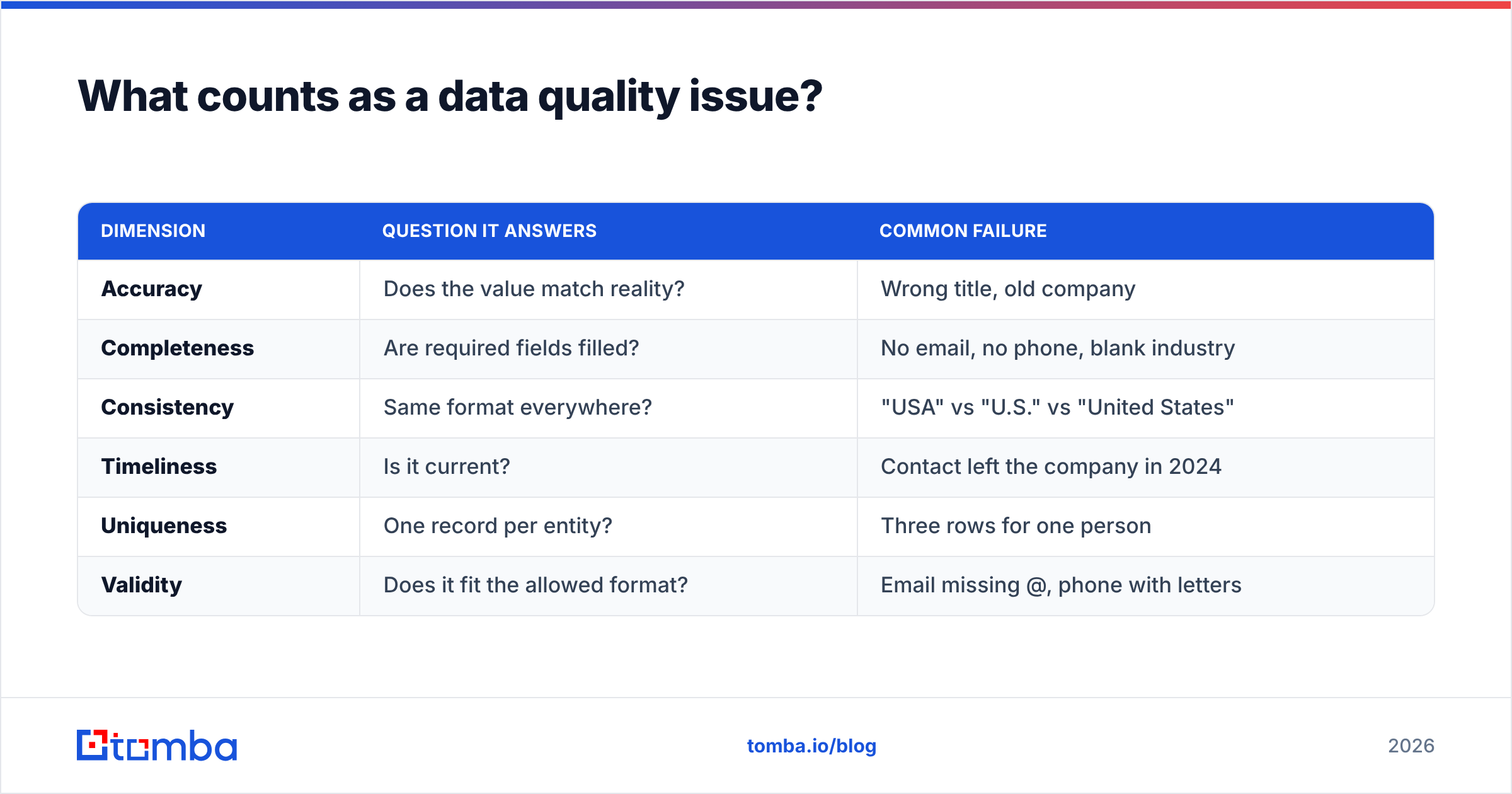
Analysts frame quality across six standard dimensions. Here's how they map to what actually goes wrong in a CRM:
| Dimension | Question it answers | Common failure |
|---|---|---|
| Accuracy | Does the value match reality? | Wrong title, old company |
| Completeness | Are required fields filled? | No email, no phone, blank industry |
| Consistency | Same format everywhere? | "USA" vs "U.S." vs "United States" |
| Timeliness | Is it current? | Contact left the company in 2024 |
| Uniqueness | One record per entity? | Three rows for one person |
| Validity | Does it fit the allowed format? | Email missing @, phone with letters |
Every issue below is one of these six dimensions breaking down in a specific, recognizable way.

What are the most common data quality issues in B2B data?#
1. Duplicate records#
Duplicates are the most visible problem and the most underestimated. When "Jon Smith" and "Jonathan Smith" both live in your CRM, your rep double-emails the prospect, your forecast counts one deal twice, and your attribution splits credit across ghosts.
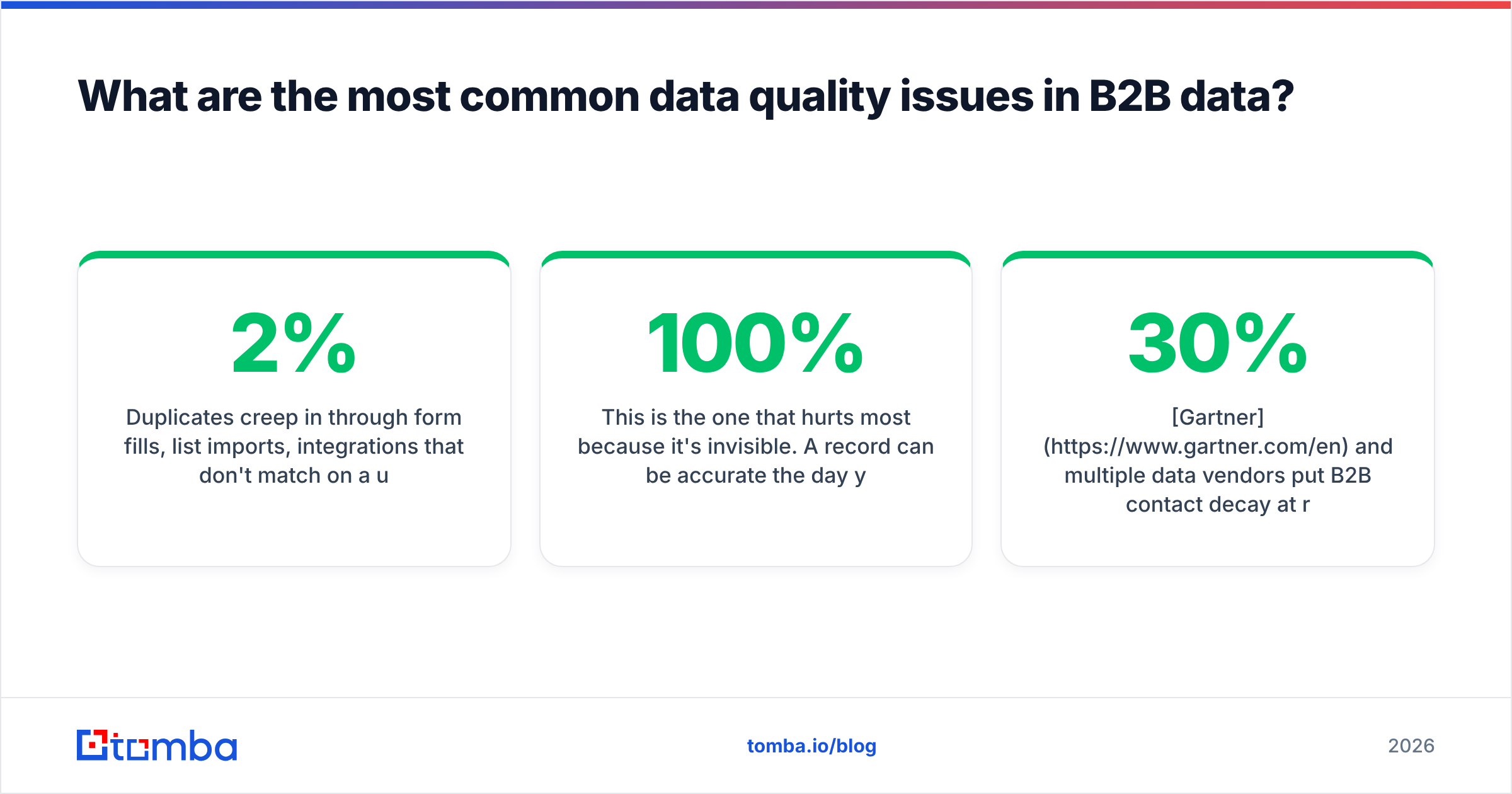
Duplicates creep in through form fills, list imports, integrations that don't match on a unique key, and manual entry. They compound. A 2% duplication rate at import becomes 15% after a year of unmanaged syncs.
Fix: match on a stable key (usually verified email or domain + name), not on display name. Run a remove duplicates pass before every import, and configure your CRM to merge on email at the point of entry.
2. Incomplete records#
A lead with a name and company but no email is a lead you can't work. Missing fields — email, phone, job title, industry, company size — quietly shrink your addressable list.
Incompleteness usually traces back to short forms (you only asked for name and company) or scraped lists that never had the fields to begin with. The record looks fine in the grid until a rep tries to act on it.
Fix: enrich at capture. Data enrichment fills the gaps automatically — appending verified emails, phone numbers, titles, and firmographics from the name and domain you already have. Enriching once at entry beats chasing blanks later.
3. Stale and decayed data#
This is the one that hurts most because it's invisible. A record can be 100% accurate the day you capture it and worthless 18 months later. People change jobs. Companies get acquired. Titles shift.
Gartner and multiple data vendors put B2B contact decay at roughly 22–30% per year. That means a list you built in early 2025 could be a quarter wrong today, with nothing on the record telling you which quarter.
Fix: treat data as perishable. Re-verify contact lists on a schedule (quarterly for active outreach), and re-enrich records that haven't been touched in six months. Decay is a maintenance problem, not a one-time cleanup.
4. Inconsistent formatting#
"United States," "USA," "U.S.," and "us" are the same country to a human and four different segments to a filter. Inconsistent formatting breaks reporting, segmentation, and any automation that keys off exact matches.
Phone numbers with and without country codes, dates in three formats, and job titles ranging from "VP Sales" to "Vice President, Sales Enablement" all fall here.
Fix: standardize on write. Define a canonical format for each field (ISO country codes, E.164 phone numbers, a controlled title taxonomy) and normalize on import. Picklists beat free text for any field you'll ever filter on.
5. Invalid emails and phone numbers#
An email that's syntactically wrong, points to a dead mailbox, or belongs to a domain with no mail server is a guaranteed bounce. Too many bounces and your sender reputation drops, which drags down deliverability for the mail that would have landed.
Invalid data is different from stale data: it was never usable, not just recently expired. Typos ("gmial.com"), role addresses that reject bulk mail, and spam traps all live here.
Fix: verify before you send. An email verifier checks syntax, domain, and mailbox existence so you strip dead addresses before they hit your ESP. For large lists, bulk verify the whole file in one pass. Pair verification with a free email checker for one-off manual checks.
6. Inaccurate values#
Inaccuracy is the subtle one: the field is filled, formatted correctly, and completely wrong. A prospect listed as "CFO" who's actually a junior analyst. A company tagged "50–200 employees" that's now 2,000. The record passes every automated check and still misleads the rep.
This usually comes from aging data, guessed values, or low-quality sources that never verified in the first place.
Fix: source matters. Prefer providers transparent about where their data comes from and how it's validated. Cross-check high-value records against a second signal (LinkedIn, the company site) before a rep invests time.
7. Unverified catch-all domains#
Catch-all domains accept mail to any address, so a standard verifier can't tell you whether the specific mailbox exists. Treat every catch-all as "valid" and you'll bounce; treat every one as "invalid" and you'll discard real contacts.
Fix: use a dedicated catch-all verifier that applies deeper heuristics to score catch-all addresses instead of guessing. It's the difference between mailing a real buyer and burning your domain reputation.
Which data quality issues cost the most?#
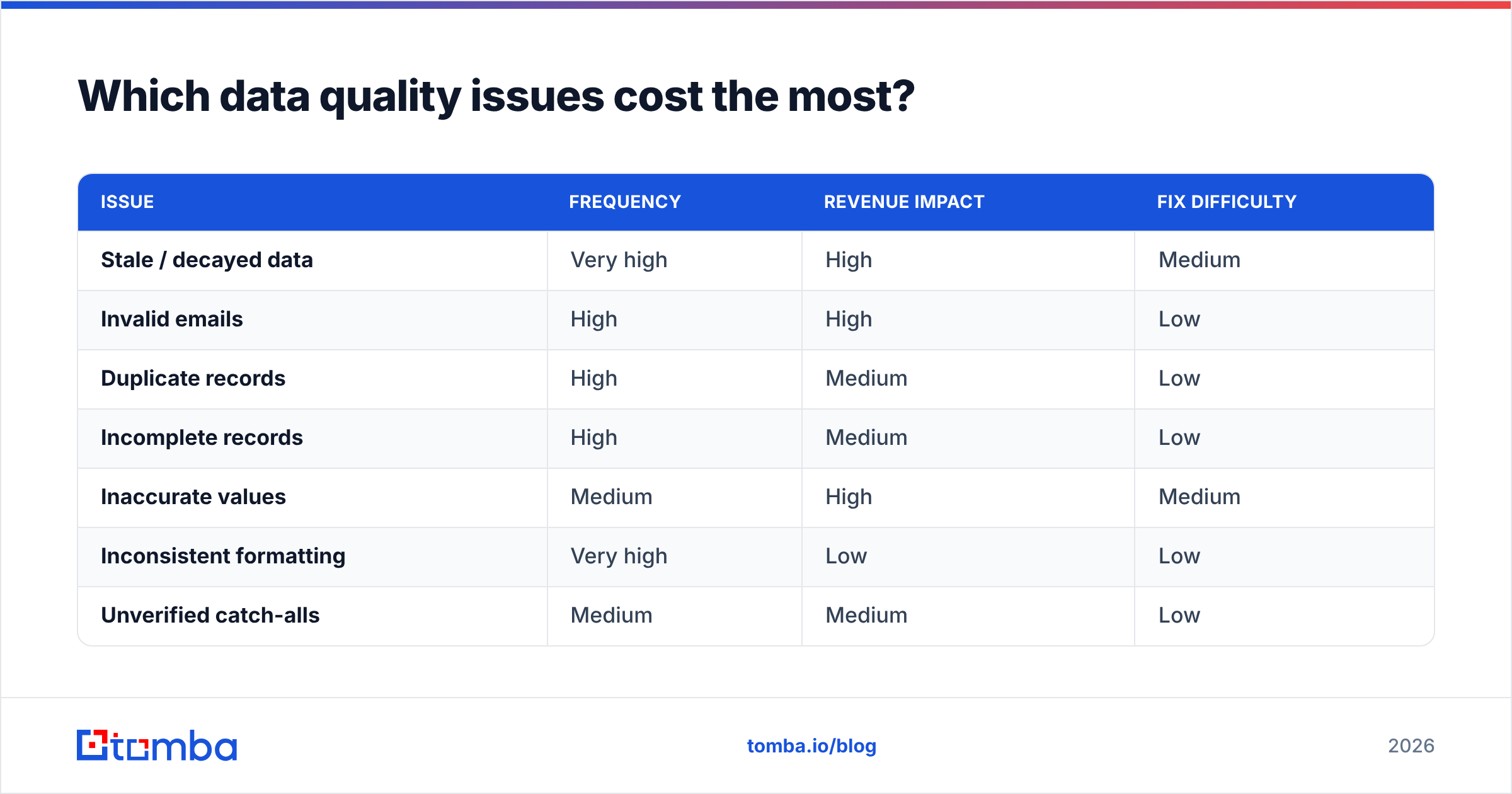
Not all issues carry the same price tag. Ranking by real-world impact on a sales team:
| Issue | Frequency | Revenue impact | Fix difficulty |
|---|---|---|---|
| Stale / decayed data | Very high | High | Medium |
| Invalid emails | High | High | Low |
| Duplicate records | High | Medium | Low |
| Incomplete records | High | Medium | Low |
| Inaccurate values | Medium | High | Medium |
| Inconsistent formatting | Very high | Low | Low |
| Unverified catch-alls | Medium | Medium | Low |
The pattern: the cheapest fixes (verification, dedupe) attack the highest-frequency, highest-impact problems. You don't need a data-governance overhaul to capture most of the value. You need three or four routine passes.
How do you prevent data quality issues instead of cleaning them up?#
Prevention beats cleanup by an order of magnitude, the same way not spilling coffee beats mopping it. Cleanup is reactive, expensive, and always behind. Here's the preventive stack, in order of leverage:
- Validate at entry. Reject malformed emails and phones on the form before they ever reach the CRM. Bad data that never enters costs nothing to remove.
- Enrich at capture. Append missing fields the moment a lead comes in, so records are complete from day one instead of half-blank.
- Verify before every send. Run outreach lists through a verifier as a standing step in the sequence, not an occasional chore.
- Standardize with picklists. Replace free-text fields with controlled values wherever you'll filter or report.
- Deduplicate on a unique key. Match and merge on verified email or domain, automatically, on every import.
- Re-verify on a schedule. Quarterly for active lists, semi-annually for the long tail, to stay ahead of decay.
Teams that build these six steps into their workflow rarely run big cleanup projects, because the database never gets dirty enough to need one.
What tools fix common data quality issues?#
You can cover the seven issues above with a small, focused toolset rather than a heavyweight master-data platform. Match the job to the tool:
- Verification — strip invalid and dead addresses with an email verifier; handle ambiguous domains with a catch-all verifier.
- Completeness — fill blank fields with contact enrichment so every record is workable.
- Uniqueness — dedupe imports with a remove duplicates pass keyed on email.
- Sourcing — find missing emails by name and company with a reliable email finder instead of guessing formats.
- Scale — process whole lists at once through bulk verification and lookup.
For teams standardizing on a stack, tools like HubSpot handle CRM-side hygiene and workflow, while a dedicated finder-and-verifier layer keeps the contact data feeding it clean. Peer directories such as G2 are useful for comparing verification and enrichment vendors side by side before you commit.
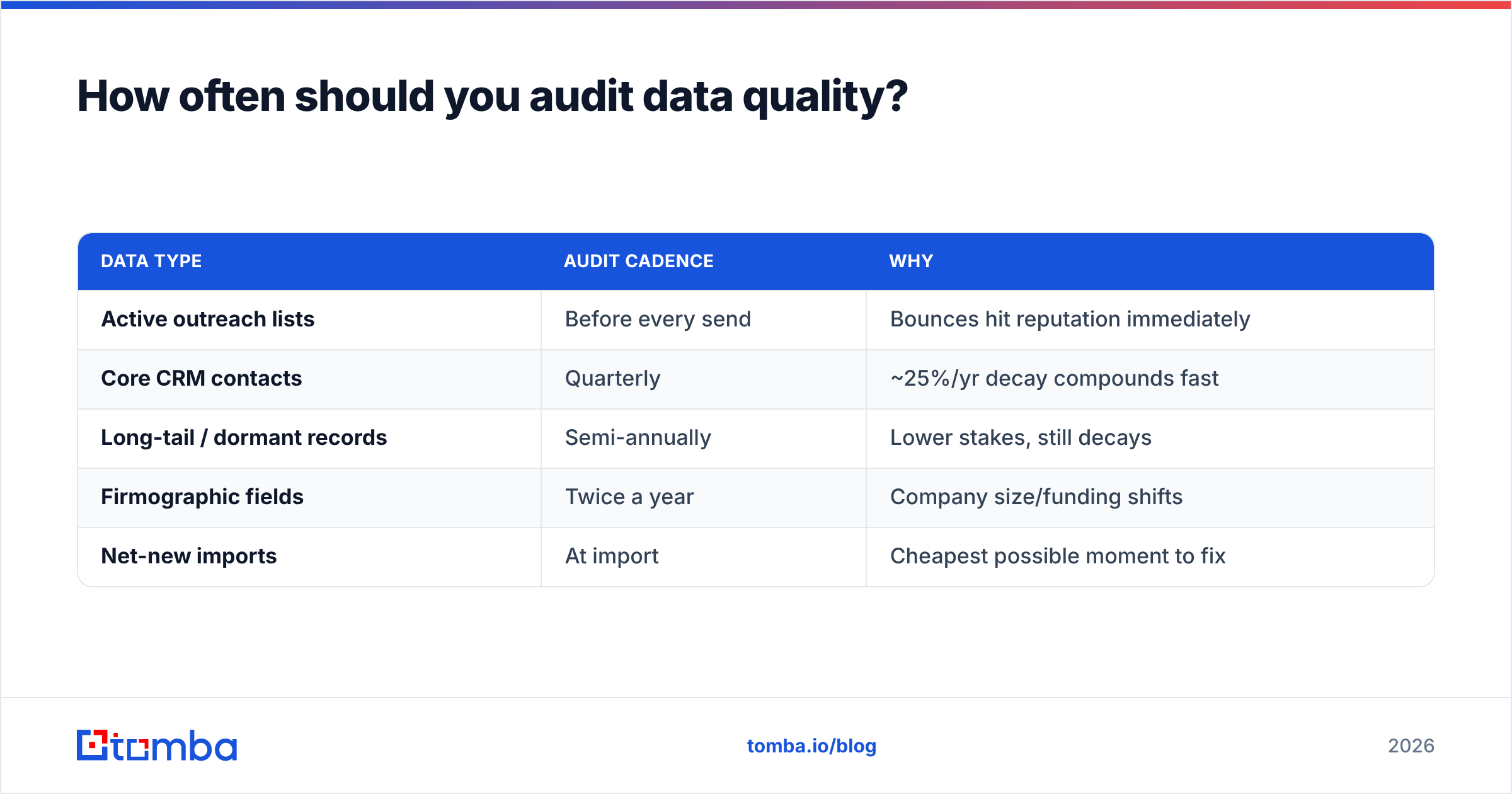
How often should you audit data quality?#
Set the cadence by how fast the data moves and how much it costs you to be wrong:
| Data type | Audit cadence | Why |
|---|---|---|
| Active outreach lists | Before every send | Bounces hit reputation immediately |
| Core CRM contacts | Quarterly | ~25%/yr decay compounds fast |
| Long-tail / dormant records | Semi-annually | Lower stakes, still decays |
| Firmographic fields | Twice a year | Company size/funding shifts |
| Net-new imports | At import | Cheapest possible moment to fix |
The rule underneath the table: audit at the point where being wrong is cheapest to catch and most expensive to miss. That's almost always at entry and right before you act.
Getting started#
Start with the two moves that pay back fastest. First, run your most-used outreach list through verification and dedupe today — you'll likely strip 10–20% dead weight and protect your sender reputation on the next send. Second, turn on enrichment and validation at your form and import points so the problem stops growing while you clean up the backlog.
Ready to fix the issues at the source? The Tomba Email Finder finds and verifies professional email addresses by name, company, or domain — so the contacts entering your CRM are accurate, complete, and deliverable from day one. Pair it with the built-in verifier and enrichment, start free with 25 searches a month, and scale up through Tomba's plans as your list grows. Clean data isn't a one-time project. It's a habit, and the right tools make it automatic.
Related guides#
Ready to find emails that actually work?
Join 150,000+ professionals who stopped guessing and started sending. Free credits on signup — no credit card required.
Get the Tomba newsletter
Practical outbound tactics and product updates — once every two weeks.
About the author