How to Write a Company Introduction Email to Prospective Clients
A company introduction email to a prospective client only works when it earns the reply. Here are the structure, templates, and mistakes that decide whether yours gets read or deleted.
Your first email to a prospective client is a job interview you didn't schedule. They didn't ask to meet you, they don't know your name, and they will decide in about three seconds whether you're worth thirty more. A company introduction email to a prospective client has to survive that flinch — and most don't.
The good news: the emails that work aren't clever. They're structured, specific, and short. This guide breaks down exactly what goes into one, gives you templates you can adapt today, and shows the mistakes that quietly sink the rest.
TL;DR#
- A company introduction email to a prospective client should be about who they are, not who you are — lead with their problem, not your founding year.
- Keep it under 150 words, one clear ask, and a subject line that reads like a human wrote it.
- Personalization beats volume: a researched email to 50 people outperforms a generic blast to 5,000.
- Deliverability matters as much as copy — a perfect email in the spam folder converts at zero.
- Reaching the right inbox starts with a verified address; guessing wastes your best line on a bounce.
What is a company introduction email to a prospective client?#
A company introduction email is the first cold (or lightly warm) message you send to someone who could become a customer. Its only job is to earn a reply — not to close, not to explain your entire product catalog, just to start a conversation.
Think of it like introducing yourself at a networking event. You wouldn't walk up to a stranger and recite your company's mission statement. You'd say something relevant to them, offer a reason to keep talking, and then let them respond. The email version follows the same social physics.
There are three common triggers for sending one:
- Pure cold outreach — you found a prospect who fits your ideal customer profile and have no prior relationship.
- Warm inbound follow-up — someone downloaded a resource, visited your pricing page, or was referred, and you're opening the door.
- Account expansion — you're introducing your company to a new stakeholder inside an organization you already work with.
The structure is broadly the same across all three; only the opening line and the amount of context change.
What are the essential parts of an introduction email?#
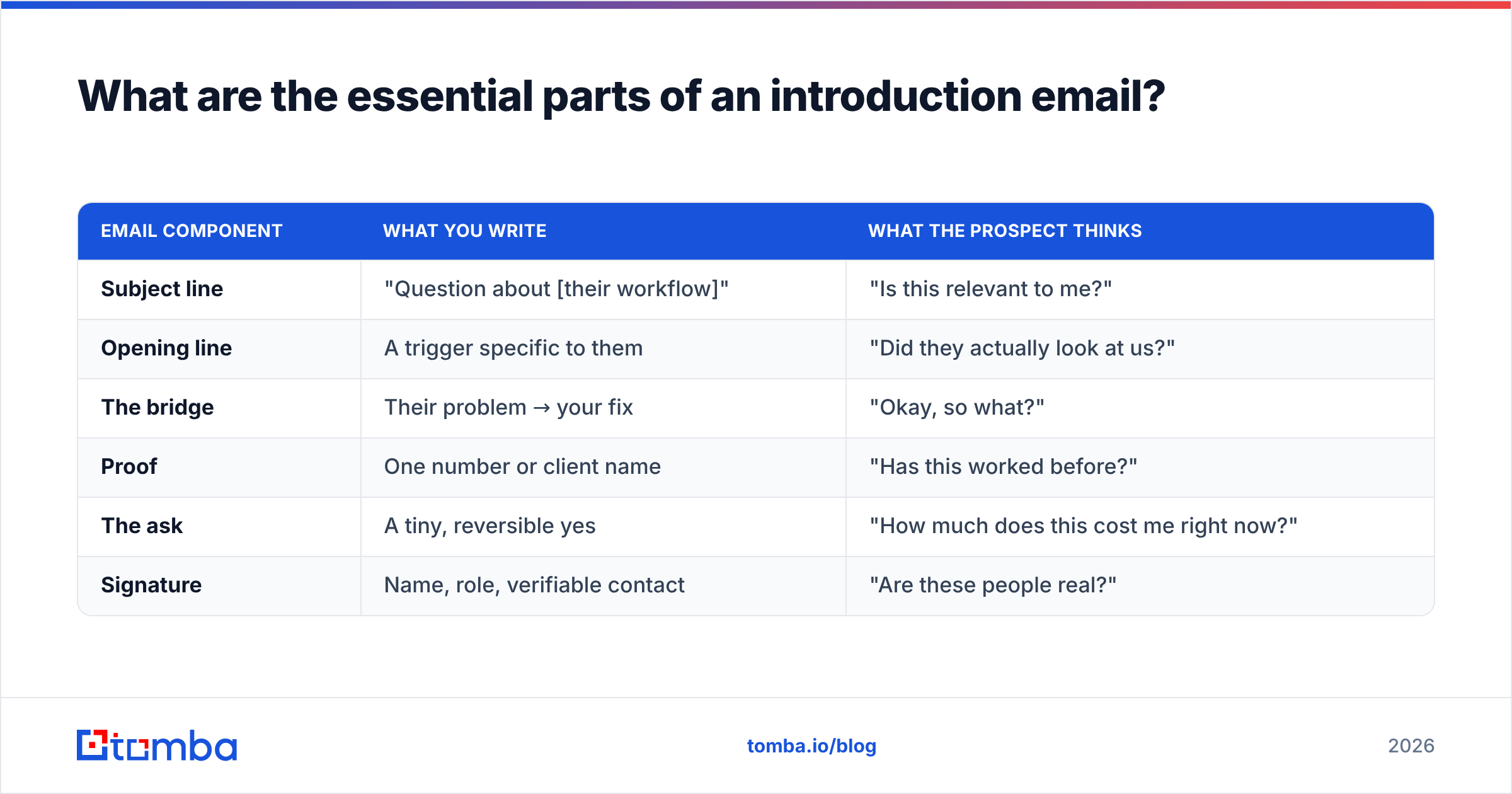
Every high-performing introduction email is built from the same six components. Miss one and the whole thing wobbles.
- Subject line — 3 to 6 words, specific, no hype. This decides whether anything else gets read.
- Opening line — about them, not you. A trigger, a compliment with substance, or a relevant observation.
- The bridge — one sentence connecting their situation to what you do.
- Proof — a single concrete result, number, or recognizable client. Not three. One.
- The ask — one low-friction next step ("worth a quick look?"), never "let's book a 30-minute demo."
- Signature — real name, real company, real contact details, and a way to verify you're legitimate.
Here's how those pieces map to what the reader is actually thinking:
| Email component | What you write | What the prospect thinks |
|---|---|---|
| Subject line | "Question about [their workflow]" | "Is this relevant to me?" |
| Opening line | A trigger specific to them | "Did they actually look at us?" |
| The bridge | Their problem → your fix | "Okay, so what?" |
| Proof | One number or client name | "Has this worked before?" |
| The ask | A tiny, reversible yes | "How much does this cost me right now?" |
| Signature | Name, role, verifiable contact | "Are these people real?" |
Notice that the reader's questions are all skeptical. Your email isn't fighting for enthusiasm — it's fighting to clear doubt fast enough to earn a reply.
What does a good introduction email look like?#
Templates are starting points, not scripts. Adapt the variables, keep the structure. Here are three that map to the triggers above.
Template 1 — Cold outreach
Subject: Cutting [specific task] time at [Company]
Hi [First name],
Noticed [Company] just [trigger — expanded to a new region / posted three SDR roles / launched X]. That usually means [relevant pain] gets louder fast.
We help teams like [recognizable peer] handle exactly that — they cut [metric] by [number] in [timeframe].
Worth a two-minute look at how, or is this not on your radar right now?
[Name], [Company]
Template 2 — Warm inbound
Subject: Saw you checked out [resource]
Hi [First name],
Thanks for grabbing our [guide/tool]. Most people who do are wrestling with [problem it addresses].
If that's you, I put together a short breakdown of how [peer company] solved it. Happy to send it over — want me to?
[Name], [Company]
Template 3 — New stakeholder in an existing account
Subject: Intro — we already work with [their colleague's team]
Hi [First name],
We've been supporting [colleague/team] on [project] for the last few months. Since [initiative] now touches your side, I wanted to introduce myself directly.
Open to a quick sync so you're not hearing about us secondhand?
[Name], [Company]
Each of these is under 90 words. Each opens with the reader. Each ends with a question a busy person can answer in one line. If you want more variations to start from, Tomba's cold email templates library is a useful swipe file.
How long should an introduction email be?#
Shorter than you think. The sweet spot is 50 to 125 words — roughly what fits on a phone screen without scrolling, since more than half of first opens happen on mobile.
Length signals effort in the wrong direction. A long introduction email reads as "I have a lot to say about myself," which is exactly the impression you're trying to avoid. Every sentence you add is another chance for the reader to decide they're too busy.
A useful test: read your draft out loud. If you run out of breath before the ask, or if you catch yourself explaining features nobody asked about, cut. The prospect doesn't need your whole story to say yes to a conversation — they need one reason to be curious.
What mistakes kill an introduction email?#
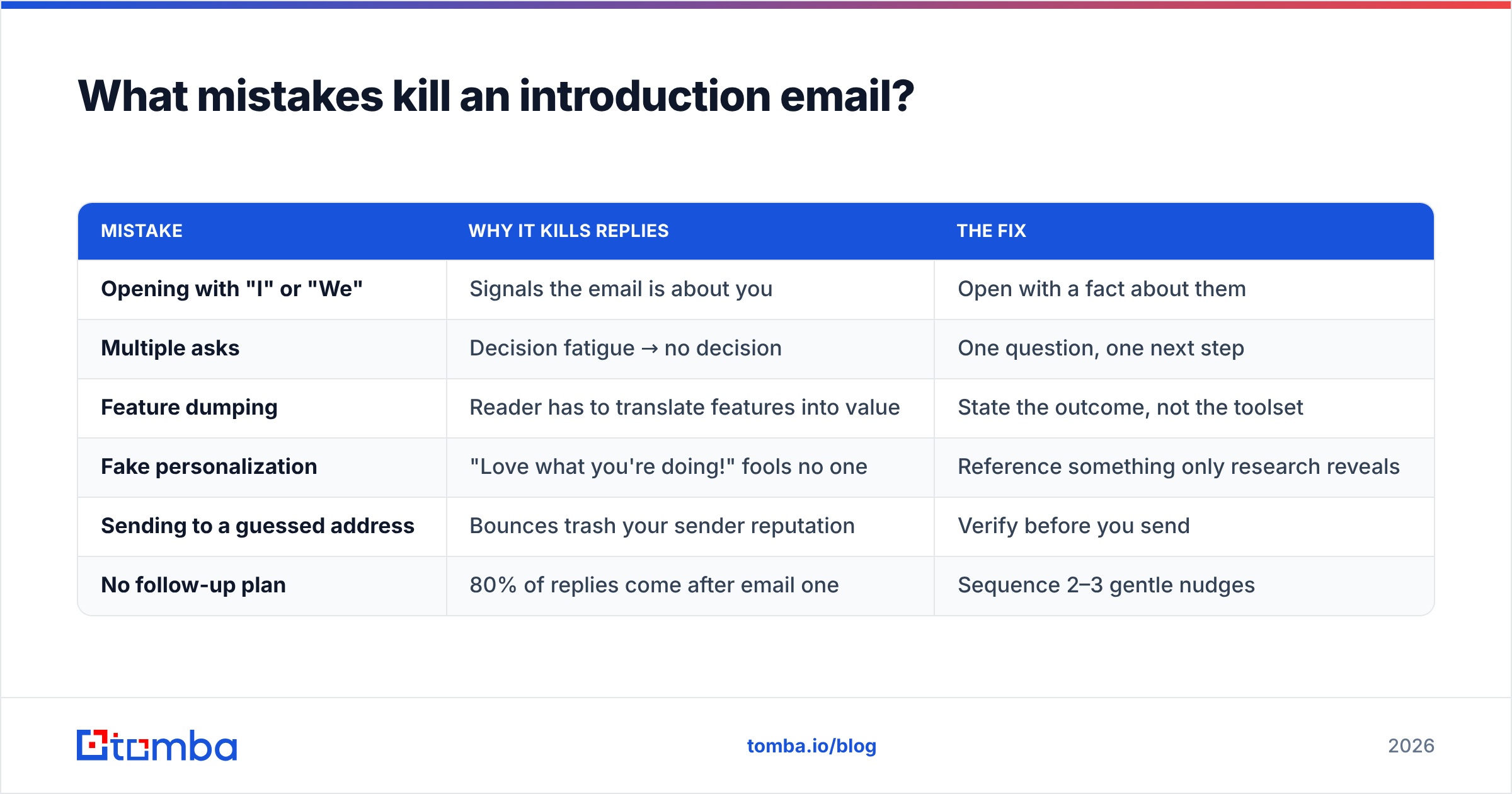
Most introduction emails fail for boring, fixable reasons. Here's what separates the deleted from the answered.
| Mistake | Why it kills replies | The fix |
|---|---|---|
| Opening with "I" or "We" | Signals the email is about you | Open with a fact about them |
| Multiple asks | Decision fatigue → no decision | One question, one next step |
| Feature dumping | Reader has to translate features into value | State the outcome, not the toolset |
| Fake personalization | "Love what you're doing!" fools no one | Reference something only research reveals |
| Sending to a guessed address | Bounces trash your sender reputation | Verify before you send |
| No follow-up plan | 80% of replies come after email one | Sequence 2–3 gentle nudges |
The last two are where technical and creative discipline meet. You can write a flawless email and still lose if it never arrives, or if you give up after a single send. A quick pass through a spam checker before your first campaign catches trigger words and formatting issues that route you straight to junk.
How do you make sure the email actually reaches the inbox?#
Copy gets the credit, but deliverability does the quiet work. An introduction email that lands in spam converts at exactly zero percent, no matter how good the writing is.
Three factors decide whether you reach the inbox:
- Address quality. Sending to invalid or catch-all addresses spikes your bounce rate, and mailbox providers read high bounces as a spam signal. Verifying addresses first protects your sender reputation — the single biggest lever on whether future emails get delivered at all.
- Authentication. SPF, DKIM, and DMARC records tell Gmail and Outlook you are who you claim to be. Check yours with a free SPF checker before you scale outreach.
- Sending behavior. New domains that suddenly blast hundreds of emails look like spammers. Warm up gradually and keep volume steady.
Google's own Postmaster guidelines spell out how spam rate and authentication feed into inbox placement — worth reading once before any serious campaign. And industry benchmarks from HubSpot consistently show that list quality, not clever copy, is the strongest predictor of engagement.
How do you find and verify the right contact?#
You can't introduce your company to someone whose email you don't have. This is the step most people fumble by either guessing formats or buying stale lists that bounce.
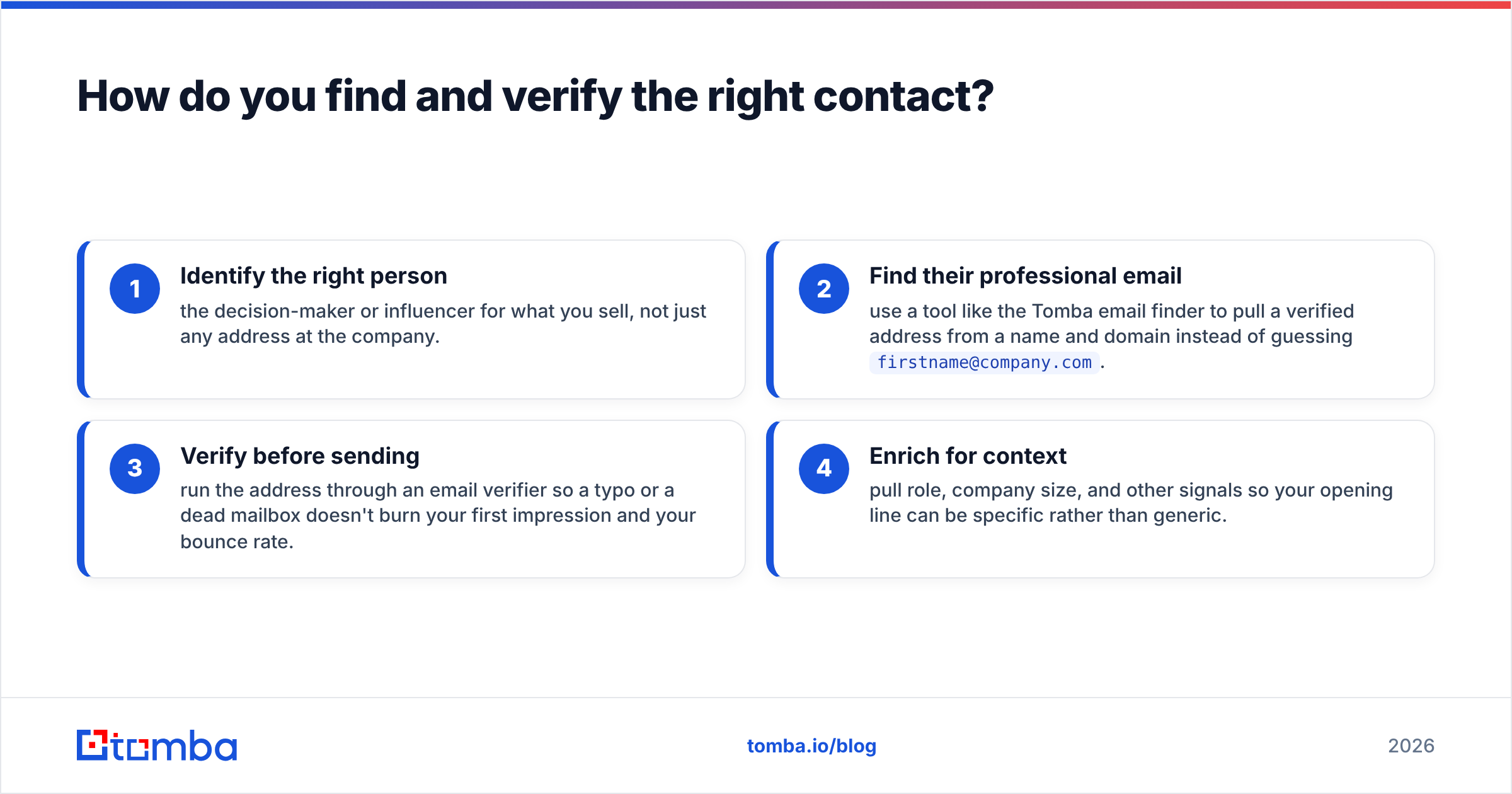
A cleaner workflow looks like this:
- Identify the right person — the decision-maker or influencer for what you sell, not just any address at the company.
- Find their professional email — use a tool like the Tomba email finder to pull a verified address from a name and domain instead of guessing
firstname@company.com. - Verify before sending — run the address through an email verifier so a typo or a dead mailbox doesn't burn your first impression and your bounce rate.
- Enrich for context — pull role, company size, and other signals so your opening line can be specific rather than generic.
This is where accuracy pays off directly. A researched, verified email to the right 50 people will beat a generic blast to 5,000 unverified addresses on every metric that matters — reply rate, meetings booked, and long-term domain health. If you're running outreach at volume, Tomba's bulk email finder handles the find-and-verify step for whole lists at once.
How does Tomba pricing fit a growing outreach effort?#
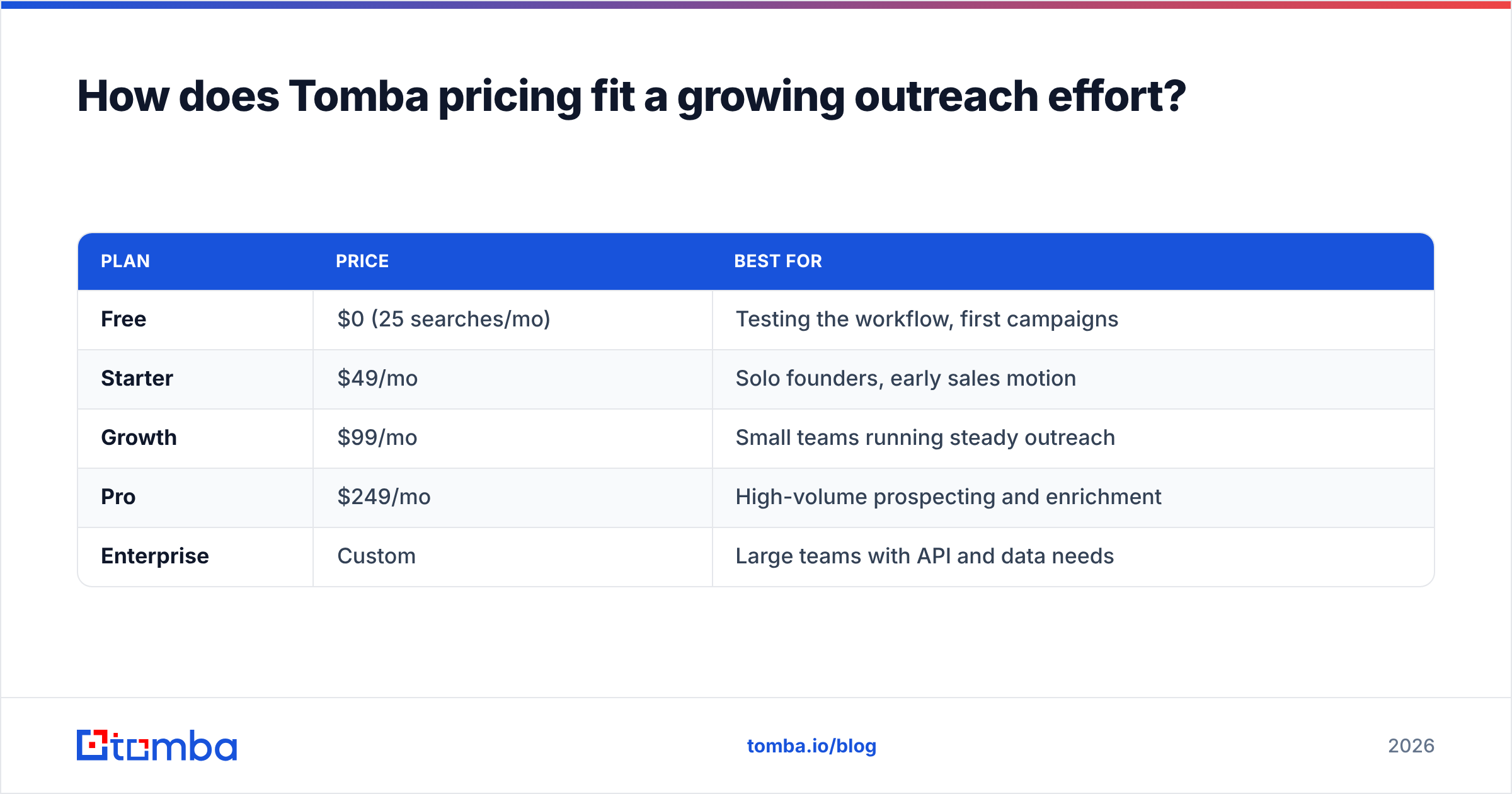
Cost scales with how much prospecting you do, so it helps to match a plan to your actual volume rather than overbuying. Here's how Tomba's tiers line up against typical use cases.
| Plan | Price | Best for |
|---|---|---|
| Free | $0 (25 searches/mo) | Testing the workflow, first campaigns |
| Starter | $49/mo | Solo founders, early sales motion |
| Growth | $99/mo | Small teams running steady outreach |
| Pro | $249/mo | High-volume prospecting and enrichment |
| Enterprise | Custom | Large teams with API and data needs |
The free tier is enough to prove the loop works — find a contact, verify it, send a tested introduction email, and watch whether replies come back. When they do, you scale the volume, not the guesswork. Full Tomba pricing is broken down by search and verification credits so you can size a plan to real numbers.
Frequently asked questions#
How many follow-ups should I send after an introduction email? Two to three, spaced three to five days apart. Most positive replies arrive after the first email, not on it. Keep each follow-up shorter than the last and add a new angle rather than repeating "just checking in."
Should I attach a brochure or deck to my first email? No. Attachments hurt deliverability and signal a hard sell before the prospect has agreed to anything. Offer to send materials after they express interest.
What's the best time to send a company introduction email? Mid-morning on Tuesday through Thursday tends to perform best across most B2B data, but your audience's timezone and role matter more than any universal rule. Test and let your own reply data decide.
How personal does the opening line really need to be? Personal enough that it could only have been written to that one person. A recent funding round, a job posting, a product launch — anything that proves you looked. Generic flattery is worse than no personalization at all.
Start with the right inbox#
A great introduction email is wasted on the wrong address. Before you polish another draft, make sure it's going to a real person who can actually say yes. Use the Tomba Email Finder to pull verified, deliverable addresses from a name and domain — then spend your energy on the one thing that actually earns the reply: writing like you did your homework. Find the contact, verify it, and let your introduction do its job.
Related guides#
Ready to find emails that actually work?
Join 150,000+ professionals who stopped guessing and started sending. Free credits on signup — no credit card required.
Get the Tomba newsletter
Practical outbound tactics and product updates — once every two weeks.
About the author