Company Leads in 2026: How to Find, Verify, and Convert Them
Company leads are only as good as the data behind them. Here's how to source, verify, and enrich B2B company leads in 2026 without wasting budget on stale lists.
Company leads are the raw material of every B2B pipeline — and most teams are working with material that's already rusted. A list you bought six months ago is decaying at roughly 2-3% per month as people change jobs, companies rebrand, and inboxes go dark. If you want a pipeline that actually converts in 2026, the work isn't "get more leads." It's "source the right accounts, verify the contact data, and enrich it with signals that tell you who to call first."
This guide walks through the full loop: what a company lead actually is, where to find them, how to keep the data clean, and how to turn a flat list into a ranked queue your reps will thank you for.
TL;DR#
- A company lead is an account plus a reachable human — the firmographics tell you if you should sell, the verified contact tells you how.
- Buying a giant static list is the slowest-converting option. Fresh, verified, enriched data beats volume every time.
- Verification is non-negotiable: bounce rates above 3-5% quietly wreck sender reputation and hide your good emails in spam.
- Signals decide sequence. Job changes, funding, hiring, and tech-stack shifts tell you which company leads are warm right now.
- The efficient stack is a targeted finder + verifier + enrichment layer, not a single dusty CSV.
What is a company lead?#
A company lead is a business account you've identified as a potential customer, paired with at least one contact you can actually reach. Think of it like a house you want to sell to: the firmographic data (industry, size, revenue, location) tells you whether the house is in your market, and the contact data (a verified email, a direct phone number, a LinkedIn profile) is the front door you knock on. A list of company names with no door is just a phone book.
Two things separate a usable company lead from noise:
- Fit — does the account match your ideal customer profile (ICP)? Industry, headcount, revenue band, geography, and tech stack all feed this.
- Reachability — do you have a verified way to contact a real decision-maker, not a
info@catch-all that no human reads?
Most teams over-index on fit and ignore reachability, then wonder why a "10,000-lead" campaign produced 40 replies. The data underneath matters more than the row count.
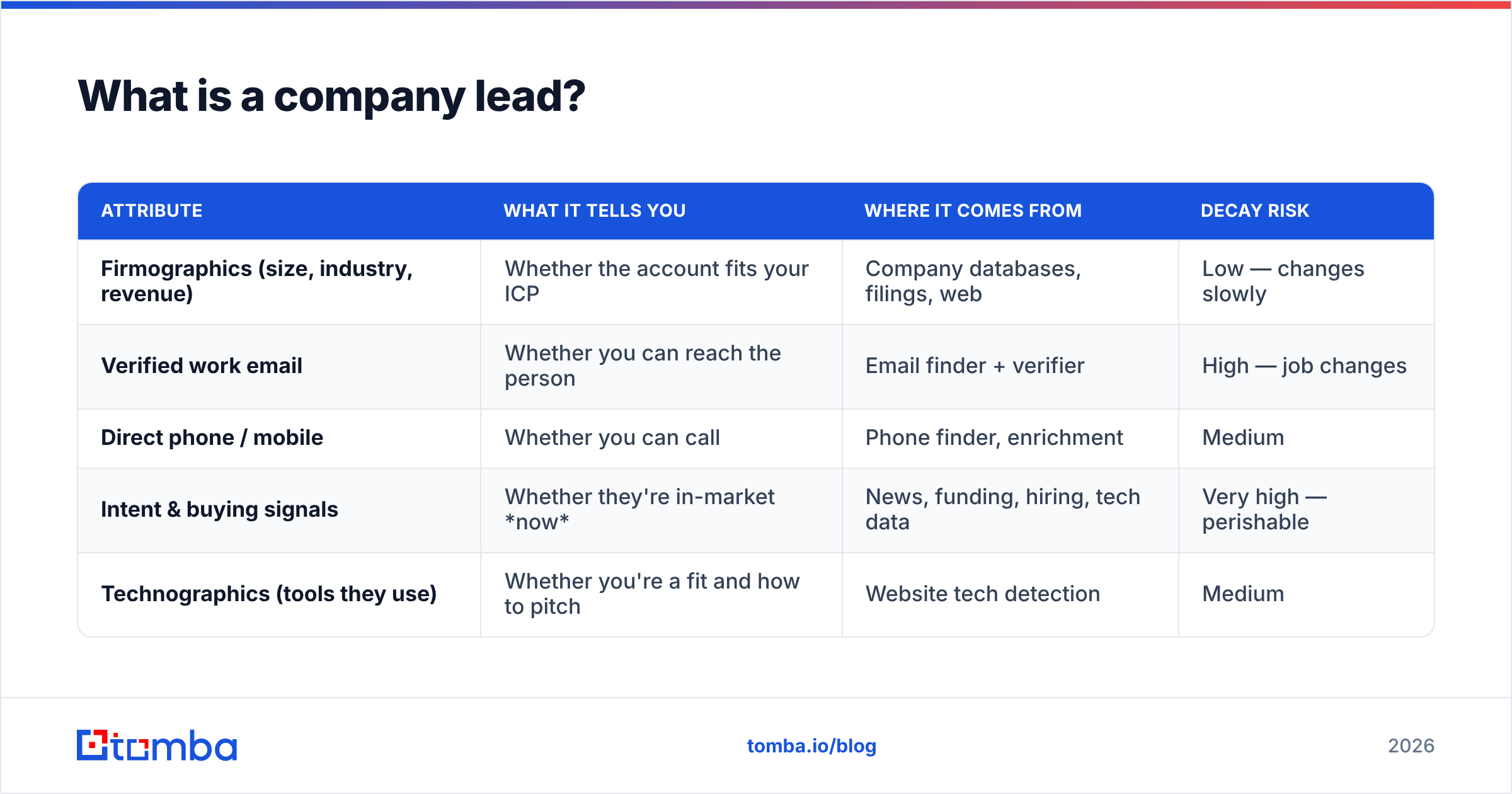
Here's how the core attributes stack up by what they're actually good for:
| Attribute | What it tells you | Where it comes from | Decay risk |
|---|---|---|---|
| Firmographics (size, industry, revenue) | Whether the account fits your ICP | Company databases, filings, web | Low — changes slowly |
| Verified work email | Whether you can reach the person | Email finder + verifier | High — job changes |
| Direct phone / mobile | Whether you can call | Phone finder, enrichment | Medium |
| Intent & buying signals | Whether they're in-market now | News, funding, hiring, tech data | Very high — perishable |
| Technographics (tools they use) | Whether you're a fit and how to pitch | Website tech detection | Medium |
Notice the pattern: the attributes that move the needle most (signals, verified email) are also the ones that go stale fastest. That's the whole reason a static purchased list underperforms.
Where do you find company leads in 2026?#
There's no single best source — there's a best combination. Each channel is blind to what the others see, so stacking two or three gives you coverage one alone can't.
- Company databases and B2B data providers. Filter by firmographics to build a target account list fast. This is your ICP net. Providers like BookYourData and Tomba's own B2B database let you slice by industry, size, and geography before you spend a single sales hour.
- Domain search. When you already know the target companies, find emails by domain to pull every reachable contact and their role at that company — no guessing at formats.
- Website visitor identification. Some of your warmest company leads already visited your pricing page and left anonymously. Reveal that anonymous traffic and you're contacting accounts that already know you exist.
- LinkedIn and social. Great for identifying the right person by title. Pair it with a LinkedIn email extractor to turn a profile into a reachable contact instead of an InMail lottery ticket.
- Inbound and content. Slower, but the highest intent. Anyone who fills a form or downloads a guide is a company lead that raised its own hand.
The practical workflow: use a database to define the account universe, use domain search or a finder to get contacts inside those accounts, and layer visitor reveal + social to catch the warm ones the net missed.
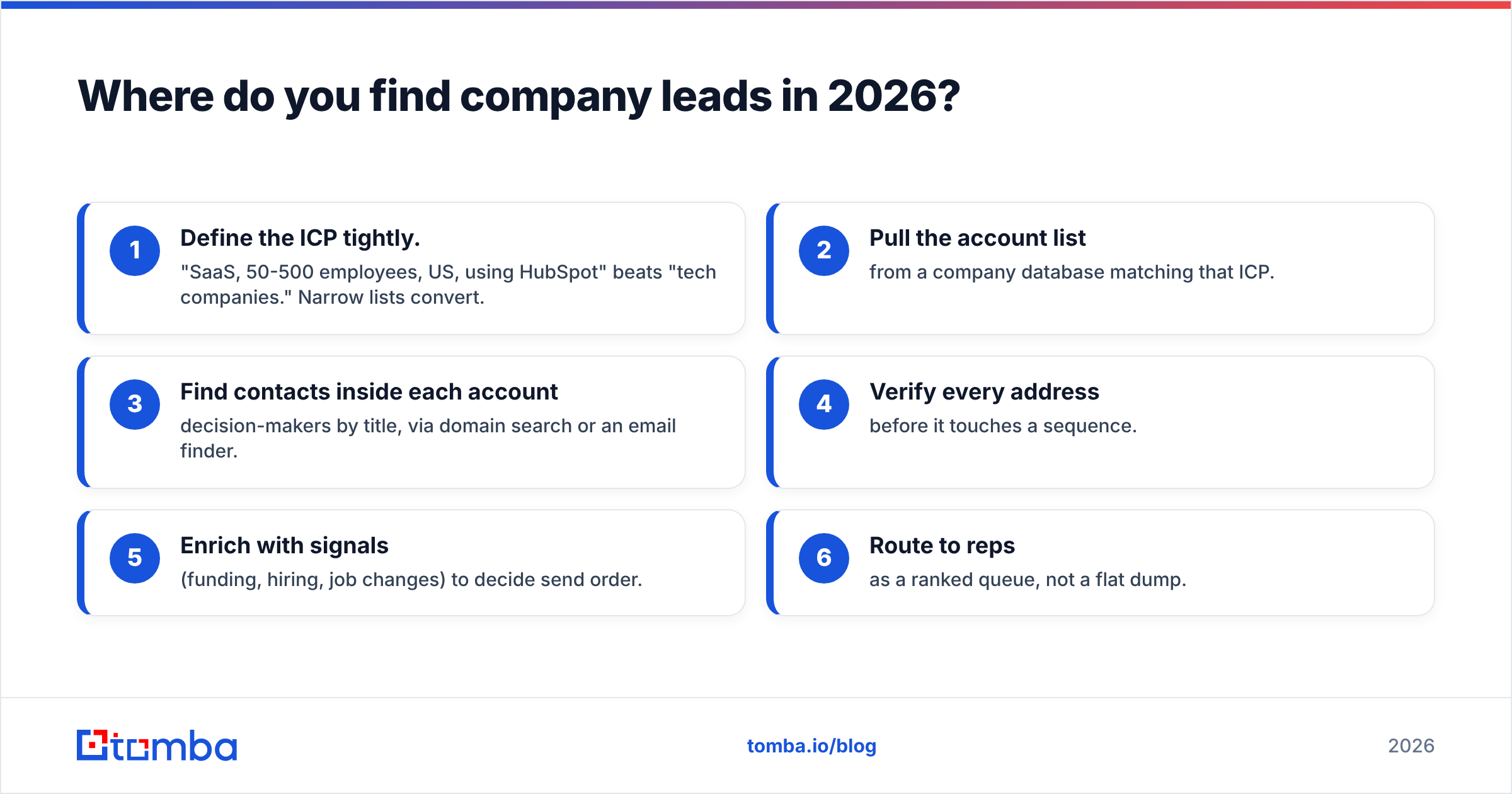
A simple sourcing sequence that works#
- Define the ICP tightly. "SaaS, 50-500 employees, US, using HubSpot" beats "tech companies." Narrow lists convert.
- Pull the account list from a company database matching that ICP.
- Find contacts inside each account — decision-makers by title, via domain search or an email finder.
- Verify every address before it touches a sequence.
- Enrich with signals (funding, hiring, job changes) to decide send order.
- Route to reps as a ranked queue, not a flat dump.
Should you buy company lead lists?#
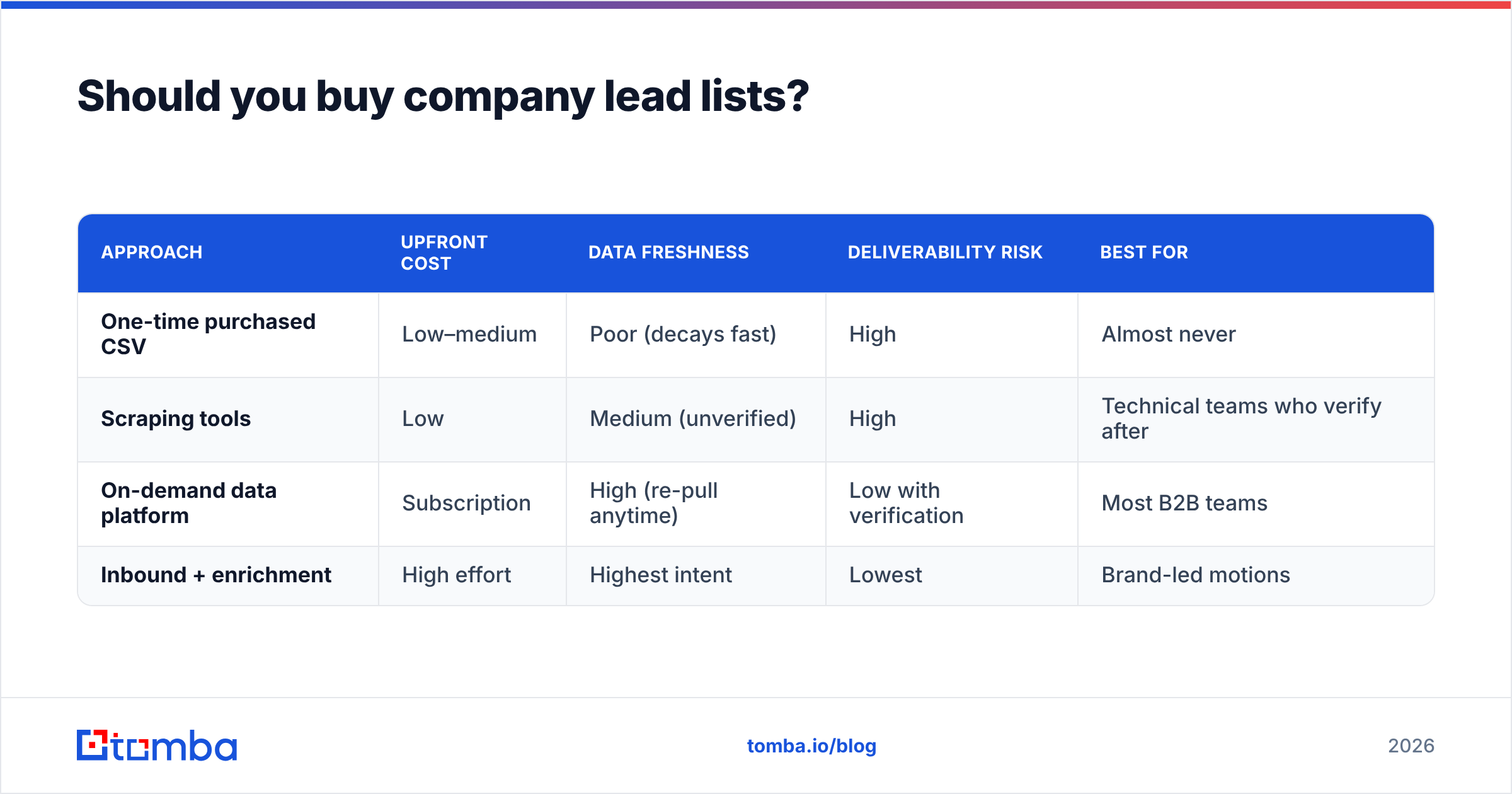
Short answer: buy access to fresh, filterable data — don't buy a frozen CSV. The distinction matters. A modern data platform lets you pull a targeted, verified slice on demand and re-pull it when it decays. A one-time list purchase is stale the day it lands in your inbox and gets staler every week.
The math is unforgiving. A B2B database contact decays at roughly 2-3% a month. A list bought in January is 15-20% wrong by summer. Every wrong row is a bounce, and bounces don't just fail silently — they damage your sender reputation, which quietly buries your good emails in spam. One bad list can poison a clean domain.
| Approach | Upfront cost | Data freshness | Deliverability risk | Best for |
|---|---|---|---|---|
| One-time purchased CSV | Low–medium | Poor (decays fast) | High | Almost never |
| Scraping tools | Low | Medium (unverified) | High | Technical teams who verify after |
| On-demand data platform | Subscription | High (re-pull anytime) | Low with verification | Most B2B teams |
| Inbound + enrichment | High effort | Highest intent | Lowest | Brand-led motions |
If you do inherit a list — from an event, a partner, an old export — treat it as raw ore, not finished product. Run it through a bulk verify pass before it goes anywhere near a sequence.
How do you keep company lead data clean?#
Verification is the step everyone skips and everyone regrets. Sending to an unverified list is like mailing letters to addresses you copied off a whiteboard from last year — a chunk bounce back, and the post office starts treating all your mail as suspect.
Here's the hygiene loop that keeps a company lead database healthy:
- Verify on entry. Every new email runs through an email verifier before it's stored. Catch invalid and risky addresses at the door.
- Handle catch-all domains explicitly. Many company domains accept every address, so a "valid" result is misleading. A dedicated catch-all verifier tells you whether the specific mailbox actually exists.
- Re-verify on a schedule. Because of decay, re-run your active list quarterly. It's cheaper than the reputation hit from a spike in bounces.
- Deduplicate ruthlessly. The same person shows up three times across imports. A remove-duplicates pass keeps your counts honest and your reps from triple-touching one prospect.
- Watch the bounce rate. Keep it under 3-5%. Above that, pause and clean before you send another batch.
Clean data isn't a one-time project — it's a maintenance habit. The teams with the best reply rates aren't the ones with the biggest lists; they're the ones whose small lists are almost entirely deliverable.

How do you prioritize company leads with signals?#
Not all fit-matched company leads are equal — some are in-market this week and most aren't. Buying signals are how you tell the difference, and they're the highest-leverage thing you can add to a raw list.
The signals that reliably indicate a company lead is warm:
- Job changes. A new VP or director in your buyer role is re-evaluating vendors in their first 90 days. This is the single strongest B2B trigger — reach out fast.
- Funding rounds. Fresh capital means new budget and new hiring. A Series A/B announcement is a green light.
- Hiring surges. A company posting 10 roles on your target team is scaling that function — and scaling means tooling gaps.
- Tech-stack shifts. If they just adopted a tool you complement (or replace), that's a timed opening. Detect it with a website tech stack checker.
- Website visits. Anonymous traffic on your pricing or demo page is intent you can act on today via visitor identification.
- Content engagement. Repeat opens, replies, or downloads mark a company lead that's self-selecting into a conversation.
Once you have signals, enrich each lead so your CRM shows not just who but why now. Then sequence by heat: warm signals get a call and a personalized email this week; cold-but-fit leads get a lighter nurture. A ranked queue turns the same list into two or three times the meetings, because rep hours land where the intent is.
What does an efficient company lead stack look like?#
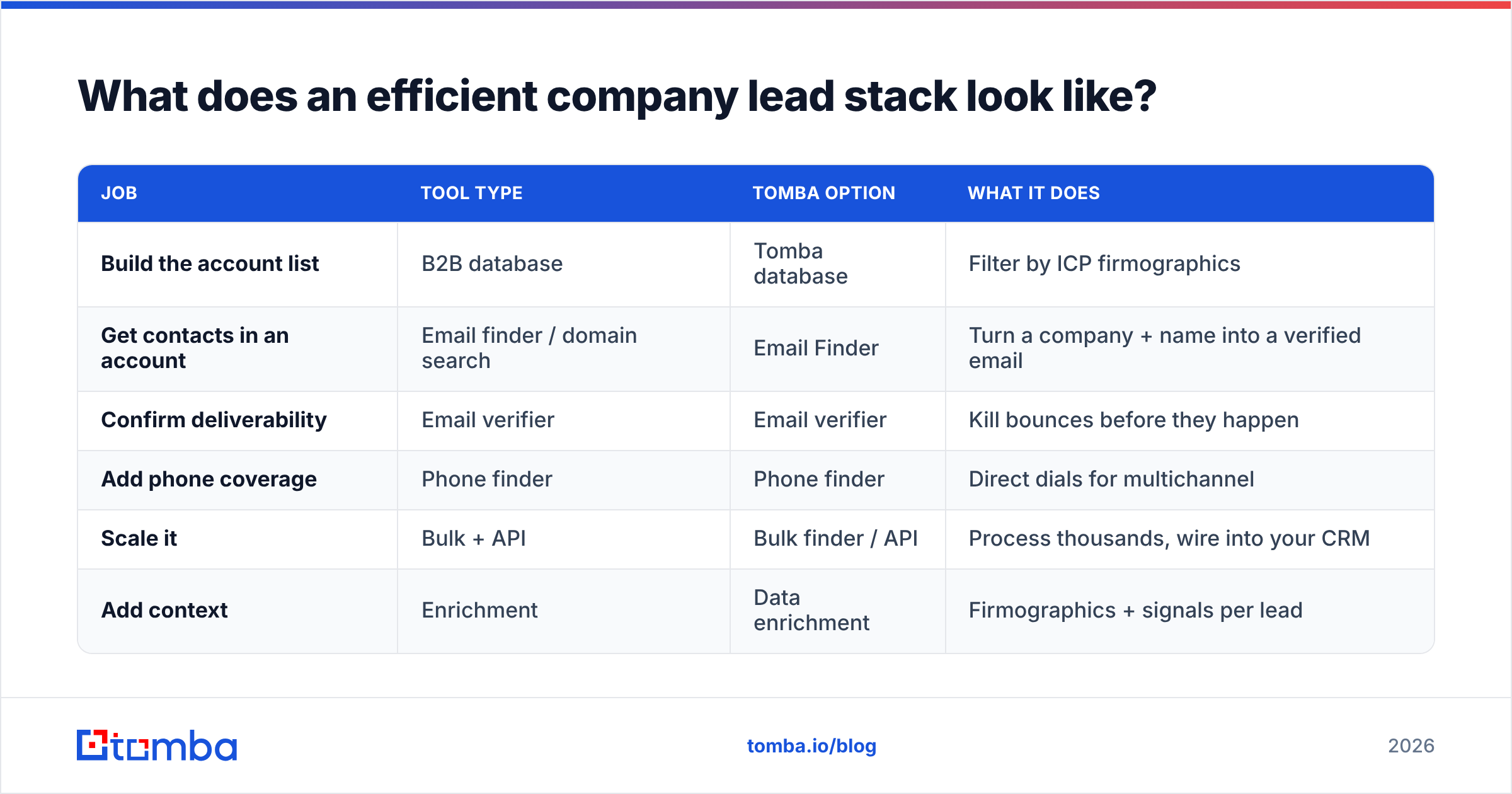
You don't need a dozen tools. You need three jobs done well: find, verify, enrich. Here's a lean stack and where each piece fits.
| Job | Tool type | Tomba option | What it does |
|---|---|---|---|
| Build the account list | B2B database | Tomba database | Filter by ICP firmographics |
| Get contacts in an account | Email finder / domain search | Email Finder | Turn a company + name into a verified email |
| Confirm deliverability | Email verifier | Email verifier | Kill bounces before they happen |
| Add phone coverage | Phone finder | Phone finder | Direct dials for multichannel |
| Scale it | Bulk + API | Bulk finder / API | Process thousands, wire into your CRM |
| Add context | Enrichment | Data enrichment | Firmographics + signals per lead |
For pricing, Tomba runs a free tier at 25 searches/month, then Starter at $49/mo, Growth at $99/mo, and Pro at $249/mo — full Tomba pricing is on the site, and the free tier is enough to test the whole loop on real accounts before you commit.
The integration matters as much as the tools. If your finder, verifier, and enrichment don't push straight into your CRM, someone is copy-pasting rows at midnight. Native HubSpot and Salesforce connections — plus Zapier for everything else — mean a company lead flows from discovery to a rep's queue without a spreadsheet in the middle. If you'd rather trust a third-party read on quality before you buy, vendor-review sites like G2 collect real user data on accuracy and support across the category.
How many company leads do you actually need?#
Fewer than you think, if they're clean. A common mistake is chasing volume: teams brag about 50,000 leads and forget that if 40% bounce and 90% aren't in-market, they're really working 3,000 usable, timed contacts — and drowning them in noise.
Work backward from your goal instead. If a rep needs 5 meetings a week, and your sequence books a meeting per ~30 verified, in-ICP contacts, that's 150 quality company leads per rep per week — not 15,000 random ones. Quality data lets a small, focused list outperform a bloated one, and it protects the sender reputation that keeps your whole program deliverable. Build the tight list, verify it, enrich it, and refill it monthly to beat decay. That cadence — not a mega-purchase — is what a durable pipeline looks like.
Turn clean company leads into pipeline#
The teams winning in 2026 aren't the ones with the longest lists — they're the ones whose company leads are verified, enriched, and ranked by intent. Start by defining a tight ICP, pull a targeted account list, and use the Tomba Email Finder to turn those accounts into verified, reachable contacts your reps can act on today. Run the free tier against your real target accounts first: if the deliverability and match rate hold up on your own market, you'll feel the difference in reply rates within a single campaign — and you'll never go back to buying a frozen CSV again.
Related guides#
Ready to find emails that actually work?
Join 150,000+ professionals who stopped guessing and started sending. Free credits on signup — no credit card required.
Get the Tomba newsletter
Practical outbound tactics and product updates — once every two weeks.
About the author