Connection Email: How to Write One That Actually Gets a Reply
A connection email only works when it feels one-to-one. Here are the templates, subject lines, and follow-up timing that turn a cold intro into a real conversation.
Connection Email: How to Write One That Actually Gets a Reply
A connection email is the first message you send to someone you don't yet know but want a relationship with — a prospect, a hiring manager, a potential partner, a founder you admire. Done right, it opens a door. Done wrong, it's just another line in a crowded inbox that gets archived in two seconds.
Most connection emails fail for the same three reasons: they're all about the sender, they read like a template, and they ask for too much too soon. This guide fixes all three with structures, subject lines, real templates, and a follow-up cadence you can copy today.
TL;DR#
- A connection email is a short, personalized first-touch message that aims to start a relationship, not close a deal.
- Winning emails follow a simple arc: relevant hook, one line of credibility, a specific reason for reaching out, and a low-friction ask.
- Keep it under 120 words, use a subject line that promises value or curiosity, and send from a warmed-up domain.
- Personalization at the first line drives replies more than any other single factor.
- Getting the right email address is half the battle — verify before you send so bounces don't wreck your sender reputation.
What is a connection email?#
Think of a connection email like introducing yourself at a conference. You wouldn't walk up to a stranger and immediately pitch a 12-month contract. You'd find common ground, say something useful, and suggest a next step that costs them almost nothing — "want to grab coffee?"
A connection email does the same thing in writing. It's a first-touch message designed to earn a reply and start a two-way conversation. That's the whole job. It is not a sales pitch, not a newsletter, and not a resume dump.
Connection emails show up across many situations:
- Sales prospecting — reaching a decision-maker who has never heard of you.
- Networking — connecting with a peer, mentor, or industry leader.
- Job outreach — messaging a hiring manager or a team you'd love to join.
- Partnerships — proposing a collaboration between two companies.
- Post-event follow-up — continuing a conversation you started in person or on LinkedIn outreach.
- Warm re-engagement — reviving a contact who went quiet months ago.
The mechanics are the same in every case. Only the hook and the ask change.

What makes a connection email actually work?#
The best connection emails share a recognizable structure. You can memorize it in a minute:
- Hook (line 1): Something specific about them — a recent post, a launch, a mutual contact, a shared alma mater.
- Bridge (line 2): Why that hook made you reach out. This connects their world to yours.
- Credibility (line 3): One sentence that says why you're worth a reply, ideally with a proof point.
- Ask (line 4): A single, low-effort request. A yes/no question beats "let's hop on a 30-minute call."
Here's why this order matters. If you lead with yourself, the reader has no reason to keep going. If you open with something about them, you've earned the next three seconds — and three seconds is all you need to get to the ask.
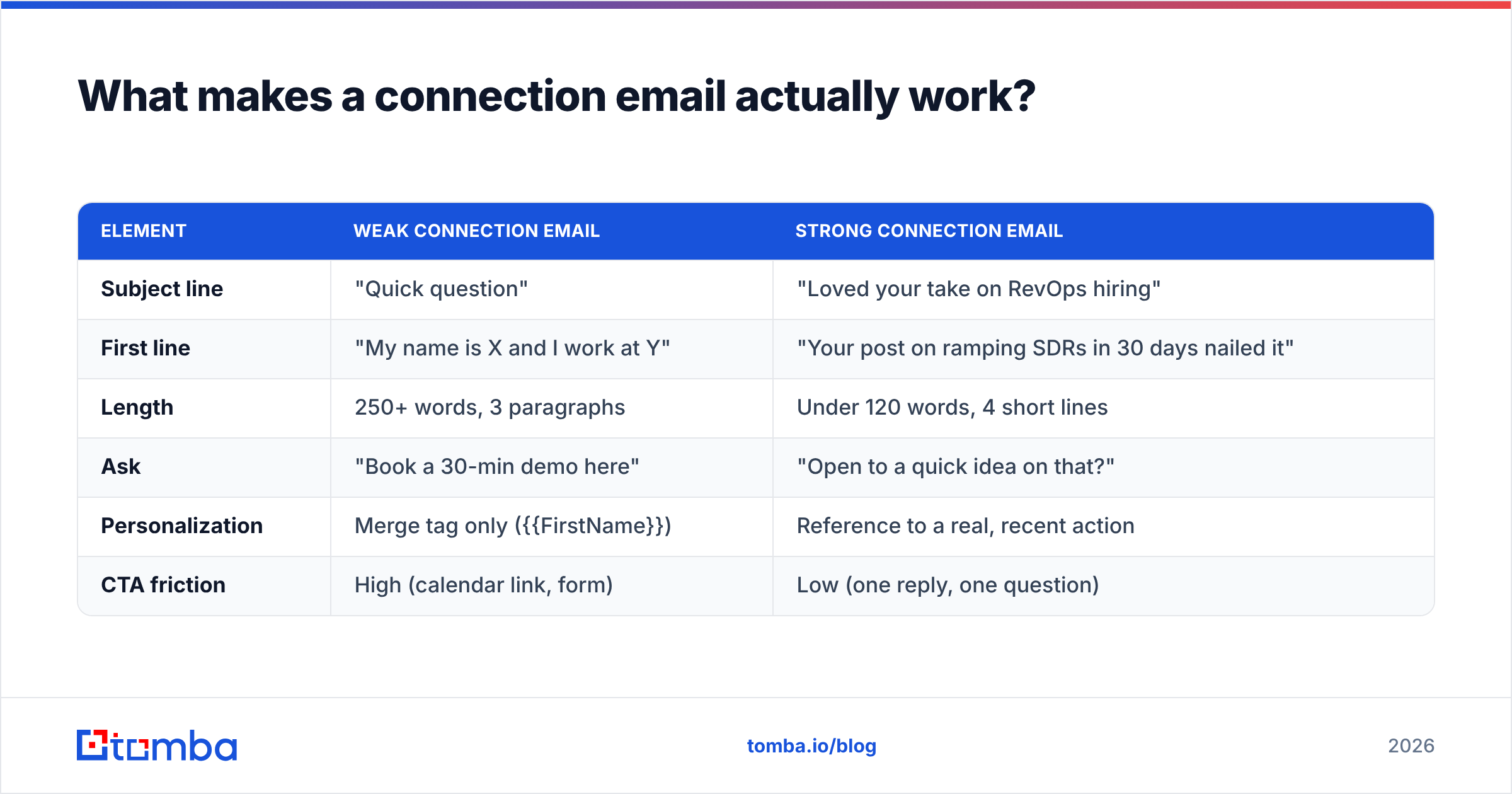
Below is a quick comparison of a weak connection email against a strong one, so the difference is concrete rather than abstract.
| Element | Weak connection email | Strong connection email |
|---|---|---|
| Subject line | "Quick question" | "Loved your take on RevOps hiring" |
| First line | "My name is X and I work at Y" | "Your post on ramping SDRs in 30 days nailed it" |
| Length | 250+ words, 3 paragraphs | Under 120 words, 4 short lines |
| Ask | "Book a 30-min demo here" | "Open to a quick idea on that?" |
| Personalization | Merge tag only ({{FirstName}}) | Reference to a real, recent action |
| CTA friction | High (calendar link, form) | Low (one reply, one question) |
Notice that the strong version doesn't sell anything. It earns a conversation. The sale comes later, once trust exists.
What subject line should a connection email use?#
Your subject line has one job: get the email opened without overpromising. According to HubSpot's email research, personalized subject lines meaningfully lift open rates, and shorter lines tend to outperform long ones on mobile.
Reliable subject-line patterns for a connection email:
- The reference: "Loved your talk at SaaStr"
- The mutual tie: "Sarah Chen suggested I reach out"
- The curiosity gap: "A question about your Q3 hiring plan"
- The value tease: "An idea to cut your onboarding time"
- The plainly human: "Reaching out from one PLG nerd to another"
Avoid anything that smells like automation — "Increase your revenue by 300%", ALL CAPS, or emoji spam. If you want to pressure-test options before you hit send, run a few through a subject line generator and then a subject line tester to catch spam triggers.
What are proven connection email templates?#
Steal these, then swap in real details. The brackets are where personalization lives — never send them blank.
1. The cold sales intro
Subject: Your post on [specific topic]
Hi [Name],
Your breakdown of [specific thing they published] stood out — especially the point about [detail].
I work with [type of company] on [outcome], and we recently helped [peer company] [concrete result]. Given [observation about their company], I thought there might be a fit.
Worth a quick note back to see if it's relevant?
[Your name]
2. The networking reach
Subject: One [industry] person to another
Hi [Name],
I've followed your work on [topic] for a while and finally decided to say hello instead of just lurking.
I'm building [what you do] and would value your perspective on [specific question]. No pitch — genuinely curious how you think about it.
Open to a short exchange?
[Your name]
3. The warm referral
Subject: [Mutual contact] pointed me your way
Hi [Name],
[Mutual contact] mentioned you're the person thinking hardest about [problem] at [company], and suggested we connect.
I'm working on [related thing] and would love 10 minutes of your read on it. Happy to share something useful in return.
Does a quick call next week work?
[Your name]
4. The post-event follow-up
Subject: Great chatting at [event]
Hi [Name],
Really enjoyed our conversation about [topic] at [event] — your point on [detail] stuck with me.
You mentioned [challenge]. I've got a resource that might help; want me to send it over?
[Your name]
Each one is short, centered on the recipient, and asks for a reply rather than a commitment. If you want more ready-to-use frameworks, browse Tomba's library of cold email templates and adapt the tone to your audience.

How long should a connection email be, and when should you follow up?#
Short. Aim for 50–120 words. On mobile, that's a message someone can read in a single glance without scrolling. Every extra sentence is a new reason to bail.
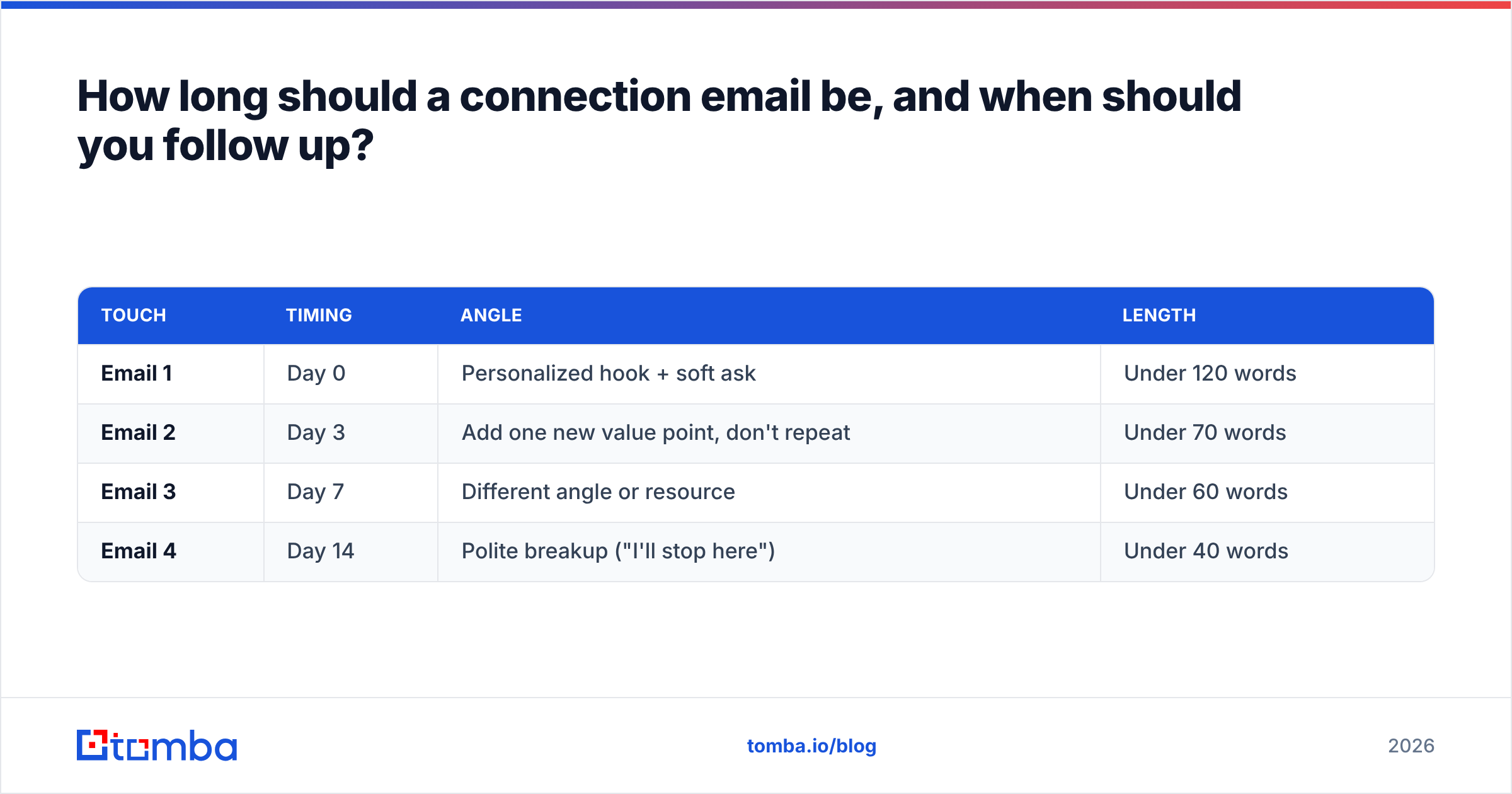
Follow-up is where most people quietly lose the game. A single email rarely lands — replies compound across a short, polite sequence. Here's a cadence that respects the reader:
| Touch | Timing | Angle | Length |
|---|---|---|---|
| Email 1 | Day 0 | Personalized hook + soft ask | Under 120 words |
| Email 2 | Day 3 | Add one new value point, don't repeat | Under 70 words |
| Email 3 | Day 7 | Different angle or resource | Under 60 words |
| Email 4 | Day 14 | Polite breakup ("I'll stop here") | Under 40 words |
Two rules keep this from feeling like nagging. First, never send a bare "just bumping this to the top of your inbox" — add a reason to reply each time. Second, stop at four. If someone hasn't answered by the breakup email, more messages only hurt your reputation.
Why does deliverability decide whether your connection email is even seen?#
Here's the part nobody wants to hear: the most perfectly written connection email in the world is worthless if it lands in spam or bounces. Before you obsess over copy, get the plumbing right.
Three things matter most:
- Verified addresses. Sending to bad addresses spikes your bounce rate, and mailbox providers read that as a spammer signal. Run every list through an email verifier first, and check risky domains with a catch-all verifier.
- Sender reputation. A cold domain that suddenly blasts 500 emails looks exactly like an attacker. Warm up gradually and monitor your sender reputation so you don't burn the domain you'll rely on for years.
- Authentication. Make sure your SPF, DKIM, and DMARC records are set. A quick pass with an SPF checker catches the most common misconfiguration.
You can validate the health of your setup on independent platforms too — vendor comparison sites like G2 list deliverability tools with real user reviews if you want a second opinion beyond your own testing.
How do you find and verify the right email address?#
You can't send a connection email to an address you don't have — and guessing wastes time and torches deliverability. This is where a dedicated finder earns its keep.
A workflow that scales without sacrificing accuracy:
- Identify the person on LinkedIn, a company site, or an event list.
- Find the address by name and domain using an email finder, or pull a whole team at once with domain search.
- Verify it before sending so you never eat an avoidable bounce.
- Enrich the record with role, company size, and other context so your hook writes itself. Tomba's data enrichment fills in the gaps.
- Scale carefully — for larger campaigns, a bulk email finder handles hundreds of lookups while keeping verification in the loop.
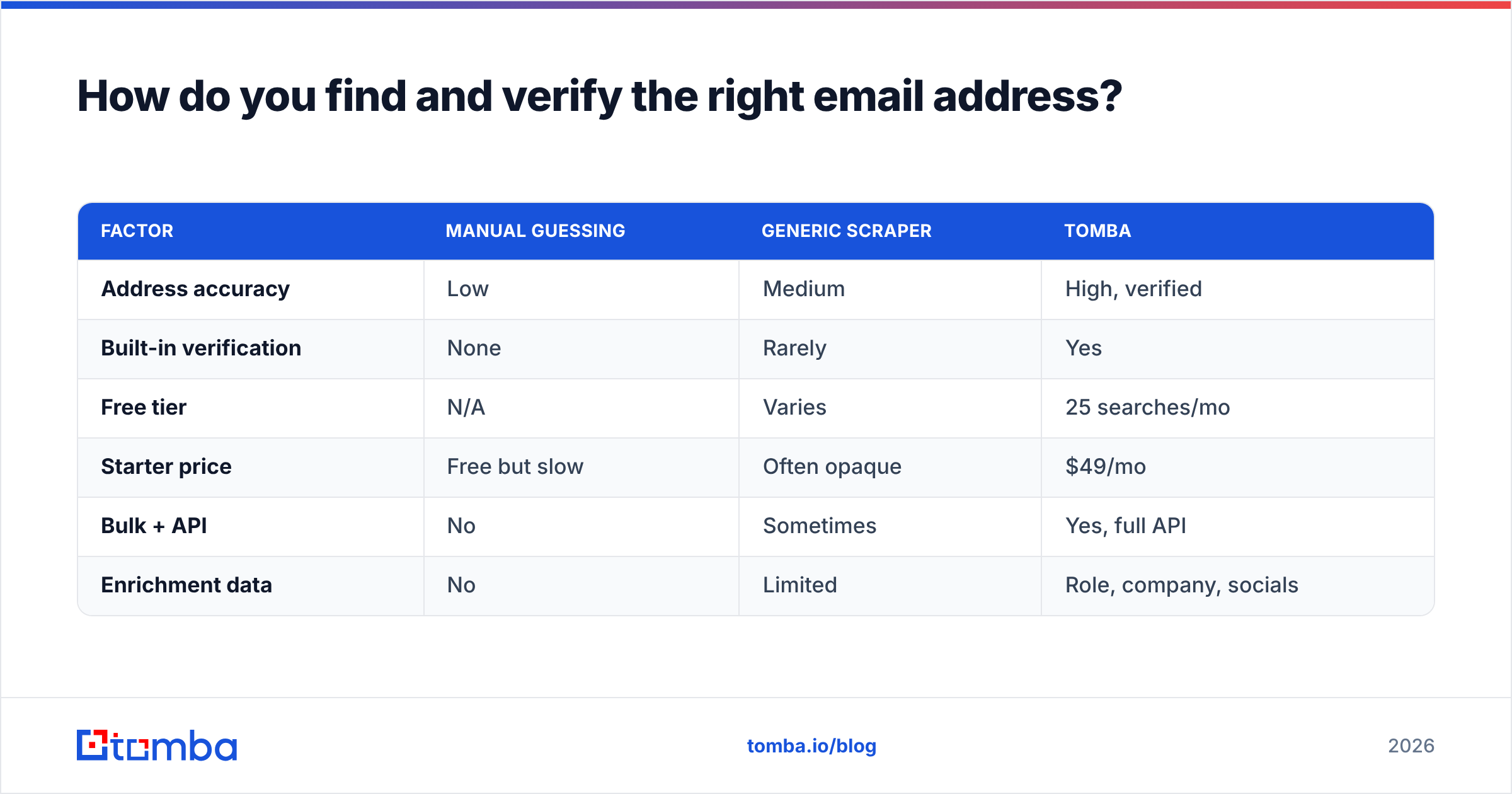
Here's how Tomba stacks up against the guess-and-hope approach and generic scrapers on the factors that actually affect your reply rate:
| Factor | Manual guessing | Generic scraper | Tomba |
|---|---|---|---|
| Address accuracy | Low | Medium | High, verified |
| Built-in verification | None | Rarely | Yes |
| Free tier | N/A | Varies | 25 searches/mo |
| Starter price | Free but slow | Often opaque | $49/mo |
| Bulk + API | No | Sometimes | Yes, full API |
| Enrichment data | No | Limited | Role, company, socials |
For teams comparing tools on price and limits, the transparent Tomba pricing tiers run from a free plan (25 searches/month) up through Starter at $49/mo, Growth at $99/mo, and Pro at $249/mo, with custom Enterprise plans for high-volume outreach.
What are the most common connection email mistakes?#
Even good writers trip over these. Scan the list before every send:
- Leading with yourself. "I'm reaching out because I…" — delete it. Start with them.
- The fake compliment. "Love what you're doing!" with no specifics reads as automation. Reference a real detail or skip it.
- Asking for too much. A 30-minute call from a stranger is a big ask. Trade it for a one-line question.
- No follow-up. One email and silence isn't rejection — it's usually just timing. Follow the cadence.
- Sending unverified. Every bounce chips away at the domain you need for the next thousand emails.
- Wall of text. If it needs scrolling on a phone, it's too long.
Fix these six and your reply rate climbs before you've touched a single word of the actual pitch.
Frequently asked questions#
How is a connection email different from a cold email? A cold email is any unsolicited first message, often sales-focused. A connection email is a specific kind of cold (or warm) email whose only goal is to start a relationship, not to sell. Every connection email is a first touch; not every cold email tries to build a relationship first.
What's the ideal send time? Mid-morning on Tuesday through Thursday tends to perform well for B2B, but your audience's timezone and habits matter more than any universal rule. Test and let your own reply data decide.
Should I include a link in the first email? Keep it minimal. One relevant link is fine; a calendar link, an attachment, and three CTAs together look like spam and hurt deliverability.
How many follow-ups are too many? Four total touches is a safe ceiling for a connection email. Beyond that, you're more likely to annoy than convert.
Start the conversation with the right address#
A great connection email is short, specific, and built around the person you're writing to. But none of that matters if the message never arrives. Get the fundamentals right — a verified address, a warm domain, and a hook that proves you did your homework.
The fastest way to do that at scale is Tomba Email Finder. Find professional email addresses by name, company, or domain, verify them in the same flow, and enrich each contact with the context that makes your first line write itself. Start on the free tier with 25 searches a month, and only upgrade when your outreach is already working.
Write the email like a human. Let Tomba handle the plumbing.
Related guides#
Ready to find emails that actually work?
Join 150,000+ professionals who stopped guessing and started sending. Free credits on signup — no credit card required.
Get the Tomba newsletter
Practical outbound tactics and product updates — once every two weeks.
About the author