ContactOut vs Lead Kahuna 2026: Which Prospecting Tool Wins?
ContactOut pulls contacts off LinkedIn profiles. Lead Kahuna scrapes local business listings. They solve different problems — and neither is the cheapest way to get verified B2B emails at volume.
TL;DR
- ContactOut is a LinkedIn-first contact finder. You browse a profile, the extension surfaces personal and work emails plus phone numbers. It is built for recruiters and SDRs who live inside LinkedIn and Recruiter.
- Lead Kahuna is a local-lead scraper. It pulls business listings from Google Maps, Yellow Pages, and similar directories, then tries to attach a website, an email, and a phone number. It is built for agencies selling to SMBs.
- They are not really competitors — they overlap for maybe 20% of use cases. Picking the "winner" without naming your ICP is a mistake.
- Cost structure differs sharply: ContactOut is per-seat SaaS with credit ceilings; Lead Kahuna has historically leaned on one-time/lifetime licensing with your own scraping throughput.
- If your actual job is "turn a list of companies and names into verified, deliverable B2B emails at volume, via API", neither tool is the natural fit — a dedicated email finder with a verification layer costs less and fails less.
What problem is each tool actually solving?#
Start here, because the entire comparison collapses if you skip it.
ContactOut (contactout.com) is a contact-enrichment layer bolted onto LinkedIn. Its core motion: you find a person on LinkedIn — or in LinkedIn Recruiter, or in a saved list — and ContactOut reveals contact details it has previously indexed for that person. Its differentiator has always been personal email coverage, which is why recruiting teams adopted it early. Recruiters need to reach someone who might leave their job next month; a work email is a wasting asset.
Lead Kahuna (leadkahuna.com) comes from a completely different tradition: local lead generation. You tell it "dentists in Phoenix" or "roofers in Manchester," and it walks directory sources — Google Maps, business listings, company websites — collecting rows: business name, site, phone, and whatever email it can scrape or guess from the site. Its buyers are typically agencies, freelancers, and SMB service sellers who want a list of 500 plumbers by Thursday.
So: ContactOut answers "what is this specific person's email?" Lead Kahuna answers "who are all the businesses of type X in place Y?"
If you get this wrong you will buy the wrong tool and blame the tool.

How do ContactOut and Lead Kahuna compare head to head?#
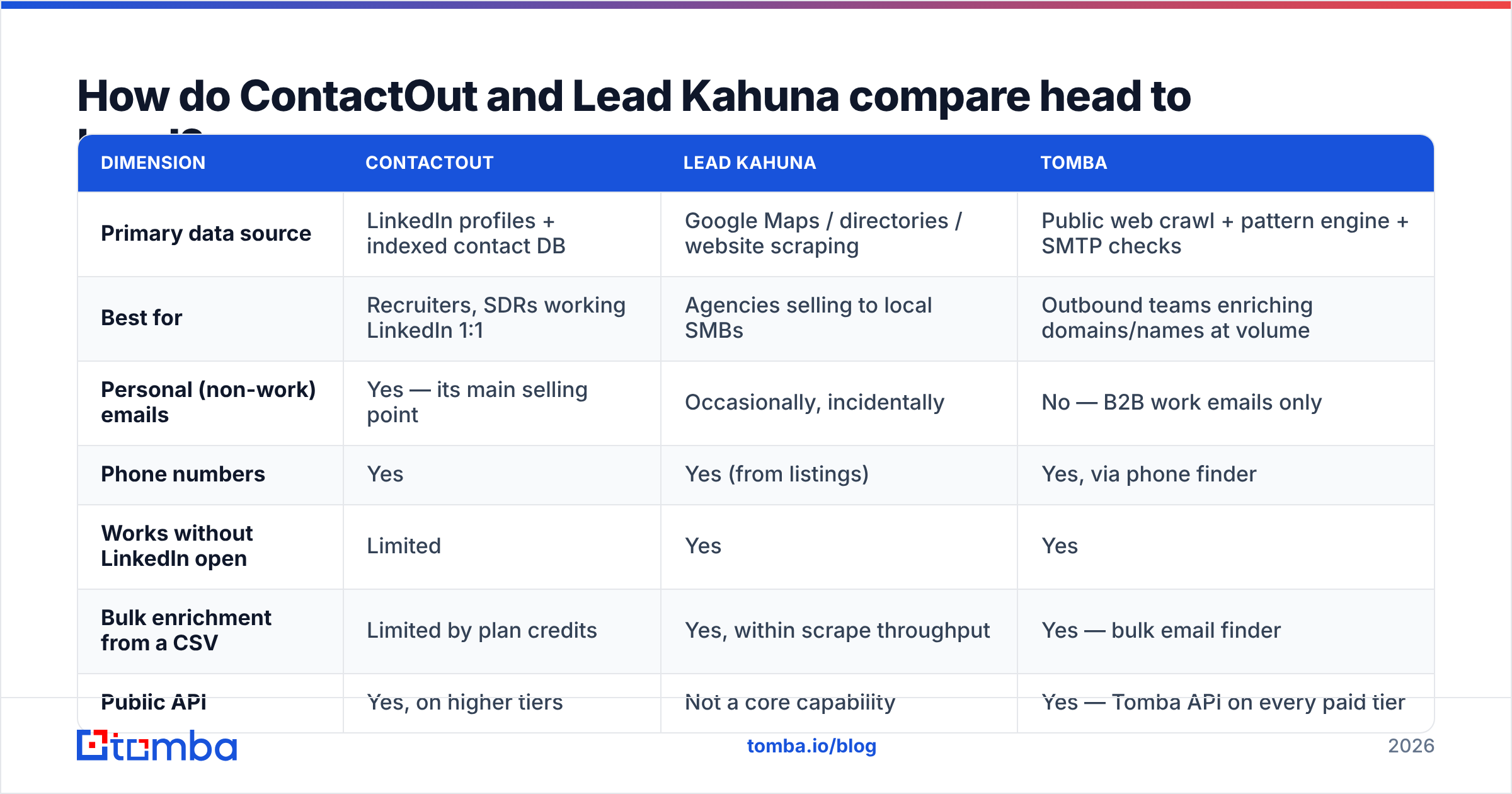
Here is the honest side-by-side. Pricing moves — check each vendor's page before you buy — but the shape of each offer has been stable.
| Dimension | ContactOut | Lead Kahuna | Tomba |
|---|---|---|---|
| Primary data source | LinkedIn profiles + indexed contact DB | Google Maps / directories / website scraping | Public web crawl + pattern engine + SMTP checks |
| Best for | Recruiters, SDRs working LinkedIn 1:1 | Agencies selling to local SMBs | Outbound teams enriching domains/names at volume |
| Personal (non-work) emails | Yes — its main selling point | Occasionally, incidentally | No — B2B work emails only |
| Phone numbers | Yes | Yes (from listings) | Yes, via phone finder |
| Works without LinkedIn open | Limited | Yes | Yes |
| Bulk enrichment from a CSV | Limited by plan credits | Yes, within scrape throughput | Yes — bulk email finder |
| Public API | Yes, on higher tiers | Not a core capability | Yes — Tomba API on every paid tier |
| Verification built in | Basic validity signals | Minimal — you verify elsewhere | Yes — email verifier + catch-all handling |
| Entry price | ~$99/mo/seat range (free tier is small) | One-time / lifetime licence tiers | Free 25 searches/mo, Starter $49/mo |
| Team scaling cost | Per seat — grows linearly | Per licence — flatter | Per credits, seats not metered the same way |
Two things jump out.
First, ContactOut's per-seat model punishes teams. Five SDRs means five seats. If two of them only need 200 lookups a month, you are still paying full freight.
Second, Lead Kahuna's scraping model punishes accuracy. A scraped info@ from a plumber's website is a real address, but it is a role account with a shared inbox and a spam filter tuned to nuke exactly your kind of email. Volume is not the same as reachability.
Is ContactOut accurate enough for cold outbound?#
For LinkedIn-sourced individuals, ContactOut's coverage is genuinely strong — it is one of the few tools with meaningful personal-email hit rates, and that is a real moat for recruiting.
But two caveats matter for sales outbound:
- Personal emails are a liability in B2B. Emailing a prospect's Gmail about your API monitoring product is a great way to get marked as spam. The reply-rate lift you imagine rarely materialises, and the sender reputation cost is real.
- Freshness decays. Any tool built on an indexed contact database has staleness. Someone changed jobs in March; the index says otherwise until it re-crawls. This is not a ContactOut-specific flaw — it is structural to every database-first vendor, including the big ones. It is why you verify at send time, not at scrape time.
The practical fix is boring: whatever tool sources the address, run it through verification immediately before it enters a sequence. Bounce rates above roughly 3% start dragging email deliverability for the whole domain, and no amount of clever copy recovers a burned sending reputation.
Is Lead Kahuna good value, or just cheap?#
Lead Kahuna's appeal is obvious: pay once, scrape as much as your machine and the target sites allow. For an agency owner cold-calling local businesses, that arithmetic is hard to argue with.
The costs show up elsewhere.
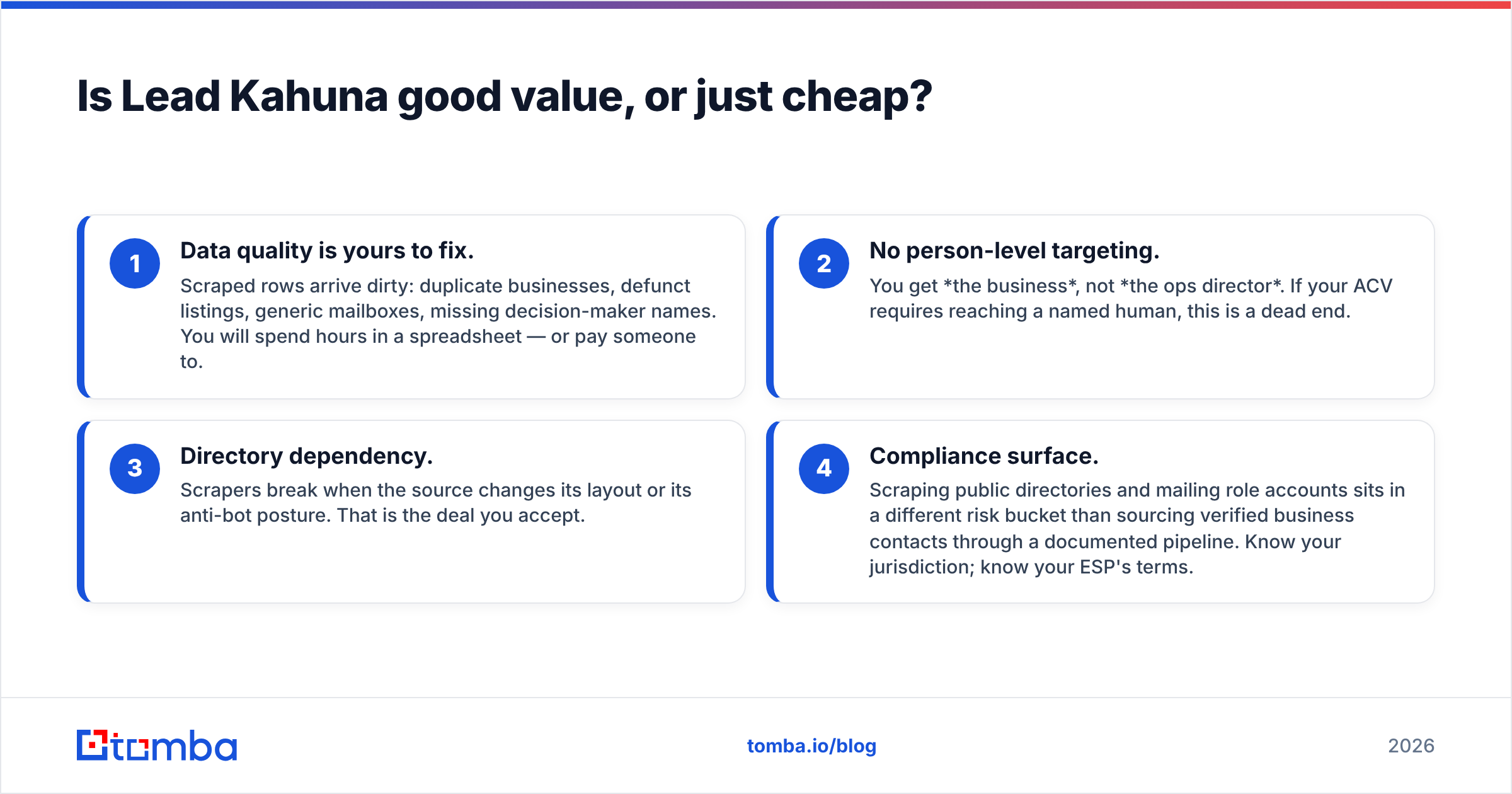
- Data quality is yours to fix. Scraped rows arrive dirty: duplicate businesses, defunct listings, generic mailboxes, missing decision-maker names. You will spend hours in a spreadsheet — or pay someone to.
- No person-level targeting. You get the business, not the ops director. If your ACV requires reaching a named human, this is a dead end.
- Directory dependency. Scrapers break when the source changes its layout or its anti-bot posture. That is the deal you accept.
- Compliance surface. Scraping public directories and mailing role accounts sits in a different risk bucket than sourcing verified business contacts through a documented pipeline. Know your jurisdiction; know your ESP's terms.
For high-volume, low-ACV, phone-led local selling, Lead Kahuna does its job. For anything that looks like a modern B2B outbound motion — named accounts, named personas, sequenced email — it is the wrong shape of tool.

Which one should you pick for your team?#
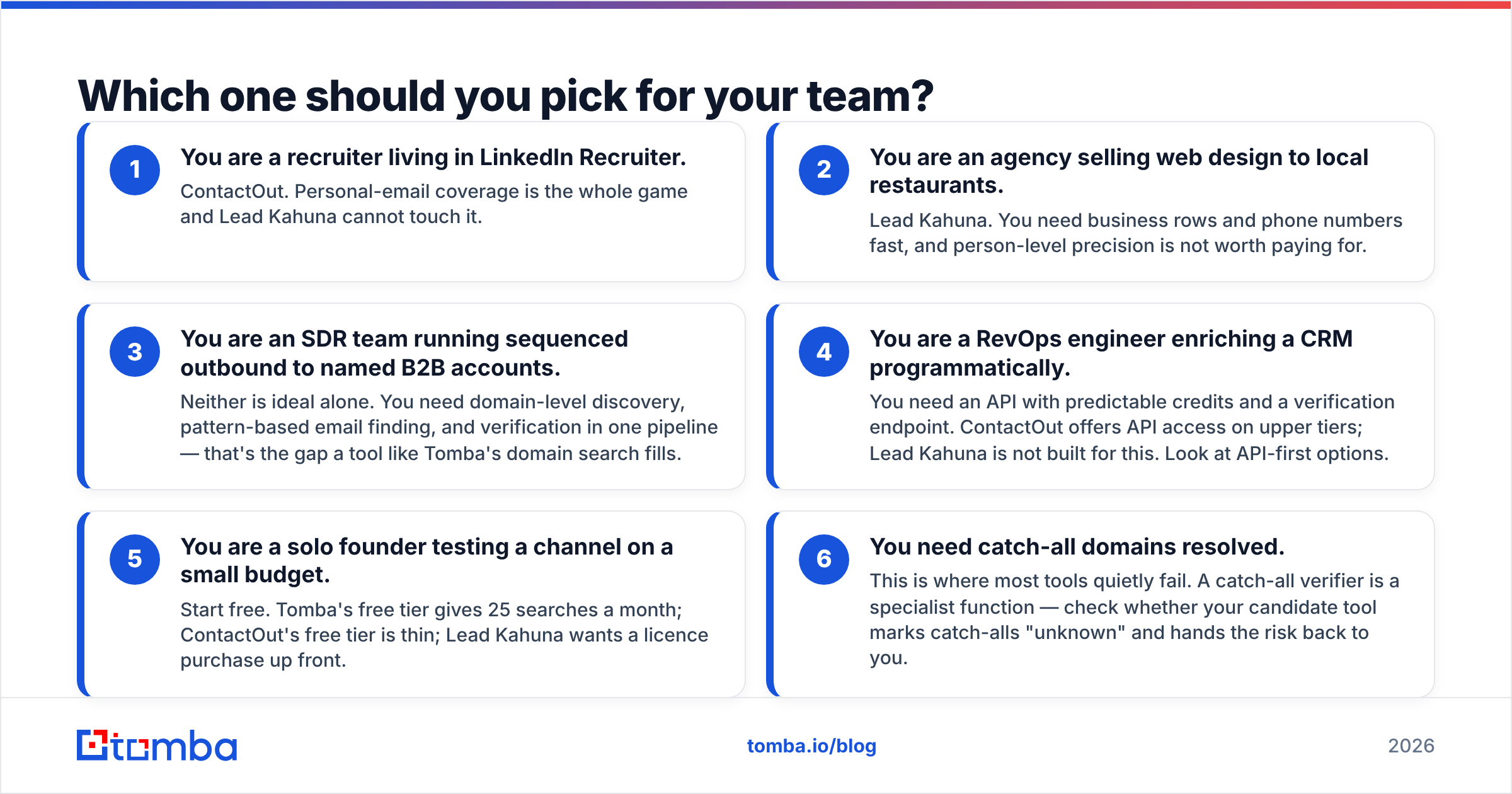
Use this as a decision list rather than a scorecard:
- You are a recruiter living in LinkedIn Recruiter. ContactOut. Personal-email coverage is the whole game and Lead Kahuna cannot touch it.
- You are an agency selling web design to local restaurants. Lead Kahuna. You need business rows and phone numbers fast, and person-level precision is not worth paying for.
- You are an SDR team running sequenced outbound to named B2B accounts. Neither is ideal alone. You need domain-level discovery, pattern-based email finding, and verification in one pipeline — that's the gap a tool like Tomba's domain search fills.
- You are a RevOps engineer enriching a CRM programmatically. You need an API with predictable credits and a verification endpoint. ContactOut offers API access on upper tiers; Lead Kahuna is not built for this. Look at API-first options.
- You are a solo founder testing a channel on a small budget. Start free. Tomba's free tier gives 25 searches a month; ContactOut's free tier is thin; Lead Kahuna wants a licence purchase up front.
- You need catch-all domains resolved. This is where most tools quietly fail. A catch-all verifier is a specialist function — check whether your candidate tool marks catch-alls "unknown" and hands the risk back to you.
Where does Tomba fit in a ContactOut vs Lead Kahuna comparison?#
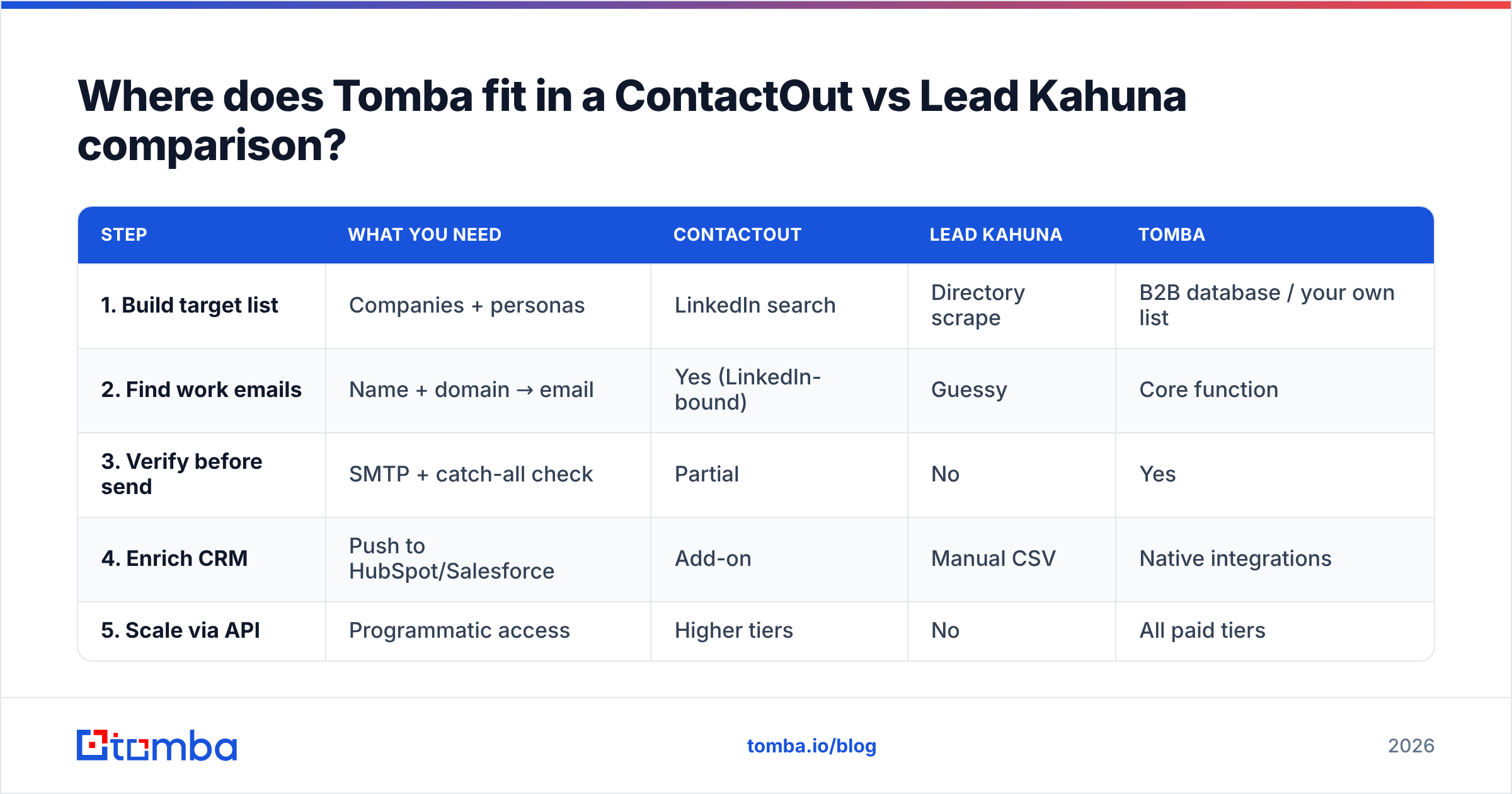
Straight answer: Tomba is not a LinkedIn scraper and it is not a Google Maps harvester. It is the layer both of those tools assume you already have — reliable B2B email discovery and verification, priced by usage rather than by seat.
The workflow most teams converge on:
| Step | What you need | ContactOut | Lead Kahuna | Tomba |
|---|---|---|---|---|
| 1. Build target list | Companies + personas | LinkedIn search | Directory scrape | B2B database / your own list |
| 2. Find work emails | Name + domain → email | Yes (LinkedIn-bound) | Guessy | Core function |
| 3. Verify before send | SMTP + catch-all check | Partial | No | Yes |
| 4. Enrich CRM | Push to HubSpot/Salesforce | Add-on | Manual CSV | Native integrations |
| 5. Scale via API | Programmatic access | Higher tiers | No | All paid tiers |
Pricing, for the record and without spin: Tomba runs a free tier at 25 searches/month, Starter at $49/mo, Growth at $99/mo, Pro at $249/mo, and custom Enterprise. Full Tomba pricing is public. The relevant comparison is not "is $49 cheaper than $99" — it is that credits are pooled across your team rather than metered per seat, which is what actually blows up ContactOut's bill at 5+ users.

What do real users say about each tool?#
Don't take a vendor blog's word for it — including this one. Do this before you buy:
- Read the recent reviews (last 6 months only) on G2 and Capterra. Ignore the five-stars; read the three-stars, where people explain what actually broke.
- Filter reviews by company size. A tool loved by 1–10 employee companies often collapses at 200.
- Search for the phrase "bounce" and the phrase "credits" in reviews. Those two words surface the two failure modes that matter.
- Run the same 50-row test list through every finalist. Not a demo list — your list. Measure hit rate and bounce rate, not marketing claims.
That last step is non-negotiable. Every vendor in this category quotes an accuracy number computed on a dataset that flatters them. Your ICP is the only benchmark that means anything.
How do you avoid burning your domain with either tool?#
Whichever tool you land on, the sending hygiene is identical and it is where most teams actually lose:
- Verify every address before it enters a sequence. Not the ones you doubt — all of them. A free email checker handles spot checks; run bulk lists through a proper verifier.
- Never mail scraped role accounts at scale.
info@,contact@,sales@— these are spam-trap adjacent and they wreck complaint rates. - Warm the domain properly before volume. Use a warmup calculator to set a realistic ramp rather than guessing.
- Fix your authentication. Run an SPF checker and confirm DKIM and DMARC are aligned. Google and Microsoft both tightened bulk-sender enforcement, and unauthenticated mail is simply not delivered at volume any more — see Google's bulk sender guidelines for the current bar.
- Watch bounce rate weekly. Over 3% means stop, clean, restart. Not "push through."
A tool that hands you 10,000 unverified addresses is not giving you 10,000 leads. It is giving you a liability with a spreadsheet wrapper.
The verdict: ContactOut vs Lead Kahuna in 2026#
- ContactOut wins if your prospecting starts and ends inside LinkedIn, you need personal emails, and you can absorb per-seat pricing. Recruiters: this is your tool.
- Lead Kahuna wins if you sell to local businesses, work by phone, and want list volume for a fixed cost. Agencies: this is your tool.
- Neither wins for the most common B2B case — a sales team enriching named accounts, sequencing email, and pushing verified contacts into a CRM through an API. That workflow needs discovery plus verification plus programmatic access, and both tools give you at most one of the three.
Be suspicious of any "winner" declared without a stated use case. This category is full of tools that are excellent at one job and useless at the adjacent one, and the review sites blur them together.
Ready to test a third option?#
If your bottleneck is "I have companies and names, I need deliverable work emails, and I need them at volume without paying per seat" — that is precisely what the Tomba Email Finder is built for. Start on the free tier (25 searches/month, no card), run your own 50-row benchmark against whatever ContactOut or Lead Kahuna returns, and compare hit rate and bounce rate side by side on your ICP. If Tomba doesn't win on your data, don't buy it. That is the only honest way to run this decision.
Related guides#
Ready to find emails that actually work?
Join 150,000+ professionals who stopped guessing and started sending. Free credits on signup — no credit card required.
Get the Tomba newsletter
Practical outbound tactics and product updates — once every two weeks.
About the author