ContactOut vs LeadLeaper: Which Email Finder Wins in 2026?
ContactOut and LeadLeaper both promise LinkedIn emails on demand — but they price, verify, and scale in completely different ways. Here's the honest head-to-head, plus where both fall short.
TL;DR
- ContactOut is the stronger LinkedIn-native tool: bigger personal-email coverage, a mature Chrome extension, and enterprise-grade recruiting workflows. It's also the pricier of the two once you go past the free tier.
- LeadLeaper is the budget option: a Chrome extension that pulls emails from LinkedIn search results and pushes them into simple lists. Lighter feature set, lighter price, thinner verification.
- Neither is a great fit if your workflow starts from a domain rather than a LinkedIn profile — that's where a domain-first finder like Tomba, Hunter, or Apollo covers ground both of these miss.
- Verification is the real differentiator. ContactOut verifies more aggressively; LeadLeaper leans on pattern guessing, so budget for a separate verifier.
- If you need API access, bulk enrichment, or CRM-native workflows, both extensions will bottleneck you fast.
If you've landed on this comparison, you're almost certainly living in LinkedIn Sales Navigator or LinkedIn Recruiter, clicking profiles, and wondering which extension will hand you a working email address without burning your budget or your sender reputation.
The honest answer: these two tools are not really peers. They overlap on the surface — both are Chrome extensions, both scrape contact data from LinkedIn profiles — but they're built for different buyers, priced an order of magnitude apart, and fail in different ways. Below is the head-to-head, followed by the part most comparison posts skip: when the right answer is neither.
What is ContactOut and who is it built for?#
ContactOut is a contact-data platform built primarily around LinkedIn. Its core promise is finding personal email addresses — the Gmail/Outlook accounts people keep across job changes — not just work emails. That single design choice tells you who it's for: recruiters.
Recruiters need to reach candidates who may leave their current company next month, so a work email has a short shelf life. ContactOut leans hard into that use case, with a Chrome extension that overlays LinkedIn profiles, a searchable contact database, and a dashboard for saved lists. It also sells to sales teams, but the recruiting DNA shows: features like candidate pipelines and ATS-flavored exports are front and center.
What you actually get:
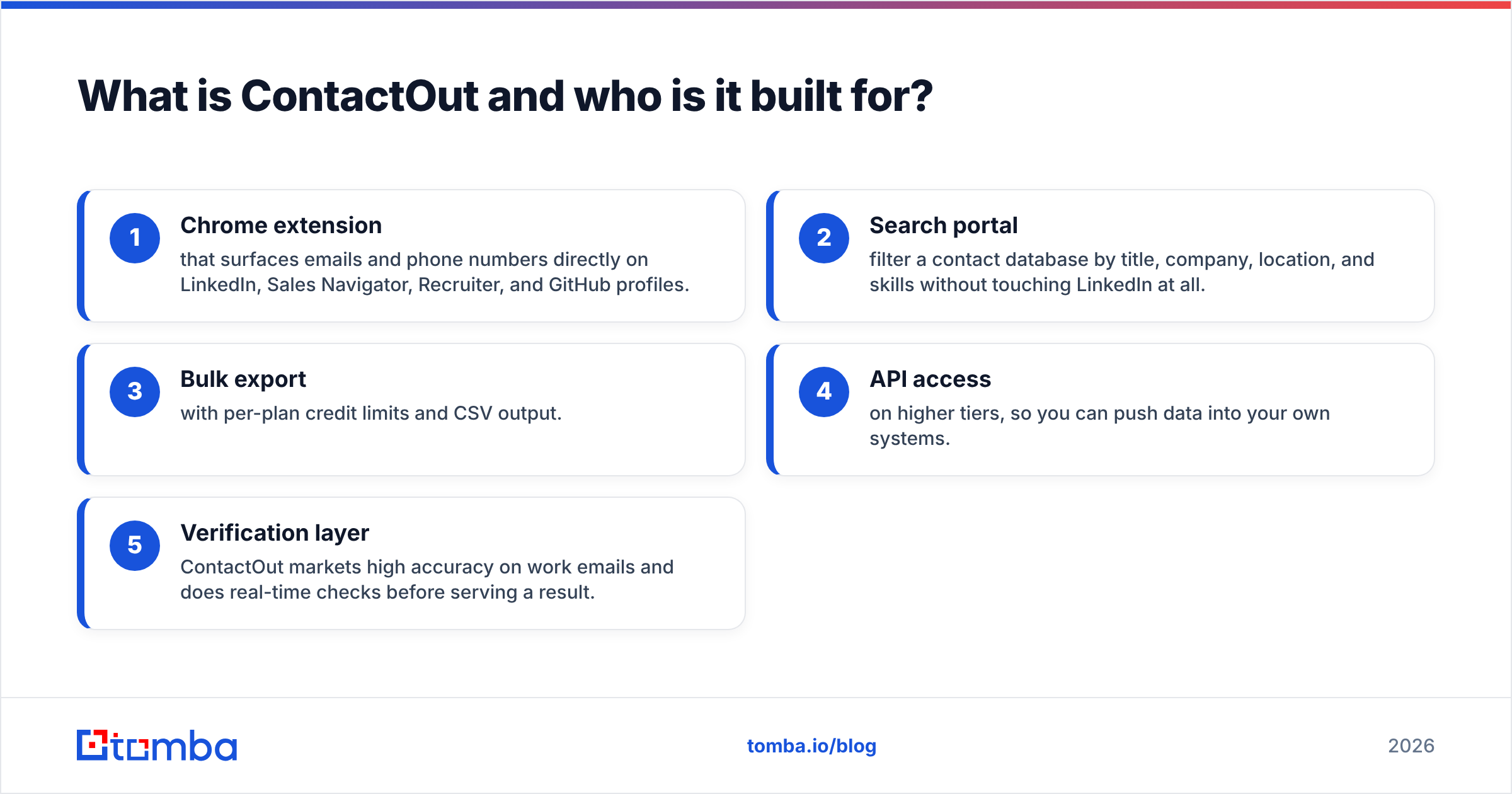
- Chrome extension that surfaces emails and phone numbers directly on LinkedIn, Sales Navigator, Recruiter, and GitHub profiles.
- Search portal — filter a contact database by title, company, location, and skills without touching LinkedIn at all.
- Bulk export with per-plan credit limits and CSV output.
- API access on higher tiers, so you can push data into your own systems.
- Verification layer — ContactOut markets high accuracy on work emails and does real-time checks before serving a result.
The catch is price. ContactOut is not a $19/month tool once you exceed the free allowance, and the "unlimited" language on its marketing pages is bounded by fair-use caps that most heavy users hit.
What is LeadLeaper and how is it different?#
LeadLeaper is the leaner, cheaper cousin. It's a Chrome extension that captures leads from LinkedIn — including from search results pages, not just individual profiles — and builds email addresses for them.
Its calling card is speed on volume: run a LinkedIn search, click capture, and it pulls a page of prospects at once instead of making you open each profile. For a solo founder doing manual outbound, that's a real time saver. It also bundles a lightweight email-sending feature, which ContactOut does not.
Where it gets thinner:
- Email discovery is more pattern-driven. LeadLeaper is very good at deducing
first.last@company.com-style formats. It's less good at finding the person whose company uses an irregular format, or whose address doesn't follow the domain pattern at all. - Verification is minimal. You'll want to run its output through an email verifier before you send anything at scale, or your bounce rate will teach you the lesson the expensive way.
- No serious API. If you want programmatic enrichment, this isn't the tool.
- Personal emails are rare. LeadLeaper is a work-email tool. Recruiters will find that limiting.

ContactOut vs LeadLeaper: how do they compare head-to-head?#
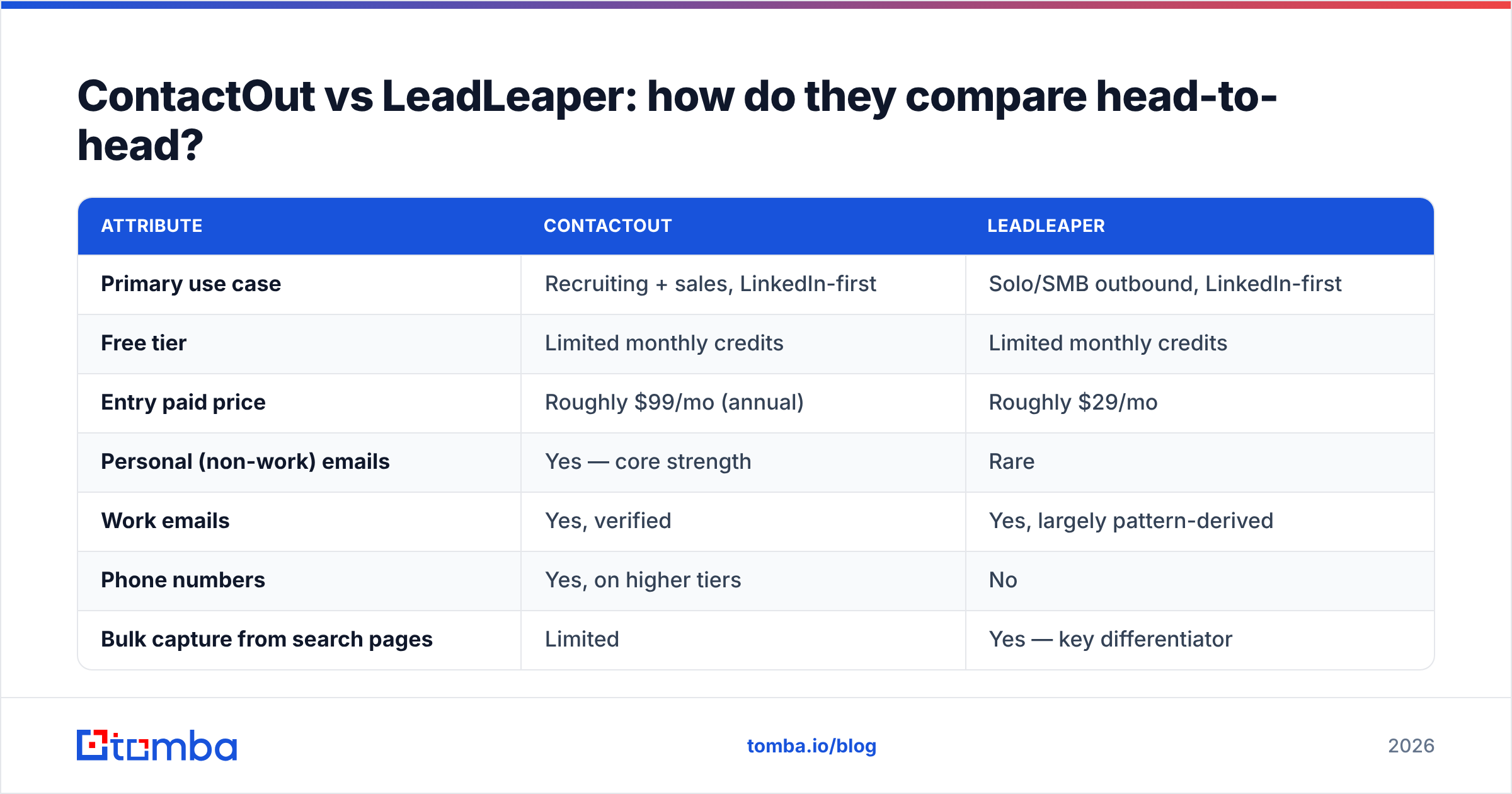
Here's the direct comparison. Prices reflect publicly listed 2026 plans; both vendors negotiate custom deals above their published tiers, so treat the top rows as list price, not final price.
| Attribute | ContactOut | LeadLeaper |
|---|---|---|
| Primary use case | Recruiting + sales, LinkedIn-first | Solo/SMB outbound, LinkedIn-first |
| Free tier | Limited monthly credits | Limited monthly credits |
| Entry paid price | Roughly $99/mo (annual) | Roughly $29/mo |
| Personal (non-work) emails | Yes — core strength | Rare |
| Work emails | Yes, verified | Yes, largely pattern-derived |
| Phone numbers | Yes, on higher tiers | No |
| Bulk capture from search pages | Limited | Yes — key differentiator |
| Built-in email sending | No | Yes (basic) |
| Verification depth | Real-time SMTP + database checks | Light / minimal |
| API | Yes, on higher tiers | Effectively none |
| ATS / CRM integrations | Strong (Greenhouse, Lever, Salesforce) | Weak |
| Best for | Recruiters, enterprise sourcing | Budget solo prospecting |
Read that table honestly and the split is clean:
Choose ContactOut if you're a recruiter, you need personal emails and mobile numbers, you have an ATS to feed, and your budget is a company budget rather than a personal card.
Choose LeadLeaper if you're one person, you prospect from LinkedIn search results, you only need work emails, and $29 versus $99 is a decision that actually matters to you this quarter.
Which one actually finds more valid emails?#
This is where you need to be skeptical of both vendors' marketing.
Every email-finder vendor publishes an accuracy number, and every one of those numbers is measured on a dataset the vendor chose. Independent testing on G2 and in practitioner communities consistently shows the same pattern: accuracy varies enormously by segment, not by vendor.
Concretely:
- Large US tech companies — everyone does well. ContactOut, LeadLeaper, Tomba, Hunter, Apollo will all resolve
jane.doe@stripe.combecause the pattern is public and heavily observed. - Mid-market European and APAC companies — coverage drops fast, and the gap between a verified-database tool and a pattern-guesser widens. This is where LeadLeaper's approach starts producing bounces.
- Catch-all domains — both tools will happily return an address that "passes" SMTP because the server accepts everything. Neither resolves this well. You need a dedicated catch-all verifier to tell a real inbox from a black hole.
- Personal emails — ContactOut wins outright. LeadLeaper barely competes here.
The practical takeaway: do not trust a single tool's "valid" label. Whatever you pick, run the export through independent verification before it touches a sequence. A 3% bounce rate is survivable. An 8% bounce rate — which is entirely achievable with unverified pattern-guessed emails — will drag your sender reputation into the ground and start landing your good emails in spam.
What are the hidden costs of a LinkedIn-only email finder?#
Both of these tools share the same structural limitation, and it's worth naming because it's the thing that will eventually push you to a different category of product.
They start from a person, not a company.
That's fine when your workflow is "I found this person on LinkedIn, get me their email." It falls apart the moment your workflow becomes:
- "Get me every decision-maker at these 400 target accounts."
- "Enrich these 12,000 rows in our CRM that are missing emails."
- "Find the person who wrote this article and get me their contact."
- "Build me a list of everyone with
@acme.comwho works in engineering."
None of those start on a LinkedIn profile page. They start with a domain, a list, or a CRM record. A Chrome extension is the wrong shape of tool for all of them, and the workaround — a human clicking through hundreds of profiles — is the most expensive thing in your GTM stack.
The other hidden cost is LinkedIn risk. Aggressive scraping via extensions is against LinkedIn's terms of service. Both vendors work hard to stay under detection thresholds, but the account that gets restricted is yours, not theirs. If your LinkedIn account is your prospecting channel, that's a real, uninsured liability.

When should you skip both and use a domain-first email finder?#
Use a domain-first tool when your list-building starts anywhere other than a LinkedIn profile. That's most of the time, once you're past the first fifty prospects.
A domain-first email finder inverts the workflow: you give it a company domain and a name (or just the domain), and it returns verified addresses along with the company's email pattern. That means you can:
- Run domain search across a target-account list and get every discoverable address at each company in one pass.
- Push the whole thing through the Tomba API so enrichment happens inside your own pipeline, no browser tab required.
- Use bulk email finder jobs to enrich thousands of rows at once instead of clicking.
- Verify catch-alls properly instead of shipping a coin-flip into your sequence.
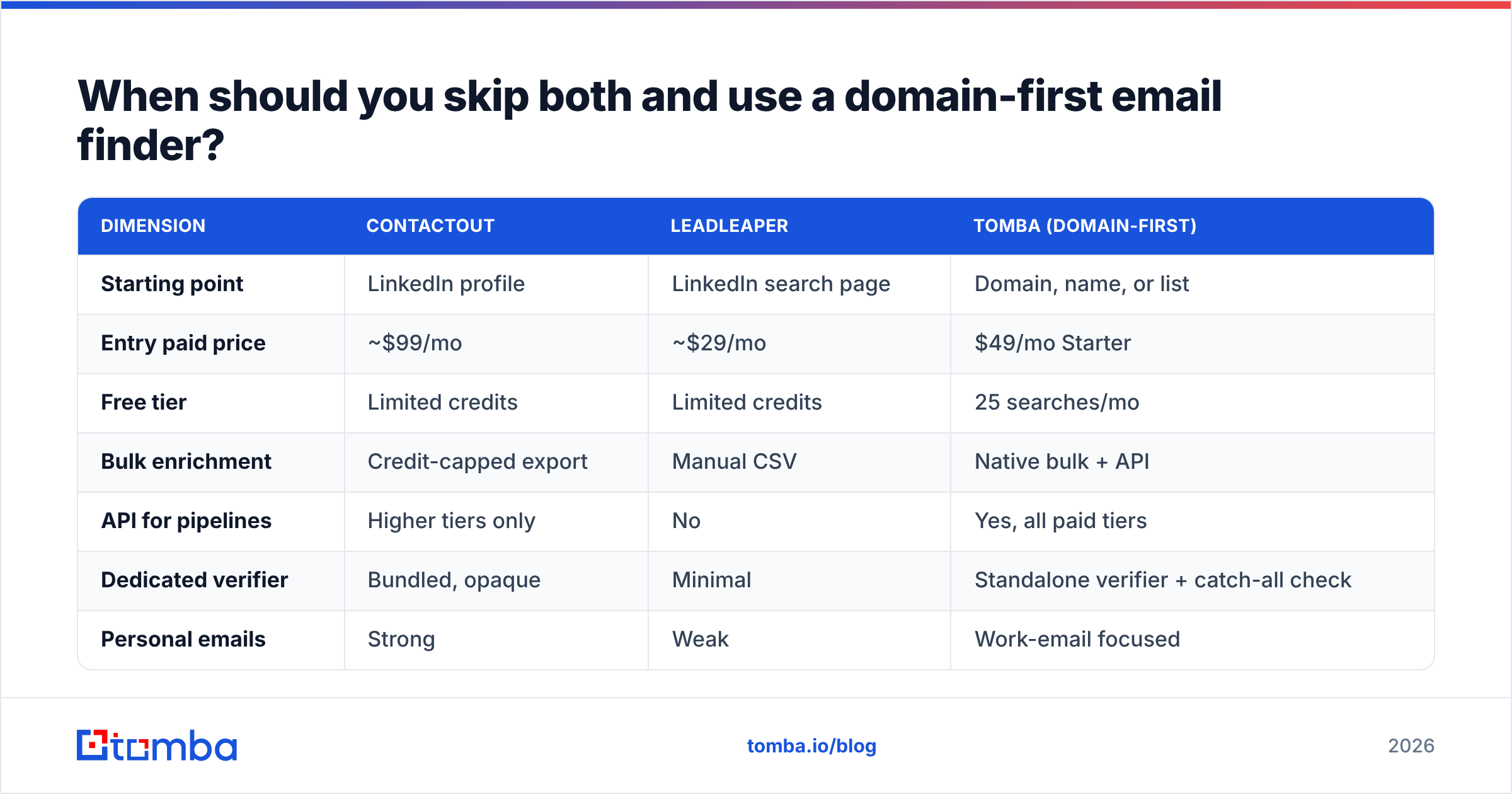
Here's how the three approaches stack up on the dimensions that actually decide your bounce rate and your hours-per-week:
| Dimension | ContactOut | LeadLeaper | Tomba (domain-first) |
|---|---|---|---|
| Starting point | LinkedIn profile | LinkedIn search page | Domain, name, or list |
| Entry paid price | ~$99/mo | ~$29/mo | $49/mo Starter |
| Free tier | Limited credits | Limited credits | 25 searches/mo |
| Bulk enrichment | Credit-capped export | Manual CSV | Native bulk + API |
| API for pipelines | Higher tiers only | No | Yes, all paid tiers |
| Dedicated verifier | Bundled, opaque | Minimal | Standalone verifier + catch-all check |
| Personal emails | Strong | Weak | Work-email focused |
| LinkedIn ToS exposure | Extension-based | Extension-based | Server-side, no scraping needed |
| Sheets / Excel / CRM | Partial | Weak | Sheets, Excel, HubSpot, Salesforce, Zapier |
Notice the honest column: if you specifically need personal Gmail addresses for candidate outreach, ContactOut is still the better buy, and no domain-first tool changes that. Tools are not interchangeable. Match the tool to where your data starts.
It's also worth pricing this out properly. ContactOut at ~$99/mo plus a separate verifier plus a separate bulk-enrichment step is three line items. Tomba pricing starts at $49/mo for Starter, $99/mo for Growth, and $249/mo for Pro, with the finder, email verifier, domain search, and API in the same plan. Whether that's cheaper depends entirely on your volume — run your own numbers rather than trusting anyone's comparison table, including this one.
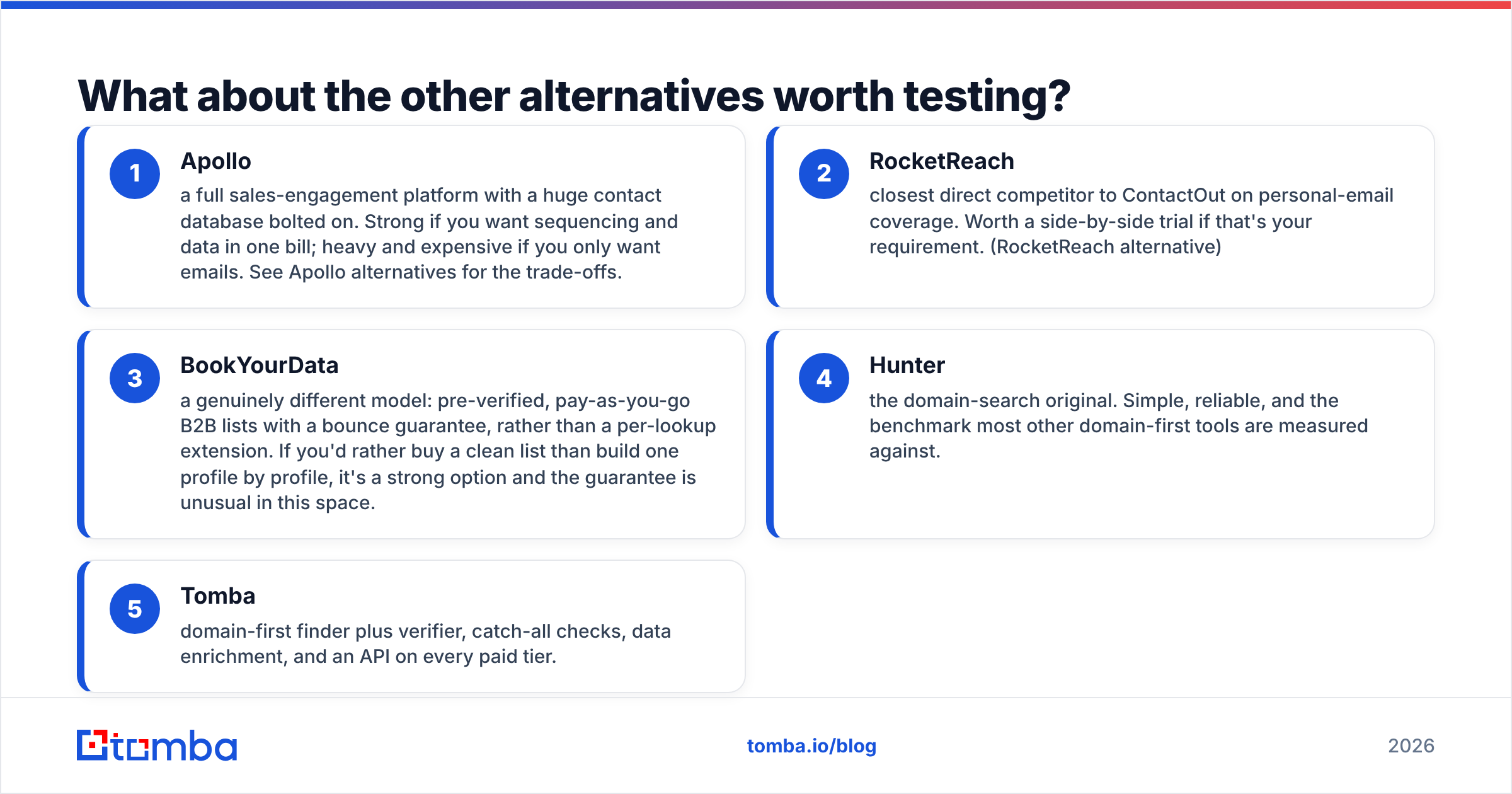
What about the other alternatives worth testing?#
If you're already evaluating these two, three or four more belong on your shortlist:
- Apollo — a full sales-engagement platform with a huge contact database bolted on. Strong if you want sequencing and data in one bill; heavy and expensive if you only want emails. See Apollo alternatives for the trade-offs.
- RocketReach — closest direct competitor to ContactOut on personal-email coverage. Worth a side-by-side trial if that's your requirement. (RocketReach alternative)
- BookYourData — a genuinely different model: pre-verified, pay-as-you-go B2B lists with a bounce guarantee, rather than a per-lookup extension. If you'd rather buy a clean list than build one profile by profile, it's a strong option and the guarantee is unusual in this space.
- Hunter — the domain-search original. Simple, reliable, and the benchmark most other domain-first tools are measured against.
- Tomba — domain-first finder plus verifier, catch-all checks, data enrichment, and an API on every paid tier.
The right test is boring and it works: take 50 real prospects from your actual ICP — not a demo list, not a Fortune 500 sample — run them through two or three tools, then verify every result with an independent verifier and compare true match rates. A vendor's headline accuracy number tells you nothing about your segment. Fifty rows of your own data tells you everything.
How should you actually decide?#
Answer three questions honestly.
1. Where does your list start? LinkedIn profile → ContactOut or LeadLeaper. Domain, account list, or CRM export → a domain-first finder. This one question resolves most of the decision.
2. Do you need personal emails or work emails? Personal → ContactOut, full stop. Work → any of them, and now price and verification quality decide.
3. Are you clicking or scripting? If a human is clicking, an extension is fine. If a pipeline is running, you need an API, and only ContactOut's top tiers and domain-first tools like Tomba offer one that's genuinely usable.
Everything else — UI polish, credit rollover, dashboard design — is noise next to those three.
The bottom line#
ContactOut is the better product; LeadLeaper is the better price. Both are LinkedIn-shaped tools that will serve you well right up until your prospecting stops being LinkedIn-shaped.
If you're a recruiter chasing candidates who change jobs, pay for ContactOut and don't overthink it. If you're a solo founder capturing 200 leads a month off LinkedIn search and sending manually, LeadLeaper does the job for a third of the money — just budget for verification, because you will need it.
But if you're building repeatable outbound — target-account lists, CRM enrichment, sequences that run without a human in a browser tab — you've outgrown both. That's the moment to move to a domain-first stack.
Start there with the Tomba Email Finder. Give it a domain and a name and it returns a verified address with a confidence score; give it a list and the bulk engine handles thousands at once; give it an API key and it runs inside your own pipeline with no browser and no LinkedIn exposure. The free tier includes 25 searches a month, which is enough to run the 50-prospect test above against whatever you're using today and see the match rates for yourself. That's the only comparison that counts.
Related guides#
Ready to find emails that actually work?
Join 150,000+ professionals who stopped guessing and started sending. Free credits on signup — no credit card required.
Get the Tomba newsletter
Practical outbound tactics and product updates — once every two weeks.
About the author