ContactOut vs Mailmeteor: Which One Does Your Outbound Need?
ContactOut finds the contact. Mailmeteor sends the email. They solve opposite halves of the same problem — here is how they compare on price, limits, data quality, and which one you actually need first.

TL;DR — what you actually need to know#
- ContactOut and Mailmeteor are not competitors. ContactOut is a contact-data tool (find emails and phone numbers, mostly from LinkedIn). Mailmeteor is a Gmail-based mail merge tool (send personalized emails from Google Sheets). One fills the list; the other mails the list.
- If you already have a clean list, Mailmeteor is the cheaper, simpler pick — it lives inside Gmail and costs a fraction of a full sales-engagement platform.
- If you have no list, Mailmeteor is useless to you. You need a data source first, and ContactOut is one of several — alongside Tomba, Apollo, and Wiza.
- The expensive mistake is pairing a scraped, unverified list with a Gmail sender. Google's spam filters do not care that your merge tool was clean; bounce rate is what burns your domain.
- Most teams end up with two line items: a finder + verifier for the data, and a sender for the sequence. Budget for both, not one.
Why does "ContactOut vs Mailmeteor" even come up?#
Because both tools show up when you search "how do I email 500 prospects from Gmail," and the search results flatten them into the same bucket. They are not the same bucket.
Think of it like cooking. ContactOut is the grocery store — it gets you ingredients (a name, a work email, a mobile number). Mailmeteor is the stove — it turns those ingredients into something you actually serve. Buying a stove when your fridge is empty gets you nothing. Buying groceries with no stove gets you nothing either.
So the real question is not "which one wins." It is: which half of the problem are you solving right now, and what's the cheapest correct tool for that half?
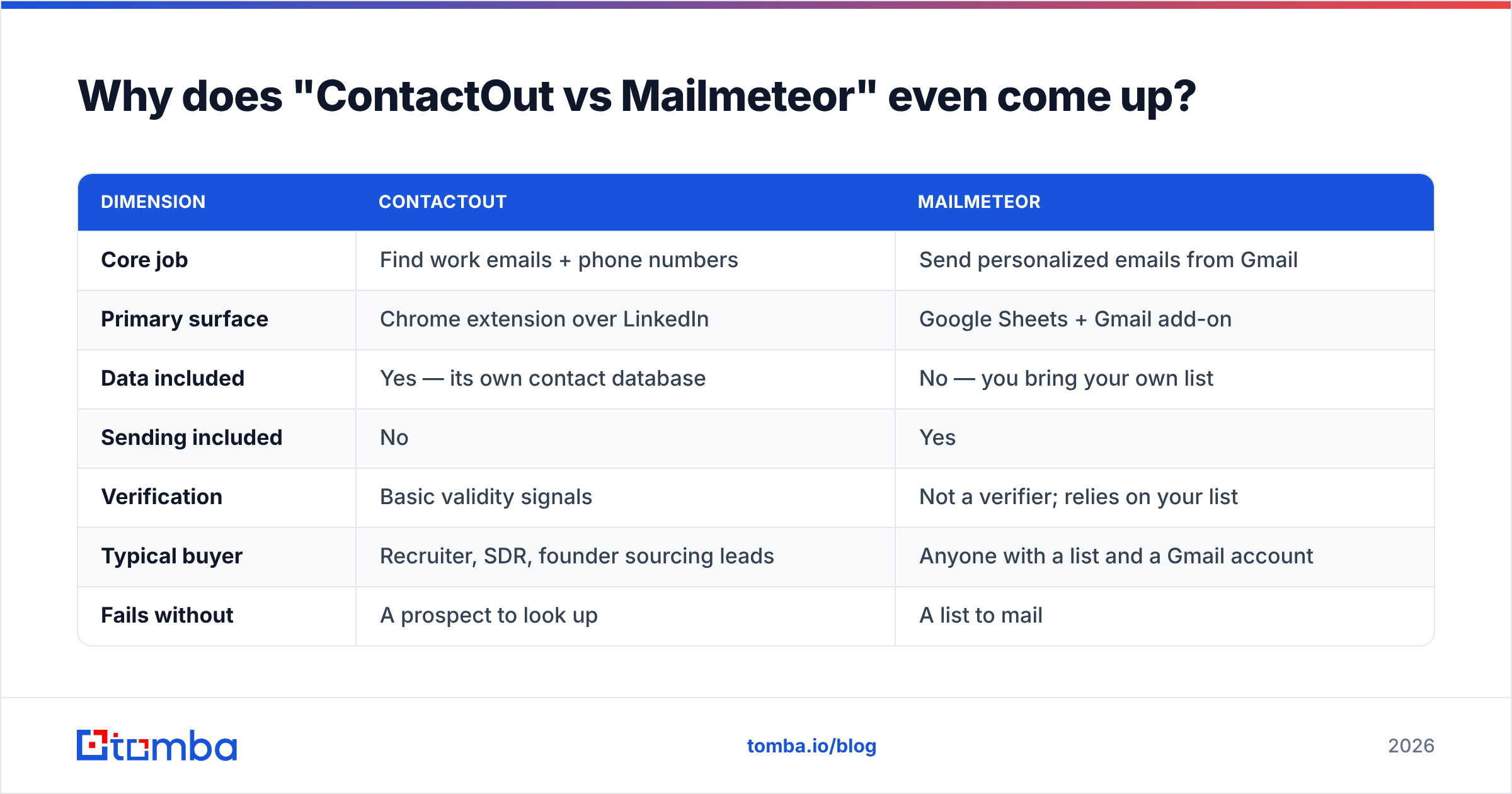
Here is the split in plain terms:
| Dimension | ContactOut | Mailmeteor |
|---|---|---|
| Core job | Find work emails + phone numbers | Send personalized emails from Gmail |
| Primary surface | Chrome extension over LinkedIn | Google Sheets + Gmail add-on |
| Data included | Yes — its own contact database | No — you bring your own list |
| Sending included | No | Yes |
| Verification | Basic validity signals | Not a verifier; relies on your list |
| Typical buyer | Recruiter, SDR, founder sourcing leads | Anyone with a list and a Gmail account |
| Fails without | A prospect to look up | A list to mail |
| Entry price band | Mid (contact-data pricing) | Low (mail-merge pricing) |
If that table already answered your question, you can stop here. If you want the details — pricing traps, deliverability risk, and where a dedicated finder beats a browser extension — keep reading.
What is ContactOut, really?#
ContactOut is a contact-data platform best known for its Chrome extension. You open a LinkedIn profile, click the extension, and it surfaces what it believes is that person's work email, personal email, and sometimes a mobile number. It also ships a web-based search app, list building, and integrations that push contacts to a CRM or ATS.
It grew up serving recruiters, and it shows. The workflow is profile-first: you're looking at one human, and you want that human's contact details right now. That's a great fit for sourcing a shortlist of 40 engineers. It's a worse fit for "give me every marketing decision-maker at 2,000 SaaS companies with 50–200 employees."
Strengths:
- Personal emails. ContactOut is unusually good at surfacing personal (Gmail-style) addresses, which matters enormously in recruiting and almost never in B2B sales.
- LinkedIn-native UX. Zero context switching. You're already on the profile; the data appears in a side panel.
- Phone coverage. Mobile numbers are part of the pitch, not an upsell afterthought.
Weaknesses:
- It's a lookup tool, not a pipeline tool. Bulk work — enriching a 5,000-row CSV, running a domain-wide sweep — is not where the extension shines.
- Credit models get expensive fast once you leave the free tier, and email credits and phone credits are usually separate buckets.
- Verification is thin. "We found an address" and "this address will accept mail today" are different claims. You still want a dedicated email verifier in the loop before you send.
Check the current plans on the ContactOut site — contact-data vendors change pricing and credit definitions often, and any number in a blog post ages badly.

What is Mailmeteor, really?#
Mailmeteor is a mail merge. That's it, and that's the point.
You put your contacts in a Google Sheet, write a template in Gmail with {{first_name}}-style variables, and Mailmeteor sends each row as an individual email from your own Gmail address. It adds tracking (opens, clicks), scheduling, follow-ups, and unsubscribe handling on top. It's fast to learn, it's cheap, and it doesn't pretend to be a sales-engagement platform.
Where it wins:
- Price. Mail-merge pricing lives in the $10–$50/user/month band, not the $80–$150 band that sequencers charge.
- Deliverability posture (in the good sense). It sends through your actual Gmail/Google Workspace account using Google's APIs, so there's no third-party SMTP relay in the path. Your sender reputation is your own.
- Zero learning curve. If you can use a spreadsheet, you can use it today.
Where it stops:
- Google's sending limits are the ceiling. A Workspace account caps out in the low hundreds of recipients per day. Mailmeteor can't raise that — no add-on can. If you need 5,000 sends a day, you need a dedicated sending infrastructure, not a Gmail add-on.
- No data. None. Zero contacts included. This is the crux of the whole comparison.
- Light on sequencing logic compared with a full platform (multi-channel steps, task queues, deal-stage triggers). Follow-ups exist; complex branching doesn't.
The Mailmeteor site lists current plan tiers and daily limits, and independent user reviews sit on G2 if you want unfiltered opinions on both tools.
ContactOut vs Mailmeteor: how do they compare head to head?#
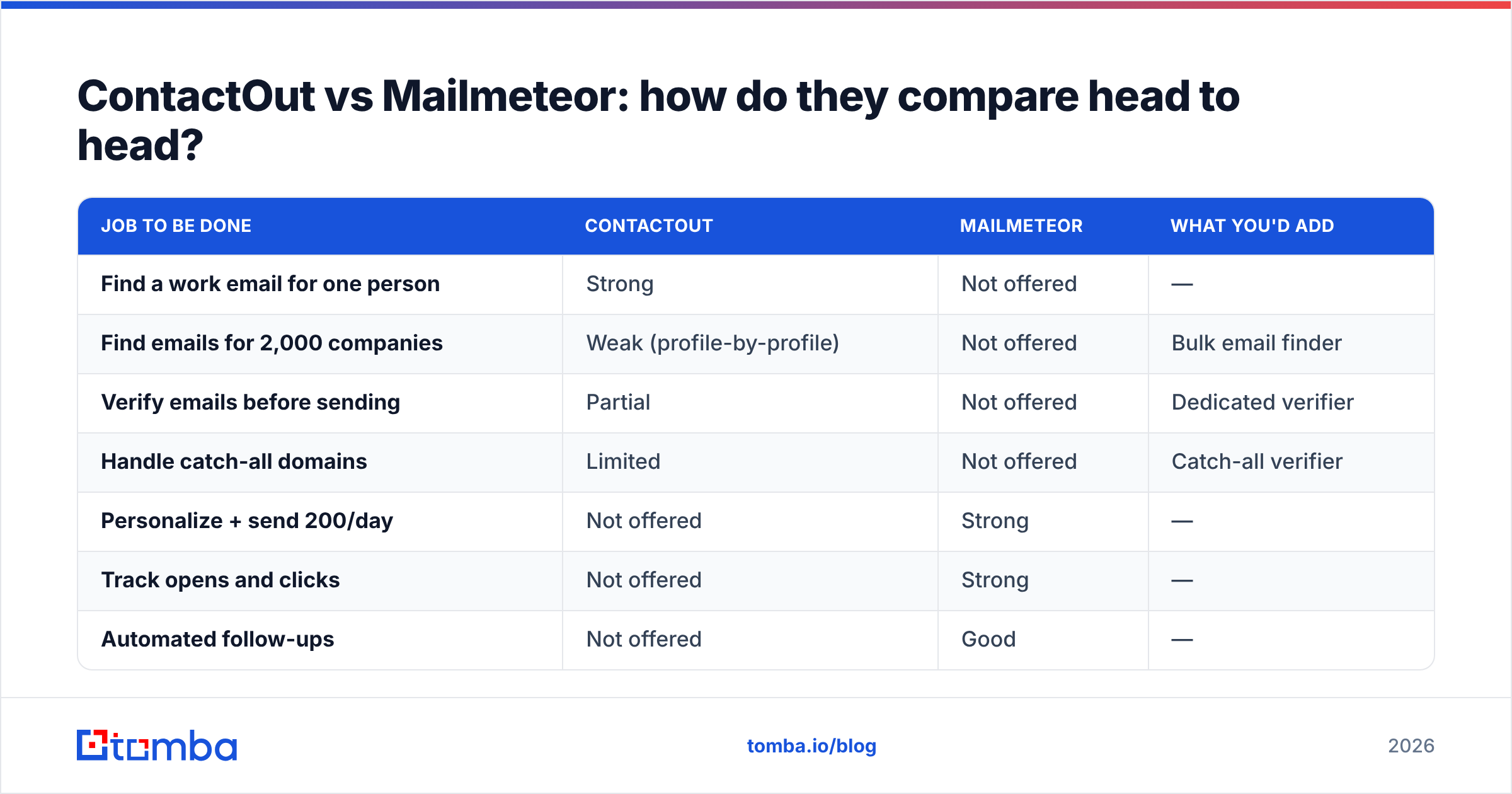
Since they overlap almost nowhere, the honest comparison is a compatibility matrix, not a scoreboard. Here's where each one lands on the jobs a cold-outreach motion actually requires:
| Job to be done | ContactOut | Mailmeteor | What you'd add |
|---|---|---|---|
| Find a work email for one person | Strong | Not offered | — |
| Find emails for 2,000 companies | Weak (profile-by-profile) | Not offered | Bulk email finder |
| Verify emails before sending | Partial | Not offered | Dedicated verifier |
| Handle catch-all domains | Limited | Not offered | Catch-all verifier |
| Personalize + send 200/day | Not offered | Strong | — |
| Track opens and clicks | Not offered | Strong | — |
| Automated follow-ups | Not offered | Good | — |
| Push contacts to CRM | Good | Basic | CRM integration |
| Programmatic access (API) | Available | Limited | Email finder API |
| Cost to run 1,000 outbound emails | Data cost only | Sending cost only | Both |
The pattern is obvious once it's laid out: a full outbound motion needs one tool from each column. Buying only ContactOut leaves you with a list and no way to work it (or you go back to pasting addresses into Gmail one at a time). Buying only Mailmeteor leaves you with a beautiful merge template and an empty sheet.
Which one should you buy first?#
Buy the one that unblocks you.
- You're a recruiter with LinkedIn Recruiter already open all day. ContactOut first. Your sends are low-volume and often manual; a merge tool is a nice-to-have.
- You're a founder with a list from a conference, a webinar, or a partner. Mailmeteor first. You already have the data; you need to mail it without spamming BCC.
- You're an SDR building lists from scratch, at volume. Neither, alone. You want a bulk finder plus a verifier plus a sender, and ContactOut's profile-by-profile model will slow you down.
- You're doing account-based outreach on 50 target accounts. Domain search to map who works there, verify, then Mailmeteor to send. ContactOut is optional.
Is the data quality difference real?#
Yes — and it's the part that quietly determines whether the whole stack works.
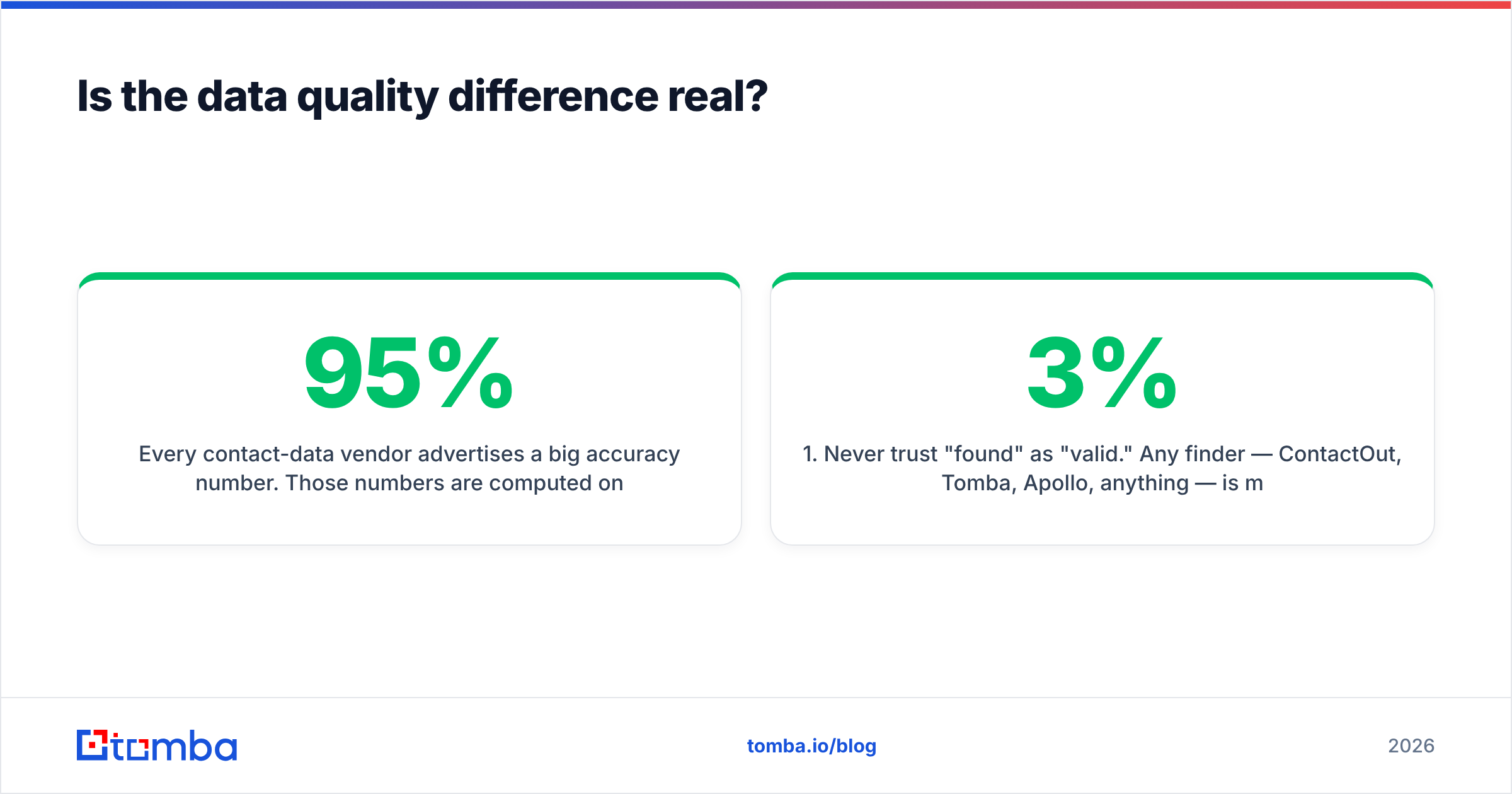
Every contact-data vendor advertises a big accuracy number. Those numbers are computed on the vendor's own sample, which is not your sample. What matters is the bounce rate on the specific segment you're targeting, and that varies wildly by geography, company size, and industry. A tool that's 95% accurate on US tech firms can be 60% accurate on European manufacturers.
Two things follow from that:
- Never trust "found" as "valid." Any finder — ContactOut, Tomba, Apollo, anything — is making a probabilistic guess plus a validation check. Run every list through verification before it touches your sender. A 3% bounce rate is survivable; 12% will get your domain throttled, and Mailmeteor cannot save you from that because the sends come from your Google account.
- Test on a sample before you commit budget. Pull 100 contacts from your actual ICP, verify them, and send a small batch. Measure the real bounce rate. Then decide which finder to standardize on.
This is where a purpose-built data platform tends to beat a browser extension. Extensions optimize for the single-profile moment. Data platforms optimize for the whole list: bulk lookups, catch-all verification, enrichment, and an API you can wire into your own pipeline. If your motion is "one profile at a time," the extension is fine. If it's "3,000 rows by Friday," it isn't.

What does the total stack actually cost?#
This is where people get surprised. They compare a $10/mo mail merge to a $99/mo data tool, conclude the mail merge is "cheaper," and then discover it does nothing without data.
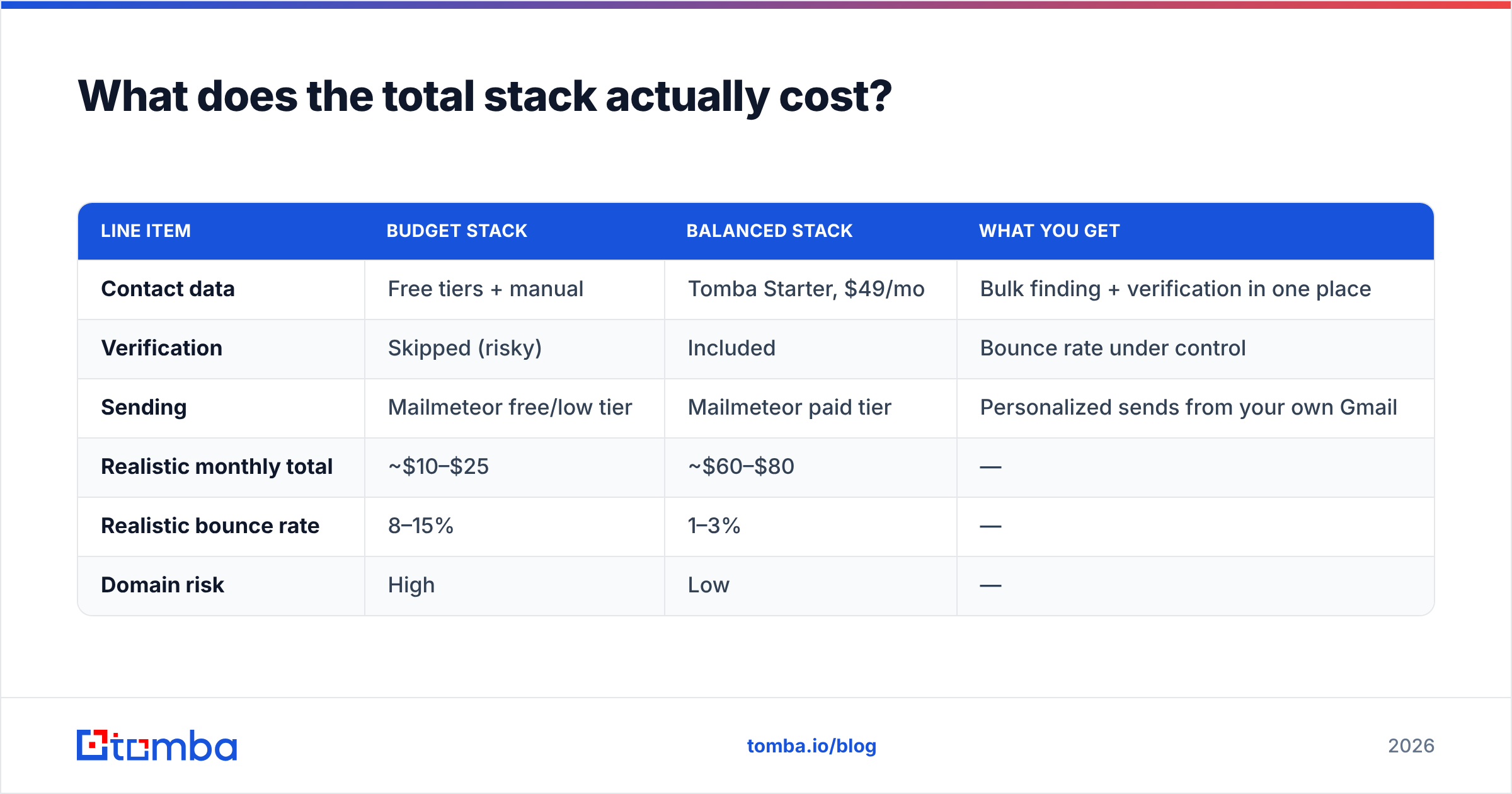
Here's a realistic monthly bill for a solo founder or a small SDR pod running ~1,000 outbound emails a month:
| Line item | Budget stack | Balanced stack | What you get |
|---|---|---|---|
| Contact data | Free tiers + manual | Tomba Starter, $49/mo | Bulk finding + verification in one place |
| Verification | Skipped (risky) | Included | Bounce rate under control |
| Sending | Mailmeteor free/low tier | Mailmeteor paid tier | Personalized sends from your own Gmail |
| Realistic monthly total | ~$10–$25 | ~$60–$80 | — |
| Realistic bounce rate | 8–15% | 1–3% | — |
| Domain risk | High | Low | — |
The budget stack looks like a win for about three weeks. Then the bounces stack up, Gmail starts routing you to spam, and you spend a month rebuilding sender reputation — which costs far more than the $50 you saved. Deliverability is the constraint that governs everything else in cold email; treat it as the first-class metric it is.
Tomba's own tiers run Free (25 searches/mo), Starter $49/mo, Growth $99/mo, Pro $249/mo, and Enterprise custom — with finding, verification, and enrichment in the same account rather than as three separate subscriptions. ContactOut and Mailmeteor both publish their own tiers; price the full stack, not the single line item.
Are there better combinations than ContactOut + Mailmeteor?#
Depends on what you're optimizing for.
Optimize for recruiting. ContactOut + Mailmeteor is genuinely coherent. Recruiters need personal emails (ContactOut's edge) and low-volume, highly personalized sends (Mailmeteor's edge). Keep it.
Optimize for B2B sales volume. Swap the data layer. A bulk-first finder with a real API and built-in verification will beat a profile-by-profile extension the moment your list crosses a few hundred rows. Tomba, and options like Findymail or Wiza, are worth pricing out. Keep Mailmeteor if your daily volume fits inside Google's limits; graduate to a dedicated sender if it doesn't.
Optimize for one bill. All-in-one platforms (Apollo, Instantly, Amplemarket) bundle data + sending. You pay more per seat and you're locked to their data quality with no easy swap. Some teams prefer that; many find the data half underwhelming and end up buying a finder anyway. If you're weighing this, our Apollo alternative breakdown covers the tradeoff in detail.
Optimize for engineering control. Finder API + verification API + your own sending infrastructure. More work, lowest cost per contact at scale, and total control over deliverability. This is the right answer above roughly 20,000 contacts a month.
What should you do this week?#
Run this in order. It takes an afternoon.
- Define the segment. 100 companies, one job title. Not "everyone."
- Pull contacts two ways. Try ContactOut's free tier and a finder's free tier on the same 100 targets. Compare hit rate.
- Verify both lists. Same verifier, same day. Compare bounce-risk flags. This is the number that decides your data vendor — not the vendor's marketing page.
- Load the winner into a Google Sheet and send 50 through Mailmeteor. Personalize two fields minimum.
- Read the real metrics after 72 hours: bounce rate, spam-complaint rate, reply rate. Bounce over 5% means your data layer is wrong, not your copy.
Do that, and "ContactOut vs Mailmeteor" stops being a question you argue about and becomes a number you measured.
Which tool wins?#
Neither, because they never fought. Mailmeteor is a very good, very cheap way to send personalized email from Gmail, and nothing in this post should talk you out of it if you have a list. ContactOut is a strong recruiting-flavored contact-data tool, and if your work is profile-by-profile sourcing, it earns its seat.
The failure mode isn't picking the "wrong" one. It's picking one, assuming it's a complete stack, and discovering three weeks later that your bounce rate torched a domain you spent two years building.
Fix the data half first. If you're building B2B lists at any real volume, start with the Tomba Email Finder — bulk lookups, domain search, and verification in one account, with a free tier (25 searches/mo) that's enough to run the 100-contact test above before you spend a dollar. Get the list right, then let Mailmeteor do what it's good at.
Related guides#
Ready to find emails that actually work?
Join 150,000+ professionals who stopped guessing and started sending. Free credits on signup — no credit card required.
Get the Tomba newsletter
Practical outbound tactics and product updates — once every two weeks.
About the author