ContactOut vs QuickMail (2026): Which One Do You Need?
ContactOut finds the contact. QuickMail sends the sequence. Most teams compare them as rivals, then buy the wrong one. Here is the honest breakdown of pricing, data quality, deliverability, and who each tool is actually built for.
TL;DR — what you actually need to know#
- These are not competitors. ContactOut is a contact-data tool (emails and phone numbers, mostly sourced off LinkedIn profiles). QuickMail is a cold email sending platform (sequences, inbox rotation, deliverability). Buying one does not remove the need for the other.
- If your problem is "I don't have emails," you need ContactOut — or a cheaper, API-first data provider.
- If your problem is "my emails aren't landing or aren't being sent at scale," you need QuickMail — its inbox rotation and auto-warmer are its whole reason to exist.
- Pricing is structured differently. ContactOut charges per seat plus credits. QuickMail charges per sending inbox/prospect volume. Compare cost-per-contacted-prospect, not cost-per-month.
- The cheapest realistic stack is a data layer (ContactOut, Tomba, or similar) + a verifier + a sender. Buying an all-in-one that does one half poorly is the most common outbound money leak.
What is ContactOut, really?#
ContactOut is a contact-discovery tool. Its core loop: you open a LinkedIn profile, click the extension, and it surfaces a personal email, a work email, and sometimes a mobile number. It also ships a web search portal, a bulk enrichment flow, and an API.
What it's genuinely good at:
- Personal emails. This is ContactOut's signature. Most B2B data vendors give you
first.last@company.com. ContactOut leans heavily into personal Gmail-style addresses, which is why recruiters — its dominant user base — love it. - Recruiting workflows. The product is shaped around sourcing candidates, not around go-to-market pipeline. That shows in the UI, the exports, and the ATS integrations.
- Coverage on people, not companies. If you know the human, ContactOut usually finds a way to reach them. If you only know the domain and want "everyone in RevOps," it is a clunkier path.
What it is not: a sending tool. There is no sequencer, no inbox rotation, no reply detection, no bounce handling on send. It hands you a contact and stops.
Where teams get frustrated: cost per credit at scale, the seat-based pricing model (every SDR needs a license), and the fact that personal email addresses — while great for recruiting — often perform worse in B2B sales, where a work address is expected and a Gmail hit looks like a privacy problem.
What is QuickMail, really?#
QuickMail is a cold outreach sending platform. You bring a list; QuickMail delivers it. Its differentiators:
- Inbox rotation. Spread one campaign across many sending mailboxes so no single domain or inbox absorbs the whole volume. This is the single most important feature in 2026, when Google and Microsoft enforce hard complaint-rate thresholds on bulk senders.
- Auto-warmer (MailFlow). Built-in warmup that runs continuously, not as a paid add-on.
- Deliverability-first design. Attribution, per-inbox health, and reply detection are treated as first-class, not bolted on.
- Agency-friendly structure. Multiple clients, multiple domains, shared reporting.
What it is not: a data provider. QuickMail does not find emails for you. It will happily send to a garbage list and let your domain burn. Its verification is limited, and its "list quality" story assumes you solved that upstream.

Is ContactOut better than QuickMail?#
The question is malformed, and that's the most useful thing to know before you spend money. Asking whether ContactOut beats QuickMail is like asking whether a flour supplier beats an oven. You need both, and the failure modes are different:
- Bad data + great sender = perfect delivery of emails to addresses that don't exist. Bounce rate spikes, sender reputation tanks, domain gets throttled.
- Great data + no sender = a spreadsheet of verified contacts, manually emailed 40 at a time from your primary inbox, until Gmail flags you.
So the real decision is: which layer are you missing, and what is the cheapest reliable way to fill it?
ContactOut vs QuickMail: the head-to-head table#
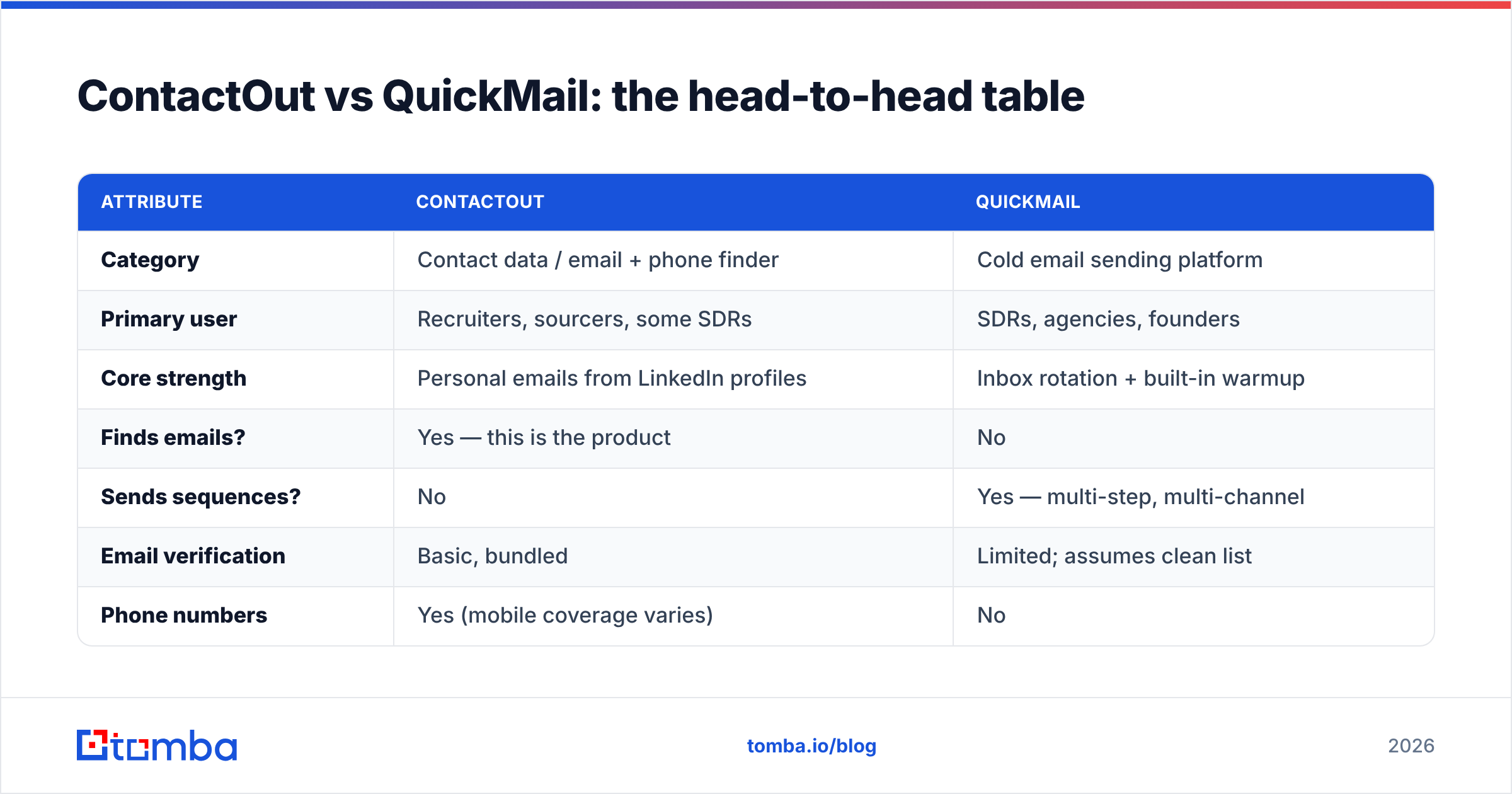
| Attribute | ContactOut | QuickMail |
|---|---|---|
| Category | Contact data / email + phone finder | Cold email sending platform |
| Primary user | Recruiters, sourcers, some SDRs | SDRs, agencies, founders |
| Core strength | Personal emails from LinkedIn profiles | Inbox rotation + built-in warmup |
| Finds emails? | Yes — this is the product | No |
| Sends sequences? | No | Yes — multi-step, multi-channel |
| Email verification | Basic, bundled | Limited; assumes clean list |
| Phone numbers | Yes (mobile coverage varies) | No |
| API | Yes | Yes |
| Pricing model | Per seat + credit tiers | Per prospect volume / inbox count |
| Entry price (approx.) | ~$29–$49/user/mo, scaling fast with credits | ~$49/mo entry, scales with volume |
| Free tier | Limited monthly credits | Free trial, no permanent free tier |
| Where it breaks | Cost per seat at team scale; work-email coverage weaker than personal | Sends whatever you give it — no data safety net |
Two things to read out of that table. First, there is exactly one row where they overlap (API), and it's for different jobs. Second, both charge in ways that punish scale differently: ContactOut punishes headcount, QuickMail punishes volume.
How should you actually structure the stack?#
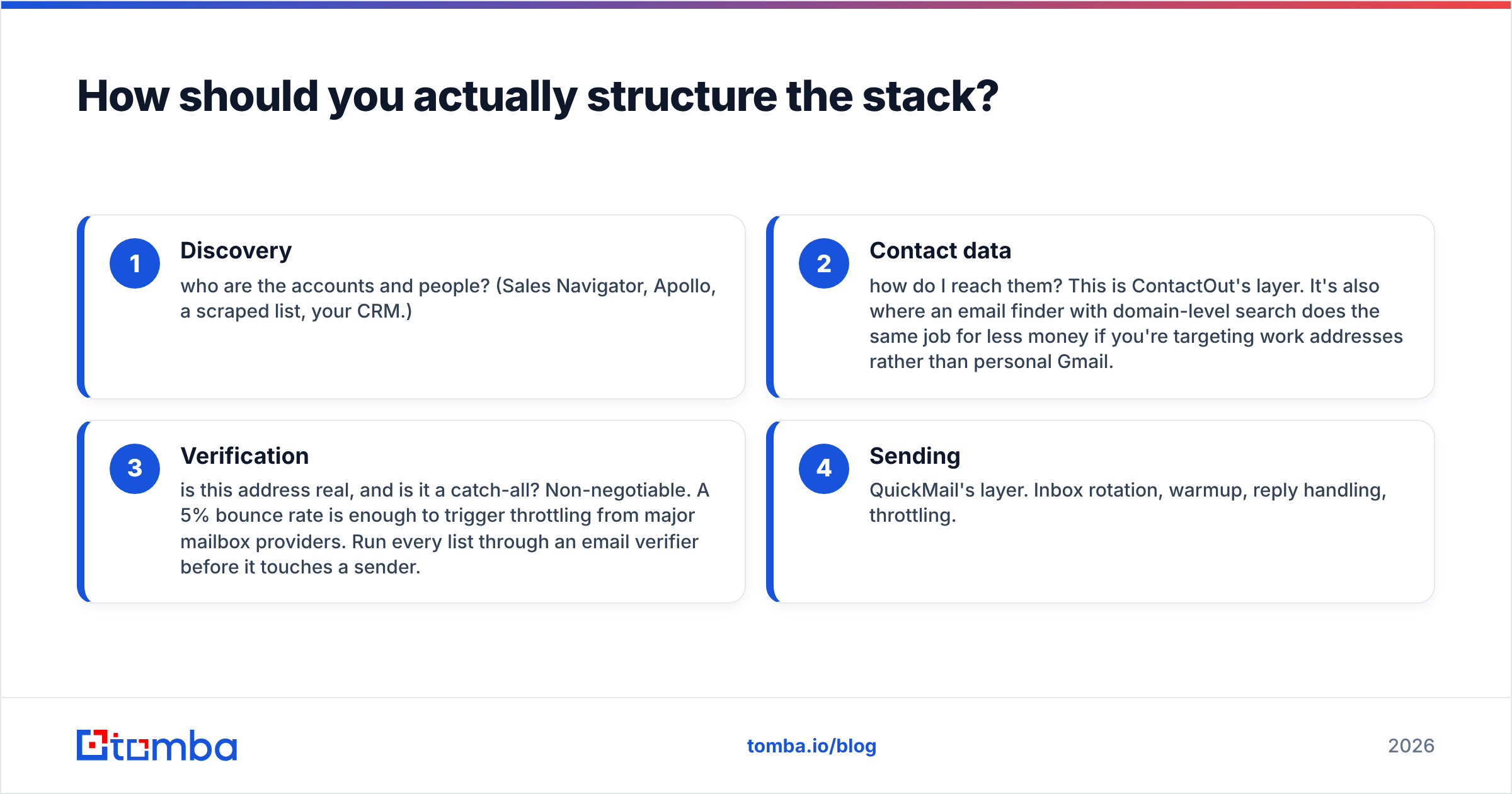
A functioning outbound stack in 2026 has four layers. Most "vs" posts pretend it has one.
- Discovery — who are the accounts and people? (Sales Navigator, Apollo, a scraped list, your CRM.)
- Contact data — how do I reach them? This is ContactOut's layer. It's also where an email finder with domain-level search does the same job for less money if you're targeting work addresses rather than personal Gmail.
- Verification — is this address real, and is it a catch-all? Non-negotiable. A 5% bounce rate is enough to trigger throttling from major mailbox providers. Run every list through an email verifier before it touches a sender.
- Sending — QuickMail's layer. Inbox rotation, warmup, reply handling, throttling.
Skipping layer 3 is the most expensive mistake here, and it's the one both ContactOut and QuickMail quietly leave to you. ContactOut hands you a contact with a confidence score. QuickMail assumes you did the work. In between sits the bounce rate that determines whether your next 10,000 emails get delivered at all.

What does each one actually cost at real volume?#
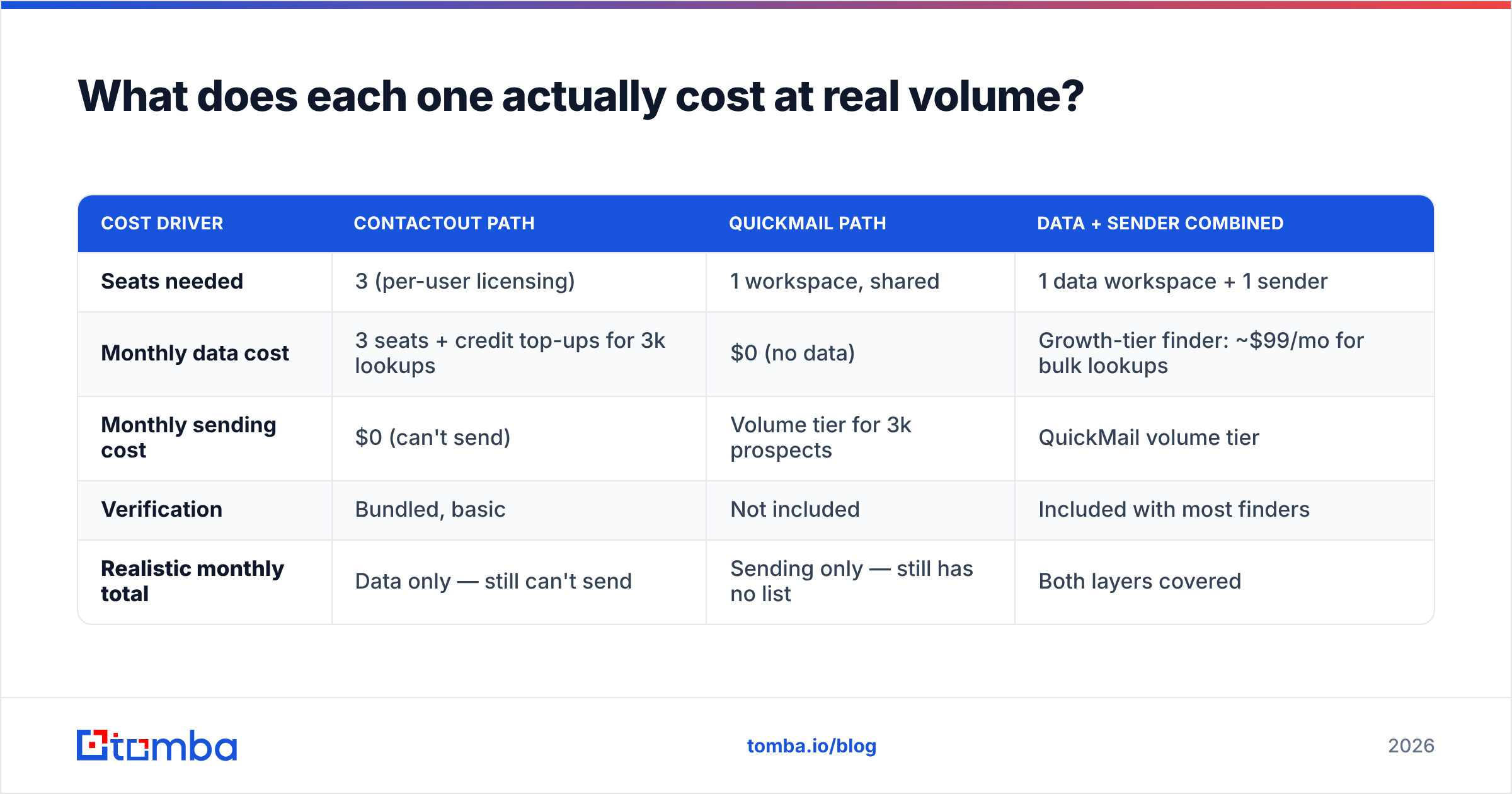
Forget list price. Model a 3-SDR team contacting 3,000 new prospects a month.
| Cost driver | ContactOut path | QuickMail path | Data + sender combined |
|---|---|---|---|
| Seats needed | 3 (per-user licensing) | 1 workspace, shared | 1 data workspace + 1 sender |
| Monthly data cost | 3 seats + credit top-ups for 3k lookups | $0 (no data) | Growth-tier finder: ~$99/mo for bulk lookups |
| Monthly sending cost | $0 (can't send) | Volume tier for 3k prospects | QuickMail volume tier |
| Verification | Bundled, basic | Not included | Included with most finders |
| Realistic monthly total | Data only — still can't send | Sending only — still has no list | Both layers covered |
The point of that table isn't a precise dollar figure; vendors move pricing quarterly and your credit burn depends on match rates. The point is that either tool alone leaves a hole, and once you accept you're buying two things, the seat-based data pricing starts looking expensive fast. Three SDRs on a per-seat data tool costs more than a whole-team data plan at $49/mo Starter or $99/mo Growth, where credits are pooled instead of fenced per user.
If per-seat credits are what's killing your budget, the honest move is to shop the data layer separately. That's the entire argument behind looking at a ContactOut alternative — not that ContactOut is bad at what it does, but that most B2B sales teams need work emails at domain scale, not personal emails at profile scale, and they're paying a recruiter-shaped price for a sales-shaped job.
Which one should you buy — a decision guide?#
Buy ContactOut if:
- You're a recruiter or sourcer and personal email/mobile is the whole point.
- Your workflow lives inside LinkedIn profile pages, one human at a time.
- You already have a sender (Instantly, Smartlead, QuickMail, Outreach) and only need the data.
Buy QuickMail if:
- You have a list and it's already verified.
- You're an agency running many clients across many domains and need inbox rotation without paying enterprise prices.
- Deliverability, not data, is what's broken. If your open rates collapsed but your bounce rate is under 2%, it's a sending problem.
Buy neither, and rebuild the stack, if:
- You're paying per seat for data your whole team needs to share.
- Your bounce rate is over 3% — no sender can save you; fix the data layer.
- You're doing bulk, domain-level prospecting (find everyone in Engineering at 500 SaaS companies) rather than profile-by-profile sourcing. That's a domain search job, and it's a fundamentally cheaper operation than per-profile credit burn.
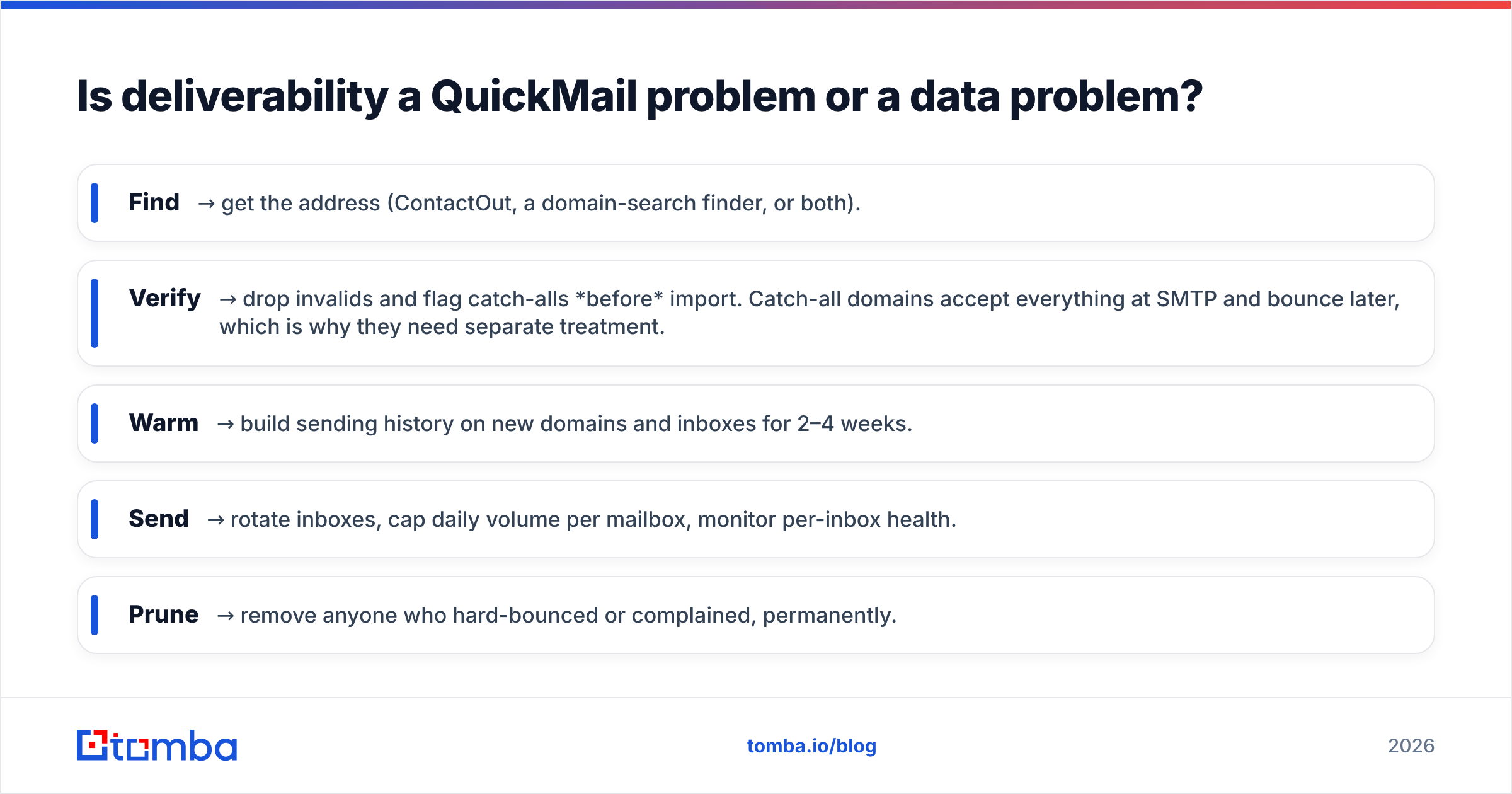
Is deliverability a QuickMail problem or a data problem?#
Mostly a data problem, and this is where the ContactOut vs QuickMail framing misleads people worst.
QuickMail's inbox rotation and warmup are excellent at spreading legitimate volume across mailboxes so no single sender trips a rate limit. What they cannot do is undo a hard bounce. Mailbox providers weigh bounce rate and complaint rate heavily; a list with 8% invalid addresses will degrade your sending domain no matter how elegantly you rotate inboxes. Warmup fixes reputation-from-cold. It does not fix reputation-from-bad-list.
So the sequence that actually works:
- Find → get the address (ContactOut, a domain-search finder, or both).
- Verify → drop invalids and flag catch-alls before import. Catch-all domains accept everything at SMTP and bounce later, which is why they need separate treatment.
- Warm → build sending history on new domains and inboxes for 2–4 weeks.
- Send → rotate inboxes, cap daily volume per mailbox, monitor per-inbox health.
- Prune → remove anyone who hard-bounced or complained, permanently.
Skip step two and steps three through five are theater. If you want a sanity check on what your ramp should look like before you push volume, run the numbers through a warmup calculator rather than guessing.
What do reviewers say?#
Both tools hold solid ratings on G2, and the review patterns are consistent with everything above: ContactOut users praise LinkedIn coverage and personal-email hit rates while complaining about credit costs and seat pricing; QuickMail users praise deliverability, inbox rotation, and support responsiveness while noting the UI feels dated next to newer sequencers and that it does nothing to help you build a list.
Read the complaints, not the praise. The complaints tell you exactly which adjacent tool you'll end up buying.
The verdict#
If you can only buy one, buy the one that fills your missing layer — and be honest about which layer that is. No sender rescues bad data. No data provider sends your emails.
For most B2B sales teams (as opposed to recruiting teams), the sharper move is to unbundle: pair a purpose-built sender like QuickMail with a data layer that prices by pooled credits instead of per seat, and that treats work-email accuracy and catch-all detection as the core product rather than an afterthought.
That's the gap Tomba is built for. Tomba Email Finder finds professional email addresses by domain, name, or company — with verification built into the same workflow, an API and CLI for pipelines, and pooled credits so your third SDR doesn't cost you a third license. Start on the free tier (25 searches/month), scale to Starter at $49/mo or Growth at $99/mo when the list gets serious, and let your sending platform do what it's actually good at.
Related guides#
Ready to find emails that actually work?
Join 150,000+ professionals who stopped guessing and started sending. Free credits on signup — no credit card required.
Get the Tomba newsletter
Practical outbound tactics and product updates — once every two weeks.
About the author