ContactOut vs Sales Automation Systems: The 2026 Verdict
ContactOut finds the contact. A sales automation system sends the sequence. They solve different halves of outbound — and buying them in the wrong order is how teams end up with a $1,200/mo stack that bounces 12% of its email.
TL;DR
- ContactOut and sales automation systems are not competitors. ContactOut is a data layer (find the person, get the email and phone). Salesloft, Outreach, Instantly, Reply.io and friends are a sending layer (sequence, track, route replies).
- If you only buy one, buy the data layer first. A perfect sequence sent to guessed addresses produces bounces; a plain three-step sequence sent to verified addresses produces meetings.
- ContactOut's strength is LinkedIn-sourced personal + work contacts inside a Chrome extension. Its weakness is that it does nothing after the export — no sending, no cadence, no reply handling.
- Sales automation platforms usually bundle a "data" add-on. Those add-ons are almost always the weakest module in the suite, and they're priced per seat, not per credit.
- The cheapest working stack in 2026 is: a credit-priced enrichment API (Tomba, ContactOut, or similar) + a lightweight sequencer + your CRM. Expect $150–$400/mo for a two-person outbound team, not $1,200.
What does ContactOut actually do?#
ContactOut is a contact-data tool. You install a Chrome extension, open a LinkedIn profile or a Sales Navigator list, and it surfaces work emails, personal emails, and (on higher tiers) phone numbers. It has a web search app, a bulk export flow, an API, and CRM pushes to HubSpot, Salesforce, and a handful of sequencers.
What it does not do: send anything. There is no cadence engine, no A/B testing, no inbox rotation, no reply detection, no meeting booking, no pipeline reporting. It is a very good faucet. It is not a plumbing system.
That distinction matters because most "ContactOut vs X" searches are really one of two questions in disguise:
- "Do I need a data tool at all if my sequencer has a built-in database?" (Usually yes.)
- "Which do I buy first with a limited budget?" (The data tool.)
What is a sales automation system, exactly?#
A sales automation system is the machinery that takes a list of contacts and turns it into repeatable, tracked outreach. In practice it covers:
- Sequencing / cadence — multi-step email, call, and LinkedIn tasks with delays and branching.
- Deliverability infrastructure — inbox rotation, sending limits, warmup, SPF/DKIM/DMARC checks, spintax.
- Reply and intent handling — categorising replies, auto-pausing sequences, routing hot leads to a rep.
- CRM sync — writing activities back to Salesforce, HubSpot, or Pipedrive so the pipeline stays honest.
- Reporting — reply rate, meeting rate, sequence-level and rep-level performance.
- Occasionally, a bundled database — a "find contacts" tab that is usually a reseller of someone else's data.
Outreach and Salesloft sit at the enterprise end. Instantly, Smartlead, Reply.io, Saleshandy, and Lemlist sit at the SMB end. Apollo tries to be both a database and a sequencer, which is exactly why it shows up in this comparison constantly — and exactly why its data quality is argued about on G2 every quarter.

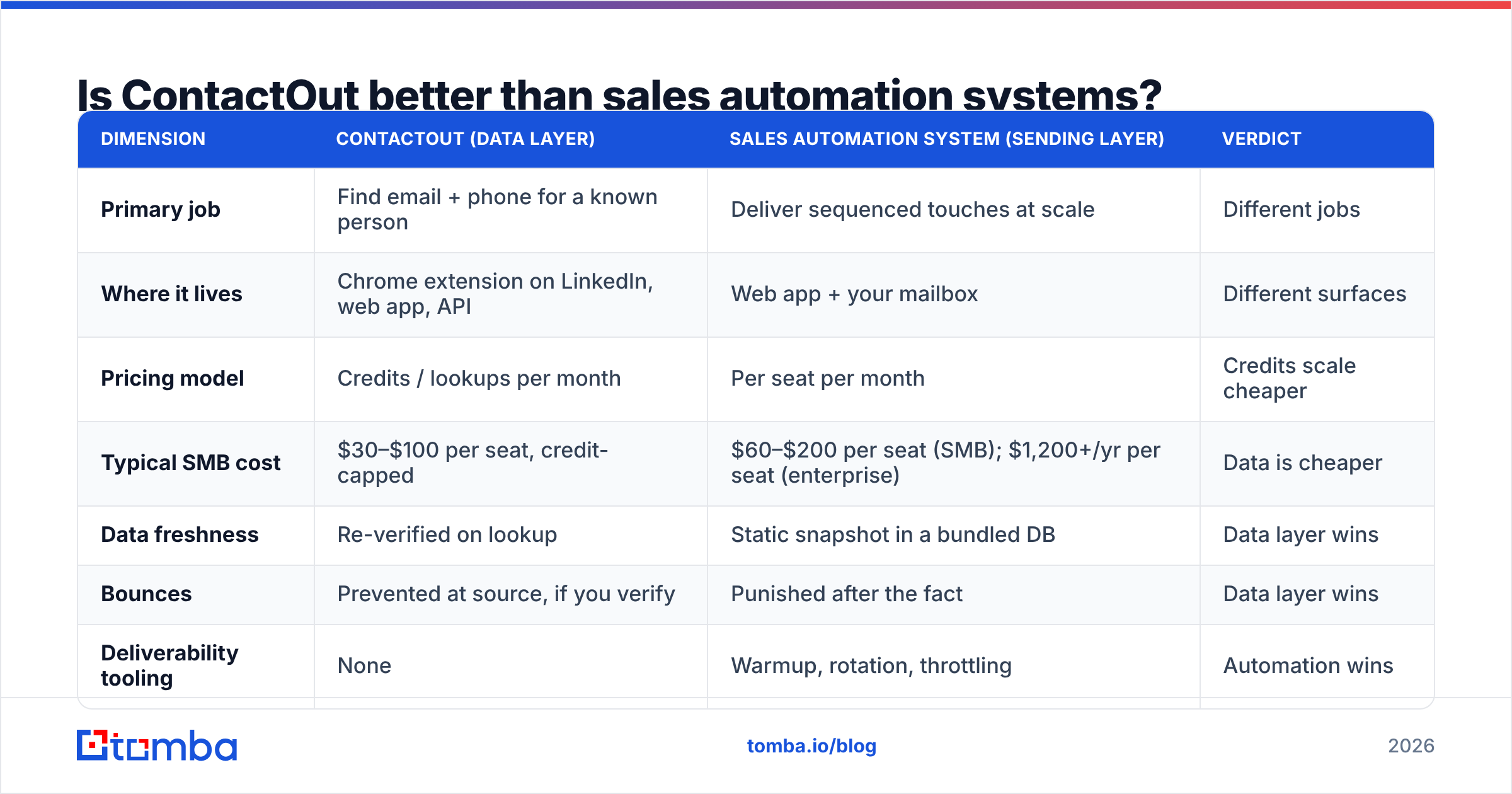
Is ContactOut better than sales automation systems?#
Wrong question, but here is the honest answer to the question underneath it.
| Dimension | ContactOut (data layer) | Sales automation system (sending layer) | Verdict |
|---|---|---|---|
| Primary job | Find email + phone for a known person | Deliver sequenced touches at scale | Different jobs |
| Where it lives | Chrome extension on LinkedIn, web app, API | Web app + your mailbox | Different surfaces |
| Pricing model | Credits / lookups per month | Per seat per month | Credits scale cheaper |
| Typical SMB cost | $30–$100 per seat, credit-capped | $60–$200 per seat (SMB); $1,200+/yr per seat (enterprise) | Data is cheaper |
| Data freshness | Re-verified on lookup | Static snapshot in a bundled DB | Data layer wins |
| Bounces | Prevented at source, if you verify | Punished after the fact | Data layer wins |
| Deliverability tooling | None | Warmup, rotation, throttling | Automation wins |
| Reply handling | None | Core feature | Automation wins |
| Works without the other? | Yes — export to CSV, send manually | Only if you already have contacts | Data layer is more standalone |
The scoreboard is 4–2 for the data layer on standalone usefulness — but the two categories are complements, not substitutes. The real decision is sequencing (pun intended): which one you buy in month one.
Which one should you buy first?#
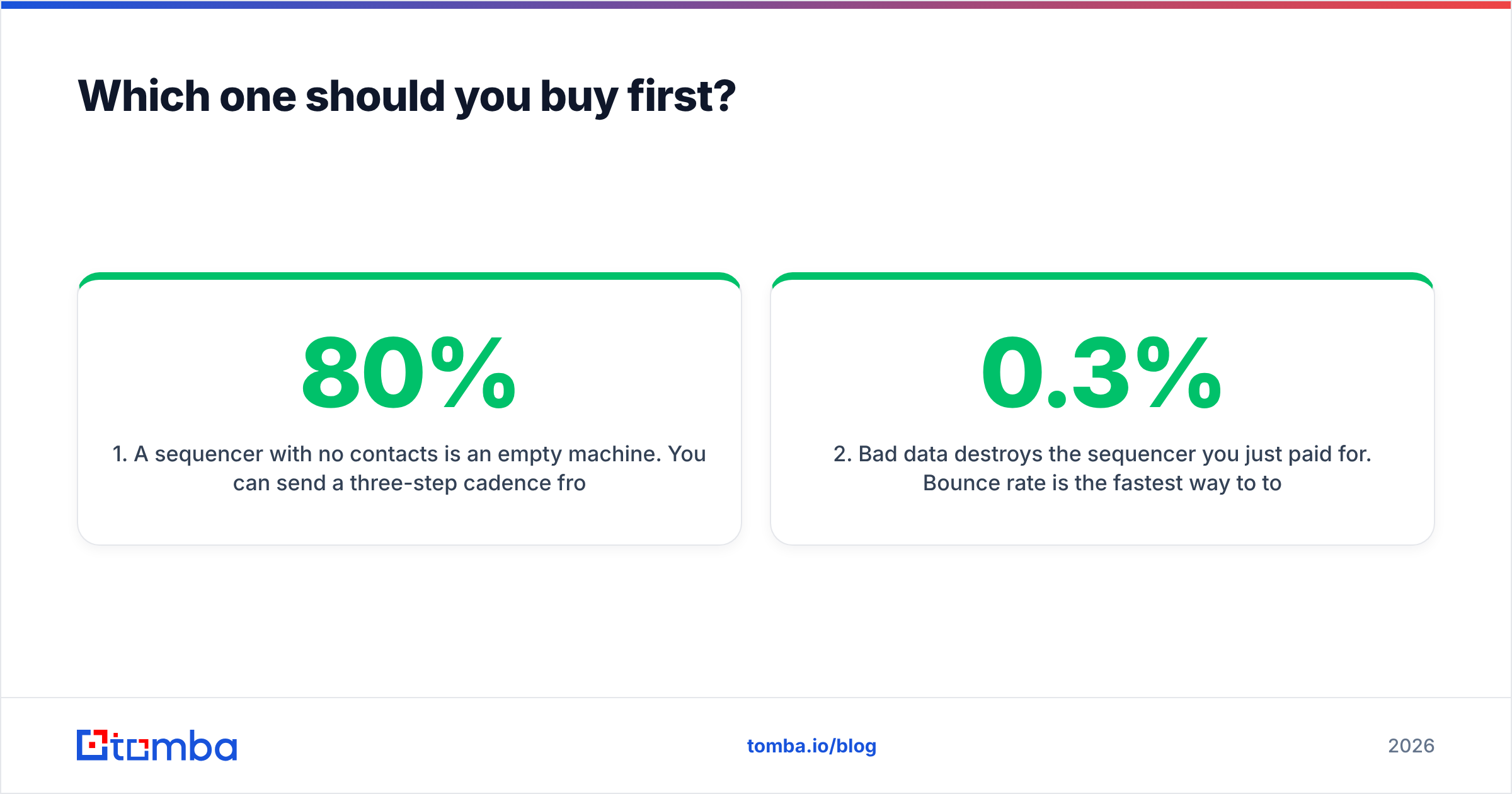
Buy the data layer first. Three reasons, in order of how much money they save you.
1. A sequencer with no contacts is an empty machine. You can send a three-step cadence from Gmail with a free tracker and get 80% of a $99/mo sequencer's outcome at 30 leads/week. You cannot manufacture a verified CFO email address out of a cadence builder.
2. Bad data destroys the sequencer you just paid for. Bounce rate is the fastest way to torch a sending domain. Google and Microsoft both tightened bulk-sender enforcement in 2024 and have not loosened it since — Google's Email sender guidelines still put spam-complaint rate under 0.3% and require authentication for bulk senders. If 10% of your list bounces, your email deliverability collapses and every dollar you spend on automation is spent pushing mail into spam folders. Run an email verifier before the first send, not after the first crisis.
3. Data is credit-priced; automation is seat-priced. You can buy 5,000 lookups for the cost of one sequencer seat. When budget is tight, the elastic line item wins.
The exception: if your team already has a clean CRM full of contacts (say, a 40,000-record HubSpot instance built over five years), the automation layer is the bottleneck and you should buy that first. Enrich the stale records later.
How do the data options compare?#
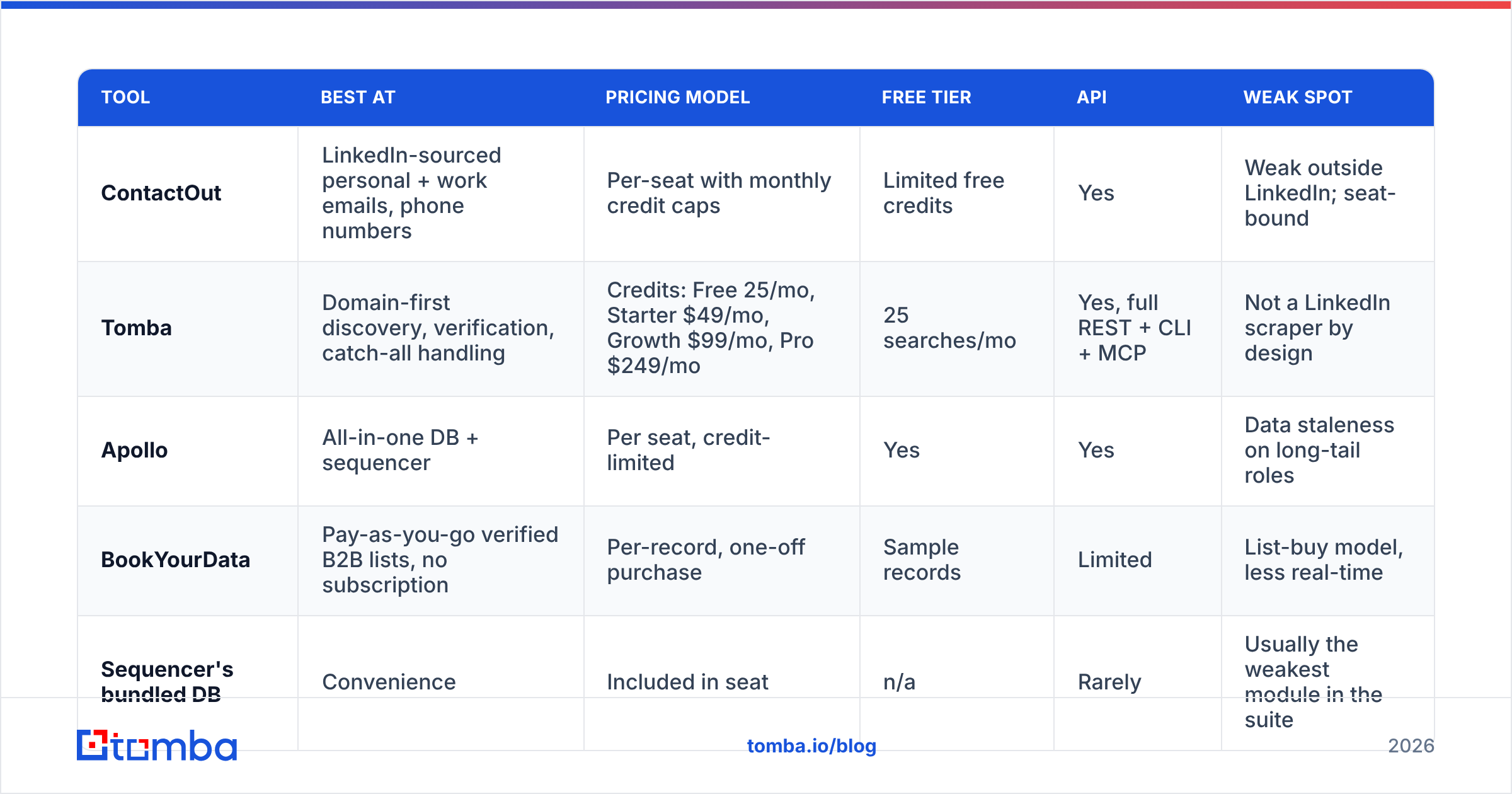
Once you accept that you need a data layer, ContactOut is one of several. Here's the honest field, judged on the things that actually change your bounce rate and your bill.
| Tool | Best at | Pricing model | Free tier | API | Weak spot |
|---|---|---|---|---|---|
| ContactOut | LinkedIn-sourced personal + work emails, phone numbers | Per-seat with monthly credit caps | Limited free credits | Yes | Weak outside LinkedIn; seat-bound |
| Tomba | Domain-first discovery, verification, catch-all handling | Credits: Free 25/mo, Starter $49/mo, Growth $99/mo, Pro $249/mo | 25 searches/mo | Yes, full REST + CLI + MCP | Not a LinkedIn scraper by design |
| Apollo | All-in-one DB + sequencer | Per seat, credit-limited | Yes | Yes | Data staleness on long-tail roles |
| BookYourData | Pay-as-you-go verified B2B lists, no subscription | Per-record, one-off purchase | Sample records | Limited | List-buy model, less real-time |
| Sequencer's bundled DB | Convenience | Included in seat | n/a | Rarely | Usually the weakest module in the suite |
Two things to notice.
First, the tools are not interchangeable by workflow. ContactOut is profile-first: you have a person, you want their contact details. Tomba's domain search is company-first: you have a domain, you want every reachable person on it plus the email pattern the company uses. If your ICP is "the 400 Series-B fintechs in the UK," domain-first is faster. If your ICP is "these 60 specific VPs I found on Sales Navigator," profile-first is faster. Teams doing serious volume run both.
Second, catch-all domains are where most tools quietly fail. A catch-all server accepts every address, so a naive verifier marks everything as valid and your bounce rate looks fine right up until the send. Ask any vendor how they handle catch-alls before you sign — a real catch-all verifier gives you a confidence score, not a shrug.
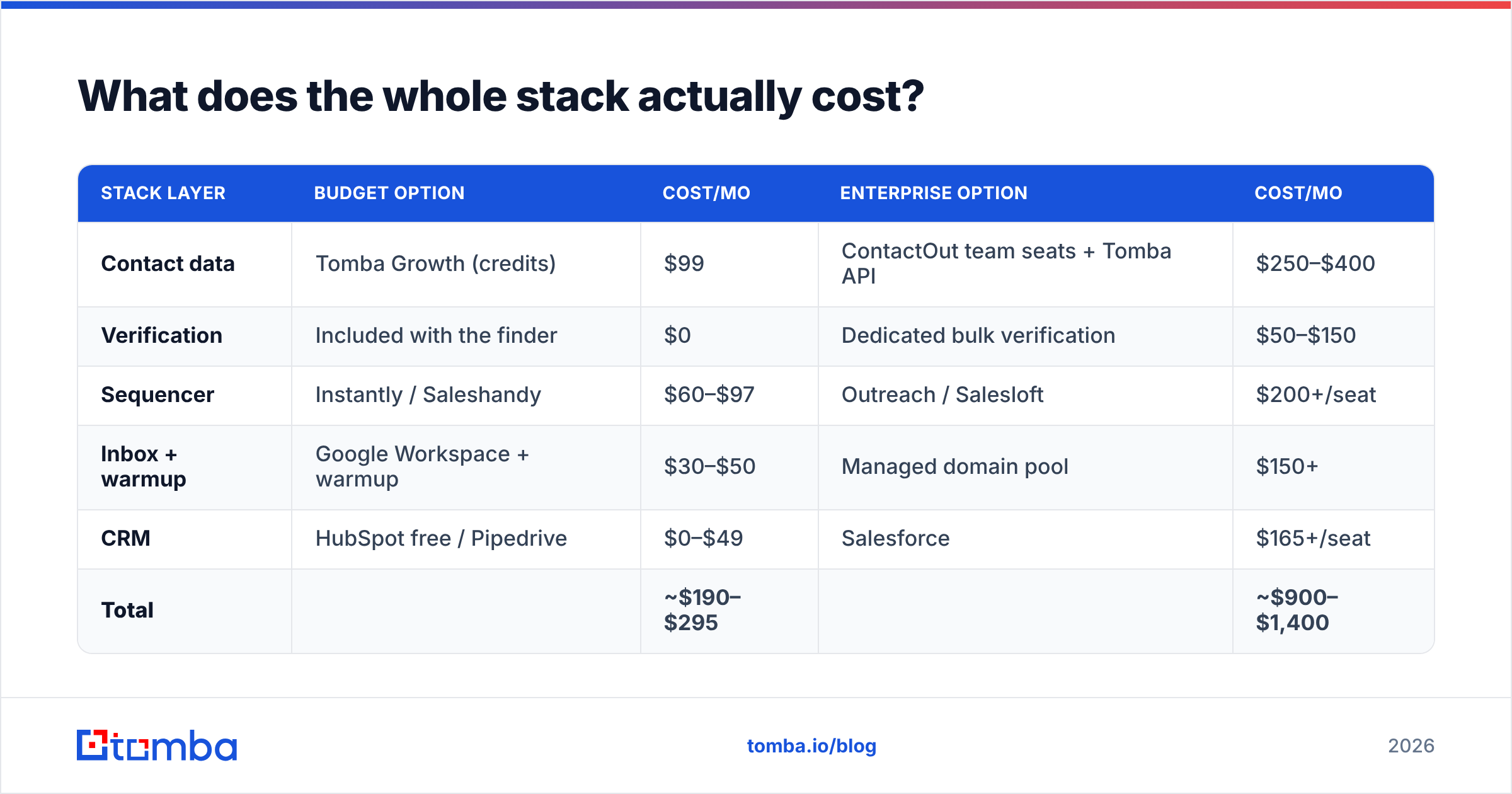
What does the whole stack actually cost?#
Here is a realistic two-rep outbound stack for 2026, priced honestly.
| Stack layer | Budget option | Cost/mo | Enterprise option | Cost/mo |
|---|---|---|---|---|
| Contact data | Tomba Growth (credits) | $99 | ContactOut team seats + Tomba API | $250–$400 |
| Verification | Included with the finder | $0 | Dedicated bulk verification | $50–$150 |
| Sequencer | Instantly / Saleshandy | $60–$97 | Outreach / Salesloft | $200+/seat |
| Inbox + warmup | Google Workspace + warmup | $30–$50 | Managed domain pool | $150+ |
| CRM | HubSpot free / Pipedrive | $0–$49 | Salesforce | $165+/seat |
| Total | ~$190–$295 | ~$900–$1,400 |
The budget stack is not a compromise for teams under ~15 reps. What you lose is enterprise reporting, territory routing, and SSO. What you keep is every meeting you would have booked anyway. HubSpot's sales research consistently shows that response rates track personalisation and targeting, not tooling spend — the platform is not the variable that moves the number.
Where teams overspend: paying for a $200/seat sequencer's bundled data credits and a standalone data tool, then discovering the bundled credits produce a 12% bounce rate and going unused. Audit that overlap first. If you're already paying for a suite, compare its data module honestly against a dedicated one before you renew — that's the same logic behind evaluating any Apollo alternative or ContactOut alternative.

How do you wire the two layers together?#
The integration is simpler than vendors make it sound. Four steps:
- Build the account list. Filter by firmographics in your CRM, a database, or LinkedIn Sales Navigator. Output: a list of domains and named people.
- Enrich and verify. Push the list through your data layer — bulk email finder for volume, a browser extension for one-offs. Verify in the same pass. Drop anything below your confidence threshold instead of "sending and seeing." A 95%+ deliverable list is the entry ticket.
- Load into the sequencer. Map custom fields (first name, company, role, one personalisation token that is not "I loved your post"). Set sending limits per inbox — 30–50/day per mailbox is still the safe band.
- Write results back to the CRM. Every reply, bounce, and meeting flows back to the record. If you skip this, you will re-enrich the same dead contact in six months and pay twice.
Steps 1–2 belong to the data layer, steps 3–4 to the automation layer. Anywhere the handoff is manual (a CSV emailed between two people), that's the friction to automate — with Zapier, a native HubSpot integration, or the Tomba API if you have an engineer with a spare afternoon.
When does ContactOut win outright?#
Be fair to it. ContactOut is the right primary tool when:
- Your motion is LinkedIn-native. Recruiters, agency prospectors, and anyone whose ICP is defined by a Sales Navigator filter rather than a firmographic query.
- You need personal emails and mobile numbers. Work email alone is a weak channel for exec and candidate outreach. If your motion is cold calling plus email, mobile coverage is worth the seat price.
- You prospect one profile at a time. The extension is genuinely fast for a rep working a list of 25 named targets.
Where it struggles: coverage outside LinkedIn, company-wide discovery, and the seat-based ceiling when you need 10,000 lookups this month and not next. That's the point where a credit-priced API is simply the cheaper unit economics — and where a domain-first email finder does work ContactOut structurally isn't built for.
What's the actual verdict?#
ContactOut vs sales automation systems is a false fight. You will end up owning one of each. The question worth arguing about is which data layer feeds your sending layer, because that's the choice that determines your bounce rate, your sender reputation, and whether the $99/mo sequencer you just bought does anything at all.
Decision rules:
- Under 5 reps, LinkedIn-driven motion: ContactOut extension + a cheap sequencer. Add a domain-first finder when list-building gets repetitive.
- Under 5 reps, account-driven motion: Credit-priced finder + verifier + a cheap sequencer. Skip the enterprise suite entirely.
- 15+ reps, existing CRM discipline: Enterprise sequencer for routing and reporting. Do not rely on its bundled data — plug a dedicated enrichment API into it.
- Any size, high bounce rate today: Stop everything. Fix verification before you touch the cadence.
Get the data layer right first#
If your sequences are landing in spam, the sequencer isn't the problem — the list is. Start with the Tomba Email Finder: find verified work emails by domain, name, or company, with verification and catch-all scoring built into the same lookup so nothing enters your sequencer unchecked. The free tier gives you 25 searches a month to test the accuracy against whatever you're using today, and paid plans start at $49/mo with credits that scale with volume instead of headcount. See full Tomba pricing, or run a domain through it and compare the results with your current list before your next send.
Related guides#
Ready to find emails that actually work?
Join 150,000+ professionals who stopped guessing and started sending. Free credits on signup — no credit card required.
Get the Tomba newsletter
Practical outbound tactics and product updates — once every two weeks.
About the author