ContactOut vs YAMM (Yet Another Mail Merge): 2026 Comparison
ContactOut finds the email. YAMM sends the email. Comparing them head-to-head only makes sense once you know which half of the outbound problem you're actually trying to solve — here's the honest breakdown.
TL;DR
- These two tools do not compete. ContactOut is a contact-data tool (find emails and phone numbers, mostly from LinkedIn). YAMM — Yet Another Mail Merge — is a Gmail/Google Sheets add-on that sends personalized mail merges. One fills the spreadsheet; the other mails it.
- If your problem is "I don't have the emails," buy a finder. ContactOut, Tomba, or a similar data layer. YAMM will not help you.
- If your problem is "I have a clean list and need to send 200 personalized emails from Gmail," buy YAMM. It's cheap, it lives inside Google Workspace, and it does one job well.
- The trap is sending unverified data through Gmail. YAMM inherits your Gmail sending reputation. A 12% bounce rate on a mail merge does real damage to a domain you also use for real business email.
- Most teams end up running both layers. The question worth asking is which finder feeds your merge — and whether you're paying twice for coverage you could get from one API.
What are ContactOut and YAMM, exactly?#
They sit on opposite ends of the same workflow, which is why "ContactOut vs YAMM" is a confusing search in the first place.
ContactOut is a B2B contact-data platform. Its core surface is a Chrome extension that overlays LinkedIn profiles and reveals work emails, personal emails, and phone numbers. It also ships a web-based search app, a list builder, and an API. You use it to answer: who is this person and how do I reach them? See contactout.com for the current product surface.
YAMM (Yet Another Mail Merge) is a Google Workspace add-on. You put a list of recipients in a Google Sheet, write a draft in Gmail with {{merge_tags}}, hit send, and YAMM personalizes and dispatches each message from your own Gmail account. It tracks opens, clicks, and responses back into the same Sheet. You use it to answer: how do I send 300 personalized emails without writing 300 emails? Details at yamm.com.
That's the whole distinction. ContactOut produces rows. YAMM consumes rows.

Is ContactOut a competitor to YAMM at all?#
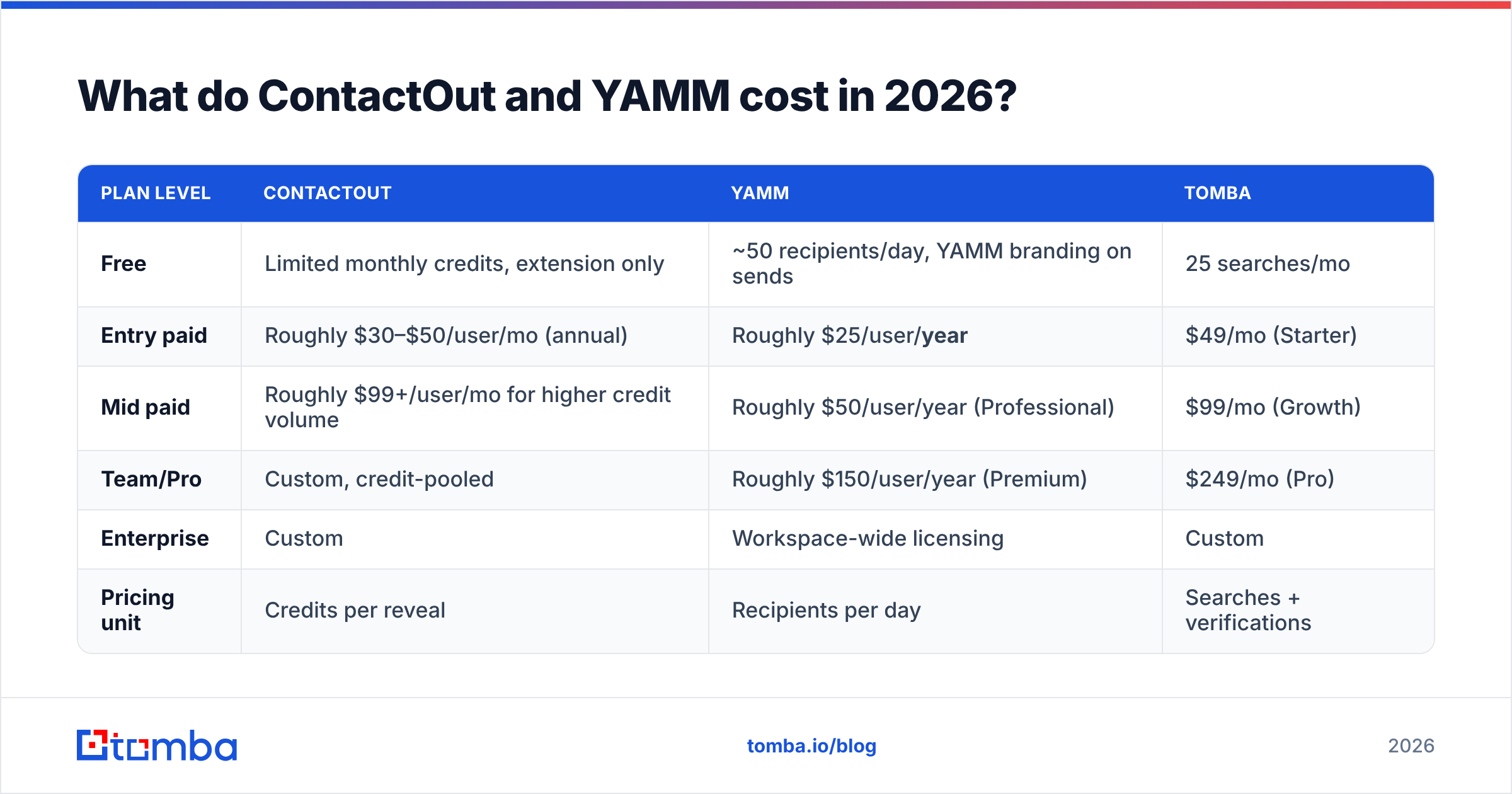
No — and treating them as competitors is how people end up with a broken stack. Here's the layer breakdown:
- Data layer (find). ContactOut, Tomba, Apollo, RocketReach, Lusha. Output: name, title, company, verified email, sometimes phone.
- Verification layer (clean). An email verifier that removes dead, role-based, and risky addresses before they ever touch your sending domain. Some finders bundle this; many don't verify at send-time freshness.
- Sending layer (deliver). YAMM, Mailmeteor, Instantly, Smartlead, Lemlist. Output: emails in inboxes, plus open/click/reply telemetry.
- Sequencing layer (follow up). Multi-step cadences with conditional logic. YAMM does one merge at a time — it is not a sequencer. If you need "email 1, wait 3 days, email 2 if no reply," YAMM is the wrong tier.
- CRM layer (record). HubSpot, Pipedrive, Salesforce. Where the reply actually turns into pipeline.
ContactOut is a #1. YAMM is a #3. If you buy only one and expect a working outbound motion, you will be disappointed in a very specific way: either you'll have a beautiful merge template and no addresses, or a spreadsheet of 4,000 emails and no way to mail them.
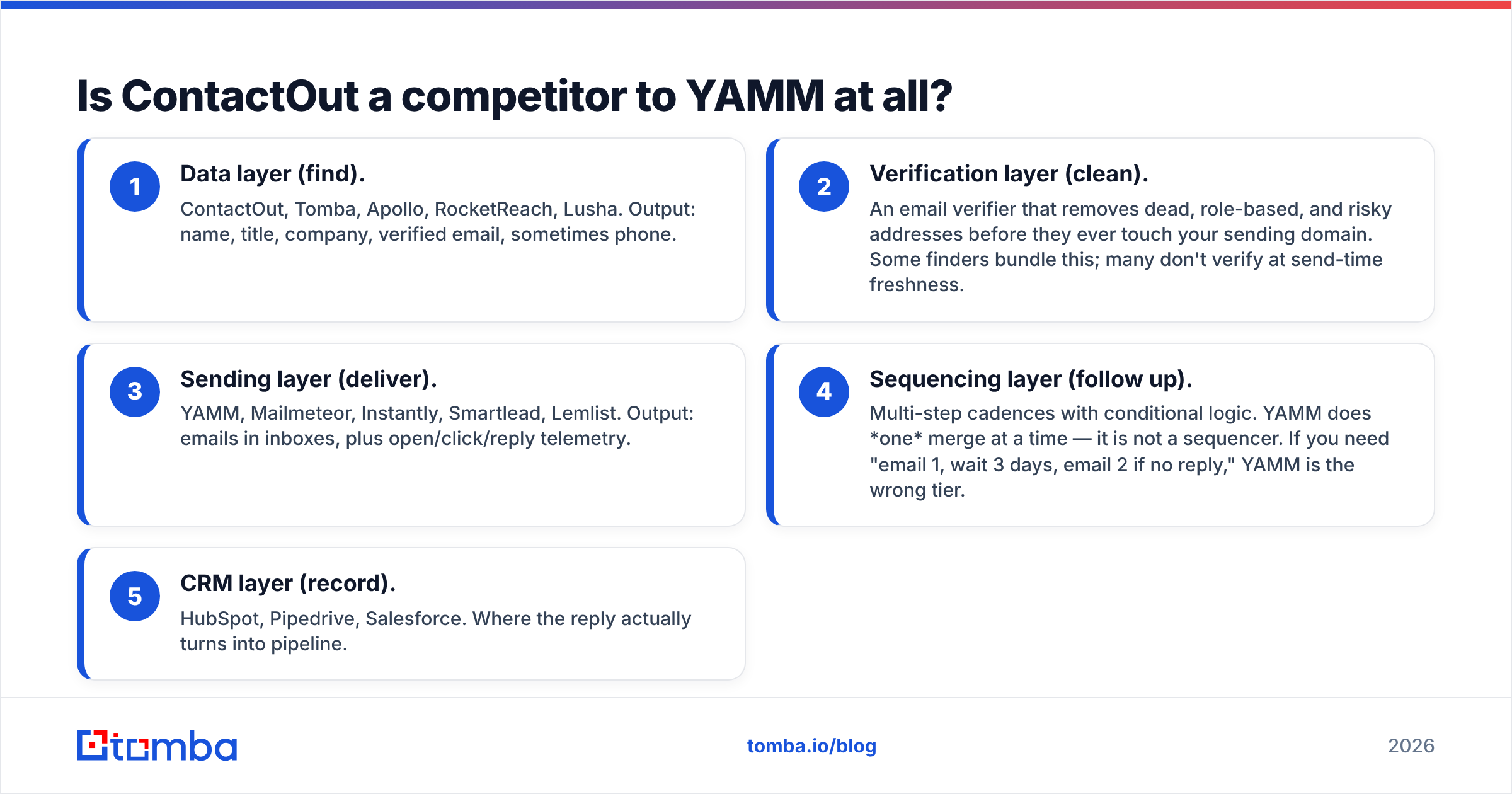
How do ContactOut and YAMM compare feature by feature?#
Here is the head-to-head, with Tomba included as a third column because it's the layer most people are actually shopping for when they type this comparison into Google.
| Attribute | ContactOut | YAMM (Yet Another Mail Merge) | Tomba |
|---|---|---|---|
| Primary job | Find emails + phones | Send personalized mail merges from Gmail | Find + verify emails at scale |
| Where it lives | Chrome extension, web app, API | Google Sheets + Gmail add-on | Web app, API, CLI, Chrome, Sheets, Excel |
| Finds new contacts | Yes — LinkedIn-first | No | Yes — domain, name, LinkedIn, author, bulk |
| Verifies deliverability | Basic validity signals | No | Yes — verifier + catch-all verifier |
| Sends email | No | Yes (via your Gmail) | No |
| Tracks opens/clicks/replies | No | Yes, back into the Sheet | No |
| Multi-step sequences | No | No (single merge per campaign) | No |
| Bulk enrichment of an existing list | Yes | No | Yes — CSV in, enriched CSV out |
| API access | Yes (higher tiers) | Limited (Apps Script) | Yes, on all paid plans |
| Free tier | Yes, limited credits | Yes — capped daily recipients | Yes — 25 searches/mo |
| Best for | Recruiters, LinkedIn-heavy sourcing | Small Gmail-native sends, event invites, newsletters | Teams needing verified data + API |
The row that matters most is "Verifies deliverability." YAMM sends from your Gmail account, on your domain. There is no shared IP pool, no warmup abstraction, no bounce-absorbing infrastructure between your list and your sender reputation. Whatever garbage is in column C goes straight out under your name.
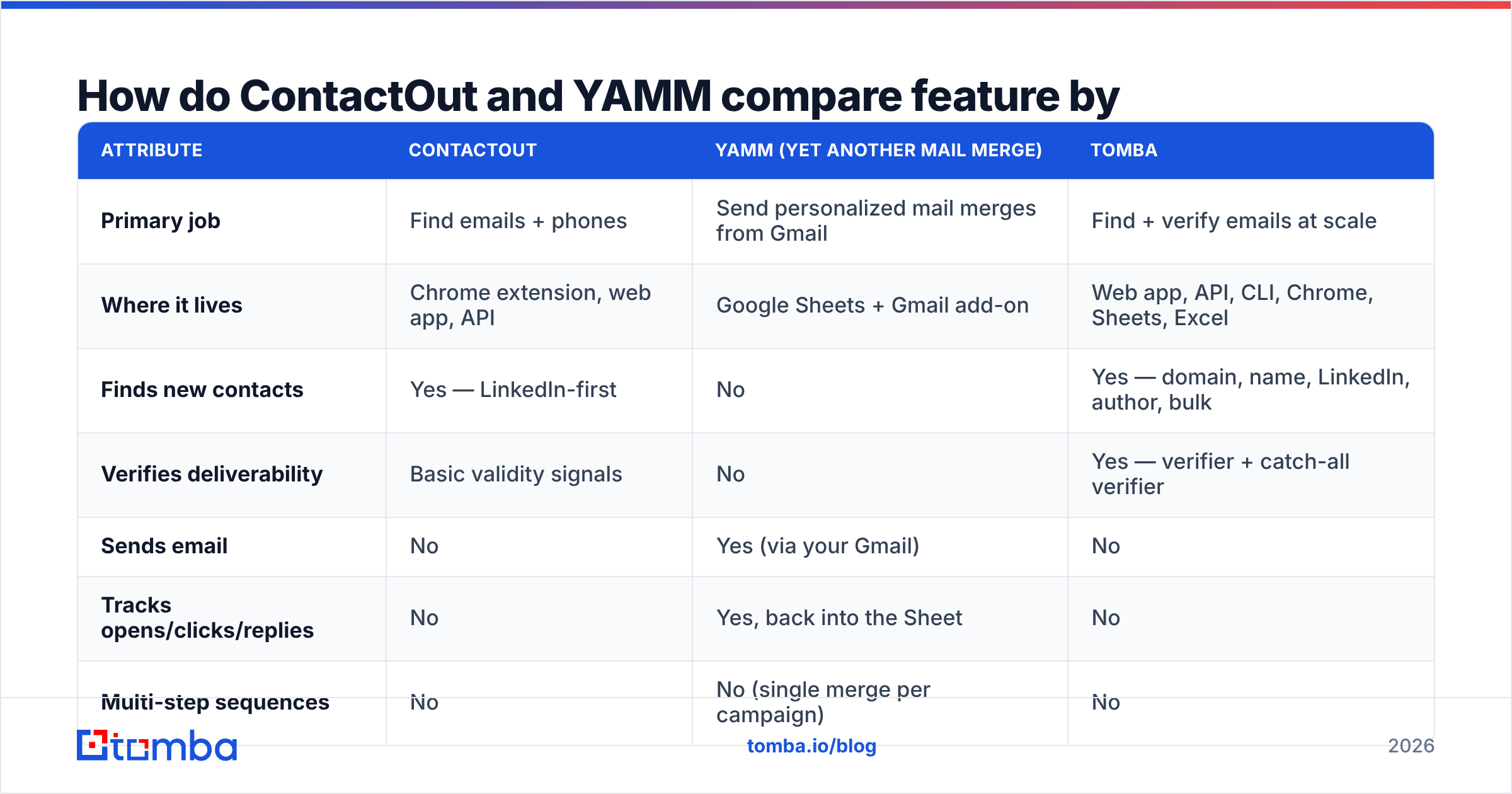
What do ContactOut and YAMM cost in 2026?#
Both vendors move pricing, and both gate the interesting features behind higher tiers, so treat this as a shape-of-the-market snapshot and confirm on their pricing pages before you buy.
| Plan level | ContactOut | YAMM | Tomba |
|---|---|---|---|
| Free | Limited monthly credits, extension only | ~50 recipients/day, YAMM branding on sends | 25 searches/mo |
| Entry paid | Roughly $30–$50/user/mo (annual) | Roughly $25/user/year | $49/mo (Starter) |
| Mid paid | Roughly $99+/user/mo for higher credit volume | Roughly $50/user/year (Professional) | $99/mo (Growth) |
| Team/Pro | Custom, credit-pooled | Roughly $150/user/year (Premium) | $249/mo (Pro) |
| Enterprise | Custom | Workspace-wide licensing | Custom |
| Pricing unit | Credits per reveal | Recipients per day | Searches + verifications |
Two things jump out.
YAMM is startlingly cheap. It's priced per year, not per month, because it isn't infrastructure — it's a thin, well-built layer on top of Gmail that you already pay Google for. That's a feature, not a knock. If your send volume genuinely fits inside Gmail's limits, you are not going to find better value.
Finder pricing is per-credit and per-seat, which is where budgets leak. ContactOut's credit model means a reveal that returns a stale or catch-all address still consumes budget. That's true of most finders. The mitigation is a verification pass before you pay to mail anything — which is why we publish Tomba pricing with verification included rather than sold as a separate meter.
What are the real limits you'll hit?#
Every tool in this comparison has a ceiling. Know them before you commit.
- YAMM's ceiling is Gmail's ceiling. A consumer Gmail account caps around 500 recipients/day; Google Workspace accounts go higher (commonly cited around 1,500–2,000/day depending on plan and history). YAMM cannot exceed what Google allows — it's a client of the same API you are. Google documents its sending limits in Workspace Admin Help. If you need 5,000 sends a day, YAMM is architecturally the wrong tool.
- YAMM has no warmup, no rotation, no deliverability safety net. Cold outbound at volume needs inbox rotation and gradual ramp. YAMM offers neither. It is a mail merge, not a cold-email platform. Use our email warmup calculator before you point it at a cold list.
- ContactOut's ceiling is LinkedIn. Its strongest data comes from profile-adjacent enrichment. If your ICP doesn't maintain LinkedIn profiles — trades, local services, non-US SMB, much of APAC — coverage drops and your cost-per-usable-contact climbs.
- Credit burn on unusable rows. Whether it's ContactOut or any other finder, a "found" email that's a catch-all with no further validation is a coin flip. Run a catch-all verifier on those before you send.
- Neither tool sequences. No follow-ups, no branching, no reply detection driving next steps. If your motion needs 4-touch cadences, you need a sequencer on top, and now you're at three subscriptions.

Which one should you actually buy first?#
Pick by the bottleneck, not by the review score.
Buy the finder first if: you have a target account list but blank email columns, your reps are hand-guessing firstname.lastname@ patterns, or your bounce rate is already above 5%. No sending tool fixes bad data. Start with an email finder and a verification pass.
Buy YAMM first if: you already have a clean, opted-in-or-warm list (event registrants, customers, applicants, inbound leads), you live in Google Workspace, and you need to send under a thousand personalized messages a week. YAMM is arguably the best value in this entire post for that specific job. It's not trying to be an outbound platform, and it doesn't pretend to be.
Buy neither if: you need multi-step cold sequences at volume. That's a different category — Instantly, Smartlead, Lemlist — and you should read a G2 category grid before spending. Both ContactOut and YAMM will feel like the wrong shape.
Can you run ContactOut and YAMM together as one workflow?#
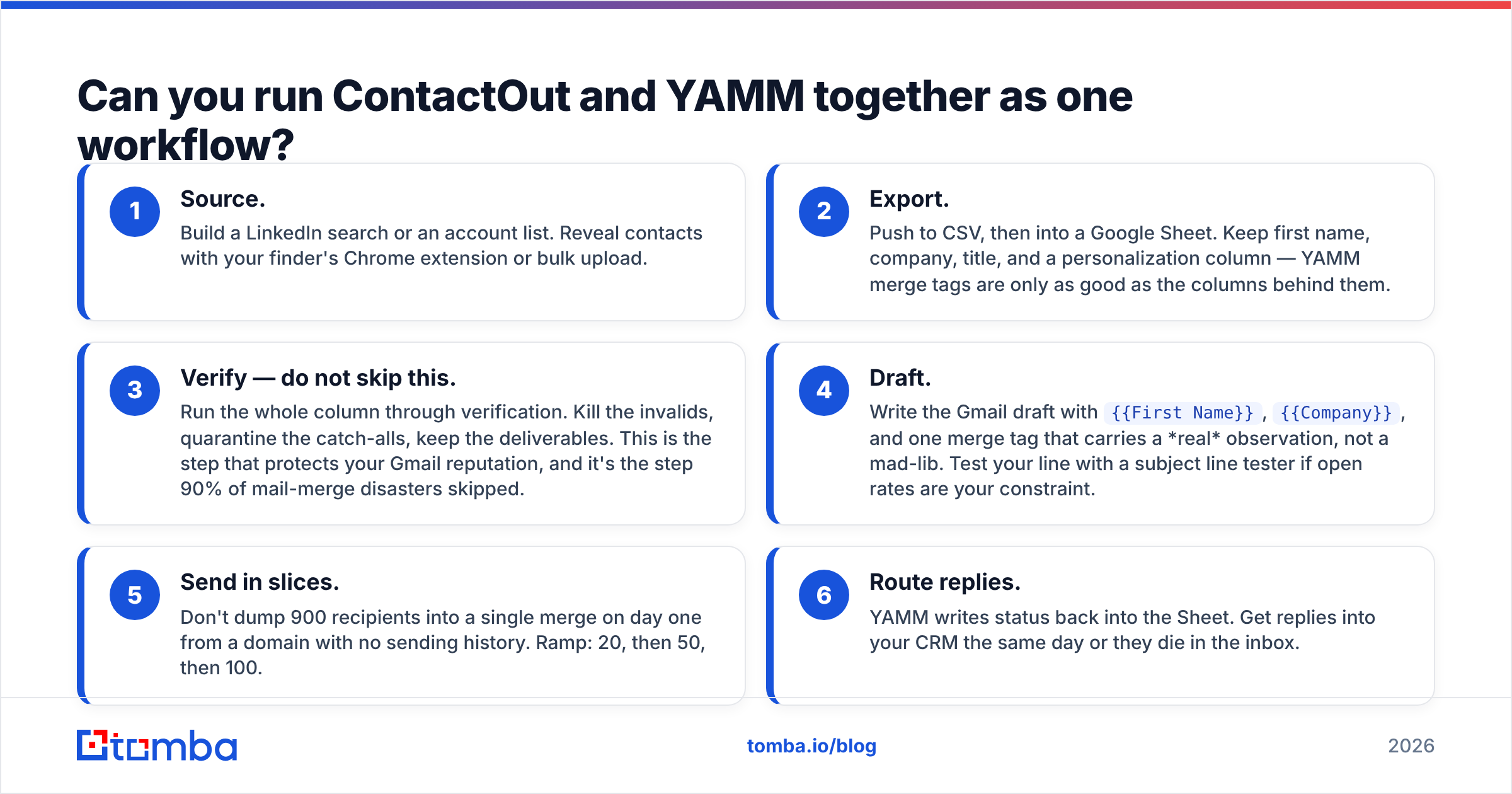
Yes, and plenty of small teams do. Here's the honest version of that pipeline, including the step most people skip:
- Source. Build a LinkedIn search or an account list. Reveal contacts with your finder's Chrome extension or bulk upload.
- Export. Push to CSV, then into a Google Sheet. Keep first name, company, title, and a personalization column — YAMM merge tags are only as good as the columns behind them.
- Verify — do not skip this. Run the whole column through verification. Kill the invalids, quarantine the catch-alls, keep the deliverables. This is the step that protects your Gmail reputation, and it's the step 90% of mail-merge disasters skipped.
- Draft. Write the Gmail draft with
{{First Name}},{{Company}}, and one merge tag that carries a real observation, not a mad-lib. Test your line with a subject line tester if open rates are your constraint. - Send in slices. Don't dump 900 recipients into a single merge on day one from a domain with no sending history. Ramp: 20, then 50, then 100.
- Route replies. YAMM writes status back into the Sheet. Get replies into your CRM the same day or they die in the inbox.
Step 3 is the one this whole comparison hinges on. A finder that hands you addresses without a verification verdict is handing you risk, and YAMM will happily deliver that risk to Google's spam filter under your own domain name.
What's the alternative to paying for two tools?#
You'll still need a sender — nobody's data platform will mail for you, and that's fine. But you can collapse the find + verify + enrich side into one meter instead of three.
That's the specific gap Tomba is built for: find email addresses by domain, name, or LinkedIn URL; verify them in the same call; enrich with title and company; then hand a clean CSV to YAMM, Mailmeteor, or whatever sends your mail. The Tomba API means the whole first half of that pipeline can run without a human touching a spreadsheet — and the Google Sheets add-on means it can run inside a spreadsheet if that's how your team works.
Honest caveats, since this is a comparison and not an ad: Tomba doesn't send email, doesn't sequence, and doesn't track opens. If LinkedIn-profile phone numbers are your core need, a LinkedIn-first tool like ContactOut will out-cover us on that specific surface. And if you send 300 emails a month to a warm list from Gmail, YAMM alone at ~$50/year is a perfectly rational stack — buying a data platform on top of it would be waste.
FAQ#
Is YAMM good for cold email? It's usable at small volume with a verified list and a warmed domain. It is not built for cold email at scale — no inbox rotation, no warmup, no sequences, and it's bound by Gmail's daily caps. Above a few hundred cold sends a week, move to a purpose-built platform.
Does ContactOut send emails? No. It has light outreach features around list-building, but it's a data tool. You still need a sender.
Which is more accurate — ContactOut or a dedicated verifier? Different jobs. A finder's accuracy claim covers "is this the right person's address." A verifier's job is "will this address accept mail today." You want both numbers, and they don't come from the same test. See where our data comes from for how we separate the two.
Can I just use Gmail's built-in mail merge? Google Workspace includes a basic multi-send feature on some tiers. It's fine for simple blasts. YAMM adds tracking, retry logic, scheduling, and better merge-tag handling — that delta is what you're paying for.
Ready to fix the half of the stack that actually breaks?#
The mail merge is rarely the problem. The list is. If your bounce rate is embarrassing, your reps are guessing email patterns, or your credits are burning on addresses that were dead in 2024, start upstream.
Try the Tomba Email Finder — find and verify professional email addresses by domain, name, or LinkedIn profile, then export a clean sheet straight into YAMM or any sender you like. The free tier gives you 25 searches a month to test the data against a list you already know the answers to. Paid plans start at $49/mo, with verification included rather than metered separately.
Find them right. Then merge.
Related guides#
Ready to find emails that actually work?
Join 150,000+ professionals who stopped guessing and started sending. Free credits on signup — no credit card required.
Get the Tomba newsletter
Practical outbound tactics and product updates — once every two weeks.
About the author