CRM Adoption Best Practices: A 2026 Playbook That Sticks
Most CRM rollouts fail on adoption, not software. Here are the CRM adoption best practices that actually move reps to log deals — plus the data hygiene layer nobody talks about.
Your CRM isn't failing because the software is bad. It's failing because your reps don't trust it, don't update it, and quietly run their real pipeline in a spreadsheet. CRM adoption is a people-and-data problem wearing a software costume, and the fix is a system of habits — not another training webinar nobody remembers.
This guide breaks down the CRM adoption best practices that actually change behavior in 2026: how to reduce data entry, prove value fast, and keep records clean enough that reps want to open the tool.
TL;DR#
- Adoption dies from friction, not features. Every field a rep fills by hand is a reason to skip the CRM. Automate entry and enrichment first.
- Clean data is the on-ramp. Reps abandon a CRM full of bounced emails and dead numbers. Fix data quality before you push usage.
- Executives must model the behavior. If leadership runs forecasts off gut feel, reps will too.
- Measure adoption as a metric, not a vibe. Track login rate, fields completed, and activity logged — then coach to the gap.
- Start small. Roll out 3-5 mandatory fields, not 40. Expand once the habit sticks.
Why do most CRM adoption efforts fail?#
Think of a CRM like a gym membership. Buying it feels like progress. Actually showing up every day is where 80% of people quit. According to widely cited industry surveys, roughly a third to a half of CRM projects fall short of expectations — almost always on the adoption line, not the license line.
The failure pattern is predictable:
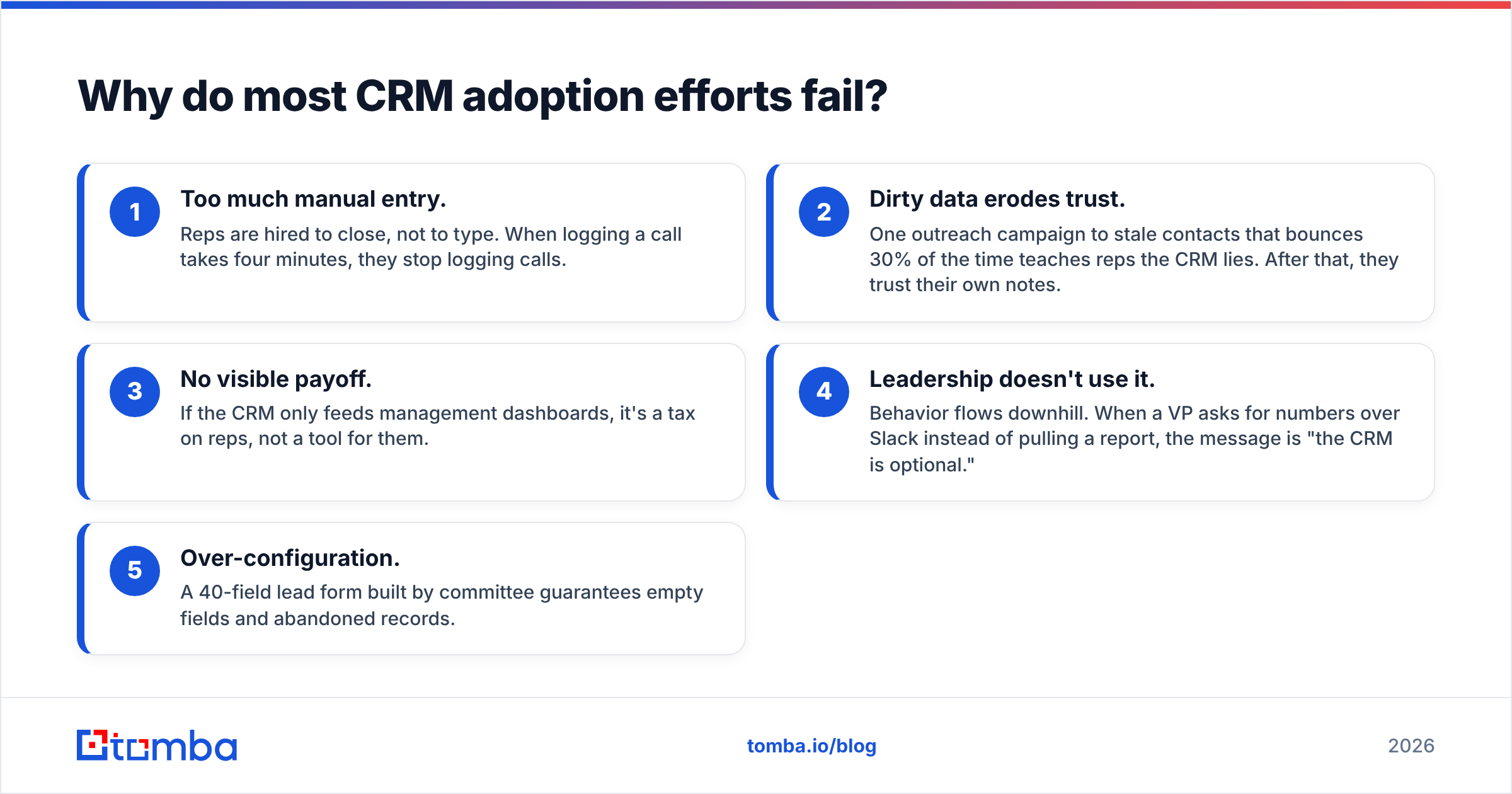
- Too much manual entry. Reps are hired to close, not to type. When logging a call takes four minutes, they stop logging calls.
- Dirty data erodes trust. One outreach campaign to stale contacts that bounces 30% of the time teaches reps the CRM lies. After that, they trust their own notes.
- No visible payoff. If the CRM only feeds management dashboards, it's a tax on reps, not a tool for them.
- Leadership doesn't use it. Behavior flows downhill. When a VP asks for numbers over Slack instead of pulling a report, the message is "the CRM is optional."
- Over-configuration. A 40-field lead form built by committee guarantees empty fields and abandoned records.
Fix these five and adoption follows. Ignore them and no incentive program will save you.

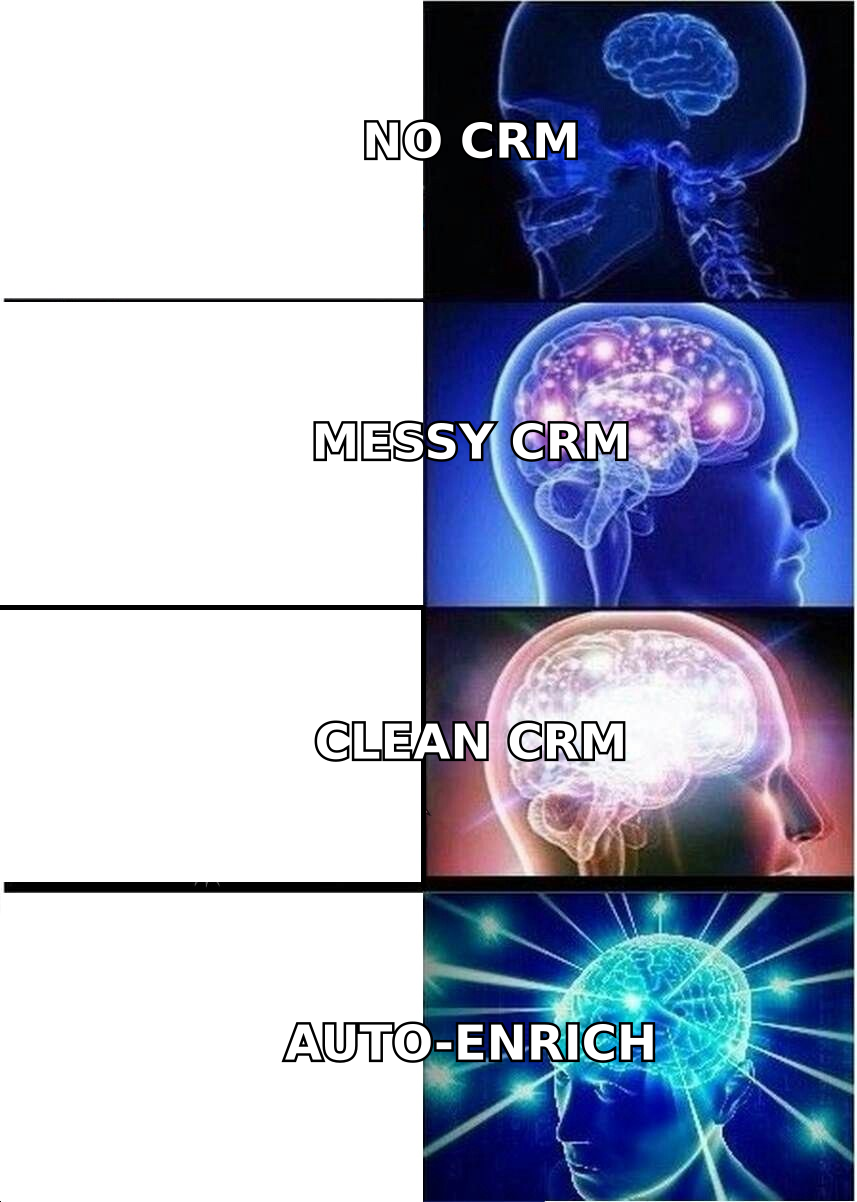
Wait — that image is a placeholder for the meme below.
What are the core CRM adoption best practices?#
Here's the short version, ranked by impact. The rest of the article expands each one.
- Reduce data entry to near-zero. Auto-capture emails, calls, and meetings. Enrich records automatically instead of asking reps to research.
- Guarantee data quality on day one. Import clean, verified contacts so the first experience is trustworthy.
- Ship a minimal required-field set. Start with 3-5 fields tied directly to forecasting.
- Make the CRM the rep's tool, not just management's. Give them views, reminders, and next-best-actions that save them time.
- Coach to adoption metrics weekly. Treat "did you log it" like any other coachable behavior.
- Have leaders live in the system. Every forecast, 1:1, and deal review runs from CRM data — no exceptions.
How does data quality drive CRM adoption?#
Clean data is the single biggest lever, and it's the one most rollout plans skip. Reps don't abandon a CRM because it has too few features — they abandon it because the contact record in front of them is wrong.
Picture a new rep's first week. They open the CRM, pull a list of 200 "warm" accounts, and start emailing. Sixty bounce. Twenty go to people who left the company two years ago. By Friday, that rep has quietly decided the database is garbage and started building their own list. You just lost adoption before training even ended.
The fix is a hygiene layer that runs before and during CRM use:
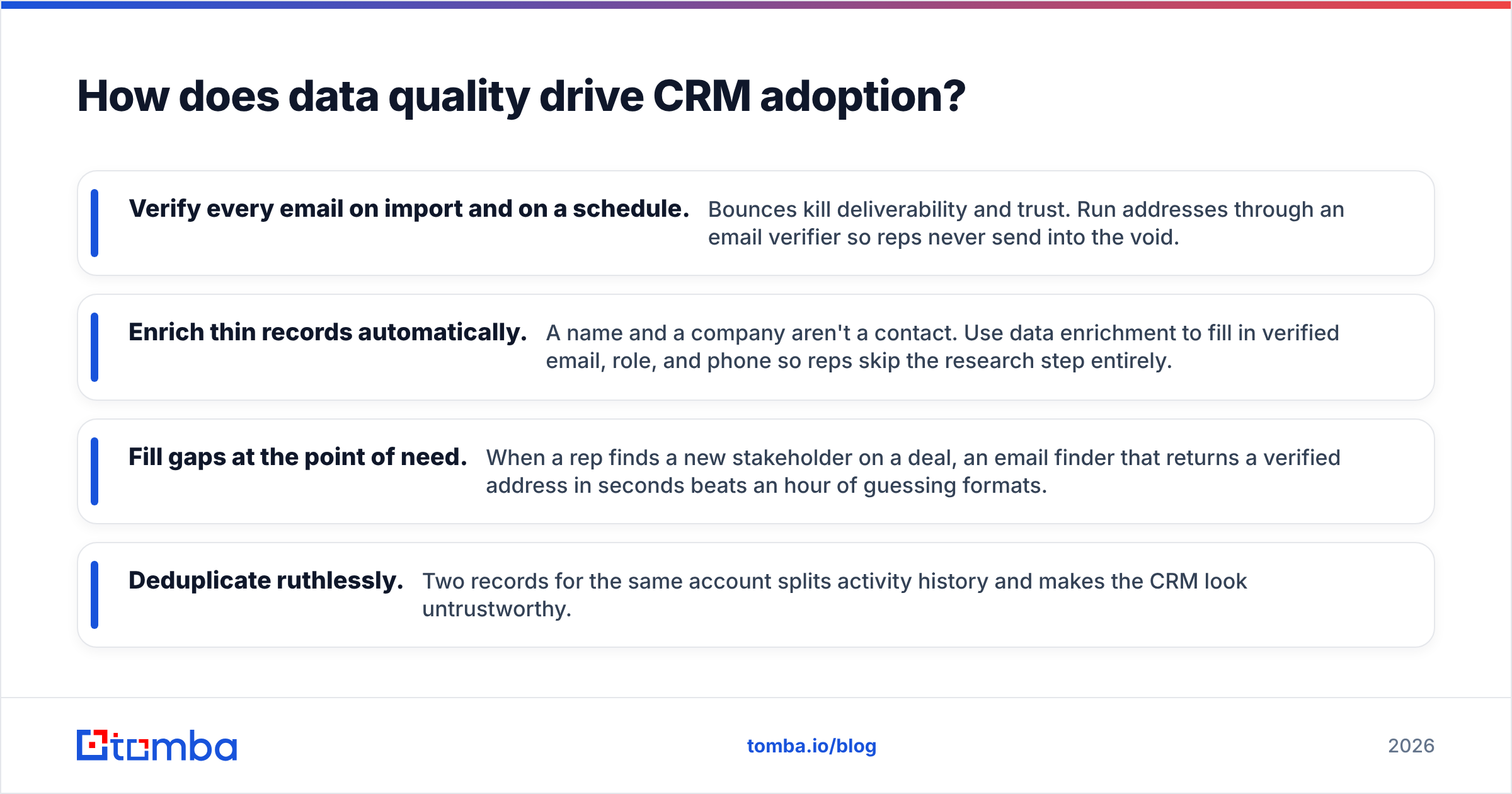
- Verify every email on import and on a schedule. Bounces kill deliverability and trust. Run addresses through an email verifier so reps never send into the void.
- Enrich thin records automatically. A name and a company aren't a contact. Use data enrichment to fill in verified email, role, and phone so reps skip the research step entirely.
- Fill gaps at the point of need. When a rep finds a new stakeholder on a deal, an email finder that returns a verified address in seconds beats an hour of guessing formats.
- Deduplicate ruthlessly. Two records for the same account splits activity history and makes the CRM look untrustworthy.
When the data is right, the CRM stops feeling like a chore and starts feeling like an advantage. That's the psychological turn that makes adoption stick.
Which CRM should you standardize on?#
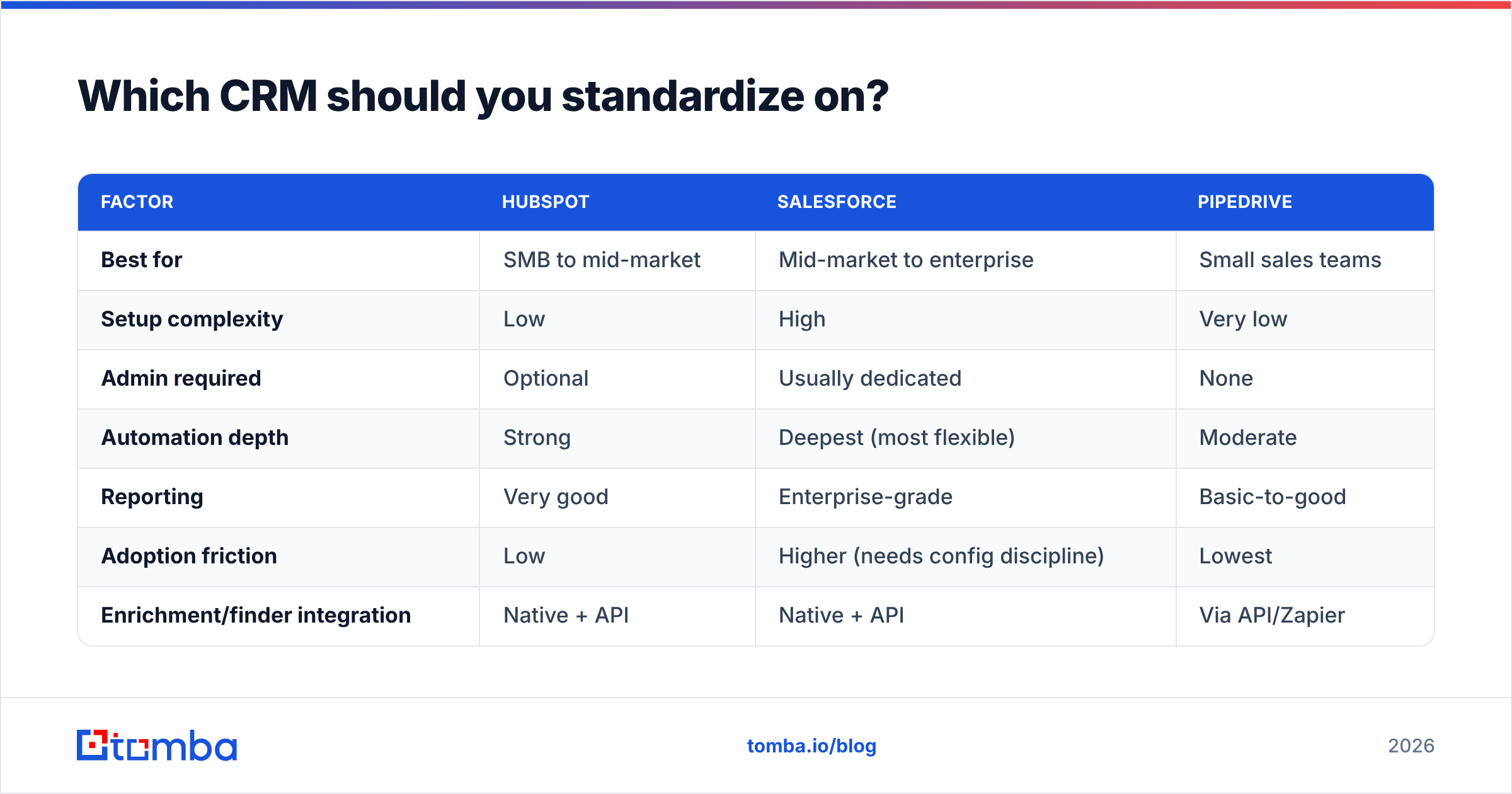
Tool choice matters less than adoption discipline, but the platform sets your friction floor. Here's an honest comparison of the platforms most B2B teams weigh in 2026.
| Factor | HubSpot | Salesforce | Pipedrive |
|---|---|---|---|
| Best for | SMB to mid-market | Mid-market to enterprise | Small sales teams |
| Setup complexity | Low | High | Very low |
| Admin required | Optional | Usually dedicated | None |
| Automation depth | Strong | Deepest (most flexible) | Moderate |
| Reporting | Very good | Enterprise-grade | Basic-to-good |
| Adoption friction | Low | Higher (needs config discipline) | Lowest |
| Enrichment/finder integration | Native + API | Native + API | Via API/Zapier |
The pattern: the more powerful the platform, the more configuration discipline you need to keep adoption high. Salesforce can do anything, which is exactly why teams drown it in fields and workflows. Pipedrive stays adopted partly because it refuses to be complicated. Whichever you pick, connect your data layer — Tomba plugs into Salesforce and HubSpot directly, plus dozens of other tools through the integrations library, so enrichment and verification happen inside the CRM your reps already open.
Compare seats and workflows yourself on G2 before committing — pricing and packaging shift every quarter.
How do you reduce data entry so reps actually log activity?#
Every manual field is a tiny tax, and reps pay it by not paying it. The goal is to make the correct action the easy action.
Auto-capture what you can. Email and calendar sync should log meetings and messages without a click. Call tools should attach recordings and outcomes automatically. Modern platforms like HubSpot do most of this out of the box — turn it on.
Enrich instead of asking. Don't make a rep look up a title, company size, or LinkedIn URL. Pull it in automatically. This is where a finder-plus-enrichment layer pays for itself: the rep types a name, the system returns a verified, enriched contact.
Cut the required fields. If you're mandating 40 fields, you'll get 40 empty fields. Mandate five that feed the forecast — stage, amount, close date, next step, and champion — and leave the rest optional.
Meet reps where they work. A Chrome extension that finds and pushes verified contacts into the CRM from LinkedIn or a company site removes the copy-paste tax that quietly kills logging discipline.
How do you roll out a CRM without overwhelming the team?#
Treat the rollout like seasoning a dish — add a little, taste, add more. Dumping the full configuration on reps day one guarantees rejection.
A staged rollout that works:
- Phase 1 — Foundation (Weeks 1-2): Import clean, verified data. Turn on email/calendar auto-capture. Require only the five forecast fields. Train on one daily workflow: work your list, log next steps.
- Phase 2 — Habit (Weeks 3-6): Add sequences and reminders. Introduce rep-facing dashboards that show their pipeline, not just management's. Start weekly adoption coaching.
- Phase 3 — Depth (Weeks 7+): Layer in advanced automation, custom reports, and forecasting rigor once the base habit is established.
The principle throughout: never add a field or step until the previous behavior is automatic. Adoption is compounding — small wins build the trust that lets you ask for more.
How do you measure and coach CRM adoption?#
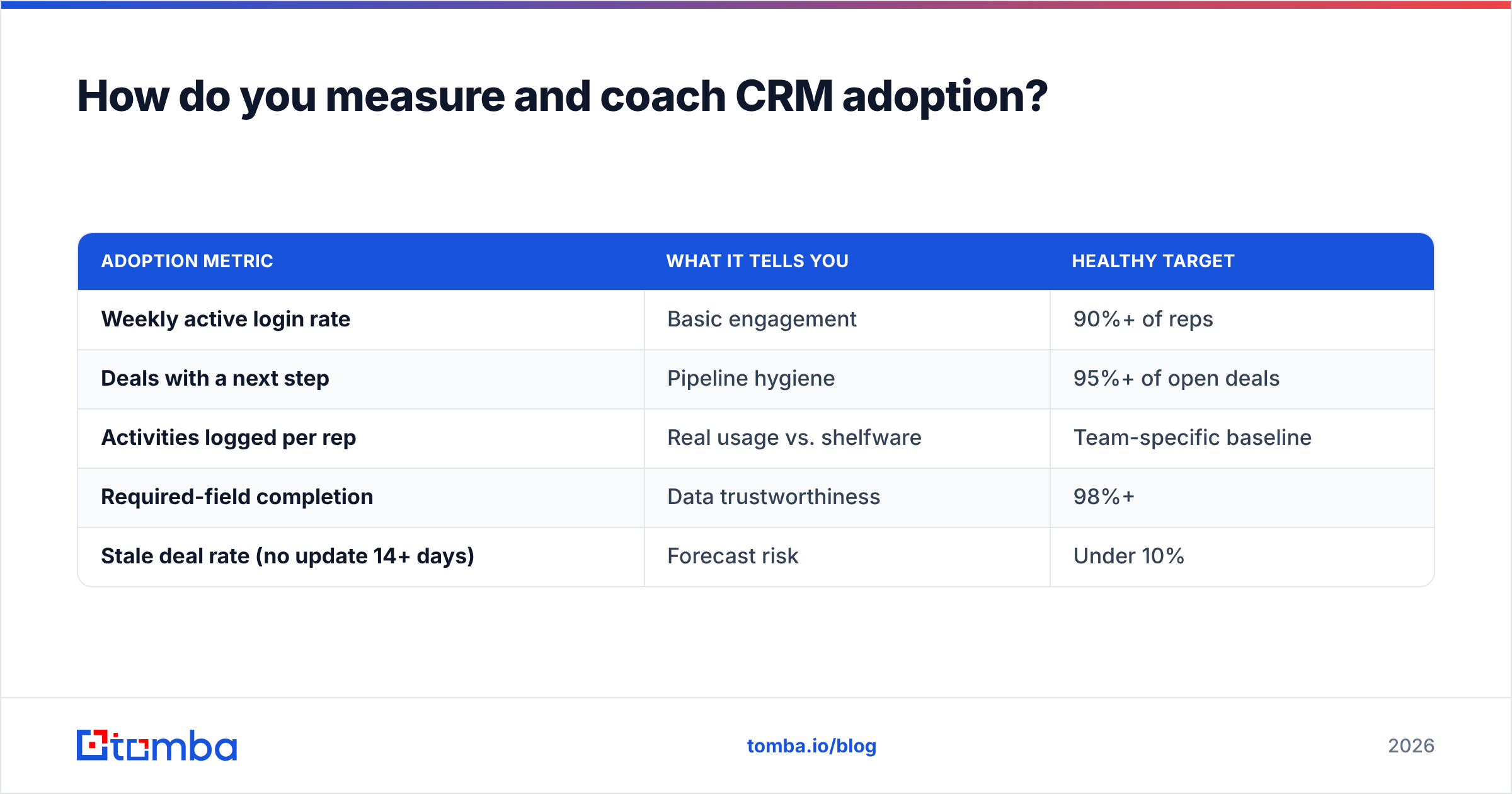
You can't manage what you don't measure, and "the team seems to be using it" is not measurement. Track adoption like a pipeline metric.
| Adoption metric | What it tells you | Healthy target |
|---|---|---|
| Weekly active login rate | Basic engagement | 90%+ of reps |
| Deals with a next step | Pipeline hygiene | 95%+ of open deals |
| Activities logged per rep | Real usage vs. shelfware | Team-specific baseline |
| Required-field completion | Data trustworthiness | 98%+ |
| Stale deal rate (no update 14+ days) | Forecast risk | Under 10% |
Then coach to the gaps in weekly 1:1s. When a rep's next-step completion drops, that's a coaching moment — same as a low connect rate. Praise the reps who keep clean records publicly; it signals that logging is part of the job, not overhead.
Crucially, leadership must run everything from the CRM. If forecasts, deal reviews, and 1:1s all pull from live CRM data, reps learn that what's not in the CRM doesn't exist. That single norm drives more adoption than any incentive scheme. Analyst firms like Gartner have argued for years that executive usage is the strongest predictor of CRM success — model the behavior you want.
What role does automation and enrichment play long-term?#
Adoption isn't a launch event; it's a maintenance job. Data decays at roughly 2-3% per month as people change roles and companies. Left alone, a pristine CRM rots into the same untrusted mess reps abandoned before.
Keep it alive with automation:
- Scheduled re-verification so bounced and dead addresses get flagged before a rep hits them.
- Continuous enrichment via API so new records arrive complete. The Tomba API lets you verify and enrich inside your own workflows and CRM automation without manual steps.
- Bulk cleanups on a cadence — quarterly at minimum — to catch drift across the whole database.
Automate the hygiene and the CRM stays trustworthy, which keeps it adopted, which keeps the data flowing in. That's the virtuous loop every high-performing revenue org runs on.
Frequently asked questions#
How long does CRM adoption take? Expect 60-90 days to establish core habits with a staged rollout, and 6-12 months for advanced usage to feel native. Speed depends far more on data quality and leadership modeling than on the software itself.
What's the number one reason CRM adoption fails? Manual data entry combined with untrustworthy data. Reps abandon tools that cost them time and lie to them. Remove both and adoption follows.
Should we mandate CRM usage? Mandate outcomes (every open deal has a next step) and make compliance nearly effortless through automation. Mandating manual data entry without reducing friction backfires.
Do incentives drive CRM adoption? They help at the margins, but they can't fix a high-friction, low-trust system. Fix friction and data quality first; use incentives to reinforce, not to rescue.
Make adoption effortless with clean, verified data#
The fastest path to a CRM your team actually uses isn't a bigger training budget — it's removing the two things reps hate most: manual research and bad data. When every record is enriched and every email is verified before a rep touches it, the CRM stops being a chore and becomes the fastest way to sell.
Start there. Use the Tomba Email Finder to populate and enrich your CRM with verified, accurate contacts, then verify on a schedule to keep it clean. Explore Tomba pricing — a free tier covers 25 searches a month so you can test the workflow before rolling it out to the team. Get the data layer right, and adoption stops being something you fight for and starts being something reps choose.
Related guides#
Ready to find emails that actually work?
Join 150,000+ professionals who stopped guessing and started sending. Free credits on signup — no credit card required.
Get the Tomba newsletter
Practical outbound tactics and product updates — once every two weeks.
About the author