CRM Automated Follow-Ups: Build a System That Actually Closes
Most deals die in the follow-up gap, not the pitch. Here's how to build CRM automated follow-ups that stay human, get replies, and never let a lead go cold.
Most B2B deals are not lost on the first pitch. They are lost in the silence afterward — the second, third, and fourth touch that a busy rep forgets to send. CRM automated follow-ups exist to close that gap: they make sure every lead gets the next message at the right time, without a human remembering to hit send.
Done badly, automation feels like spam and burns your domain. Done well, it looks like a diligent rep who never sleeps. This guide shows you the difference and how to build the second kind.
TL;DR#
- The follow-up gap kills pipeline. Up to 80% of conversions need five or more touches, yet most reps stop after two. Automation is how you cover the other three.
- CRM automated follow-ups = triggers + sequences + branching logic living inside your CRM, so timing keys off real deal stages, not a spreadsheet.
- Personalization at the data layer beats personalization at the copy layer. Clean, enriched contact records are what make an automated message read as human.
- Choose tools by where your team already works — native CRM automation, a dedicated sequencer, or a data-first stack. The comparison table below breaks it down.
- Guardrails matter more than volume. Reply detection, send caps, and verified addresses protect deliverability and keep you out of the spam folder.
What are CRM automated follow-ups?#
CRM automated follow-ups are pre-defined message sequences that your CRM sends (or queues) automatically based on triggers — a form fill, a deal moving to "Proposal Sent," a demo booking, or simply time passing since the last touch.
Think of it like a restaurant's closing routine. After serving the meal (your first outreach), the staff still wipes the tables, restocks, and preps for tomorrow (the follow-up touches) whether or not the chef reminds them. The system runs the routine so nobody has to hold it all in their head.
Technically, a follow-up automation has three moving parts:
- A trigger — the event that starts the sequence (new lead, stage change, no reply after N days).
- A sequence — the ordered set of messages, each with its own delay and channel (email, LinkedIn, task, SMS).
- Branching logic — the if/then rules that reroute a contact when they reply, click, book, or go cold.
The CRM is the right home for this because it already holds the context: who the person is, what stage the deal is in, what they last did. That context is what separates a smart follow-up from a blind blast.
Why do manual follow-ups fail so often?#
The short answer: humans forget, and humans get busy. A rep juggling 60 open deals cannot reliably remember that the CFO at account #37 asked for a check-in "next quarter."
Manual follow-up breaks down in predictable ways:
- Inconsistent cadence. Some leads get chased daily, others fall through the cracks entirely.
- Recency bias. Reps chase the deal they talked to this morning and neglect the one that went quiet three weeks ago — often the one closest to a decision.
- No memory of context. Without automation logging every touch, the fifth email repeats the first.
- It doesn't scale. Doubling your lead volume means doubling manual effort, or dropping the ball twice as often.
Research consistently shows that the majority of sales require five or more follow-ups, while most reps give up after one or two. Automation is not about replacing the human — it is about making sure touch three, four, and five actually happen. For a deeper look at how cadence affects outcomes, HubSpot's sales statistics research is a useful, vendor-neutral reference.
How does a CRM automated follow-up system actually work?#
A working system chains four layers together. Miss one and the whole thing feels robotic.
1. Data foundation. Every automated message is only as good as the record behind it. If the email is wrong or the name is misspelled, automation just scales the mistake. This is where verified, enriched contact data earns its keep — a clean email verifier pass before a sequence starts prevents bounces that wreck your sender reputation.
2. Trigger engine. The CRM watches for events. Deal enters "Negotiation" and stalls for 4 days? Fire the "gentle nudge" sequence. Lead downloads a pricing PDF? Start the "buying-intent" track.
3. Sequence + branching. Messages go out on a schedule, but the schedule bends to behavior. A reply pauses the sequence and alerts the owner. A click advances to a warmer message. Silence rolls to the next touch.
4. Handoff to human. The best systems know when to get out of the way. The moment a prospect replies, a person takes over. Automation handles the persistence; the human handles the conversation.
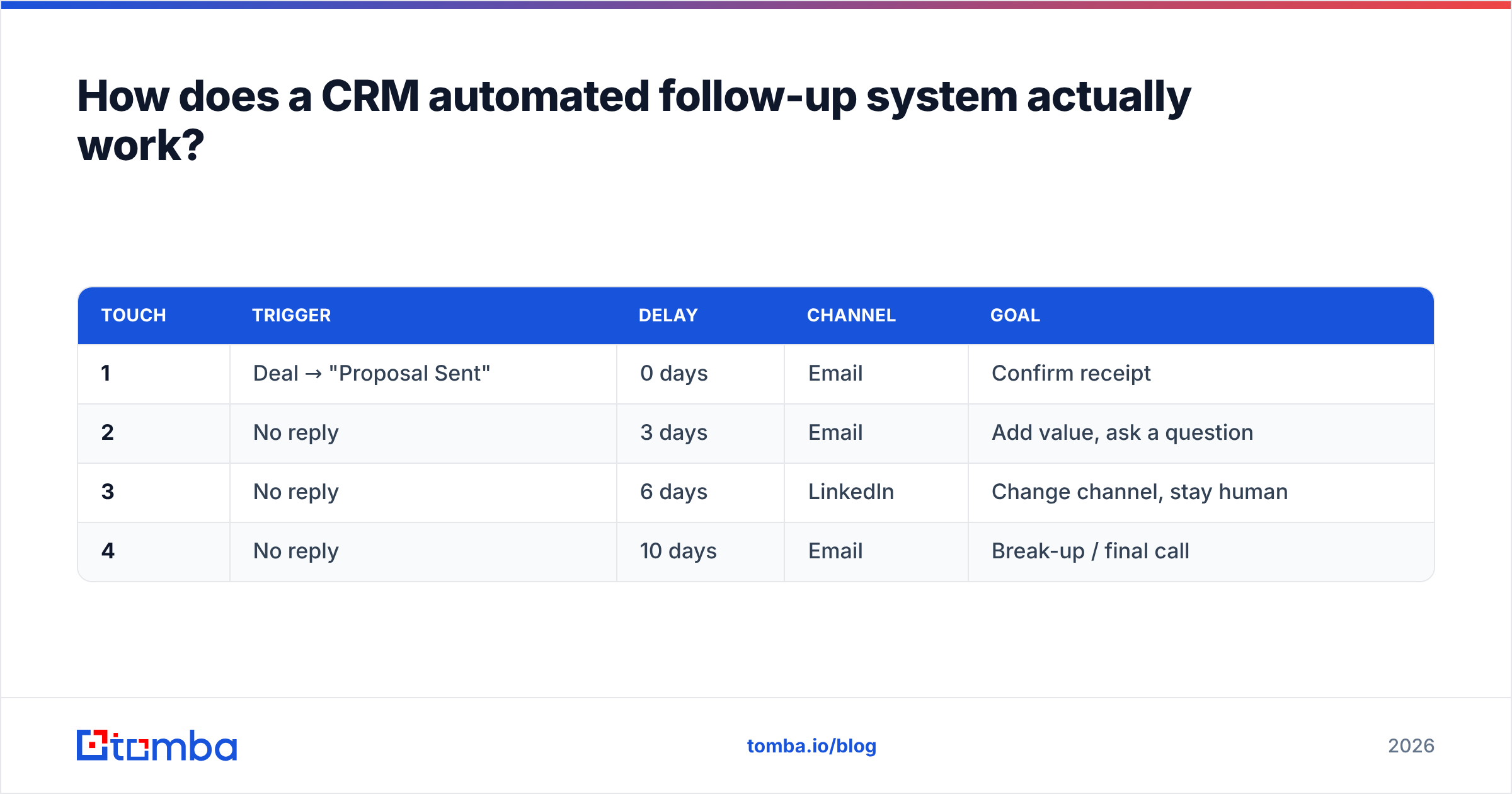
Here is how those pieces map to a simple four-touch B2B sequence:
| Touch | Trigger | Delay | Channel | Goal |
|---|---|---|---|---|
| 1 | Deal → "Proposal Sent" | 0 days | Confirm receipt | |
| 2 | No reply | 3 days | Add value, ask a question | |
| 3 | No reply | 6 days | Change channel, stay human | |
| 4 | No reply | 10 days | Break-up / final call |
Notice that no touch is "just checking in." Each has a distinct job and a distinct channel. That is what keeps an automated sequence from reading like a nag.
Which tools handle CRM automated follow-ups best?#
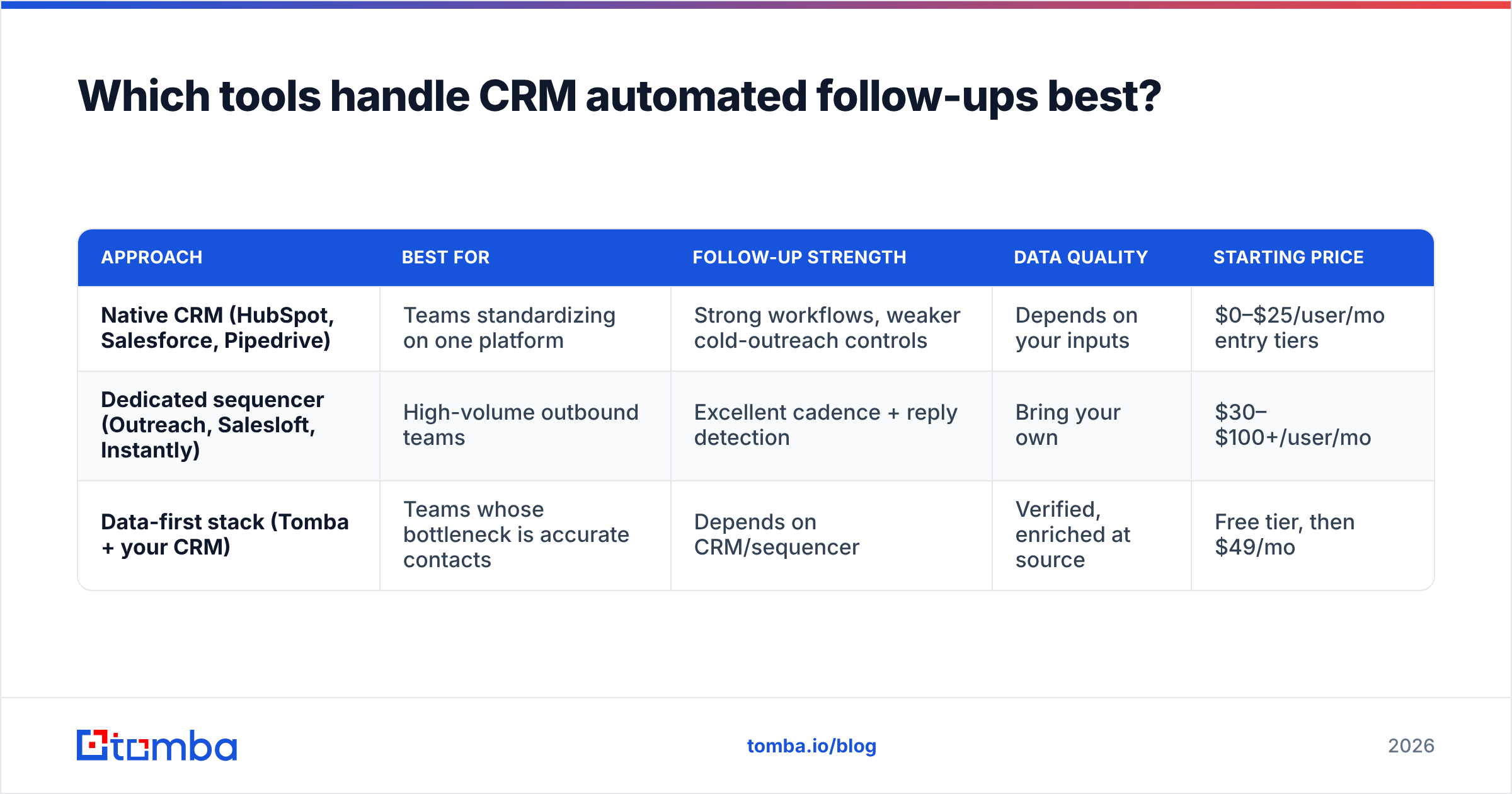
There is no single winner — the right pick depends on where your team already lives. Broadly, you are choosing between three approaches: native CRM automation, a dedicated sales sequencer, and a data-first stack that feeds either of the above.
| Approach | Best for | Follow-up strength | Data quality | Starting price |
|---|---|---|---|---|
| Native CRM (HubSpot, Salesforce, Pipedrive) | Teams standardizing on one platform | Strong workflows, weaker cold-outreach controls | Depends on your inputs | $0–$25/user/mo entry tiers |
| Dedicated sequencer (Outreach, Salesloft, Instantly) | High-volume outbound teams | Excellent cadence + reply detection | Bring your own | $30–$100+/user/mo |
| Data-first stack (Tomba + your CRM) | Teams whose bottleneck is accurate contacts | Depends on CRM/sequencer | Verified, enriched at source | Free tier, then $49/mo |
Most successful setups combine two of these: a data layer that keeps records accurate and a sequencer or CRM that does the sending. The failure mode is buying a powerful sequencer and feeding it a dirty list — you just automate the bounce.
If you are weighing dedicated tools, independent review sites like G2's sales engagement category are worth a scan for real-user pros and cons before you commit budget.
Where does contact data fit into follow-up automation?#
Data is the layer everyone skips and everyone regrets skipping. You can build the most elegant branching sequence in the world, but if 15% of your email addresses bounce, three things happen at once: your deliverability drops, your CRM fills with noise, and your automated "personal" messages hit dead inboxes.
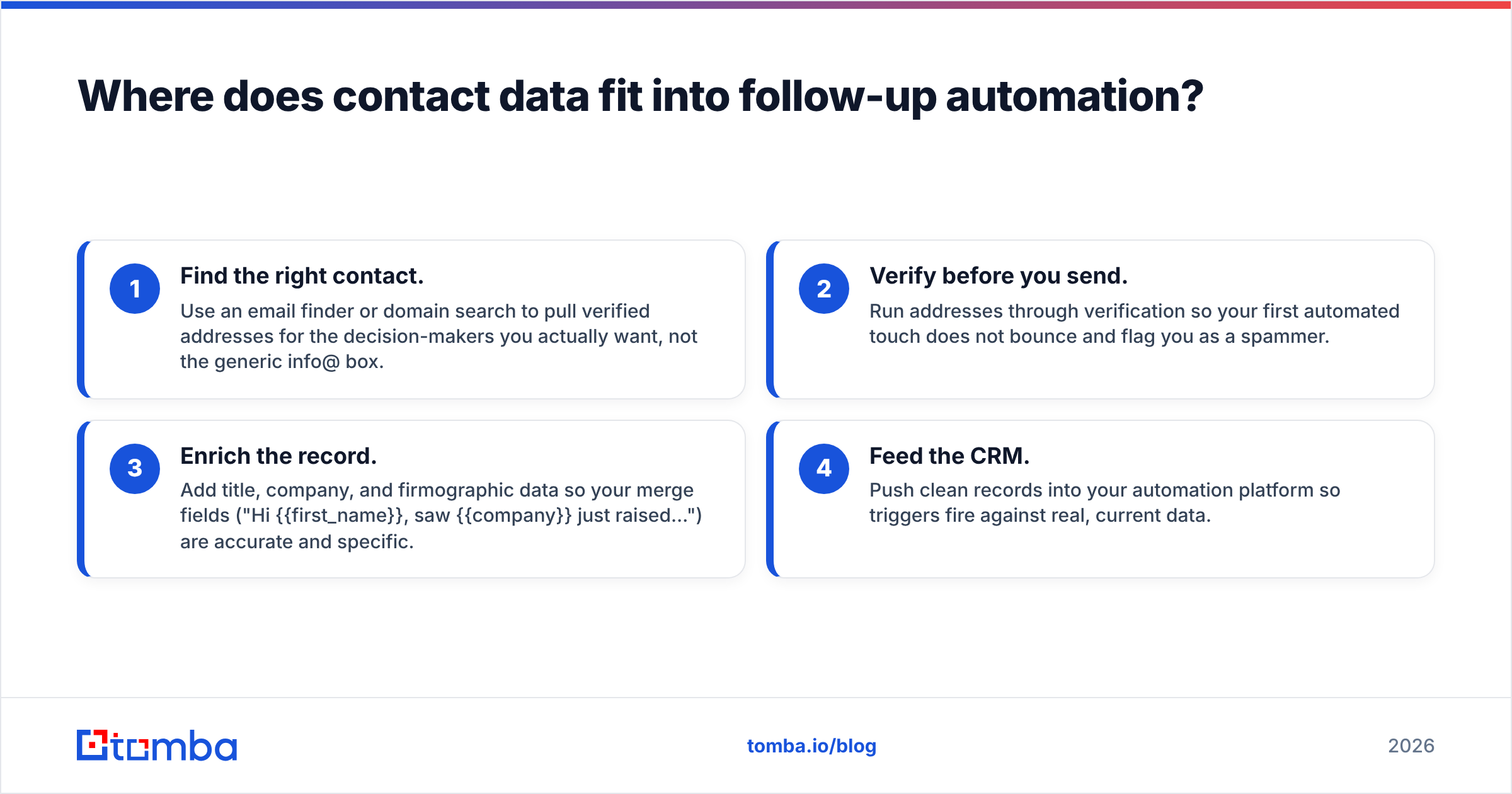
A data-first workflow looks like this:
- Find the right contact. Use an email finder or domain search to pull verified addresses for the decision-makers you actually want, not the generic info@ box.
- Verify before you send. Run addresses through verification so your first automated touch does not bounce and flag you as a spammer.
- Enrich the record. Add title, company, and firmographic data so your merge fields ("Hi {{first_name}}, saw {{company}} just raised…") are accurate and specific.
- Feed the CRM. Push clean records into your automation platform so triggers fire against real, current data.
This is where a tool like Tomba slots in cleanly — it is not a sequencer, so it does not compete with your CRM. It sits upstream, making sure the contacts your follow-up engine acts on are real. You can wire it in through the HubSpot integration or Pipedrive integration so enrichment happens without a manual export-import dance.
The rule of thumb: personalization at the copy layer ("I loved your recent post") is nice, but personalization at the data layer (right person, right company, correct email) is what actually gets the message delivered and read.
What does a good automated follow-up sequence look like?#
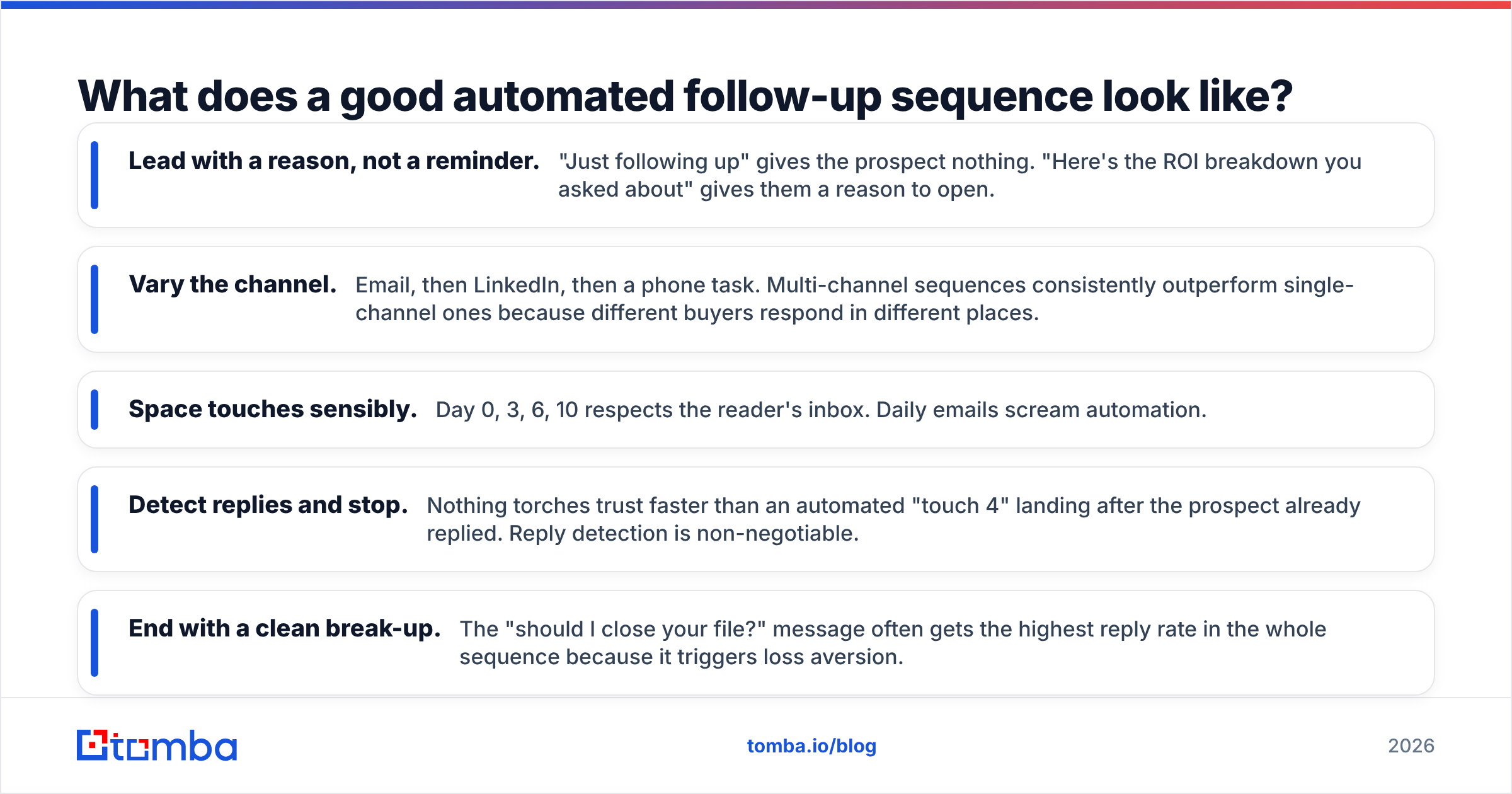
Structure beats volume. A tight four-to-six touch sequence that respects the reader outperforms a twelve-touch grind that annoys them. Use these principles:
- Lead with a reason, not a reminder. "Just following up" gives the prospect nothing. "Here's the ROI breakdown you asked about" gives them a reason to open.
- Vary the channel. Email, then LinkedIn, then a phone task. Multi-channel sequences consistently outperform single-channel ones because different buyers respond in different places.
- Space touches sensibly. Day 0, 3, 6, 10 respects the reader's inbox. Daily emails scream automation.
- Detect replies and stop. Nothing torches trust faster than an automated "touch 4" landing after the prospect already replied. Reply detection is non-negotiable.
- End with a clean break-up. The "should I close your file?" message often gets the highest reply rate in the whole sequence because it triggers loss aversion.
For teams writing these from scratch, Tomba's free cold email templates and subject line generator give you a starting frame you can then personalize with real data.
How do you keep automated follow-ups from hurting deliverability?#
Automation amplifies whatever you feed it — including mistakes. Scale a bad list and you scale your bounce rate straight into the spam folder. Protect your sender reputation with these guardrails:
- Verify every address before the first send. Bounces above roughly 2–3% signal spam behavior to mailbox providers.
- Cap daily send volume per inbox. Sending 500 cold emails from one address on day one is the fastest way to get blocked. Warm up gradually.
- Authenticate your domain. Set up SPF, DKIM, and DMARC. A quick SPF checker confirms your records are valid before you scale.
- Watch your reply-to-bounce ratio. Healthy sequences generate replies; a sequence that only generates bounces is a reputation liability.
- Segment catch-all domains. These need extra scrutiny — route them through a catch-all verifier so you are not guessing.
The goal is simple: every automated message should have a real chance of reaching a real person. Volume without deliverability is just noise you are paying to generate.
When should a human take over from the automation?#
Immediately, the moment a prospect engages. Automation's job is to earn the reply; a person's job is to handle it.
Set your system so that any reply, meeting booking, or high-intent action (like visiting the pricing page twice) instantly pauses the sequence and notifies the deal owner. The worst-case scenario is a warm, interested prospect receiving your pre-scheduled "breaking up with you" email because the automation never noticed they said yes.
A practical division of labor:
- Automation owns: cadence, timing, reminders, logging, and the cold-to-lukewarm touches.
- Humans own: the actual conversation, objection handling, negotiation, and anything requiring judgment.
Treat automation as the assistant that never forgets, not the closer. The teams that win with CRM automated follow-ups are the ones that use the time saved on manual chasing to have better conversations with the leads that raise their hand.
Build the data layer your follow-ups depend on#
Automated follow-ups only work when they act on accurate contacts — right person, right company, verified email. That is the layer most teams get wrong, and it is the layer Tomba was built for. Use the Tomba Email Finder to source verified decision-maker emails, verify them before your first automated touch, and enrich each record so your merge fields are actually true. Start free with 25 searches a month, then scale on the Starter plan at $49/mo when your pipeline demands it. Feed your CRM clean data, and your follow-up automation stops looking like a robot and starts closing like your best rep.
Related guides#
Ready to find emails that actually work?
Join 150,000+ professionals who stopped guessing and started sending. Free credits on signup — no credit card required.
Get the Tomba newsletter
Practical outbound tactics and product updates — once every two weeks.
About the author