How to Run a CRM Data Audit in 2026 (Step-by-Step Playbook)
Dirty CRM data quietly wrecks forecasts, routing, and outreach. This step-by-step CRM data audit shows you how to find decayed records, kill duplicates, and rebuild trust in your pipeline.
Your CRM looks full. That's the problem. Row after row of contacts, accounts, and open deals create a comforting illusion that your go-to-market engine knows what it's doing. Then a rep emails a "decision-maker" who left 14 months ago, marketing counts the same account three times, and your quarterly forecast is built on records nobody has touched since the last reorg.
A CRM data audit is how you separate the signal from the rot. Done right, it's not a one-time cleanup — it's a repeatable process that keeps your revenue data honest.
TL;DR#
- A CRM data audit is a structured review of accuracy, completeness, duplication, and freshness across your contact and account records — not a vague "let's clean the CRM someday."
- B2B data decays ~30% per year. Job changes, company moves, and dead emails silently degrade your database whether you touch it or not.
- Run it in five phases: scope, profile, deduplicate, verify and enrich, then govern so it stays clean.
- Verification is the highest-ROI step. Removing invalid emails before a send protects sender reputation and forecast accuracy at the same time.
- Automate the boring parts. Bulk verification, enrichment, and dedupe rules turn a quarterly fire drill into a background job.
What is a CRM data audit?#
A CRM data audit is a systematic inspection of the data inside your customer relationship management system to measure its quality against defined standards. Think of it like a financial audit: you're not just glancing at the balance, you're checking every entry against reality and flagging what doesn't reconcile.
Most teams conflate "auditing" with "deleting stuff that looks old." That's cleanup, and cleanup without measurement is guessing. A real audit produces numbers you can act on: what percentage of email addresses are valid, how many duplicate accounts exist, which fields are empty on your highest-value records, and how stale the average contact is.
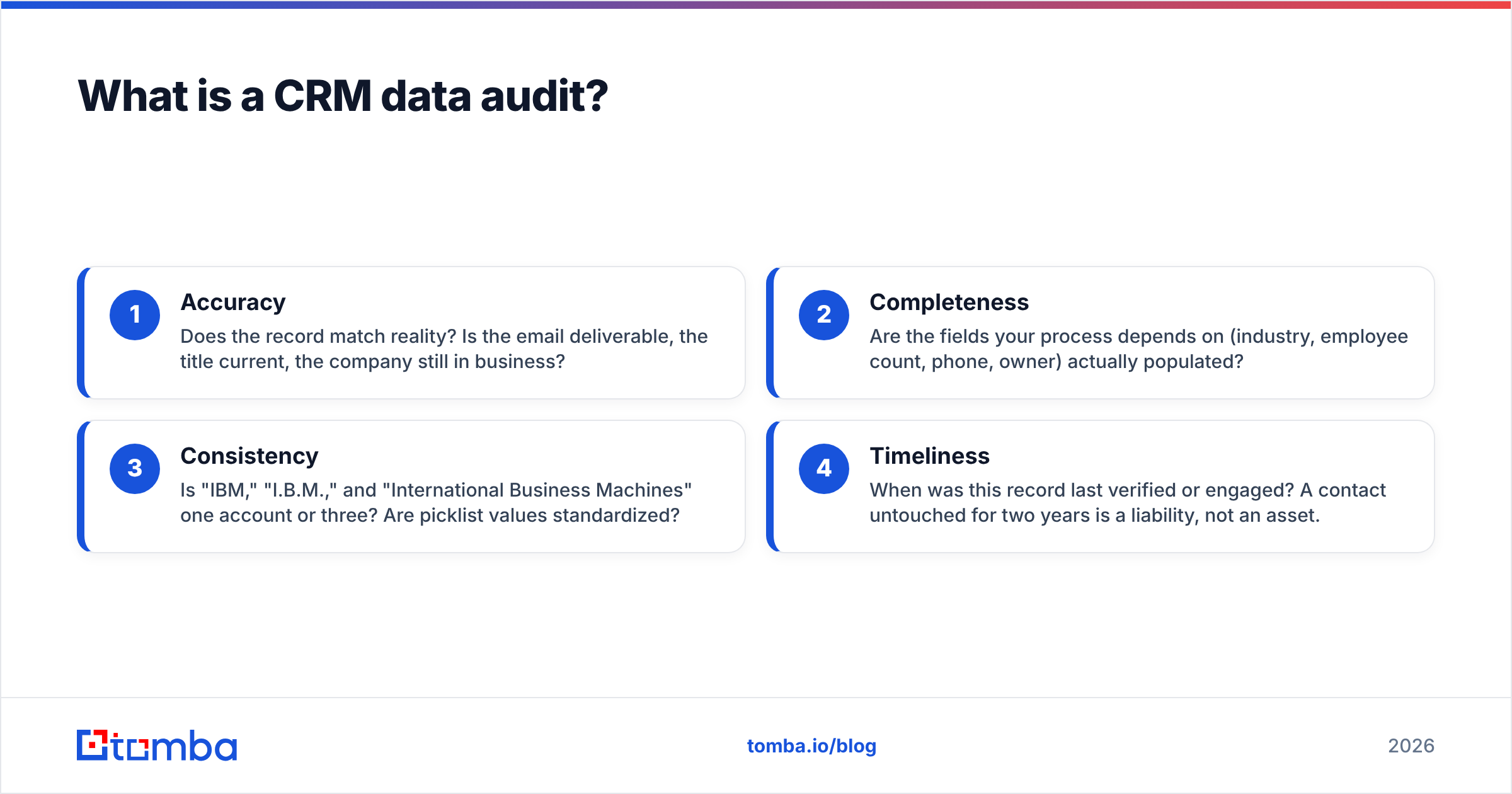
The four dimensions worth scoring:
- Accuracy — Does the record match reality? Is the email deliverable, the title current, the company still in business?
- Completeness — Are the fields your process depends on (industry, employee count, phone, owner) actually populated?
- Consistency — Is "IBM," "I.B.M.," and "International Business Machines" one account or three? Are picklist values standardized?
- Timeliness — When was this record last verified or engaged? A contact untouched for two years is a liability, not an asset.
If you want a shared vocabulary for the terms your team throws around during this work, Tomba's B2B glossary is a decent reference to anchor definitions like MQL, sender reputation, and enrichment.

Why does CRM data quality decay so fast?#
Because the world moves and your database doesn't. According to widely cited research from vendors like Gartner and validated repeatedly across the industry, B2B contact data decays at roughly 20–30% per year. Some segments — high-churn tech, VC-backed startups — decay faster.
Here's what's actually happening under the hood:
- People change jobs. A contact who was VP of Marketing at Acme is now at a competitor. The email still parses, but it's dead or, worse, routed to their old inbox where it damages your reputation.
- Companies merge, rebrand, or fold. Domains change.
acme.combecomesacme-global.comand every stored email silently breaks. - Manual entry introduces errors. Reps fat-finger emails, skip required fields to move faster, and create duplicate accounts because search didn't surface the existing one.
- Integrations double-write. Two tools sync into the same object without a dedupe key and you get twins.
The cost isn't abstract. Bad data inflates your total addressable market, misroutes leads, corrupts attribution, and — most expensively — trains your team to distrust the CRM. Once reps stop trusting the data, they build shadow spreadsheets, and your single source of truth becomes a museum.
What should a CRM data audit checklist include?#
Run these phases in order. Skipping ahead to "delete duplicates" before you've profiled the data is how you accidentally merge two legitimate accounts.
Phase 1 — Scope and set standards#
Decide what "good" means before you measure. Define required fields per object, acceptable formats (phone as E.164, country as ISO code), and freshness thresholds ("re-verify any contact older than 90 days"). Write it down. An audit without a standard is just an opinion.
Phase 2 — Profile the data#
Export or query your CRM and count the damage. What percentage of contacts have a valid-format email? How many accounts have no industry? What's the median age of "last activity"? This baseline is your before-photo — you'll need it to prove the audit worked.
Phase 3 — Deduplicate#
Identify duplicate contacts (same email, or same name + company) and duplicate accounts (same domain, or fuzzy-matched name). Merge on a survivorship rule: keep the record with the most complete data and most recent activity, and preserve related activities. A free remove-duplicates tool handles the flat-list case before you import anything back.
Phase 4 — Verify and enrich#
This is where quality gets rebuilt. Run every email through an email verifier to catch invalid, disposable, and risky addresses. For accounts missing firmographics, enrich the leads with current company data. Where a record is missing its key contact entirely, an email finder fills the gap with a verified address instead of a guess.
Phase 5 — Govern#
The audit isn't done when the data is clean — it's done when it stays clean. Add validation rules, dedupe-on-create logic, a required-field policy, and a scheduled re-verification job. Governance is the difference between a one-time cleanup and a durable process.
How do I choose between a manual audit and an automated one?#
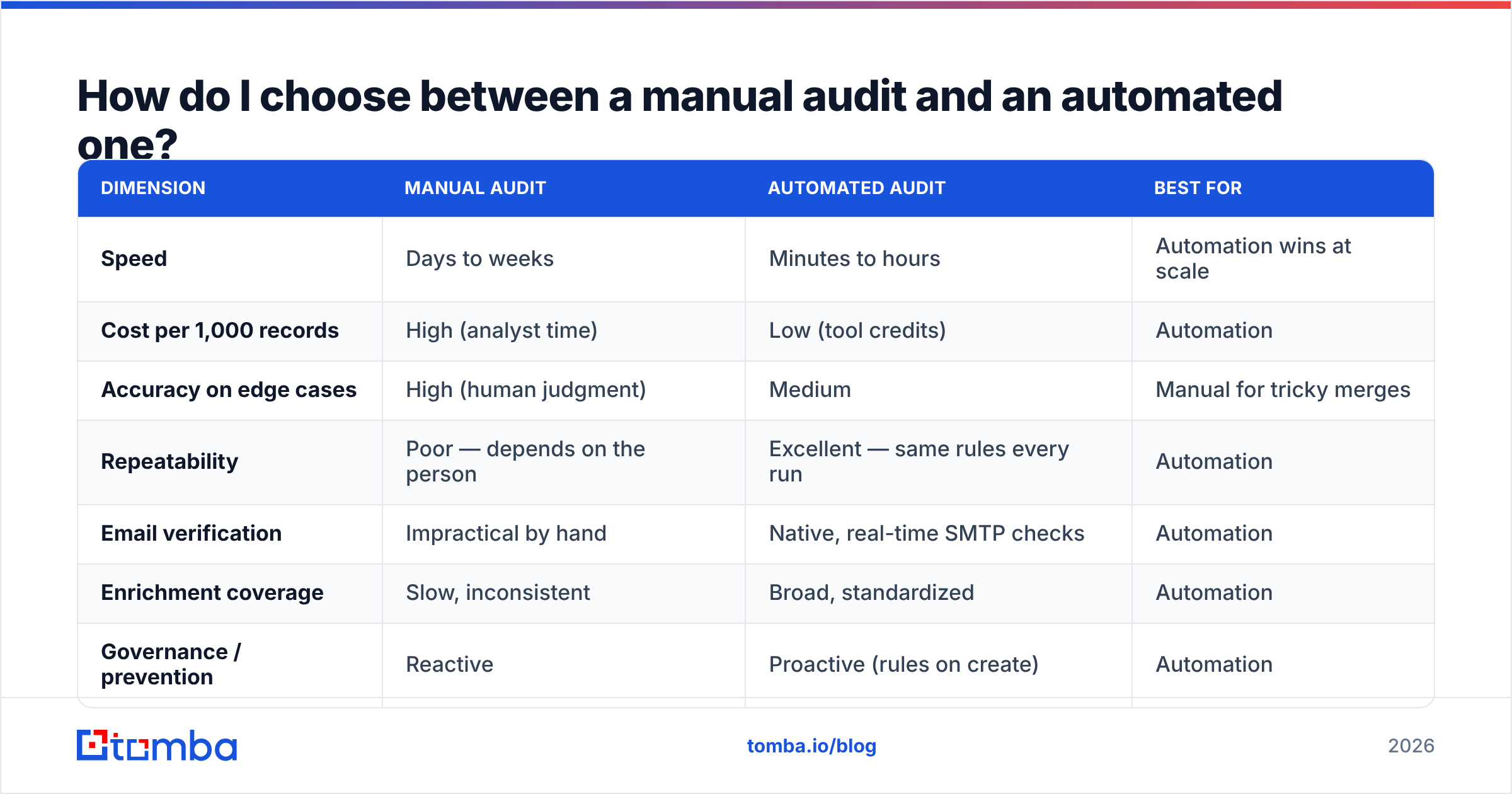
You'll do both, but the split matters. Manual review is right for judgment calls — deciding survivorship on a messy merge, reviewing your highest-value accounts by hand. Automation is right for volume: verifying 50,000 emails, enriching thousands of accounts, applying dedupe rules on every insert.
The table below maps the trade-offs.
| Dimension | Manual audit | Automated audit | Best for |
|---|---|---|---|
| Speed | Days to weeks | Minutes to hours | Automation wins at scale |
| Cost per 1,000 records | High (analyst time) | Low (tool credits) | Automation |
| Accuracy on edge cases | High (human judgment) | Medium | Manual for tricky merges |
| Repeatability | Poor — depends on the person | Excellent — same rules every run | Automation |
| Email verification | Impractical by hand | Native, real-time SMTP checks | Automation |
| Enrichment coverage | Slow, inconsistent | Broad, standardized | Automation |
| Governance / prevention | Reactive | Proactive (rules on create) | Automation |
The pragmatic answer: automate profiling, deduplication, verification, and enrichment; reserve human time for standards, survivorship policy, and reviewing your top-tier accounts.
Which tools actually move the needle?#
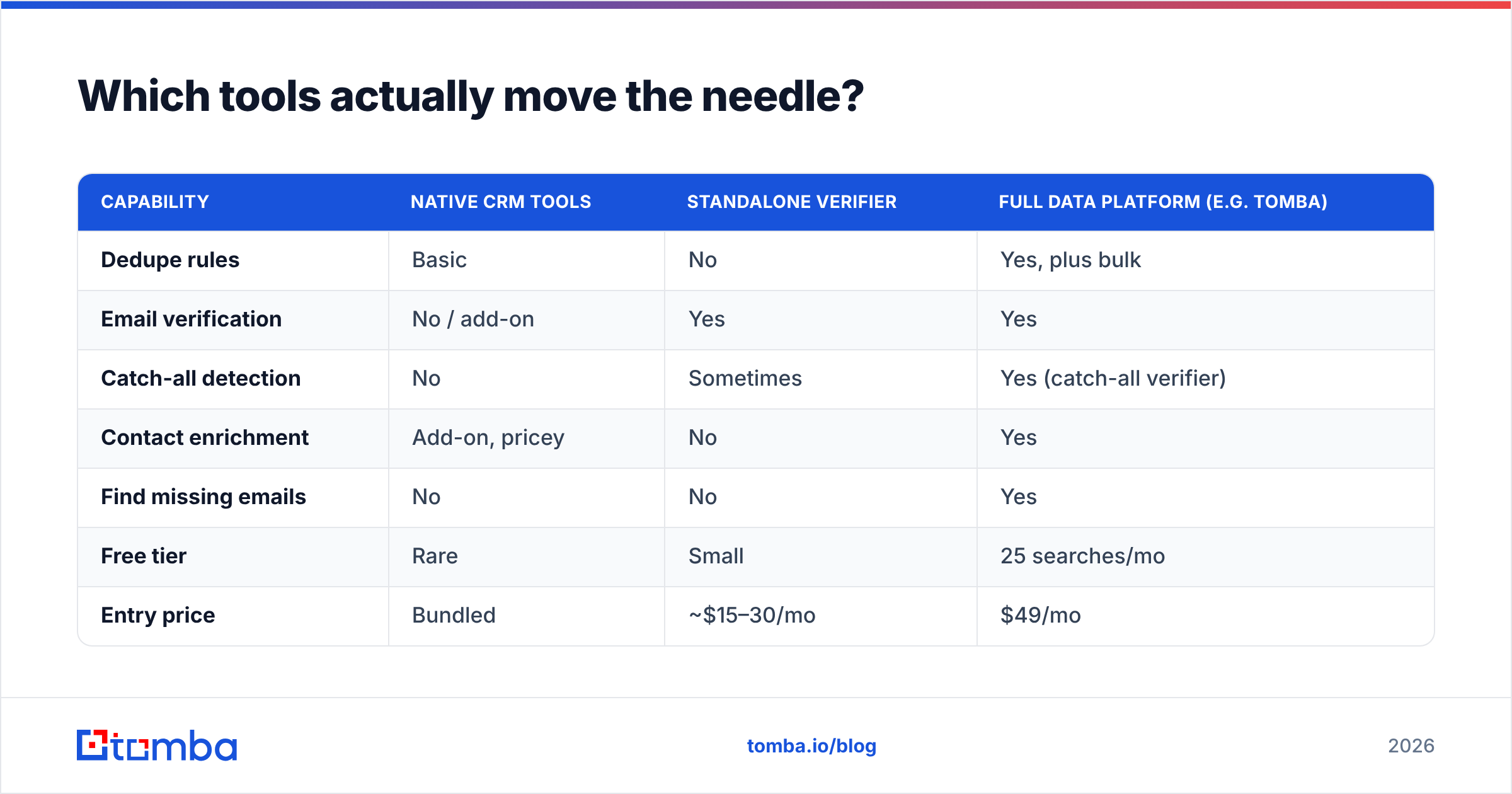
Different jobs, different tools. Here's how the categories compare on what a data audit needs, with representative pricing so you can budget realistically. Note that a starter plan on a modern data platform like Tomba runs $49/mo, not the $39 you'll see quoted in outdated roundups.
| Capability | Native CRM tools | Standalone verifier | Full data platform (e.g. Tomba) |
|---|---|---|---|
| Dedupe rules | Basic | No | Yes, plus bulk |
| Email verification | No / add-on | Yes | Yes |
| Catch-all detection | No | Sometimes | Yes (catch-all verifier) |
| Contact enrichment | Add-on, pricey | No | Yes |
| Find missing emails | No | No | Yes |
| Free tier | Rare | Small | 25 searches/mo |
| Entry price | Bundled | ~$15–30/mo | $49/mo |
| API access | Limited | Sometimes | Yes (Tomba API) |
The point isn't that one tool does everything — it's that the verification and enrichment layer is where audit quality is won or lost, and it's the layer native CRMs are weakest at. Peer platforms in the space, including data providers like BookYourData, solve adjacent problems (pre-built B2B lists); a verification-first workflow complements rather than replaces them.

How does verification protect deliverability and forecasting at once?#
Because a bad email address hurts you twice. First, if you send to it, hard bounces pile up and your sender reputation drops — which quietly reduces inbox placement for the good addresses too. Second, that same dead contact is often attached to an open opportunity, inflating a forecast that will never close.
Verifying before you send and before you forecast fixes both. A clean list means fewer bounces and better email deliverability; accurate contact status means your pipeline reflects reality. One action, two wins.
The tricky case is catch-all domains — servers that accept every address, so a standard SMTP check can't confirm a specific mailbox exists. These are exactly the records that look valid but silently fail. A dedicated catch-all finder applies pattern analysis and additional signals to resolve them, so you're not gambling on a coin-flip address inside your best accounts.
How often should you run a CRM data audit?#
Match the cadence to your decay rate and data volume. A useful default:
- Continuous: Validation-on-create and dedupe-on-insert rules run every time a record enters the system. This is prevention, and it's the cheapest hour you'll ever spend.
- Monthly: Bulk-verify contacts touched or added in the last 30 days. Small, fast, keeps the working set clean.
- Quarterly: Full re-verification of active pipeline contacts plus enrichment of records missing key firmographics. Re-baseline your quality scores.
- Annually: Deep archive review — sunset contacts with no engagement in 12+ months, reassess your standards, and audit the audit itself.
If you're running high-volume outbound, lean toward the aggressive end. A bulk verify pass before every major campaign is cheaper than torching your domain reputation on a list you assumed was clean.
What does "good" look like after an audit?#
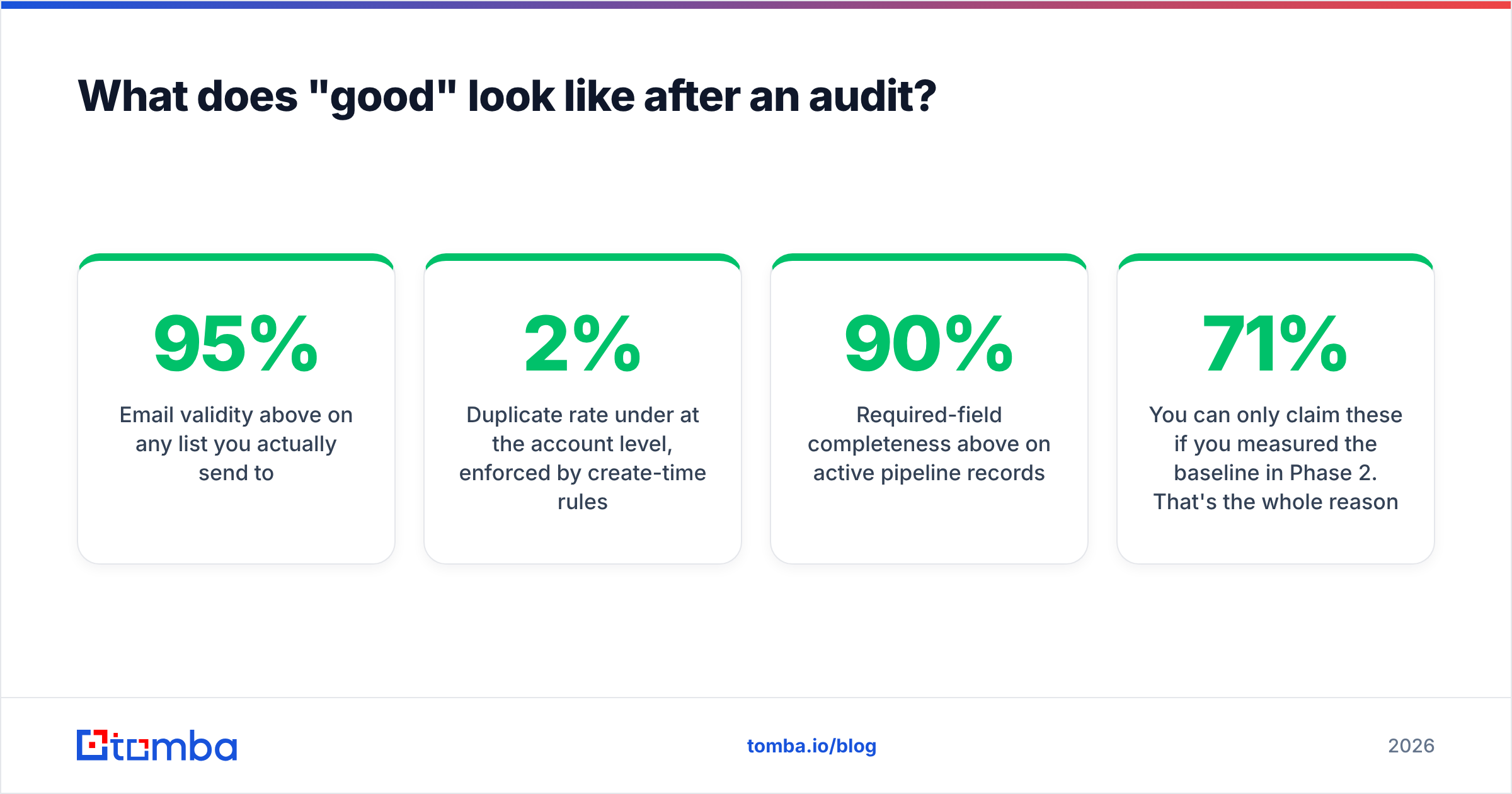
Concrete targets, not vibes. After a solid audit cycle, aim for:
- Email validity above 95% on any list you actually send to.
- Duplicate rate under 2% at the account level, enforced by create-time rules.
- Required-field completeness above 90% on active pipeline records.
- Freshness under 90 days median last-verified date on your engaged segment.
You can only claim these if you measured the baseline in Phase 2. That's the whole reason profiling comes before cleanup — "we cleaned a lot" is a feeling; "email validity went from 71% to 96%" is a result you can show a VP.
For teams standardizing this across tools, connecting your platform through native integrations — HubSpot, Salesforce, Pipedrive — lets verification and enrichment run inside the CRM instead of in a side spreadsheet nobody syncs back.
Common mistakes that sink a data audit#
- Deleting before profiling. You lose the baseline and can't prove impact — or worse, you nuke recoverable records.
- Merging on name alone. "John Smith at Acme" might be two real people. Merge on verified email or domain, with human review on ambiguous cases.
- Verifying once and calling it done. Data decays continuously; a point-in-time clean list is stale within a quarter.
- Ignoring catch-alls. Treating "accepted" as "valid" on catch-all domains puts unverified addresses into your best accounts.
- No governance. Without create-time rules, you re-earn the same mess every quarter and wonder why the audit "didn't work."
Put your CRM data audit on autopilot#
The fastest way to turn a dreaded quarterly cleanup into a background process is to make verification and enrichment automatic. Start by running your active pipeline through the Tomba Email Finder and verifier to rebuild a clean, current contact layer — then wire it into your CRM so every new record gets checked on the way in. You keep the human judgment for the calls that need it, and let the platform handle the volume. Your forecast, your deliverability, and the reps who finally trust the data will all thank you. Start on the free tier and scale up only when the results are obvious.
Related guides#
Ready to find emails that actually work?
Join 150,000+ professionals who stopped guessing and started sending. Free credits on signup — no credit card required.
Get the Tomba newsletter
Practical outbound tactics and product updates — once every two weeks.
About the author