CRM Data Enrichment in 2026: The Complete Guide
Your CRM decays about 30% a year. Here's how CRM data enrichment fixes stale records, fills gaps, and keeps reps selling instead of Googling contacts.
Your CRM is lying to you a little more every day. Contacts change jobs, companies rebrand, phone numbers get reassigned, and the tidy record a rep entered last spring is quietly rotting. CRM data enrichment is how you fight that decay — automatically topping up missing fields and correcting stale ones so your team sells to real people instead of ghosts.
TL;DR#
- CRM data enrichment appends and corrects missing or outdated fields (job title, company size, email, phone, industry) on records you already own.
- B2B data decays roughly 20–30% per year, so enrichment is maintenance, not a one-time cleanup.
- Two flavors: batch enrichment (fix the whole database at once) and real-time enrichment (fill fields the moment a lead enters).
- The payoff is concrete: better routing, cleaner segmentation, higher deliverability, and reps who stop manually Googling prospects.
- Pick a provider on match rate, freshness, coverage, and cost per enriched record — not the size of the logo wall.
What is CRM data enrichment?#
CRM data enrichment is the process of enhancing the records already in your CRM with additional, verified data pulled from external sources. You start with a thin record — maybe just a name and a company — and end with a complete profile: verified work email, direct phone, job title, seniority, department, company headcount, revenue band, industry, and tech stack.
Think of it like a passport control officer. A traveler hands over a name; the officer cross-references databases to confirm identity, nationality, and history before stamping them through. Enrichment does the same for your contacts — it takes the sparse detail a lead volunteered and validates it against trustworthy external data before that record is allowed to drive a campaign.
Technically, enrichment works by matching your existing record against a data provider's database using an anchor key — usually a work email, a domain, or a LinkedIn URL — and then writing back the fields you're missing. Good providers verify each returned field rather than guessing, which is the difference between "enriched" and "confidently wrong."
Why does CRM data decay so fast?#
People move. According to widely cited B2B data studies, somewhere between 20% and 30% of contact data goes stale every year. In practice that means:
- Job changes — a champion switches companies and your carefully nurtured relationship now points at an empty desk.
- Company changes — mergers, rebrands, and domain migrations break the email pattern your record relied on.
- Role changes — the same person gets promoted, and now the title you're personalizing against is wrong.
- Manual entry rot — reps fat-finger fields, skip the boring ones, and paste inconsistent formats.
- Form abandonment — prospects give you the minimum (name + email) and nothing else.
Left alone, this decay quietly erodes everything downstream. Lead scoring misfires because firmographics are blank. Territory routing sends enterprise deals to the SMB team. Email campaigns bounce and drag your sender reputation down with them. Enrichment is the maintenance schedule that keeps the whole engine from seizing.
What fields can you actually enrich?#
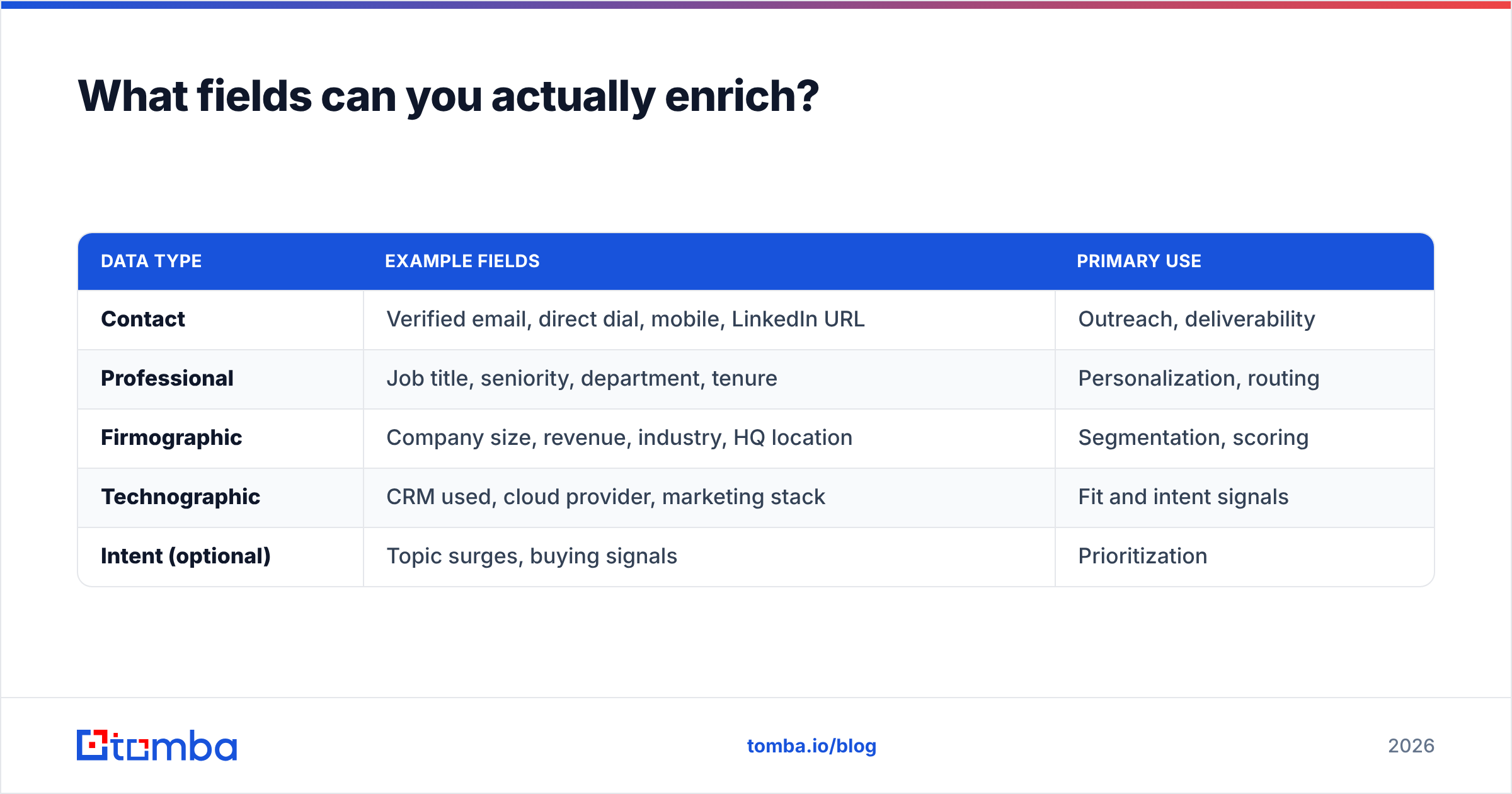
Enrichment isn't one thing — it's several data categories stacked on the same record. Here's the practical breakdown of what a modern provider fills in.
| Data type | Example fields | Primary use |
|---|---|---|
| Contact | Verified email, direct dial, mobile, LinkedIn URL | Outreach, deliverability |
| Professional | Job title, seniority, department, tenure | Personalization, routing |
| Firmographic | Company size, revenue, industry, HQ location | Segmentation, scoring |
| Technographic | CRM used, cloud provider, marketing stack | Fit and intent signals |
| Intent (optional) | Topic surges, buying signals | Prioritization |
Most teams start with contact and firmographic enrichment because those two unlock immediate wins: valid emails to send to and firmographics to segment by. Technographic and intent data are the layer you add once the basics are clean.
Batch vs real-time enrichment: which do you need?#
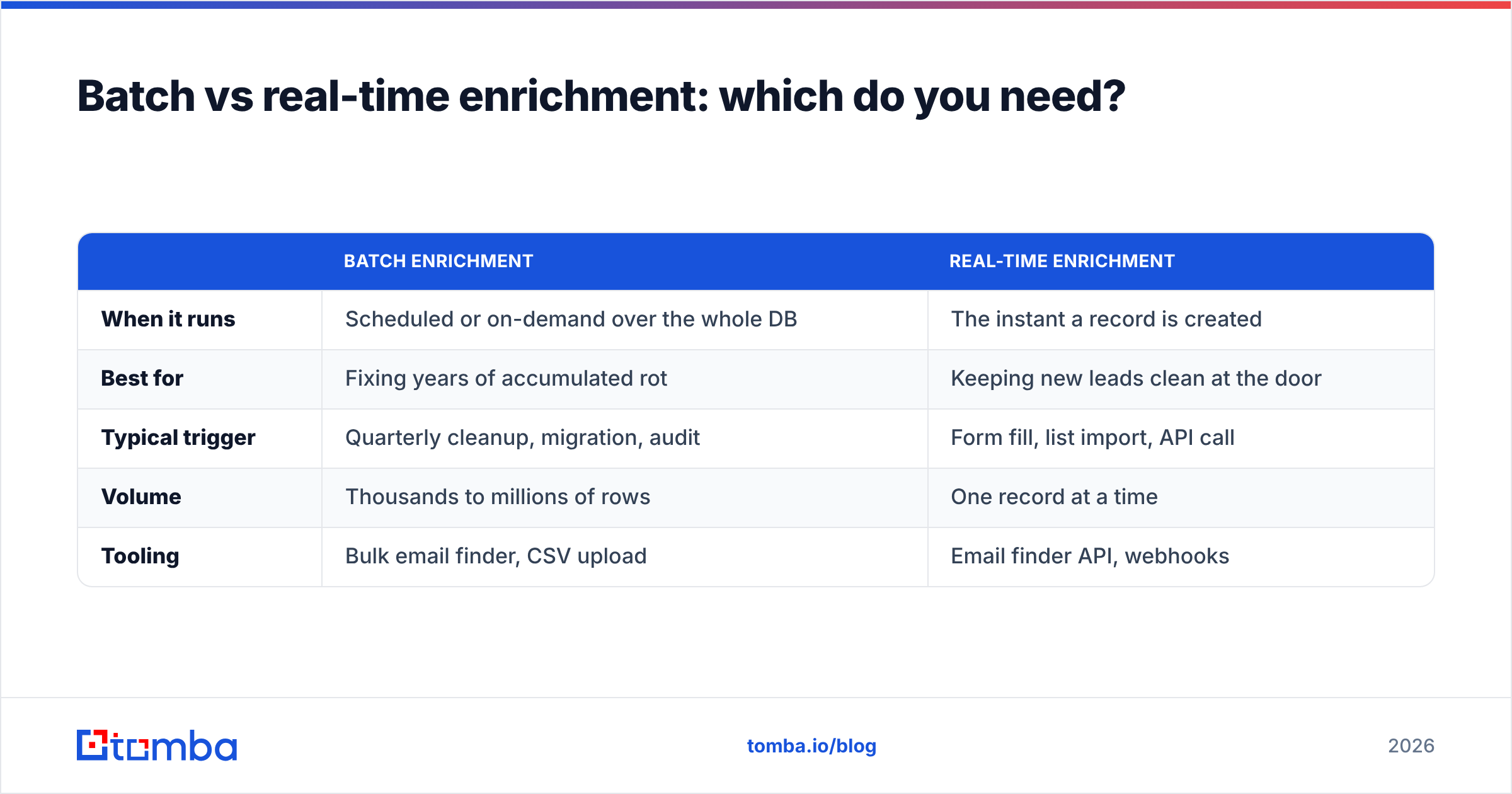
Both, eventually — but they solve different problems. Batch enrichment is the deep clean; real-time enrichment is the ongoing hygiene.
| Batch enrichment | Real-time enrichment | |
|---|---|---|
| When it runs | Scheduled or on-demand over the whole DB | The instant a record is created |
| Best for | Fixing years of accumulated rot | Keeping new leads clean at the door |
| Typical trigger | Quarterly cleanup, migration, audit | Form fill, list import, API call |
| Volume | Thousands to millions of rows | One record at a time |
| Tooling | Bulk email finder, CSV upload | Email finder API, webhooks |
The winning pattern is to run one large batch pass to fix the existing mess, then wire real-time enrichment into your inbound flow so the mess never rebuilds. A batch pass without real-time enrichment just means you'll be back here in twelve months.
How does the enrichment process work, step by step?#
Enrichment feels like magic when it works, but the pipeline is mechanical and predictable:
- Deduplicate first. Enriching duplicates doubles your cost and re-splits the same person into two records. Run a remove duplicates pass before anything else.
- Pick an anchor key. Decide what you'll match on — work email, company domain, or LinkedIn URL. Email is the strongest anchor because it's unique.
- Match against the provider. The provider looks up your anchor and returns candidate data.
- Verify the returned fields. Never trust an appended email blindly — run it through an email verifier so bounces don't reach your inbox.
- Write back to the CRM. Map fields carefully, and set rules for when enriched data overwrites existing data (usually: fill blanks, flag conflicts for review).
- Log and re-run. Enrichment isn't done; it's scheduled. Re-run on a cadence that matches your decay rate.
That verification step in the middle is where cheap providers cut corners. A high match rate is worthless if half the matches are guesses.
What are the benefits of CRM data enrichment?#
The ROI shows up across the whole go-to-market motion, not just in the marketing team's dashboards.
- Higher deliverability. Verified emails mean fewer bounces, which protects email deliverability and keeps you out of spam folders.
- Sharper segmentation. Complete firmographics let you build ICP segments that actually reflect fit instead of guesswork.
- Faster routing. Company size and industry fields drive lead-to-rep assignment automatically.
- Better personalization. Reps open with a relevant title and company detail instead of "Hi there."
- Time back for reps. Salespeople reportedly spend a painful share of their week on manual research. Enrichment hands that time back to selling.
- Trustworthy reporting. Clean firmographics mean your pipeline-by-segment dashboards stop lying to leadership.

How do you choose a CRM data enrichment provider?#
Ignore the logo wall and evaluate on the metrics that predict whether your database will actually improve. Here's what separates a real provider from a plausible-looking one.
- Match rate on YOUR data. Vendor-quoted match rates are measured on vendor-friendly lists. Run a free-tier test on a sample of your own records before committing.
- Field-level accuracy. Ask whether returned emails are verified or merely pattern-guessed. Guessed emails inflate match rate and destroy deliverability.
- Data freshness. How often is the underlying database refreshed? Stale data is just a different flavor of the problem you're trying to solve.
- Coverage for your geography and roles. A provider strong in North American SaaS may be thin on EMEA manufacturing.
- Cost per enriched record. Not per seat, not per "credit" — the real unit is dollars per record you can actually use.
- Compliance. Confirm the provider documents its data sources and handles GDPR/CCPA obligations.
A quick word on peers: providers like BookYourData focus on prebuilt, pay-as-you-go contact lists, which is a genuinely useful complement when you need net-new records rather than enrichment of existing ones. The two approaches aren't rivals — enrichment cleans what you have; a list vendor adds what you don't. Many teams run both.
For an independent read on providers, cross-reference user reviews on G2 rather than relying on any single vendor's landing page.
What does CRM data enrichment cost?#
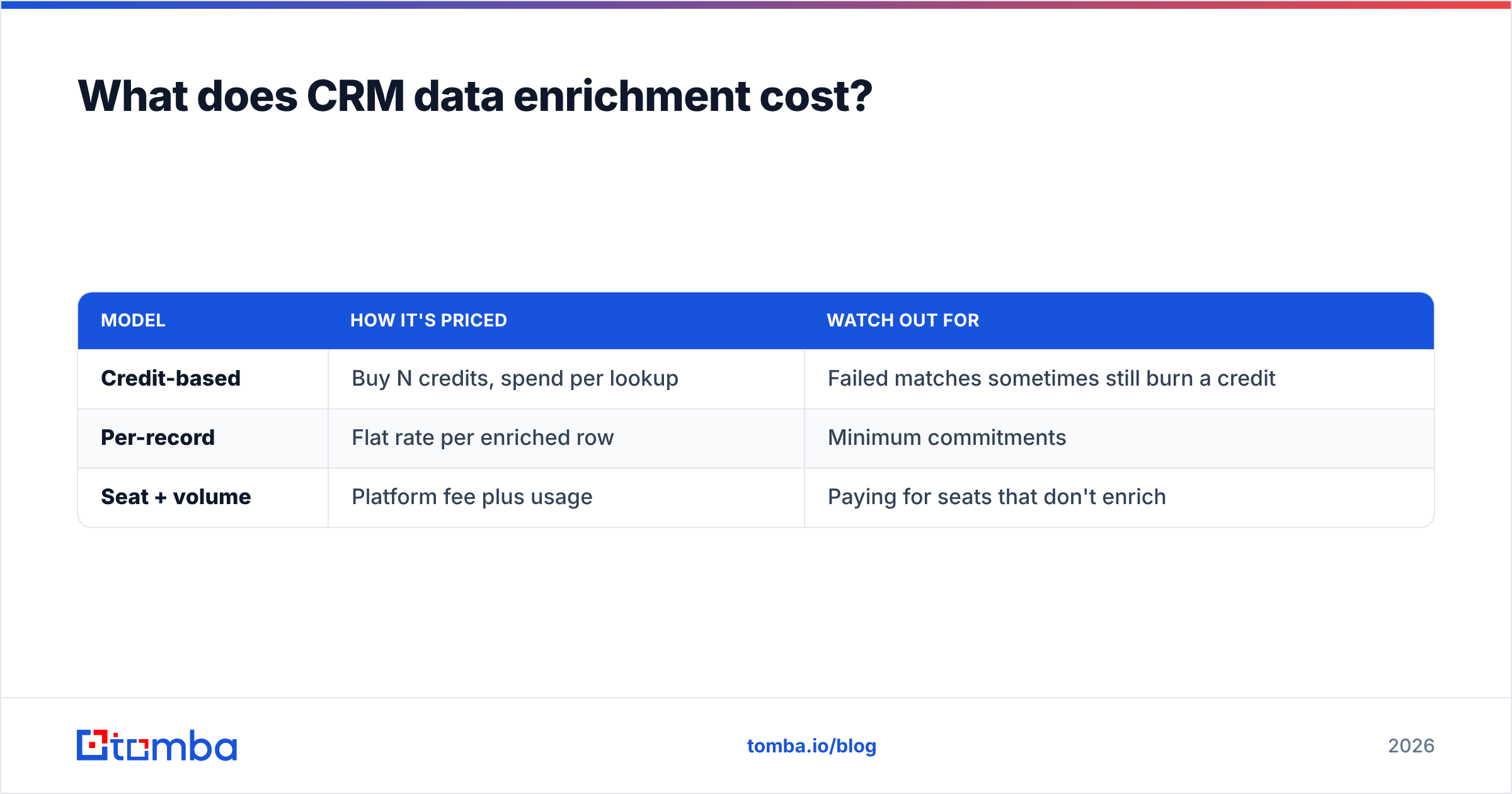
Pricing models vary, which makes apples-to-apples comparison annoying. You'll encounter three common structures:
| Model | How it's priced | Watch out for |
|---|---|---|
| Credit-based | Buy N credits, spend per lookup | Failed matches sometimes still burn a credit |
| Per-record | Flat rate per enriched row | Minimum commitments |
| Seat + volume | Platform fee plus usage | Paying for seats that don't enrich |
As a reference point, Tomba pricing runs a free tier at 25 searches per month, then Starter at $49/mo, Growth at $99/mo, and Pro at $249/mo, with Enterprise custom. The value test is simple: divide the monthly cost by the number of records you'll successfully enrich and verify, and compare that unit economic across vendors. A "cheaper" plan that matches half as often is not cheaper.
How do you keep enriched data from decaying again?#
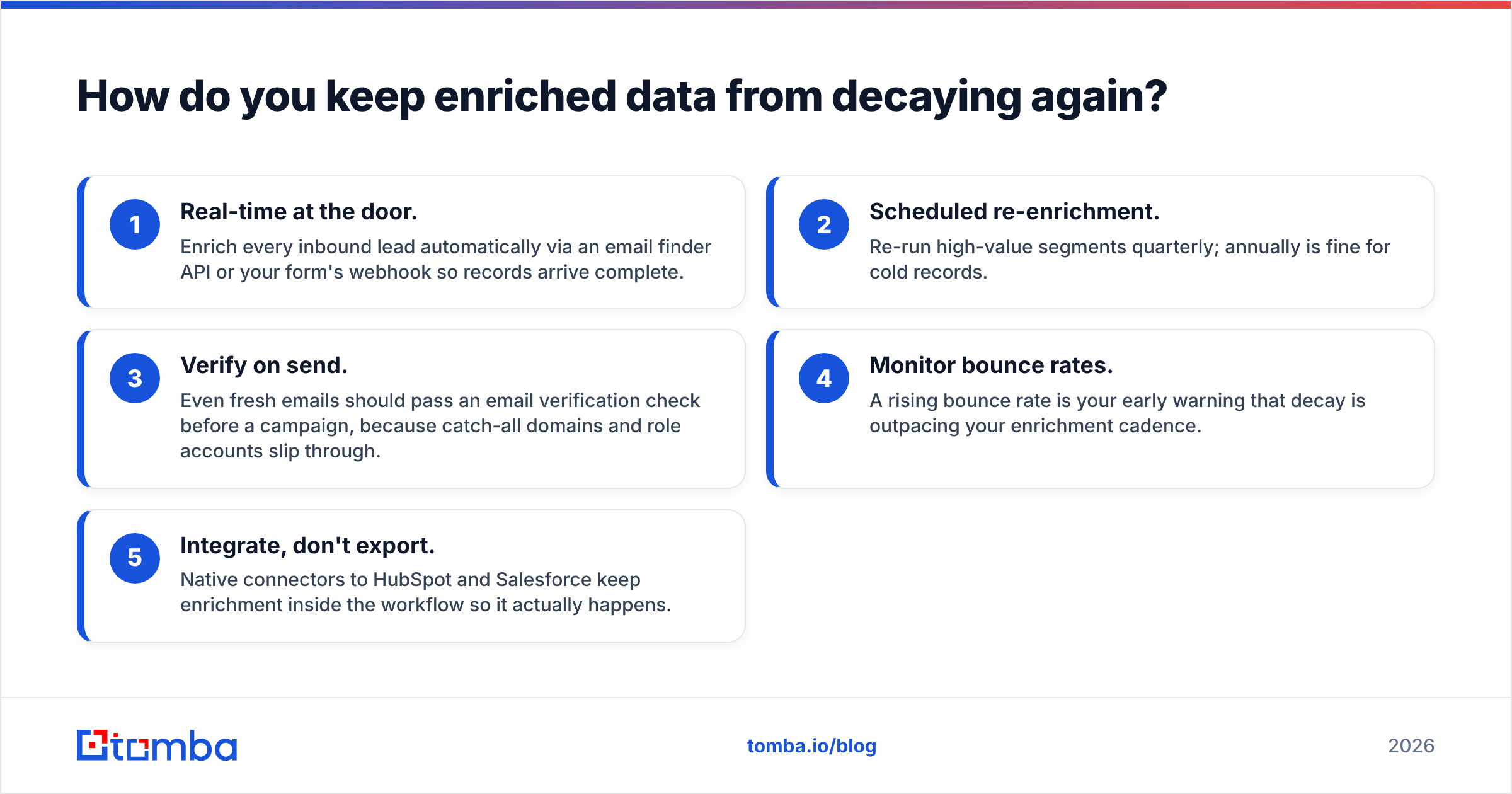
Enrichment is a subscription to freshness, not a purchase. Build these habits so you don't relapse:
- Real-time at the door. Enrich every inbound lead automatically via an email finder API or your form's webhook so records arrive complete.
- Scheduled re-enrichment. Re-run high-value segments quarterly; annually is fine for cold records.
- Verify on send. Even fresh emails should pass an email verification check before a campaign, because catch-all domains and role accounts slip through.
- Monitor bounce rates. A rising bounce rate is your early warning that decay is outpacing your enrichment cadence.
- Integrate, don't export. Native connectors to HubSpot and Salesforce keep enrichment inside the workflow so it actually happens.
HubSpot and Salesforce both publish extensive data-management guidance worth reading if you're standardizing fields before an enrichment project — clean field mapping upfront saves painful rework later.
Common CRM data enrichment mistakes to avoid#
- Enriching before deduping. You'll pay twice and merge nothing.
- Overwriting good data. Set enrichment to fill blanks by default and flag conflicts, not bulldoze rep-entered notes.
- Skipping verification. An appended email that bounces is worse than a blank field — it costs you deliverability.
- Treating it as one-and-done. Decay is continuous; your enrichment has to be too.
- Ignoring compliance. Enriching with data of unclear provenance is a legal risk, not a growth hack.
The bottom line#
CRM data enrichment is the maintenance layer that keeps every other go-to-market investment from degrading. A pretty automation sequence, a sharp lead score, a well-designed territory plan — all of them run on the assumption that the underlying records are accurate. Enrichment is what makes that assumption safe.
Start with a batch cleanup, verify everything you append, wire real-time enrichment into your inbound flow, and re-run on a cadence that matches your decay rate. Do that and your CRM stops being a slowly accumulating liability and starts being the asset it was supposed to be.
If you want to fill the contact gaps in your records with verified, deliverable data, start with the Tomba Email Finder — it finds and verifies professional emails by name, company, or domain, plugs into data enrichment for the rest of the profile, and offers a free tier so you can test match rate on your own database before you spend a dollar. Clean data is cheaper than the deals you lose without it.
Related guides#
Ready to find emails that actually work?
Join 150,000+ professionals who stopped guessing and started sending. Free credits on signup — no credit card required.
Get the Tomba newsletter
Practical outbound tactics and product updates — once every two weeks.
About the author