CRM Data Migration in 2026: A Practical Step-by-Step Guide
CRM data migration fails when teams move dirty records and hope for the best. Here's a field-tested plan to map, clean, verify, and validate every record before go-live.
Moving your customer data from one CRM to another sounds like a copy-paste job. It never is. The tool swap is the easy 10%. The other 90% is deciding what data is worth keeping, fixing what's broken, and proving the new system is trustworthy on day one.
This guide walks through CRM data migration the way experienced RevOps teams actually run it — as a data-quality project that happens to end in a system cutover, not the other way around.
TL;DR#
- CRM data migration is a data-cleaning project first, a technical move second. Most failures come from garbage records, not broken imports.
- Audit and map before you touch a migration tool. Know your object model, field-by-field, in both systems.
- Clean and verify contacts before load — deduplicate, standardize, and re-verify emails so you don't carry dead data into a fresh CRM.
- Migrate in staged waves (test → pilot → full) with rollback ready, never a single big-bang cutover.
- Validate after go-live with record counts, spot checks, and user acceptance before you decommission the old system.
What is CRM data migration?#
CRM data migration is the process of moving contacts, accounts, deals, activities, and their relationships from a source system into a new CRM — while preserving accuracy, structure, and history.
Think of it like moving houses. You don't just throw everything into a truck. You decide what furniture is worth keeping, you label boxes so they land in the right room, and you throw out the broken chair instead of paying to move it. Skip that discipline and you spend your first month in the new house digging through unlabeled boxes.
The "furniture" here is your data model: standard objects (Contacts, Companies, Deals), custom fields, picklists, owners, and the associations that tie them together. A migration that moves records but loses associations — deals detached from accounts, activities orphaned from contacts — is technically "done" and practically useless.

Why do CRM migrations fail?#
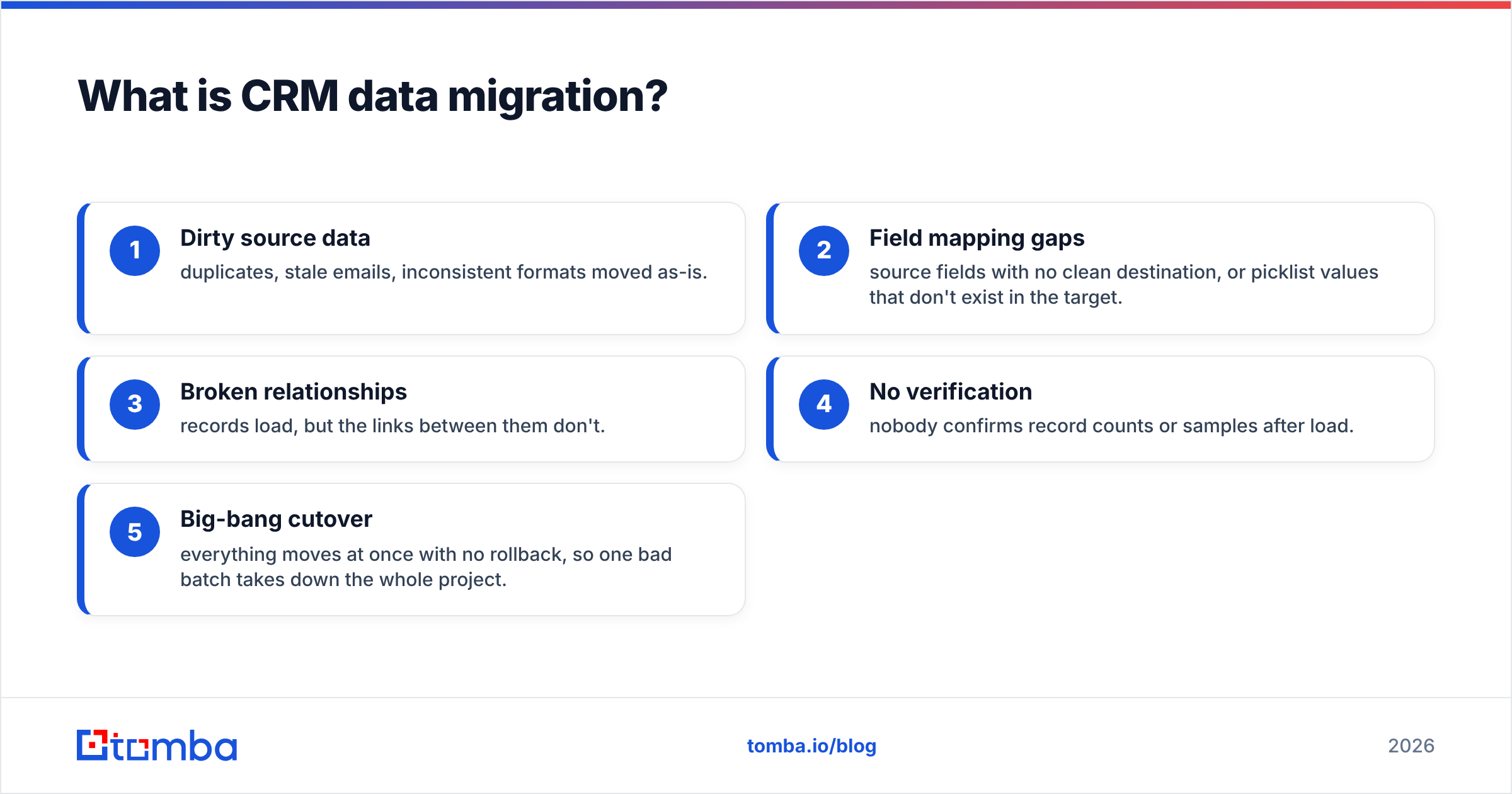
They rarely fail on the import step. They fail on assumptions. The most common causes:
- Dirty source data — duplicates, stale emails, inconsistent formats moved as-is.
- Field mapping gaps — source fields with no clean destination, or picklist values that don't exist in the target.
- Broken relationships — records load, but the links between them don't.
- No verification — nobody confirms record counts or samples after load.
- Big-bang cutover — everything moves at once with no rollback, so one bad batch takes down the whole project.
How do you plan a CRM data migration?#
Start with an audit, not a tool. You cannot map what you haven't measured.
Pull an inventory of every object and field in the source CRM: how many records, how many are populated, how many are obviously junk (test accounts, "asdf" companies, 2014 leads with no activity). This inventory becomes your scope document. It also surfaces the uncomfortable truth most teams avoid — you probably don't need to migrate everything.
A useful filter: migrate what is active, archive what is historical, delete what is noise. A contact with no email, no activity in three years, and no open deal is not worth the credits, storage, or confusion.
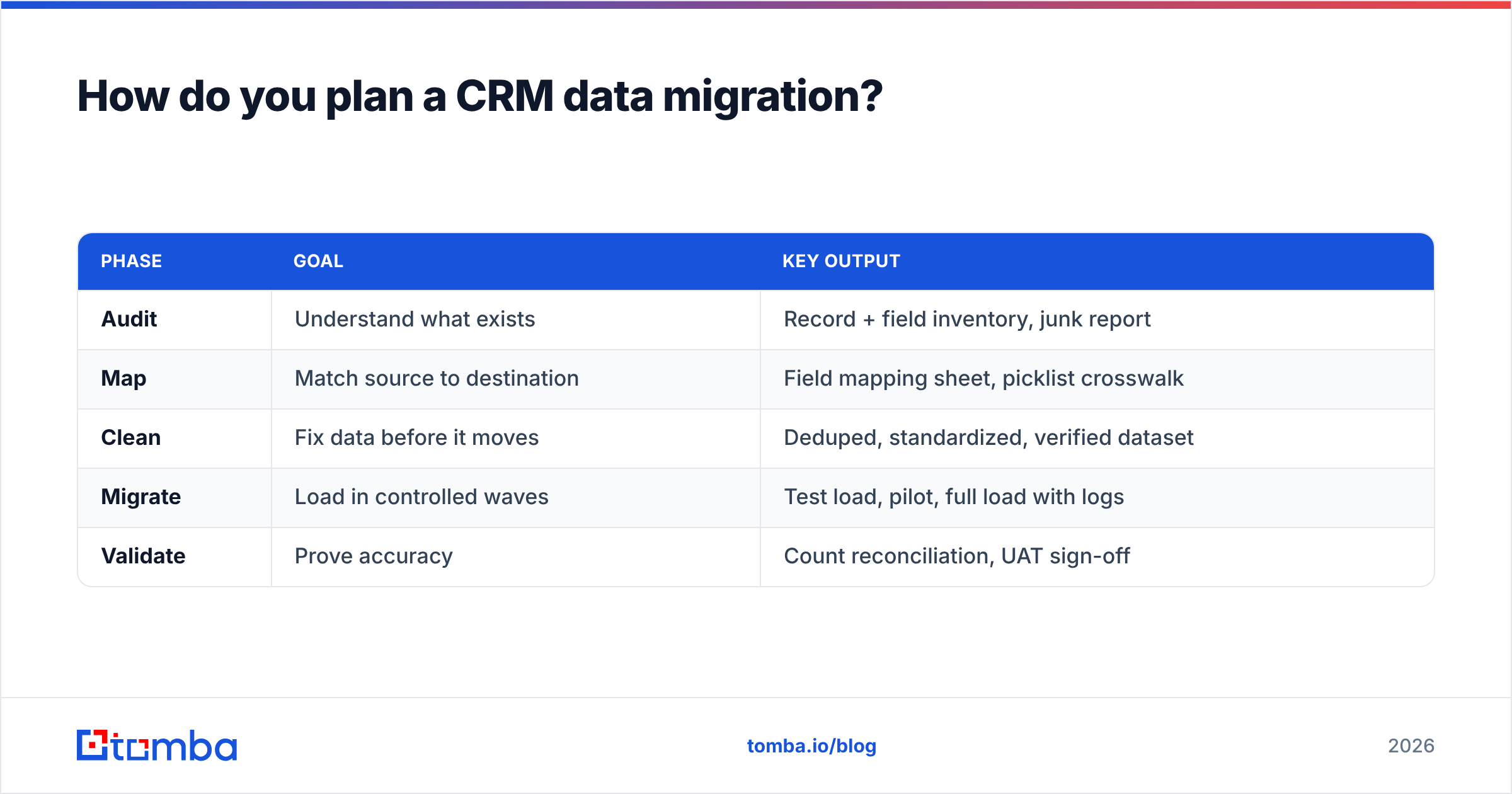
Here's a planning checklist that maps to the phases below:
| Phase | Goal | Key output |
|---|---|---|
| Audit | Understand what exists | Record + field inventory, junk report |
| Map | Match source to destination | Field mapping sheet, picklist crosswalk |
| Clean | Fix data before it moves | Deduped, standardized, verified dataset |
| Migrate | Load in controlled waves | Test load, pilot, full load with logs |
| Validate | Prove accuracy | Count reconciliation, UAT sign-off |
Step 1 — Map every field, both directions#
Build a mapping sheet with one row per source field. For each, record the destination field, the data type, transformation rules, and a note for anything that doesn't have a clean home.
Watch for the classics: a free-text "Region" field that needs to become a picklist, phone numbers in five formats, date fields stored as strings, and owner references that point to users who no longer exist. Both HubSpot and Salesforce publish detailed object and field references — read the destination's constraints before you assume a field will accept your data.
Step 2 — Clean and deduplicate#
This is where migrations are won or lost. Deduplicate first, because merging is far cheaper before load than after. Standardize formats — country names, job titles, phone patterns — so filtering and reporting work on day one. Use a remove duplicates pass on your export before anything touches the new CRM.
Then handle the part most teams skip entirely: email accuracy.
Step 3 — Re-verify contact data before load#
An email that was valid three years ago may bounce today. People change jobs, companies get acquired, domains lapse. Migrating unverified contacts means importing bounce risk directly into a brand-new sender reputation.
Run every contact through an email verifier before load, and for records missing an email, use domain search to recover current addresses by company. For large lists, a bulk email finder handles thousands of lookups in one pass, and data enrichment can backfill missing job titles, company size, and phone numbers so records land complete rather than half-empty.
The payoff is compounding: clean, verified data in means accurate reporting, higher deliverability, and reps who actually trust the CRM instead of quietly keeping their own spreadsheet.
What tools do you use for CRM data migration?#
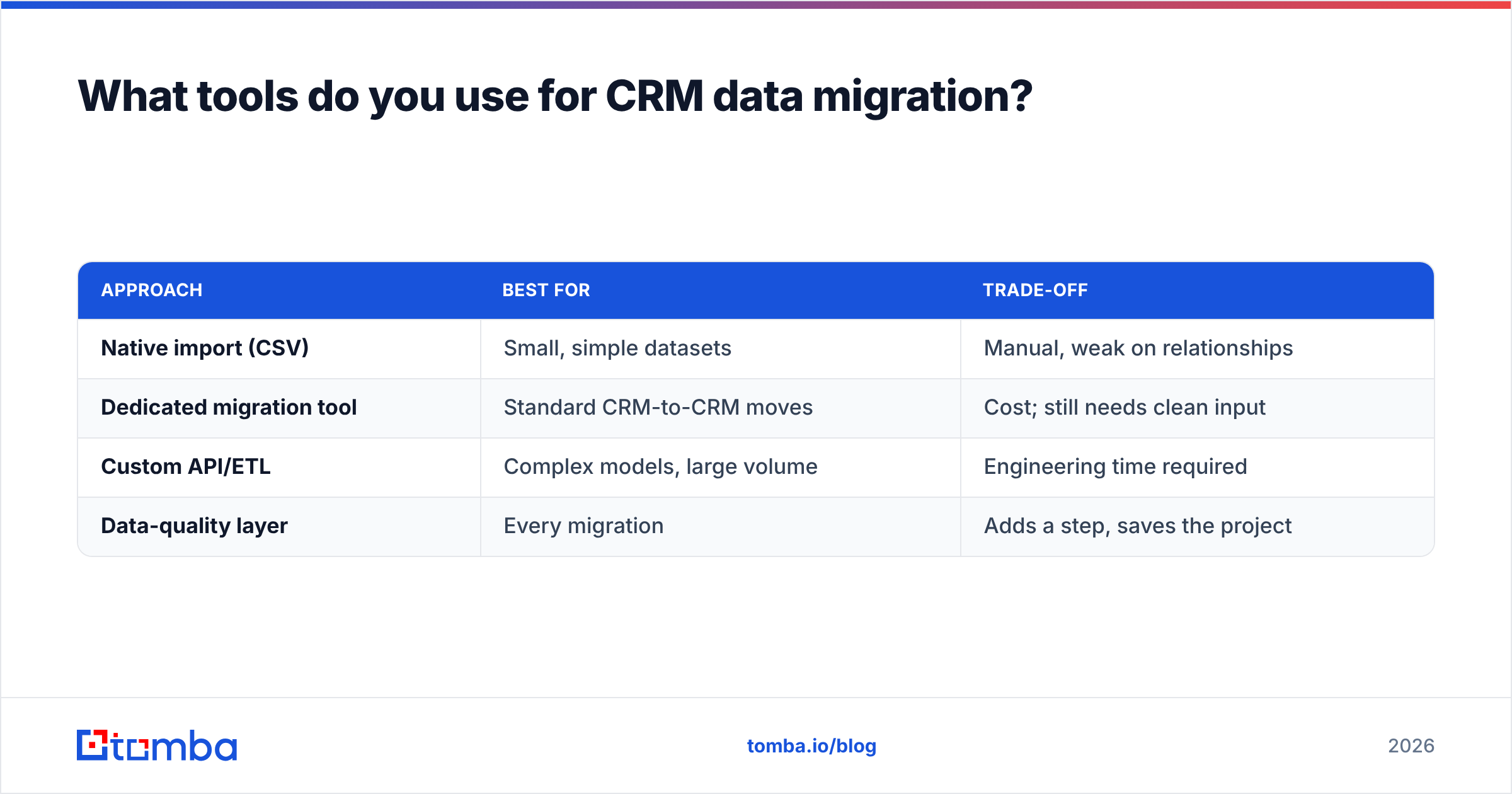
There are three broad approaches, and most real projects blend them.
| Approach | Best for | Trade-off |
|---|---|---|
| Native import (CSV) | Small, simple datasets | Manual, weak on relationships |
| Dedicated migration tool | Standard CRM-to-CRM moves | Cost; still needs clean input |
| Custom API/ETL | Complex models, large volume | Engineering time required |
| Data-quality layer | Every migration | Adds a step, saves the project |
The migration mechanism (CSV, tool, or API) only moves what you give it. The data-quality layer — dedup, standardize, verify, enrich — is what determines whether the move is worth doing. Compare migration vendors on G2 if you're evaluating dedicated tools, but budget separately for the cleaning step. No migration tool cleans your data for you; it faithfully moves whatever you hand it, dirty or not.
Should you migrate everything at once?#
No. Big-bang cutovers are the single biggest avoidable risk. Migrate in waves:
- Test load — a representative sample (500–1,000 records) into a sandbox. Confirm mapping, associations, and formatting.
- Pilot — one team, one region, or one product line into production. Let real users work in it for a few days.
- Full load — the remainder, in batches small enough to review logs and roll back a single batch if something breaks.
Keep the source system read-only but alive until validation is complete. Rollback should mean "point back to the old CRM," not "restore from a backup and pray."
How do you validate a CRM migration after go-live?#
Validation is evidence, not vibes. "It looks fine" is not a sign-off.
Reconcile record counts object by object: how many contacts, accounts, and open deals in the source versus the destination? Numbers should match your migration plan (remember, you intentionally dropped junk — account for that). Then spot-check samples across each object type, confirming that a contact's associated company, deals, and recent activities all survived the move intact.
Finally, run user acceptance testing. Have a few reps pull up their top accounts and confirm the data is complete and correctly linked. Reps find broken associations faster than any script because they know what their pipeline should look like.
A practical validation checklist:
- Counts reconcile per object, adjusted for intentional deletions.
- Associations intact — deals linked to accounts, activities to contacts.
- No duplicates created during load.
- Emails verified and deliverable, not just present.
- Owners assigned correctly, with no orphaned records.
- Custom fields and picklists populated with valid values.
- UAT sign-off from at least one rep per team.
Only after this passes should you decommission the old system — and even then, keep an exported archive for a defined retention period.
How long does a CRM data migration take?#
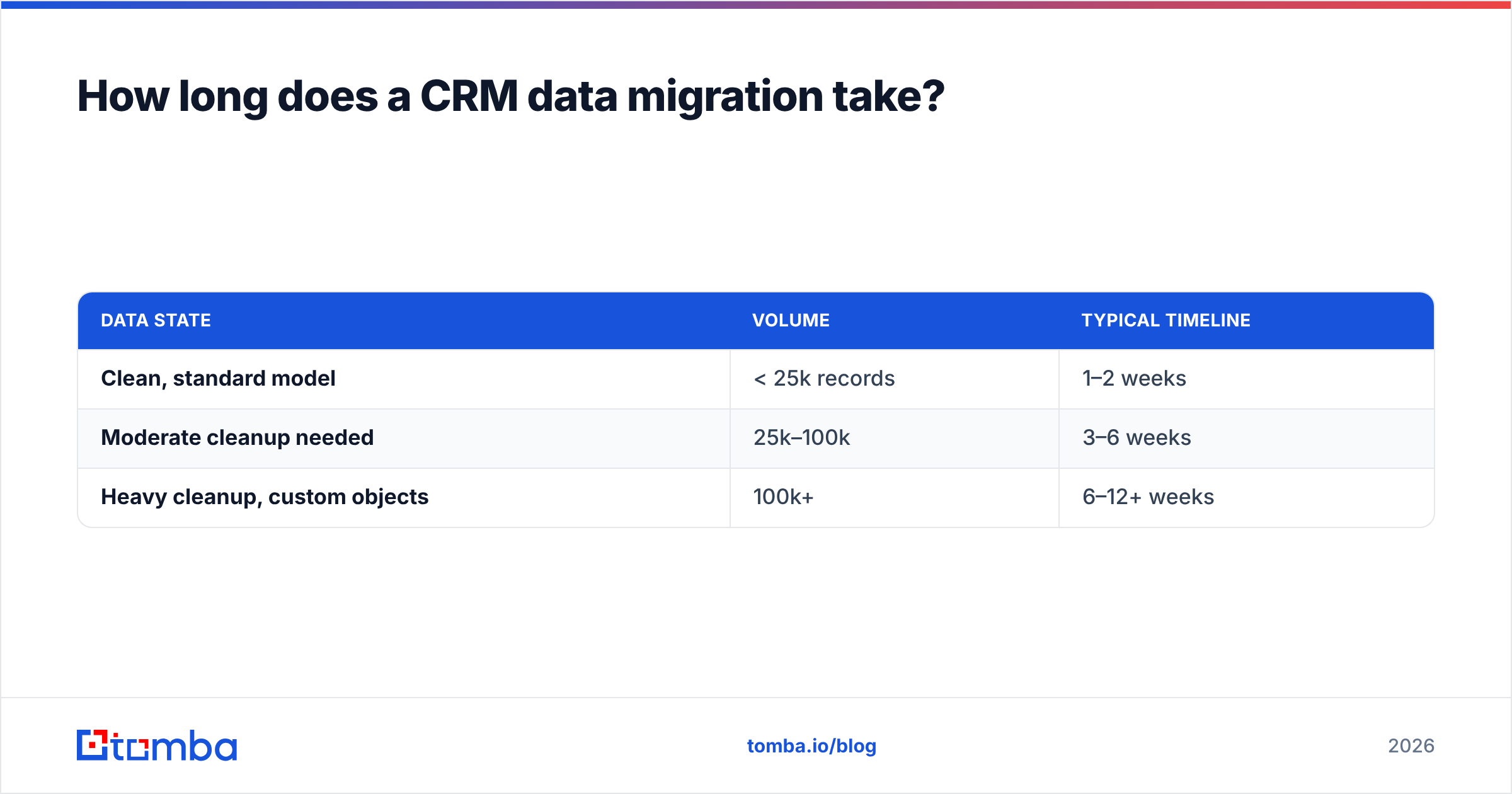
It depends far more on data quality than data volume. A clean 50,000-record dataset with a simple model can migrate in days. A messy 10,000-record dataset with tangled custom objects, inconsistent picklists, and years of unverified contacts can take weeks, because the cleaning — not the loading — is the work.
Rough planning ranges:
| Data state | Volume | Typical timeline |
|---|---|---|
| Clean, standard model | < 25k records | 1–2 weeks |
| Moderate cleanup needed | 25k–100k | 3–6 weeks |
| Heavy cleanup, custom objects | 100k+ | 6–12+ weeks |
The lesson repeats: invest in cleaning up front and the migration compresses. Skip it and you pay the same cost later, plus interest, in a live system your team is trying to sell from.
Common CRM migration mistakes to avoid#
- Migrating unverified emails. You inherit bounce risk on a fresh domain. Verify first.
- Skipping the mapping sheet. "We'll figure it out during load" is how associations break.
- No sandbox test. The first load should never be the production load.
- Deleting the source too early. Keep it read-only until validation signs off.
- Treating it as an IT task. RevOps and sales must own scope and validation, because they know what "correct" looks like.
Bringing it together#
CRM data migration succeeds when you treat it as a data-quality project with a cutover at the end — audit, map, clean, verify, migrate in waves, validate with evidence. The teams that struggle are the ones who reverse that order and try to fix data quality after the move, inside a live system.
The verification and enrichment step is the highest-leverage part, and it's the one most teams underinvest in. Before you load a single contact into your new CRM, run your list through the Tomba Email Finder to recover and confirm current, deliverable addresses — then enrich the gaps so records arrive complete. Clean data in means a CRM your team actually trusts on day one. See Tomba pricing to match a plan to your migration volume, starting free at 25 searches a month and scaling to bulk workloads on the Growth and Pro tiers.
Related guides#
Ready to find emails that actually work?
Join 150,000+ professionals who stopped guessing and started sending. Free credits on signup — no credit card required.
Get the Tomba newsletter
Practical outbound tactics and product updates — once every two weeks.
About the author