The Best CRM With Email Tracking in 2026: A Practical Guide
A CRM with email tracking tells you who opened, clicked, and went quiet — so reps stop guessing and start following up at the right moment. Here's how to choose one.
Your reps are sending emails into a black hole. They hit send, wait, and follow up on a schedule that has nothing to do with whether the prospect actually read the message. A CRM with email tracking closes that gap: it tells you the moment someone opens your email, clicks a link, or reopens a proposal three days later — so the follow-up lands when attention is highest, not when a calendar reminder fires.
This guide breaks down what email tracking inside a CRM actually does, which tools do it well in 2026, where the accuracy traps are, and how to feed clean contact data into whichever platform you pick.
TL;DR#
- A CRM with email tracking logs opens, clicks, replies, and attachment views against each contact record automatically — no copy-paste, no guesswork.
- HubSpot, Salesforce (with Sales Engagement), Pipedrive, and Zoho lead the pack, but they differ sharply on free tiers, notification quality, and how many tracked emails you get per month.
- Open tracking is directional, not gospel — Apple Mail Privacy Protection and image proxies inflate open rates. Weight clicks and replies higher.
- Tracking is only as good as your data: bounced sends never get opened. Verify and enrich contacts with a tool like Tomba Email Finder before they enter the CRM.
- Pick based on notification latency, sequence support, and per-seat tracked-email limits — not the logo.
What is a CRM with email tracking?#
A CRM with email tracking is a customer relationship platform that watches your outbound email and writes what it sees back onto the contact's timeline. Think of it like a delivery-tracking number for every message you send: instead of "shipped and hoping," you see "delivered," "opened," "link clicked," and "reopened twice."
Mechanically, it works one of two ways:
- Open tracking embeds a tiny invisible pixel (a 1x1 image) in the email. When the recipient's client loads that image, the CRM records an open.
- Click tracking rewrites your links to route through the CRM's redirect, logging the click before forwarding the visitor to the real destination.
Modern CRMs layer more on top: reply detection, attachment/proposal view tracking, sequence enrollment, and real-time desktop or Slack notifications. The point is not surveillance — it's timing. A rep who knows a prospect just reopened last week's quote can call while the intent is fresh instead of leaving a generic voicemail on Tuesday because that's when they always do follow-ups.
The core signals a good tracker captures#
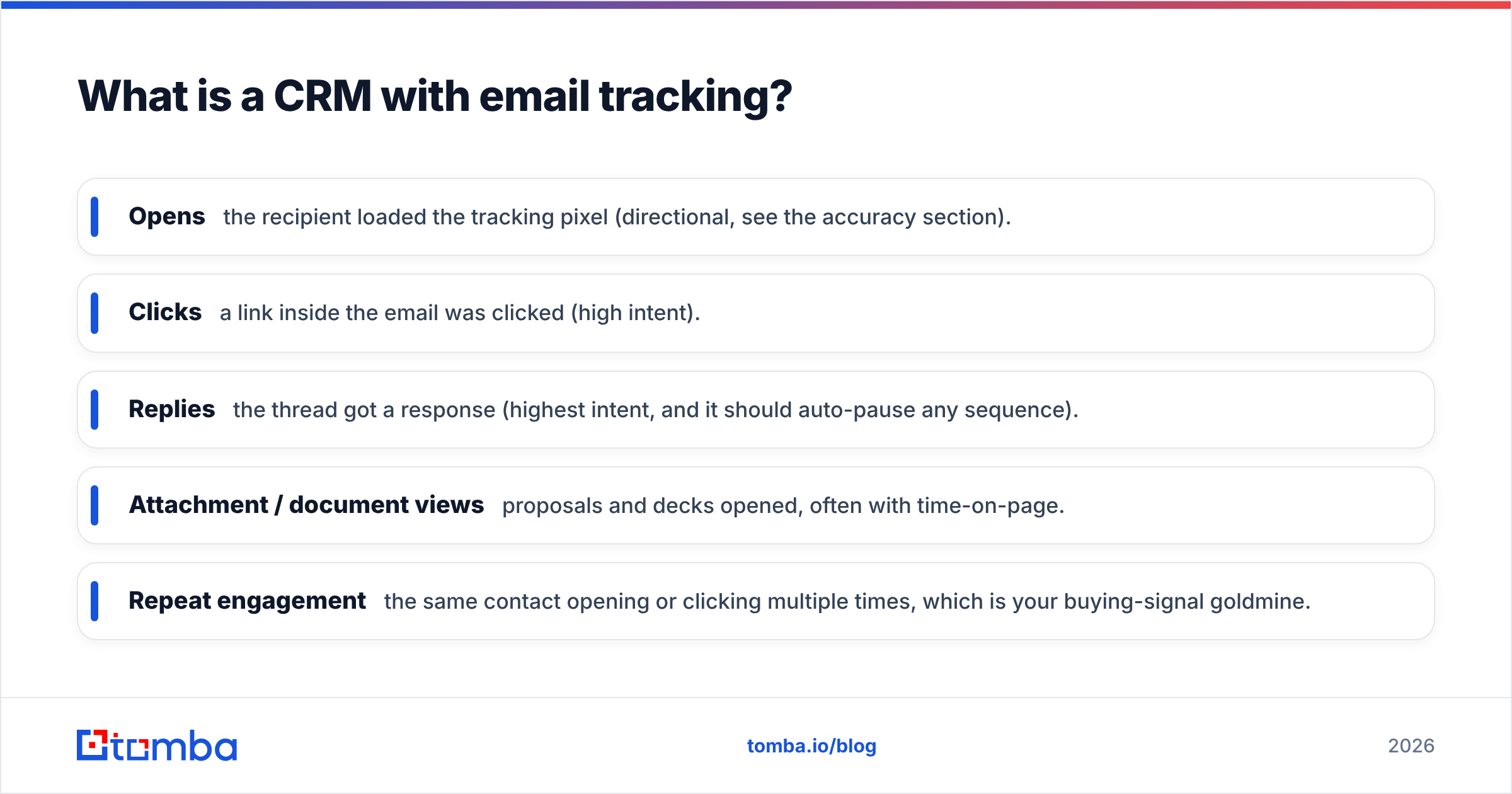
- Opens — the recipient loaded the tracking pixel (directional, see the accuracy section).
- Clicks — a link inside the email was clicked (high intent).
- Replies — the thread got a response (highest intent, and it should auto-pause any sequence).
- Attachment / document views — proposals and decks opened, often with time-on-page.
- Repeat engagement — the same contact opening or clicking multiple times, which is your buying-signal goldmine.
Why does email tracking matter for B2B sales?#
Because follow-up timing is the single cheapest lever you have on reply rates, and most teams pull it blind.
Consider two reps sending the same 200 emails. Rep A follows up every prospect on day 3, flat. Rep B gets a notification the instant a prospect clicks the pricing link and calls within the hour. Rep B is talking to someone who is, right now, thinking about the purchase. That timing difference routinely doubles connect rates without a single extra email sent.
Tracking also fixes pipeline hygiene. When engagement data lives on the contact record, you can:
- Score leads by behavior, not just firmographics — see marketing qualified lead scoring.
- Kill dead deals faster — zero opens across a whole sequence is a signal to stop, not to send email number seven.
- Coach reps with evidence — managers can see which subject lines and templates actually get opened and clicked.
According to HubSpot's sales research, response time and follow-up cadence are among the strongest predictors of whether a deal advances. Email tracking is what turns cadence from a guess into a data-driven decision.
Which CRMs have the best email tracking in 2026?#
Here's the honest comparison. Every platform below does the basics; the differences are in limits, notification quality, and how much you pay to unlock the good stuff.
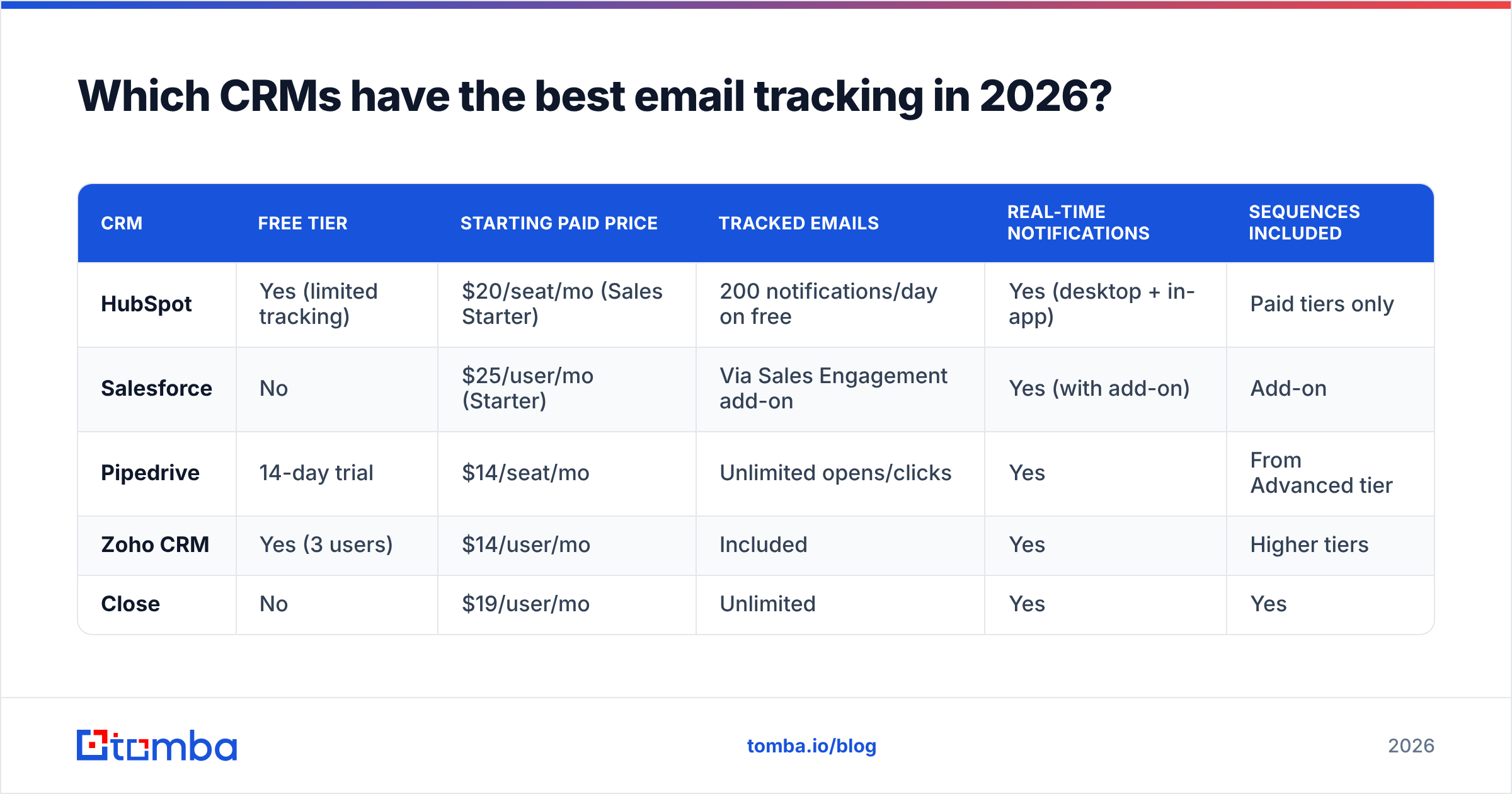
| CRM | Free tier | Starting paid price | Tracked emails | Real-time notifications | Sequences included |
|---|---|---|---|---|---|
| HubSpot | Yes (limited tracking) | $20/seat/mo (Sales Starter) | 200 notifications/day on free | Yes (desktop + in-app) | Paid tiers only |
| Salesforce | No | $25/user/mo (Starter) | Via Sales Engagement add-on | Yes (with add-on) | Add-on |
| Pipedrive | 14-day trial | $14/seat/mo | Unlimited opens/clicks | Yes | From Advanced tier |
| Zoho CRM | Yes (3 users) | $14/user/mo | Included | Yes | Higher tiers |
| Close | No | $19/user/mo | Unlimited | Yes | Yes |
A few things this table won't tell you that matter in practice:
- HubSpot's free tracking is genuinely useful but caps notifications and hides sequences behind paid plans. Great for a small team validating the workflow.
- Salesforce has the deepest data model but treats email engagement as an add-on (Sales Engagement, formerly High Velocity Sales). Budget accordingly.
- Pipedrive offers unlimited open and click tracking even on lower tiers, which makes it a favorite for high-volume outbound teams watching cost.
- Close is built for phone-and-email SDR motions and bundles tracking, calling, and sequences without nickel-and-diming.
Compare full pricing tables directly on G2 before committing — vendor pages change often.
How accurate is email open tracking, really?#
Open tracking is directional, not precise — treat it as a soft signal and weight clicks and replies far higher.
The reason is the pixel. Anything that loads images automatically can trigger a false open, and anything that blocks images produces a false negative. The big distortions in 2026:
- Apple Mail Privacy Protection (MPP) pre-loads tracking pixels for a large share of Apple Mail users, registering an "open" whether or not a human ever saw the message. This inflates open rates and makes the exact open time unreliable.
- Corporate image proxies and security scanners (Gmail, Outlook ATP, Mimecast) can fire the pixel during automated link/image scanning — another false open.
- Plain-text clients and image-blocking produce opens that never register even though the email was read.
How to read tracking data without fooling yourself#
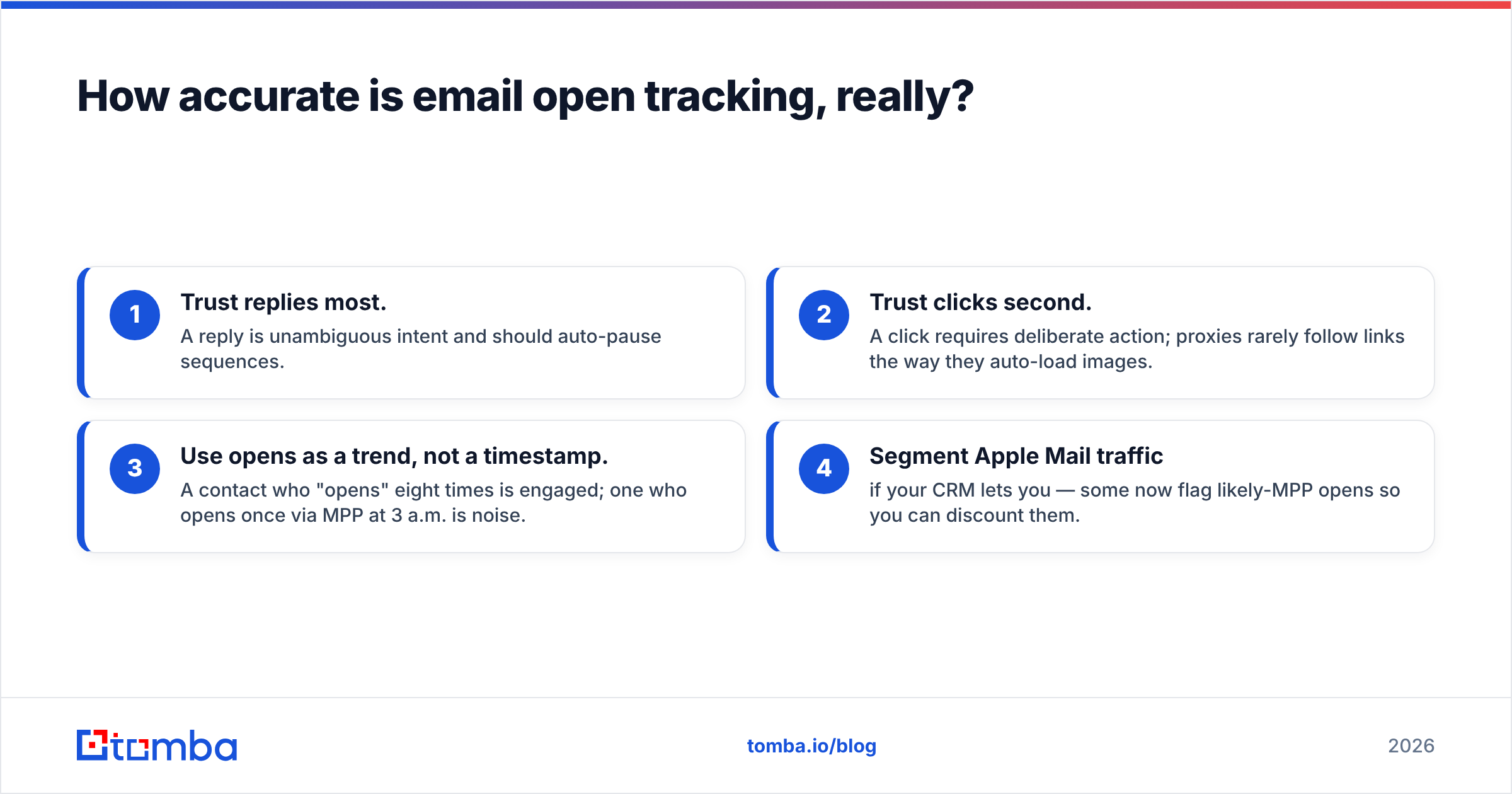
- Trust replies most. A reply is unambiguous intent and should auto-pause sequences.
- Trust clicks second. A click requires deliberate action; proxies rarely follow links the way they auto-load images.
- Use opens as a trend, not a timestamp. A contact who "opens" eight times is engaged; one who opens once via MPP at 3 a.m. is noise.
- Segment Apple Mail traffic if your CRM lets you — some now flag likely-MPP opens so you can discount them.
For a deeper primer on the deliverability side, see email deliverability and how sender reputation affects whether your tracked emails even reach the inbox.
What features should you look for beyond basic tracking?#
The pixel is table stakes. These are the features that separate a CRM you tolerate from one your reps actually live in.
- Notification latency and channel. A tracked open is worthless if the alert arrives an hour later or buried in email. Look for real-time desktop and Slack/Teams notifications. See Slack integration patterns for wiring alerts into where reps work.
- Sequence auto-pause on reply. Nothing burns trust like a prospect replying "yes let's talk" and then getting automated follow-up number four. The CRM must stop sequences the instant a human replies.
- Template-level analytics. Open and click rates per template, so you can retire the losers. Pair this with a subject line tester before you send.
- Document and proposal tracking. Knowing a prospect spent four minutes on the pricing page of your proposal is a stronger buying signal than any open.
- Two-way calendar and CRM sync. Engagement data is only useful if it lands on the right record automatically.
- Data hygiene hooks. Native or API-based email verification so bad addresses never enter the sending pool.
How do you keep tracked-email data clean?#
Simple rule: you cannot track an email that bounced, and you cannot enrich a signal attached to the wrong person. Tracking sits at the end of a data pipeline, and garbage upstream poisons everything downstream.
Three habits keep the data trustworthy:
- Verify before you send. Run every new address through an email verifier so hard bounces don't tank your sender reputation and skew engagement rates. High bounce rates also get your domain throttled, which quietly suppresses real opens.
- Enrich sparse records. A contact with just an email and no title, company size, or LinkedIn is hard to score. Data enrichment fills the firmographic gaps so behavioral signals actually mean something.
- Find the right contact in the first place. If you're emailing a generic info@ address, tracking tells you a shared inbox loaded a pixel — useless. Use a domain search to reach the actual decision-maker.
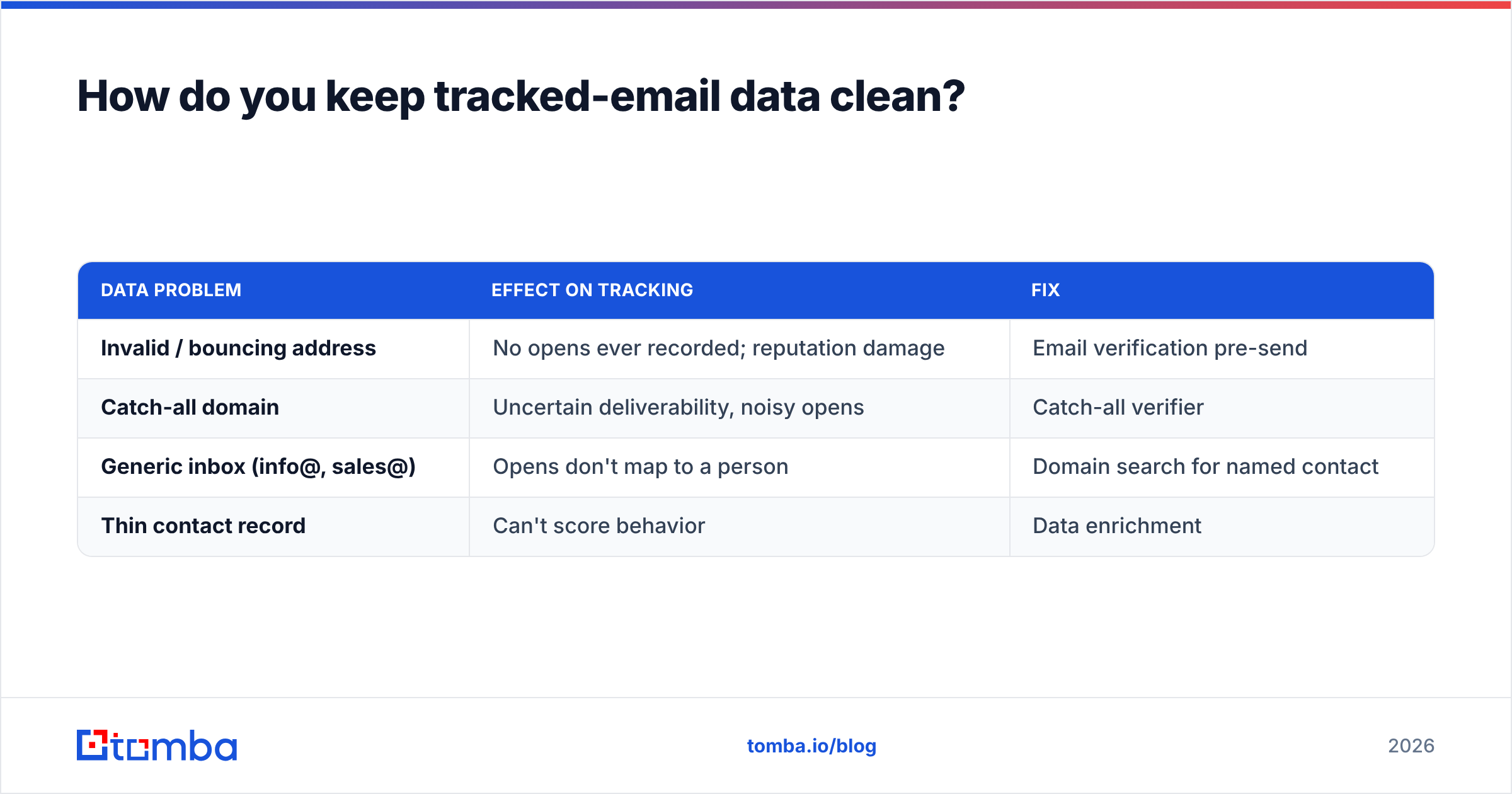
Here's how the data-quality inputs map to tracking outcomes:
| Data problem | Effect on tracking | Fix |
|---|---|---|
| Invalid / bouncing address | No opens ever recorded; reputation damage | Email verification pre-send |
| Catch-all domain | Uncertain deliverability, noisy opens | Catch-all verifier |
| Generic inbox (info@, sales@) | Opens don't map to a person | Domain search for named contact |
| Thin contact record | Can't score behavior | Data enrichment |
Tomba fits this stage of the pipeline. Its email finder API and bulk email finder feed verified, enriched contacts into HubSpot, Salesforce, Pipedrive, and the rest — so your CRM's tracking runs on data that's actually reachable. Native connectors like the HubSpot integration and Salesforce integration mean the handoff is automatic.
Is a dedicated tracking tool better than a CRM's built-in tracking?#
For most teams, the CRM's native tracking wins — because the value is in one timeline, not in marginally better pixels.
Standalone tools (Mailtrack, Mixmax, standalone Gmail extensions) sometimes offer slicker notifications or a lower entry price. But they create a second source of truth: engagement lives in the tool, contact context lives in the CRM, and reps waste time reconciling the two. The moment you want to score leads, trigger sequences, or report on pipeline by engagement, the split-brain setup breaks down.
Use a standalone tracker if:
- You're a solo founder or a two-person team without a CRM yet.
- You need tracking on personal Gmail before budgeting for a platform.
Use CRM-native tracking if:
- You have a pipeline you report on.
- More than one rep touches the same accounts.
- You want engagement to drive automation (scoring, routing, sequence pauses).
The winning stack for most B2B teams: a CRM with solid native tracking, fed by a dedicated data layer (finding, verification, enrichment) at the top of the funnel. That's the division of labor that actually scales.
How do you set up email tracking without tanking deliverability?#
Tracking pixels and rewritten links can hurt deliverability if you're careless. Keep it clean:
- Warm the domain first. New sending domains that suddenly blast tracked emails look like spam. Use an email warmup calculator to ramp volume gradually.
- Authenticate. Publish a valid SPF record plus DKIM and DMARC so mailbox providers trust you. Verify with an SPF checker.
- Don't over-rewrite links. Excessive redirect domains and mismatched tracking domains raise spam scores. Run a draft through a spam checker before scaling a template.
- Keep lists clean. As above — verify addresses so bounces stay low and reputation stays high.
Do these four things and your tracked emails land in the inbox, where the pixel can actually fire on a real human.
The bottom line#
A CRM with email tracking turns follow-up from a guessing game into a timing advantage. HubSpot, Salesforce, Pipedrive, Zoho, and Close all track opens, clicks, and replies well enough — the real decision comes down to notification latency, sequence support, and per-seat limits against your budget. And remember that open rates are directional: weight clicks and replies, discount Apple Mail noise, and never treat a single open as a buying signal.
But tracking is only the last mile. It runs on data that has to be found, verified, and enriched before a single pixel loads. Start there: use Tomba Email Finder to source verified, decision-maker email addresses, push them straight into your CRM through native integrations, and let your tracking work on contacts who are actually reachable. Clean data in, real signals out — that's the difference between a CRM that watches your email and one that actually moves your pipeline. See Tomba pricing to start on the free tier and scale as your outbound grows.
Related guides#
Ready to find emails that actually work?
Join 150,000+ professionals who stopped guessing and started sending. Free credits on signup — no credit card required.
Get the Tomba newsletter
Practical outbound tactics and product updates — once every two weeks.
About the author