CRM9 Pricing, Reviews, Pros and Cons: A 2026 Buyer's Guide
A neutral 2026 breakdown of CRM9 pricing, real user reviews, and the honest pros and cons — so you know what each plan costs, where it hides limits, and whether it fits your sales team before you commit.
Choosing a CRM is a decision you live with for years. Moving off one later is painful, so it pays to get the price and the trade-offs right the first time. This is a neutral, third-party guide to CRM9 pricing reviews pros and cons for 2026. You'll see what you actually pay, where the costs hide, what real users praise, and what they complain about. We'll also cover where a tool like CRM9 fits in a modern sales stack — and where it does not.
TL;DR#
- CRM9 is a mid-market CRM aimed at sales teams that want pipeline management, contact records, and light automation without enterprise complexity.
- Pricing scales by seat and by feature tier — the entry plan looks cheap, but automation, reporting, and API access usually sit on higher tiers.
- Reviews are broadly positive on usability, mixed on support responsiveness and on how quickly costs climb as you add seats and add-ons.
- The biggest hidden cost is data: a CRM stores contacts, it does not find or verify them. You still need a dedicated tool to fill and clean your pipeline.
- Verdict: solid for teams that already have clean data flowing in; pair it with an accurate email finder so your reps sell instead of guessing addresses.
What is CRM9 and who is it for?#
Think of a CRM like the filing cabinet and the calendar for your entire sales floor. CRM9 is the cabinet — it stores every contact, deal, note, and task, and it reminds reps what to do next. Technically, it is a cloud-based customer relationship management platform built around a pipeline view, contact and company records, activity logging, and a workflow-automation layer that triggers tasks and emails based on deal stage.
CRM9 targets the space between a lightweight contact manager and a heavyweight enterprise suite. If a spreadsheet has stopped scaling but Salesforce feels like buying a freight train to move a couch, this is the tier CRM9 plays in. Its typical buyer is a 5–50 person sales team that wants:
- A clean pipeline with drag-and-drop deal stages
- Contact and company records with activity history
- Email sync and templates
- Basic-to-mid automation (task creation, stage triggers, reminders)
- Reporting dashboards for forecast and activity
What it is not is a data provider. That distinction drives half the pros and cons below, so keep it in mind.

How much does CRM9 cost in 2026?#
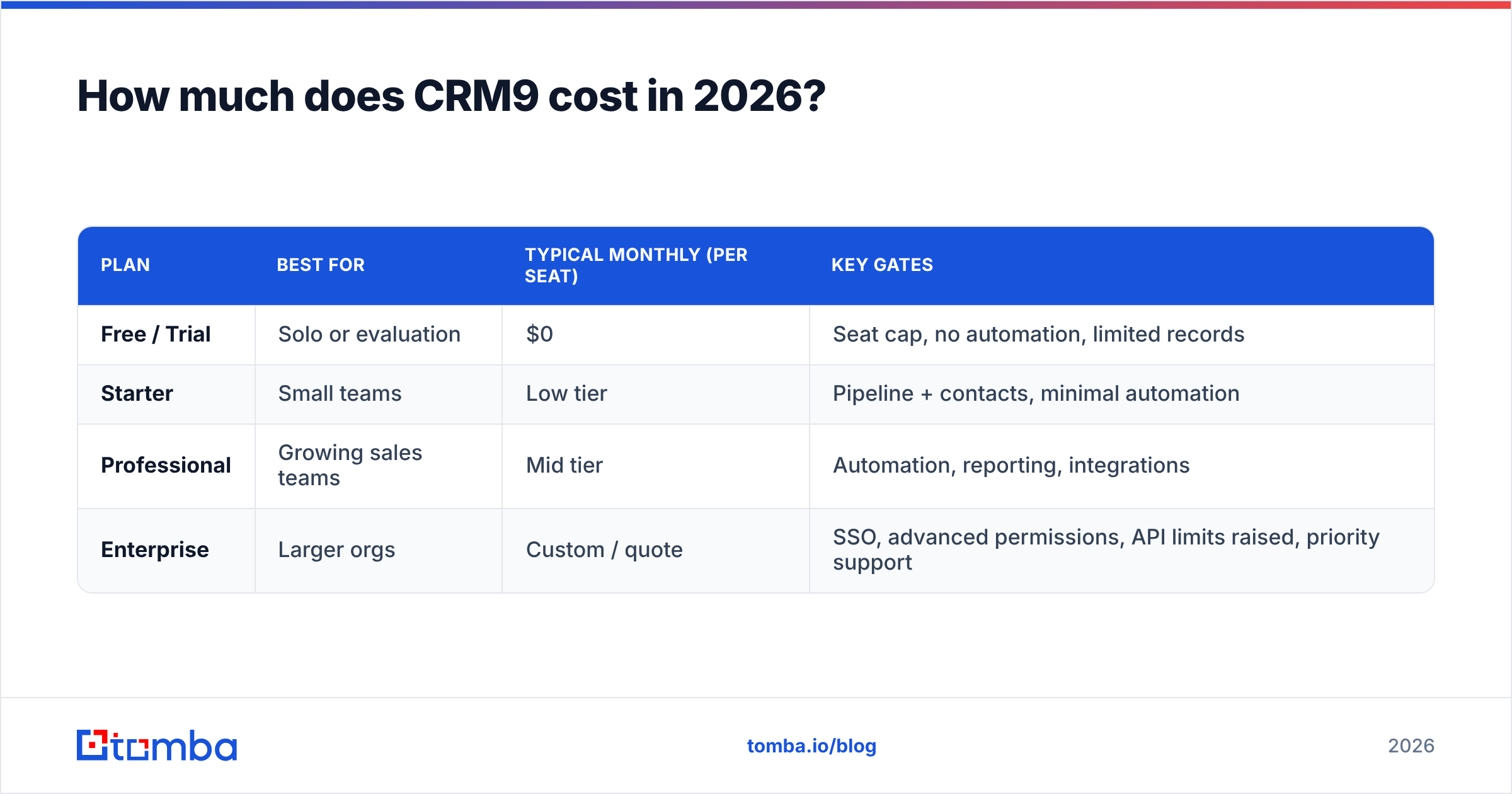
CRM9 uses the standard SaaS pricing shape: per-seat, per-month, billed annually for the best rate, with features gated behind ascending tiers. The pattern — not the exact cents, which shift with promos and region — looks like this:
| Plan | Best for | Typical monthly (per seat) | Key gates |
|---|---|---|---|
| Free / Trial | Solo or evaluation | $0 | Seat cap, no automation, limited records |
| Starter | Small teams | Low tier | Pipeline + contacts, minimal automation |
| Professional | Growing sales teams | Mid tier | Automation, reporting, integrations |
| Enterprise | Larger orgs | Custom / quote | SSO, advanced permissions, API limits raised, priority support |
Three things drive your real bill beyond the sticker price:
- Seats. The per-seat number is what everyone quotes, but you multiply it by your whole revenue team — reps, SDRs, managers, and often ops. Ten seats on a "cheap" mid tier is a five-figure annual line item.
- Tier jumps. The features most teams actually need — automation, custom reporting, and API access — usually live one tier above where the marketing anchors your attention. Budget for the Professional tier, not the Starter one.
- Add-ons. Extra storage, additional automation runs, dedicated onboarding, and premium support are frequently separate. Ask for the all-in quote, not the base seat price.
Rule of thumb: take the advertised per-seat price, multiply by every human who will log in, then move up one tier for the features you'll need within 90 days. That number is your realistic year-one cost.
For a sense of what transparent pricing looks like, see a published table like Tomba pricing. The tiers and monthly search limits are listed outright rather than quoted.
What do CRM9 reviews actually say?#
Aggregating the themes you'll find on independent review sites like G2 and Capterra, the sentiment clusters into a few consistent patterns.
What reviewers like:
- Fast onboarding. Most teams are logging deals within a day. The pipeline UI is intuitive, and the learning curve is shallow compared to enterprise CRMs.
- Clean interface. Reps generally don't fight the tool. Deal drag-and-drop, activity timelines, and email sync get repeated praise.
- Reasonable entry price. The Starter tier is genuinely affordable for a small team getting off spreadsheets.
What reviewers criticize:
- Cost creep. The most common complaint: the plan you signed up for isn't the plan you end up needing. Automation and reporting pull you upward.
- Support variance. Response times and depth get mixed marks, especially on lower tiers where priority support isn't included.
- Reporting ceilings. Power users hit limits on custom reports and want deeper forecast controls sooner than expected.
- Data quality is your problem. Reviewers repeatedly note that CRM9 is only as good as what you put in it — duplicate contacts, stale emails, and missing phone numbers are a data-hygiene issue the CRM won't solve on its own.
That last point is the recurring theme across almost every mid-market CRM review, and it's the bridge to the pros and cons.
What are the pros and cons of CRM9?#
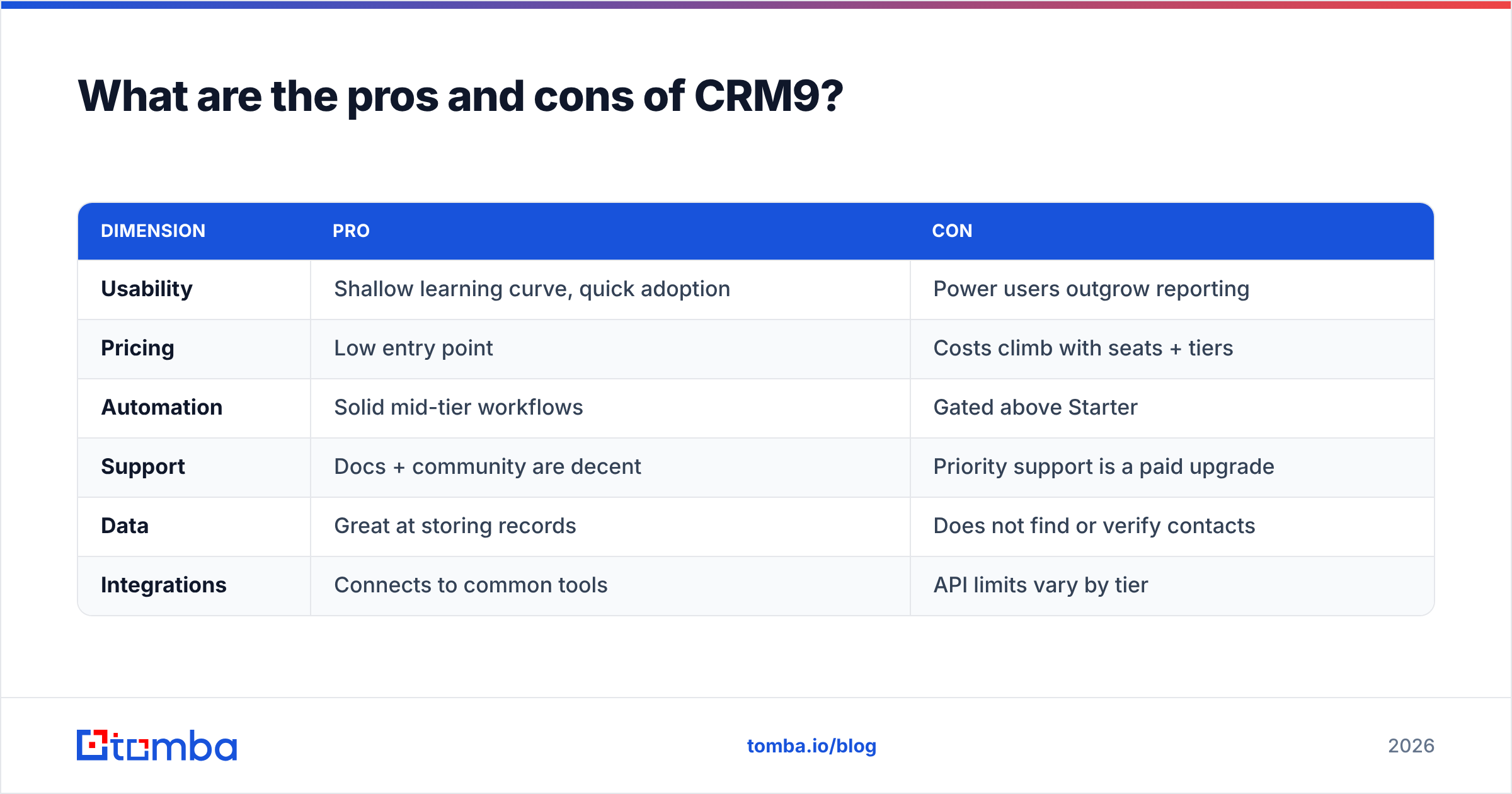
Here's the honest ledger. No CRM is universally right; the question is whether CRM9's trade-offs match your team's shape.
| Dimension | Pro | Con |
|---|---|---|
| Usability | Shallow learning curve, quick adoption | Power users outgrow reporting |
| Pricing | Low entry point | Costs climb with seats + tiers |
| Automation | Solid mid-tier workflows | Gated above Starter |
| Support | Docs + community are decent | Priority support is a paid upgrade |
| Data | Great at storing records | Does not find or verify contacts |
| Integrations | Connects to common tools | API limits vary by tier |
Pros in plain terms:
- Time-to-value is fast. You can migrate a spreadsheet and be running your pipeline the same week.
- It scales with a team's maturity. Start on Starter, move to Professional as your process hardens.
- The pipeline discipline is real. Forcing deals into stages with next-step tasks improves forecast accuracy on its own.
Cons in plain terms:
- The quote you get isn't the bill you pay. Model the full-team, full-tier cost before you commit.
- Reporting maturity lags usability. If board-grade forecasting is a day-one need, pressure-test the reporting in a trial.
- It assumes your data is already clean and complete. It isn't, unless you have a system feeding it verified contacts.
Is CRM9 worth it compared to the alternatives?#
Short answer: CRM9 is worth it if you're a mid-market team that values speed of adoption over deep customization — and if you already have a data pipeline feeding it. If you need heavy customization, you'll look at enterprise suites; if you need built-in prospecting data, you'll look at all-in-one platforms.
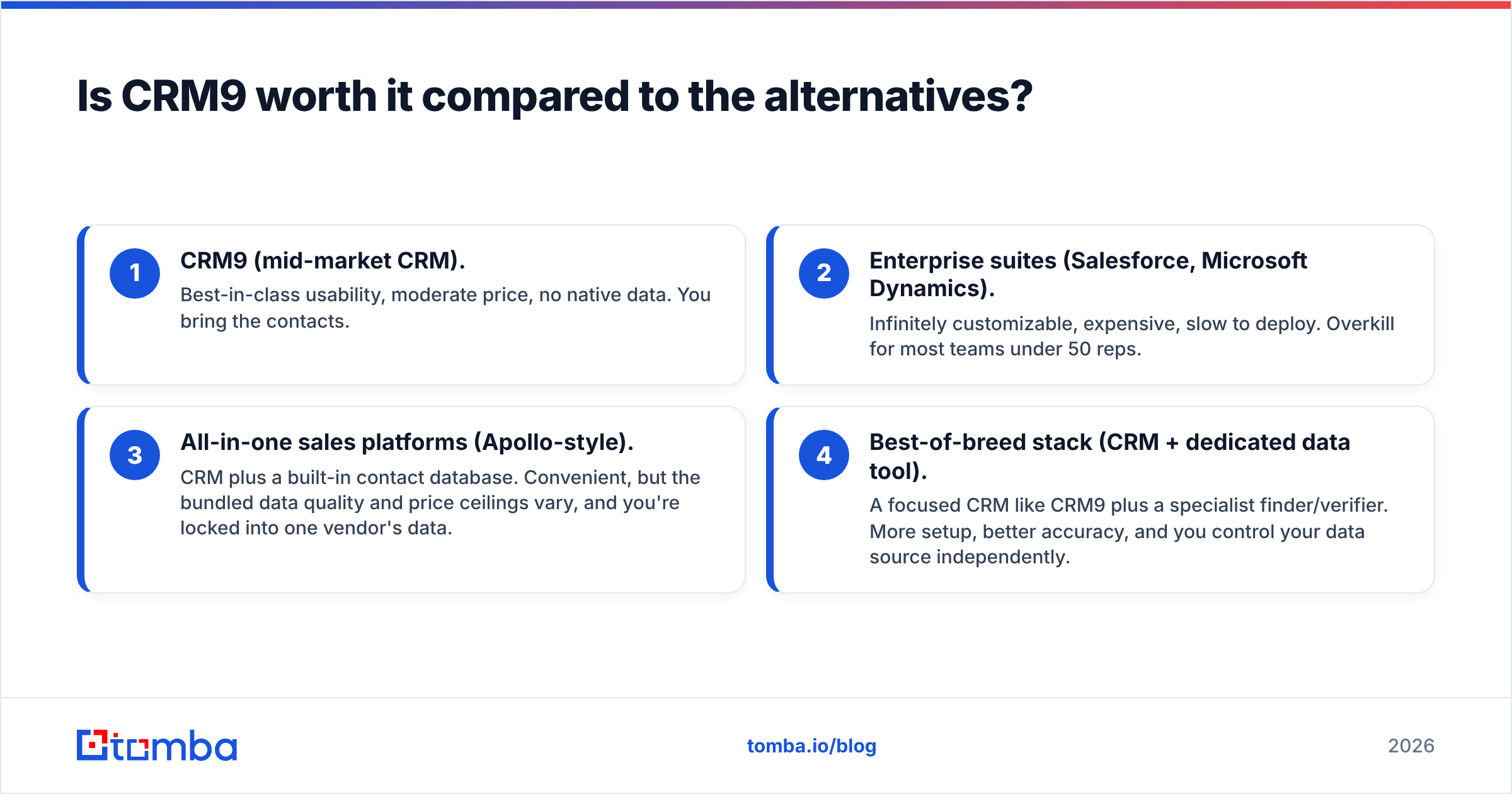
Here's how the categories stack up conceptually:
- CRM9 (mid-market CRM). Best-in-class usability, moderate price, no native data. You bring the contacts.
- Enterprise suites (Salesforce, Microsoft Dynamics). Infinitely customizable, expensive, slow to deploy. Overkill for most teams under 50 reps.
- All-in-one sales platforms (Apollo-style). CRM plus a built-in contact database. Convenient, but the bundled data quality and price ceilings vary, and you're locked into one vendor's data.
- Best-of-breed stack (CRM + dedicated data tool). A focused CRM like CRM9 plus a specialist finder/verifier. More setup, better accuracy, and you control your data source independently.
The best-of-breed approach is why so many teams keep their CRM lean and bolt on a dedicated data layer. The CRM manages relationships; a specialist tool keeps the contact records accurate. For a sense of how the data-tool side compares across vendors, an Apollo alternative breakdown shows the trade-offs between bundled and standalone data.
What does CRM9 not do — and how do you fill the gap?#
CRM9 does not find email addresses, it does not verify them, and it does not enrich thin records into full contact profiles. This isn't a knock — very few CRMs do. But it's the single biggest reason CRM rollouts underperform. Reps spend hours hunting for the right email, guessing formats, and sending to addresses that bounce. Those bounces quietly wreck your sender reputation.
A clean data workflow around your CRM looks like this:
- Find. Use an email finder to get the verified address for a name-and-company, or run a domain search to pull every reachable contact at a target account.
- Verify. Run every address through an email verifier before it enters the CRM, so bounces never touch your sending domain.
- Enrich. Fill in titles, phone numbers, and social profiles with data enrichment so reps have context before the first touch.
- Sync. Push clean, verified records into CRM9 and keep them fresh.
Do this and CRM9 stops being a graveyard of stale contacts and starts being an accurate revenue engine. Skip it, and you're paying per seat to store bad data.
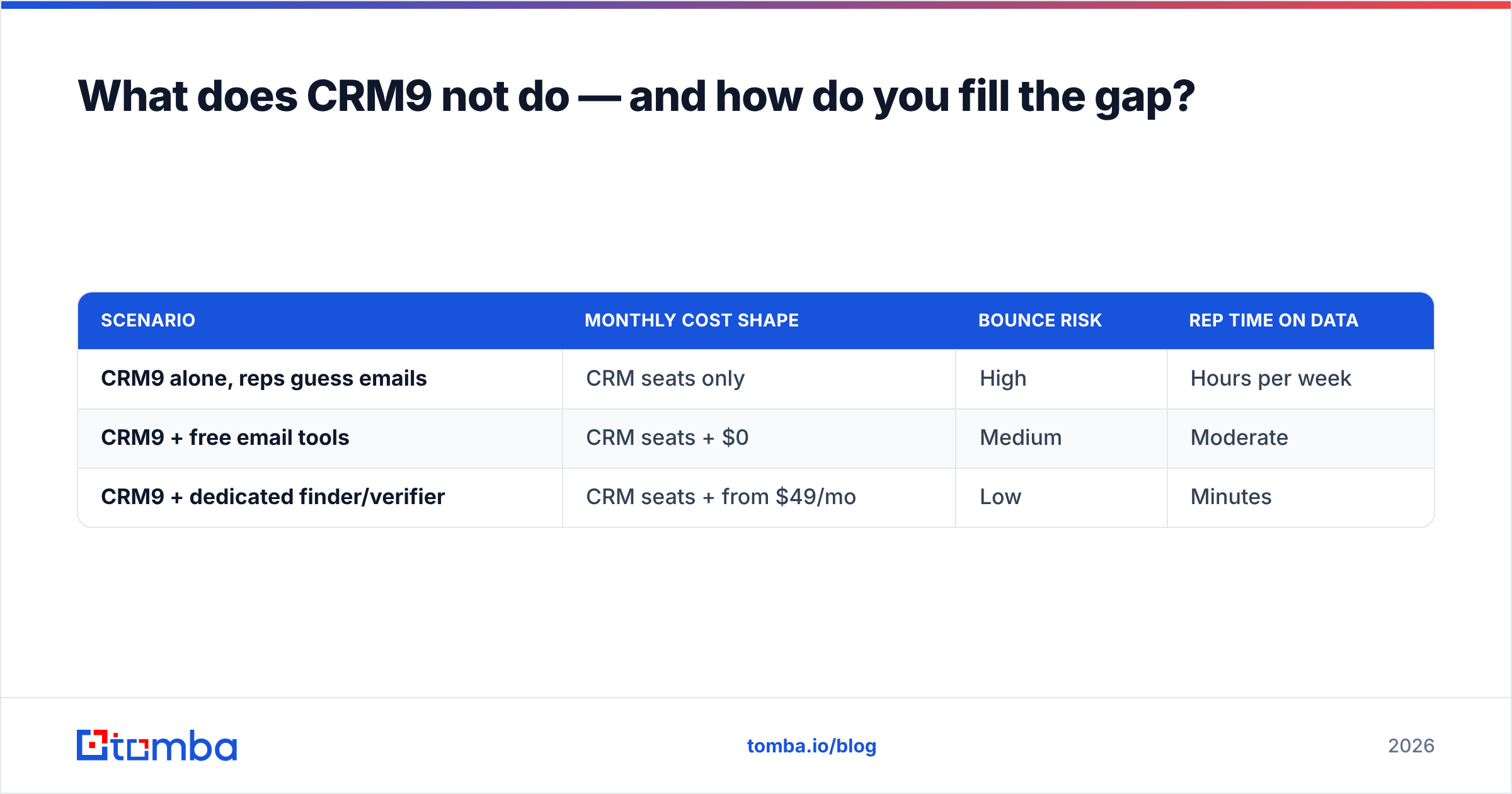
Here's the cost comparison that actually matters — not CRM versus CRM, but "CRM alone" versus "CRM plus a data layer":
| Scenario | Monthly cost shape | Bounce risk | Rep time on data |
|---|---|---|---|
| CRM9 alone, reps guess emails | CRM seats only | High | Hours per week |
| CRM9 + free email tools | CRM seats + $0 | Medium | Moderate |
| CRM9 + dedicated finder/verifier | CRM seats + from $49/mo | Low | Minutes |
That third row is the sweet spot. A dedicated data tool starts around $49/mo on a plan like Tomba's Starter tier — a rounding error against your CRM seat spend, and it pays for itself the first time it prevents a batch of bounces.
How should you evaluate CRM9 before buying?#
Run this checklist during your trial, not after you've signed:
- Price the full team. Multiply the per-seat cost by everyone who logs in, on the tier you'll actually need. Get the all-in quote in writing.
- Stress-test reporting. Build the three reports your leadership asks for every week. If you can't, the tier ceiling will bite you.
- Test the automations you need. Confirm they're on your target tier, not one above it.
- Check API and integration limits. If you plan to sync a data tool, Zapier, or your marketing stack, verify the request limits on your tier.
- Plan your data source first. Decide how verified contacts will enter the CRM before day one, not as an afterthought.
Skip step five and you'll relearn the oldest lesson in sales tech: a CRM is a container, and an empty or dirty container doesn't close deals.
The bottom line on CRM9 pricing reviews pros and cons#
So here is the honest verdict on CRM9 pricing reviews pros and cons. CRM9 earns its reputation as an approachable, well-designed mid-market CRM. The pricing is fair at entry and reasonable at scale. You just have to budget for the real tier and seat cost, not the headline number. And go in knowing the reviews' steady warning: the tool is only as good as the data you feed it.
That's the part you control. Before your reps ever open CRM9, make sure every contact in it is real and reachable. Start free and put accurate, verified contacts into your pipeline with the Tomba Email Finder — 25 free searches a month to test it, then plans from $49/mo when you're ready to scale. Your CRM will finally be as good as the data inside it.
Related guides#
Ready to find emails that actually work?
Join 150,000+ professionals who stopped guessing and started sending. Free credits on signup — no credit card required.
Get the Tomba newsletter
Practical outbound tactics and product updates — once every two weeks.
About the author