CSVGO vs SignalHire (2026): Contact Data Tools Compared
CSVGO vs SignalHire: one enriches your spreadsheets, the other reveals phones and emails from LinkedIn. See which fits your outbound stack in 2026 — and the cheaper flat-rate alternative.
Picking between CSVGO and SignalHire usually comes down to one question you may not have asked yet: do you need to enrich a list you already have, or find contacts from scratch? These two tools sit on opposite sides of that line, and choosing the wrong one means paying for a feature set you'll never touch.
This is a neutral, hands-on comparison — accuracy, phone coverage, pricing math, integrations, and the workflows each one actually fits. No fluff, no vendor spin.
TL;DR — CSVGO vs SignalHire at a glance#
- CSVGO is a spreadsheet-first enrichment tool: you upload a CSV of names/domains/LinkedIn URLs and it appends emails, company data, and firmographics. Great if you already have a list.
- SignalHire is a contact-reveal tool built around a browser extension and LinkedIn: it surfaces personal + work emails and direct-dial phone numbers one profile (or bulk) at a time. Great if you're prospecting live.
- Phone numbers are SignalHire's real edge — CSVGO is email/firmographic-focused and thin on direct dials.
- Pricing is credit-based on both sides, which makes cost hard to predict as volume climbs.
- If you want flat, predictable pricing plus a verifier and API in one place, a dedicated email-finder like Tomba is worth pricing against both before you commit.
What is CSVGO?#
CSVGO is a bulk data-enrichment platform. The core loop is simple: bring a spreadsheet, map your columns (name, company, domain, or LinkedIn URL), and CSVGO runs each row through its data sources to append business emails, company size, industry, location, and other firmographic fields. Output is a clean CSV or a push to your CRM.
Its sweet spot is the "I scraped 5,000 LinkedIn profiles and now have names but no emails" problem. You feed the list in, it fills the gaps. Because it's batch-oriented rather than one-at-a-time, it suits list-builders, agencies, and RevOps folks assembling large outbound files.
Where CSVGO is weaker: it's not designed for live, in-the-moment prospecting. There's less of a "I'm looking at this one person right now, get me their number" flow, and phone data is limited compared to a contact-reveal specialist.

What is SignalHire?#
SignalHire is a contact-finding tool centered on a Chrome extension and a searchable candidate/lead database. Open a LinkedIn profile, click the extension, and SignalHire attempts to reveal that person's emails and phone numbers. It also supports bulk reveal from LinkedIn search results and Recruiter, plus an internal search over its own contact database.
SignalHire started with a strong recruiting audience, which shaped its product: it's good at people data — personal emails, mobile numbers, social profiles — not just work emails. That makes it popular with recruiters and sales reps who cold-call as much as they cold-email.
The trade-off: it's more of a per-contact reveal engine than a bulk spreadsheet enricher. You can do volume, but the mental model is "reveal this profile," and credits burn per contact revealed.
CSVGO vs SignalHire: the core differences#
Here's the honest split. These tools overlap on "find a work email," but they're built for different jobs.
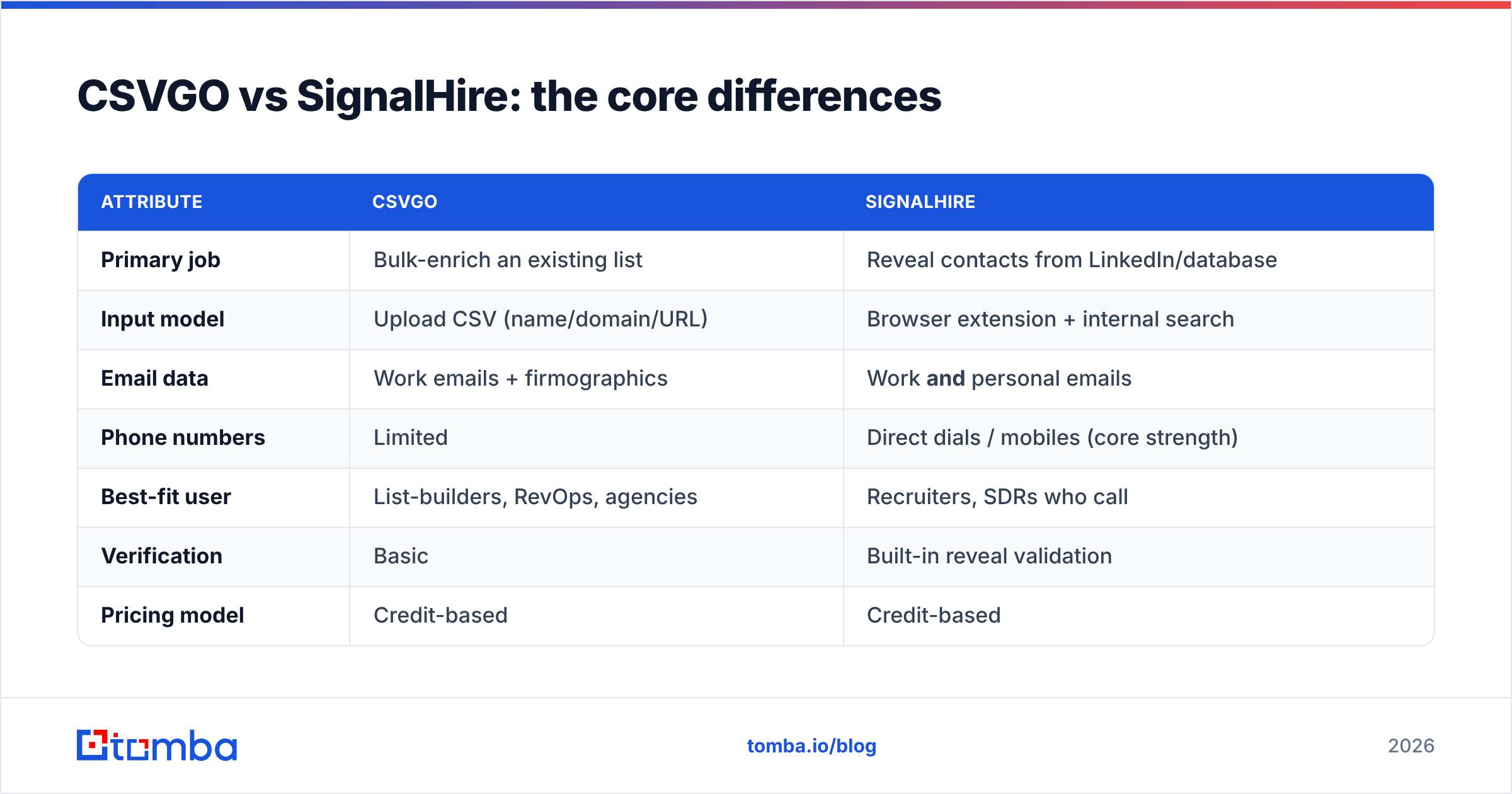
| Attribute | CSVGO | SignalHire |
|---|---|---|
| Primary job | Bulk-enrich an existing list | Reveal contacts from LinkedIn/database |
| Input model | Upload CSV (name/domain/URL) | Browser extension + internal search |
| Email data | Work emails + firmographics | Work and personal emails |
| Phone numbers | Limited | Direct dials / mobiles (core strength) |
| Best-fit user | List-builders, RevOps, agencies | Recruiters, SDRs who call |
| Verification | Basic | Built-in reveal validation |
| Pricing model | Credit-based | Credit-based |
| Free option | Trial credits | Free plan with limited credits |
The one-line verdict: CSVGO for enriching lists you already own, SignalHire for finding people (especially phone numbers) as you prospect. If your workflow is mostly "I have a spreadsheet and need emails on it," CSVGO's batch model is less fiddly. If it's "I live in LinkedIn and need to call people," SignalHire wins.
Which has better data accuracy?#
Accuracy is where these tools live or die, so treat any single vendor's "95% accurate" claim with skepticism and test on your ICP before scaling.

A few patterns hold up across contact-data tools generally:
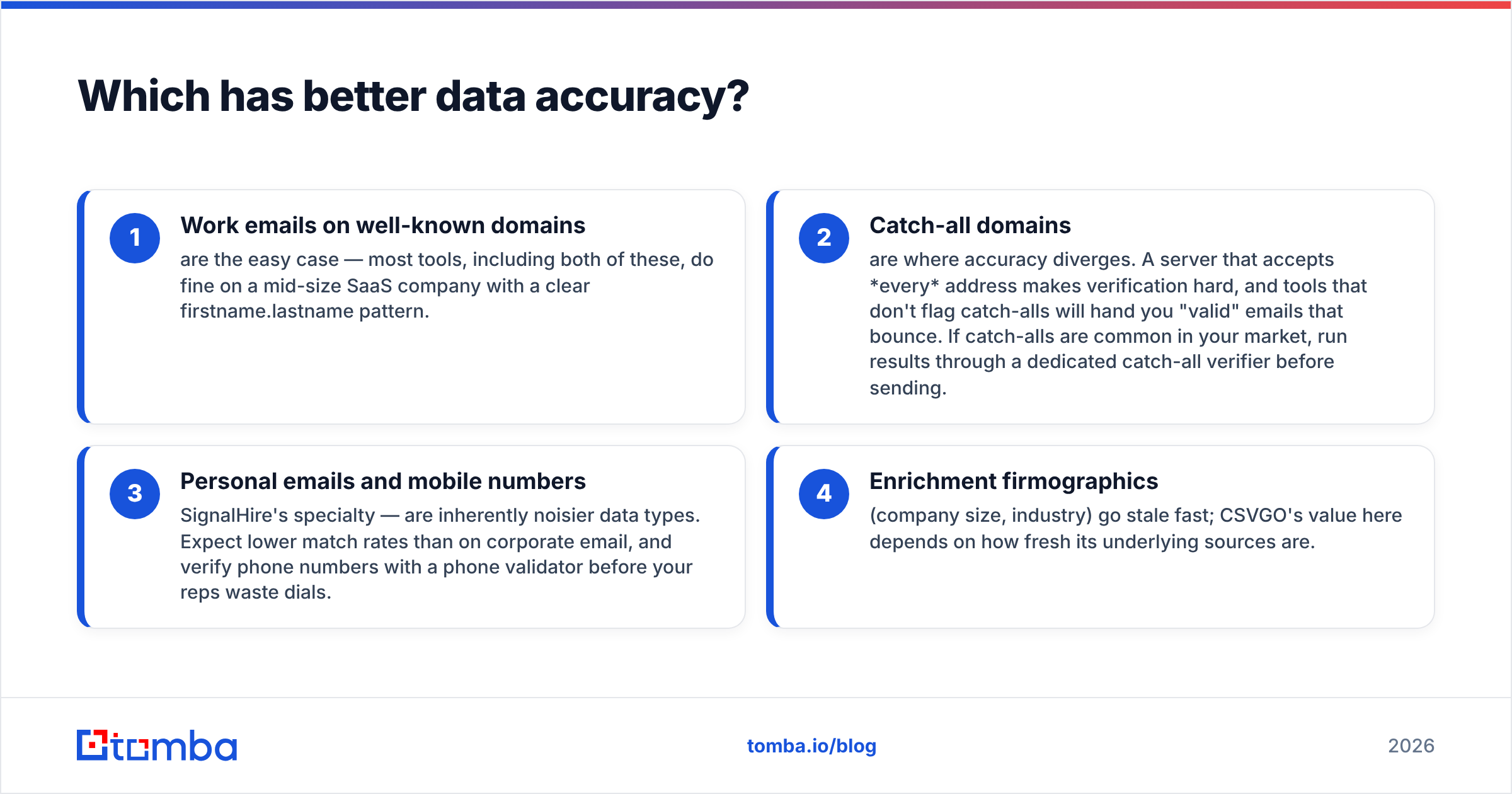
- Work emails on well-known domains are the easy case — most tools, including both of these, do fine on a mid-size SaaS company with a clear firstname.lastname pattern.
- Catch-all domains are where accuracy diverges. A server that accepts every address makes verification hard, and tools that don't flag catch-alls will hand you "valid" emails that bounce. If catch-alls are common in your market, run results through a dedicated catch-all verifier before sending.
- Personal emails and mobile numbers — SignalHire's specialty — are inherently noisier data types. Expect lower match rates than on corporate email, and verify phone numbers with a phone validator before your reps waste dials.
- Enrichment firmographics (company size, industry) go stale fast; CSVGO's value here depends on how fresh its underlying sources are.
The practical move: run a 100-row sample through each tool against contacts you can independently confirm, then measure real bounce rate — not the tool's self-reported confidence score. An email that a tool calls "valid" but that bounces still torches your sender reputation.
CSVGO vs SignalHire pricing: which is cheaper?#
Both tools price on credits, and that's the thing to watch. A credit-based model looks cheap at the entry tier and gets expensive — or runs dry — exactly when your campaign is working and you need more volume.
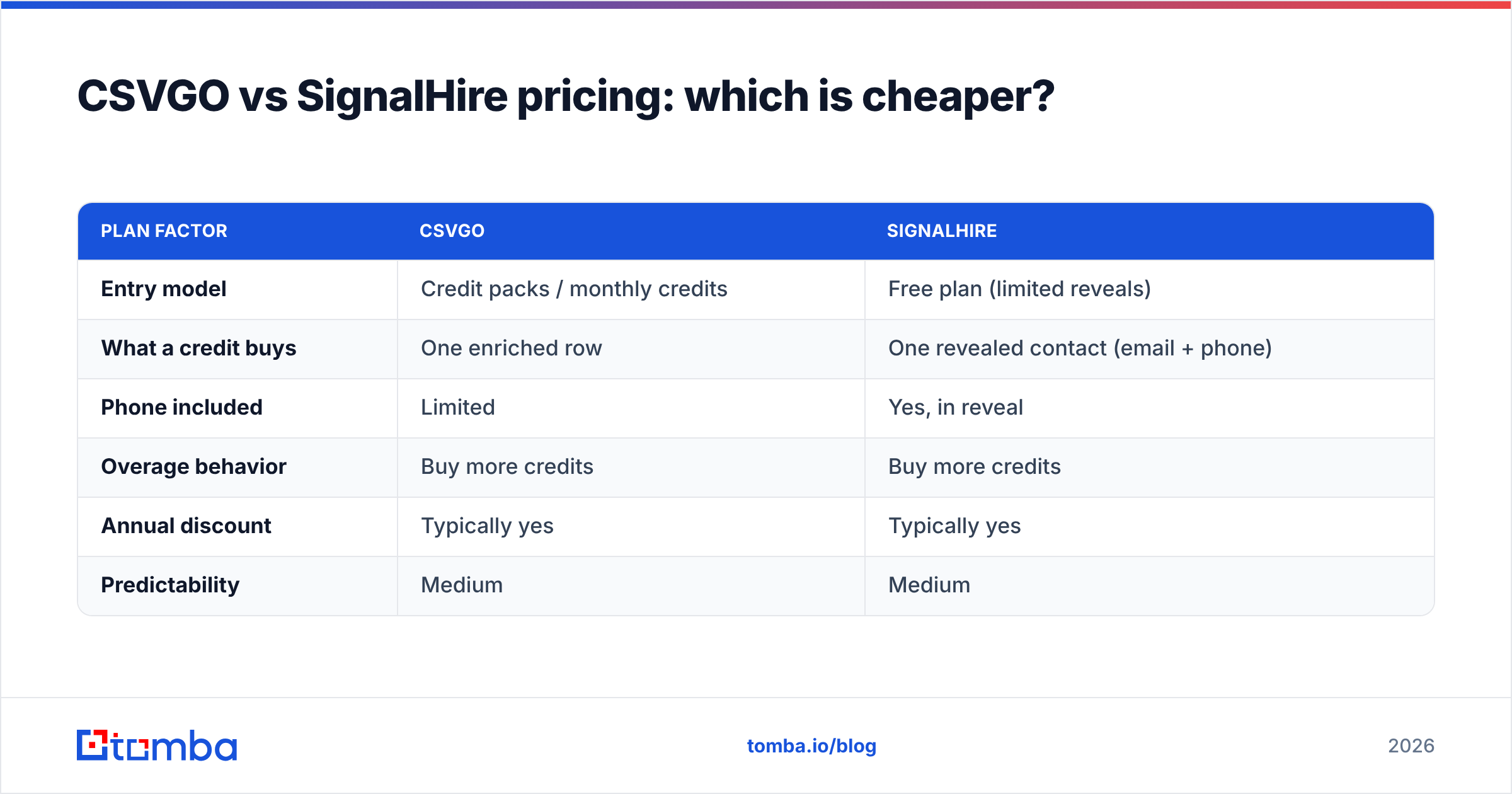
| Plan factor | CSVGO | SignalHire |
|---|---|---|
| Entry model | Credit packs / monthly credits | Free plan (limited reveals) |
| What a credit buys | One enriched row | One revealed contact (email + phone) |
| Phone included | Limited | Yes, in reveal |
| Overage behavior | Buy more credits | Buy more credits |
| Annual discount | Typically yes | Typically yes |
| Predictability | Medium | Medium |
Because both publish tiers that shift over time, verify live numbers on each vendor's pricing page before you buy — but the structure is the real story. With credits, your cost per usable contact is a moving target: it climbs every time a credit is spent on a catch-all, a stale record, or a duplicate you already had.

This is exactly why flat-rate finders exist. If you'd rather know your monthly bill regardless of how many searches a campaign burns, compare both credit tools against Tomba pricing: a Free tier (25 searches/mo), Starter at $49/mo, Growth at $99/mo, and Pro at $249/mo — with the email verifier, domain search, and Tomba API bundled in rather than metered separately.
Which fits your workflow — enrichment vs prospecting?#
Match the tool to how you actually work, not to the longest feature list.
Choose CSVGO if:
- You already have lists (scraped, exported, or bought) and need emails appended in bulk.
- You run an agency or RevOps function that processes large files on a schedule.
- Firmographic enrichment (company size, industry, location) matters as much as the email.
- You live in spreadsheets and CRMs, not in the LinkedIn tab.
Choose SignalHire if:
- You prospect live inside LinkedIn and want a one-click reveal.
- Phone numbers matter — you cold-call, and direct dials are worth the credits.
- You're in recruiting or a call-heavy sales role where personal contact data counts.
- You want emails and phones from a single reveal action.
Consider a dedicated email-finder if:
- Your primary need is accurate work emails at predictable cost.
- You want finding and email verification in one workflow instead of stitching tools together.
- You need an API or bulk workflow that scales without credit anxiety.
Most teams end up wanting elements of all three. That's fine — the point is to lead with your dominant workflow. A caller-heavy SDR team leans SignalHire; a list-processing growth team leans CSVGO or a flat-rate finder.
What about integrations and scale?#
Both tools plug into an outbound stack, but the shape differs.
CSVGO's batch model means it plays well with CSV round-trips and CRM imports — you enrich, you export, you load. SignalHire's extension model means it's tightest inside the browser and LinkedIn, with bulk export for the lists you build there.
For teams standardizing on one data layer, the questions to ask are:
- Does it push directly to my CRM (HubSpot, Salesforce, Pipedrive) or do I export CSVs by hand?
- Is there an API for programmatic enrichment inside my own tools?
- Can it dedupe so I don't spend credits re-finding contacts I already have?
If native CRM sync is your priority, note that a finder like Tomba offers direct HubSpot integration, Salesforce integration, plus Google Sheets and a bulk email finder — so enrichment lands where your reps already work instead of in a downloads folder.
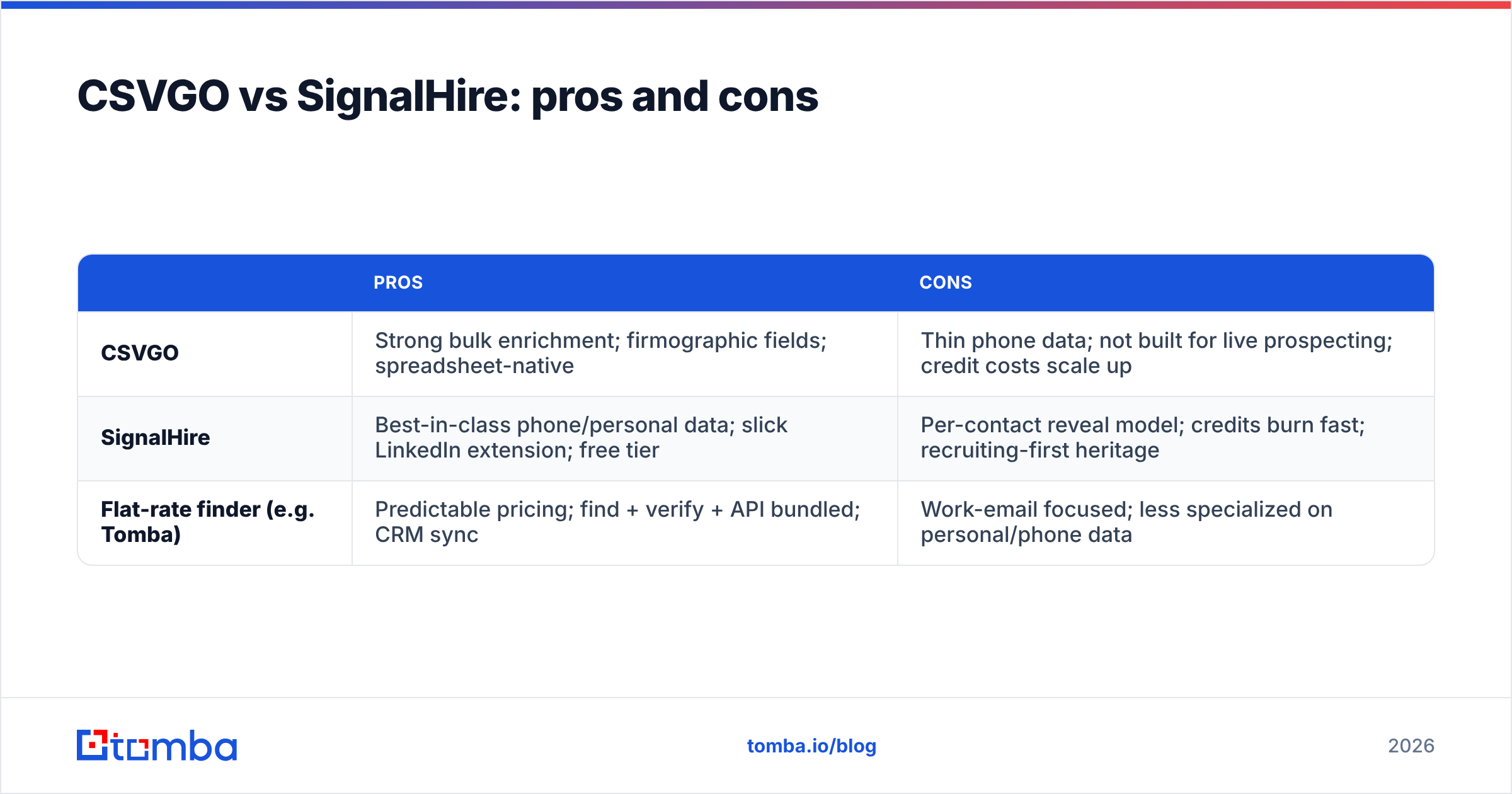
CSVGO vs SignalHire: pros and cons#
| Pros | Cons | |
|---|---|---|
| CSVGO | Strong bulk enrichment; firmographic fields; spreadsheet-native | Thin phone data; not built for live prospecting; credit costs scale up |
| SignalHire | Best-in-class phone/personal data; slick LinkedIn extension; free tier | Per-contact reveal model; credits burn fast; recruiting-first heritage |
| Flat-rate finder (e.g. Tomba) | Predictable pricing; find + verify + API bundled; CRM sync | Work-email focused; less specialized on personal/phone data |
No tool is strictly best. CSVGO wins on batch enrichment ergonomics. SignalHire wins on phone and people data. A flat-rate finder wins on cost predictability and an all-in-one find-plus-verify pipeline.
How do I decide in five minutes?#
Run this quick decision path:
- Do I mostly enrich existing lists? → CSVGO is the natural fit.
- Do I mostly prospect in LinkedIn and need phone numbers? → SignalHire.
- Do I mostly need accurate work emails at a fixed monthly cost? → A dedicated finder like Tomba.
- Am I worried about bounce rate? → Whichever you pick, verify before sending. Deliverability problems cost more than any tool's subscription.
- Is budget predictability critical? → Avoid pure credit models; favor flat-rate.
Then test. Take 100 real contacts from your ICP, run them through your top two picks, send to a seed inbox, and measure actual bounces and connect rates. The tool that gives you the most deliverable contacts per dollar wins — regardless of marketing claims.
For a broader field beyond these two, our roundups on the best email finders and each tool's Apollo alternative and RocketReach alternative comparisons cover adjacent options worth a look.
The bottom line#
CSVGO and SignalHire aren't really competitors so much as neighbors: CSVGO enriches lists you bring, SignalHire reveals people you find. Pick based on which of those two jobs dominates your week, and always verify contacts before you send or dial.
If your core need is accurate business emails at a price that doesn't spike the moment a campaign works — plus verification, domain search, and an API in one place — start with the Tomba Email Finder. Test it free with 25 searches, run it head-to-head against your CSVGO or SignalHire sample, and let real bounce rates make the call. Predictable pricing and built-in email verification mean you spend on contacts that actually reach an inbox, not on credits that vanish into catch-alls.
Related guides#
Ready to find emails that actually work?
Join 150,000+ professionals who stopped guessing and started sending. Free credits on signup — no credit card required.
Get the Tomba newsletter
Practical outbound tactics and product updates — once every two weeks.
About the author