Cufinder vs Generect: Which B2B Data Tool Wins in 2026?
Cufinder and Generect both promise fresh B2B contact data at mid-market prices. We compared accuracy, pricing, API depth, and coverage to find where each one actually earns its keep.
Cufinder vs Generect is a common shortlist for B2B data buyers. Both promise fresh contact data at mid-market prices. Here is how the two tools differ, and where each one falls down.
TL;DR
- Cufinder is a broad enrichment suite — 26+ lookup tools, a large company database, and decent LinkedIn-to-email coverage. Best if you need company data as much as contact data.
- Generect is narrower and LinkedIn-centric — real-time lookups against live profiles, strong for recruiters and LinkedIn-first SDRs, weaker on standalone domain-based prospecting.
- Neither publishes independently audited accuracy numbers. Both self-report 95%+; real-world bounce rates land closer to 3-8% depending on vertical.
- Pricing is the sharpest fork: Cufinder sells credit bundles that expire monthly, Generect sells seat-plus-usage. Heavy API users get burned by different things on each.
- If your core job is finding and verifying work emails from domains at scale, a dedicated email finder with a real verification layer will beat both on cost-per-valid-contact.
What are Cufinder and Generect?#
Both tools sit in the same messy middle of the B2B data market. They cost less than ZoomInfo. They are more structured than scraping. And they are pitched at teams that build outbound lists without an enterprise data budget.
Cufinder launched as a company-data engine and expanded outward. It now bundles roughly two dozen micro-tools — company-name-to-domain, domain-to-email, LinkedIn-to-email, phone lookup, tech-stack detection — under one credit wallet. The pitch is breadth: one subscription, many lookups, one API.
Generect took the opposite path. It is built around LinkedIn as the source of truth. It resolves each query against live profiles instead of serving from a pre-built cache. That architecture is the whole product thesis: data that is fresh at query time, not fresh whenever the last crawl ran.
That difference explains almost every trade-off below. A cached database is fast, cheap per lookup, and drifts stale. A real-time resolver is slower and pricier per call. But it is less likely to hand you a contact who left the company nine months ago.

Neither model is strictly better. It depends entirely on whether your bottleneck is volume or decay.
Cufinder vs Generect: head-to-head comparison#
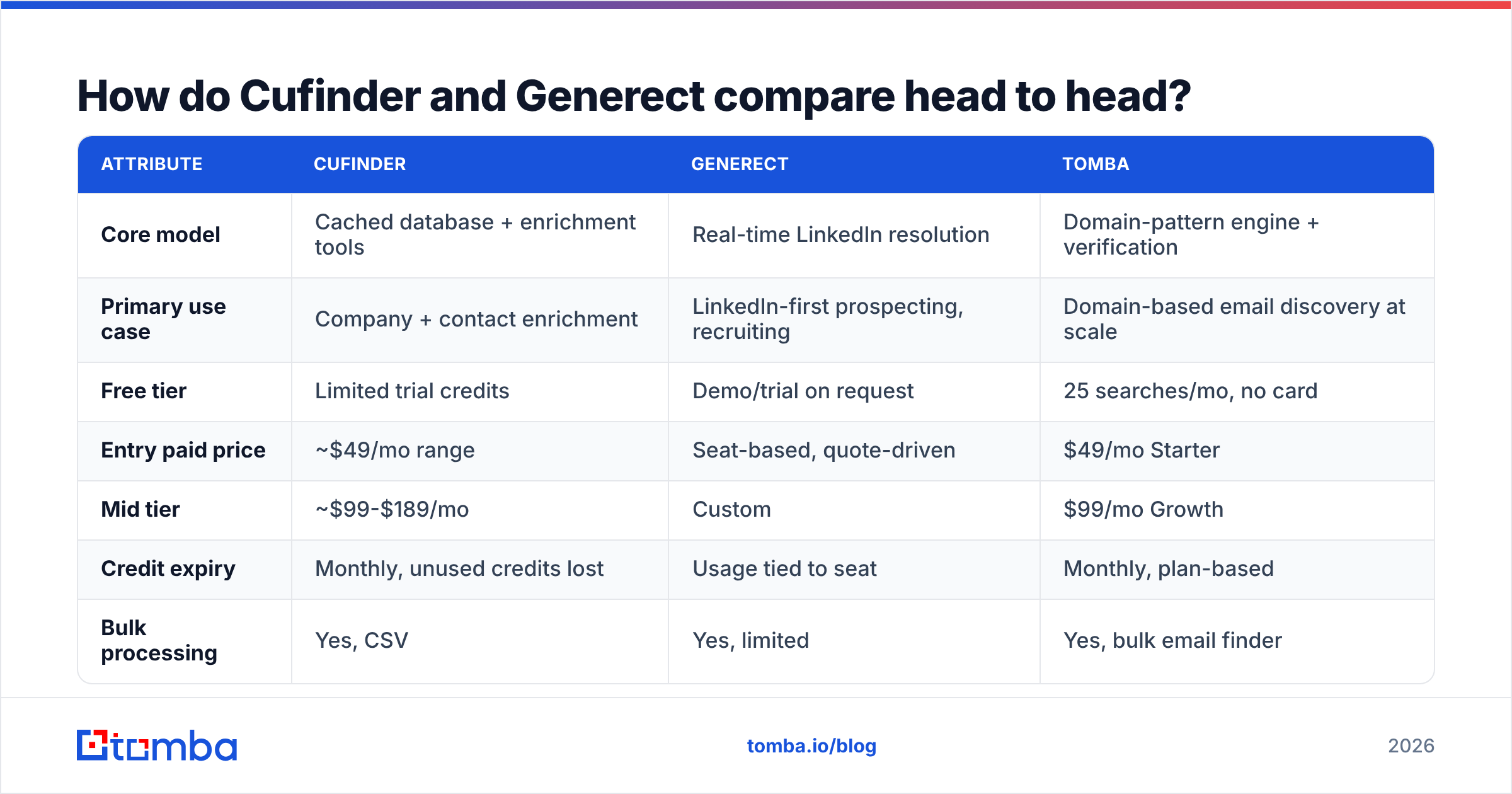
Here is the practical comparison, using publicly listed capabilities as of early 2026. Verify current pricing on each vendor's site before you commit — this market repricies constantly.
| Attribute | Cufinder | Generect | Tomba |
|---|---|---|---|
| Core model | Cached database + enrichment tools | Real-time LinkedIn resolution | Domain-pattern engine + verification |
| Primary use case | Company + contact enrichment | LinkedIn-first prospecting, recruiting | Domain-based email discovery at scale |
| Free tier | Limited trial credits | Demo/trial on request | 25 searches/mo, no card |
| Entry paid price | ~$49/mo range | Seat-based, quote-driven | $49/mo Starter |
| Mid tier | ~$99-$189/mo | Custom | $99/mo Growth |
| Credit expiry | Monthly, unused credits lost | Usage tied to seat | Monthly, plan-based |
| Bulk processing | Yes, CSV | Yes, limited | Yes, bulk email finder |
| Email verification | Basic syntax + MX | Basic | Dedicated email verifier + catch-all handling |
| Catch-all domains | Flagged, not resolved | Flagged | Dedicated catch-all verifier |
| API | REST, documented | REST, documented | REST + CLI + MCP + Sheets/Excel |
| Phone numbers | Yes | Limited | Yes, phone finder |
| Native CRM sync | Zapier/Make | Limited | HubSpot, Salesforce, Pipedrive, Zapier, Make |
The table hides one thing worth saying plainly: Cufinder and Generect are not really competing for the same buyer. They show up in the same search results because both rank for "B2B data tool." But their users have almost nothing in common. One is a recruiter sourcing 40 engineers a month. The other is a demand-gen team building a 20,000-row TAM list.
Cufinder vs Generect: which one is more accurate?#
Neither vendor publishes third-party audits. So treat every "98% accurate" claim on either homepage as marketing until you test it on your own list.
What you can reason about is where the errors come from:
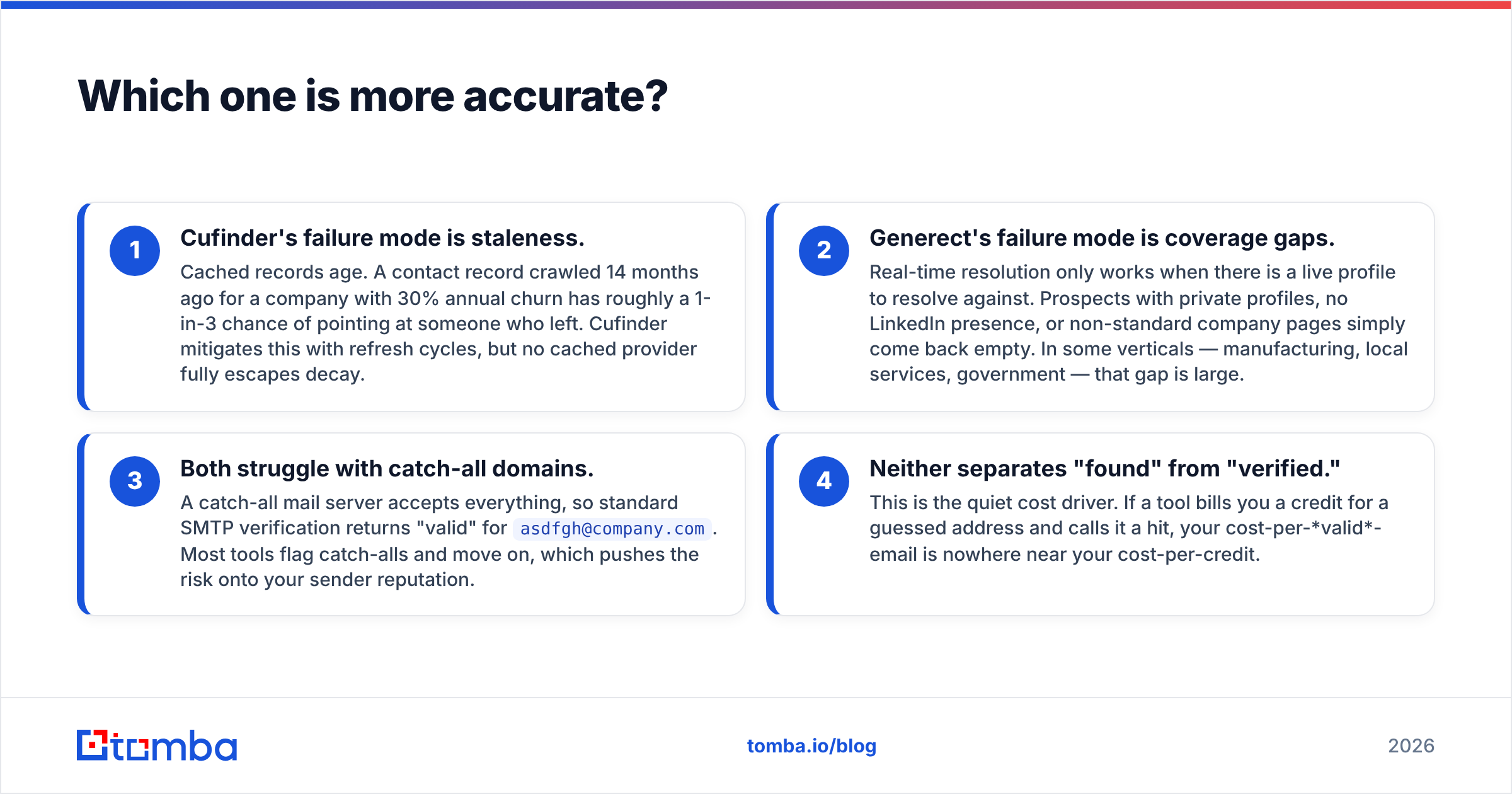
Cufinder's failure mode is staleness. Cached records age. Take a contact crawled 14 months ago at a company with 30% annual churn. Roughly one in three of those records now points at someone who left. Cufinder mitigates this with refresh cycles, but no cached provider fully escapes decay.
Generect's failure mode is coverage gaps. Real-time resolution only works when there is a live profile to resolve against. Prospects with private profiles, no LinkedIn presence, or non-standard company pages simply come back empty. In some verticals — manufacturing, local services, government — that gap is large.
Both struggle with catch-all domains. A catch-all mail server accepts everything. So standard SMTP verification returns "valid" even for
asdfgh@company.com. Most tools flag catch-alls and move on, which pushes the risk onto your sender reputation.Neither separates "found" from "verified." This is the quiet cost driver. If a tool bills you a credit for a guessed address and calls it a hit, your cost-per-valid-email is nowhere near your cost-per-credit.
That last point is where dedicated finders pull ahead. Tomba's approach splits discovery from verification. The finder returns a confidence score and source attribution. Then the email verifier runs a separate SMTP and catch-all pass before anything hits your sequencer. You can read how the sourcing works on the data sources page.

Here is the honest benchmark to run yourself. Take 200 contacts you already have verified emails for. Blind them, then push them through each tool. Measure match rate and exact-match accuracy. Vendor-reported numbers on lists the vendor picked are worth nothing.
How does pricing actually work on each?#
This is where most teams get surprised, so read carefully.
Cufinder sells credits. Different lookups burn different credit amounts — a company enrichment might cost 1 credit, a verified email 2, a phone number 5. Unused credits expire at the end of the billing month. The practical effect: you either overbuy and waste, or underbuy and hit a wall mid-campaign. Bulk uploads that partially fail still consume credits on the attempts.
Generect prices around seats plus usage envelopes, with a quote-driven model at higher volumes. That is friendlier for small, steady teams. It is worse for spiky workloads. A one-off 10,000-contact TAM build does not fit the seat model cleanly.
Tomba is flat-plan: Free (25 searches/mo), Starter $49/mo, Growth $99/mo, Pro $249/mo, Enterprise custom. Full breakdown on the Tomba pricing page.
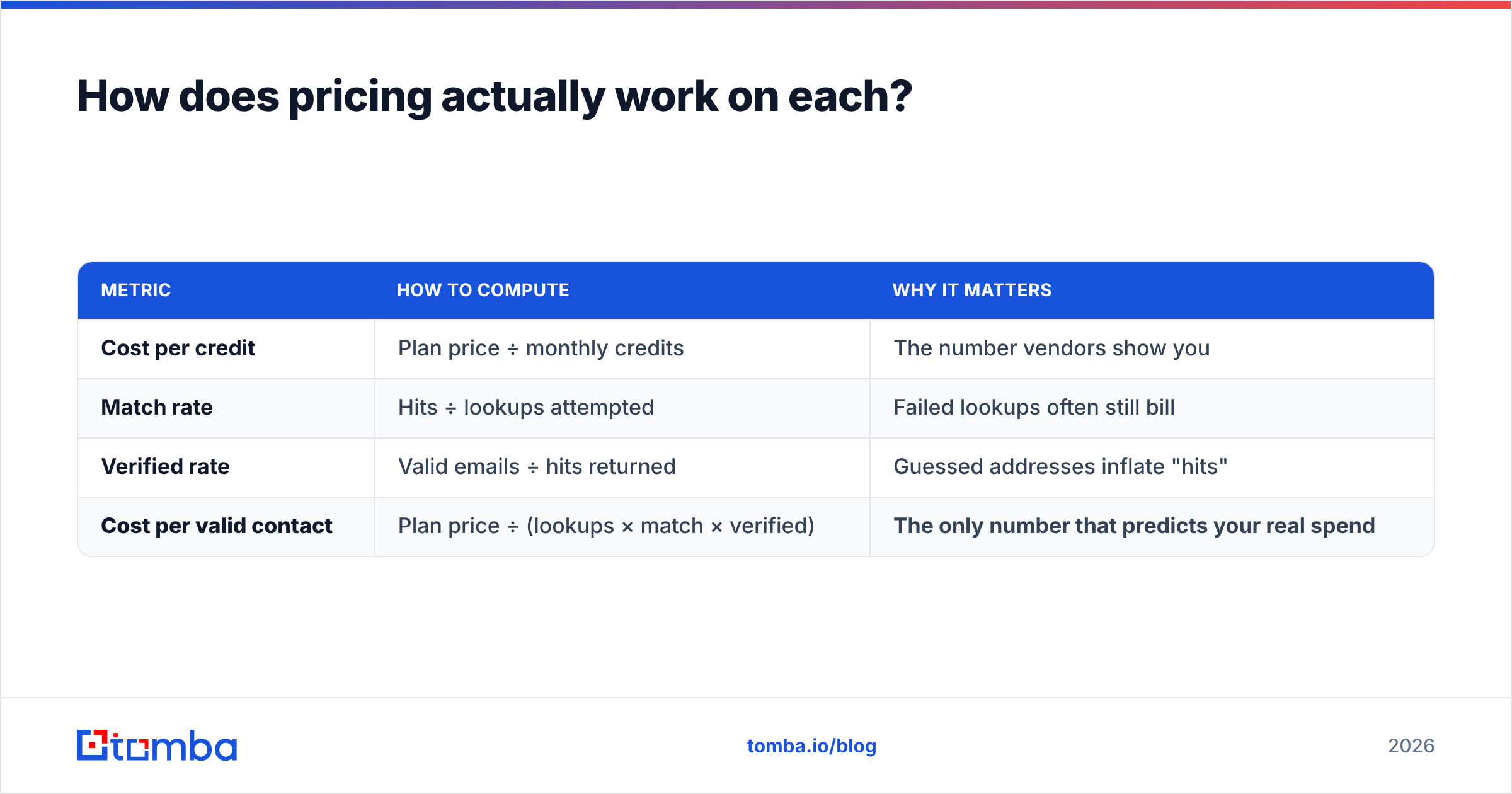
Run the only calculation that matters:
| Metric | How to compute | Why it matters |
|---|---|---|
| Cost per credit | Plan price ÷ monthly credits | The number vendors show you |
| Match rate | Hits ÷ lookups attempted | Failed lookups often still bill |
| Verified rate | Valid emails ÷ hits returned | Guessed addresses inflate "hits" |
| Cost per valid contact | Plan price ÷ (lookups × match × verified) | The only number that predicts your real spend |
A tool at $0.02/credit with a 45% match rate and 80% verified rate costs you $0.055 per usable contact. A tool at $0.04/credit with a 70% match and 95% verified rate costs $0.060. Close — and the cheap one looked 2× better on the pricing page.
Who should pick which tool?#
Straight recommendations, no hedging:
- Pick Cufinder if you need company-level enrichment (firmographics, tech stack, domain resolution) alongside contacts, and you can live with credit expiry. It is the better suite.
- Pick Generect if LinkedIn is your primary sourcing surface and freshness matters more than volume — recruiting, exec search, ABM into fast-moving startups.
- Pick a dedicated email finder if your workflow is domain-in, verified-contacts-out at volume, and you need the verification layer to be a real product rather than a checkbox.
- Pick a database product like BookYourData if you'd rather buy a pre-built, pay-as-you-go list with no subscription commitment — a genuinely different and reasonable purchase model, especially for one-off campaigns.
- Pick ZoomInfo or Apollo if you have the budget and want intent data plus a sequencer in the same seat. Different tier, different price. See our Apollo alternative breakdown if you're weighing that.

What do both tools miss?#
Three gaps show up regardless of which one you choose.
1. Deliverability is not their problem. Both hand you addresses and walk away. Whether those addresses damage your sender reputation is on you. Google and Yahoo set bulk-sender rules in 2024, documented in Google's Postmaster guidelines. A spam-complaint rate above 0.3% is now a hard failure. And a 6% bounce rate on a cold list will get your domain throttled before your copy ever gets tested.
2. Enrichment depth stops at the obvious fields. Name, title, company, email, sometimes phone. If your ICP scoring needs headcount-by-department, funding stage, or hiring signals, you're bolting on a second vendor either way.
3. Neither has a serious workflow surface. Both ship an API and a CSV upload. If your team lives in Sheets or a CRM, you'll build glue. Tools with native integrations — HubSpot, Salesforce, Google Sheets, Zapier — remove a week of engineering you'd otherwise expense against the "cheaper" tool.
Check independent review volume on G2 before you commit to either. Both have thinner review histories than the incumbents, which cuts both ways: less astroturf, but also less signal.
How should you actually test them?#
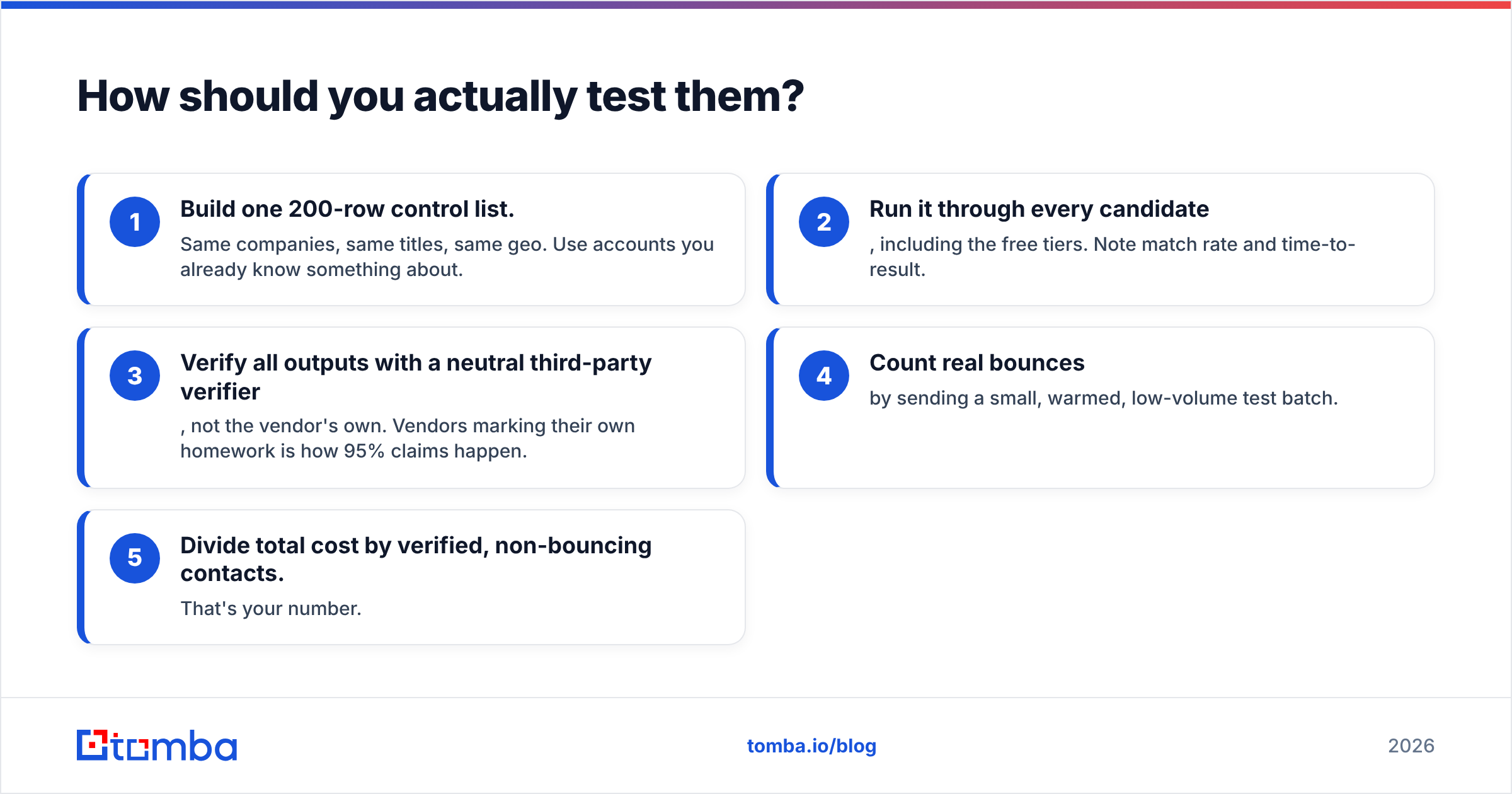
Do not read another comparison post — including this one — and buy. Run a 48-hour bake-off:
- Build one 200-row control list. Same companies, same titles, same geo. Use accounts you already know something about.
- Run it through every candidate, including the free tiers. Note match rate and time-to-result.
- Verify all outputs with a neutral third-party verifier, not the vendor's own. Vendors marking their own homework is how 95% claims happen.
- Count real bounces by sending a small, warmed, low-volume test batch.
- Divide total cost by verified, non-bouncing contacts. That's your number.
Most teams find the ranking flips completely between step 2 and step 5. The tool with the highest match rate frequently has the worst cost-per-valid-contact, because match rate counts guesses.
The verdict#
Cufinder wins on breadth. Generect wins on freshness. Neither wins on cost-per-valid-contact. Neither one treats verification as a first-class product. And that is the metric that decides whether your outbound spend produces meetings or bounces.
For most outbound teams, the real job is simple: turn a list of company domains into verified, deliverable work emails. If that is your job, start with a tool built for exactly that. Tomba's Email Finder resolves emails by domain, name, or company, with confidence scoring and source attribution. It then runs a real verification pass, catch-all handling included, before anything reaches your sequencer. The free tier gives you 25 searches a month with no card. That is enough to run the 200-row bake-off above on a slice and see the numbers yourself. Starter is $49/mo when you're ready to scale.
Test it against your control list. Let the cost-per-valid-contact decide.
Related guides#
Ready to find emails that actually work?
Join 150,000+ professionals who stopped guessing and started sending. Free credits on signup — no credit card required.
Get the Tomba newsletter
Practical outbound tactics and product updates — once every two weeks.
About the author