Digital Sales Rooms in 2026: The Complete Buyer's Guide
Digital sales rooms are replacing the scattered email-and-PDF handoff with one shared space for buyers and sellers. Here's how they work, what they cost, and when they actually move deals forward.
TL;DR
- A digital sales room (DSR) is a single, secure, shareable microsite where a seller and a buying committee collaborate on everything a deal needs: decks, pricing, mutual action plans, contracts, and recordings.
- DSRs exist because the average B2B purchase now involves 6–10 stakeholders and dozens of forwarded email attachments. A room replaces that mess with one link.
- The upside is real: better engagement tracking, faster internal buy-in, and a defensible "single source of truth" that survives the deal even when your champion goes quiet.
- The catch: a DSR is only as good as the content and contact data you put in it. A beautiful room aimed at the wrong stakeholders closes nothing.
- Before you buy a DSR platform, fix your inputs first — verified contacts, clean CRM data, and a mutual action plan. The tooling is the easy part.
What is a digital sales room?#
A digital sales room is a shared online space where a salesperson and a prospect's buying committee interact throughout a deal. Think of it less like a slide deck and more like a private, deal-specific website: one link that holds your proposal, product one-pagers, ROI calculators, security documents, recorded demos, a mutual action plan, and a live chat thread — all in one place, all tracked.
The everyday analogy: a DSR is the deal's shared kitchen table. Instead of every stakeholder rummaging through their own inbox for the "latest" version of the proposal, everyone sits at the same table looking at the same documents. When the pricing changes, it changes on the table — not in a re-sent attachment that three people never open.
Technically, most DSRs are hosted microsites with granular access controls, content analytics, and CRM sync. Gartner popularized the term as buyers shifted toward self-directed, largely digital purchasing. According to Gartner's research on the B2B buying journey, buyers spend only about 5% of their total purchase time with any single sales rep — which means the assets you leave behind in a room often do more selling than you do live.
Why do digital sales rooms exist now?#
Because the modern buying committee broke the old model. A single enterprise deal routinely pulls in a champion, an economic buyer, a technical evaluator, a security reviewer, a procurement lead, and a skeptical executive sponsor. Each one gets forwarded a different attachment, at a different time, with no context.
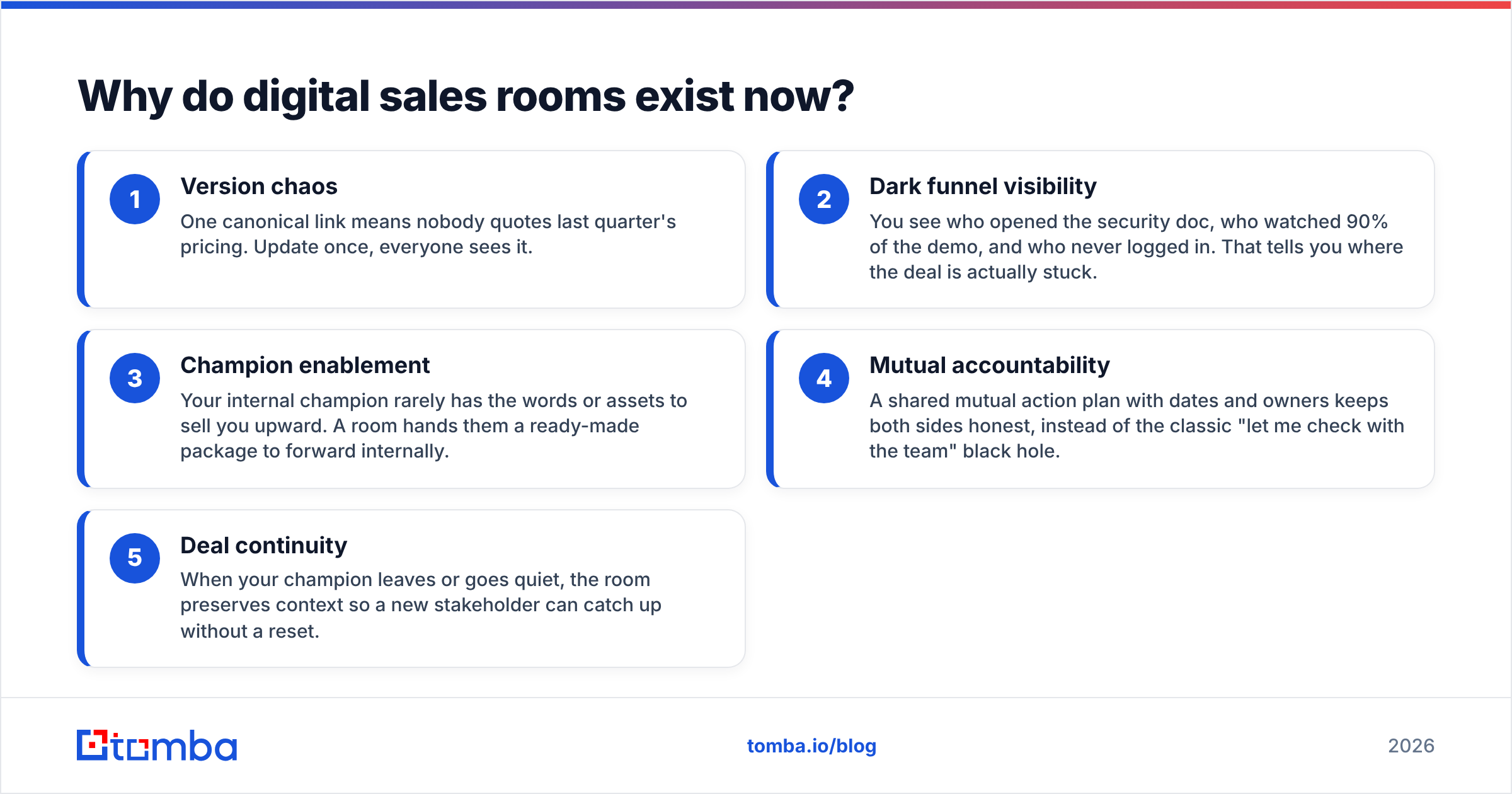
Here is what a DSR fixes, point by point:
- Version chaos — One canonical link means nobody quotes last quarter's pricing. Update once, everyone sees it.
- Dark funnel visibility — You see who opened the security doc, who watched 90% of the demo, and who never logged in. That tells you where the deal is actually stuck.
- Champion enablement — Your internal champion rarely has the words or assets to sell you upward. A room hands them a ready-made package to forward internally.
- Mutual accountability — A shared mutual action plan with dates and owners keeps both sides honest, instead of the classic "let me check with the team" black hole.
- Deal continuity — When your champion leaves or goes quiet, the room preserves context so a new stakeholder can catch up without a reset.
That last point matters more than people admit. In long enterprise cycles, deals don't die from a hard "no" — they die from entropy. A room is a hedge against entropy.
How does a digital sales room work in a real deal?#
Walk through a typical mid-market SaaS deal. After a strong discovery call, the rep spins up a room instead of sending a follow-up email with four attachments. The room contains a short recap video, the tailored deck, a pricing page, a security overview, and a mutual action plan with the next three milestones.
The champion forwards one link to their VP. The VP watches the recap, skims pricing, and leaves a comment asking about SSO. The rep gets a notification, drops the SSO doc into the room, and replies in-thread. Procurement joins two weeks later and finds the contract and the DPA already waiting. No reset, no "can you resend that?"
Behind the scenes, the platform logs every view and pushes engagement signals into the CRM. When five stakeholders visit in one week, the rep knows the deal is heating up. When the room goes cold for ten days, that's an early warning — not a surprise at quarter's end.
The quiet dependency here is data quality. A room only reaches the right people if you actually know who the right people are and how to contact them. That's where an email finder and solid data enrichment earn their keep: they turn a half-mapped buying committee into a fully-addressed one before you ever build the room.
What should a digital sales room include?#
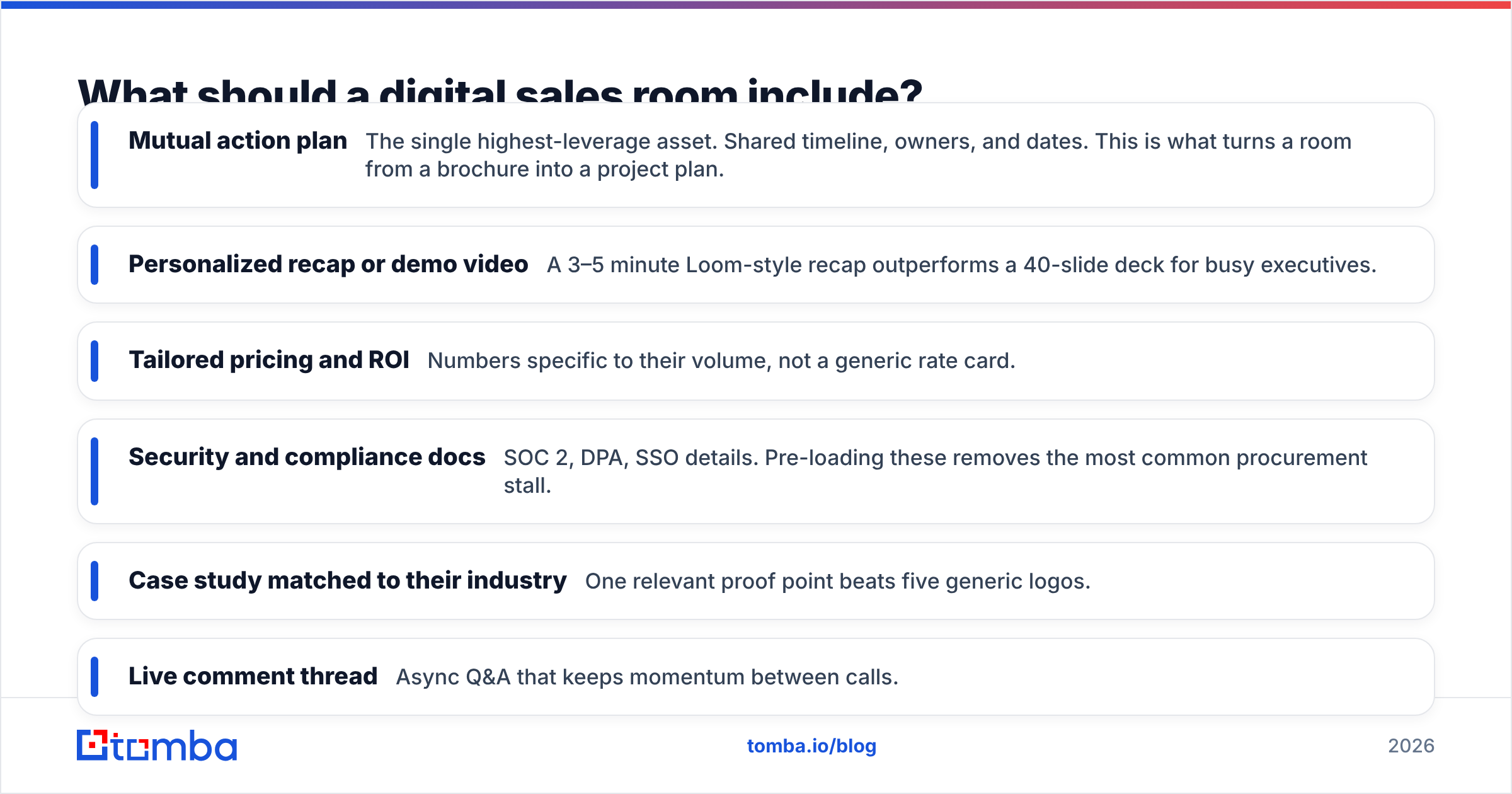
Not everything. The fastest way to make a room useless is to dump your entire content library into it. A good room is curated to the specific deal and the specific committee. Here's the core stack, ranked by impact:
- Mutual action plan — The single highest-leverage asset. Shared timeline, owners, and dates. This is what turns a room from a brochure into a project plan.
- Personalized recap or demo video — A 3–5 minute Loom-style recap outperforms a 40-slide deck for busy executives.
- Tailored pricing and ROI — Numbers specific to their volume, not a generic rate card.
- Security and compliance docs — SOC 2, DPA, SSO details. Pre-loading these removes the most common procurement stall.
- Case study matched to their industry — One relevant proof point beats five generic logos.
- Live comment thread — Async Q&A that keeps momentum between calls.
Digital sales room vs. the old way: a comparison#
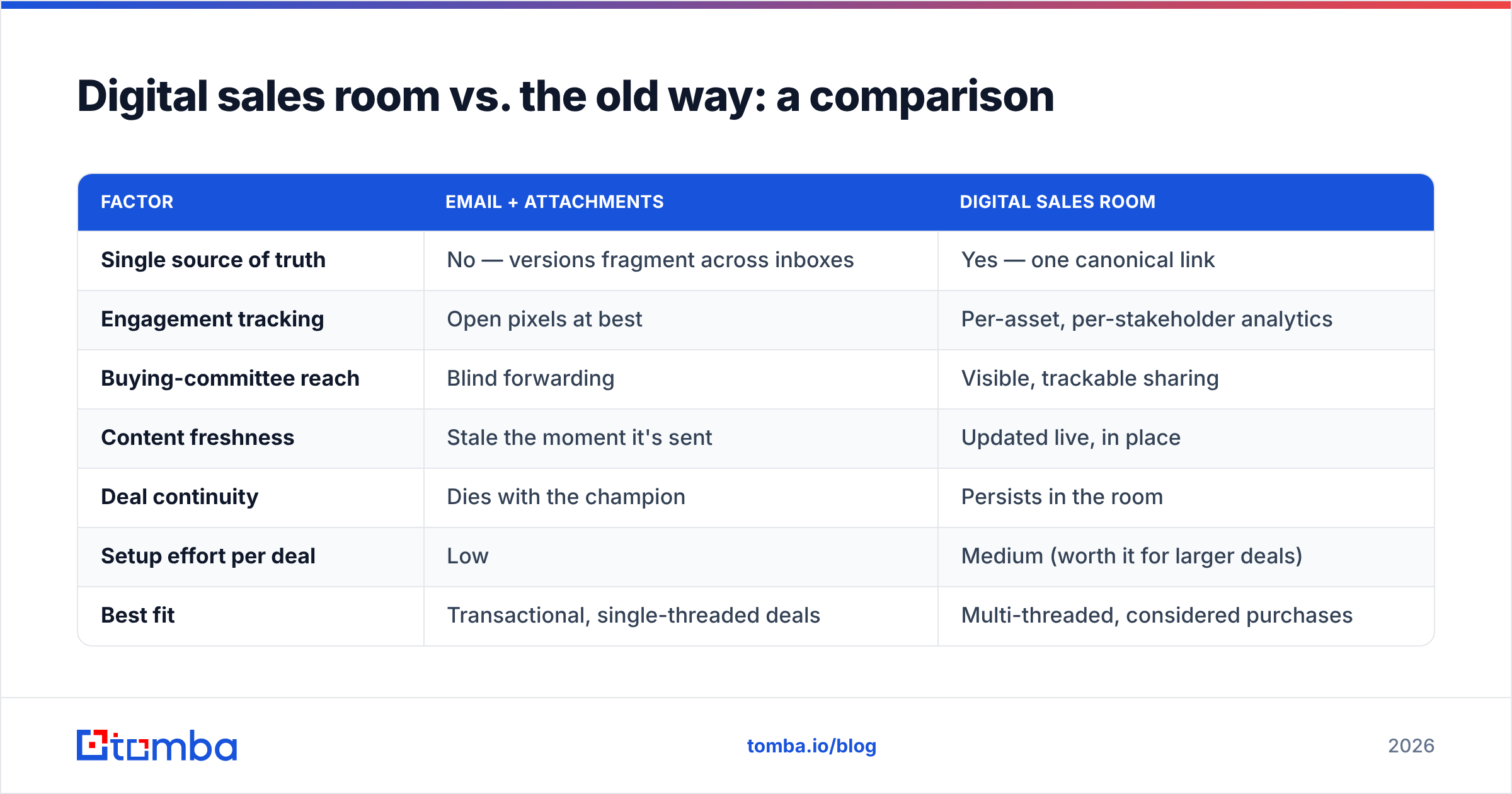
The clearest way to judge a DSR is against the workflow it replaces. Most teams today run some version of "email + attachments + a scheduling link." Here's how the two stack up.
| Factor | Email + attachments | Digital sales room |
|---|---|---|
| Single source of truth | No — versions fragment across inboxes | Yes — one canonical link |
| Engagement tracking | Open pixels at best | Per-asset, per-stakeholder analytics |
| Buying-committee reach | Blind forwarding | Visible, trackable sharing |
| Content freshness | Stale the moment it's sent | Updated live, in place |
| Deal continuity | Dies with the champion | Persists in the room |
| Setup effort per deal | Low | Medium (worth it for larger deals) |
| Best fit | Transactional, single-threaded deals | Multi-threaded, considered purchases |
The honest read: a DSR is overkill for a $99/month self-serve signup. It shines when the deal is big enough, slow enough, and multi-threaded enough that keeping everyone aligned is itself the hard part.
Are digital sales rooms worth it, or just hype?#
They're worth it when three conditions hold: your deals involve multiple stakeholders, your sales cycle runs longer than a few weeks, and your content is good enough to carry a conversation you're not in. Miss any of those, and a DSR adds overhead without a payoff.
Where DSRs get oversold is the implicit promise that the tool itself creates pipeline. It doesn't. A room is an amplifier. It makes a well-researched, well-targeted deal move faster — and it makes a poorly-targeted one fail more visibly. The platforms won't tell you that, because their pitch is the room, not the inputs.
This is also why the "which DSR platform is best" debate is usually the wrong first question. The teams that win with digital sales rooms almost always fixed their upstream data and process first. They mapped the buying committee, verified the contacts, connected the room to their CRM, and only then worried about which vendor's UI they liked. G2 and Capterra reviews of DSR tools reflect this pattern too — the highest-rated deployments pair the software with disciplined outreach, not fancy templates. You can browse category leaders and honest user reviews on G2's sales enablement category.
How do you choose a digital sales room platform?#
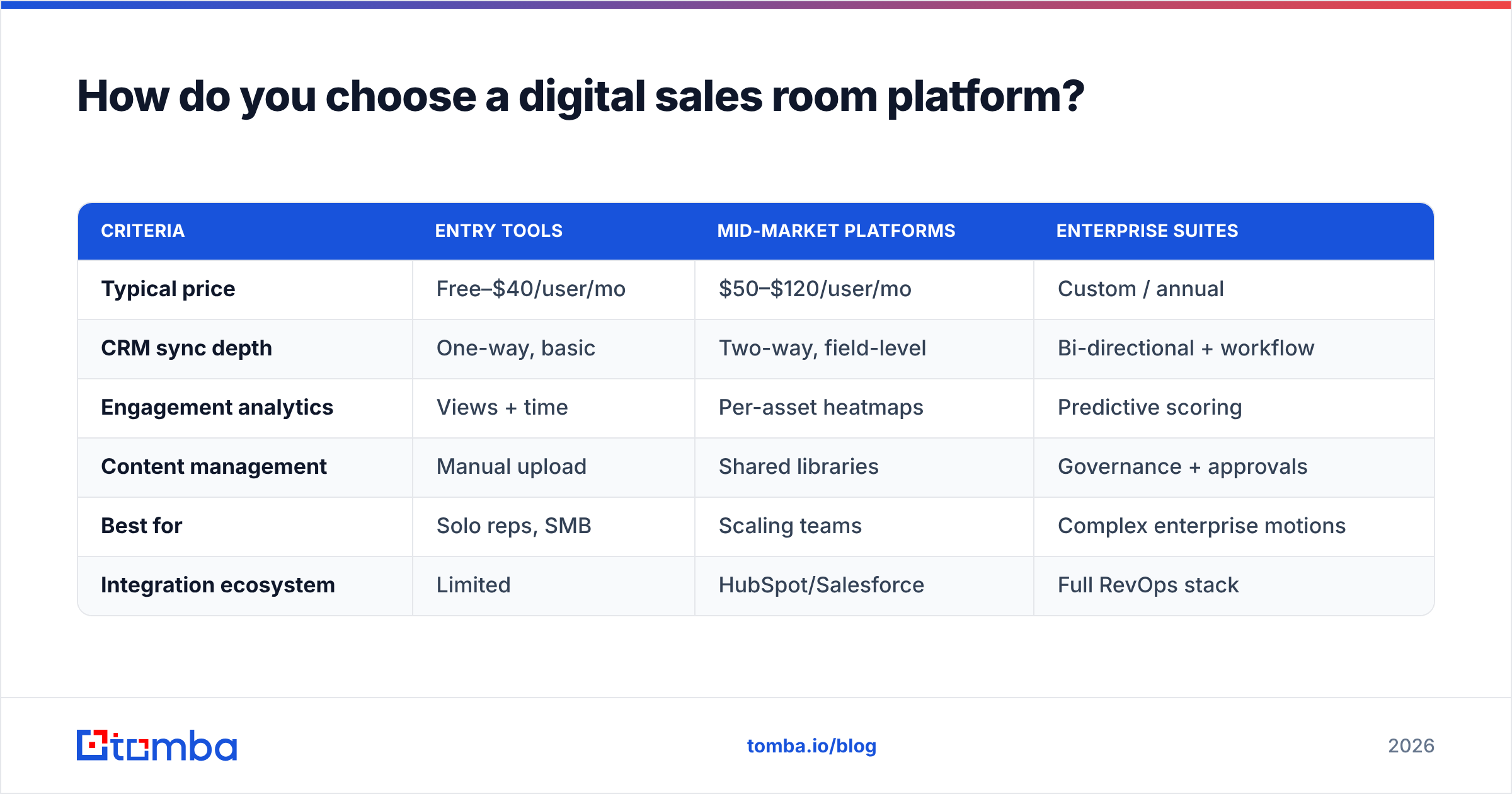
Compare on the dimensions that actually change outcomes, not the demo dazzle. Here's a practical scoring frame across the common tiers you'll encounter.
| Criteria | Entry tools | Mid-market platforms | Enterprise suites |
|---|---|---|---|
| Typical price | Free–$40/user/mo | $50–$120/user/mo | Custom / annual |
| CRM sync depth | One-way, basic | Two-way, field-level | Bi-directional + workflow |
| Engagement analytics | Views + time | Per-asset heatmaps | Predictive scoring |
| Content management | Manual upload | Shared libraries | Governance + approvals |
| Best for | Solo reps, SMB | Scaling teams | Complex enterprise motions |
| Integration ecosystem | Limited | HubSpot/Salesforce | Full RevOps stack |
A few buying guardrails:
- Prioritize CRM depth over aesthetics. A gorgeous room that doesn't write engagement data back to your pipeline is a silo. Check whether it connects cleanly to your stack — for example, a native HubSpot integration or Salesforce sync you don't have to babysit.
- Insist on per-stakeholder analytics. Aggregate "room views" is a vanity metric. You want to know who.
- Test the buyer's experience on mobile. Executives open links on phones. If the room is clumsy on a small screen, it dies there.
- Watch the per-seat math. DSR pricing scales with your team; the total can outpace the deal size on smaller accounts.
For a broader view of how sales enablement content should be structured and measured, HubSpot's sales enablement resources are a solid, vendor-neutral starting point.
Where does contact data fit into all this?#
At the very front — and it's the step most teams skip. A digital sales room reaches a buying committee only if you've actually identified and reached the whole committee. That's a data problem before it's a software problem.
The practical workflow looks like this: run a domain search to surface the relevant people at the target company, verify each address so your room invites don't bounce, enrich the records with titles and roles so you know who's the economic buyer versus the technical evaluator, then build the room around those real people. Skip that, and you're sending a beautiful room to a champion who has no authority and no path upward.
This is the unglamorous truth behind every "our sales cycle dropped 30%" DSR case study: the teams that got results were also the teams that stopped guessing at contacts. The room made their good targeting faster. It could not fix bad targeting.
Quick answers to common questions#
- Is a digital sales room the same as a CMS or a proposal tool? No. Proposal software generates and e-signs a document. A DSR is an ongoing shared workspace that includes the proposal but persists across the whole deal.
- Do buyers actually like them? Increasingly, yes — self-directed buyers prefer having assets on demand over chasing a rep for the latest file. The key is not making them create an account just to look.
- How long does it take to set up a room? With templates, 10–20 minutes per deal once your content library exists. The library is the one-time cost.
- Can small teams use them? Yes, but be selective — reserve rooms for your larger, multi-threaded deals where the setup pays back.
The bottom line#
Digital sales rooms are a genuine improvement over the email-and-attachment scramble — for the right deals. They give you a single source of truth, real visibility into a buying committee, and a way to keep deals alive when champions go quiet. They are not magic, and they will happily amplify a badly-targeted deal straight into a public failure.
So sequence it correctly. Get your buying-committee map and your contact data right first, then wrap a well-built room around it. If the foundation is accurate, the room compounds it; if the foundation is guesswork, no platform saves you.
That foundation is exactly where Tomba fits. Before you spin up a single room, use the Tomba Email Finder to identify and verify every stakeholder in the buying committee — economic buyer, technical evaluator, procurement, all of them — with the accuracy that keeps your room invites landing in the right inboxes. Start free with 25 searches a month, and see full Tomba pricing when you're ready to scale your outbound. Build the room on real people, and the room starts working for you.
Related guides#
Ready to find emails that actually work?
Join 150,000+ professionals who stopped guessing and started sending. Free credits on signup — no credit card required.
Get the Tomba newsletter
Practical outbound tactics and product updates — once every two weeks.
About the author