DiscoverOrg Pros and Cons in 2026: An Honest Data Review
DiscoverOrg is now part of ZoomInfo, and the buying decision changed with it. Here's a neutral look at the data quality, the contract terms, the real annual cost, and when a cheaper stack does the same job.
TL;DR
- DiscoverOrg no longer exists as a standalone product. It acquired ZoomInfo in 2019, took the ZoomInfo name, and the technology now ships inside ZoomInfo Sales. When people search "DiscoverOrg pros and cons," they are really evaluating ZoomInfo's enterprise data platform.
- The pros are real: hand-built org charts, direct dials, technographics, and intent signals in one place. Nothing in the mid-market matches the depth for enterprise account mapping.
- The cons are equally real: five-figure annual contracts, seat and credit minimums, auto-renewal clauses buyers complain about publicly, and thinner coverage outside North America.
- Most teams over-buy. If you need verified work emails and a few thousand contacts a month, a focused email finder plus a verifier covers the job for a fraction of the price.
- Decision rule: buy DiscoverOrg/ZoomInfo when org hierarchy and intent drive your motion. Skip it when your bottleneck is simply "I have names and companies, I need valid emails."
What happened to DiscoverOrg — is it still a product in 2026?#
Short answer: the brand is retired, the data is not.
DiscoverOrg launched in 2007 as a research-heavy contact database. Its differentiator was human verification — analysts phoning into IT departments to map who reported to whom. In February 2019 DiscoverOrg acquired ZoomInfo, kept ZoomInfo's better-known name, and rebranded the combined company. It went public in 2020 and has since absorbed Clickagy (intent), Chorus.ai (conversation intelligence), and RingLead (data orchestration). You can read the corporate timeline on Wikipedia or on the vendor's own site at zoominfo.com.
Why this matters for your evaluation: legacy DiscoverOrg reviews describe a leaner, cheaper, research-first tool. The 2026 product is a platform — bigger, broader, and priced accordingly. If a colleague tells you "we used DiscoverOrg back in 2018 and it was great," they are describing a product you can no longer buy.
What are DiscoverOrg's biggest pros?#
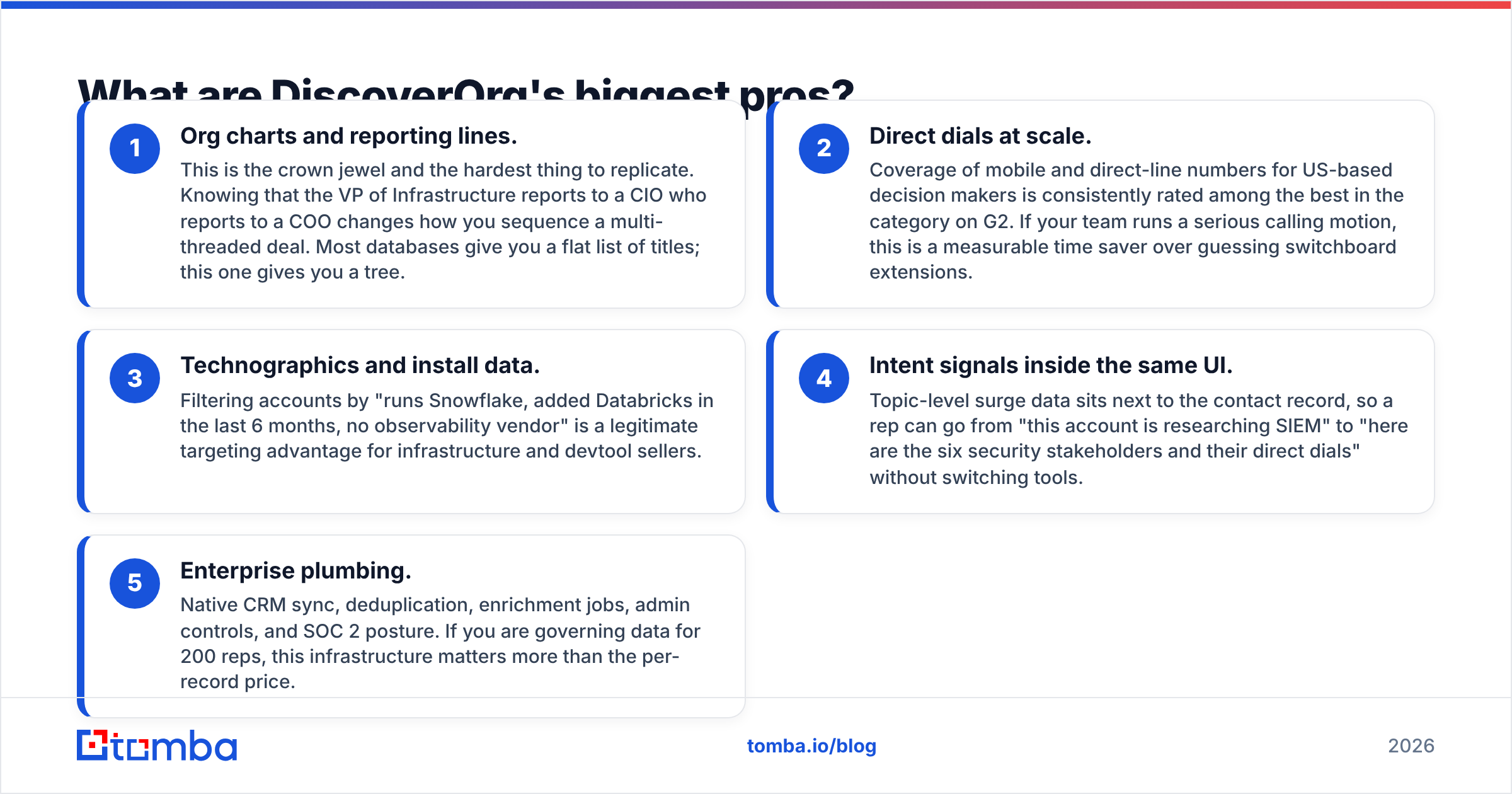
Credit where it is due. The reason this platform commands enterprise budgets is that four things genuinely work.
- Org charts and reporting lines. This is the crown jewel and the hardest thing to replicate. Knowing that the VP of Infrastructure reports to a CIO who reports to a COO changes how you sequence a multi-threaded deal. Most databases give you a flat list of titles; this one gives you a tree.
- Direct dials at scale. Coverage of mobile and direct-line numbers for US-based decision makers is consistently rated among the best in the category on G2. If your team runs a serious calling motion, this is a measurable time saver over guessing switchboard extensions.
- Technographics and install data. Filtering accounts by "runs Snowflake, added Databricks in the last 6 months, no observability vendor" is a legitimate targeting advantage for infrastructure and devtool sellers.
- Intent signals inside the same UI. Topic-level surge data sits next to the contact record, so a rep can go from "this account is researching SIEM" to "here are the six security stakeholders and their direct dials" without switching tools.
- Enterprise plumbing. Native CRM sync, deduplication, enrichment jobs, admin controls, and SOC 2 posture. If you are governing data for 200 reps, this infrastructure matters more than the per-record price.
That bundle is the actual product. You are not paying for emails. You are paying for hierarchy, signal, and governance.
What are the real cons of DiscoverOrg?#
Every honest review of this platform lands on the same five complaints, and they show up across review sites year after year.
1. Price, and the shape of the price. Public entry points do not exist. Buyer reports across review platforms and procurement communities consistently put realistic annual spend in the mid-five figures for a small team and well into six figures for enterprise deployments. That number is a function of seats plus credits plus modules, not a flat per-user rate, so quotes for two similar companies can differ dramatically.
2. Annual contracts with auto-renewal. This is the single most repeated criticism in public reviews: the contract renews automatically unless you cancel inside a defined notice window, and the window is easy to miss. It is not hidden — it is in the paper you signed — but it converts "we'll try it for a year" into a two-year commitment more often than buyers expect. Read the termination clause before the demo, not after.
3. Credit ceilings and export limits. Your seat does not give you unlimited exports. Credits are consumed by contact reveals and enrichment, and heavy users hit ceilings mid-quarter. Teams then buy overage packs at rates negotiated under time pressure, which is the worst position to negotiate from.
4. Coverage falls off outside North America. EMEA and APAC records are thinner and stale faster, and GDPR-driven suppression means European contacts are less complete by design. If more than a third of your ICP sits in Europe, run a coverage test on your actual target list before signing anything.
5. Data decay is still data decay. No provider is immune. Roughly a quarter to a third of B2B contact records go stale each year through job changes alone — a figure most analysts, including Gartner, have flagged as a structural problem in B2B data. A big database is not a fresh database. Any list you export still needs verification before it touches a sending domain, which is why teams pair even premium data with a standalone email verifier.
6. Complexity tax. The platform rewards teams with an ops function. Without someone owning filters, enrichment rules, and CRM mapping, most orgs use maybe 20% of what they bought — and pay for 100%.
How does DiscoverOrg pricing actually work?#
There is no published price sheet, so here is how the quote is assembled in practice:
- Seat licenses. Priced per user, usually with a minimum seat count. Adding a rep mid-term is easy; removing one is not.
- Credit pools. Contact reveals and enrichment draw from an annual pool. Unused credits generally do not roll over.
- Module add-ons. Intent, conversation intelligence, data orchestration, and website visitor identification are separate lines.
- Term length. Multi-year terms unlock the discounts sales reps lead with. That discount is the hook that converts a one-year evaluation into a three-year commitment.
The practical consequence: your effective cost per usable contact depends entirely on how much of the pool you actually consume. Teams that pull 50,000 well-targeted records a year get real value. Teams that pull 4,000 are paying enterprise rates for boutique volume — and that is the most common way this purchase goes wrong.
Compare that to per-credit tools where the math is visible up front. Tomba pricing starts free at 25 searches a month, moves to $49/mo on Starter, $99/mo on Growth, and $249/mo on Pro, with an enterprise tier for volume. You will not get org charts for that. You will get verified emails, and you will know exactly what you spent.
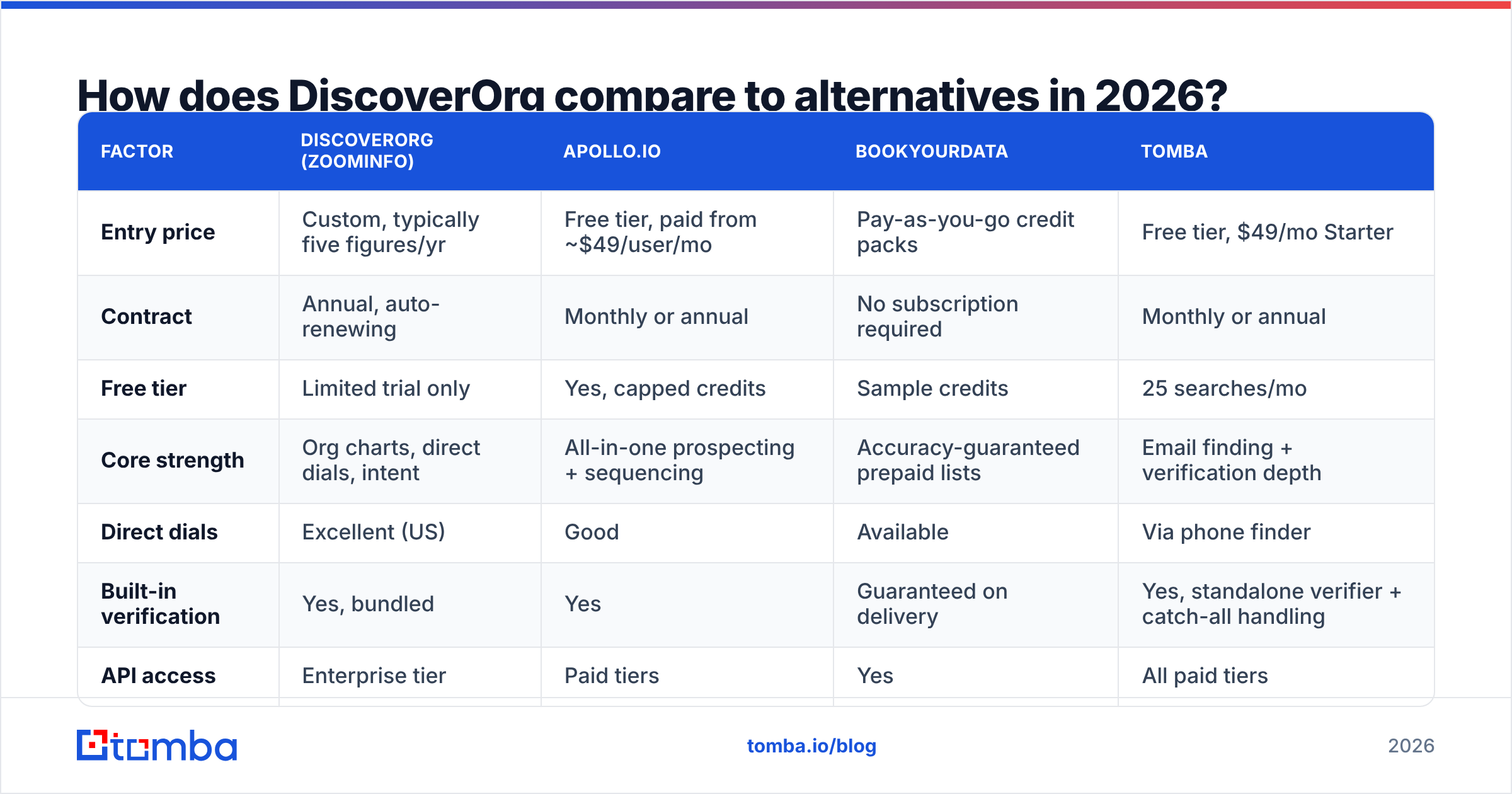
How does DiscoverOrg compare to alternatives in 2026?#
| Factor | DiscoverOrg (ZoomInfo) | Apollo.io | BookYourData | Tomba |
|---|---|---|---|---|
| Entry price | Custom, typically five figures/yr | Free tier, paid from ~$49/user/mo | Pay-as-you-go credit packs | Free tier, $49/mo Starter |
| Contract | Annual, auto-renewing | Monthly or annual | No subscription required | Monthly or annual |
| Free tier | Limited trial only | Yes, capped credits | Sample credits | 25 searches/mo |
| Core strength | Org charts, direct dials, intent | All-in-one prospecting + sequencing | Accuracy-guaranteed prepaid lists | Email finding + verification depth |
| Direct dials | Excellent (US) | Good | Available | Via phone finder |
| Built-in verification | Yes, bundled | Yes | Guaranteed on delivery | Yes, standalone verifier + catch-all handling |
| API access | Enterprise tier | Paid tiers | Yes | All paid tiers |
| Best for | Enterprise ABM with an ops team | SMB teams wanting one tool | Buyers who want data without a subscription | Teams that need verified emails at predictable cost |
Two notes on reading this table honestly. First, these tools are not substitutes in the strict sense — a platform that maps a 4,000-person enterprise is solving a different problem than a tool that returns a verified address for a known name and domain. Second, BookYourData deserves a specific mention for buyers allergic to annual commitments: the prepaid, accuracy-backed model removes the renewal risk that dominates complaints about enterprise contracts, which is a legitimately different way to buy.
If you are evaluating the broader field, our breakdowns of Apollo alternatives and RocketReach alternatives cover the adjacent options in more detail.

Who should still buy DiscoverOrg in 2026?#
Buy it if three or more of these describe you:
- You sell into enterprises where six to twelve people touch the deal and you need the hierarchy to sequence outreach.
- Your motion is calling-heavy and direct dials materially change connect rates.
- Technographic filters map cleanly to your ICP — you sell infrastructure, security, or devtools.
- You have a RevOps person who will own configuration, enrichment rules, and CRM hygiene.
- Your ACV is high enough that a single sourced deal pays for the year. At a $60k ACV, two extra closed deals justify almost any data budget.
If that is you, the platform is defensible and the price is a rounding error against pipeline. The critique in this article is not that the product is bad. It is that most buyers are not this buyer.
Who should skip it?#
Skip it if your bottleneck is narrower than the platform:
- You already know your targets. If your list comes from LinkedIn, a conference roster, a G2 category, or a scraped set of company domains, you do not need a discovery engine. You need addresses. A domain search plus an email finder closes that gap for well under $100/month.
- You are under 15 reps. Seat minimums and credit pools rarely pencil out at that scale.
- Your ICP is mostly outside North America. Coverage risk is real and the contract is not.
- Your deliverability is fragile. Sending to unverified records from any database will burn a young domain. Verification and warmup matter more than database size at this stage.
- You cannot commit for twelve months. If budget is quarterly, an annual auto-renewing contract is the wrong instrument regardless of data quality.
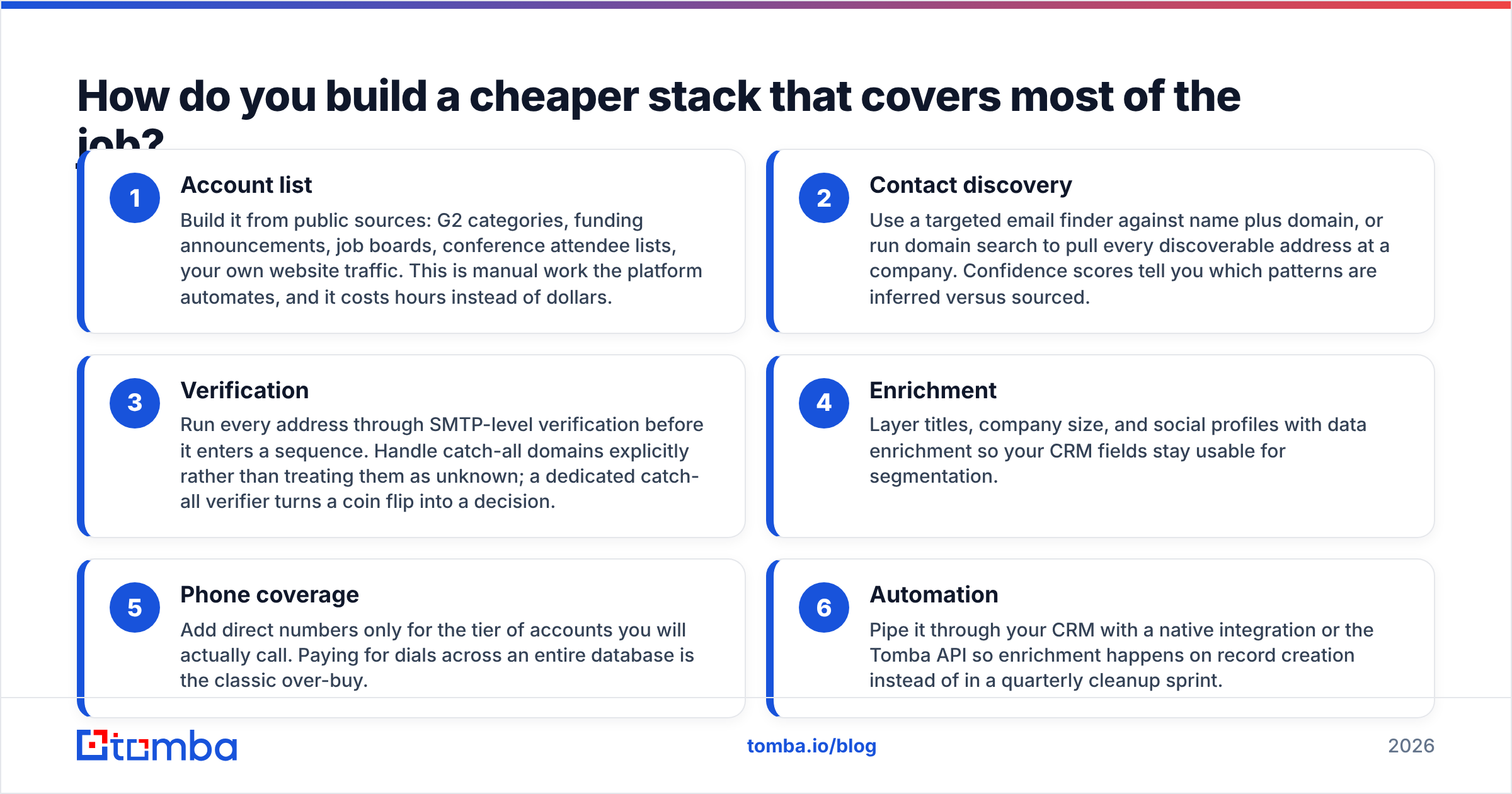
How do you build a cheaper stack that covers most of the job?#
You will not replicate org charts and intent data on a small budget. You can replicate the parts most teams actually use. Here is the substitution, layer by layer:
- Account list — Build it from public sources: G2 categories, funding announcements, job boards, conference attendee lists, your own website traffic. This is manual work the platform automates, and it costs hours instead of dollars.
- Contact discovery — Use a targeted email finder against name plus domain, or run domain search to pull every discoverable address at a company. Confidence scores tell you which patterns are inferred versus sourced.
- Verification — Run every address through SMTP-level verification before it enters a sequence. Handle catch-all domains explicitly rather than treating them as unknown; a dedicated catch-all verifier turns a coin flip into a decision.
- Enrichment — Layer titles, company size, and social profiles with data enrichment so your CRM fields stay usable for segmentation.
- Phone coverage — Add direct numbers only for the tier of accounts you will actually call. Paying for dials across an entire database is the classic over-buy.
- Automation — Pipe it through your CRM with a native integration or the Tomba API so enrichment happens on record creation instead of in a quarterly cleanup sprint.
Total cost of that stack for a five-person team: roughly $99 to $249 a month plus the labor of building account lists yourself. Total cost of the enterprise platform: a five-figure commitment. The gap is what you are paying for hierarchy, intent, and convenience — decide deliberately whether those three things are worth it to you, rather than defaulting to yes because a competitor uses the platform.
What should you do before signing any data contract?#
Four steps, in this order, every time:
- Test on your real list, not their sample. Hand the vendor 200 accounts from your actual pipeline and measure match rate and bounce rate. Vendor-supplied samples are curated by definition.
- Get the termination clause in writing before the pricing conversation. Notice window, renewal terms, mid-term seat reduction rights. If the answer is vague, that is the answer.
- Model cost per usable contact. Divide the annual price by the number of contacts you will realistically export and verify. Compare that to per-credit pricing. Many teams discover their effective cost is several dollars per usable record.
- Run a bounce test. Take 100 records from any provider, verify them independently, and count the failures. This one test tells you more than any review site.
The bottom line#
DiscoverOrg's legacy — human-verified org charts and reliable direct dials — is genuinely valuable, and it lives on inside ZoomInfo. The cons are structural rather than technical: enterprise pricing, annual auto-renewing contracts, credit ceilings, and regional coverage gaps. Those are fine trade-offs for a large enterprise sales org with an ops function and a high ACV. They are expensive mistakes for a ten-person team whose real need is verified email addresses.
Be honest about which one you are.
If your gap is contacts and not org charts, start with the Tomba Email Finder. Twenty-five free searches a month, no contract, no auto-renewal, and verification built in — enough to test coverage on your own ICP before you spend a dollar. If it covers your list, you just saved a five-figure line item. If it does not, you will know exactly which gap the enterprise platform is actually filling, and you will negotiate that contract from a much stronger position.
Related guides#
Ready to find emails that actually work?
Join 150,000+ professionals who stopped guessing and started sending. Free credits on signup — no credit card required.
Get the Tomba newsletter
Practical outbound tactics and product updates — once every two weeks.
About the author