DiscoverOrg vs eGrabber: Which B2B Data Tool Wins in 2026?
DiscoverOrg (now ZoomInfo) sells enterprise org charts at enterprise prices. eGrabber sells a desktop scraper you buy once. Here's how they actually compare on cost, accuracy, and workflow in 2026.
TL;DR
- DiscoverOrg no longer exists as a standalone product. It merged with ZoomInfo in 2019 and is sold today as ZoomInfo SalesOS. Anyone shopping "DiscoverOrg" in 2026 is really evaluating a ZoomInfo contract that typically starts around $15,000/year.
- eGrabber is a different species entirely — Windows desktop software (eGrabber Email Finder, LeadGrabber Pro) with a perpetual or annual license in the $3,495–$5,000 range that appends emails and phones to lists you already have.
- DiscoverOrg/ZoomInfo wins on org charts, intent data, and technographics. eGrabber wins on cost per record when you already know who you want to reach.
- Neither is a great fit for lean teams — one is priced for enterprise, the other is a desktop app with no real API. Modern API-first tools like Tomba, BookYourData, or Apollo cover most of the same ground for a fraction of the spend.
- Our pick: enterprise ABM teams take ZoomInfo; recruiters and list-builders on Windows take eGrabber; everyone else should skip both and start with a credit-based email finder.
What is DiscoverOrg and does it still exist?#
DiscoverOrg was, for about a decade, the gold standard of human-verified B2B contact data. It was built on a research-team model: analysts phoned companies, mapped reporting lines, and refreshed records on a schedule. That produced org charts you could actually trust — who reports to whom, who owns budget, who just changed titles.
In February 2019, DiscoverOrg acquired ZoomInfo and then adopted the ZoomInfo name. The DiscoverOrg brand was retired. Today the product lives inside ZoomInfo SalesOS, which bolts intent signals, technographics, websites-visitor tracking, and a sequencing engine on top of the old research-verified database.
That matters for this comparison in one blunt way: when you request a "DiscoverOrg demo" in 2026, you get a ZoomInfo sales cycle. Annual contract, seat minimums, credit caps, procurement. The scrappy point-purchase you might be imagining does not exist.
What is eGrabber and how is it different?#
eGrabber is a Silicon Valley company that has been shipping Windows desktop tools since the 1990s. Its two relevant products are LeadGrabber Pro (scrape a LinkedIn or directory list, then append business emails and phones) and eGrabber Email Finder (upload a list of names and companies, get emails back).
The architecture is the opposite of ZoomInfo's. eGrabber does not sell you a database. It sells you a research robot that runs on your machine. When you feed it a name and a company, it guesses email patterns, checks them against public sources, and runs verification in real time. Nothing is pre-stored, so there is no "database size" number to brag about — and no monthly platform fee once you own the license.
That design has consequences. It only runs on Windows. It's throughput-bound by your own machine and IP. And there is no meaningful REST API to embed in a data pipeline — it's a GUI you sit in front of.
How do DiscoverOrg and eGrabber compare head to head?#
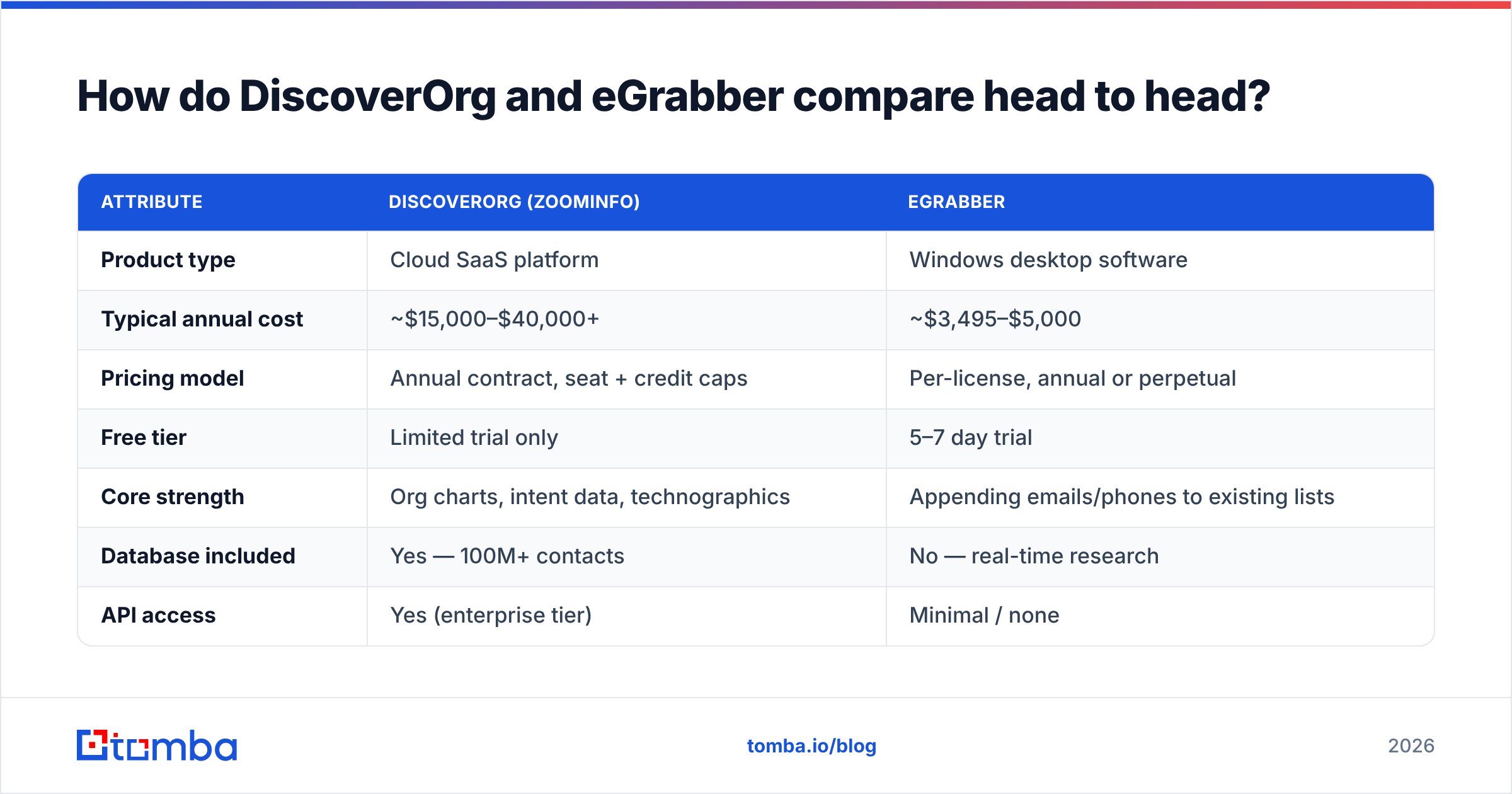
| Attribute | DiscoverOrg (ZoomInfo) | eGrabber |
|---|---|---|
| Product type | Cloud SaaS platform | Windows desktop software |
| Typical annual cost | ~$15,000–$40,000+ | ~$3,495–$5,000 |
| Pricing model | Annual contract, seat + credit caps | Per-license, annual or perpetual |
| Free tier | Limited trial only | 5–7 day trial |
| Core strength | Org charts, intent data, technographics | Appending emails/phones to existing lists |
| Database included | Yes — 100M+ contacts | No — real-time research |
| API access | Yes (enterprise tier) | Minimal / none |
| Mac / Linux support | Yes (browser) | No |
| Verification | Pre-verified records | Real-time SMTP-style checks |
| Best for | Enterprise ABM and RevOps teams | Recruiters, agency list-builders |
| Contract exit | Notoriously rigid auto-renewal | Just stop renewing |
The two tools solve different halves of the same problem. ZoomInfo answers "who should I talk to?" eGrabber answers "I know who — how do I reach them?" Teams that already have a target list and a CRM full of names get more per dollar out of eGrabber. Teams doing account-based motions that need buying committees mapped need the ZoomInfo side.
Which one has better data accuracy?#
Accuracy in this category is always a moving target, so treat every vendor-published number with suspicion — including these.
ZoomInfo's advantage is breadth plus recency signals. Because it ingests contributory data from users' connected inboxes, plus web crawling and its legacy research team, it catches job changes fast. Its published email accuracy sits in the mid-90s, though independent tests on G2 consistently land lower — call it 80–90% on real-world lists, with direct dials noticeably weaker than emails.
eGrabber's accuracy behaves differently because it's computed at request time. On common corporate domains with predictable patterns (first.last@, flast@), hit rates are strong. On small companies, catch-all domains, and privacy-heavy European firms, it degrades — and it will happily hand you a "guessed" address flagged with lower confidence. That's honest, but it means you still need a separate email verifier pass before you send.
The universal failure mode for both: catch-all domains. Neither tool can definitively confirm a mailbox exists on a domain configured to accept everything. If a meaningful slice of your ICP sits behind catch-alls, budget for a dedicated catch-all verifier regardless of which platform you pick.
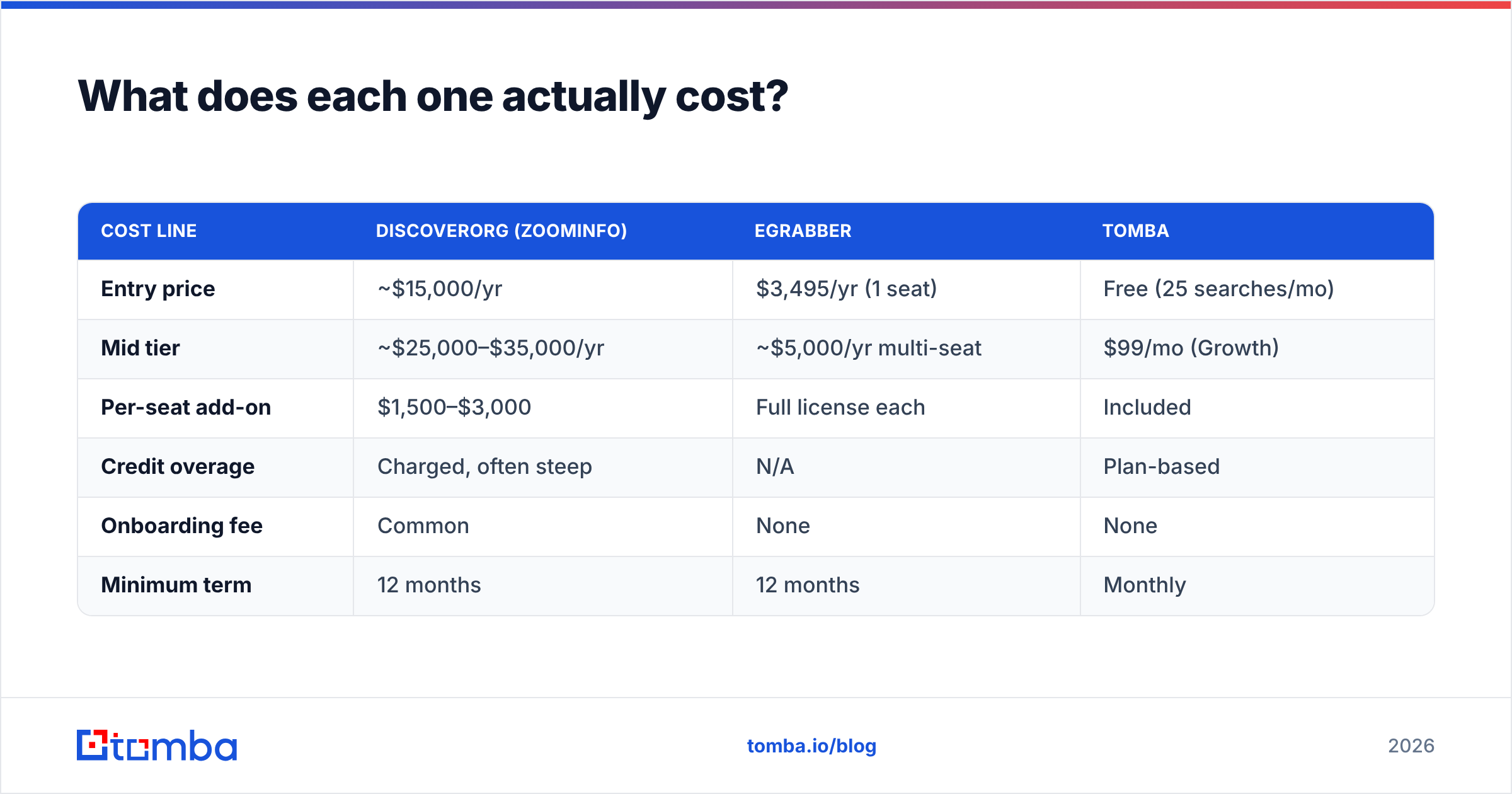
What does each one actually cost?#
| Cost line | DiscoverOrg (ZoomInfo) | eGrabber | Tomba |
|---|---|---|---|
| Entry price | ~$15,000/yr | $3,495/yr (1 seat) | Free (25 searches/mo) |
| Mid tier | ~$25,000–$35,000/yr | ~$5,000/yr multi-seat | $99/mo (Growth) |
| Per-seat add-on | $1,500–$3,000 | Full license each | Included |
| Credit overage | Charged, often steep | N/A | Plan-based |
| Onboarding fee | Common | None | None |
| Minimum term | 12 months | 12 months | Monthly |
The honest read: ZoomInfo's list price is only the start. Seat minimums, credit caps that reset annually rather than monthly, and add-on modules (intent, WebSights, Engage) drive real spend well past the sticker. Many teams report a 3x gap between quoted entry and final invoice by year two.
eGrabber's pricing is boring in a good way. You pay once a year for a license, and there's no metered anxiety about burning credits. The trade is that a $3,495 desktop license is still a lot of money for a tool that can't run headless, can't be scheduled server-side, and can't feed a data warehouse.
For comparison, a credit-based email finder covers the "reach this person" job at $49/mo on Starter and $99/mo on Growth — with a real API instead of a GUI. Full Tomba pricing is public, which is itself a differentiator in a category where "contact sales" is the norm.
Who should choose DiscoverOrg (ZoomInfo)?#
Pick ZoomInfo if three or more of these describe you:
- You run account-based motions where knowing the full buying committee — not just one contact — determines whether the deal moves.
- You need intent data and are prepared to actually operationalize it with routing rules, not just look at a dashboard once a quarter.
- You have a RevOps function that can own enrichment sync, dedupe rules, and the CRM hygiene that makes a data contract worth its price.
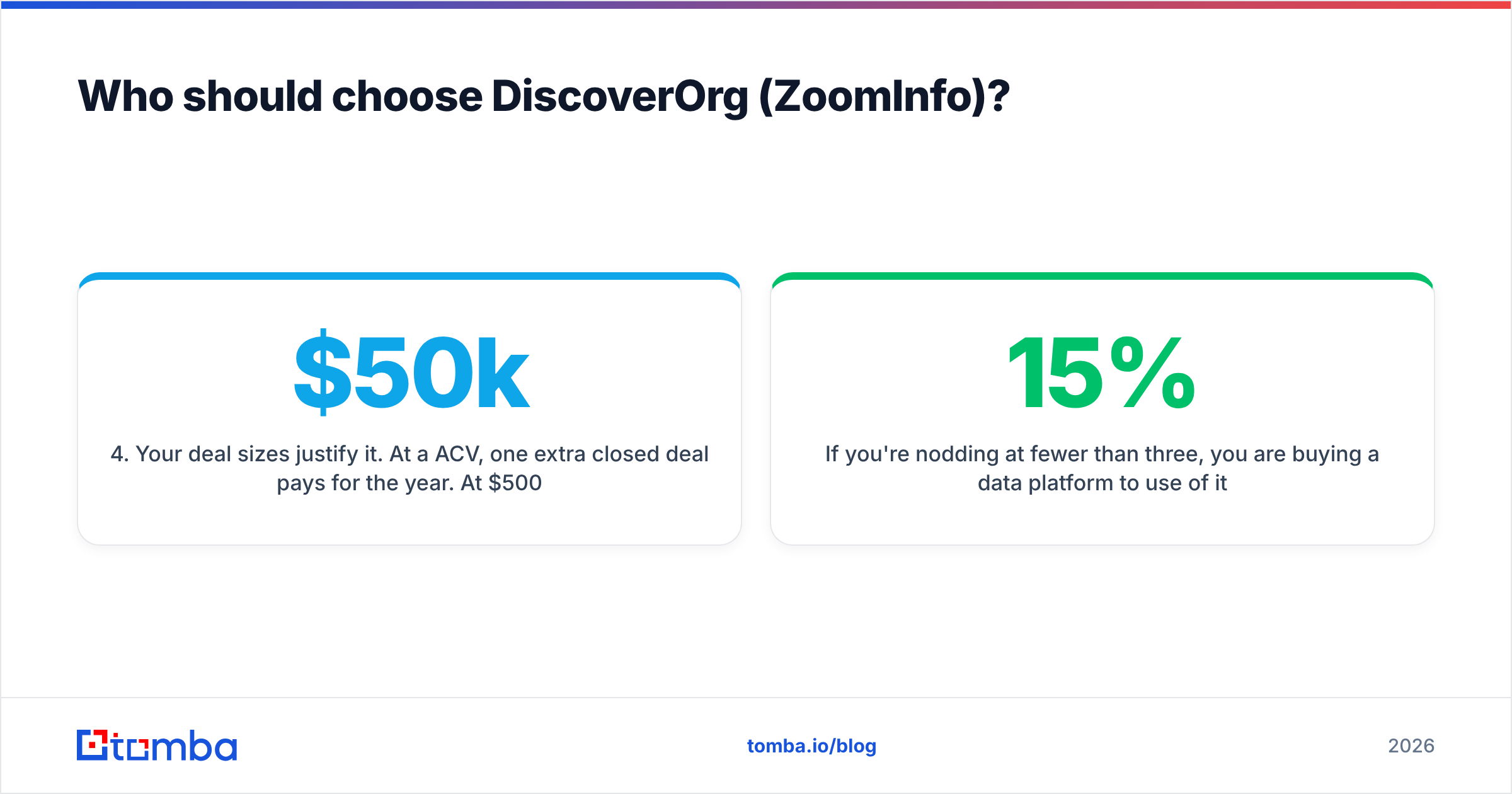
- Your deal sizes justify it. At a $50k ACV, one extra closed deal pays for the year. At $500 MRR SaaS, the math never works.
- You need technographics — knowing that an account runs Snowflake and Segment is a real qualification signal for your product.
If you're nodding at fewer than three, you are buying a data platform to use 15% of it.
Who should choose eGrabber?#
eGrabber earns its keep in a narrower but very real set of jobs:
- Recruiters who source candidate lists from LinkedIn and need personal-adjacent contact info at volume, on one machine, without a per-record meter.
- Agencies building client lists where the deliverable is a spreadsheet, not a synced CRM.
- Windows-native teams that don't want another browser tab or another SaaS subscription line item.
- Anyone with an existing name-and-company list — this is eGrabber's sweet spot. Give it 5,000 rows of names and employers and it will do the append work overnight.
Where it fails: any workflow that needs automation. If your dream state is "new lead hits HubSpot → enrichment fires → rep gets a task," eGrabber cannot be part of that chain. You want an email finder API or a native HubSpot integration instead.
What are the better alternatives in 2026?#
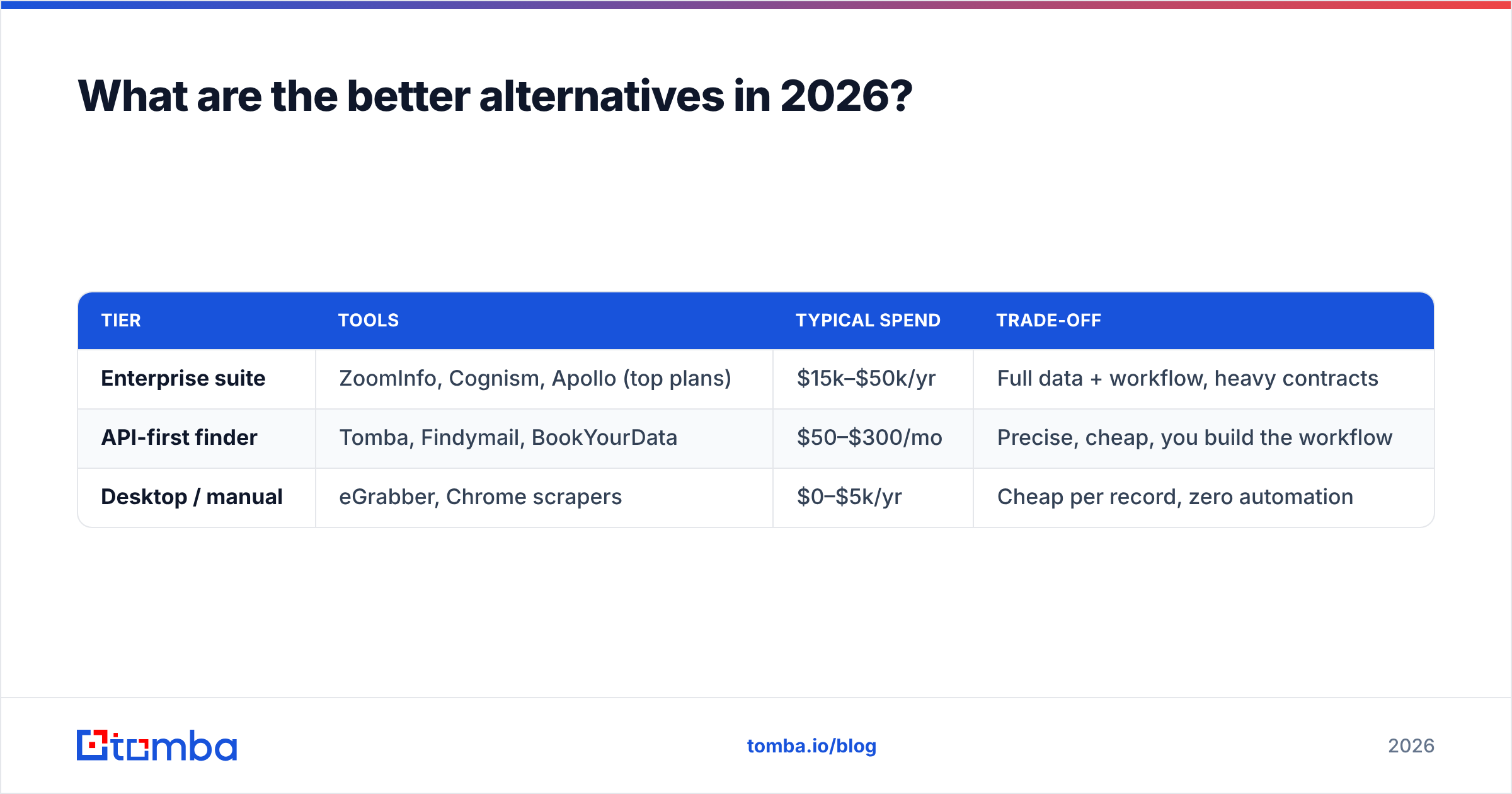
The DiscoverOrg-vs-eGrabber framing is a 2018 question. In 2026 the market has split into three tiers, and most teams belong in the middle one.
| Tier | Tools | Typical spend | Trade-off |
|---|---|---|---|
| Enterprise suite | ZoomInfo, Cognism, Apollo (top plans) | $15k–$50k/yr | Full data + workflow, heavy contracts |
| API-first finder | Tomba, Findymail, BookYourData | $50–$300/mo | Precise, cheap, you build the workflow |
| Desktop / manual | eGrabber, Chrome scrapers | $0–$5k/yr | Cheap per record, zero automation |
BookYourData deserves a specific mention here because it takes a genuinely different approach — pay-as-you-go, no subscription, with a bounce guarantee on the emails it sells. If your buying pattern is "I need 5,000 verified contacts this quarter and nothing next quarter," that model beats both tools in this comparison outright.
Tomba sits in the API-first tier. It won't map an org chart for you, but for the actual bottleneck — turning a name and a domain into a verified, deliverable address — it does the job at 1/50th of a ZoomInfo contract. Domain search pulls every public address on a company domain; bulk email finder handles list appends the way eGrabber does, minus the Windows requirement.
Apollo is the fourth name that always comes up. It bundles data plus sequencing at a mid-market price. Data accuracy is noticeably below ZoomInfo's, but the all-in-one convenience is real. Compare the tradeoffs on our Apollo alternative page if that's your shortlist.
How do you decide without wasting a quarter?#
Run this test before you sign anything. It takes an afternoon.
- Pull 100 real target contacts from your actual ICP — not a clean list of Fortune 500 execs, which every vendor nails.
- Run the same 100 through every trial you can get. Vendors will resist. Insist.
- Measure three numbers: match rate (how many returned anything), verified rate (how many passed independent verification), and bounce rate on a small live send.
- Divide annual cost by usable records. Not by total credits — by records that survived step 3.
- Check the workflow tax. How many manual steps between "record found" and "record in CRM"? Multiply by your rep's hourly cost.
- Read the renewal clause before the discount tempts you. Auto-renewal terms are where enterprise data contracts hurt.
Most teams that run this honestly discover their real cost per usable contact is 2–4x the vendor's implied number, and that the cheap tool with an API beats the expensive tool with a GUI once workflow time is priced in. That's also where response rate math bites: 500 accurate contacts you can actually sequence outperform 5,000 stale ones sitting in a CSV.
Frequently asked questions#
Is DiscoverOrg the same as ZoomInfo now? Yes. DiscoverOrg acquired ZoomInfo in 2019 and rebranded under the ZoomInfo name. There is no separate DiscoverOrg product to buy in 2026.
Does eGrabber work on Mac? Not natively. It requires Windows, though some users run it through Parallels or a Windows VM with mixed results on performance.
Can I use both together? Some teams do — ZoomInfo for account intelligence and org mapping, eGrabber or a cheaper finder for contact-level appends. It's a valid pattern if you can justify both line items, but it's redundant for most.
Which is better for GDPR compliance? ZoomInfo has more mature compliance tooling, notification workflows, and DPAs. eGrabber puts more responsibility on you as the operator since the research runs on your machine. Neither absolves you of lawful-basis requirements under GDPR — check the regulation's own guidance before running EU outbound.
Start with the part that actually blocks your pipeline#
The bottleneck in most outbound programs is not org-chart intelligence. It's that a third of your contact list bounces and your domain reputation eats the damage.
Fix that first. Tomba's Email Finder turns a name and a company domain into a verified professional email through a REST API, a Chrome extension, or a bulk CSV upload — starting free with 25 searches a month and $49/mo on Starter. Test it against the same 100 contacts you'd send to ZoomInfo or eGrabber, compare verified-record cost, and let the numbers decide before anyone signs an annual contract.
Related guides#
Ready to find emails that actually work?
Join 150,000+ professionals who stopped guessing and started sending. Free credits on signup — no credit card required.
Get the Tomba newsletter
Practical outbound tactics and product updates — once every two weeks.
About the author