DiscoverOrg vs Salesbot: Which One Actually Books Meetings
DiscoverOrg is a five-figure B2B contact database that now lives inside ZoomInfo. Salesbot is a no-code chat automation layer. Here is what each one actually does, what it costs in 2026, and which one your team should buy first.
TL;DR
- DiscoverOrg no longer exists as a standalone product. It merged with ZoomInfo in 2019, and the DiscoverOrg brand was folded into ZoomInfo's platform. When someone sells you "DiscoverOrg" in 2026, they are selling you a ZoomInfo contract.
- Salesbot is not a database. It is a no-code conversational automation builder (best known as Kommo's chat feature) that replies to inbound messages, qualifies leads, and moves deals through pipeline stages.
- These two tools solve opposite problems: DiscoverOrg/ZoomInfo answers who should I contact, Salesbot answers what happens when they reply. Comparing them one-to-one is like comparing a phone book to an answering machine.
- Budget gap is enormous. ZoomInfo contracts routinely land in the $15,000–$40,000/year range with seat minimums and annual commitments. Salesbot rides along with a CRM subscription starting around $15/user/month.
- If your actual pain is "I need verified contact data without a five-figure contract," neither one is the answer. A dedicated email finder at $49/mo covers the discovery half at a fraction of the cost.
What are DiscoverOrg and Salesbot, exactly?#
Start here, because most "DiscoverOrg vs Salesbot" searches come from someone who inherited a stack and is trying to figure out what they are paying for.
DiscoverOrg launched in 2007 as a human-researched B2B contact database aimed squarely at IT and technology sellers. Its pitch was depth over breadth: org charts, direct dials, tech installs, and verified titles for enterprise accounts, refreshed by a research team rather than scraped in bulk. In February 2019 DiscoverOrg acquired ZoomInfo and eventually adopted the ZoomInfo name. Today the DiscoverOrg dataset lives inside ZoomInfo, and legacy customers were migrated onto ZoomInfo contracts. You can still buy the data. You cannot buy "DiscoverOrg" as a distinct product.
Salesbot is a different animal entirely. The name is used by several vendors, but the one people mean in a sales-tooling comparison is Kommo's Salesbot: a visual, no-code bot builder that sits on top of a CRM and handles conversations across WhatsApp, Instagram, Telegram, Facebook Messenger, and web chat. You draw a flow, the bot greets inbound leads, asks qualifying questions, tags the contact, assigns an owner, and pushes the deal to the next stage. Some other products use "SalesBot" as a feature name too (Zoho and Creatio both ship conversational agents), so confirm which vendor you are actually evaluating before you compare price sheets.
The one-line version: DiscoverOrg is data acquisition. Salesbot is conversation automation.

Why does this comparison confuse so many buyers?#
Because both tools get pitched as "pipeline software," and pipeline is a word that means nothing without a stage attached to it.
Here is the honest mapping of where each one lives in an outbound motion:
- Target account selection — DiscoverOrg/ZoomInfo firmographics, intent signals, tech-install filters. Salesbot: no role.
- Contact discovery — DiscoverOrg/ZoomInfo contact records, direct dials, verified emails. Salesbot: no role.
- Data hygiene and verification — both weak. ZoomInfo refreshes on its own cadence; Salesbot never touches contact accuracy. This is where a standalone email verifier earns its keep.
- Outbound send — neither tool. You need a sequencer here.
- Inbound reply handling — Salesbot's home turf. Auto-reply, qualify, route, book. DiscoverOrg/ZoomInfo: no role.
- CRM hygiene and stage movement — Salesbot automates the movement; ZoomInfo enriches the record. Genuine overlap here, and it is small.
Out of six stages, they overlap on roughly half of one. That is why teams that buy both rarely regret it, and teams that buy one expecting it to do the other always do.
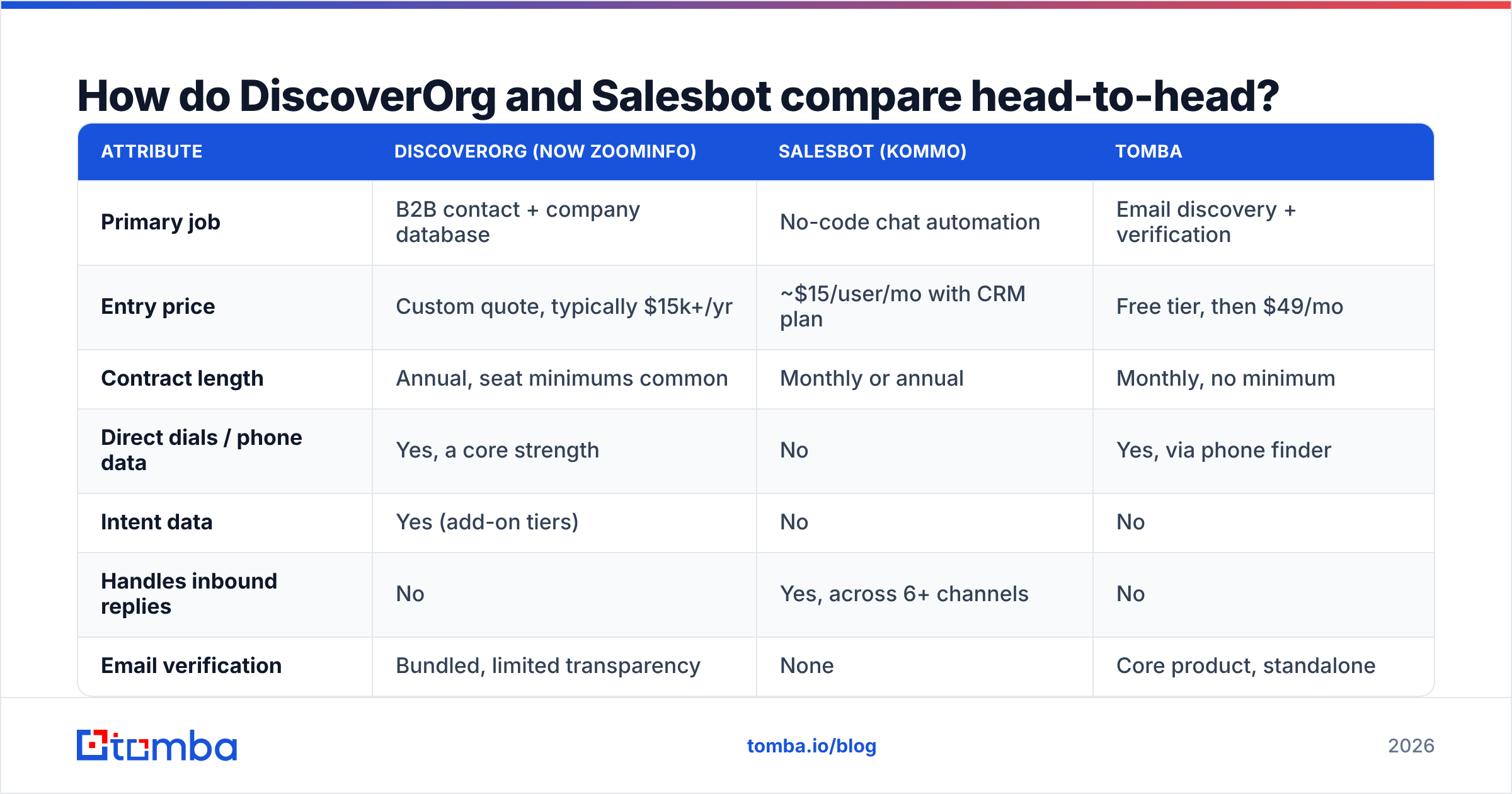
How do DiscoverOrg and Salesbot compare head-to-head?#
| Attribute | DiscoverOrg (now ZoomInfo) | Salesbot (Kommo) | Tomba |
|---|---|---|---|
| Primary job | B2B contact + company database | No-code chat automation | Email discovery + verification |
| Entry price | Custom quote, typically $15k+/yr | ~$15/user/mo with CRM plan | Free tier, then $49/mo |
| Contract length | Annual, seat minimums common | Monthly or annual | Monthly, no minimum |
| Direct dials / phone data | Yes, a core strength | No | Yes, via phone finder |
| Intent data | Yes (add-on tiers) | No | No |
| Handles inbound replies | No | Yes, across 6+ channels | No |
| Email verification | Bundled, limited transparency | None | Core product, standalone |
| API access | Enterprise tiers | Yes | All paid plans |
| Time to first value | 2–6 weeks (onboarding, training) | 1–2 days | Under 10 minutes |
| Best for | Enterprise ABM teams with budget | Inbound-heavy SMB and agencies | Lean outbound teams |
Two things jump off that table. First, the price asymmetry is not marginal, it is an order of magnitude. Second, there is almost no feature row where both tools score "yes." That is the clearest evidence you can get that this is a category mismatch rather than a bake-off.
What does DiscoverOrg actually cost in 2026?#
ZoomInfo does not publish list pricing, and that is deliberate. What buyers consistently report on G2 and in procurement threads:
- Entry packages land somewhere between $15,000 and $25,000 per year for a small seat count.
- Seat minimums are common; you rarely buy one license.
- Credits for exports are metered, and running out mid-quarter is a normal experience.
- Intent data, Engage (the sequencer), and Chat are separate line items that inflate the quote fast.
- Contracts are annual with auto-renew clauses. Read the termination window.
The value is real if you sell six-figure deals into enterprise accounts and need org charts plus direct dials that a scraper will never produce. The value evaporates if you are a five-person team sending 500 emails a month, because you will pay enterprise rates for a fraction of enterprise utilization.
What does Salesbot cost?#
Salesbot is priced as part of a CRM subscription rather than as a standalone. Kommo's published tiers start around $15 per user per month on the base plan, with the more capable bot logic and higher automation limits appearing on the mid and top tiers (roughly $25 and $45 per user per month at the time of writing — check the vendor page, SaaS pricing moves).
The real cost is not the license. It is the flow design. A Salesbot that asks three generic questions and dumps everyone into the same pipeline stage will annoy your inbound leads and teach your reps to ignore the bot's tags. Budget a few days of someone thinking carefully about branching logic, and expect to rewrite the flow twice in the first quarter.
Is DiscoverOrg's data still accurate after the ZoomInfo merger?#
Mixed, and it depends heavily on the segment.
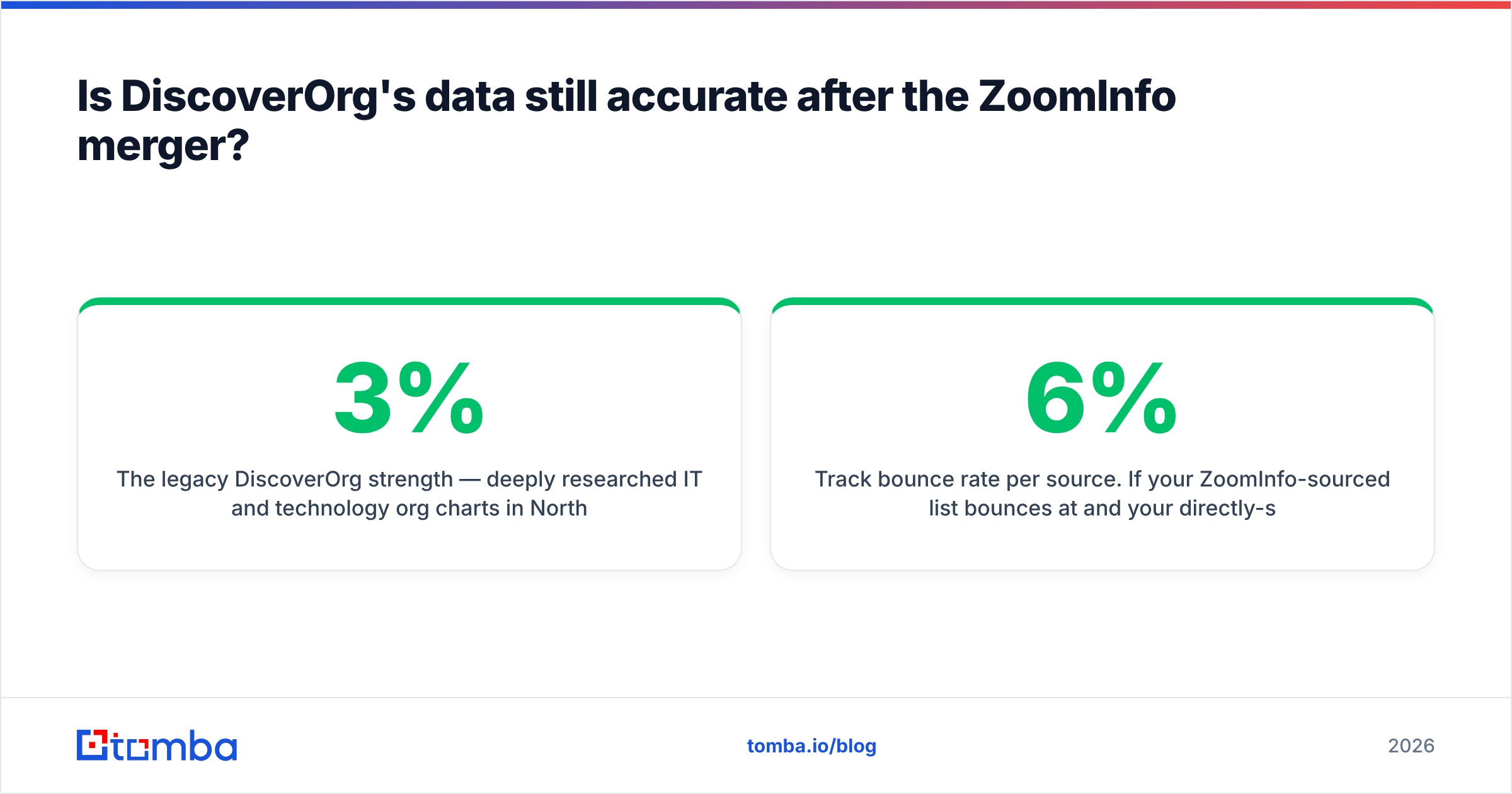
The legacy DiscoverOrg strength — deeply researched IT and technology org charts in North American mid-market and enterprise — held up reasonably well through the merger. The weakness is the same weakness every large aggregated database has: coverage thins outside North America, job-change decay runs somewhere around 2–3% per month in tech roles, and a record that was verified nine months ago is not a record that is verified today.
Two habits protect you regardless of which vendor you buy from:
- Verify before you send, not before you buy. Any database's freshness claim describes the moment of collection, not the moment of your send. Run your export through a catch-all verifier or a standard SMTP check on the day you actually launch the campaign.
- Track bounce rate per source. If your ZoomInfo-sourced list bounces at 6% and your directly-sourced list bounces at 1.5%, you have a data problem, not a copy problem. Bounces above 2% put your sender reputation at risk, and reputation damage takes weeks to undo.
Which one should you buy first?#
Pick based on where your pipeline actually leaks. Four scenarios cover most teams:
- You have inbound volume but slow response times. Buy Salesbot (or any CRM-native bot). A 5-minute first response versus a 5-hour one is one of the few genuinely well-documented conversion levers in B2B. DiscoverOrg data will not help you here at all.
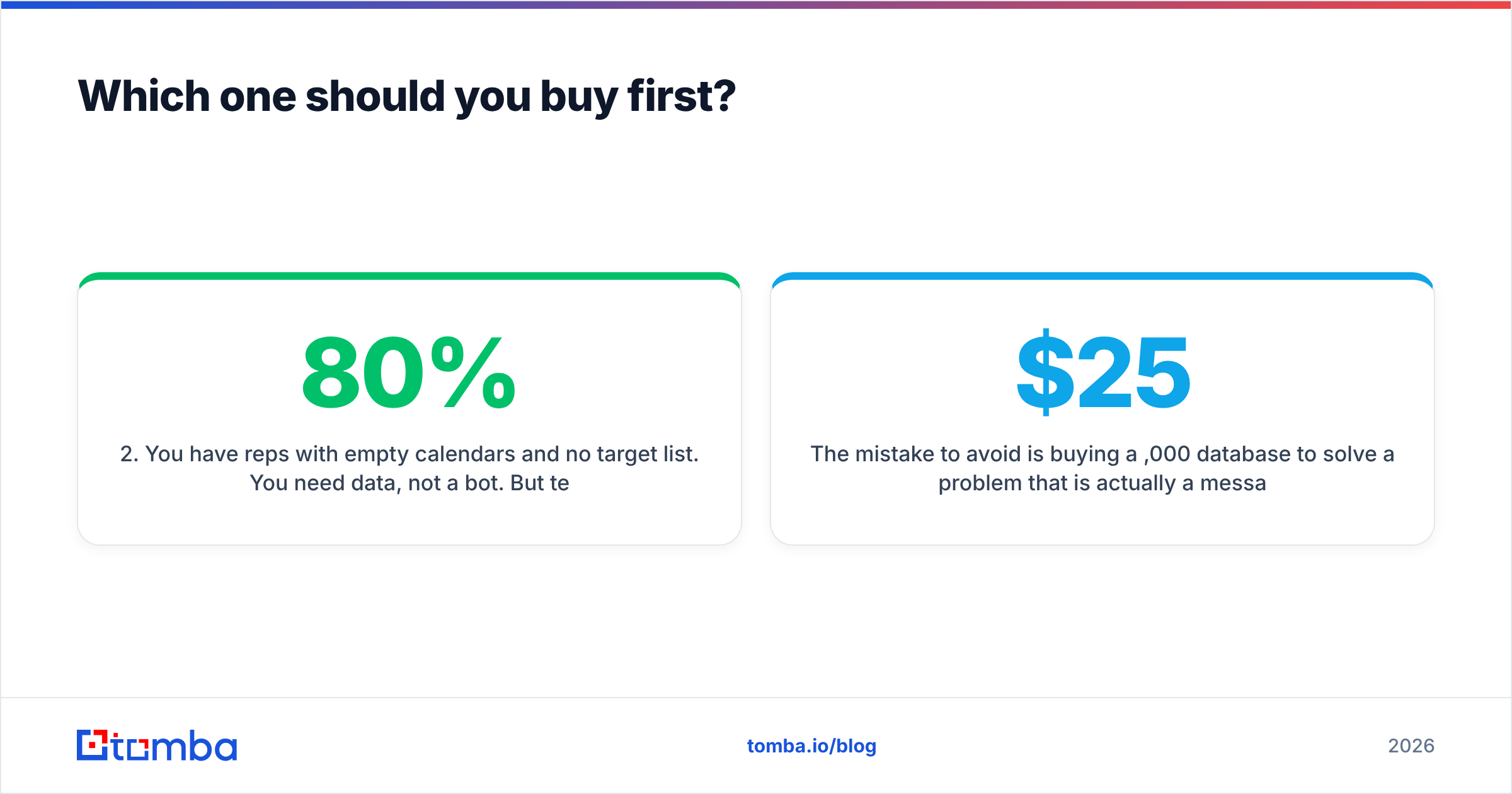
- You have reps with empty calendars and no target list. You need data, not a bot. But test whether you need enterprise data. If your ICP is companies under 500 employees, a self-serve domain search plus verification will get you 80% of the value for 5% of the price.
- You sell six-figure deals into enterprise IT. This is the one case where a ZoomInfo contract genuinely pencils out. Org charts and direct dials into named accounts are hard to replicate, and one closed deal covers the year.
- You are doing both inbound and outbound on a startup budget. Split the stack: a cheap CRM with bot automation for inbound, a dedicated email finder for outbound, and skip the enterprise database entirely until seat count justifies it.
The mistake to avoid is buying a $25,000 database to solve a problem that is actually a messaging problem. If your reply rate is 0.4%, better data raises it to maybe 0.7%. Better targeting and a rewritten first line raises it more, and costs nothing.
Can you run both together?#
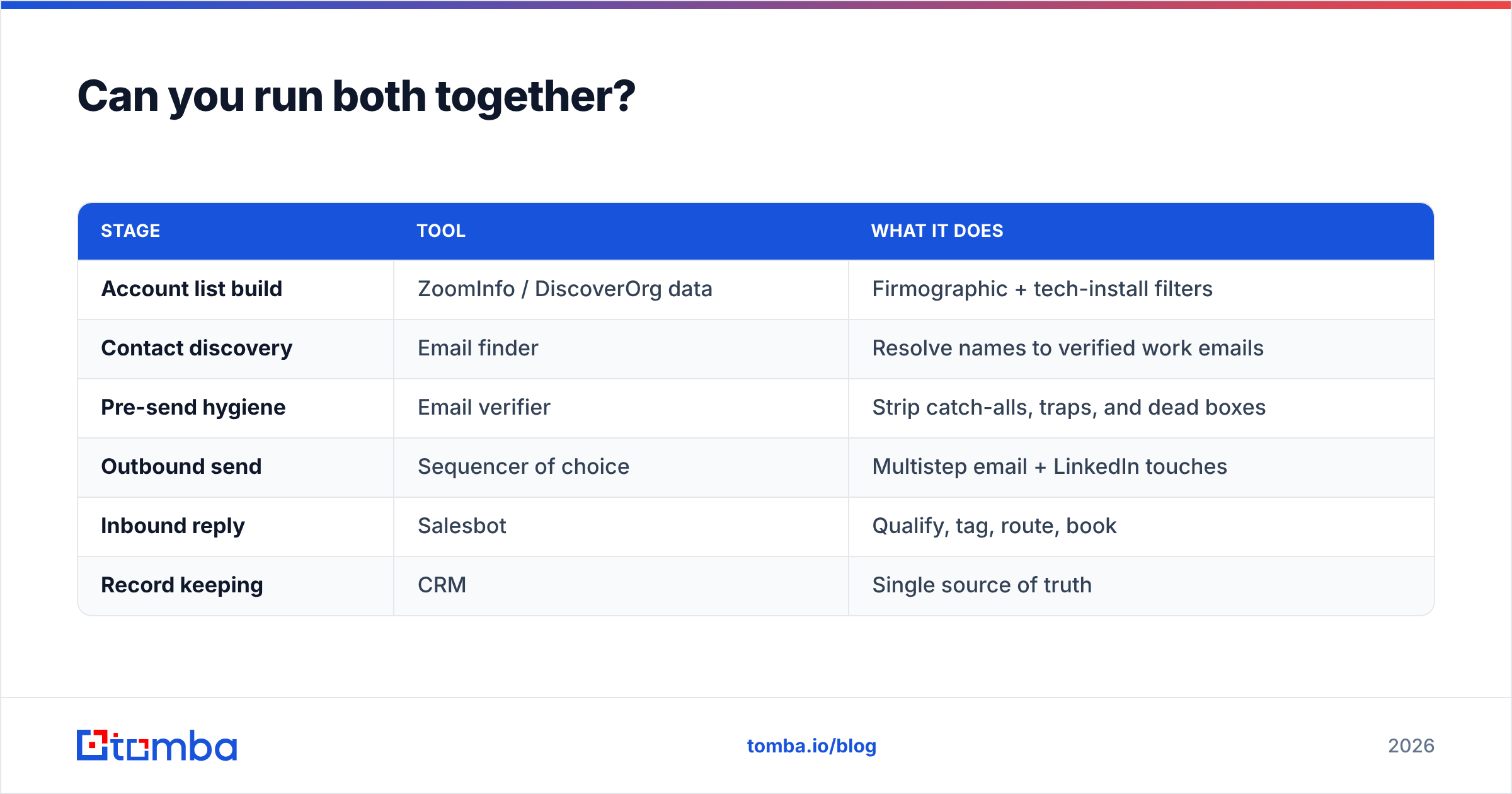
Yes, and the combination is coherent once you stop treating them as alternatives. A working stack looks like this:
| Stage | Tool | What it does |
|---|---|---|
| Account list build | ZoomInfo / DiscoverOrg data | Firmographic + tech-install filters |
| Contact discovery | Email finder | Resolve names to verified work emails |
| Pre-send hygiene | Email verifier | Strip catch-alls, traps, and dead boxes |
| Outbound send | Sequencer of choice | Multistep email + LinkedIn touches |
| Inbound reply | Salesbot | Qualify, tag, route, book |
| Record keeping | CRM | Single source of truth |
Notice that the data layer and the conversation layer never touch. They are connected by the CRM, not by each other. That is the architectural reason a direct comparison never resolves cleanly.
If you are building this stack from scratch, the cheapest correct order is: CRM first, discovery second, bot third. Automating conversations you are not yet having is the most common way small teams waste their first tooling budget.
What are the realistic alternatives to each?#
Instead of DiscoverOrg/ZoomInfo: Apollo, Cognism, Lusha, and BookYourData all compete for slices of the same job — BookYourData in particular is worth a look if you want verified B2B lists on a pay-as-you-go basis rather than an annual commitment. For teams whose bottleneck is specifically finding and verifying work emails rather than browsing a full database, a focused tool is faster and dramatically cheaper. Compare the Apollo alternative route before you sign anything annual.
Instead of Salesbot: Intercom, Drift, Chatfuel, and ManyChat cover overlapping ground with different channel strengths. Intercom is stronger for product-led SaaS, ManyChat for social-first commerce, Salesbot for CRM-anchored SMB sales teams that live in WhatsApp and Instagram DMs.
The honest middle path: most teams under 50 people do not need either premium product. They need a reliable way to find and verify contact data, a decent sequencer, and one person who reads replies quickly. Tooling budget is best spent on the first of those three.
The bottom line#
DiscoverOrg vs Salesbot is not a real fight. One is a legacy enterprise database that now bills as ZoomInfo and costs five figures a year. The other is a low-cost automation layer that handles conversations after someone raises a hand. Buy Salesbot if inbound response time is your leak. Buy the ZoomInfo dataset only if enterprise org charts justify the contract. Buy neither if what you actually need is verified contact data at a price a growing team can absorb.
That last case is the most common one we see, and it is the one with the cleanest answer. Tomba's Email Finder resolves a name and a domain into a verified, deliverable work email — with a free tier at 25 searches a month and paid plans starting at $49/mo instead of a five-figure annual commitment. Bulk lookups, an API, a Chrome extension, and built-in verification are included rather than sold as add-on credits. Check Tomba pricing, run your existing list through it, and compare the bounce rate against whatever you are paying for now. If the numbers do not improve, you have lost ten minutes. If they do, you have just found a much cheaper answer to the only question a database was ever supposed to solve.
Related guides#
Ready to find emails that actually work?
Join 150,000+ professionals who stopped guessing and started sending. Free credits on signup — no credit card required.
Get the Tomba newsletter
Practical outbound tactics and product updates — once every two weeks.
About the author